audio SUBARU CROSSTREK 2018 User Guide
[x] Cancel search | Manufacturer: SUBARU, Model Year: 2018, Model line: CROSSTREK, Model: SUBARU CROSSTREK 2018Pages: 474, PDF Size: 20.76 MB
Page 188 of 474
(193,1)
北米Model "A1320BE-C" EDITED: 2017/ 10/ 10
Item Details
The posted speed limit of the road
you are currently driving on is
displayed.*
1
The calender is displayed.Nothing is displayed.
*1: If equipped
*2: Models with SiriusXM Satellite Radio
NOTESome displayed items may be not
displayed depending on the model
and specifications.
The items shown in the favorite screen can
be changed. For details, refer to“Favorite
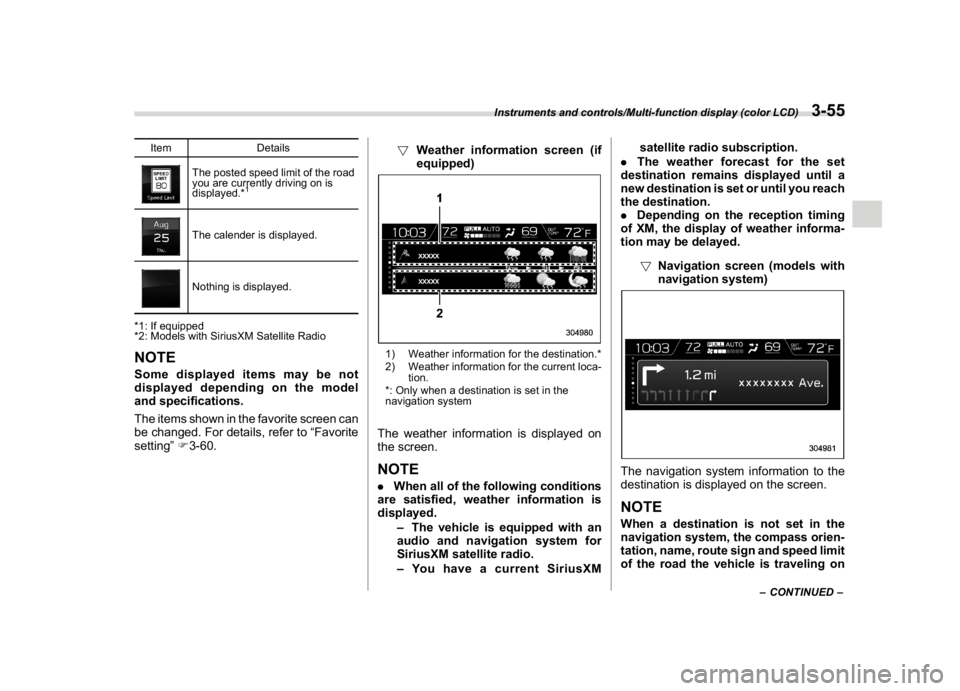
setting”F3-60.!Weather information screen (if
equipped)
1) Weather information for the destination.*
2) Weather information for the current loca-
tion.
*: Only when a destination is set in the
navigation systemThe weather information is displayed on
the screen.NOTE.When all of the following conditions
are satisfied, weather information is
displayed.
–The vehicle is equipped with an
audio and navigation system for
SiriusXM satellite radio.
–You have a current SiriusXMsatellite radio subscription.
.The weather forecast for the set
destination remains displayed until a
new destination is set or until you reach
the destination.
.Depending on the reception timing
of XM, the display of weather informa-
tion may be delayed.
!Navigation screen (models with
navigation system)
The navigation system information to the
destination is displayed on the screen.NOTEWhen a destination is not set in the
navigation system, the compass orien-
tation, name, route sign and speed limit
of the road the vehicle is traveling on
–CONTINUED–
Instruments and controls/Multi-function display (color LCD)
3-55
3
Page 189 of 474
(194,1)
北米Model "A1320BE-C" EDITED: 2017/ 10/ 10
remain displayed on the screen.
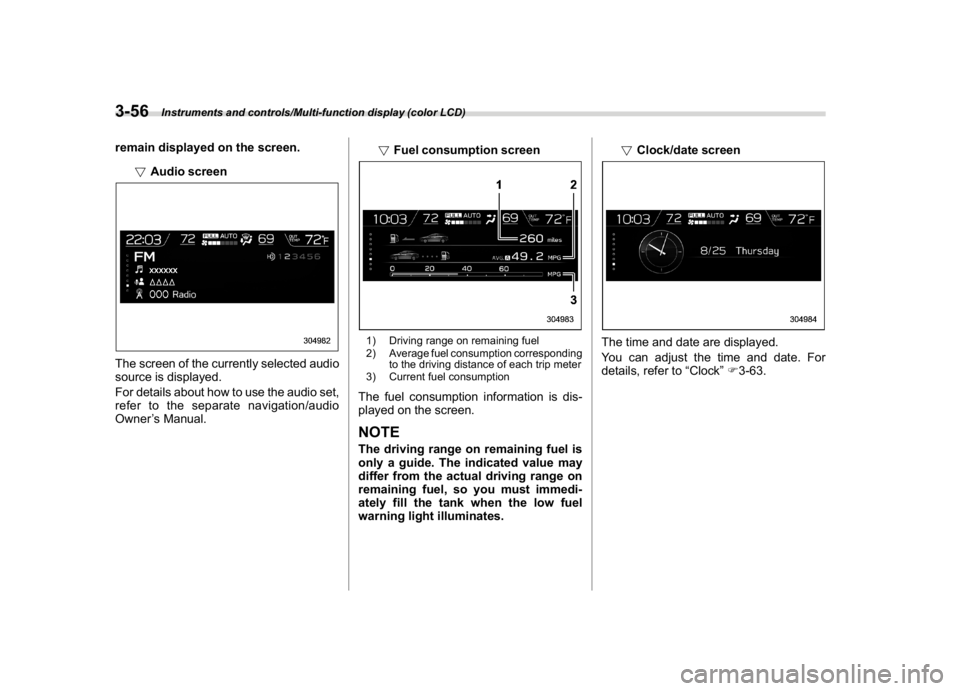
!Audio screenThe screen of the currently selected audio
source is displayed.
For details about how to use the audio set,
refer to the separate navigation/audio
Owner’s Manual.!Fuel consumption screen
1) Driving range on remaining fuel
2) Average fuel consumption corresponding
to the driving distance of each trip meter
3) Current fuel consumptionThe fuel consumption information is dis-
played on the screen.NOTEThe driving range on remaining fuel is
only a guide. The indicated value may
differ from the actual driving range on
remaining fuel, so you must immedi-
ately fill the tank when the low fuel
warning light illuminates.!Clock/date screen
The time and date are displayed.
You can adjust the time and date. For
details, refer to“Clock”F3-63.
Instruments and controls/Multi-function display (color LCD)
3-56
Page 193 of 474

(198,1)
北米Model "A1320BE-C" EDITED: 2017/ 10/ 10
the ignition switch is turned to the“ON”or
“ACC”position, the screen will be restored.
The screen will be restored with the basic
screen that was displayed when the
screen was turned off.NOTEWhile the screen is off, the screen
switches to the climate control screen
only when the climate control system is
operated.
!Favorite setting
1. Select the“Favorite”from the 2nd
menu in setting screen. Refer to“Setting
screen”F3-57.2. Set the desired items by using the
control switches. For details about items,
refer to“Favorite screen”F3-54.3. Select“Set”to exit settings. Select“Go
Back”to return to the previous screen
without applying the setting changes.
NOTE.You can display a maximum of the 3
items.
.The same item cannot be selected
for the left, center or right location.
.Weather information for 3 hours
later or 6 hours later can be displayed.
!Bypass screen setting
1. Select“Bypass Screen”from the 2nd
menu in the setting screen. Refer to
“Setting screen”F3-57.2. Select“On”or“Off”to turn the display
of items on or off by using the controlswitches.
3. Select“Set”to exit settings. Select“Go
Back”to return to the previous screen
without applying the setting changes.
NOTETraffic information setting is only dis-
played for the audio unit with SiriusXM
satellite radio.
!Beep setting
1. Select“Beep”from the 2nd menu in the
setting screen. Refer to“Setting screen”
F3-57.2. Set the beep volume by using the
control switches.
3. Select“Set”to exit settings. Select“Go
Back”to return to the previous screen
Instruments and controls/Multi-function display (color LCD)
3-60
Page 196 of 474
(201,1)
北米Model "A1320BE-C" EDITED: 2017/ 10/ 10
ClockFor models with a SUBARU genuine
navigation and/or audio system, the clock
can be adjusted using either auto mode or
manual mode.
.Auto mode: automatic clock adjustment
.Manual mode: manual clock adjust-
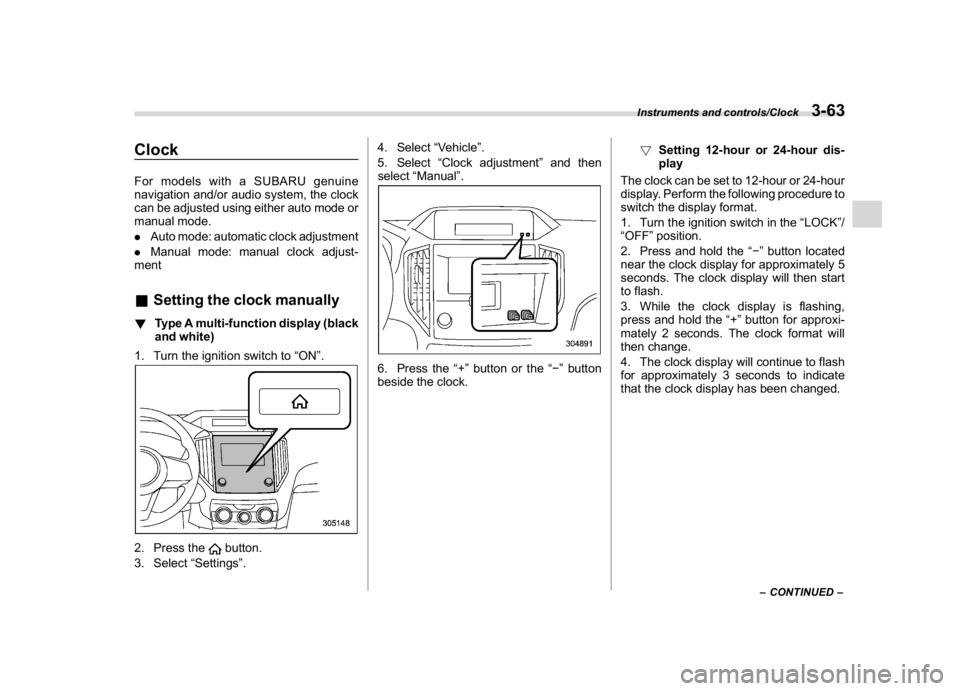
ment&Setting the clock manually!Type A multi-function display (black
and white)
1. Turn the ignition switch to“ON”.2. Press the
button.
3. Select“Settings”.4. Select“Vehicle”.
5. Select“Clock adjustment”and then
select“Manual”.
6. Press the“+”button or the“”button
beside the clock.!Setting 12-hour or 24-hour dis-
play
The clock can be set to 12-hour or 24-hour
display. Perform the following procedure to
switch the display format.
1. Turn the ignition switch in the“LOCK”/
“OFF”position.
2. Press and hold the“”button located
near the clock display for approximately 5
seconds. The clock display will then start
to flash.
3. While the clock display is flashing,
press and hold the“+”button for approxi-
mately 2 seconds. The clock format will
then change.
4. The clock display will continue to flash
for approximately 3 seconds to indicate
that the clock display has been changed.
–CONTINUED–
Instruments and controls/Clock
3-63
3
Page 199 of 474
(204,1)
北米Model "A1320BE-C" EDITED: 2017/ 10/ 10
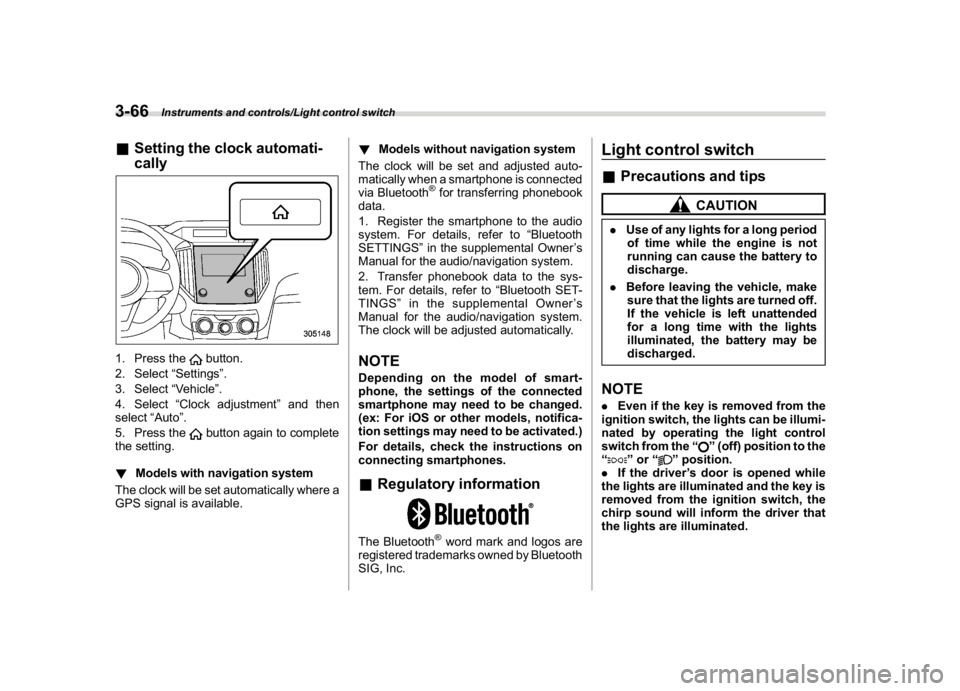
&Setting the clock automati-
cally1. Press the
button.
2. Select“Settings”.
3. Select“Vehicle”.
4. Select“Clock adjustment”and then
select“Auto”.
5. Press thebutton again to complete
the setting.
!Models with navigation system
The clock will be set automatically where a
GPS signal is available.!Models without navigation system
The clock will be set and adjusted auto-
matically when a smartphone is connected
via Bluetooth
®for transferring phonebook
data.
1. Register the smartphone to the audio
system. For details, refer to“Bluetooth
SETTINGS”in the supplemental Owner’s
Manual for the audio/navigation system.
2. Transfer phonebook data to the sys-
tem. For details, refer to“Bluetooth SET-
TINGS”in the supplemental Owner’s
Manual for the audio/navigation system.
The clock will be adjusted automatically.
NOTEDepending on the model of smart-
phone, the settings of the connected
smartphone may need to be changed.
(ex: For iOS or other models, notifica-
tion settings may need to be activated.)
For details, check the instructions on
connecting smartphones.&Regulatory informationThe Bluetooth
®word mark and logos are
registered trademarks owned by Bluetooth
SIG, Inc.
Light control switch&Precautions and tips
CAUTION
.Use of any lights for a long period
of time while the engine is not
running can cause the battery to
discharge.
.Before leaving the vehicle, make
sure that the lights are turned off.
If the vehicle is left unattended
for a long time with the lights
illuminated, the battery may be
discharged.NOTE.Even if the key is removed from the
ignition switch, the lights can be illumi-
nated by operating the light control
switch from the“
”(off) position to the
“
”or“
”position.
.If the driver’s door is opened while
the lights are illuminated and the key is
removed from the ignition switch, the
chirp sound will inform the driver that
the lights are illuminated.
Instruments and controls/Light control switch
3-66
Page 240 of 474
(247,1)
北米Model "A1320BE-C" EDITED: 2017/ 10/ 10
Antenna...................................................................5-2
Roof antenna (for Rod type)................................... 5-2
Roof antenna (for Shark fin type)........................... 5-2
Audio set.................................................................5-3
Audio
5
Page 241 of 474
(248,1)
北米Model "A1320BE-C" EDITED: 2017/ 10/ 10
Antenna&Roof antenna (for Rod type)
CAUTION
.Be sure to remove the antenna
rod before entering garages,
parking towers and other loca-
tions with low ceilings.
.Remove the antenna rod before
washing your car at a car wash. If
the antenna rod remains at-
tached, it may scratch the roof.
.When reinstalling the removed
antenna rod, be sure to fully
tighten it.
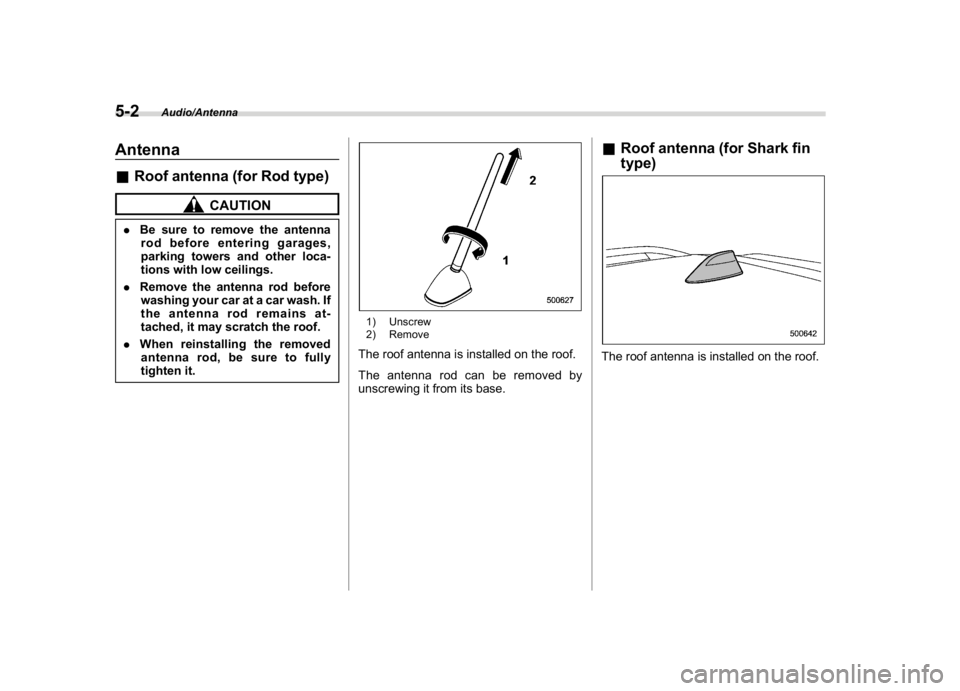
1) Unscrew
2) RemoveThe roof antenna is installed on the roof.
The antenna rod can be removed by
unscrewing it from its base.
&Roof antenna (for Shark fin
type)The roof antenna is installed on the roof.
Audio/Antenna
5-2
Page 242 of 474

(249,1)
北米Model "A1320BE-C" EDITED: 2017/ 10/ 10
Audio setIf your vehicle is equipped with a genuine
SUBARU navigation system or audio
system, refer to the separate navigation/
audio Owner’s Manual for details.
Audio/Audio set
5-3
5
Page 311 of 474
(320,1)
北米Model "A1320BE-C" EDITED: 2017/ 10/ 10
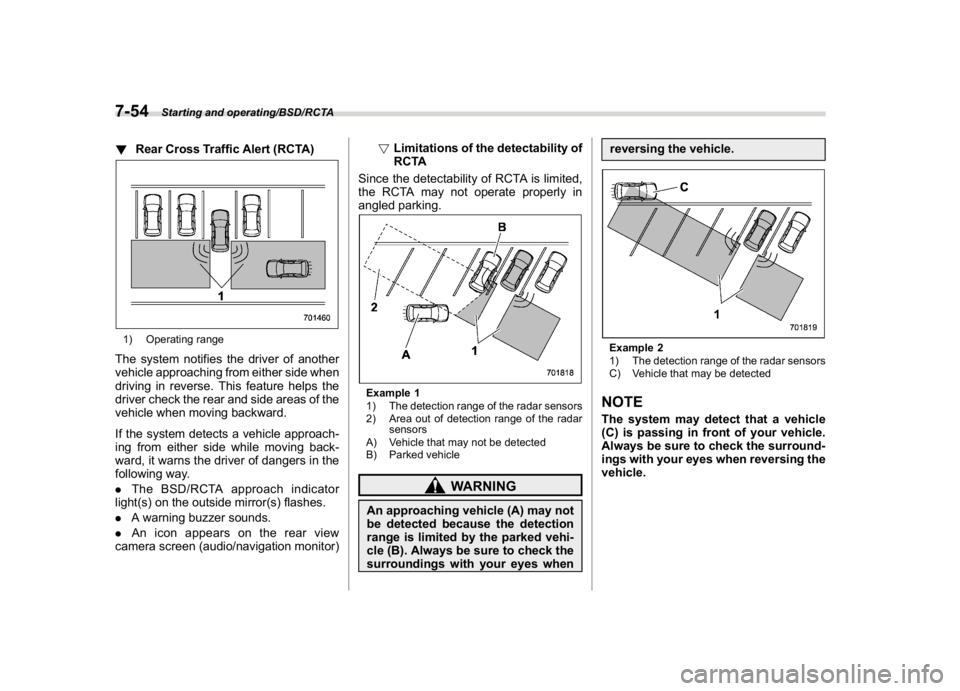
!Rear Cross Traffic Alert (RCTA)1) Operating rangeThe system notifies the driver of another
vehicle approaching from either side when
driving in reverse. This feature helps the
driver check the rear and side areas of the
vehicle when moving backward.
If the system detects a vehicle approach-
ing from either side while moving back-
ward, it warns the driver of dangers in the
following way.
.The BSD/RCTA approach indicator
light(s) on the outside mirror(s) flashes.
.A warning buzzer sounds.
.An icon appears on the rear view
camera screen (audio/navigation monitor)!Limitations of the detectability of
RCTA
Since the detectability of RCTA is limited,
the RCTA may not operate properly in
angled parking.
Example 1
1) The detection range of the radar sensors
2) Area out of detection range of the radar
sensors
A) Vehicle that may not be detected
B) Parked vehicle
WARNING
An approaching vehicle (A) may not
be detected because the detection
range is limited by the parked vehi-
cle (B). Always be sure to check the
surroundings with your eyes whenreversing the vehicle.
Example 2
1) The detection range of the radar sensors
C) Vehicle that may be detectedNOTEThe system may detect that a vehicle
(C) is passing in front of your vehicle.
Always be sure to check the surround-
ings with your eyes when reversing the
vehicle.
Starting and operating/BSD/RCTA
7-54
Page 313 of 474
(322,1)
北米Model "A1320BE-C" EDITED: 2017/ 10/ 10
with a low body height such as
sports cars or a trailer with no
cargo)
–Vehicles that are not approaching
your vehicle even though they are in
the detection area (either on a
neighboring lane to the rear or be-
side your vehicle when reversing)
(The system determines the pre-
sence of approaching vehicles
based on data detected by the radar
sensors.)
–Vehicles traveling at significantly
different speeds
–Vehicles driving in parallel at al-
most the same speed as your vehi-
cle for a prolonged time
–Oncoming vehicles
–Vehicles in a lane beyond the
neighboring lane
–Vehicles travelling at a signifi-
cantly lower speed that you are
trying to overtake
.On a road with extremely narrow
lanes, the system may detect vehicles
driving in a lane next to the neighboring
lane.
.When the 8-inch audio/navigation
system is performing a software up-
date, the RCTA warning icons may not
be displayed on the audio/navigation
screen until the update is complete.
&BSD/RCTA approach indica-
tor light/warning buzzerWhen the BSD/RCTA is active, the BSD/
RCTA approach indicator light will operate
to alert the driver when there are vehicles
in the neighboring lanes. When reversing
the vehicle, the BSD/RCTA approach
indicator light and warning buzzer will
operate to alert the driver that a vehicle is
approaching from the left or right side.
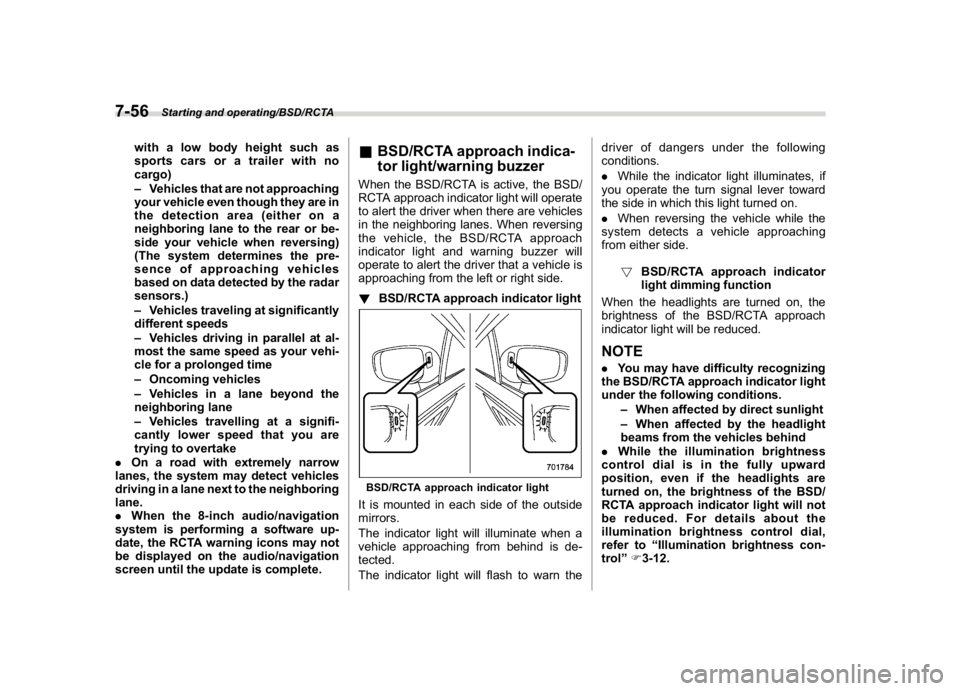
!BSD/RCTA approach indicator lightBSD/RCTA approach indicator lightIt is mounted in each side of the outside
mirrors.
The indicator light will illuminate when a
vehicle approaching from behind is de-
tected.
The indicator light will flash to warn thedriver of dangers under the following
conditions.
.While the indicator light illuminates, if
you operate the turn signal lever toward
the side in which this light turned on.
.When reversing the vehicle while the
system detects a vehicle approaching
from either side.
!BSD/RCTA approach indicator
light dimming function
When the headlights are turned on, the
brightness of the BSD/RCTA approach
indicator light will be reduced.
NOTE.You may have difficulty recognizing
the BSD/RCTA approach indicator light
under the following conditions.
–When affected by direct sunlight
–When affected by the headlight
beams from the vehicles behind
.While the illumination brightness
control dial is in the fully upward
position, even if the headlights are
turned on, the brightness of the BSD/
RCTA approach indicator light will not
be reduced. For details about the
illumination brightness control dial,
refer to“Illumination brightness con-
trol”F3-12.
Starting and operating/BSD/RCTA
7-56