audio SUBARU CROSSTREK 2018 Owner's Manual
[x] Cancel search | Manufacturer: SUBARU, Model Year: 2018, Model line: CROSSTREK, Model: SUBARU CROSSTREK 2018Pages: 474, PDF Size: 20.76 MB
Page 318 of 474
(327,1)
北米Model "A1320BE-C" EDITED: 2017/ 10/ 10
sensor becomes misaligned, a system
malfunction may occur, including the in-
ability to detect vehicles entering the
detection areas. If any strong shock is
applied to the bumper, be sure to contact
your SUBARU dealer for inspection.
.Do not disassemble the radar sensors.NOTEIf the radar sensors require repair or
replacement, or the bumper area
around the radar sensors requires
repair, paintwork or replacement, con-
tact your SUBARU dealer for assis-
tance.
Reverse Automatic Braking
System (if equipped)Reverse Automatic Braking is a system
designed to help avoid collisions or reduce
collision damage when reversing the
vehicle. If a wall or an obstacle is detected
in the reversing direction, the system will
notify the driver with a warning sound and
may activate the vehicle’s brakes auto-
matically.
WARNING
.Reverse Automatic Braking is not
a system intended to replace the
driver’s responsibility to check
surrounding areas for vehicles or
obstacles to avoid a collision.
.The driver is responsible for driv-
ing safely. Always be sure to
check the surroundings visually
when reversing the vehicle.
.Since the system operation has
various limitations, the warning
sound or automatic braking may
be delayed or may not operate at
all even when an obstacle is
present in the reversing direc-
tion.
.The system is not designed todetect people (including chil-
dren), animals or other moving
objects.
.Depending on the vehicle condi-
tion or the surrounding environ-
ment, the sonar sensor’s ability
to detect objects may be compro-
mised.
NOTEThe Reverse Automatic Braking Sys-
tem records and stores the following
data when automatic braking operates.
It does not record conversations, per-
sonal information or other audio data.
.Distance from the object
.Vehicle speed
.Accelerator pedal operation status
.Brake pedal operation status
.Select lever position
.Outside temperature
.The sensitivity setting of the sonar
sensors
SUBARU and third parties contracted
by SUBARU may acquire and use the
recorded data for the purpose of vehi-
cle research and development.
SUBARU and third parties contracted
by SUBARU will not disclose or provide
the acquired data to any other third
–CONTINUED–
Starting and operating/Reverse Automatic Braking System
7-61
7
Page 320 of 474

(329,1)
北米Model "A1320BE-C" EDITED: 2017/ 10/ 10
tem is set to on
.The select lever is in the“R”position
.The vehicle speed is between 1 to 9
mph (1.5 to 15 km/h)NOTE.In the following cases, the Reverse
Automatic braking system will not
operate. Promptly contact a SUBARU
dealer to have the system inspected.
–The EyeSight warning indicator
is illuminated
–The Reverse Automatic Braking
fail indicator is illuminated
.When the Reverse Automatic Brak-
ing system OFF indicator is illumi-
nated, the Reverse Automatic braking
system cannot be operated.
.In the following cases, the system
may not be able to properly detect an
obstacle. Promptly contact a SUBARU
dealer to have the system inspected.
–A sticker, paint, or a chemical is
applied to the rear bumper near the
sonar sensor
–The rear bumper is modified
–The rear bumper has been re-
moved and reattached
–The ground clearance is changed
due to the vehicle’s loading condi-
tion or modification
–Ice, snow or mud is adhered tothe rear bumper near the sonar
sensor
–The rear bumper is exposed to
strong impact, or the rear bumper is
deformed
.When the 8-inch audio/navigation
system is performing a software up-
date, the Reverse Automatic Braking
System may not display the following
items on the audio/navigation screen
until the update is complete.
–Display Icon on/off Function
–Distance Indicator Image
–Warning Message
.On a steep hill, the system’s auto-
matic braking ability will be reduced.
.The system is designed to avoid
collisions by automatic hard braking
when the vehicle’s reversing speed is
less than approximately 3 mph (5 km/h).
However, the system does not guaran-
tee that the vehicle will be able to avoid
collisions in any situation.
.If the vehicle is reversed at an
extremely slow speed, the driver’s
operation may be prioritized. In this
case, automatic braking will not oper-
ate.
.The system may not be able to detect
the following objects
–Sharp or thin objects such as
poles, fences and ropes which maynot reflect the sound wave emitted
from the sonar sensor
–Objects that are too close to the
rear bumper when the select lever is
set to the“R”position
–Objects with a surface which may
not reflect the sound wave emitted
from the sonar sensor such as a
chain link fence.
.Objects the system is not designed
to detect
–Pedestrians
–Moving objects including moving
vehicles
–Objects which absorb sound
waves such as cloth or snow
–Objects whose surface has a
diagonal angle
–Objects that are low to the ground
such as parking blocks
–Objects that are high above the
ground such as objects hanging
from above
.The system may not be able to
properly detect objects or may cause
a system malfunction when the follow-
ing conditions exist
High frequency sound from other
sources are nearby
–Horn sound from another vehicle
–Engine sound from other vehi-
–CONTINUED–
Starting and operating/Reverse Automatic Braking System
7-63
7
Page 322 of 474

(331,1)
北米Model "A1320BE-C" EDITED: 2017/ 10/ 10
&Reverse Automatic Braking
System operationWhen the Reverse Automatic Braking
System is in operation, the range between
the vehicle and the detected object will be
indicated on the audio/navigation monitor.
Also, warning sounds will activate in 3
levels to warn the driver of a potential
collision.
While the RAB is operating, a warning
message is displayed on the audio/navi-
gation monitor and the combination meter
display (color LCD).
Guideline of detecting range
Alert level Range of detected object* Distance indicator Alarm pattern
Long proximity (ob-
ject detected)35 inches (90 cm) or more Green No warning sound
Medium proximity
alert (approaching the
object)28 to 35 inches (70 to 90
cm)Yellow Short beeps
Short proximity alert
(approaching closer
to the object)20 to 28 inches (50 to 70
cm)Orange Rapid short beeps
Closest proximity
alert (too close to the
object)20 inches (50 cm) or less RedContinuous beep
*: Range of detection may vary depending on the environmental condition.
–CONTINUED–
Starting and operating/Reverse Automatic Braking System
7-65
7
Page 323 of 474
(332,1)
北米Model "A1320BE-C" EDITED: 2017/ 10/ 10
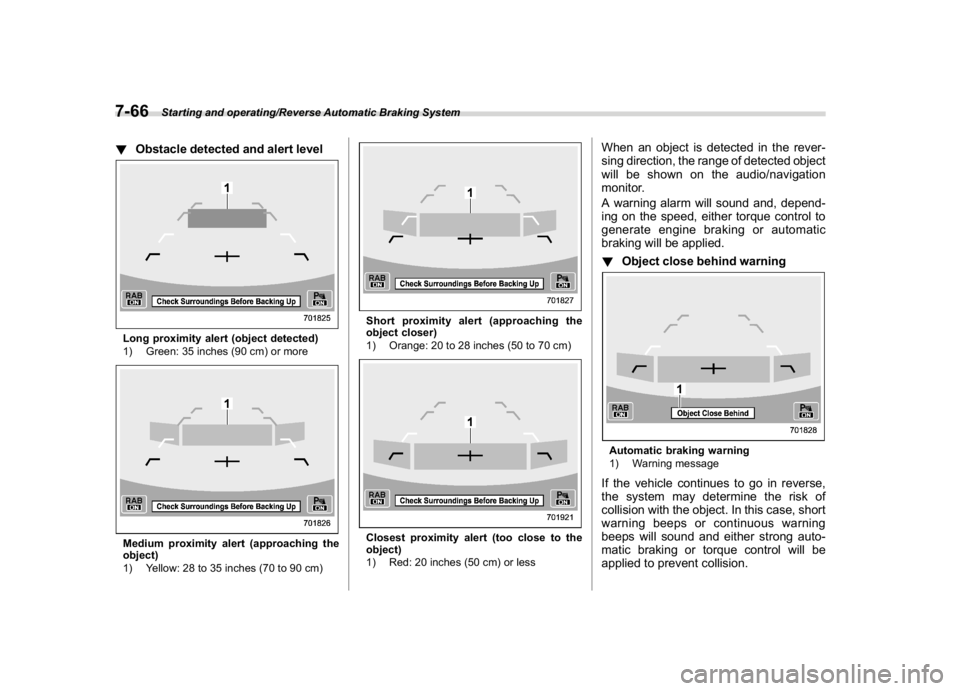
!Obstacle detected and alert levelLong proximity alert (object detected)
1) Green: 35 inches (90 cm) or moreMedium proximity alert (approaching the
object)
1) Yellow: 28 to 35 inches (70 to 90 cm)
Short proximity alert (approaching the
object closer)
1) Orange: 20 to 28 inches (50 to 70 cm)Closest proximity alert (too close to the
object)
1) Red: 20 inches (50 cm) or less
When an object is detected in the rever-
sing direction, the range of detected object
will be shown on the audio/navigation
monitor.
A warning alarm will sound and, depend-
ing on the speed, either torque control to
generate engine braking or automatic
braking will be applied.
!Object close behind warningAutomatic braking warning
1) Warning messageIf the vehicle continues to go in reverse,
the system may determine the risk of
collision with the object. In this case, short
warning beeps or continuous warning
beeps will sound and either strong auto-
matic braking or torque control will be
applied to prevent collision.
Starting and operating/Reverse Automatic Braking System
7-66
Page 324 of 474
(333,1)
北米Model "A1320BE-C" EDITED: 2017/ 10/ 10
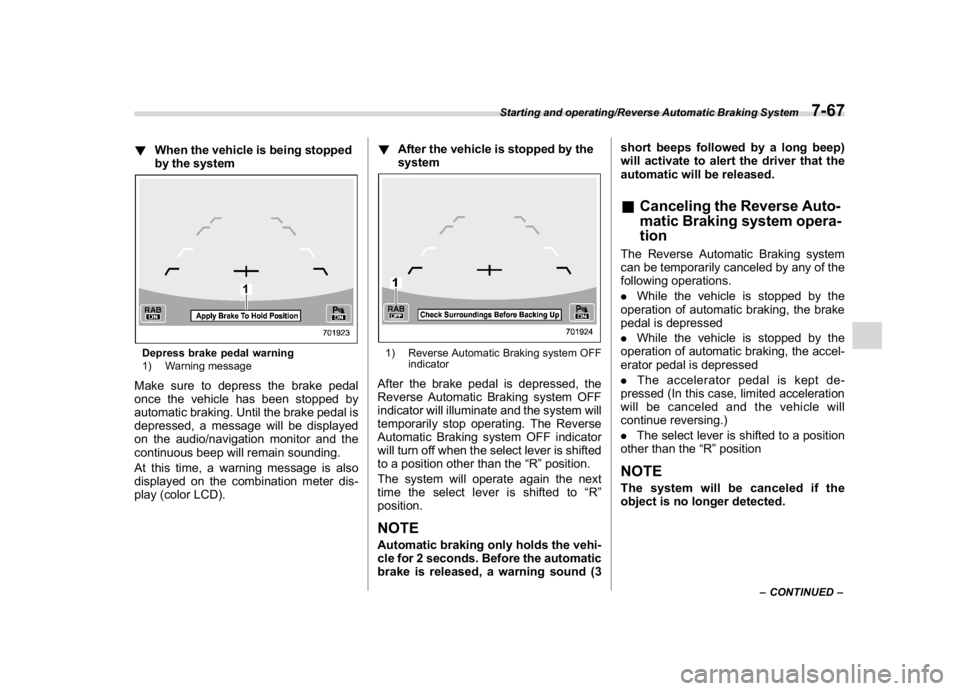
!When the vehicle is being stopped
by the systemDepress brake pedal warning
1) Warning messageMake sure to depress the brake pedal
once the vehicle has been stopped by
automatic braking. Until the brake pedal is
depressed, a message will be displayed
on the audio/navigation monitor and the
continuous beep will remain sounding.
At this time, a warning message is also
displayed on the combination meter dis-
play (color LCD).!After the vehicle is stopped by the
system
1) Reverse Automatic Braking system OFF
indicatorAfter the brake pedal is depressed, the
Reverse Automatic Braking system OFF
indicator will illuminate and the system will
temporarily stop operating. The Reverse
Automatic Braking system OFF indicator
will turn off when the select lever is shifted
to a position other than the“R”position.
The system will operate again the next
time the select lever is shifted to“R”
position.NOTEAutomatic braking only holds the vehi-
cle for 2 seconds. Before the automatic
brake is released, a warning sound (3short beeps followed by a long beep)
will activate to alert the driver that the
automatic will be released.
&Canceling the Reverse Auto-
matic Braking system opera-
tionThe Reverse Automatic Braking system
can be temporarily canceled by any of the
following operations.
.While the vehicle is stopped by the
operation of automatic braking, the brake
pedal is depressed
.While the vehicle is stopped by the
operation of automatic braking, the accel-
erator pedal is depressed
.The accelerator pedal is kept de-
pressed (In this case, limited acceleration
will be canceled and the vehicle will
continue reversing.)
.The select lever is shifted to a position
other than the“R”positionNOTEThe system will be canceled if the
object is no longer detected.
–CONTINUED–
Starting and operating/Reverse Automatic Braking System
7-67
7
Page 325 of 474
(334,1)
北米Model "A1320BE-C" EDITED: 2017/ 10/ 10
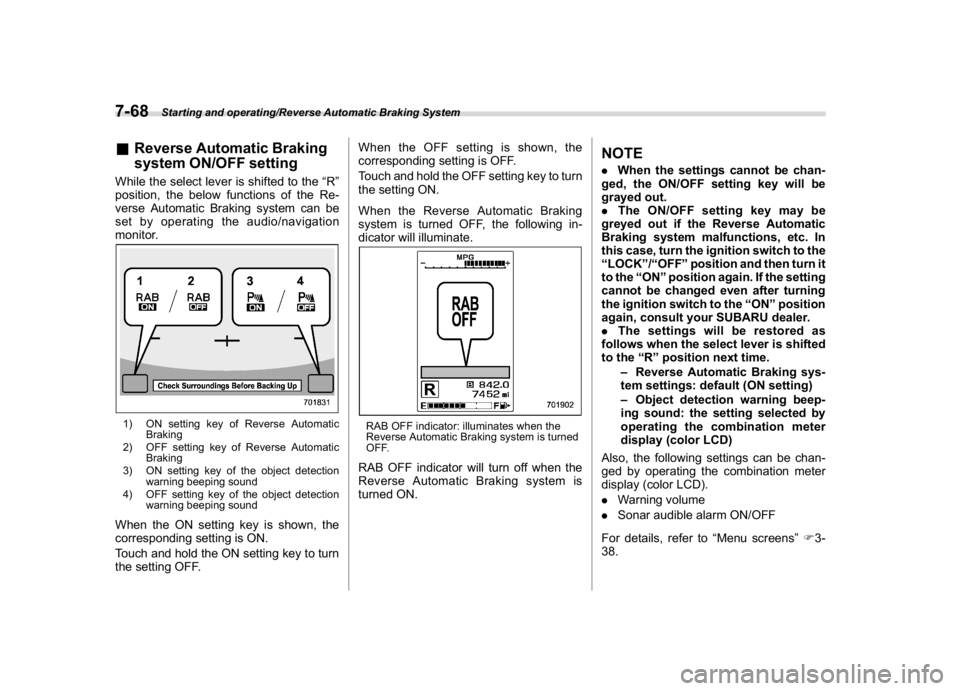
&Reverse Automatic Braking
system ON/OFF settingWhile the select lever is shifted to the“R”
position, the below functions of the Re-
verse Automatic Braking system can be
set by operating the audio/navigation
monitor.1) ON setting key of Reverse Automatic
Braking
2) OFF setting key of Reverse Automatic
Braking
3) ON setting key of the object detection
warning beeping sound
4) OFF setting key of the object detection
warning beeping soundWhen the ON setting key is shown, the
corresponding setting is ON.
Touch and hold the ON setting key to turn
the setting OFF.When the OFF setting is shown, the
corresponding setting is OFF.
Touch and hold the OFF setting key to turn
the setting ON.
When the Reverse Automatic Braking
system is turned OFF, the following in-
dicator will illuminate.
RAB OFF indicator: illuminates when the
Reverse Automatic Braking system is turned
OFF.RAB OFF indicator will turn off when the
Reverse Automatic Braking system is
turned ON.
NOTE.When the settings cannot be chan-
ged, the ON/OFF setting key will be
grayed out.
.The ON/OFF setting key may be
greyed out if the Reverse Automatic
Braking system malfunctions, etc. In
this case, turn the ignition switch to the
“LOCK”/“OFF”position and then turn it
to the“ON”position again. If the setting
cannot be changed even after turning
the ignition switch to the“ON”position
again, consult your SUBARU dealer.
.The settings will be restored as
follows when the select lever is shifted
to the“R”position next time.
–Reverse Automatic Braking sys-
tem settings: default (ON setting)
–Object detection warning beep-
ing sound: the setting selected by
operating the combination meter
display (color LCD)
Also, the following settings can be chan-
ged by operating the combination meter
display (color LCD).
.Warning volume
.Sonar audible alarm ON/OFF
For details, refer to“Menu screens”F3-
38.
Starting and operating/Reverse Automatic Braking System
7-68
Page 374 of 474
(387,1)
北米Model "A1320BE-C" EDITED: 2017/ 10/ 10
Exterior care..........................................................10-2
Washing...............................................................10-2
Waxing and polishing............................................10-3
Cleaning alloy wheels...........................................10-4
Corrosion protection............................................10-4
Most common causes of corrosion.......................10-4
To help prevent corrosion.....................................10-5
Cleaning the interior.............................................10-5
Seat fabric............................................................10-5
Leather seat materials..........................................10-6
Synthetic leather upholstery.................................10-6
Seatbelt................................................................10-6
Climate control panel, audio panel, instrument
panel, console panel, and switches....................10-6
Monitor.................................................................10-7
Appearance care
10
Page 378 of 474

(391,1)
北米Model "A1320BE-C" EDITED: 2017/ 10/ 10
vehicle remains for a long time, even
though other parts of the vehicle may be
dry.
.High temperatures will cause corrosion
to parts of the vehicle which cannot dry
quickly due to lack of proper ventilation.&To help prevent corrosionWash the vehicle regularly to prevent
corrosion of the body and suspension
components. Also, wash the vehicle
promptly after driving on any of the
following surfaces.
.roads that have been salted to prevent
them from freezing in winter
.mud, sand, or gravel
.coastal roads
After the winter has ended, it is recom-
mended that the underbody be given a
very thorough washing.
Before the beginning of winter, check the
condition of underbody components, such
as the exhaust system, fuel and brake
lines, brake cables, suspension, steering
system, floor pan, and fenders. If any of
them are found to be rusted, they should
be given an appropriate rust prevention
treatment or should be replaced. Contact
your SUBARU dealer to perform this kind
of maintenance and treatment if you needassistance.
Repair chips and scratches in the paint as
soon as you find them.
Check the interior of the vehicle for water
and dirt accumulation under the floor mats
because that could cause corrosion. Oc-
casionally check under the mats to make
sure the area is dry.
Keep your garage dry. Do not park your
vehicle in a damp, poorly ventilated gar-
age. In such a garage, corrosion can be
caused by dampness. If you wash the
vehicle in the garage or put the vehicle into
the garage when wet or covered with
snow, that can cause dampness.
If your vehicle is operated in cold weather
and/or in areas where road salts and other
corrosive materials are used, the door
hinges and locks, rear gate lock, and hood
latch should be inspected and lubricated
periodically.
Cleaning the interiorUse a soft, damp cloth to clean the climate
control panel, audio equipment, instru-
ment panel, center console, combination
meter panel, and switches. (Do not use
organic solvents.)
CAUTION
Do not use sharp instruments or
window cleaner containing abra-
sives to clean the inner surface of
the rear window. They may damage
the conductors printed on the win-
dow.&Seat fabricRemove loose dirt, dust or debris with a
vacuum cleaner. If the dirt is caked on the
fabric or hard to remove with a vacuum
cleaner, use a soft brush then vacuum it.
Wipe the fabric surface with a tightly wrung
cloth and dry the seat fabric thoroughly. If
the fabric is still dirty, wipe using a solution
of mild soap and lukewarm water then dry
thoroughly.
If the stain does not come out, try a
commercially-available fabric cleaner.
Use the cleaner on a hidden place and
–CONTINUED–
Appearance care/Cleaning the interior
10-5
10
Page 379 of 474
(392,1)
北米Model "A1320BE-C" EDITED: 2017/ 10/ 10
make sure it does not affect the fabric
adversely. Use the cleaner according to its
instructions.
CAUTION
When cleaning the seat, do not use
benzine, paint thinner, or any similar
materials. Doing so could damage
the surface and cause the color to
deteriorate.&Leather seat materialsThe leather used by SUBARU is a high
quality natural product which will retain its
distinctive appearance and feel for many
years with proper care.
Allowing dust or road dirt to build up on the
surface can cause the material to become
brittle and to wear prematurely. Regular
cleaning with a soft, moist, natural fiber
cloth should be performed monthly, taking
care not to soak the leather or allow water
to penetrate the stitched seams.
A mild detergent suitable for cleaning
woolen fabrics may be used to remove
difficult dirt spots, rubbing with a soft, dry
cloth afterwards to restore the luster. If
your SUBARU is to be parked for a long
time in bright sunlight, it is recommended
that the seats and head restraints becovered, or the windows shaded, to pre-
vent fading or shrinkage.
Minor surface blemishes or bald patches
may be treated with a commercial leather
spray lacquer. You will discover that each
leather seat section will develop soft folds
or wrinkles, which is characteristic of
genuine leather.
&Synthetic leather upholsteryThe synthetic leather material used on the
SUBARU may be cleaned using mild soap
or detergent and water, after first vacuum-
ing or brushing away loose dirt. Allow the
soap to soak in for a few minutes and wipe
off with a clean, damp cloth. Commercial
foam-type cleaners suitable for synthetic
leather materials may be used when
necessary.
CAUTION
Strong cleaning agents such as
solvents, paint thinners, window
cleaner or fuel must never be used
on leather or synthetic interior ma-
terials. Doing so could damage the
surface and cause the color to
deteriorate.
&SeatbeltFor details about how to clean the seatbelt,
refer to“Seatbelt maintenance”F1-20.&Climate control panel, audio
panel, instrument panel, con-
sole panel, and switchesUse a soft, damp cloth to clean the climate
control panel, audio equipment, instru-
ment panel, center console, combination
meter panel, and switches.
CAUTION
.Do not use organic solvents such
as paint thinners or fuel, or
strong cleaning agents that con-
tain those solvents. Doing so
could damage the surface and
cause the color to deteriorate.
.Do not use chemical solvents that
contain silicone on the vehicle
audio system, electrical compo-
nents of the air-conditioner or
any switches. If silicone adheres
to these parts, it may cause
damage to electrical compo-
nents.
Appearance care/Cleaning the interior
10-6
Page 380 of 474

(393,1)
北米Model "A1320BE-C" EDITED: 2017/ 10/ 10
&MonitorTo clean the audio/navigation/multi func-
tion display monitor, wipe it with a silicone
cloth or with a soft cloth. If the monitor is
extremely dirty, clean it with a soft cloth
moistened with neutral detergent then
carefully wipe off any remaining detergent.
CAUTION
.Do not spray neutral detergent
directly onto the monitor. Doing
so could damage the monitor’s
components.
.Do not wipe the monitor with a
hard cloth. Doing so could
scratch the monitor.
.Do not use cleaning fluid that
contains thinner, fuel, or any
other volatile substance. Such
cleaning fluid could erase the
lettering on the switches at the
bottom of the monitor.
Appearance care/Cleaning the interior
10-7
10