display SUBARU CROSSTREK 2018 User Guide
[x] Cancel search | Manufacturer: SUBARU, Model Year: 2018, Model line: CROSSTREK, Model: SUBARU CROSSTREK 2018Pages: 474, PDF Size: 20.76 MB
Page 135 of 474

(140,1)
北米Model "A1320BE-C" EDITED: 2017/ 10/ 10
Cruise control indicator light (if equipped).............3-31
Cruise control set indicator light (if equipped).......3-31
Automatic headlight beam leveler warning light
(models with LED headlights)..............................3-31
LED headlight warning light (models with LED
headlights)..........................................................3-31
Steering Responsive Headlight warning light/
Steering Responsive Headlight OFF indicator
light (if equipped)................................................3-31
Front fog light indicator light (if equipped) ............3-31
Headlight indicator light (if equipped)....................3-31
Steering responsive fog lights warning indicator/
Steering responsive fog lights OFF indicator
(if equipped).......................................................3-31
X-mode indicator (if equipped)..............................3-32
Hill descent control indicator (if equipped) ............3-32
BSD/RCTA warning indicator (if equipped).............3-32
BSD/RCTA OFF indicator (if equipped)..................3-32
RAB warning indicator (if equipped)......................3-32
RAB OFF indicator light (if equipped)....................3-32
Icy road surface warning indicator (if equipped)....3-32
Combination meter display (color LCD)
(if equipped).......................................................3-33
Basic operation.....................................................3-34
Welcome screen and Good-bye screen..................3-34
Warning screen.....................................................3-35
Telltale screen.......................................................3-35
Basic screens.......................................................3-36
Menu screens.......................................................3-38
Multi-function display (black andwhite).............3-42
Driving information display...................................3-43
Outside temperature indicator...............................3-46X-mode indicator (if equipped)..............................3-47
Clock....................................................................3-47
Multi-function display (color LCD)
(if equipped).......................................................3-47
Features...............................................................3-48
Welcome screen...................................................3-48
Self-check screen.................................................3-48
Interruption screen...............................................3-49
Basic operation....................................................3-49
Basic screens.......................................................3-50
Setting screen......................................................3-57
How to get the source code using the open
source...............................................................3-62
Clock......................................................................3-63
Setting the clock manually....................................3-63
Setting the clock automatically.............................3-66
Regulatory information.........................................3-66
Light control switch.............................................3-66
Precautions and tips.............................................3-66
Headlights............................................................3-67
High/low beam change (dimmer) ...........................3-68
Headlight flasher..................................................3-69
High beam assist function (if equipped)................3-69
Daytime running light system...............................3-72
Steering Responsive Headlight (SRH)
(if equipped).......................................................3-72
Headlight beam leveler
(models with LEDheadlights)..........................3-73
Fog light switch (ifequipped)..............................3-74
Steering responsive fog lights system
(if equipped)......................................................3-74
Instruments and controls
Page 141 of 474
(146,1)
北米Model "A1320BE-C" EDITED: 2017/ 10/ 10
.If the indicator light on the push-
button ignition switch flashes in green
when the push-button ignition switch is
pressed, steering is locked. When this
occurs, press the push-button ignition
switch while turning the steering wheel
left and right.
!Battery drainage prevention func-
tion
When the push-button ignition switch is left
in the“ACC”or“ON”position for approxi-
mately 1 hour, the push-button ignition
switch will be automatically switched to
“OFF”to prevent the battery from going
dead.&When access key fob does
not operate properlyRefer to“Access key fob–if access key
fob does not operate properly”F9-17.
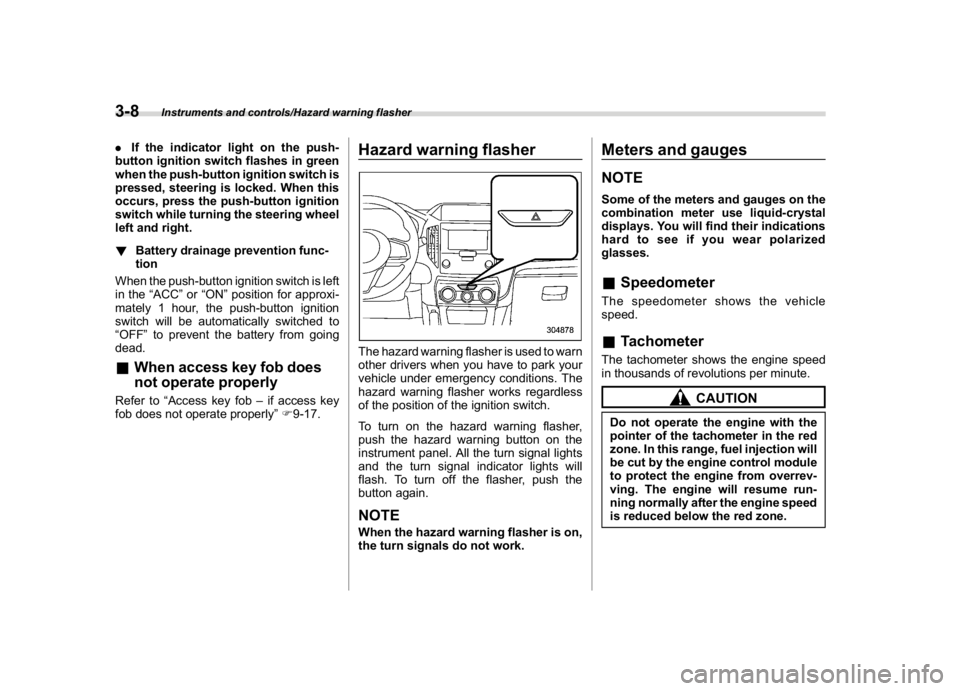
Hazard warning flasherThe hazard warning flasher is used to warn
other drivers when you have to park your
vehicle under emergency conditions. The
hazard warning flasher works regardless
of the position of the ignition switch.
To turn on the hazard warning flasher,
push the hazard warning button on the
instrument panel. All the turn signal lights
and the turn signal indicator lights will
flash. To turn off the flasher, push the
button again.NOTEWhen the hazard warning flasher is on,
the turn signals do not work.
Meters and gaugesNOTESome of the meters and gauges on the
combination meter use liquid-crystal
displays. You will find their indications
hard to see if you wear polarized
glasses.&SpeedometerThe speedometer shows the vehicle
speed.&TachometerThe tachometer shows the engine speed
in thousands of revolutions per minute.
CAUTION
Do not operate the engine with the
pointer of the tachometer in the red
zone. In this range, fuel injection will
be cut by the engine control module
to protect the engine from overrev-
ving. The engine will resume run-
ning normally after the engine speed
is reduced below the red zone.
Instruments and controls/Hazard warning flasher
3-8
Page 142 of 474
(147,1)
北米Model "A1320BE-C" EDITED: 2017/ 10/ 10
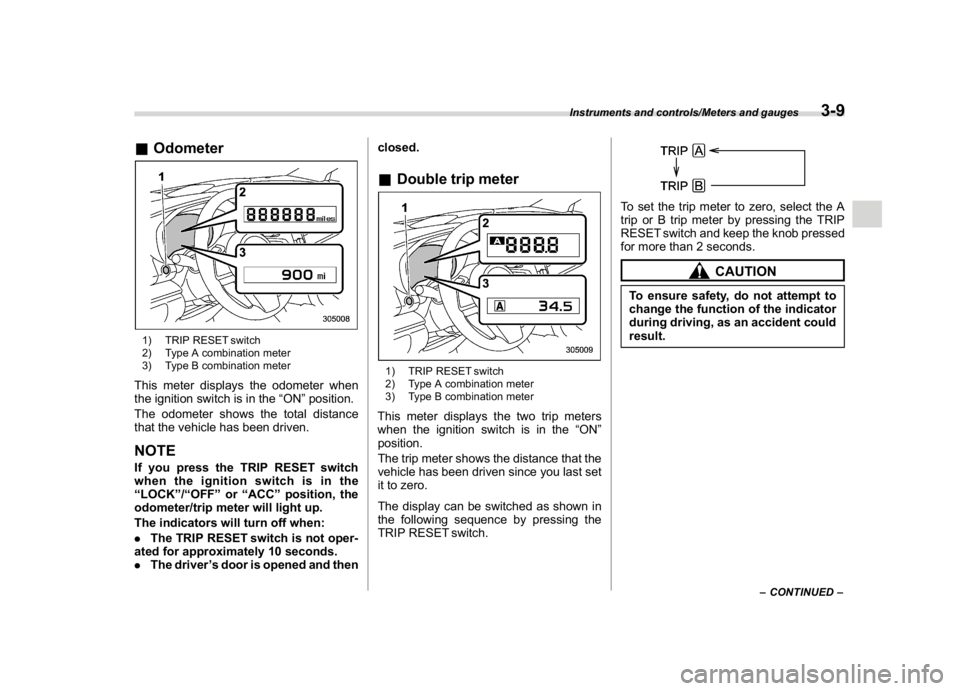
&Odometer1) TRIP RESET switch
2) Type A combination meter
3) Type B combination meterThis meter displays the odometer when
the ignition switch is in the“ON”position.
The odometer shows the total distance
that the vehicle has been driven.NOTEIf you press the TRIP RESET switch
when the ignition switch is in the
“LOCK”/“OFF”or“ACC”position, the
odometer/trip meter will light up.
The indicators will turn off when:
.The TRIP RESET switch is not oper-
ated for approximately 10 seconds.
.The driver’s door is opened and thenclosed.
&Double trip meter1) TRIP RESET switch
2) Type A combination meter
3) Type B combination meterThis meter displays the two trip meters
when the ignition switch is in the“ON”
position.
The trip meter shows the distance that the
vehicle has been driven since you last set
it to zero.
The display can be switched as shown in
the following sequence by pressing the
TRIP RESET switch.
To set the trip meter to zero, select the A
trip or B trip meter by pressing the TRIP
RESET switch and keep the knob pressed
for more than 2 seconds.
CAUTION
To ensure safety, do not attempt to
change the function of the indicator
during driving, as an accident could
result.
–CONTINUED–
Instruments and controls/Meters and gauges
3-9
3
Page 143 of 474
(148,1)
北米Model "A1320BE-C" EDITED: 2017/ 10/ 10
NOTE.If the connection between the com-
bination meter and battery is broken for
any reason such as vehicle mainte-
nance or fuse replacement, the data
recorded on the trip meter will be lost.
.If you press the TRIP RESET switch
when the ignition switch is in the
“LOCK”/“OFF”or“ACC”position, the
odometer/trip meter will light up. It is
possible to switch between the A trip
meter and B trip meter indications while
the odometer/trip meter is lit up.
In addition, it is possible to reset the trip
meter by pressing and holding the TRIP
RESET switch.
The indicators will turn off when:
–The TRIP RESET switch is not
operated for approximately 10 sec-
onds.
–The driver’s door is opened and
then closed.
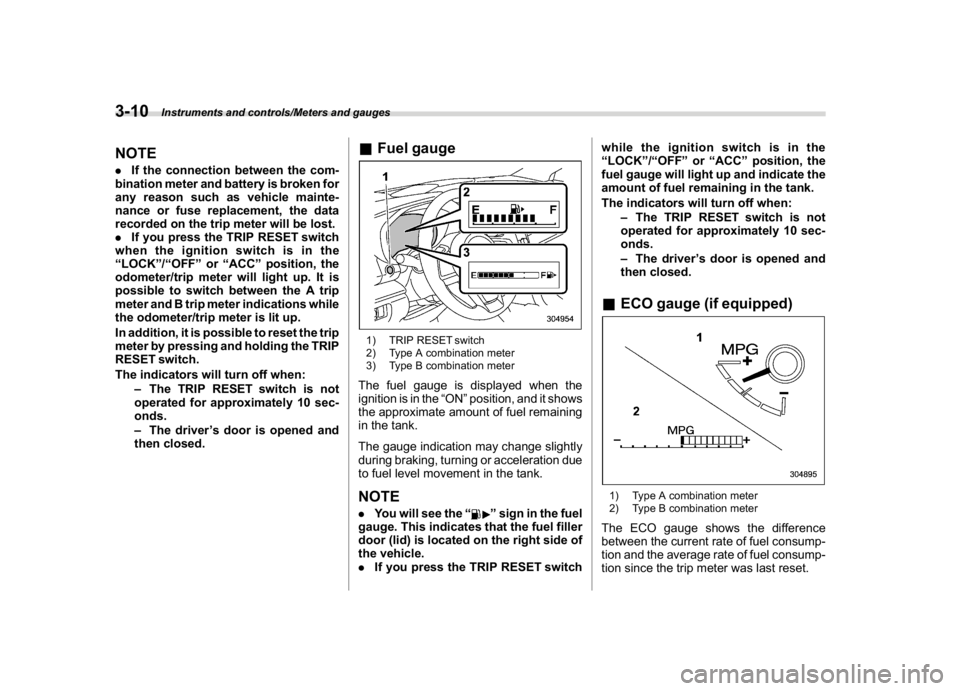
&Fuel gauge1) TRIP RESET switch
2) Type A combination meter
3) Type B combination meterThe fuel gauge is displayed when the
ignition is in the“ON”position, and it shows
the approximate amount of fuel remaining
in the tank.
The gauge indication may change slightly
during braking, turning or acceleration due
to fuel level movement in the tank.NOTE.You will see the“
”sign in the fuel
gauge. This indicates that the fuel filler
door (lid) is located on the right side of
the vehicle.
.If you press the TRIP RESET switchwhile the ignition switch is in the
“LOCK”/“OFF”or“ACC”position, the
fuel gauge will light up and indicate the
amount of fuel remaining in the tank.
The indicators will turn off when:
–The TRIP RESET switch is not
operated for approximately 10 sec-
onds.
–The driver’s door is opened and
then closed.
&ECO gauge (if equipped)1) Type A combination meter
2) Type B combination meterThe ECO gauge shows the difference
between the current rate of fuel consump-
tion and the average rate of fuel consump-
tion since the trip meter was last reset.
Instruments and controls/Meters and gauges
3-10
Page 144 of 474
(149,1)
北米Model "A1320BE-C" EDITED: 2017/ 10/ 10
If the ECO gauge moves towards the +
side, this indicates better fuel efficiency.NOTE.The ECO gauge shows only an
approximate indication of fuel effi-
ciency.
.After resetting the trip meter, the
average rate of fuel consumption is not
shown until you have driven for 1 mile
(or 1 km). Before that time, the ECO
gauge does not operate.&Combination meter settingsMeter and vehicle settings can be set on
the combination meter.
!Type A combination meter
Various adjustments can be made, such
as switching units shown on the combina-
tion meter and adjusting the warning tone
volume.
While the ignition switch is in the“OFF”
position, each press of TRIP RESET
switch results in items shown in the table
below being switched.
ItemCombination
meter displayPossible
settings
A trip
—
B trip—
Gauge
needle
sweep
function
On/Off
Changing
the unit*mile/km
Warning
volume*Lv. 1/Lv. 2/Lv. 3
*: if available
NOTE.If you switch the units on the combi-
nation meter, the units on the multi-
function display (black and white) also
switches accordingly.
.If either of the following conditions
is met, the combination meter setting
mode will be canceled.
–The driver’s door is opened.
–The TRIP RESET switch is not
operated for approximately 10 sec-
onds or more.!Switching method
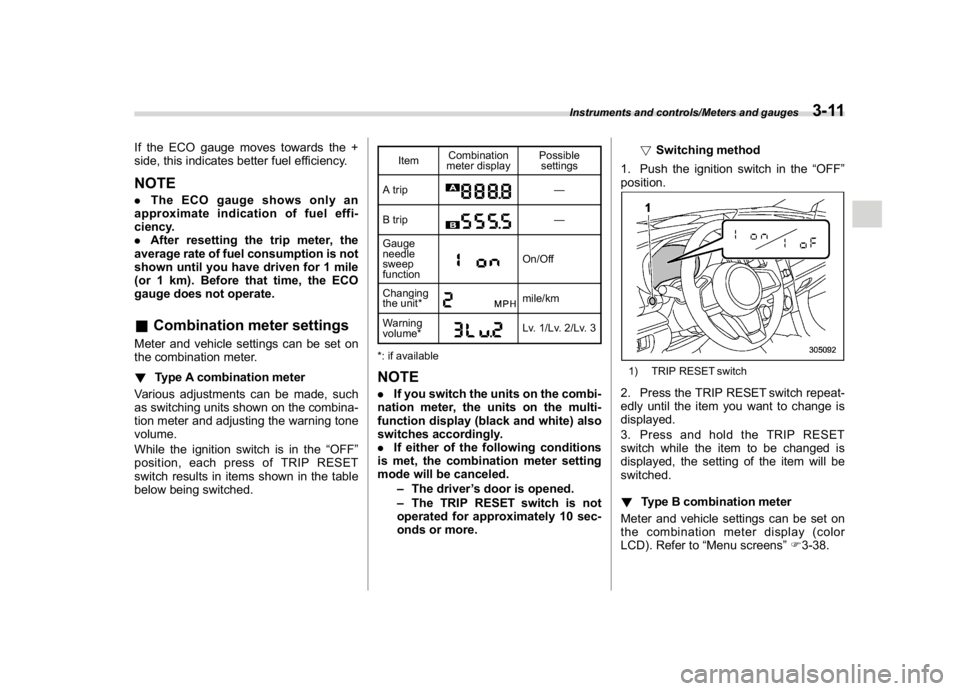
1. Push the ignition switch in the“OFF”
position.
1) TRIP RESET switch2. Press the TRIP RESET switch repeat-
edly until the item you want to change is
displayed.
3. Press and hold the TRIP RESET
switch while the item to be changed is
displayed, the setting of the item will be
switched.
!Type B combination meter
Meter and vehicle settings can be set on
the combination meter display (color
LCD). Refer to“Menu screens”F3-38.
Instruments and controls/Meters and gauges
3-11
3
Page 148 of 474
(153,1)
北米Model "A1320BE-C" EDITED: 2017/ 10/ 10
&SRS airbag system
warning light
WARNING
If the warning light exhibits any of
the following conditions, there may
be a malfunction in the seatbelt
pretensioners and/or SRS airbag
system. Immediately take your vehi-
cle to your nearest SUBARU dealer
to have the system checked. Unless
checked and properly repaired, the
seatbelt pretensioners and/or SRS
airbag will not operate properly in
the event of a collision, which may
increase the risk of injury.
.Flashing or flickering of the warn-
ing light
.No illumination of the warning
light when the ignition switch is
first turned to the“ON”position
.Continuous illumination of the
warning light
.Illumination of the warning light
while driving
For details about the components mon-
itored by the warning light, refer to“SRS
airbag system monitors”F1-66.
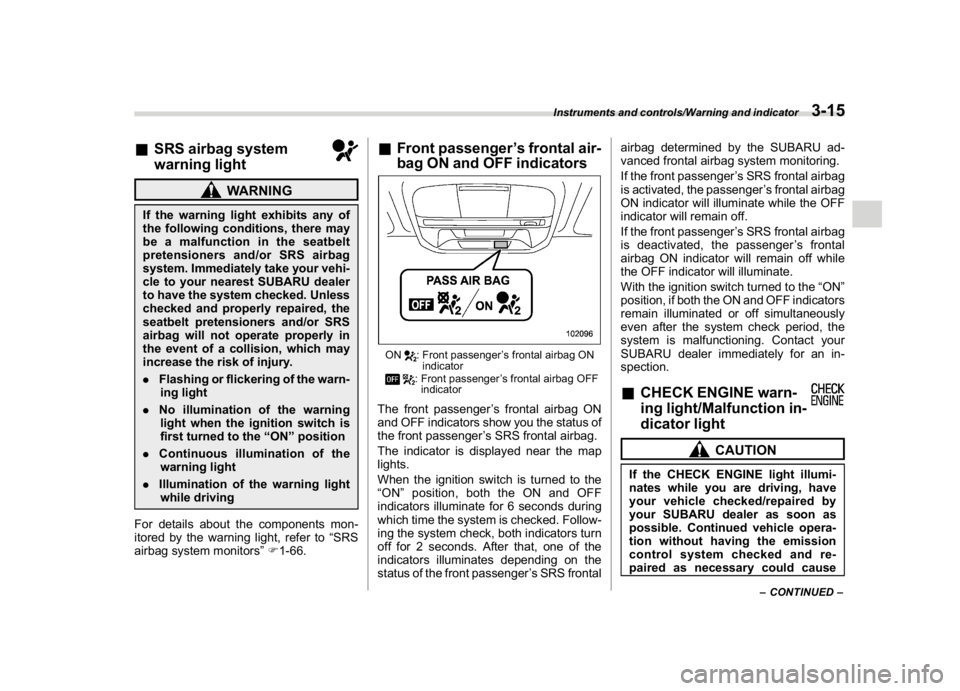
&Front passenger’s frontal air-
bag ON and OFF indicatorsON
: Front passenger’s frontal airbag ON
indicator: Front passenger’s frontal airbag OFF
indicator
The front passenger’s frontal airbag ON
and OFF indicators show you the status of
the front passenger’s SRS frontal airbag.
The indicator is displayed near the map
lights.
When the ignition switch is turned to the
“ON”position, both the ON and OFF
indicators illuminate for 6 seconds during
which time the system is checked. Follow-
ing the system check, both indicators turn
off for 2 seconds. After that, one of the
indicators illuminates depending on the
status of the front passenger’s SRS frontalairbag determined by the SUBARU ad-
vanced frontal airbag system monitoring.
If the front passenger’s SRS frontal airbag
is activated, the passenger’s frontal airbag
ON indicator will illuminate while the OFF
indicator will remain off.
If the front passenger’s SRS frontal airbag
is deactivated, the passenger’s frontal
airbag ON indicator will remain off while
the OFF indicator will illuminate.
With the ignition switch turned to the“ON”
position, if both the ON and OFF indicators
remain illuminated or off simultaneously
even after the system check period, the
system is malfunctioning. Contact your
SUBARU dealer immediately for an in-
spection.
&CHECK ENGINE warn-
ing light/Malfunction in-
dicator light
CAUTION
If the CHECK ENGINE light illumi-
nates while you are driving, have
your vehicle checked/repaired by
your SUBARU dealer as soon as
possible. Continued vehicle opera-
tion without having the emission
control system checked and re-
paired as necessary could cause
–CONTINUED–
Instruments and controls/Warning and indicator
3-15
3
Page 165 of 474
(170,1)
北米Model "A1320BE-C" EDITED: 2017/ 10/ 10
!Steering responsive fog lights
warning indicator
This indicator appears when the steering
responsive fog lights system malfunctions.
When this indicator appears while the
system is activated, contact your SUBARU
dealer for an inspection.
!Steering responsive fog lights OFF
indicator
This indicator appears when the steering
responsive fog lights system is deacti-
vated. This indicator disappears when the
system is activated.&X-mode indicator (if
equipped)This indicator appears while the X-mode is
activated. It will disappear when the X-
mode is deactivated. Refer to“To activate/
deactivate the X-mode”F7-39.&Hill descent control in-
dicator (if equipped)This indicator appears while the hill des-
cent control function is in standby. It will
flash while the hill descent control function
is operating. It will disappear when the hill
descent control function is not available.
Refer to“Hill descent control function”F7-
40.
&BSD/RCTA warning in-
dicator (if equipped)This warning indicator appears when the
BSD/RCTA is malfunctioning. In this case
the BSD/RCTA warning indicator will be
shown on the combination meter display
(color LCD). When this indicator appears,
have your vehicle inspected by your
SUBARU dealer as soon as possible.&BSD/RCTA OFF indica-
tor (if equipped)The indicator appears when the BSD/
RCTA OFF switch is pressed to deactivate
the BSD/RCTA. In this case the BSD/
RCTA OFF indicator will be shown on the
combination meter display (color LCD).
For details, refer to“BSD/RCTA”F7-52.&RAB warning
indicator (if equipped)This indicator illuminates if the Reverse
Automatic Braking System malfunctions.
Refer to“Reverse Automatic Braking
System”F7-61.
&RAB OFF indicator light
(if equipped)This indicator illuminates when the Re-
verse Automatic Braking System is turned
OFF, or when the Reverse Automatic
Braking System is suspended temporarily.
Refer to“Reverse Automatic Braking
System”F7-61.&Icy road surface warn-
ing indicator (if
equipped)When the outside temperature is 378F
(38C) or less, the icy road surface warning
will illuminate to inform the driver that the
road surface may be frozen.NOTE.The outside temperature indicator
shows the temperature in the area
around the sensor. Therefore, the tem-
perature indication may differ from the
actual outside air temperature.
.The icy road surface warning screen
should be treated only as a guide. Be
sure to check the condition of the road
surface before driving.
.Once the icy road surface warning
screen appears, it will not disappear
unless the outside temperature has
increased to 418F(58C) or higher.
Instruments and controls/Warning and indicator
3-32
Page 166 of 474
(171,1)
北米Model "A1320BE-C" EDITED: 2017/ 10/ 10
Combination meter display
(color LCD) (if equipped)
WARNING
Always pay adequate attention to
safe driving when operating the
combination meter display (color
LCD) while the vehicle is in motion.
When operation of the combination
meter display (color LCD) interferes
with your ability to concentrate on
driving, stop the vehicle before
performing operations on the
screen. Also, do not concentrate on
the display while driving. Doing so
may cause you to look away from the
road and could result in an accident.
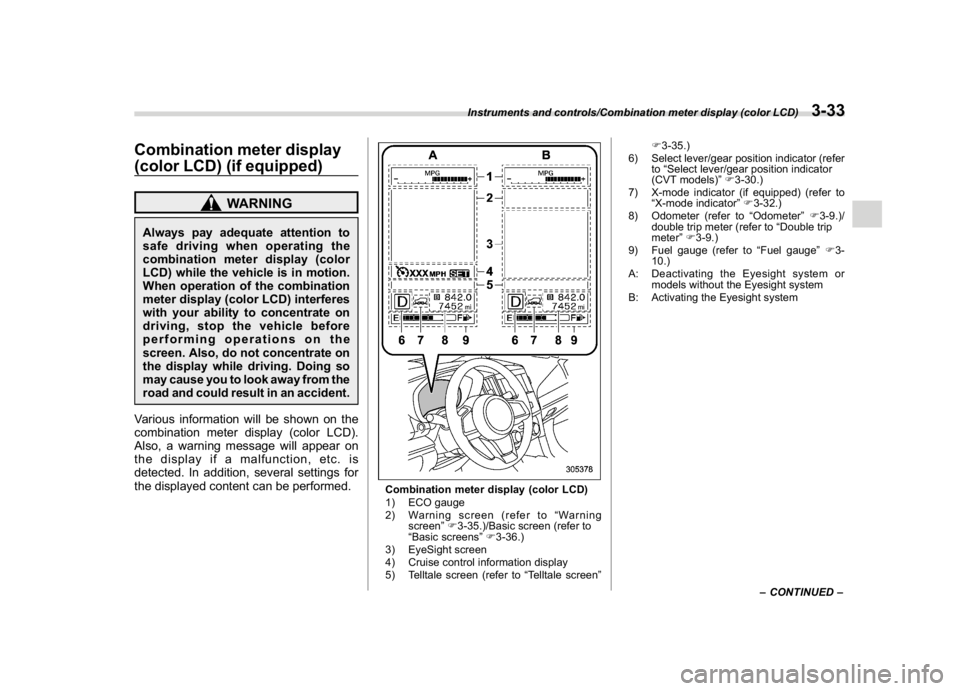
Various information will be shown on the
combination meter display (color LCD).
Also, a warning message will appear on
the display if a malfunction, etc. is
detected. In addition, several settings for
the displayed content can be performed.
Combination meter display (color LCD)
1) ECO gauge
2) Warning screen (refer to“Warning
screen”F3-35.)/Basic screen (refer to
“Basic screens”F3-36.)
3) EyeSight screen
4) Cruise control information display
5) Telltale screen (refer to“Telltale screen”F3-35.)
6) Select lever/gear position indicator (refer
to“Select lever/gear position indicator
(CVT models)”F3-30.)
7) X-mode indicator (if equipped) (refer to
“X-mode indicator”F3-32.)
8) Odometer (refer to“Odometer”F3-9.)/
double trip meter (refer to“Double trip
meter”F3-9.)
9) Fuel gauge (refer to“Fuel gauge”F3-
10.)
A: Deactivating the Eyesight system or
models without the Eyesight system
B: Activating the Eyesight system
–CONTINUED–
Instruments and controls/Combination meter display (color LCD)
3-33
3
Page 167 of 474
(172,1)
北米Model "A1320BE-C" EDITED: 2017/ 10/ 10
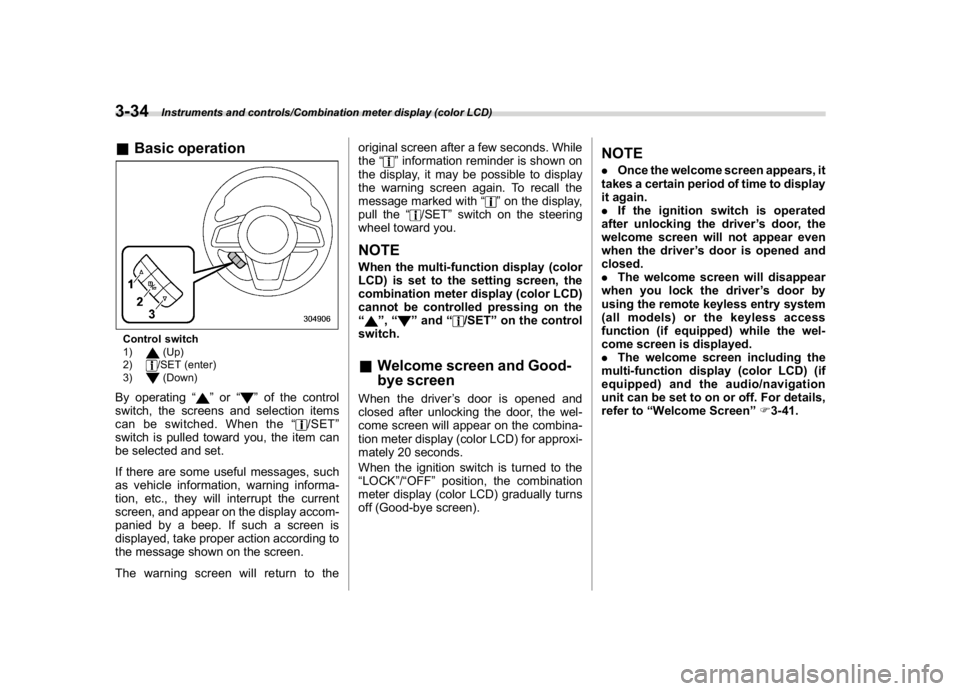
&Basic operationControl switch
1)
(Up)
2)/SET (enter)
3)(Down)
By operating“
”or“
”of the control
switch, the screens and selection items
can be switched. When the“
/SET”
switch is pulled toward you, the item can
be selected and set.
If there are some useful messages, such
as vehicle information, warning informa-
tion, etc., they will interrupt the current
screen, and appear on the display accom-
panied by a beep. If such a screen is
displayed, take proper action according to
the message shown on the screen.
The warning screen will return to theoriginal screen after a few seconds. While
the“
”information reminder is shown on
the display, it may be possible to display
the warning screen again. To recall the
message marked with“
”on the display,
pull the“
/SET”switch on the steering
wheel toward you.
NOTEWhen the multi-function display (color
LCD) is set to the setting screen, the
combination meter display (color LCD)
cannot be controlled pressing on the
“
”,“
”and“
/SET”on the control
switch.
&Welcome screen and Good-
bye screenWhen the driver’s door is opened and
closed after unlocking the door, the wel-
come screen will appear on the combina-
tion meter display (color LCD) for approxi-
mately 20 seconds.
When the ignition switch is turned to the
“LOCK”/“OFF”position, the combination
meter display (color LCD) gradually turns
off (Good-bye screen).
NOTE.Once the welcome screen appears, it
takes a certain period of time to display
it again.
.If the ignition switch is operated
after unlocking the driver’s door, the
welcome screen will not appear even
when the driver’s door is opened and
closed.
.The welcome screen will disappear
when you lock the driver’s door by
using the remote keyless entry system
(all models) or the keyless access
function (if equipped) while the wel-
come screen is displayed.
.The welcome screen including the
multi-function display (color LCD) (if
equipped) and the audio/navigation
unit can be set to on or off. For details,
refer to“Welcome Screen”F3-41.
Instruments and controls/Combination meter display (color LCD)
3-34
Page 168 of 474
(173,1)
北米Model "A1320BE-C" EDITED: 2017/ 10/ 10
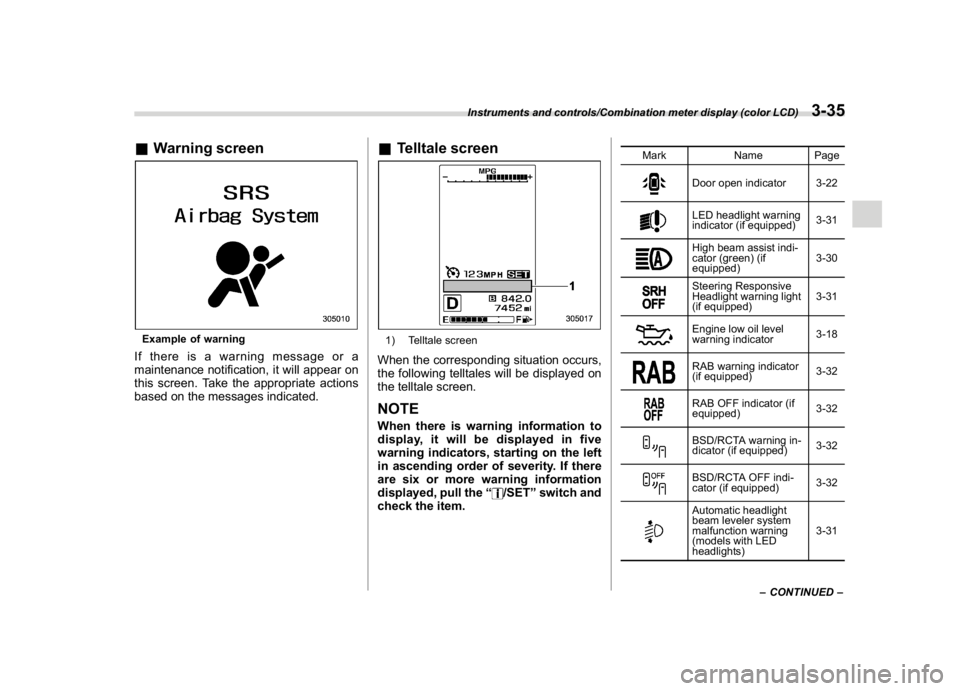
&Warning screenExample of warningIf there is a warning message or a
maintenance notification, it will appear on
this screen. Take the appropriate actions
based on the messages indicated.
&Telltale screen1) Telltale screenWhen the corresponding situation occurs,
the following telltales will be displayed on
the telltale screen.NOTEWhen there is warning information to
display, it will be displayed in five
warning indicators, starting on the left
in ascending order of severity. If there
are six or more warning information
displayed, pull the“
/SET”switch and
check the item.
Mark Name Page
Door open indicator 3-22LED headlight warning
indicator (if equipped)3-31High beam assist indi-
cator (green) (if
equipped)3-30Steering Responsive
Headlight warning light
(if equipped)3-31Engine low oil level
warning indicator3-18RAB warning indicator
(if equipped)3-32RAB OFF indicator (if
equipped)3-32BSD/RCTA warning in-
dicator (if equipped)3-32BSD/RCTA OFF indi-
cator (if equipped)3-32Automatic headlight
beam leveler system
malfunction warning
(models with LED
headlights)3-31
–CONTINUED–
Instruments and controls/Combination meter display (color LCD)
3-35
3