display SUBARU CROSSTREK 2018 Manual PDF
[x] Cancel search | Manufacturer: SUBARU, Model Year: 2018, Model line: CROSSTREK, Model: SUBARU CROSSTREK 2018Pages: 474, PDF Size: 20.76 MB
Page 324 of 474
(333,1)
北米Model "A1320BE-C" EDITED: 2017/ 10/ 10
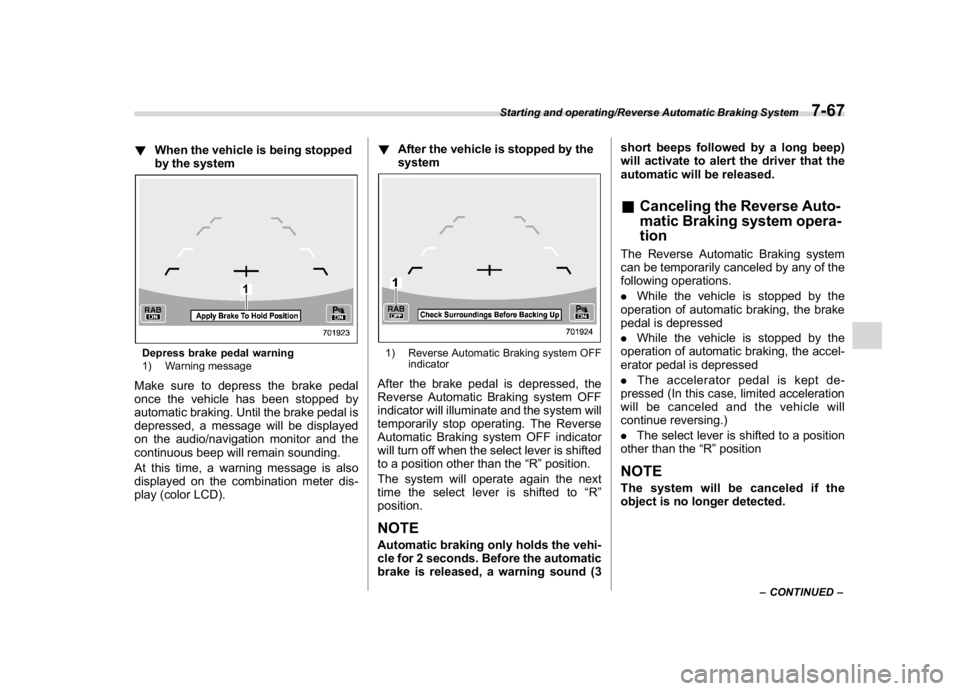
!When the vehicle is being stopped
by the systemDepress brake pedal warning
1) Warning messageMake sure to depress the brake pedal
once the vehicle has been stopped by
automatic braking. Until the brake pedal is
depressed, a message will be displayed
on the audio/navigation monitor and the
continuous beep will remain sounding.
At this time, a warning message is also
displayed on the combination meter dis-
play (color LCD).!After the vehicle is stopped by the
system
1) Reverse Automatic Braking system OFF
indicatorAfter the brake pedal is depressed, the
Reverse Automatic Braking system OFF
indicator will illuminate and the system will
temporarily stop operating. The Reverse
Automatic Braking system OFF indicator
will turn off when the select lever is shifted
to a position other than the“R”position.
The system will operate again the next
time the select lever is shifted to“R”
position.NOTEAutomatic braking only holds the vehi-
cle for 2 seconds. Before the automatic
brake is released, a warning sound (3short beeps followed by a long beep)
will activate to alert the driver that the
automatic will be released.
&Canceling the Reverse Auto-
matic Braking system opera-
tionThe Reverse Automatic Braking system
can be temporarily canceled by any of the
following operations.
.While the vehicle is stopped by the
operation of automatic braking, the brake
pedal is depressed
.While the vehicle is stopped by the
operation of automatic braking, the accel-
erator pedal is depressed
.The accelerator pedal is kept de-
pressed (In this case, limited acceleration
will be canceled and the vehicle will
continue reversing.)
.The select lever is shifted to a position
other than the“R”positionNOTEThe system will be canceled if the
object is no longer detected.
–CONTINUED–
Starting and operating/Reverse Automatic Braking System
7-67
7
Page 325 of 474
(334,1)
北米Model "A1320BE-C" EDITED: 2017/ 10/ 10
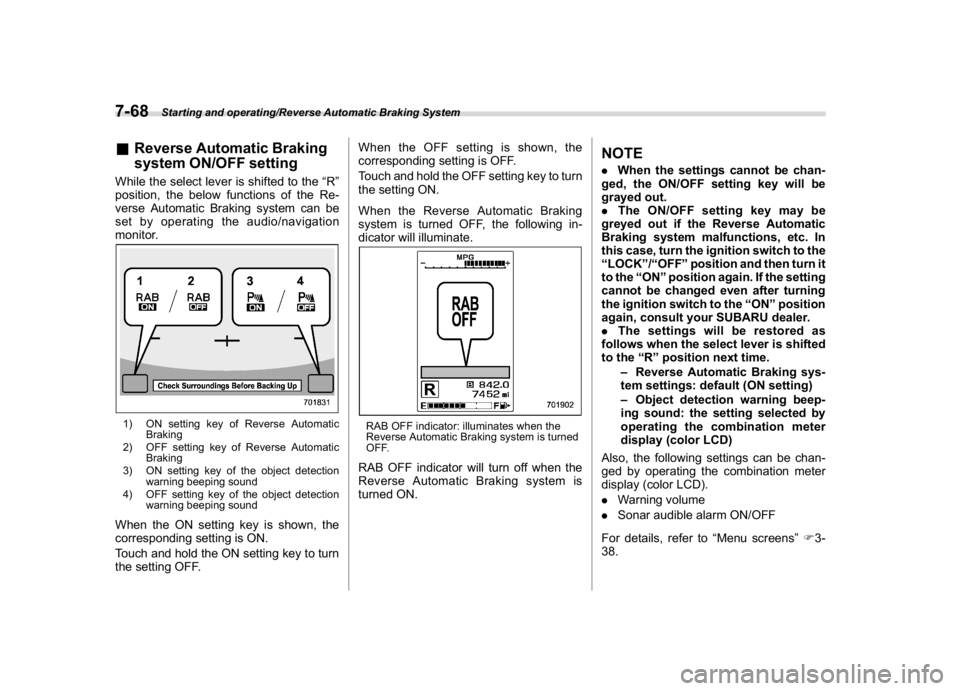
&Reverse Automatic Braking
system ON/OFF settingWhile the select lever is shifted to the“R”
position, the below functions of the Re-
verse Automatic Braking system can be
set by operating the audio/navigation
monitor.1) ON setting key of Reverse Automatic
Braking
2) OFF setting key of Reverse Automatic
Braking
3) ON setting key of the object detection
warning beeping sound
4) OFF setting key of the object detection
warning beeping soundWhen the ON setting key is shown, the
corresponding setting is ON.
Touch and hold the ON setting key to turn
the setting OFF.When the OFF setting is shown, the
corresponding setting is OFF.
Touch and hold the OFF setting key to turn
the setting ON.
When the Reverse Automatic Braking
system is turned OFF, the following in-
dicator will illuminate.
RAB OFF indicator: illuminates when the
Reverse Automatic Braking system is turned
OFF.RAB OFF indicator will turn off when the
Reverse Automatic Braking system is
turned ON.
NOTE.When the settings cannot be chan-
ged, the ON/OFF setting key will be
grayed out.
.The ON/OFF setting key may be
greyed out if the Reverse Automatic
Braking system malfunctions, etc. In
this case, turn the ignition switch to the
“LOCK”/“OFF”position and then turn it
to the“ON”position again. If the setting
cannot be changed even after turning
the ignition switch to the“ON”position
again, consult your SUBARU dealer.
.The settings will be restored as
follows when the select lever is shifted
to the“R”position next time.
–Reverse Automatic Braking sys-
tem settings: default (ON setting)
–Object detection warning beep-
ing sound: the setting selected by
operating the combination meter
display (color LCD)
Also, the following settings can be chan-
ged by operating the combination meter
display (color LCD).
.Warning volume
.Sonar audible alarm ON/OFF
For details, refer to“Menu screens”F3-
38.
Starting and operating/Reverse Automatic Braking System
7-68
Page 380 of 474
(393,1)
北米Model "A1320BE-C" EDITED: 2017/ 10/ 10
&MonitorTo clean the audio/navigation/multi func-
tion display monitor, wipe it with a silicone
cloth or with a soft cloth. If the monitor is
extremely dirty, clean it with a soft cloth
moistened with neutral detergent then
carefully wipe off any remaining detergent.
CAUTION
.Do not spray neutral detergent
directly onto the monitor. Doing
so could damage the monitor’s
components.
.Do not wipe the monitor with a
hard cloth. Doing so could
scratch the monitor.
.Do not use cleaning fluid that
contains thinner, fuel, or any
other volatile substance. Such
cleaning fluid could erase the
lettering on the switches at the
bottom of the monitor.
Appearance care/Cleaning the interior
10-7
10
Page 384 of 474
(397,1)
北米Model "A1320BE-C" EDITED: 2017/ 10/ 10
Maintenance scheduleU.S. models
The scheduled maintenance items re-
quired to be serviced at regular intervals
are shown in the“Warranty and Mainte-
nance Booklet”. For details, read the
separate“Warranty and Maintenance
Booklet”.
Canada models
The scheduled maintenance items re-
quired to be serviced at regular intervals
are shown in the“Warranty and Service
Booklet”. For details, read the separate
“Warranty and Service Booklet”.
Except for U.S. and Canada models
Some items of your vehicle are required to
be serviced at scheduled intervals. For
details about your maintenance schedule,
read the separate“Warranty and Main-
tenance Booklet”.NOTEFor models with a multi-function dis-
play (color LCD), you can set a remin-
der to be displayed when a scheduled
maintenance item is almost due. For
details, refer to“Maintenance settings”
F3-61.
Maintenance precautionsWhen maintenance and service are re-
quired, it is recommended that all work be
done by an authorized SUBARU dealer.
If you perform maintenance and service by
yourself, you should familiarize yourself
with the information provided in this sec-
tion on general maintenance and service
for your SUBARU.
Incorrect or incomplete service could
cause improper or unsafe vehicle opera-
tion. Any problems caused by improper
maintenance and service performed by
you are not eligible for warranty coverage.
WARNING
.Always select a safe area when
performing maintenance on your
vehicle.
.Always be very careful to avoid
injury when working on the vehi-
cle. Remember that some of the
materials in the vehicle may be
hazardous if improperly used or
handled, for example, battery
acid.
.Your vehicle should only be ser-
viced by persons fully competent
to do so. Serious personal injurymay result to persons not experi-
enced in servicing vehicles.
.Always use the proper tools and
make certain that they are well
maintained.
.Never get under the vehicle sup-
ported only by a jack. Always use
safety stands to support the
vehicle.
.Never keep the engine running in
a poorly ventilated area, such as
a garage or other closed areas.
.Do not smoke or allow open
flames around the fuel or battery.
This will cause a fire.
.Because the fuel system is under
pressure, replacement of the fuel
filter should be performed only
by your SUBARU dealer.
.Wear adequate eye protection to
guard against getting oil or fluids
in your eyes. If something does
get in your eyes, thoroughly
wash them out with clean water.
.Do not tamper with the wiring of
the SRS airbag system or seat-
belt pretensioner system, or at-
tempt to take its connectors
apart, as that may activate the
system or it can render it inop-
–CONTINUED–
Maintenance and service/Maintenance schedule
11-3
11