Window SUBARU CROSSTREK 2018 Owner's Manual
[x] Cancel search | Manufacturer: SUBARU, Model Year: 2018, Model line: CROSSTREK, Model: SUBARU CROSSTREK 2018Pages: 474, PDF Size: 20.76 MB
Page 124 of 474
(127,1)
北米Model "A1320BE-C" EDITED: 2017/ 10/ 10
&Alarm system operationWhen the alarm system is armed, it is
triggered by the opening any of the doors
or the rear gate.
The alarm system will activate the follow-
ing alarms when triggered.
.The vehicle’s horn will sound for 30
seconds.
.The hazard warning flashers will flash
for 30 seconds.
If any of the doors or the rear gate remains
open after the 30-second period, the horn
will continue to sound for a maximum of 3
minutes. If the door or the rear gate is
closed while the horn is sounding, the horn
will stop sounding with a delay of up to 30
seconds.NOTEThe alarm system can be set to trigger
the illumination of the following interior
lights.
.Map lights (illuminates only when
the door interlock switch is in the
“DOOR”position)
.Dome light (illuminates only when
the dome light switch is in the“DOOR”
position)
.Cargo area light (illuminates only
when the cargo area light switch is in
the“DOOR”position)The notifications regarding the map
lights, dome light and cargo area light
are deactivated as the factory setting. A
SUBARU dealer can activate the sys-
tem. Contact your SUBARU dealer for
details.
&Arming the systemThe alarm system becomes armed when
the following operation is performed.
1. Close all windows and the moonroof (if
equipped) and turn the ignition switch to
the“OFF”position.
2. Carry the key and get out of the
vehicle.
3. Lock the doors using any of the
following methods.
.Locking using the remote keyless
entry system. For details, refer to
“Remote keyless entry system”F2-17.
.Locking using the keyless access
function (if equipped). For details, refer
to“Locking with the door lock sensor”
F2-8.
.Locking using the power door lock-
ing switch. For details, refer to“Locking
using power door locking switch”F2-
22.
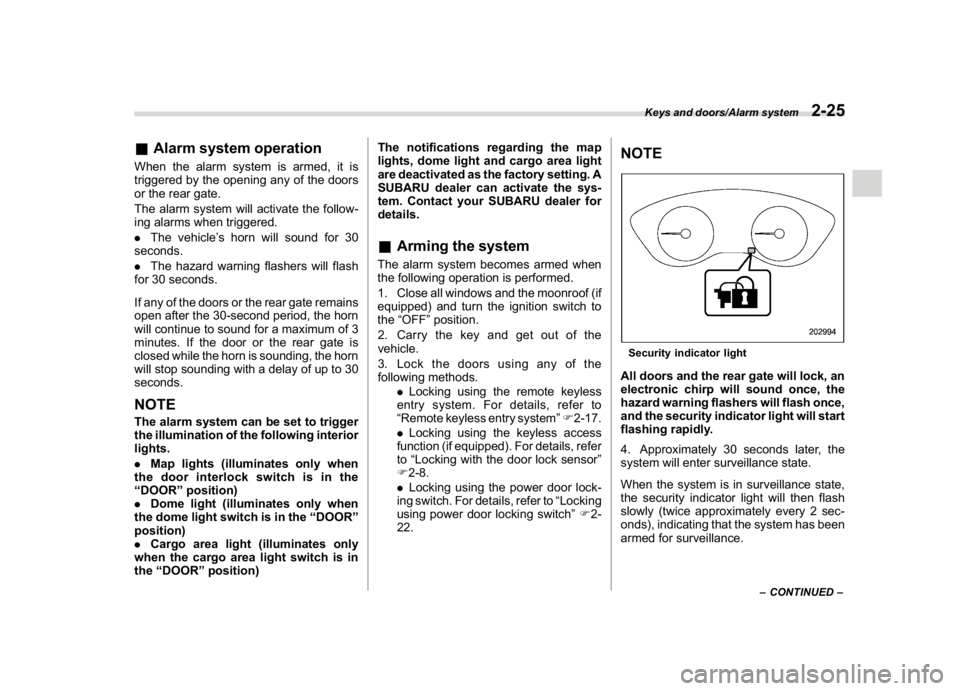
NOTESecurity indicator lightAll doors and the rear gate will lock, an
electronic chirp will sound once, the
hazard warning flashers will flash once,
and the security indicator light will start
flashing rapidly.
4. Approximately 30 seconds later, the
system will enter surveillance state.
When the system is in surveillance state,
the security indicator light will then flash
slowly (twice approximately every 2 sec-
onds), indicating that the system has been
armed for surveillance.
–CONTINUED–
Keys and doors/Alarm system
2-25
2
Page 125 of 474

(128,1)
北米Model "A1320BE-C" EDITED: 2017/ 10/ 10
NOTE.The system can be armed even if the
engine hood, windows and/or moon-
roof are open. Always make sure that
they are fully closed before arming the
system.
.When arming the system, if any of
the doors or the rear gate is not fully
closed, an electronic chirp sounds five
times, the hazard warning flashers
flash five times to alert you that the
doors (or the rear gate) are not properly
closed. When you close the door, doors
will automatically lock and the system
will automatically arm in 30 seconds.
.The 30-second standby time can be
eliminated if you prefer. Have it per-
formed by your SUBARU dealer.
.If any of the following actions is
done during the standby period, the
system will not switch to the surveil-
lance state.
–Doors (including the rear gate)
are unlocked using the access key
fob/remote transmitter.
–Doors (including the rear gate)
are unlocked using the keyless
access function (models with“key-
less access with push-button start
system”).
–Any door (including the rear gate)
is opened.–The ignition switch is turned to
the“ON”position (models without
“keyless access with push-button
start system”).
–Push-button ignition switch is
turned to the“ACC”position (mod-
els with“keyless access with push-
button start system”).
&Disarming the systemPerform either of the following procedures.
.Briefly press a button (for less than 2
seconds) on the access key fob/remote
transmitter.
.Carry the access key fob and perform
either of the following procedures (models
with“keyless access with push-button
start system”).
–Grip the front door handle.
–Press the rear gate opener button.
–Unlock using the PIN code access.
The flashing of the security indicator light
will then change slowly (once approxi-
mately every 3 seconds from twice ap-
proximately every 2 seconds), indicating
that the alarm system has been disarmed.
!Emergency disarming
If you cannot disarm the system using the
access key fob/transmitter (i.e. the trans-
mitter is lost, broken or the transmitterbattery is too weak), you can disarm the
system without using the access key fob/
remote transmitter.
The system can be disarmed if you turn the
ignition switch from the“LOCK”/“OFF”to
the“ON”position with a registered key/
access key fob.
NOTEFor models with“keyless access with
push-button start system”, if the ac-
cess key fob battery is discharged,
perform the procedure described in
“Switching power status”F9-17. In
such a case, replace the battery im-
mediately. Refer to“Replacing battery
of access key fob”F11-43.&Alarm system settingTo change the setting of your vehicle’s
alarm system for activation or deactiva-
tion, do the following.
1. Disarm the alarm system. Refer to
“Disarming the system”F2-26.
2. Sit in the driver’s seat and shut all
doors and the rear gate.
3. Turn the ignition switch to the“ON”
position.
4. Hold down“
”of the driver’s power
door locking switch, open the driver’s door
within the following 1 second, and wait 10
Keys and doors/Alarm system
2-26
Page 127 of 474
(130,1)
北米Model "A1320BE-C" EDITED: 2017/ 10/ 10
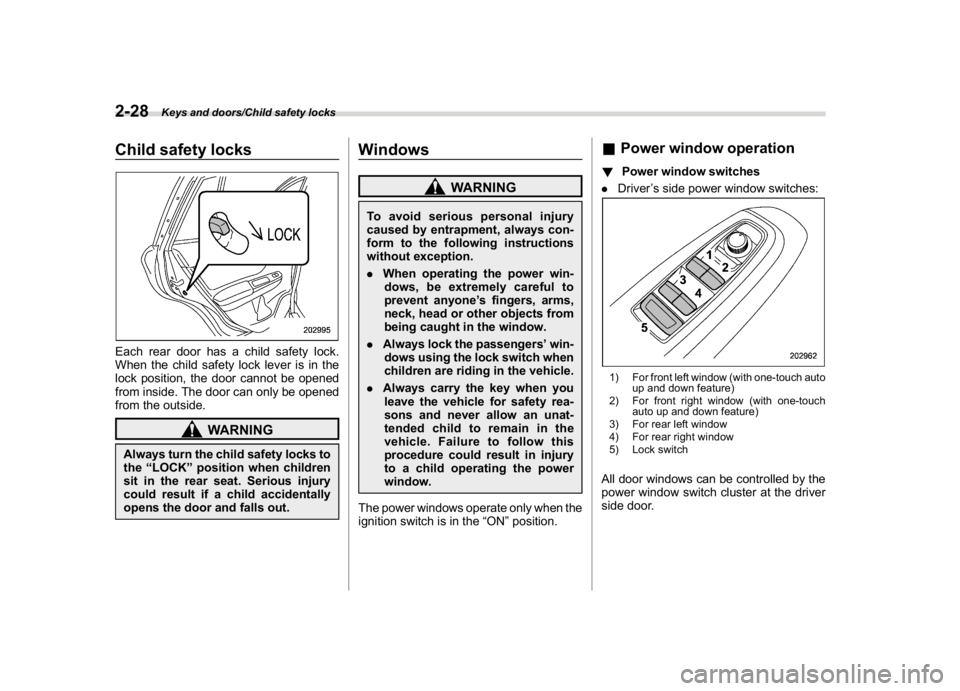
Child safety locksEach rear door has a child safety lock.
When the child safety lock lever is in the
lock position, the door cannot be opened
from inside. The door can only be opened
from the outside.
WARNING
Always turn the child safety locks to
the“LOCK”position when children
sit in the rear seat. Serious injury
could result if a child accidentally
opens the door and falls out.
Windows
WARNING
To avoid serious personal injury
caused by entrapment, always con-
form to the following instructions
without exception.
.When operating the power win-
dows, be extremely careful to
prevent anyone’s fingers, arms,
neck, head or other objects from
being caught in the window.
.Always lock the passengers’win-
dows using the lock switch when
children are riding in the vehicle.
.Always carry the key when you
leave the vehicle for safety rea-
sons and never allow an unat-
tended child to remain in the
vehicle. Failure to follow this
procedure could result in injury
to a child operating the power
window.
The power windows operate only when the
ignition switch is in the“ON”position.
&Power window operation!Power window switches
.Driver’s side power window switches:1) For front left window (with one-touch auto
up and down feature)
2) For front right window (with one-touch
auto up and down feature)
3) For rear left window
4) For rear right window
5) Lock switchAll door windows can be controlled by the
power window switch cluster at the driver
side door.
Keys and doors/Child safety locks
2-28
Page 128 of 474
(131,1)
北米Model "A1320BE-C" EDITED: 2017/ 10/ 10
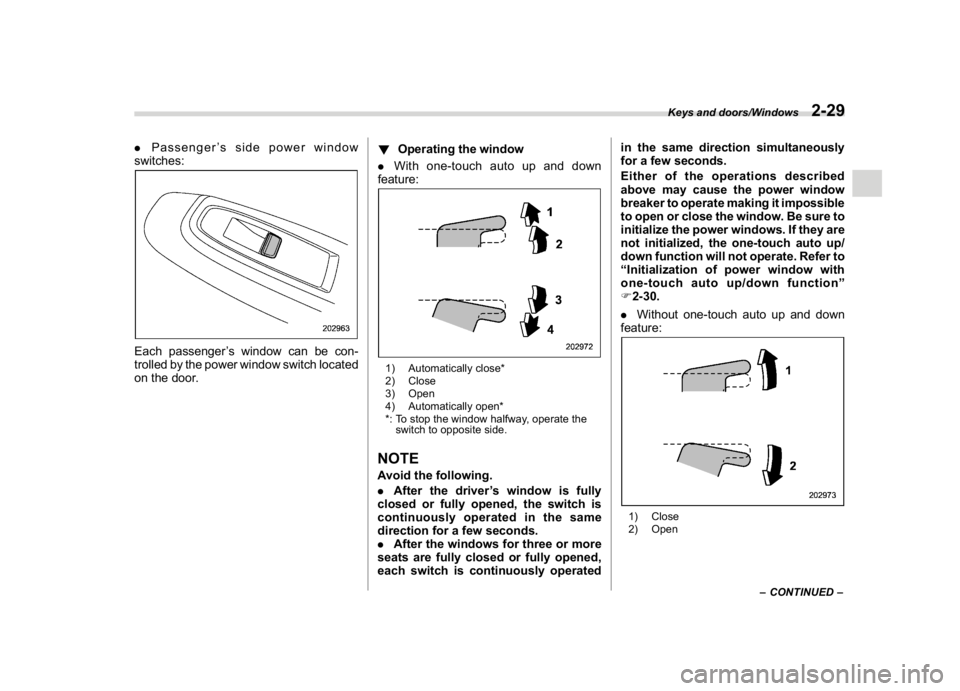
.Passenger’s side power window
switches:Each passenger’s window can be con-
trolled by the power window switch located
on the door.!Operating the window
.With one-touch auto up and down
feature:
1) Automatically close*
2) Close
3) Open
4) Automatically open*
*: To stop the window halfway, operate the
switch to opposite side.NOTEAvoid the following.
.After the driver’s window is fully
closed or fully opened, the switch is
continuously operated in the same
direction for a few seconds.
.After the windows for three or more
seats are fully closed or fully opened,
each switch is continuously operatedin the same direction simultaneously
for a few seconds.
Either of the operations described
above may cause the power window
breaker to operate making it impossible
to open or close the window. Be sure to
initialize the power windows. If they are
not initialized, the one-touch auto up/
down function will not operate. Refer to
“Initialization of power window with
one-touch auto up/down function”
F2-30.
.Without one-touch auto up and down
feature:
1) Close
2) Open
–CONTINUED–
Keys and doors/Windows
2-29
2
Page 129 of 474
(132,1)
北米Model "A1320BE-C" EDITED: 2017/ 10/ 10
!Anti-entrapment function (windows
with one-touch auto up/down func-
tion)
While closing the driver’s and front pas-
senger’s windows automatically, if the
window senses a substantial enough
object trapped between the window and
the window frame, it automatically moves
down slightly and stops.
If a foreign object is caught while the
driver’s window or passenger’s window is
opening automatically, the window will
stop.
CAUTION
.Never attempt to test this func-
tion using fingers, hands or other
parts of your body.
.The anti-entrapment function
may not operate properly if some
object gets trapped just before
the window fully closes.NOTE.If a window detects an impact similar
to that caused by trapping an object (for
example, when the vehicle encounters
a deep pothole), the anti-entrapment
function may operate.
.The window cannot be operated for afew seconds after the anti-entrapment
function operates.
!Off delay function (windows with
one-touch auto up/down function)
The front windows can be operated for
approximately 45 seconds even after the
ignition switch is turned to the“ACC”or
“OFF”position. If a front door is opened
within 45 seconds, the off delay function is
canceled.
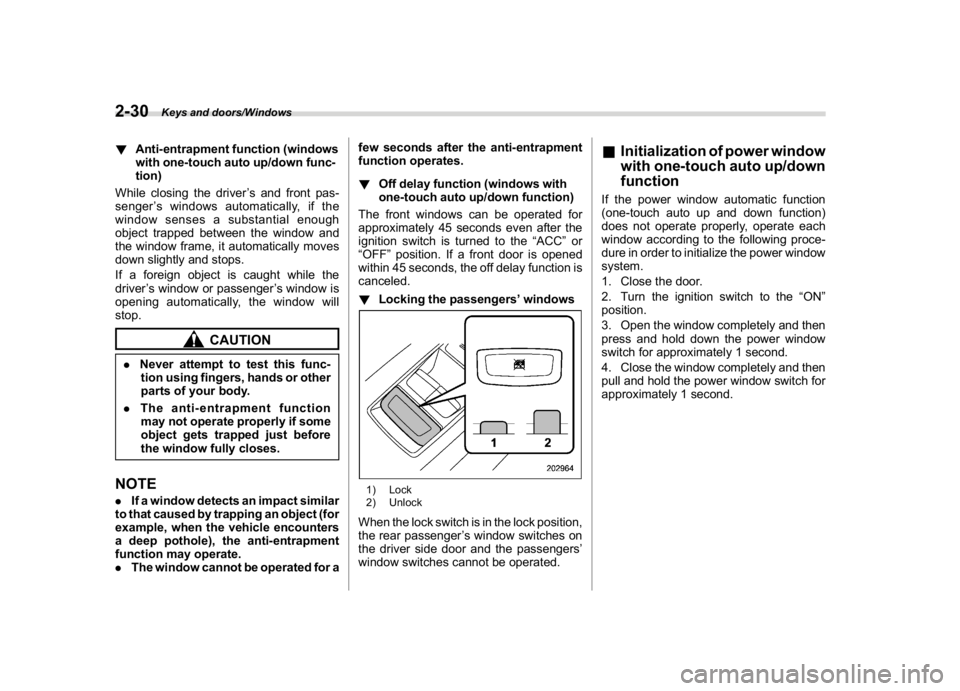
!Locking the passengers’windows
1) Lock
2) UnlockWhen the lock switch is in the lock position,
the rear passenger’s window switches on
the driver side door and the passengers’
window switches cannot be operated.
&Initialization of power window
with one-touch auto up/down
functionIf the power window automatic function
(one-touch auto up and down function)
does not operate properly, operate each
window according to the following proce-
dure in order to initialize the power window
system.
1. Close the door.
2. Turn the ignition switch to the“ON”
position.
3. Open the window completely and then
press and hold down the power window
switch for approximately 1 second.
4. Close the window completely and then
pull and hold the power window switch for
approximately 1 second.
Keys and doors/Windows
2-30
Page 136 of 474

(141,1)
北米Model "A1320BE-C" EDITED: 2017/ 10/ 10
Turn signallever...................................................3-75
One-touch lane changer........................................3-76
Wiper and washer.................................................3-76
Windshield wiper and washer switches .................3-77
Rear window wiper and washer switch..................3-79
Mirrors...................................................................3-80
Inside mirror.........................................................3-80
Auto-dimming mirror/compass (if equipped)..........3-80Auto-dimming mirror/compass with HomeLink
®
(if equipped)......................................................3-81
Outside mirrors....................................................3-88
Defogger and deicer (ifequipped)......................3-89
Tilt/telescopic steeringwheel..............................3-90
Heated Steering Wheel system (if equipped).........3-91
Horn.......................................................................3-92
Instruments and controls
Page 137 of 474
(142,1)
北米Model "A1320BE-C" EDITED: 2017/ 10/ 10
Ignition switch (models with-
out“keyless access with
push-button start system”)
WARNING
.Never turn the ignition switch to
the“LOCK”position while the
vehicle is being driven or towed
because that will lock the steer-
ing wheel, preventing steering
control. And when the engine is
turned off, it takes a much greater
effort than usual to steer.
.Before leaving the vehicle, al-
ways remove the key from the
ignition switch for safety and
never allow an unattended child
to remain in the vehicle. Failure to
follow this procedure could re-
sult in injury to a child or others.
Children could operate the power
windows, the moonroof or other
controls or even make the vehicle
move.
CAUTION
Do not attach a large key holder or
key case to either key. If it banged
against your knees or hands while
you are driving, it could turn the
ignition switch from the“ON”posi-
tion to the“ACC”or“LOCK”posi-
tion, thereby stopping the engine.
Also, if the key is attached to a key
holder or to a large bunch of other
keys, centrifugal force may act on it
as the vehicle moves, resulting in
unwanted turning of the ignition
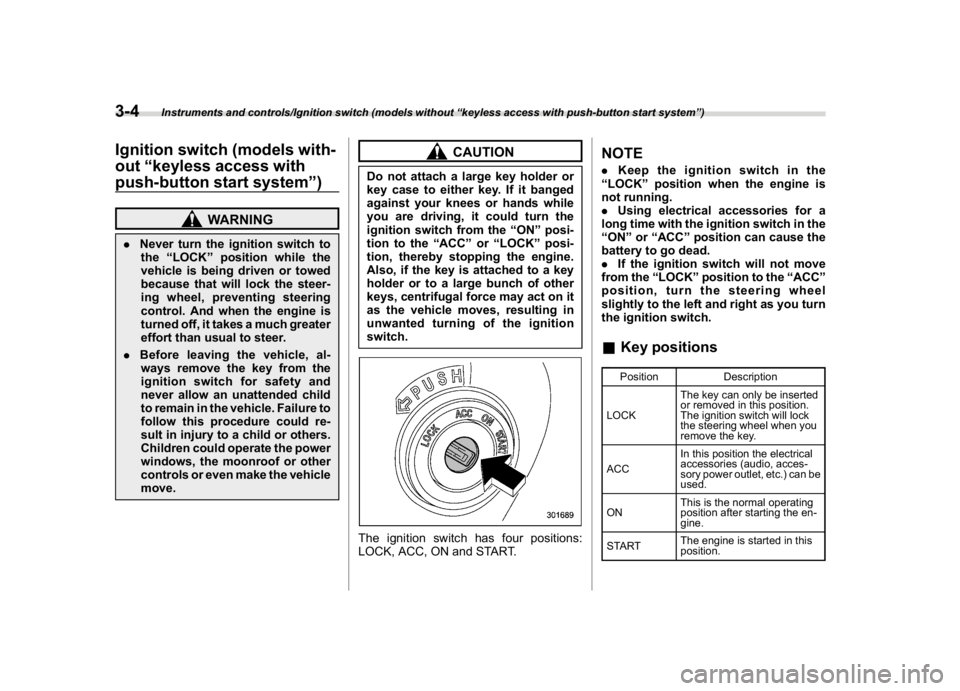
switch.The ignition switch has four positions:
LOCK, ACC, ON and START.
NOTE.Keep the ignition switch in the
“LOCK”position when the engine is
not running.
.Using electrical accessories for a
long time with the ignition switch in the
“ON”or“ACC”position can cause the
battery to go dead.
.If the ignition switch will not move
from the“LOCK”position to the“ACC”
position, turn the steering wheel
slightly to the left and right as you turn
the ignition switch.&Key positions
Position Description
LOCKThe key can only be inserted
or removed in this position.
The ignition switch will lock
the steering wheel when you
remove the key.
ACCIn this position the electrical
accessories (audio, acces-
sory power outlet, etc.) can be
used.
ONThis is the normal operating
position after starting the en-
gine.
STARTThe engine is started in this
position.
Instruments and controls/Ignition switch (models without“keyless access with push-button start system”)
3-4
Page 158 of 474
(163,1)
北米Model "A1320BE-C" EDITED: 2017/ 10/ 10
&Warning chimes and
warning indicator of the
keyless access with
push-button start sys-
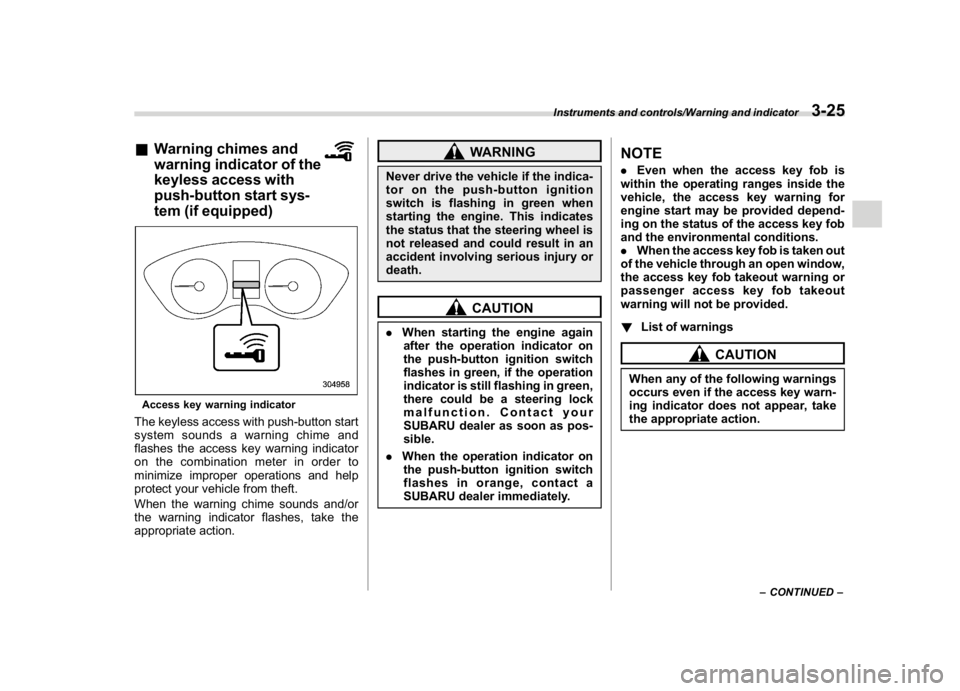
tem (if equipped)Access key warning indicatorThe keyless access with push-button start
system sounds a warning chime and
flashes the access key warning indicator
on the combination meter in order to
minimize improper operations and help
protect your vehicle from theft.
When the warning chime sounds and/or
the warning indicator flashes, take the
appropriate action.
WARNING
Never drive the vehicle if the indica-
tor on the push-button ignition
switch is flashing in green when
starting the engine. This indicates
the status that the steering wheel is
not released and could result in an
accident involving serious injury or
death.
CAUTION
.When starting the engine again
after the operation indicator on
the push-button ignition switch
flashes in green, if the operation
indicator is still flashing in green,
there could be a steering lock
malfunction. Contact your
SUBARU dealer as soon as pos-
sible.
.When the operation indicator on
the push-button ignition switch
flashes in orange, contact a
SUBARU dealer immediately.
NOTE.Even when the access key fob is
within the operating ranges inside the
vehicle, the access key warning for
engine start may be provided depend-
ing on the status of the access key fob
and the environmental conditions.
.When the access key fob is taken out
of the vehicle through an open window,
the access key fob takeout warning or
passenger access key fob takeout
warning will not be provided.
!List of warnings
CAUTION
When any of the following warnings
occurs even if the access key warn-
ing indicator does not appear, take
the appropriate action.
–CONTINUED–
Instruments and controls/Warning and indicator
3-25
3
Page 209 of 474
(214,1)
北米Model "A1320BE-C" EDITED: 2017/ 10/ 10
&One-touch lane changerTo flash the turn signal and turn signal
indicator light three times, push the turn
signal lever up or down slightly and
immediately release it.NOTEThe operational/non-operational
setting of the one-touch lane changer
can be changed by a SUBARU dealer.
Contact the nearest SUBARU dealer for
details. For models with the combina-
tion meter display (color LCD), the
setting can also be changed by operat-
ing the combination meter display
(color LCD). For details, refer to“Vehi-
cle Setting”F3-41.
Wiper and washer
WARNING
In freezing weather, do not use the
windshield washer until the wind-
shield is sufficiently warmed by the
defroster.
Otherwise the washer fluid can
freeze on the windshield, blocking
your view.
CAUTION
.Do not operate the washer con-
tinuously for more than 10 sec-
onds, or when the washer fluid
tank is empty. This may cause
overheating of the washer motor.
Check the washer fluid level fre-
quently, such as at fuel stops.
.Do not operate the wipers when
the windshield or rear window is
dry. This may scratch the glass,
damage the blade rubbers and
might cause the wiper motor to
fail. Before operating the wiper
on a dry windshield or rear win-
dow, always use the windshield
washer..In freezing weather, be sure that
the blade rubbers are not frozen
to the windshield or rear window
before switching on the wipers.
Attempting to operate the wiper
withthebladesfrozentothe
window glass could cause not
only the blade rubbers to be
damaged but also might cause
the wiper motor to fail. If the blade
rubbers are frozen to the window
glass, be sure to operate the
defroster, windshield wiper dei-
cer (if equipped) or rear window
defogger before turning on the
wiper.
.If the wipers stop during opera-
tion because of ice or some other
obstruction on the window, this
might cause the wiper motor to
fail even if the wiper switch is
turned off. If this occurs,
promptly stop the vehicle in a
safe place, turn the ignition
switch to the“LOCK”/“OFF”po-
sition and clean the window glass
to allow proper wiper operation.
.Use clean water if windshield
washer fluid is unavailable. In
areas where water freezes in
winter, use SUBARU Windshield
Washer Fluid or the equivalent.
Instruments and controls/Wiper and washer
3-76
Page 210 of 474

(215,1)
北米Model "A1320BE-C" EDITED: 2017/ 10/ 10
Refer to“Windshield washer
fluid”F11-28.
.Do not clean the blade rubbers
with gasoline or a solvent, such
as paint thinner or benzine. This
will cause deterioration of the
blade rubbers.
NOTE.The windshield wiper motor is pro-
tected against overloads by a circuit
breaker. If the motor operates continu-
ously under an unusually heavy load,
the circuit breaker may trip to stop the
motor temporarily. If this happens, park
your vehicle in a safe place, turn off the
wiper switch, and wait for approxi-
mately 10 minutes. The circuit breaker
will reset itself, and the wipers will
again operate normally.
.Clean your blade rubbers and win-
dow glass periodically with a washer
solution to prevent streaking, and to
remove accumulations of road salt or
road film. Operate the windshield
washer for at least 1 second so that
washer solution will be sprinkled all
over the windshield or rear window.
.Grease, wax, insects or other mate-
rial on the windshield or the blade
rubbers results in jerky wiper operationand streaking on the glass. If you
cannot remove those streaks after
operating the washer or if the wiper
operation is jerky, clean the outer sur-
face of the windshield or rear window
and the blade rubbers using a sponge
or soft cloth with a neutral detergent or
mild-abrasive cleaner. After cleaning,
rinse the window glass and blade
rubbers with clean water. The glass is
clean if no beads form on the glass
when you rinse with water.
.If you cannot eliminate the streaking
even after following this procedure,
replace the blade rubbers with new
ones. For replacement instructions,
refer to“Replacement of wiper blades”
F11-29.
&Windshield wiper and washer
switchesThe wiper operates only when the ignition
switch is in the“ON”or“ACC”position.
!Operating the wiper lever
: Mist operation (for a single wipe): Off: Intermittent operation: Low speed operation:High speed operation
For a single wipe of the wipers, push the
lever up. The wipers operate until you
release the lever.
–CONTINUED–
Instruments and controls/Wiper and washer
3-77
3