light SUBARU FORESTER 2004 Service Repair Manual
[x] Cancel search | Manufacturer: SUBARU, Model Year: 2004, Model line: FORESTER, Model: SUBARU FORESTER 2004Pages: 2870, PDF Size: 38.67 MB
Page 395 of 2870
IDI-11
INSTRUMENTATION/DRIVER INFO
Combination Meter Assembly
C: DISASSEMBLY
CAUTION:
Use gloves to avoid damage and getting fingerprints on the glass surface and meter surfaces.
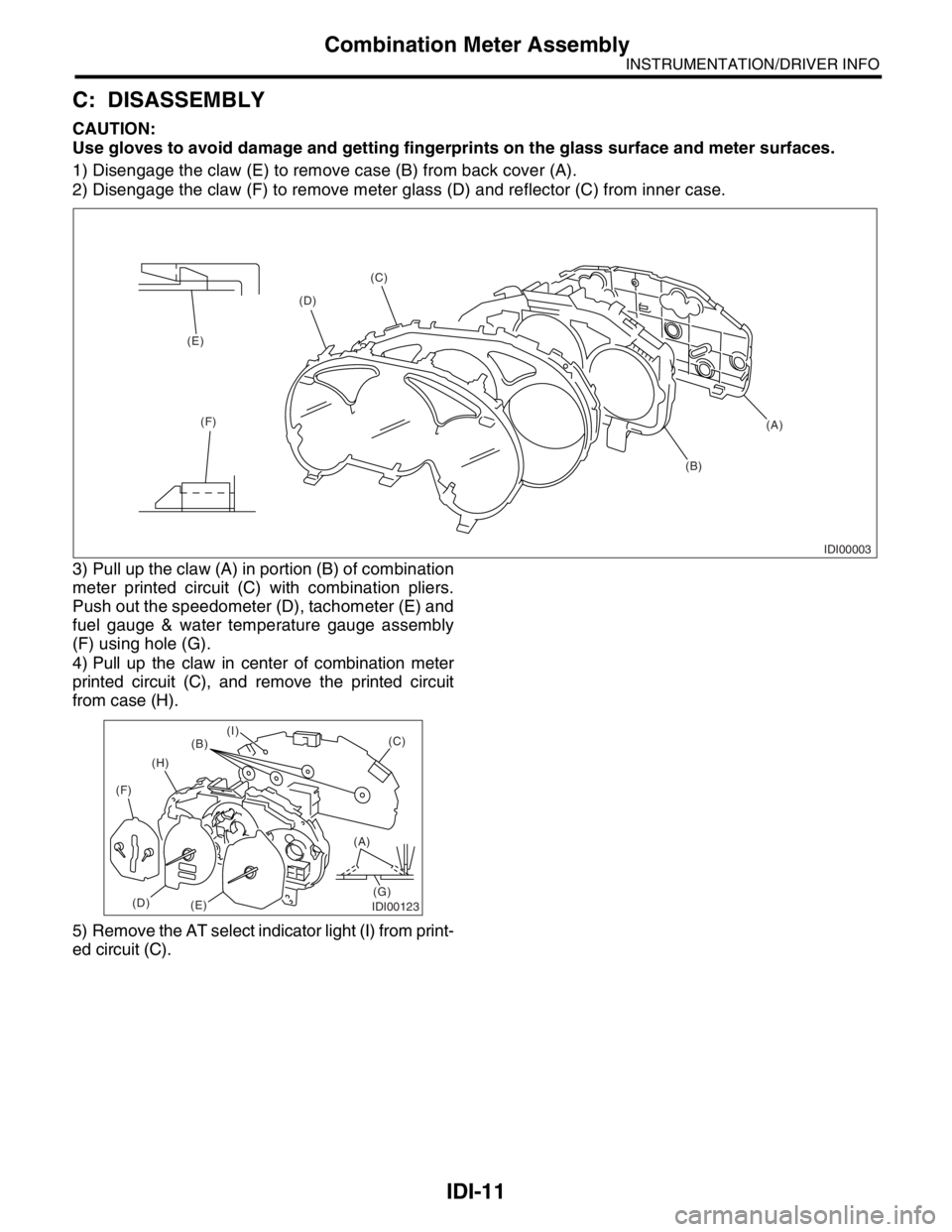
1) Disengage the claw (E) to remove case (B) from back cover (A).
2) Disengage the claw (F) to remove meter glass (D) and reflector (C) from inner case.
3) Pull up the claw (A) in portion (B) of combination
meter printed circuit (C) with combination pliers.
Push out the speedometer (D), tachometer (E) and
fuel gauge & water temperature gauge assembly
(F) using hole (G).
4) Pull up the claw in center of combination meter
printed circuit (C), and remove the printed circuit
from case (H).
5) Remove the AT select indicator light (I) from print-
ed circuit (C).
IDI00003
(A) (C)
(D)
(E)
(F)
(B)
IDI00123
(A)
(G)(C)
(B)
(H)
(F)
(D)
(E)
(I)
Page 396 of 2870
IDI-12
INSTRUMENTATION/DRIVER INFO
Combination Meter Assembly
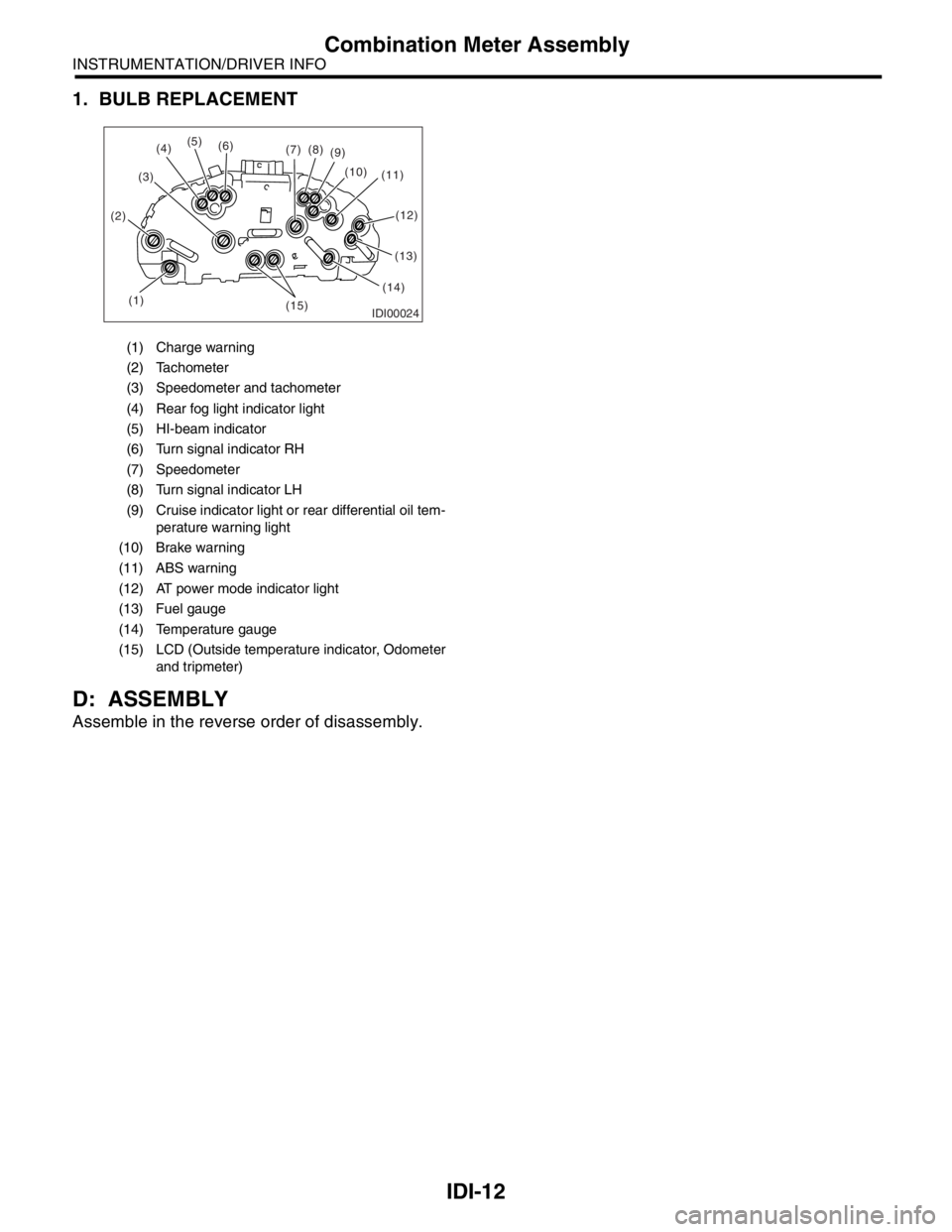
1. BULB REPLACEMENT
D: ASSEMBLY
Assemble in the reverse order of disassembly.
(1) Charge warning
(2) Tachometer
(3) Speedometer and tachometer
(4) Rear fog light indicator light
(5) HI-beam indicator
(6) Turn signal indicator RH
(7) Speedometer
(8) Turn signal indicator LH
(9) Cruise indicator light or rear differential oil tem-
perature warning light
(10) Brake warning
(11) ABS warning
(12) AT power mode indicator light
(13) Fuel gauge
(14) Temperature gauge
(15) LCD (Outside temperature indicator, Odometer
and tripmeter)
IDI00024(1) (2)(3)(5)
(6)
(7)(8)
(9)
(10)
(11)
(13)
(14)
(15)
(4)
(12)
Page 403 of 2870
FUJI HEAVY INDUSTRIES LTD. G8080GE7
2004 FORESTER SERVICE MANUAL QUICK REFERENCE INDEX
BODY SECTION
This service manual has been prepared
to provide SUBARU service personnel
with the necessary information and data
for the correct maintenance and repair
of SUBARU vehicles.
This manual includes the procedures
for maintenance, disassembling, reas-
sembling, inspection and adjustment of
components and diagnostics for guid-
ance of experienced mechanics.
Please peruse and utilize this manual
fully to ensure complete repair work for
satisfying our customers by keeping
their vehicle in optimum condition.
When replacement of parts during
repair work is needed, be sure to use
SUBARU genuine parts.
All information, illustration and specifi-
cations contained in this manual are
based on the latest product information
available at the time of publication
approval.HVAC SYSTEM
(HEATER, VENTILATOR AND A/C)AC
HVAC SYSTEM (AUTO A/C)
(DIAGNOSTIC)AC
AIRBAG SYSTEM AB
AIRBAG SYSTEM (DIAGNOSTIC) AB
SEAT BELT SYSTEM SB
LIGHTING SYSTEM LI
WIPER AND WASHER SYSTEM WW
ENTERTAINMENT ET
COMMUNICATION SYSTEM COM
GLASS/WINDOW/MIRROR GW
BODY STRUCTURE BS
INSTRUMENTATION/DRIVER INFO IDI
SEAT SE
SECURITY AND LOCK SL
SUNROOF/T-TOP/CONVERTIBLE TOP
(SUNROOF)SR
EXTERIOR/INTERIOR TRIM EI
EXTERIOR BODY PANEL EB
Page 410 of 2870
SE-6
SEAT
Front Seat
2. Front Seat
A: REMOVAL
1) Disconnect the ground cable from battery.
WARNING:
The airbag system is fitted with a backup power
source. If the airbag system is serviced within 20
seconds after the ground cable is disconnected,
it may inflate.
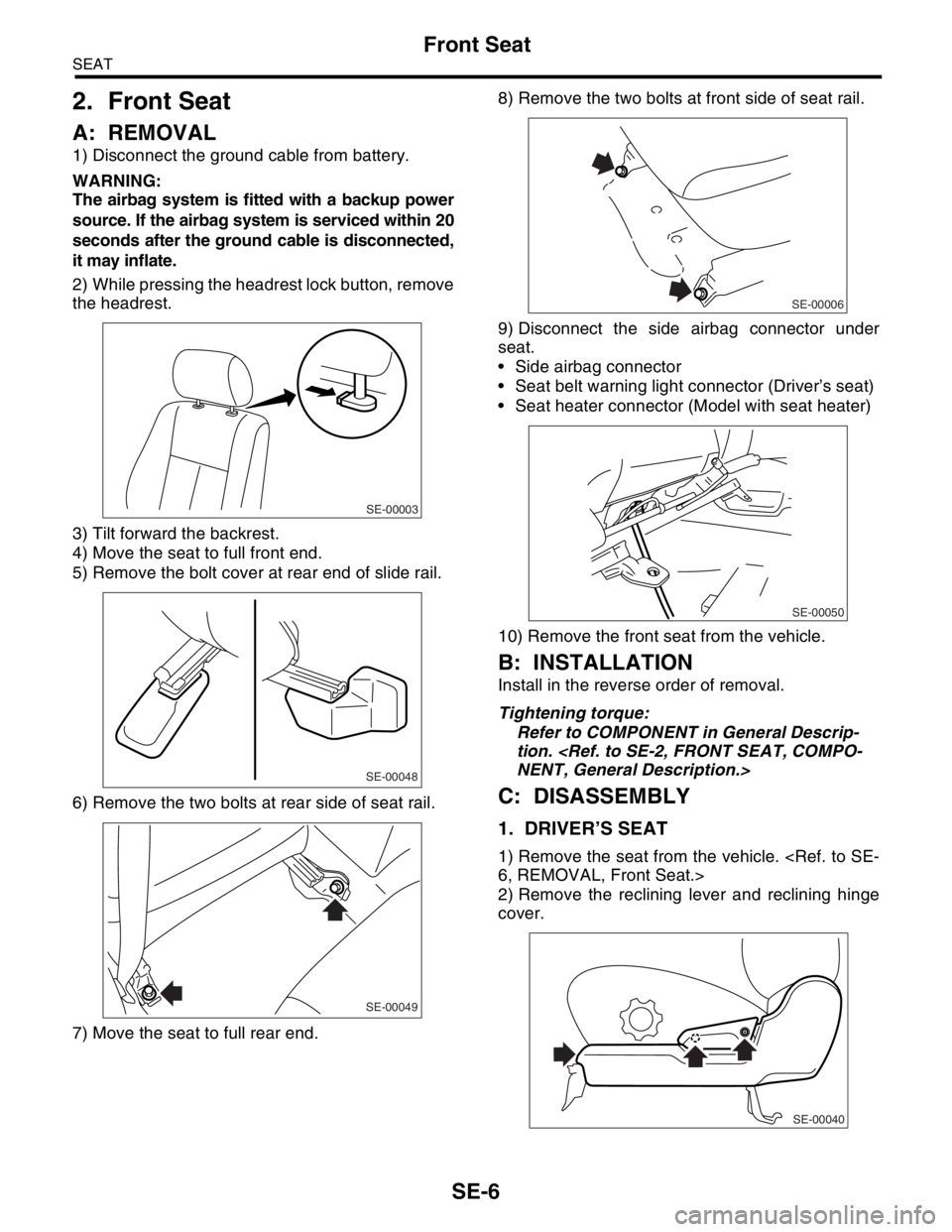
2) While pressing the headrest lock button, remove
the headrest.
3) Tilt forward the backrest.
4) Move the seat to full front end.
5) Remove the bolt cover at rear end of slide rail.
6) Remove the two bolts at rear side of seat rail.
7) Move the seat to full rear end.8) Remove the two bolts at front side of seat rail.
9) Disconnect the side airbag connector under
seat.
Side airbag connector
Seat belt warning light connector (Driver’s seat)
Seat heater connector (Model with seat heater)
10) Remove the front seat from the vehicle.
B: INSTALLATION
Install in the reverse order of removal.
Tightening torque:
Refer to COMPONENT in General Descrip-
tion.
C: DISASSEMBLY
1. DRIVER’S SEAT
1) Remove the seat from the vehicle.
2) Remove the reclining lever and reclining hinge
cover.
SE-00003
SE-00048
SE-00049
SE-00006
SE-00050
SE-00040
Page 419 of 2870
FUJI HEAVY INDUSTRIES LTD. G8080GE7
2004 FORESTER SERVICE MANUAL QUICK REFERENCE INDEX
BODY SECTION
This service manual has been prepared
to provide SUBARU service personnel
with the necessary information and data
for the correct maintenance and repair
of SUBARU vehicles.
This manual includes the procedures
for maintenance, disassembling, reas-
sembling, inspection and adjustment of
components and diagnostics for guid-
ance of experienced mechanics.
Please peruse and utilize this manual
fully to ensure complete repair work for
satisfying our customers by keeping
their vehicle in optimum condition.
When replacement of parts during
repair work is needed, be sure to use
SUBARU genuine parts.
All information, illustration and specifi-
cations contained in this manual are
based on the latest product information
available at the time of publication
approval.HVAC SYSTEM
(HEATER, VENTILATOR AND A/C)AC
HVAC SYSTEM (AUTO A/C)
(DIAGNOSTIC)AC
AIRBAG SYSTEM AB
AIRBAG SYSTEM (DIAGNOSTIC) AB
SEAT BELT SYSTEM SB
LIGHTING SYSTEM LI
WIPER AND WASHER SYSTEM WW
ENTERTAINMENT ET
COMMUNICATION SYSTEM COM
GLASS/WINDOW/MIRROR GW
BODY STRUCTURE BS
INSTRUMENTATION/DRIVER INFO IDI
SEAT SE
SECURITY AND LOCK SL
SUNROOF/T-TOP/CONVERTIBLE TOP
(SUNROOF)SR
EXTERIOR/INTERIOR TRIM EI
EXTERIOR BODY PANEL EB
Page 426 of 2870
SL-6
SECURITY AND LOCK
General Description
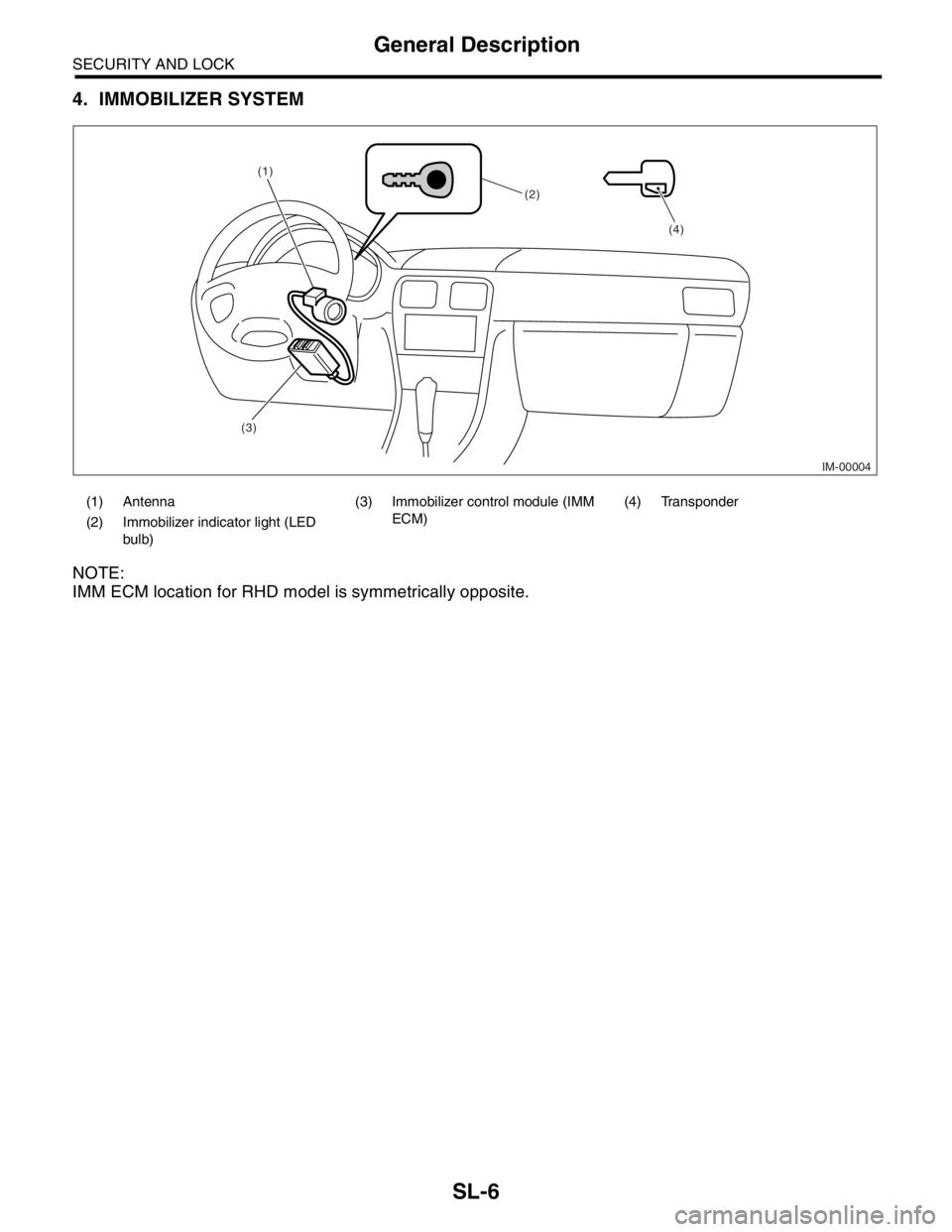
4. IMMOBILIZER SYSTEM
NOTE:
IMM ECM location for RHD model is symmetrically opposite.
(1) Antenna (3) Immobilizer control module (IMM
ECM)(4) Transponder
(2) Immobilizer indicator light (LED
bulb)
IM-00004
(1)
(2)
(3)(4)
Page 434 of 2870
SL-14
SECURITY AND LOCK
Keyless Entry System
3. Keyless Entry System
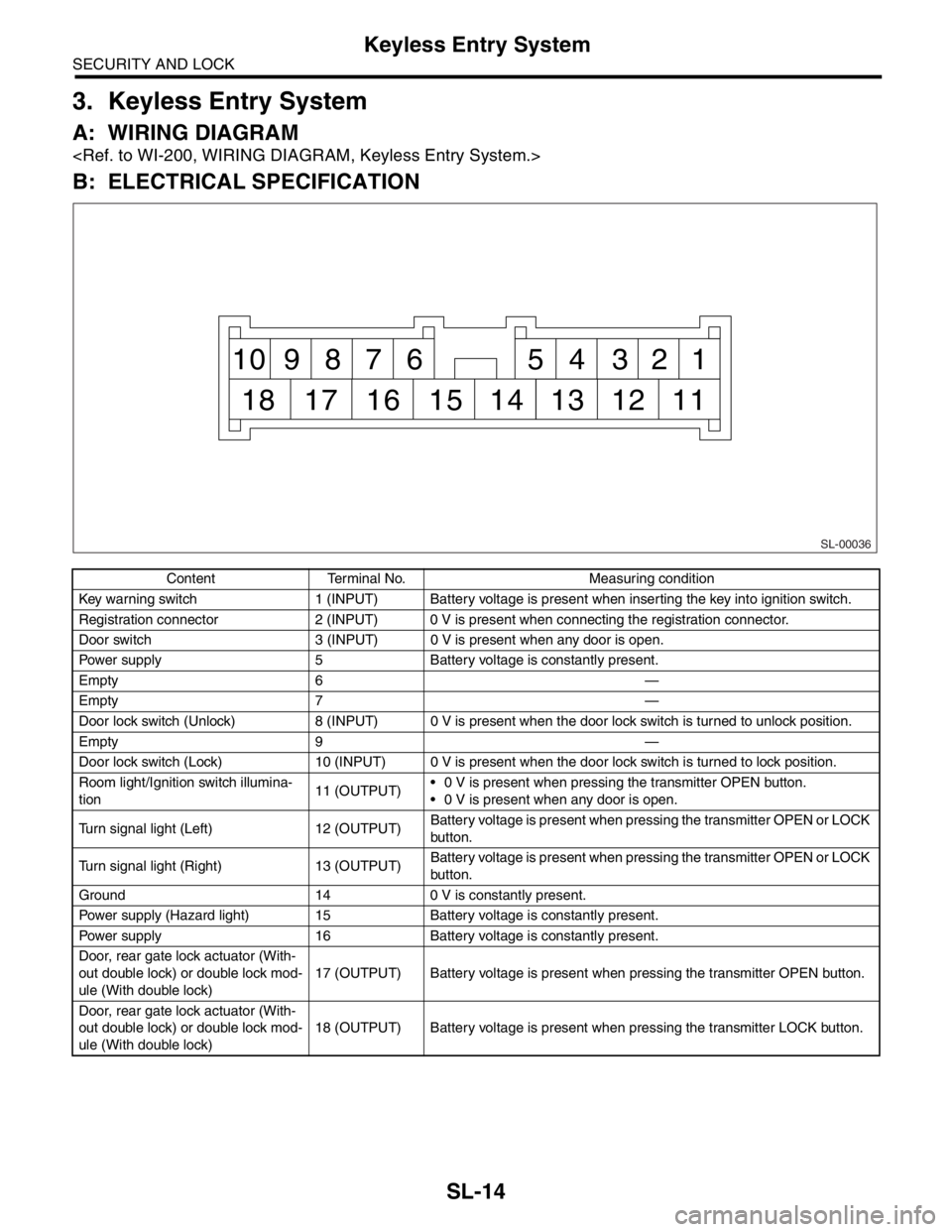
A: WIRING DIAGRAM
B: ELECTRICAL SPECIFICATION
Content Terminal No. Measuring condition
Key warning switch 1 (INPUT) Battery voltage is present when inserting the key into ignition switch.
Registration connector 2 (INPUT) 0 V is present when connecting the registration connector.
Door switch 3 (INPUT) 0 V is present when any door is open.
Power supply 5 Battery voltage is constantly present.
Empty 6 —
Empty 7 —
Door lock switch (Unlock) 8 (INPUT) 0 V is present when the door lock switch is turned to unlock position.
Empty 9 —
Door lock switch (Lock) 10 (INPUT) 0 V is present when the door lock switch is turned to lock position.
Room light/Ignition switch illumina-
tion11 (OUTPUT) 0 V is present when pressing the transmitter OPEN button.
0 V is present when any door is open.
Turn signal light (Left) 12 (OUTPUT)Battery voltage is present when pressing the transmitter OPEN or LOCK
button.
Turn signal light (Right) 13 (OUTPUT)Battery voltage is present when pressing the transmitter OPEN or LOCK
button.
Ground 14 0 V is constantly present.
Power supply (Hazard light) 15 Battery voltage is constantly present.
Power supply 16 Battery voltage is constantly present.
Door, rear gate lock actuator (With-
out double lock) or double lock mod-
ule (With double lock)17 (OUTPUT) Battery voltage is present when pressing the transmitter OPEN button.
Door, rear gate lock actuator (With-
out double lock) or double lock mod-
ule (With double lock)18 (OUTPUT) Battery voltage is present when pressing the transmitter LOCK button.
SL-00036
1 2 3 4 5 6 7 8 9 10
11 12 13 14 15 16 17 18
Page 435 of 2870

SL-15
SECURITY AND LOCK
Keyless Entry System
C: INSPECTION
1. SYMPTOM CHART
Symptom Repair order Reference
None of the functions of keyless entry
system operate.1. Check the transmitter battery.
less Entry System.>
2. Check the fuse.
tem.>
3. Check the keyless entry control module power
supply and ground circuit.
INSPECTION, Keyless Entry Sys-
tem.>
4. Replace the keyless entry control module.
The transmitter cannot be registered. 1. Check the transmitter battery.
less Entry System.>
2. Check the registration connector circuit.
INSPECTION, Keyless Entry Sys-
tem.>
3. Check the door lock switch and circuit.
Entry System.>
4. Replace the keyless entry control module.
The door lock or unlock does not
operate.
N
OTE:
If the door lock control system does
not operate when using the door lock
switch, check the door lock control
system.
less Entry System.>
2. Make sure the registration connector is not
connected.Make sure the registration connector
is not connected because keyless
entry system does not operate during
the registration connector connected.
3. Check the key warning switch.
Entry System.>
4. Check the door switch.
Entry System.>
5. Check output signal to double lock module.
(With double lock)
ULE, INSPECTION, Keyless Entry
System.>
6. Replace the keyless entry control module.
The hazard light does not operate. 1. Check the hazard light operation.
Keyless Entry System.>
2. Replace the keyless entry control module.
Page 436 of 2870

SL-16
SECURITY AND LOCK
Keyless Entry System
2. CHECK TRANSMITTER BATTERY
3. CHECK FUSE
The room light and ignition switch illu-
mination operation does not activate.1. Check the room light operation.
Keyless Entry System.>
2. Check the ignition switch illumination circuit.
INSPECTION, Keyless Entry Sys-
tem.>
3. Replace the keyless entry control module.
(without double lock)
4. Replace the double lock module. (with double
lock)
Step Check Yes No
1 CHECK TRANSMITTER BATTERY.
1) Remove the battery from transmitter.
2) Check the battery voltage.
NOTE:
If the transmitter battery voltage is 2.5 V or less,
the range of transmission becomes very short.Is the voltage more than 2.5 V? If further inspec-
tion is necessary,
refer to “SYMP-
TOM CHART”.
CHART, INSPEC-
TION, Keyless
Entry System.>Replace the trans-
mitter battery.
Step Check Yes No
1 CHECK FUSE.
Remove and visually check the fuse No. 2 (in
the main fuse box), No. 3 (in the fuse and relay
box) and SBF-6 (in the main fuse box)Is the fuse blown out? Replace the fuse
with a new one.Check the power
supply and ground
circuit.
POWER SUPPLY
AND GROUND
CIRCUIT,
INSPECTION,
Keyless Entry Sys-
tem.> Symptom Repair order Reference
Page 440 of 2870

SL-20
SECURITY AND LOCK
Keyless Entry System
8. CHECK HAZARD LIGHT OPERATION
9. CHECK ROOM LIGHT OPERATION
Step Check Yes No
1 CHECK HAZARD LIGHT OPERATION.
Make sure the hazard light blinks when hazard
switch is turned ON.Does the hazard light blink? Go to step 2.Check the hazard
light circuit.
2 CHECK OUTPUT SIGNAL.
1) Remove the key from ignition switch.
2) Close all doors and rear gate.
3) Measure the voltage between keyless entry
control module harness connector terminal
and chassis ground when LOCK or OPEN but-
ton of transmitter is pressed.
Connector & terminal
(B176) No. 12, No. 13 (+) — Chassis
ground (
−):Is the voltage more than 10 V? Check the harness
for open or short
between keyless
entry control mod-
ule and turn signal
lights.Replace the key-
less entry control
module.
Step Check Yes No
1 CHECK ROOM LIGHT OPERATION.
Make sure the room light illuminates when the
room light switch is turned ON.Does the room light illuminate? Go to step 2.Check the room
light circuit.
2 CHECK HARNESS BETWEEN ROOM LIGHT
AND KEYLESS ENTRY CONTROL MODULE
(WITHOUT DOUBLE LOCK) OR DOUBLE
LOCK MODULE (WITH DOUBLE LOCK).
1) Disconnect the keyless entry control mod-
ule or double lock module harness connector
and room light harness connector.
2) Measure the resistance between keyless
entry control module or double lock module
harness connector terminal and room light har-
ness connector terminal.
Connector & terminal
Without double lock:
(B176) No. 11 — (R52) No. 2:
With double lock:
(B325) No. 1 — (R52) No. 2:Is the resistance less than 10
Ω?The room light
operation circuit is
OK.Check the harness
for open circuits or
shorts between
keyless entry con-
trol module (With-
out double lock) or
double lock mod-
ule (With double
lock) and room
light.