display SUBARU FORESTER 2004 Service Owner's Manual
[x] Cancel search | Manufacturer: SUBARU, Model Year: 2004, Model line: FORESTER, Model: SUBARU FORESTER 2004Pages: 2870, PDF Size: 38.67 MB
Page 1130 of 2870
![SUBARU FORESTER 2004 Service Owners Manual EN(H4SO)-32
ENGINE (DIAGNOSTIC)
Subaru Select Monitor
5. READ CURRENT DATA FOR ENGINE (OBD MODE)
1) On the «Main Menu» display screen, select the {Each System Check} and press the [YES] key.
2) On t](/img/17/57426/w960_57426-1129.png "SUBARU FORESTER 2004 Service Owners Manual EN(H4SO)-32
ENGINE (DIAGNOSTIC)
Subaru Select Monitor
5. READ CURRENT DATA FOR ENGINE (OBD MODE)
1) On the «Main Menu» display screen, select the {Each System Check} and press the [YES] key.
2) On t")
EN(H4SO)-32
ENGINE (DIAGNOSTIC)
Subaru Select Monitor
5. READ CURRENT DATA FOR ENGINE (OBD MODE)
1) On the «Main Menu» display screen, select the {Each System Check} and press the [YES] key.
2) On the «System Selection Menu» display screen, select the {Engine} and press the [YES] key.
3) Press the [YES] key after the information of engine type was displayed.
4) On the «Engine Diagnosis» display screen, select the {OBD system} and press the [YES] key.
5) On the «OBD Menu» display screen, select the {Current Data Display & Save}, and press the [YES] key.
6) On the «Data Display Menu» display screen, select the {Data Display} and press the [YES] key.
7) Using the scroll key, scroll the display screen up or down until the desired data is shown.
A list of the support data is shown in the following table.
NOTE:
For detailed operation procedure, refer to the “SUBARU SELECT MONITOR OPERATION MANUAL”.
Description Display Unit of measure
Number of DTC Number of diagnosis code —
Condition of malfunction indicator light MI (MIL) ON or OFF
Monitoring test of misfire Misfire Monitoring Complete or incomplete
Monitoring test of fuel system Fuel System Diagnosis Complete or incomplete
Monitoring test of comprehensive component Component Diagnosis Complete or incomplete
Test of catalyst Catalyst diagnosis Complete or incomplete
Test of heating-type catalyst Heated catalyst diagnosis No support
Test of evaporative emission purge control system Evap. purge diagnosis Complete or incomplete
Test of secondary air system Secondary air diagnosis No support
Test of air conditioning system refrigerant A/C refrigerant diagnosis No support
Test of oxygen sensor O2 sensor diagnosis Complete or incomplete
Test of oxygen sensor heater O2 heater diagnosis Complete or incomplete
Test of EGR system EGR diagnosis —
Air fuel ratio control system for bank 1 Fuel System for bank 1 —
Engine load data Engine load %
Engine coolant temperature signal Engine coolant temperature°C or (°F)
Short term fuel trim by front oxygen (A/F) sensor Short term fuel trim B1 %
Long term fuel trim by front oxygen (A/F) sensor Long term fuel trim B1 %
Intake manifold absolute pressure signalIntake manifold absolute pres-
suremmHg, kPa, inHg or psi
Engine speed signal Engine speed rpm
Vehicle speed signal Meter vehicle speed km/h or MPH
Ignition timing advance for #1 cylinder Ignition timing adv. #1°
Intake air temperature signal Intake air temperature°C or (°F)
Amount of intake air Amount of intake air g/s
Throttle position signal Throttle valve angle %
Rear oxygen sensor output signal O2 sensor #12 V
Air fuel ratio correction by rear oxygen sensor Short term fuel trim #12 %
On-board diagnostic system OBD system —
Oxygen sensor #11 O2 sensor #11 With support
Oxygen sensor #12 O2 sensor #12 With support
A/F sensor #11 A/F sensor #11 —
Page 1131 of 2870
![SUBARU FORESTER 2004 Service Owners Manual EN(H4SO)-33
ENGINE (DIAGNOSTIC)
Subaru Select Monitor
6. READ FREEZE FRAME DATA FOR ENGINE. (OBD MODE)
1) On the «Main Menu» display screen, select the {Each System Check} and press the [YES] key.](/img/17/57426/w960_57426-1130.png "SUBARU FORESTER 2004 Service Owners Manual EN(H4SO)-33
ENGINE (DIAGNOSTIC)
Subaru Select Monitor
6. READ FREEZE FRAME DATA FOR ENGINE. (OBD MODE)
1) On the «Main Menu» display screen, select the {Each System Check} and press the [YES] key.")
EN(H4SO)-33
ENGINE (DIAGNOSTIC)
Subaru Select Monitor
6. READ FREEZE FRAME DATA FOR ENGINE. (OBD MODE)
1) On the «Main Menu» display screen, select the {Each System Check} and press the [YES] key.
2) On the «System Selection Menu» display screen, select the {Engine} and press the [YES] key.
3) Press the [YES] key after the information of engine type was displayed.
4) On the «Engine Diagnosis» display screen, select the {OBD System} and press the [YES] key.
5) On the «OBD Menu» display screen, select the {Freeze Frame Data} and press the [YES] key.
A list of the support data is shown in the following table.
NOTE:
For detailed operation procedure, refer to the SUBARU SELECT MONITOR OPERATION MANUAL.
Description Display Unit of measure
DTC of freeze frame data Freeze frame data DTC
Air fuel ratio control system for bank 1 Fuel system for Bank 1 ON or OFF
Engine load data Engine load %
Engine coolant temperature signal Engine coolant temperature°C or (°F)
Short term fuel trim by front oxygen (A/F) sensor Short term fuel trim B1 %
Long term fuel trim by front oxygen (A/F) sensor Long term fuel trim B1 %
Intake manifold absolute pressure signalIntake manifold absolute pres-
suremmHg, kPa, inHg or psi
Engine speed signal Engine speed rpm
Vehicle speed signal Meter vehicle speed km/h or MPH
Page 1132 of 2870
![SUBARU FORESTER 2004 Service Owners Manual EN(H4SO)-34
ENGINE (DIAGNOSTIC)
Subaru Select Monitor
7. LED OPERATION MODE FOR ENGINE
1) On the «Main Menu» display screen, select the {Each System Check} and press the [YES] key.
2) On the «Syste](/img/17/57426/w960_57426-1131.png "SUBARU FORESTER 2004 Service Owners Manual EN(H4SO)-34
ENGINE (DIAGNOSTIC)
Subaru Select Monitor
7. LED OPERATION MODE FOR ENGINE
1) On the «Main Menu» display screen, select the {Each System Check} and press the [YES] key.
2) On the «Syste")
EN(H4SO)-34
ENGINE (DIAGNOSTIC)
Subaru Select Monitor
7. LED OPERATION MODE FOR ENGINE
1) On the «Main Menu» display screen, select the {Each System Check} and press the [YES] key.
2) On the «System Selection Menu» display screen, select the {Engine} and press the [YES] key.
3) Press the [YES] key after the information of engine type was displayed.
4) On the «Engine Diagnosis» display screen, select the {Current Data Display/Save}, and then press the
[YES] key.
5) On the «Data Display Menu» display screen, select the {Data & LED Display} and press the [YES] key.
6) Using the scroll key, scroll the display screen up or down until the desired data is shown.
A list of the support data is shown in the following table.
NOTE:
For detailed operation procedure, refer to the “SUBARU SELECT MONITOR OPERATION MANUAL”.
Description Display Message LED “ON” requirements
Ignition switch signal Ignition SW ON or OFF When ignition switch is ON
Test mode connector signal Test mode signal ON or OFF When test mode connector is connected.
Neutral position switch signal Neutral SW ON or OFF When neutral position signal is entered.
Air conditioning switch signal A/C SW ON or OFF When air conditioning switch is ON
Air conditioning relay signal A/C Compressor Relay ON or OFF When air conditioning relay is in function.
Radiator main fan relay signal Radiator fan relay 1 ON or OFF When radiator main fan relay is in function.
Fuel pump relay signal Fuel pump relay ON or OFF When fuel pump relay is in function.
Knocking signal Knock signal ON or OFF When knocking signal is input.
Radiator sub fan relay signal Radiator fan relay 2 ON or OFF When radiator sub fan relay is in function.
Engine torque control signal #1 AT coordinate request signal 1 ON or OFFWhen engine torque control signal 1 is
entered
Engine torque control signal #2 AT coordinate request signal 2 ON or OFFWhen engine torque control signal 2 is
entered
Engine torque control permission
signalAT coordinate permission sig-
nalON or OFFWhen engine torque control permission sig-
nal is entered.
Front oxygen (A/F) sensor rich sig-
nalFront O2 Rich Signal #1 ON or OFFWhen front oxygen (A/F) sensor mixture ratio
is rich.
Rear oxygen sensor rich signal RrO2 monitor ON or OFFWhen rear oxygen sensor mixture ratio is
rich.
Starter switch signal Starter SW ON or OFF When starter switch signal is entered.
Idle switch signal Idle Switch Signal ON or OFF When idle switch signal is entered.
Crankshaft position sensor signal Crankshaft position signal ON or OFFWhen crankshaft position sensor signal is
input.
Camshaft position sensor signal Camshaft position signal ON or OFFWhen camshaft position sensor signal is
entered.
Page 1133 of 2870
![SUBARU FORESTER 2004 Service Owners Manual EN(H4SO)-35
ENGINE (DIAGNOSTIC)
Subaru Select Monitor
8. READ CURRENT DATA FOR AT
1) On the «Main Menu» display screen, select the {Each System Check} and press the [YES] key.
2) On the «System Sel](/img/17/57426/w960_57426-1132.png "SUBARU FORESTER 2004 Service Owners Manual EN(H4SO)-35
ENGINE (DIAGNOSTIC)
Subaru Select Monitor
8. READ CURRENT DATA FOR AT
1) On the «Main Menu» display screen, select the {Each System Check} and press the [YES] key.
2) On the «System Sel")
EN(H4SO)-35
ENGINE (DIAGNOSTIC)
Subaru Select Monitor
8. READ CURRENT DATA FOR AT
1) On the «Main Menu» display screen, select the {Each System Check} and press the [YES] key.
2) On the «System Selection Menu» display screen, select the {Transmission} and press the [YES] key.
3) Press the [YES] key after the information of transmission type is displayed.
4) On the «Transmission Diagnosis» display screen, select the {Current Data Display & Save} and press the
[YES] key.
5) On the «Transmission Diagnosis» display screen, select the {Data Display} and press the [YES] key.
6) Using the scroll key, scroll the display screen up or down until the desired data is shown.
A list of the support data is shown in the following table.
Description Display Unit of measure
Battery voltage Battery Voltage V
Rear vehicle speed sensor signal Rear Wheel Speed km/h or MPH
Front vehicle speed sensor signal Front Wheel Speed km/h or MPH
Engine speed signal Engine speed rpm
ATF temperature signal ATF Temp.°C or °F
Throttle position sensor Throttle Sensor Voltage V
Gear Position Gear position —
Line pressure control duty ratio Line pressure duty %
Lock up clutch control duty ratio L/U Duty %
Transfer clutch control duty ratio AWD duty %
Throttle position sensor power supply Throttle sensor power supply V
Turbine revolution signal Turbine Revolution Speed rpm
2-4 Brake timing pressure control duty ratio 2-4 B Pressure Duty %
Intake manifold pressure sensor voltage Mani. Relative Voltage V
FWD switch signal FWD SW ON or OFF
Kick down switch signal Kick Down Switch ON or OFF
Stop light switch signal Stop Light SW ON or OFF
Anti lock brake system signal ABS signal ON or OFF
Cruise control system signal Cruise Control Signal ON or OFF
Neutral/Parking range signal N/P range ON or OFF
Reverse range signal R Range ON or OFF
Drive range signal D Range ON or OFF
3rd range signal 3rd Range Signal ON or OFF
2nd range signal 2nd Range Signal ON or OFF
1st range signal 1st Range Signal ON or OFF
Shift control solenoid A Shift Solenoid #1 ON or OFF
Shift control solenoid B Shift Solenoid #2 ON or OFF
Torque control output signal #1 Torque control output signal 1 ON or OFF
Torque control output signal #2 Torque control output signal 2 ON or OFF
Torque control cut signal Torque Control Cut Sig ON or OFF
2-4 brake timing control solenoid valve 2-4B Timing Solenoid ON or OFF
Low clutch timing control solenoid valve L/C timing solenoid ON or OFF
Automatic transmission diagnosis light output signal Diagnosis Lamp ON or OFF
Page 1134 of 2870

EN(H4SO)-36
ENGINE (DIAGNOSTIC)
Read Diagnostic Trouble Code (DTC)
11.Read Diagnostic Trouble
Code (DTC)
A: OPERATION
1. SUBARU SELECT MONITOR (NORMAL
MODE)
1) On the «Main Menu» display screen, select the
{Each System Check} and press the [YES] key.
2) On the «System Selection Menu» display screen,
select the {Engine} and press the [YES] key.
3) Press the [YES] key after the information of en-
gine type was displayed.
4) On the «Engine Diagnosis» screen, select the
{DTC Display}, and then press the [YES] key.
5) On the «Diagnostic Code(s) Display» screen,
select the {Current Diagnostic Code(s)} or {History
Diagnostic Code(s)}, and then press the [YES] key.
NOTE:
For detailed operation procedure, refer to the “SUB-
ARU SELECT MONITOR OPERATION MANUAL”.
For details concerning DTC, refer to the List of Di-
agnostic Trouble Code (DTC).
2. SUBARU SELECT MONITOR (OBD
MODE)
1) On the «Main Menu» display screen, select the
{Each System Check} and press the [YES] key.
2) On the «System Selection Menu» display screen,
select the {Engine} and press the [YES] key.
3) Press the [YES] key after the information of en-
gine type was displayed.
4) On the «Engine Diagnosis» display screen, se-
lect the {OBD System} and press the [YES] key.
5) On the «OBD Menu» display screen, select the
{DTC Display} and press the [YES] key.
6) Make sure DTC is shown on the screen.
NOTE:
For detailed operation procedure, refer to the
“SUBARU SELECT MONITOR OPERATION
MANUAL”.
For details concerning DTC, refer to the List of Di-
agnostic Trouble Code (DTC).
3. OBD-II GENERAL SCAN TOOL
Refers to data denoting emission-related power-
train DTC.
For details concerning DTC, refer to the List of Di-
agnostic Trouble Code (DTC).
Refer to OBD-II general scan tool manufacturer’s
instruction manual to access powertrain DTC
(MODE $03).
Page 1138 of 2870
EN(H4SO)-40
ENGINE (DIAGNOSTIC)
Inspection Mode
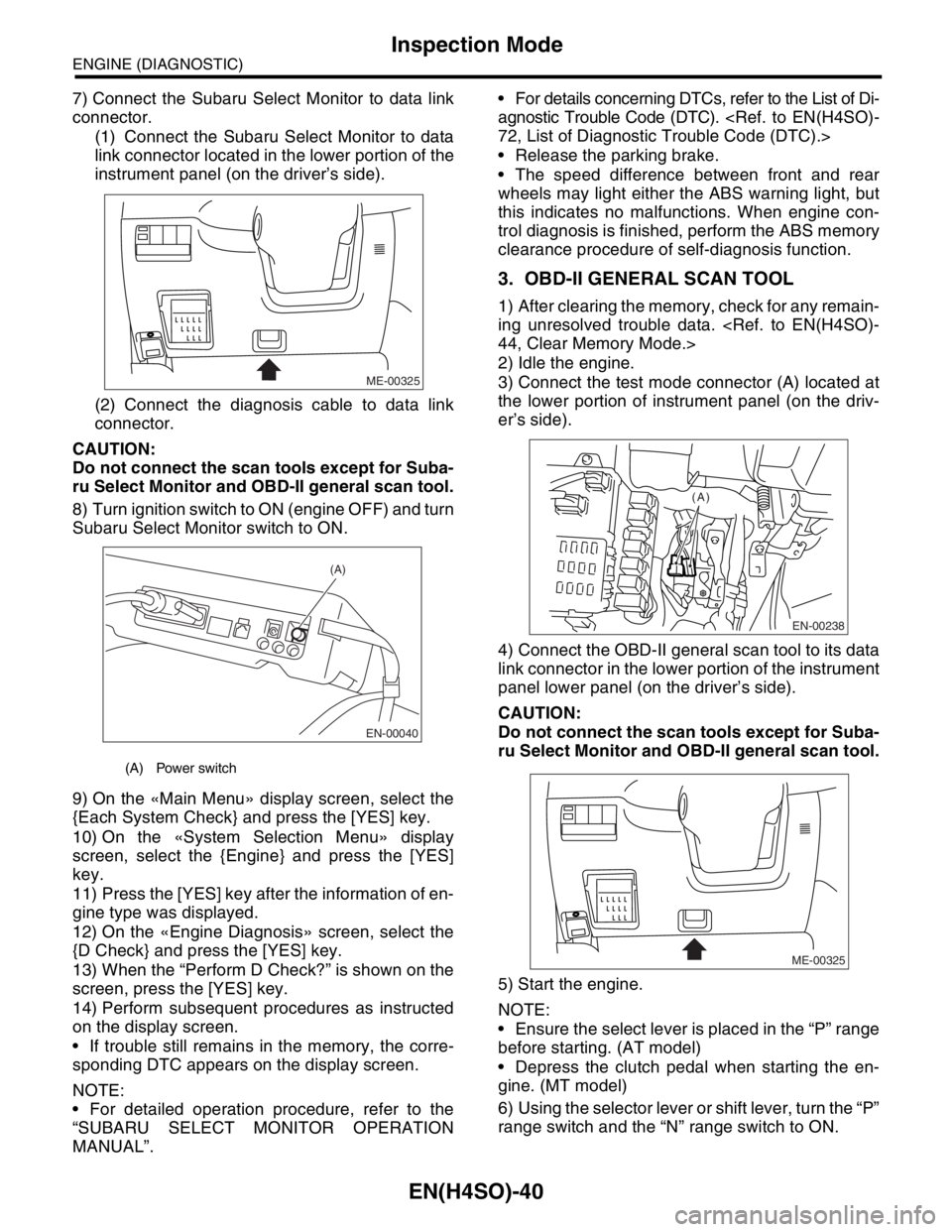
7) Connect the Subaru Select Monitor to data link
connector.
(1) Connect the Subaru Select Monitor to data
link connector located in the lower portion of the
instrument panel (on the driver’s side).
(2) Connect the diagnosis cable to data link
connector.
CAUTION:
Do not connect the scan tools except for Suba-
ru Select Monitor and OBD-II general scan tool.
8) Turn ignition switch to ON (engine OFF) and turn
Subaru Select Monitor switch to ON.
9) On the «Main Menu» display screen, select the
{Each System Check} and press the [YES] key.
10) On the «System Selection Menu» display
screen, select the {Engine} and press the [YES]
key.
11) Press the [YES] key after the information of en-
gine type was displayed.
12) On the «Engine Diagnosis» screen, select the
{D Check} and press the [YES] key.
13) When the “Perform D Check?” is shown on the
screen, press the [YES] key.
14) Perform subsequent procedures as instructed
on the display screen.
If trouble still remains in the memory, the corre-
sponding DTC appears on the display screen.
NOTE:
For detailed operation procedure, refer to the
“SUBARU SELECT MONITOR OPERATION
MANUAL”. For details concerning DTCs, refer to the List of Di-
agnostic Trouble Code (DTC).
Release the parking brake.
The speed difference between front and rear
wheels may light either the ABS warning light, but
this indicates no malfunctions. When engine con-
trol diagnosis is finished, perform the ABS memory
clearance procedure of self-diagnosis function.
3. OBD-II GENERAL SCAN TOOL
1) After clearing the memory, check for any remain-
ing unresolved trouble data.
2) Idle the engine.
3) Connect the test mode connector (A) located at
the lower portion of instrument panel (on the driv-
er’s side).
4) Connect the OBD-II general scan tool to its data
link connector in the lower portion of the instrument
panel lower panel (on the driver’s side).
CAUTION:
Do not connect the scan tools except for Suba-
ru Select Monitor and OBD-II general scan tool.
5) Start the engine.
NOTE:
Ensure the select lever is placed in the “P” range
before starting. (AT model)
Depress the clutch pedal when starting the en-
gine. (MT model)
6) Using the selector lever or shift lever, turn the “P”
range switch and the “N” range switch to ON.
(A) Power switch
ME-00325
EN-00040
(A)
EN-00238
(A)
ME-00325
Page 1142 of 2870

EN(H4SO)-44
ENGINE (DIAGNOSTIC)
Clear Memory Mode
14.Clear Memory Mode
A: OPERATION
1. SUBARU SELECT MONITOR (NORMAL
MODE)
1) On the «Main Menu» display screen, select the
{Each System Check} and press the [YES] key.
2) On the «System Selection Menu» display
screen, select the {Engine} and press the [YES]
key.
3) Press the [YES] key after the information of en-
gine type was displayed.
4) On the «Engine Diagnosis» display screen, se-
lect the {Memory Clear} and press the [YES] key.
5) When the “Done” and “Turn Ignition Switch OFF”
are shown on the display screen, turn the ignition
switch to OFF and then Subaru Select Monitor
switch to OFF.
NOTE:
After the memory has been cleared, the idle air
control solenoid valve must be initialized. To do
this, turn the ignition switch to the ON position. Wait
3 seconds before starting the engine.
For detailed operation procedure, refer to the
“SUBARU SELECT MONITOR OPERATION
MANUAL”.
2. SUBARU SELECT MONITOR (OBD
MODE)
1) On the «Main Menu» display screen, select the
{Each System Check} and press the [YES] key.
2) On the «System Selection Menu» display
screen, select the {Engine} and press the [YES]
key.
3) Press the [YES] key after the information of en-
gine type was displayed.
4) On the «Engine Diagnosis» display screen, se-
lect the {OBD System} and press the [YES] key.
5) On the «OBD Menu» display screen, select the
{DTC Clear} and press the [YES] key.
6) When the “Perform Diagnostic Code(s) Clear?”
is shown on the screen, press the [YES] key.
7) Turn the ignition switch to OFF and then turn the
Subaru Select Monitor to OFF.
NOTE:
After the memory has been cleared, the idle air
control solenoid valve must be initialized. To do
this, turn the ignition switch to the ON position. Wait
3 seconds before starting the engine.
For detailed operation procedure, refer to the
“SUBARU SELECT MONITOR OPERATION
MANUAL”.
3. OBD-II GENERAL SCAN TOOL
For clear memory procedures using the OBD-II
general scan tool, refer to the OBD-II General Scan
Tool Instruction Manual.
After the memory has been cleared, the idle air
control solenoid valve must be initialized. To do
this, turn the ignition switch to the ON position. Wait
3 seconds before starting the engine.
Page 1143 of 2870
EN(H4SO)-45
ENGINE (DIAGNOSTIC)
Compulsory Valve Operation Check Mode
15.Compulsory Valve Operation
Check Mode
A: OPERATION
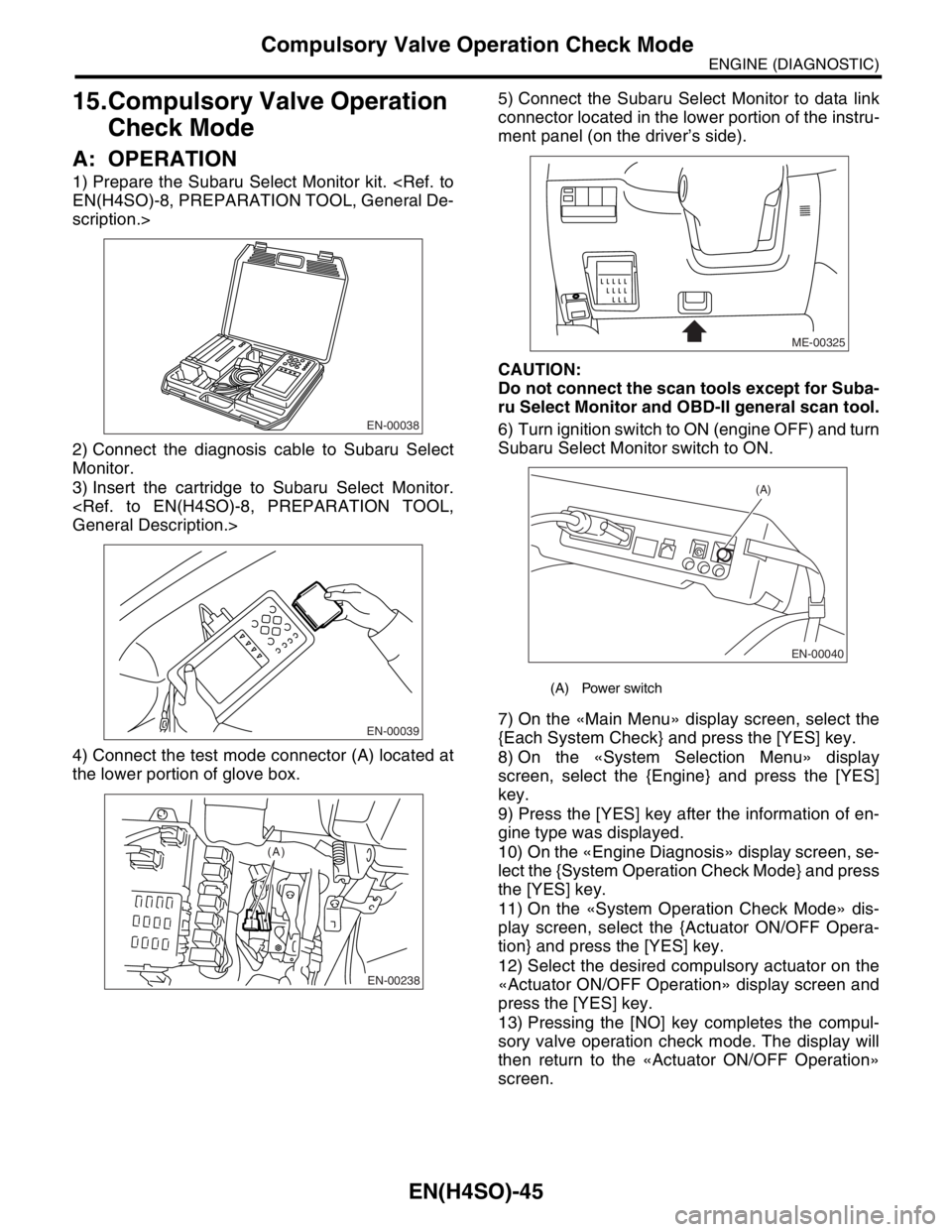
1) Prepare the Subaru Select Monitor kit.
scription.>
2) Connect the diagnosis cable to Subaru Select
Monitor.
3) Insert the cartridge to Subaru Select Monitor.
4) Connect the test mode connector (A) located at
the lower portion of glove box.5) Connect the Subaru Select Monitor to data link
connector located in the lower portion of the instru-
ment panel (on the driver’s side).
CAUTION:
Do not connect the scan tools except for Suba-
ru Select Monitor and OBD-II general scan tool.
6) Turn ignition switch to ON (engine OFF) and turn
Subaru Select Monitor switch to ON.
7) On the «Main Menu» display screen, select the
{Each System Check} and press the [YES] key.
8) On the «System Selection Menu» display
screen, select the {Engine} and press the [YES]
key.
9) Press the [YES] key after the information of en-
gine type was displayed.
10) On the «Engine Diagnosis» display screen, se-
lect the {System Operation Check Mode} and press
the [YES] key.
11) On the «System Operation Check Mode» dis-
play screen, select the {Actuator ON/OFF Opera-
tion} and press the [YES] key.
12) Select the desired compulsory actuator on the
«Actuator ON/OFF Operation» display screen and
press the [YES] key.
13) Pressing the [NO] key completes the compul-
sory valve operation check mode. The display will
then return to the «Actuator ON/OFF Operation»
screen.
EN-00038
EN-00039
EN-00238
(A)
(A) Power switch
ME-00325
EN-00040
(A)
Page 1144 of 2870

EN(H4SO)-46
ENGINE (DIAGNOSTIC)
Compulsory Valve Operation Check Mode
A list of the support data is shown in the following
table.
NOTE:
“EGR solenoid” is not indicated but EGR sole-
noid valve is installed to the vehicle.
The following parts will be displayed but not func-
tional because vehicle are not equipped with them.
For detailed operation procedure, refer to the
SUBARU SELECT MONITOR OPERATION MAN-
UAL.
Description Display
Compulsory fuel pump relay oper-
ation checkFuel Pump
Compulsory radiator fan relay
operation checkRadiator Fan Relay
Compulsory air conditioning relay
operation checkA/C Compressor Relay
Compulsory purge control sole-
noid valve operation checkCPC Solenoid
Display
ASV Solenoid
FICD Solenoid
Pressure switching solenoid 1
Pressure switching solenoid 2
PCV Solenoid
Vent Control Solenoid
Atmospheric pressure switching solenoid
Page 1150 of 2870
EN(H4SO)-52
ENGINE (DIAGNOSTIC)
Malfunction Indicator Light
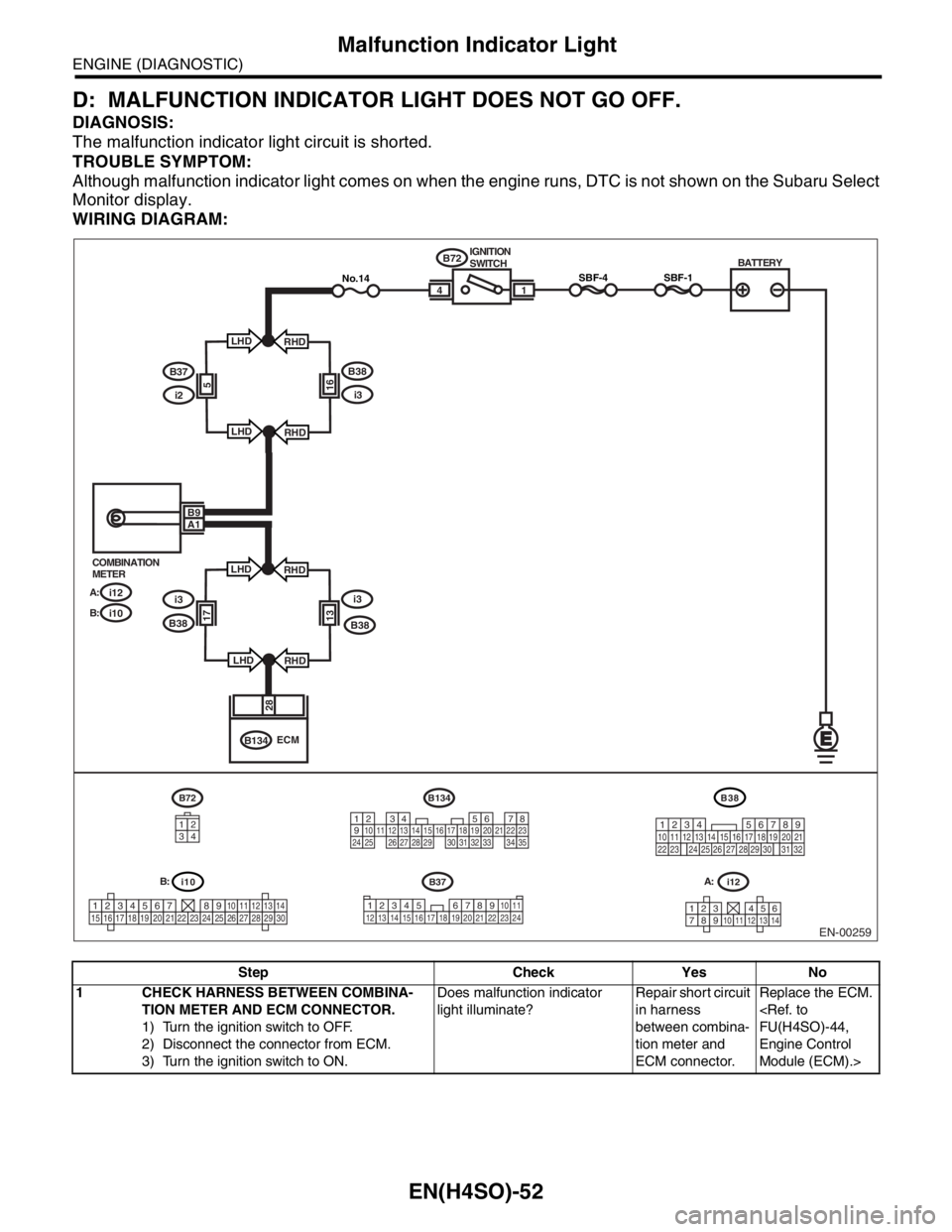
D: MALFUNCTION INDICATOR LIGHT DOES NOT GO OFF.
DIAGNOSIS:
The malfunction indicator light circuit is shorted.
TROUBLE SYMPTOM:
Although malfunction indicator light comes on when the engine runs, DTC is not shown on the Subaru Select
Monitor display.
WIRING DIAGRAM:
Step Check Yes No
1 CHECK HARNESS BETWEEN COMBINA-
TION METER AND ECM CONNECTOR.
1) Turn the ignition switch to OFF.
2) Disconnect the connector from ECM.
3) Turn the ignition switch to ON.Does malfunction indicator
light illuminate?Repair short circuit
in harness
between combina-
tion meter and
ECM connector.Replace the ECM.
Engine Control
Module (ECM).>
EN-00259
i10
123456789101112131415161718192021222324252627282930
BATTERY
1
B72
B134IGNITION
SWITCH
i12 COMBINATION
METER
A:
i10 B:
SBF-44
28
ECM
B9A1
i12
1234568791011121314
B134
1234567891011121314151617181920212223242526272829303132333435
B72
34
12
SBF-1No.14
B37
34 12 8910 11
12 13 14 15 16 17 18 19 20 21 22 23 24567
B38
219
32
1234 5610 11 12 13 14 15716
23 3019 20
22 26 27 28 29817
24 3118
25
B37
i2
B38
i3165
LHD
LHDRHD
RHD
i3i3
B381317
LHD
LHDRHD
RHD B38
A: B: