display SUBARU FORESTER 2004 Service User Guide
[x] Cancel search | Manufacturer: SUBARU, Model Year: 2004, Model line: FORESTER, Model: SUBARU FORESTER 2004Pages: 2870, PDF Size: 38.67 MB
Page 644 of 2870

IM-2
IMMOBILIZER (DIAGNOSTIC)
Basic Diagnostic Procedure
1. Basic Diagnostic Procedure
A: PROCEDURE
Step Check Yes No
1 CHECK ILLUMINATION OF IMMOBILIZER
WARNING LIGHT.
1) Turn the ignition switch to OFF or ACC
position.
2) Wait at least 60 seconds.Does the immobilizer warning
light blink?Go to step 2.Check the immobi-
lizer warning light
circuit.
IMMOBILIZER
WARNING CIR-
CUIT, INSPEC-
TION, Diagnostics
Chart for Immobi-
lizer Warning
Light.>
2 CHECK ILLUMINATION OF IMMOBILIZER
WARNING LIGHT.
Remove the key from ignition switch.Does the immobilizer warning
light begin to blink within 1 sec-
ond after the key is removed?Go to step 3.Check the key
switch circuit.
WARNING
SWITCH CIR-
CUIT, INSPEC-
TION, Diagnostics
Chart for Immobi-
lizer Warning
Light.>
3 CHECK ENGINE START.
Turn the ignition switch to START position.Does the engine start? Go to step 4.Go to step 5.
4 CHECK ILLUMINATION OF IMMOBILIZER
WARNING LIGHT.
Turn the ignition switch to ON.Does the immobilizer warning
light illuminate?Check the immobi-
lizer warning light
circuit.
IMMOBILIZER
WARNING CIR-
CUIT, INSPEC-
TION, Diagnostics
Chart for Immobi-
lizer Warning
Light.>Immobilizer sys-
tem is normal.
5 CHECK INDICATION OF DTC ON DISPLAY.
1) Turn the ignition switch to OFF.
2) Connect the Subaru Select Monitor to data
link connector.
3) Turn the ignition switch and Subaru Select
Monitors witch to ON.
4) Read any DTC on the display. Are DTCs indicated on dis-
play?Go to step 6.Repair the related
parts.
6 PERFORM THE DIAGNOSIS.
1) Inspect using “Diagnostics Chart with Trou-
ble Code”.
2) Repair the trouble cause.
3) Perform the clear memory mode.
4) Read any DTC again.Are DTCs indicated on dis-
play?Inspect using
“Diagnostic Proce-
dure with Diagnos-
tic Trouble Code
(DTC)”.
tics Procedure
with Diagnostic
Trouble Code
(DTC).>Finish the diag-
nostics.
Page 649 of 2870
IM-7
IMMOBILIZER (DIAGNOSTIC)
Subaru Select Monitor
5. Subaru Select Monitor
A: OPERATION
1. HOW TO USE SUBARU SELECT MONI-
TOR
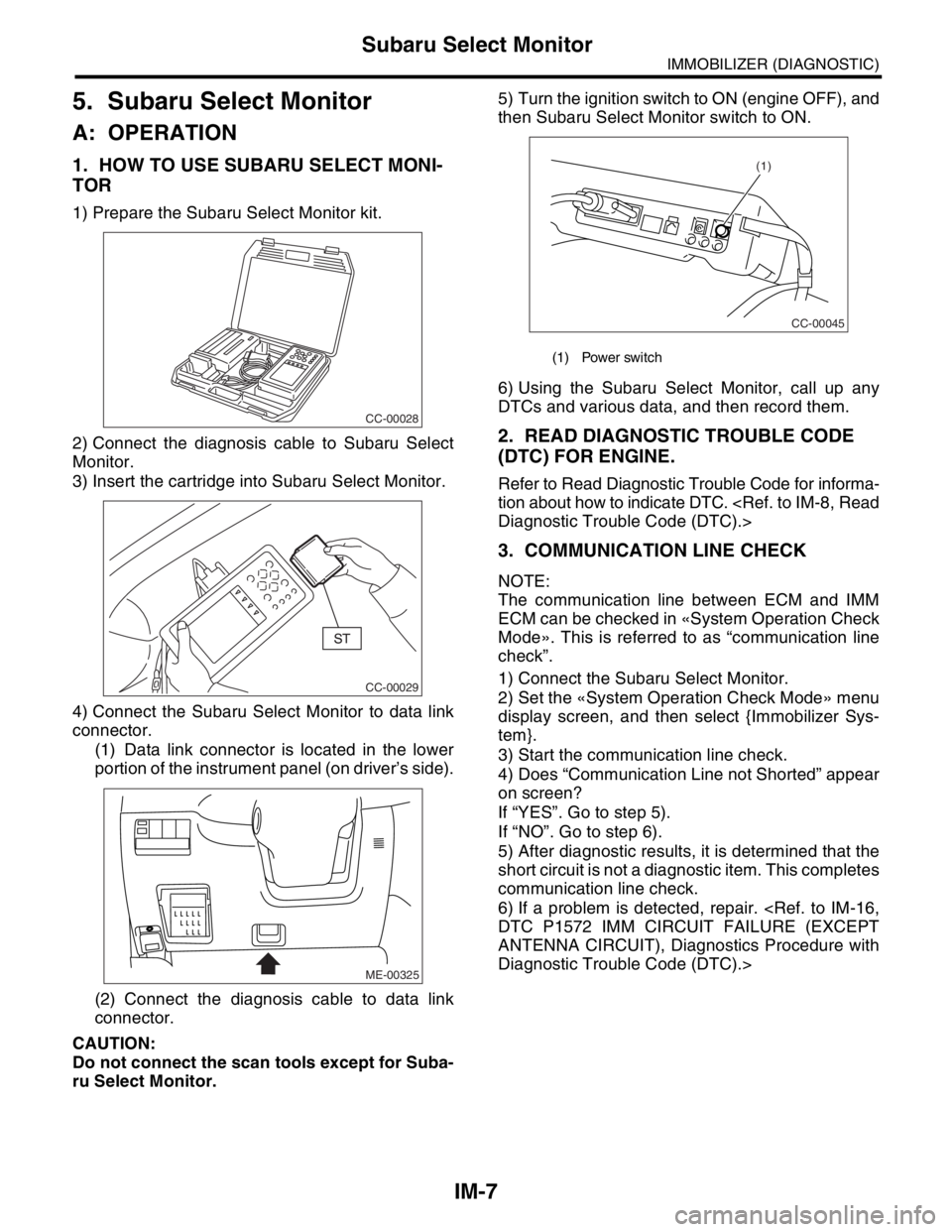
1) Prepare the Subaru Select Monitor kit.
2) Connect the diagnosis cable to Subaru Select
Monitor.
3) Insert the cartridge into Subaru Select Monitor.
4) Connect the Subaru Select Monitor to data link
connector.
(1) Data link connector is located in the lower
portion of the instrument panel (on driver’s side).
(2) Connect the diagnosis cable to data link
connector.
CAUTION:
Do not connect the scan tools except for Suba-
ru Select Monitor.5) Turn the ignition switch to ON (engine OFF), and
then Subaru Select Monitor switch to ON.
6) Using the Subaru Select Monitor, call up any
DTCs and various data, and then record them.
2. READ DIAGNOSTIC TROUBLE CODE
(DTC) FOR ENGINE.
Refer to Read Diagnostic Trouble Code for informa-
tion about how to indicate DTC.
3. COMMUNICATION LINE CHECK
NOTE:
The communication line between ECM and IMM
ECM can be checked in «System Operation Check
Mode». This is referred to as “communication line
check”.
1) Connect the Subaru Select Monitor.
2) Set the «System Operation Check Mode» menu
display screen, and then select {Immobilizer Sys-
tem}.
3) Start the communication line check.
4) Does “Communication Line not Shorted” appear
on screen?
If “YES”. Go to step 5).
If “NO”. Go to step 6).
5) After diagnostic results, it is determined that the
short circuit is not a diagnostic item. This completes
communication line check.
6) If a problem is detected, repair.
ANTENNA CIRCUIT), Diagnostics Procedure with
Diagnostic Trouble Code (DTC).>
CC-00028
CC-00029
ME-00325
(1) Power switch
CC-00045
(1)
Page 650 of 2870

IM-8
IMMOBILIZER (DIAGNOSTIC)
Read Diagnostic Trouble Code (DTC)
6. Read Diagnostic Trouble
Code (DTC)
A: OPERATION
1) On the «Main Menu» display screen, select the
{Each System Check}, and then press the [YES] key.
2) On the «System Selection Menu» display screen,
select the {Engine Control System}, and then press
the [YES] key.
3) Press the [YES] key after displayed information
of engine type.
4) On the «Engine Diagnosis» display screen, se-
lect the {Diagnostic Code(s) Display}, and then
press the [YES] key.
5) On the «Diagnostic Code(s) Display» display
screen, select the {Current Diagnostic Code(s)} or
{History Diagnostic Code(s)}, and then press the
[YES] key.
NOTE:
For detailed operation procedure, refer to the
SUBARU SELECT MONITOR OPERATION MAN-
UAL.
For detailed concerning diagnostic trouble codes,
refer to the List of Diagnostic Trouble Code (DTC).
Page 651 of 2870
![SUBARU FORESTER 2004 Service User Guide IM-9
IMMOBILIZER (DIAGNOSTIC)
Clear Memory Mode
7. Clear Memory Mode
A: OPERATION
1) On the «Main Menu» display screen, select the
{Each System Check}, and then press the [YES] key.
2) On the «Syst](/img/17/57426/w960_57426-650.png "SUBARU FORESTER 2004 Service User Guide IM-9
IMMOBILIZER (DIAGNOSTIC)
Clear Memory Mode
7. Clear Memory Mode
A: OPERATION
1) On the «Main Menu» display screen, select the
{Each System Check}, and then press the [YES] key.
2) On the «Syst")
IM-9
IMMOBILIZER (DIAGNOSTIC)
Clear Memory Mode
7. Clear Memory Mode
A: OPERATION
1) On the «Main Menu» display screen, select the
{Each System Check}, and then press the [YES] key.
2) On the «System Selection Menu» display screen,
select the {Engine Control System}, and then press the
[YES] key.
3) Press the [YES] key after displayed information
of engine type.
4) On the «Engine Diagnosis» display screen, se-
lect the {Clear Memory}, and then press the [YES]
key.
5) When the `Done’ is shown on the display screen,
turn the Subaru Select Monitor and ignition switch
to OFF.
NOTE:
After the memory has been cleared, the ISC must be
initialized.To do this, turn the ignition switch to ON po-
sition. Wait 3 seconds before starting the engine.
For detailed operation procedure, refer to the SUB-
ARUSELECT MONITOR OPERATION MANUAL.
Page 812 of 2870
FU(H4SO)-30
FUEL INJECTION (FUEL SYSTEM)
Throttle Position Sensor
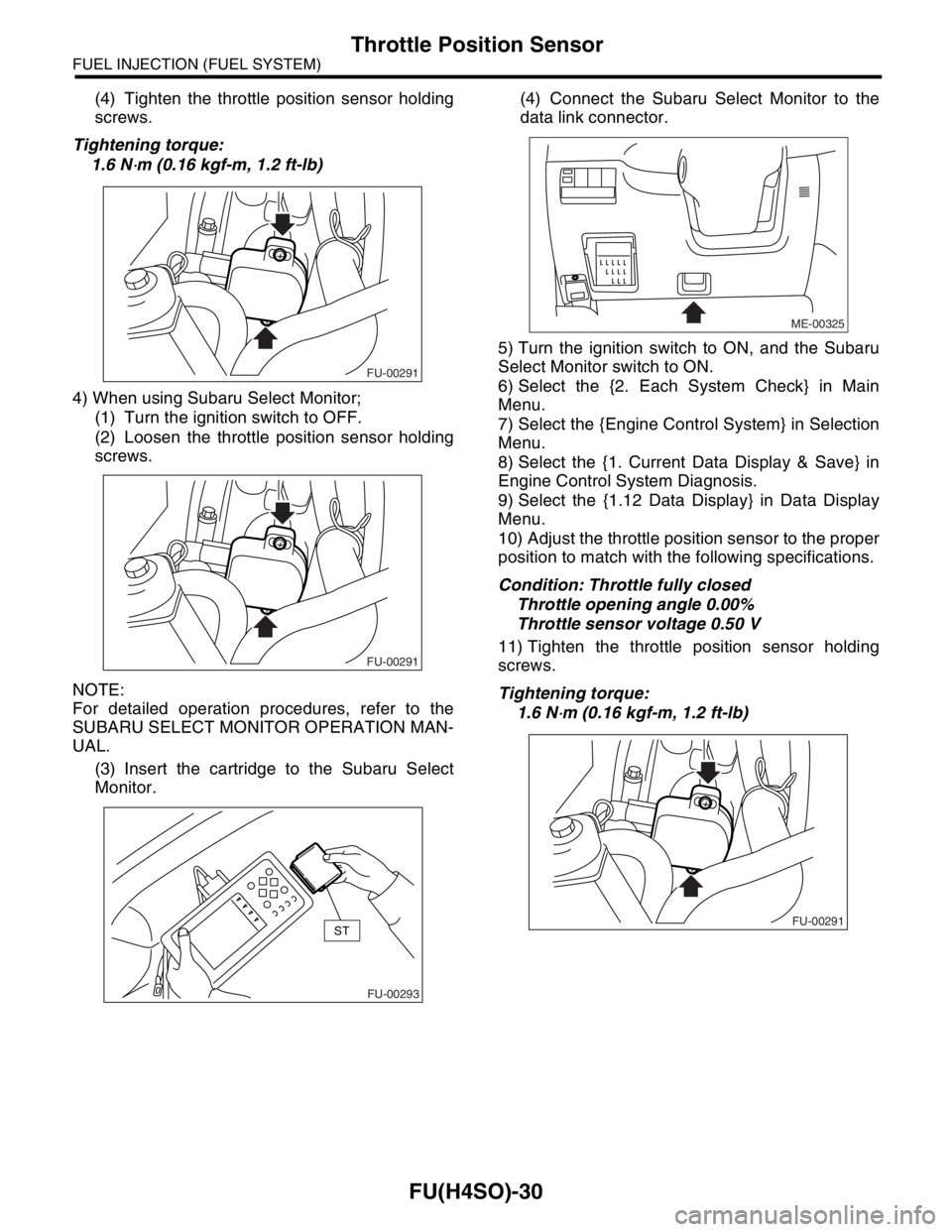
(4) Tighten the throttle position sensor holding
screws.
Tightening torque:
1.6 N
⋅m (0.16 kgf-m, 1.2 ft-lb)
4) When using Subaru Select Monitor;
(1) Turn the ignition switch to OFF.
(2) Loosen the throttle position sensor holding
screws.
NOTE:
For detailed operation procedures, refer to the
SUBARU SELECT MONITOR OPERATION MAN-
UAL.
(3) Insert the cartridge to the Subaru Select
Monitor.(4) Connect the Subaru Select Monitor to the
data link connector.
5) Turn the ignition switch to ON, and the Subaru
Select Monitor switch to ON.
6) Select the {2. Each System Check} in Main
Menu.
7) Select the {Engine Control System} in Selection
Menu.
8) Select the {1. Current Data Display & Save} in
Engine Control System Diagnosis.
9) Select the {1.12 Data Display} in Data Display
Menu.
10) Adjust the throttle position sensor to the proper
position to match with the following specifications.
Condition: Throttle fully closed
Throttle opening angle 0.00%
Throttle sensor voltage 0.50 V
11) Tighten the throttle position sensor holding
screws.
Tightening torque:
1.6 N
⋅m (0.16 kgf-m, 1.2 ft-lb)
FU-00291
FU-00291
FU-00293
ST
ME-00325
FU-00291
Page 895 of 2870
ME(H4SO)-26
MECHANICAL
Idle Speed
3. Idle Speed
A: INSPECTION
1) Before checking idle speed, check the following:
(1) Ensure the air cleaner element is free from
clogging, ignition timing is correct, spark plugs
are in good condition, and the hoses are con-
nected properly.
(2) Ensure the malfunction indicator light does
not illuminate.
2) Warm-up the engine.
3) Stop the engine, and then turn the ignition switch
to OFF.
4) When using the Subaru Select Monitor, refer to
the following.
tion.>
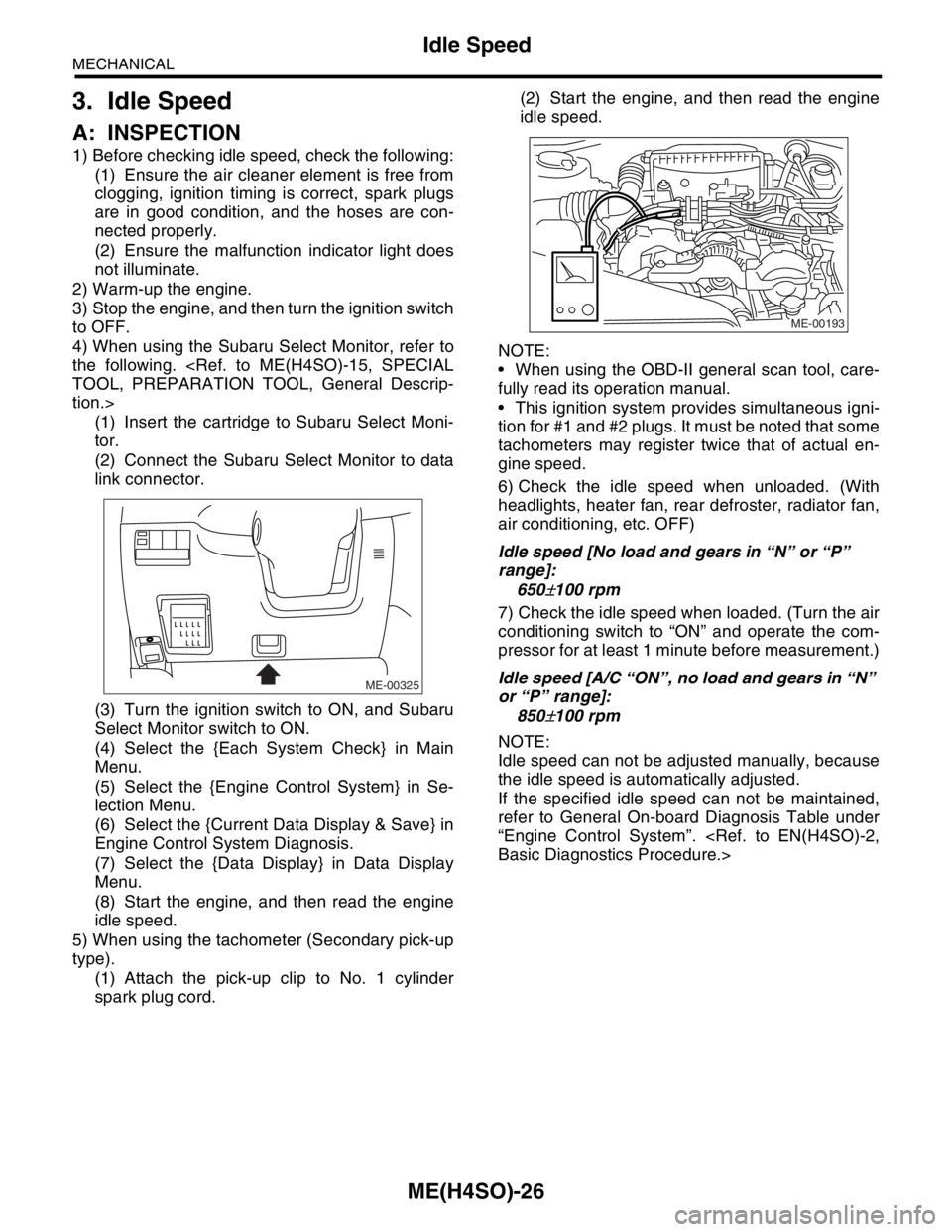
(1) Insert the cartridge to Subaru Select Moni-
tor.
(2) Connect the Subaru Select Monitor to data
link connector.
(3) Turn the ignition switch to ON, and Subaru
Select Monitor switch to ON.
(4) Select the {Each System Check} in Main
Menu.
(5) Select the {Engine Control System} in Se-
lection Menu.
(6) Select the {Current Data Display & Save} in
Engine Control System Diagnosis.
(7) Select the {Data Display} in Data Display
Menu.
(8) Start the engine, and then read the engine
idle speed.
5) When using the tachometer (Secondary pick-up
type).
(1) Attach the pick-up clip to No. 1 cylinder
spark plug cord.(2) Start the engine, and then read the engine
idle speed.
NOTE:
When using the OBD-II general scan tool, care-
fully read its operation manual.
This ignition system provides simultaneous igni-
tion for #1 and #2 plugs. It must be noted that some
tachometers may register twice that of actual en-
gine speed.
6) Check the idle speed when unloaded. (With
headlights, heater fan, rear defroster, radiator fan,
air conditioning, etc. OFF)
Idle speed [No load and gears in “N” or “P”
range]:
650
±100 rpm
7) Check the idle speed when loaded. (Turn the air
conditioning switch to “ON” and operate the com-
pressor for at least 1 minute before measurement.)
Idle speed [A/C “ON”, no load and gears in “N”
or “P” range]:
850
±100 rpm
NOTE:
Idle speed can not be adjusted manually, because
the idle speed is automatically adjusted.
If the specified idle speed can not be maintained,
refer to General On-board Diagnosis Table under
“Engine Control System”.
ME-00325
ME-00193
Page 1100 of 2870

EN(H4SO)-2
ENGINE (DIAGNOSTIC)
Basic Diagnostics Procedure
1. Basic Diagnostics Procedure
A: PROCEDURE
1. ENGINE
Step Check Yes No
1 CHECK ENGINE START FAILURE.
1) Ask the customer when and how the trou-
ble occurred using the interview check list.
2) Start the engine.Does the engine start? Go to step 2.Inspection using
“Diagnostics for
Engine Starting
Failure”.
Diagnostics for
Engine Starting
Fai lu r e.>
2 CHECK ILLUMINATION OF MALFUNCTION
INDICATOR LIGHT.Does malfunction indicator
light illuminate?Go to step 3.Inspection using
“General Diagnos-
tic Table”.
INSPECTION,
General Diagnos-
tic Table.>
3 CHECK INDICATION OF DTC ON DISPLAY
1) Turn the ignition switch to OFF.
2) Connect the Subaru Select Monitor or the
OBD-II general scan tool to data link connec-
tor.
3) Turn the ignition switch to ON and the Sub-
aru Select Monitor or OBD-II general scan tool
switch to ON.
4) Read the DTC on the Subaru Select Moni-
tor or OBD-II general scan tool.Does the Subaru Select Moni-
tor or OBD-II general scan tool
indicate DTC?Record the DTC.
Repair the trouble
cause.
of Diagnostic Trou-
ble Code (DTC).>
Go to step 4.Repair the related
parts.
N
OTE:
If DTC is not shown
on display although
the engine warning
light illuminates, per-
form the diagnostics
of engine warning
light circuit or combi-
nation meter.
Malfunction Indica-
tor Light.>
4 PERFORM THE DIAGNOSIS.
1) Perform the Clear Memory Mode.
2) Perform the Inspection Mode.
tor or OBD-II general scan tool
indicate DTC?Check on “Diag-
nostic Procedure
with Diagnostic
Trouble Code
(DTC)”
Diagnostic Proce-
dure with Diagnos-
tic Trouble Code
(DTC).>Finish the diagno-
sis.
Page 1101 of 2870

EN(H4SO)-3
ENGINE (DIAGNOSTIC)
Basic Diagnostics Procedure
2. AUTOMATIC TRANSMISSION
When the DTC about automatic transmission is
shown on display, carry out the following basic
check. After that, carry out the replacement or re-
pair work.
1) ATF level check
2) Differential gear oil level check
3) ATF leak check
4) Differential gear oil level check
5) Stall Test
6) Line Pressure Test
7) Transfer Clutch Pressure Test
8) Time Lag Test
9) Road Test
10) Shift characteristics
Page 1128 of 2870
![SUBARU FORESTER 2004 Service User Guide EN(H4SO)-30
ENGINE (DIAGNOSTIC)
Subaru Select Monitor
4. READ CURRENT DATA FOR ENGINE. (NORMAL MODE)
1) On the «Main Menu» display screen, select the {Each System Check} and press the [YES] key.
2)](/img/17/57426/w960_57426-1127.png "SUBARU FORESTER 2004 Service User Guide EN(H4SO)-30
ENGINE (DIAGNOSTIC)
Subaru Select Monitor
4. READ CURRENT DATA FOR ENGINE. (NORMAL MODE)
1) On the «Main Menu» display screen, select the {Each System Check} and press the [YES] key.
2)")
EN(H4SO)-30
ENGINE (DIAGNOSTIC)
Subaru Select Monitor
4. READ CURRENT DATA FOR ENGINE. (NORMAL MODE)
1) On the «Main Menu» display screen, select the {Each System Check} and press the [YES] key.
2) On the «System Selection Menu» display screen, select the {Engine} and press the [YES] key.
3) Press the [YES] key after the information of engine type was displayed.
4) On the «Engine Diagnosis» display screen, select the {Current Data Display/Save}, and then press the
[YES] key.
5) On the «Data Display Menu» display screen, select the {Data Display} and press the [YES] key.
6) Using the scroll key, scroll the display screen up or down until the desired data is shown.
A list of the support data is shown in the following table.
Description Display Unit of measure
Battery voltage Battery Voltage V
Vehicle speed signal Meter vehicle speed km/h or MPH
Engine speed signal Engine speed rpm
Engine coolant temperature signal Engine coolant temperature°C or (°F)
Ignition timing signal Ignition timing deg
Throttle position signal Amount of intake air %
Throttle position signal Throttle Sensor Voltage V
Injection pulse width Fuel injection pulse width ms
Idle air control signal ISC Steps STEP
Engine load data Engine load %
Front oxygen (A/F) sensor resistance A/F sensor resistance value 1 ohm
Front oxygen (A/F) sensor output signal A/F sensor current value 1 —
Rear oxygen sensor output signalRear oxygen sensor voltage
valueV
Short term fuel trim A/F Compensation 1 %
Knock sensor signal Knock Correction deg
Atmospheric absolute pressure signal Atmospheric pressure mmHg, kPa, inHg or psi
Intake manifold relative pressure signal Mani. Relative Pressure mmHg, kPa, inHg or psi
Intake manifold absolute pressure signalIntake manifold absolute pres-
suremmHg, kPa, inHg or psi
A/F correction (short term fuel trim) by rear oxygen sensor A/F Compensation 3 %
Long term whole fuel trim A/F learning 1 %
Front oxygen (A/F) sensor heater current Front O2 heater current value A
Rear oxygen sensor heater current Rear O2 heater current value A
Canister purge control solenoid valve duty ratio CPC Valve Duty Ratio %
Fuel level signal Fuel level voltage V
Intake air temperature signal Intake air temperature°C or (°F)
Learned ignition timing Ignition learning value deg
EGR signal EGR Steps STEP
Ignition switch signal Ignition SW ON or OFF
Test mode connector signal Test mode signal ON or OFF
Neutral position switch signal Neutral SW ON or OFF
Air conditioning switch signal A/C SW ON or OFF
Air conditioning compressor signal A/C Compressor Signal ON or OFF
Radiator main fan relay signal Radiator fan relay 1 ON or OFF
Fuel pump relay signal Fuel pump relay ON or OFF
Knocking signal Knock signal ON or OFF
Radiator sub fan relay signal Radiator fan relay 2 ON or OFF
Power steering switch signal Power steering SW input signal ON or OFF
Engine torque control signal #1 AT coordinate request signal 1 ON or OFF
Engine torque control signal #2 AT coordinate request signal 2 ON or OFF
Page 1129 of 2870

EN(H4SO)-31
ENGINE (DIAGNOSTIC)
Subaru Select Monitor
NOTE:
For detailed operation procedure, refer to the “SUBARU SELECT MONITOR OPERATION MANUAL”.
Engine torque control permission signalAT coordinate permission sig-
nalON or OFF
Rear oxygen sensor rich signal Rear O2 monitor ON or OFF
Starter switch signal Starter SW ON or OFF
Idle switch signal Soft idle SW ON or OFF
Crankshaft position sensor signal Crankshaft position signal ON or OFF
Camshaft position sensor signal Camshaft position signal ON or OFF
Rear defogger switch signal Rear defogger SW ON or OFF
Blower fan switch signal Blower fan SW ON or OFF
Small light switch signal Light SW ON or OFF
AT vehicle ID signal AT/MT identification terminal AT or MT
A/C middle pressure switch signal A/C middle pressure SW ON or OFFDescription Display Unit of measure