light SUBARU FORESTER 2004 Service Repair Manual
[x] Cancel search | Manufacturer: SUBARU, Model Year: 2004, Model line: FORESTER, Model: SUBARU FORESTER 2004Pages: 2870, PDF Size: 38.67 MB
Page 1667 of 2870
![SUBARU FORESTER 2004 Service Repair Manual EN(H4DOTC)-37
ENGINE (DIAGNOSTIC)
Subaru Select Monitor
7. LED OPERATION MODE FOR ENGINE
1) On the «Main Menu» display screen, select the {Each System Check} and press the [YES] key.
2) On the «Sys](/img/17/57426/w960_57426-1666.png "SUBARU FORESTER 2004 Service Repair Manual EN(H4DOTC)-37
ENGINE (DIAGNOSTIC)
Subaru Select Monitor
7. LED OPERATION MODE FOR ENGINE
1) On the «Main Menu» display screen, select the {Each System Check} and press the [YES] key.
2) On the «Sys")
EN(H4DOTC)-37
ENGINE (DIAGNOSTIC)
Subaru Select Monitor
7. LED OPERATION MODE FOR ENGINE
1) On the «Main Menu» display screen, select the {Each System Check} and press the [YES] key.
2) On the «System Selection Menu» display screen, select the {Engine} and press the [YES] key.
3) Press the [YES] key after the information of engine type was displayed.
4) On the «Engine Diagnosis» screen, select the {Current Data Display/Save}, and then press the [YES] key.
5) On the «Data Display» screen, select the {Data & LED Display} and press the [YES] key.
6) Using the scroll key, move the display screen up or down until the desired data is shown.
A list of the support data is shown in the following table.
NOTE:
For detailed operation procedure, refer to the “SUBARU SELECT MONITOR OPERATION MANUAL”.
Description Display Message LED “ON” requirements
Ignition switch signal Ignition Switch ON or OFF When ignition switch is ON.
Test mode connector signal Test Mode Signal ON or OFF When test mode connector is connected.
Neutral position switch signal Neutral Position Switch ON or OFF When neutral position signal is entered.
Air conditioning switch signal A/C Switch ON or OFF When air conditioning switch is ON.
Air conditioning relay signal A/C Compressor Signal ON or OFF When air conditioning relay is in function.
Radiator main fan relay signal Radiator Fan Relay #1 ON or OFF When radiator main fan relay is in function.
Knocking signal Knocking Signal ON or OFF When knocking signal is input.
Radiator sub fan relay signal Radiator Fan Relay #2 ON or OFF When radiator sub fan relay is in function.
Engine torque control permission
signalTorque Control Permission ON or OFFWhen engine torque control permission sig-
nal is entered.
Rear oxygen sensor rich signalRear O
2 Rich Signal
ON or OFFWhen rear oxygen sensor mixture ratio is
rich.
Starter switch signal Starter Switch ON or OFF When starter switch signal is entered.
Idle switch signal Idle Switch ON or OFF When idle switch signal is entered.
Crankshaft position sensor signal Crankshaft Position Signal ON or OFFWhen crankshaft position sensor signal is
input.
Camshaft position sensor signal Camshaft Position Signal ON or OFFWhen camshaft position sensor signal is
entered.
Power steering switch signal P/S Switch ON or OFF When power steering switch is entered.
Rear defogger switch signal Rear Defogger Switch ON or OFF When rear defogger switch is ON.
Blower fan switch signal Blower Fan Switch ON or OFF When blower fan switch is ON.
Light switch signal Light Switch ON or OFF When small light switch is ON.
Wiper switch signal Wiper Switch ON or OFF When wiper switch is ON.
A/C middle pressure switch signal A/C Mid Pressure Switch ON or OFF When A/C switch is ON.
AT retard angle demand signal Retard Signal from AT ON or OFF When AT retard angle demand signal exists.
AT fuel cut demand signal Fuel Cut Signal from AT ON or OFF When AT fuel cut demand signal exists.
AT/MT identification signal AT Vehicle ID Signal ON or OFF For AT model
Tumble generated valve actuator
signalTGV Output ON or OFF When TGV actuator signal is output.
Tumble generated valve drive sig-
nalTGV DriveOPEN or
CLOSEWhen TGV moves and valve opens.
Page 1668 of 2870
![SUBARU FORESTER 2004 Service Repair Manual EN(H4DOTC)-38
ENGINE (DIAGNOSTIC)
Subaru Select Monitor
8. READ CURRENT DATA FOR AT
1) On the «Main Menu» display screen, select the {Each System Check} and press the [YES] key.
2) On the «System S](/img/17/57426/w960_57426-1667.png "SUBARU FORESTER 2004 Service Repair Manual EN(H4DOTC)-38
ENGINE (DIAGNOSTIC)
Subaru Select Monitor
8. READ CURRENT DATA FOR AT
1) On the «Main Menu» display screen, select the {Each System Check} and press the [YES] key.
2) On the «System S")
EN(H4DOTC)-38
ENGINE (DIAGNOSTIC)
Subaru Select Monitor
8. READ CURRENT DATA FOR AT
1) On the «Main Menu» display screen, select the {Each System Check} and press the [YES] key.
2) On the «System Selection Menu» display screen, select the {Transmission} and press the [YES] key.
3) Press the [YES] key after displayed the information of transmission type.
4) On the «Transmission Diagnosis» screen, select the {Current Data Display/Save}, and then press the
[YES] key.
5) On the «Data Display Menu» screen, select the {Data Display} and press the [YES] key.
6) Using the scroll key, move the display screen up or down until the desired data is shown.
A list of the support data is shown in the following table.
NOTE:
For detailed operation procedure, refer to the “SUBARU SELECT MONITOR OPERATION MANUAL”.
Description Display Unit of measure
Battery voltage Battery Voltage V
Rear vehicle speed sensor signal Rear Wheel Speed km/h or MPH
Front vehicle speed sensor signal Front Wheel Speed km/h or MPH
Engine speed signal Engine Speed rpm
ATF temperature signal ATF Temp.°C or °F
Mass air flow sensor signal Air Flow Sensor Voltage V
Throttle position signal Throttle Sensor Voltage V
Gear Position Gear position —
Line pressure control duty ratio Line Pressure Duty Ratio %
Lock up clutch control duty ratio Lock Up Duty Ratio %
Transfer clutch control duty ratio Transfer Duty Ratio %
Throttle position sensor power supply Throttle Sensor Power V
Turbine revolution signal Turbine Revolution Speed rpm
2-4 Brake timing pressure control duty ratio Brake Clutch Duty Ratio %
Stop light switch signal Stop Light Switch ON or OFF
Anti lock brake system signal ABS Signal ON or OFF
Cruise control system signal Cruise Control Signal ON or OFF
Neutral/Parking range signal N/P Range Signal ON or OFF
Reverse range signal R Range Signal ON or OFF
Drive range signal D Range Signal ON or OFF
3rd range signal 3rd Range Signal ON or OFF
2nd range signal 2nd Range Signal ON or OFF
1st range signal 1st Range Signal ON or OFF
Shift control solenoid A Shift Solenoid #1 ON or OFF
Shift control solenoid B Shift Solenoid #2 ON or OFF
Torque control output signal #1 Torque Control Signal #1 ON or OFF
Torque control output signal #2 Torque Control Signal #2 ON or OFF
Torque control cut signal Torque Control Cut Sig. ON or OFF
2-4 brake timing control solenoid valve 2-4 Brake Timing Sol. ON or OFF
Low clutch timing control solenoid valve Low Clutch Timing Sol. ON or OFF
Automatic transmission diagnosis indicator lamp Diagnosis Lamp ON or OFF
Page 1673 of 2870
EN(H4DOTC)-43
ENGINE (DIAGNOSTIC)
Inspection Mode
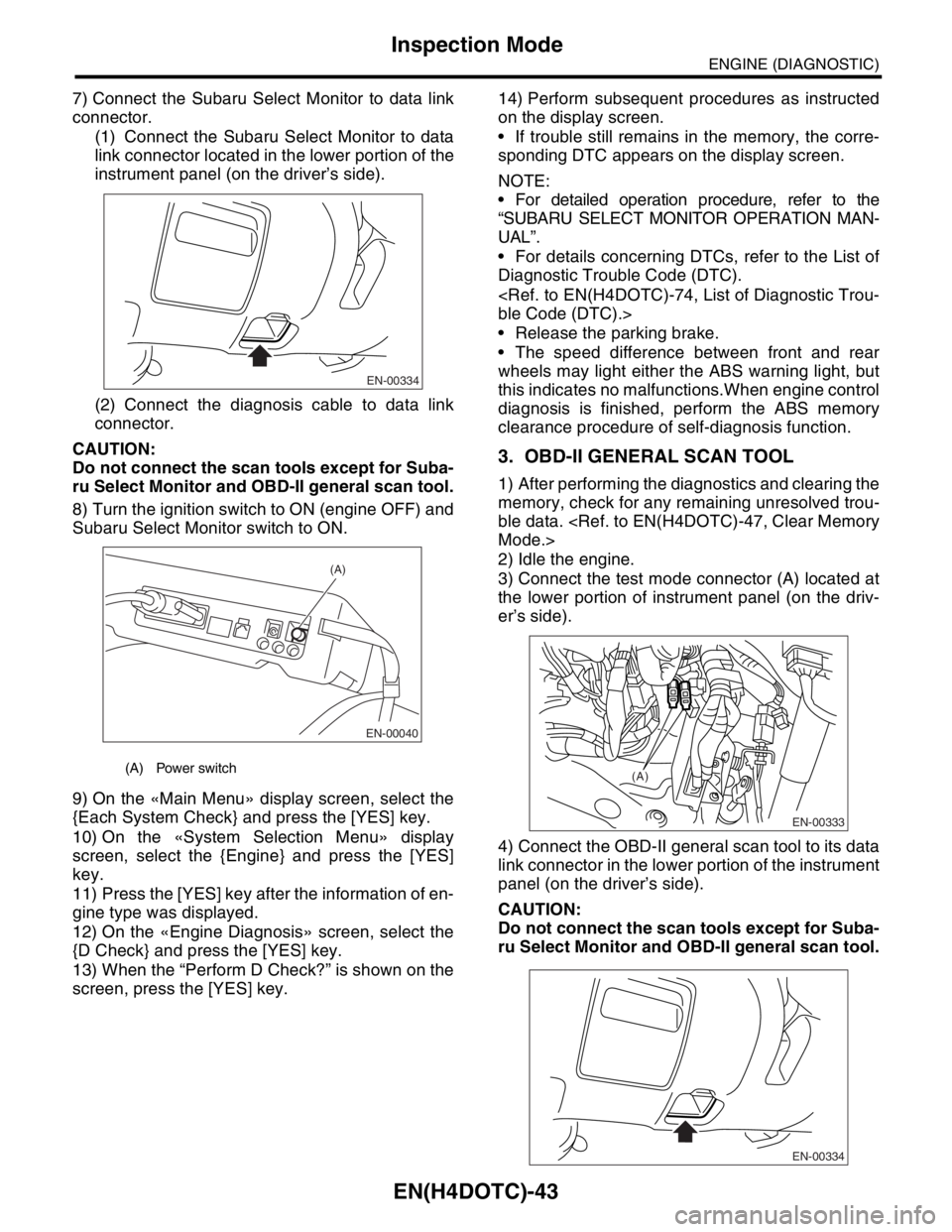
7) Connect the Subaru Select Monitor to data link
connector.
(1) Connect the Subaru Select Monitor to data
link connector located in the lower portion of the
instrument panel (on the driver’s side).
(2) Connect the diagnosis cable to data link
connector.
CAUTION:
Do not connect the scan tools except for Suba-
ru Select Monitor and OBD-II general scan tool.
8) Turn the ignition switch to ON (engine OFF) and
Subaru Select Monitor switch to ON.
9) On the «Main Menu» display screen, select the
{Each System Check} and press the [YES] key.
10) On the «System Selection Menu» display
screen, select the {Engine} and press the [YES]
key.
11) Press the [YES] key after the information of en-
gine type was displayed.
12) On the «Engine Diagnosis» screen, select the
{D Check} and press the [YES] key.
13) When the “Perform D Check?” is shown on the
screen, press the [YES] key.14) Perform subsequent procedures as instructed
on the display screen.
If trouble still remains in the memory, the corre-
sponding DTC appears on the display screen.
NOTE:
For detailed operation procedure, refer to the
“SUBARU SELECT MONITOR OPERATION MAN-
UAL”.
For details concerning DTCs, refer to the List of
Diagnostic Trouble Code (DTC).
Release the parking brake.
The speed difference between front and rear
wheels may light either the ABS warning light, but
this indicates no malfunctions.When engine control
diagnosis is finished, perform the ABS memory
clearance procedure of self-diagnosis function.
3. OBD-II GENERAL SCAN TOOL
1) After performing the diagnostics and clearing the
memory, check for any remaining unresolved trou-
ble data.
2) Idle the engine.
3) Connect the test mode connector (A) located at
the lower portion of instrument panel (on the driv-
er’s side).
4) Connect the OBD-II general scan tool to its data
link connector in the lower portion of the instrument
panel (on the driver’s side).
CAUTION:
Do not connect the scan tools except for Suba-
ru Select Monitor and OBD-II general scan tool.
(A) Power switch
EN-00334
EN-00040
(A)
EN-00333
(A)
EN-00334
Page 1674 of 2870

EN(H4DOTC)-44
ENGINE (DIAGNOSTIC)
Inspection Mode
5) Start the engine.
NOTE:
Ensure the select lever is placed in the “P” range
before starting.(AT model)
Depress the clutch pedal when starting the en-
gine.(MT model)
6) Using the selector lever or shift lever, turn the “P”
range switch and the “N” range switch to ON.
7) Depress the brake pedal to turn the brake switch
ON.(AT model)
8) Keep the engine speed in the 2,500 — 3,000
rpm range for 40 seconds.
9) Place the select lever or shift lever in the “D”
range (AT model) or “1st” gear (MT model) and
drive the vehicle at 5 to 10 km/h (3 to 6 MPH).
NOTE:
On AWD vehicles, release the parking brake.
The speed difference between front and rear
wheels may light either the ABS warning light, but
this indicates no malfunctions.When engine control
diagnosis is finished, perform the ABS memory
clearance procedure of self-diagnosis function.
10) Using the OBD-II general scan tool, check
DTC(s) and record the result(s).
NOTE:
For detailed operation procedures, refer to the
OBD-II General Scan Tool Operation Manual.
For details concerning DTCs, refer to the List of
Diagnostic Trouble Code (DTC).
Page 1680 of 2870

EN(H4DOTC)-50
ENGINE (DIAGNOSTIC)
Malfunction Indicator Light
16.Malfunction Indicator Light
A: PROCEDURE
1. Activation of malfunction indicator light.
↓
2. Check that the malfunction indicator light does not come on.
↓
3. Check that the malfunction indicator light does not go off.
↓
4. Malfunction indicator light does not blink at a cycle of 3 Hz.
↓
5. Malfunction indicator light remains blinking at a cycle of 3 Hz.
Page 1681 of 2870
EN(H4DOTC)-51
ENGINE (DIAGNOSTIC)
Malfunction Indicator Light
B: ACTIVATION OF MALFUNCTION
INDICATOR LIGHT
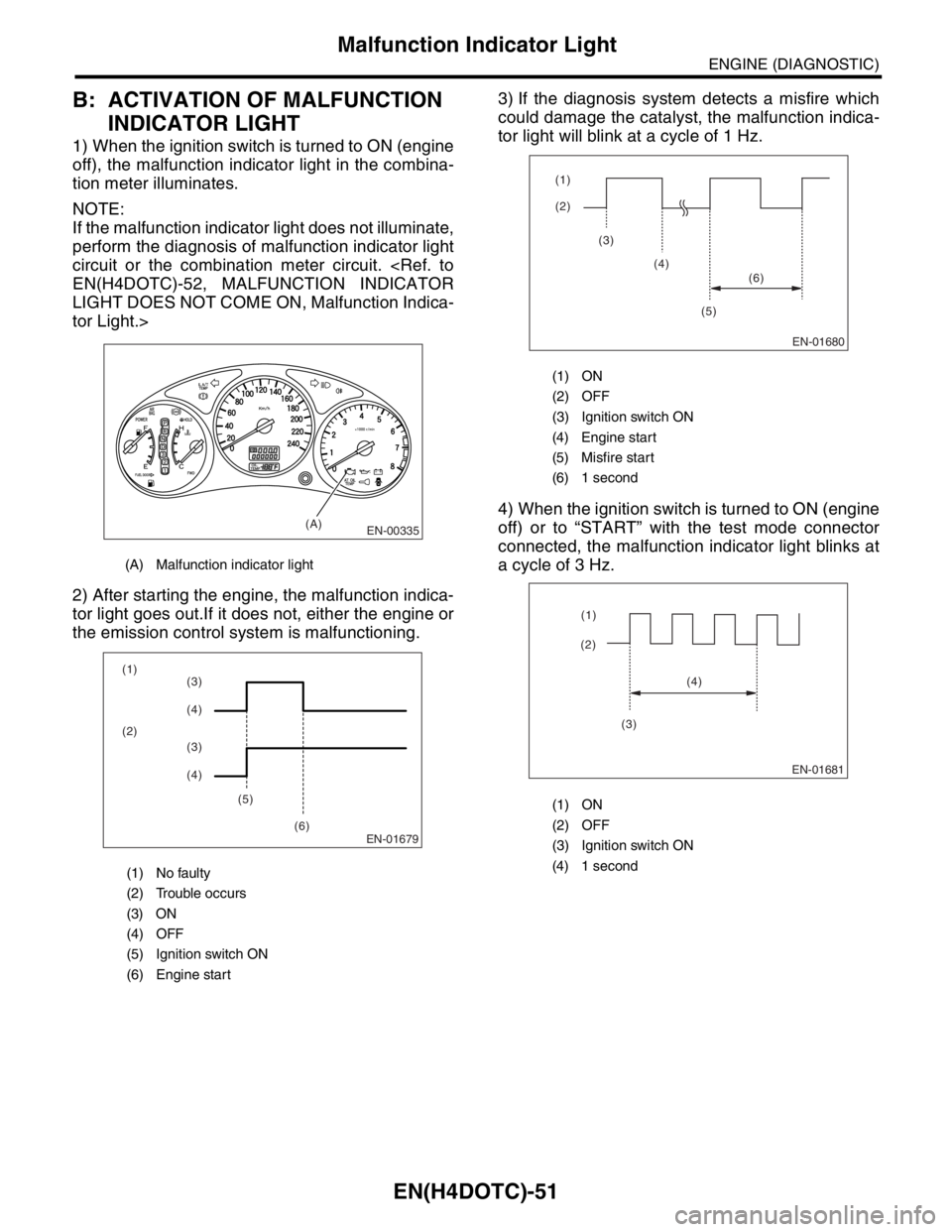
1) When the ignition switch is turned to ON (engine
off), the malfunction indicator light in the combina-
tion meter illuminates.
NOTE:
If the malfunction indicator light does not illuminate,
perform the diagnosis of malfunction indicator light
circuit or the combination meter circuit.
LIGHT DOES NOT COME ON, Malfunction Indica-
tor Light.>
2) After starting the engine, the malfunction indica-
tor light goes out.If it does not, either the engine or
the emission control system is malfunctioning.3) If the diagnosis system detects a misfire which
could damage the catalyst, the malfunction indica-
tor light will blink at a cycle of 1 Hz.
4) When the ignition switch is turned to ON (engine
off) or to “START” with the test mode connector
connected, the malfunction indicator light blinks at
a cycle of 3 Hz.
(A) Malfunction indicator light
(1) No faulty
(2) Trouble occurs
(3) ON
(4) OFF
(5) Ignition switch ON
(6) Engine start
EN-00335(A)
EN-01679
(1)
(2)
(5)
(6)(3)
(4)
(3)
(4)
(1) ON
(2) OFF
(3) Ignition switch ON
(4) Engine start
(5) Misfire start
(6) 1 second
(1) ON
(2) OFF
(3) Ignition switch ON
(4) 1 second
EN-01680
(2) (1)
(3)
(4)
(5)(6)
EN-01681
(2)(1)
(4)
(3)
Page 1682 of 2870
EN(H4DOTC)-52
ENGINE (DIAGNOSTIC)
Malfunction Indicator Light
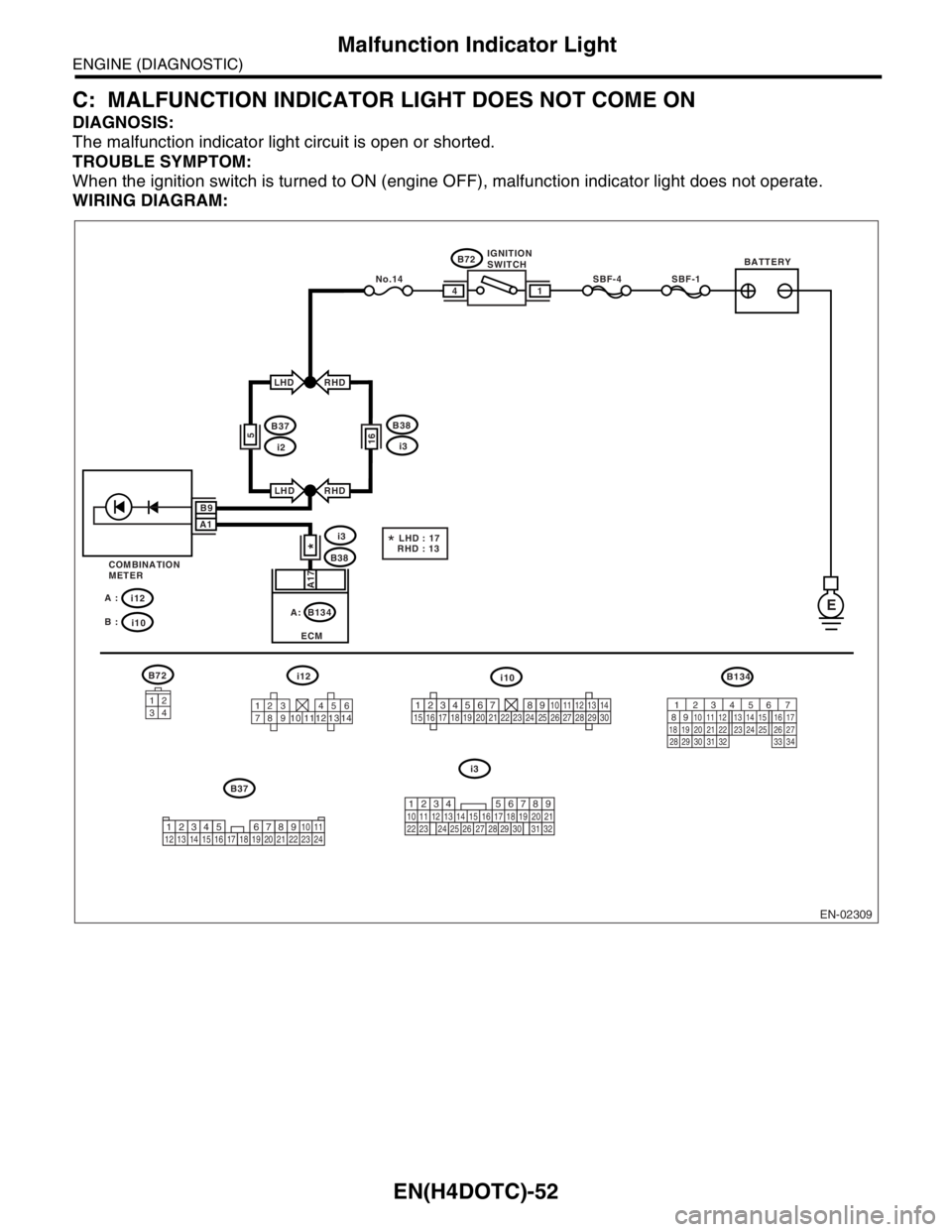
C: MALFUNCTION INDICATOR LIGHT DOES NOT COME ON
DIAGNOSIS:
The malfunction indicator light circuit is open or shorted.
TROUBLE SYMPTOM:
When the ignition switch is turned to ON (engine OFF), malfunction indicator light does not operate.
WIRING DIAGRAM:
EN-02309
BATTERYIGNITION
SWITCH
SBF-4SBF-1
B72
B72
B38
B134
ECM
i3
E
14
RHD
RHD
A17
B37
i12 A :
i10 B :
i12i10B134
i3
i2
LHD
LHD
5
COMBINATION
METER
3412
123 456
789 121310 11 14
*
16
B38
i3
B37No.14
*LHD : 17
RHD : 13
B9
A1
34
12 8910 11
12 13 14 15 16 17 18 19 20 21 22 23 24567219
32
1234 5610 11 12 13 14 15716
23 3019 20
22 26 27 28 29817
24 3118
25
12345678910111213141516171819202122232425262728293056 7
82 1
94 310
24 22 23 25 11 12 13 14 15
26 27
2816 17
18 19 20 21
33 34 29
32 30 31
A:
Page 1683 of 2870

EN(H4DOTC)-53
ENGINE (DIAGNOSTIC)
Malfunction Indicator Light
Step Check Yes No
1 CHECK OUTPUT SIGNAL FROM ECM.
1) Turn the ignition switch to ON.
2) Measure the voltage between ECM con-
nector and chassis ground.
Connector & terminal
(B134) No. 17 (+) — Chassis ground (
−):Is the voltage less than 1 V? Go to step 4.Go to step 2.
2 CHECK POOR CONTACT.Does the malfunction indicator
light come on when shaking or
pulling the ECM connector and
harness?Repair the poor
contact in ECM
connector.Go to step 3.
3 CHECK ECM CONNECTOR.Is the ECM connector correctly
connected?Replace the ECM.
Engine Control
Module (ECM).>Repair the con-
nection of ECM
connector.
4 CHECK HARNESS BETWEEN COMBINA-
TION METER AND ECM CONNECTOR.
1) Turn the ignition switch to OFF.
2) Remove the combination meter.
3) Disconnect the connector from ECM and
combination meter.
4) Measure the resistance of harness
between ECM and combination meter connec-
tor.
Connector & terminal
(B134) No. 17 — (i12) No. 1:Is the resistance less than 1
Ω?Go to step 5.Repair the har-
ness and connec-
tor.
NOTE:
In this case repair
the following:
Open circuit in
harness between
ECM and combi-
nation meter con-
nector
Poor contact in
coupling connector
5 CHECK POOR CONTACT.
Check poor contact in combination meter con-
nector.Is there poor contact in combi-
nation meter connector?Repair poor con-
tact in combination
meter connector.Go to step 6.
6 CHECK HARNESS BETWEEN COMBINA-
TION METER AND IGNITION SWITCH CON-
NECTOR.
1) Turn the ignition switch to ON.
2) Measure the voltage between combination
meter connector and chassis ground.
Connector & terminal
(i10) No. 9 (+) — Chassis ground (
−):Is the voltage more than 10 V? Replace the board
of combination
meter.
Meter Assembly.>Check the follow-
ing and repair if
necessary.
N
OTE:
Blown out of
fuse (No. 14)
Open or short
circuit in harness
between fuse (No.
14) and battery
terminal
Poor contact in
ignition switch con-
nector
Page 1684 of 2870
EN(H4DOTC)-54
ENGINE (DIAGNOSTIC)
Malfunction Indicator Light
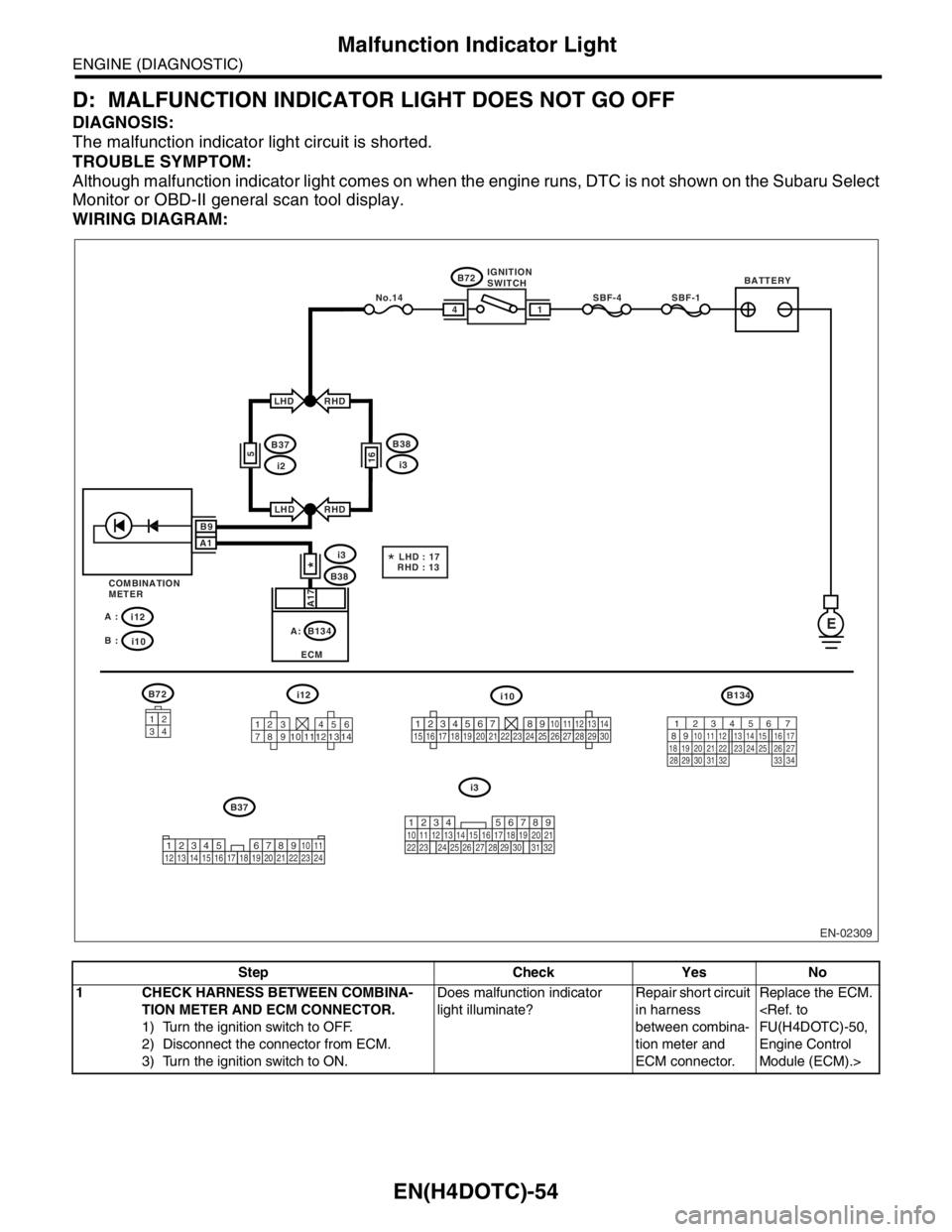
D: MALFUNCTION INDICATOR LIGHT DOES NOT GO OFF
DIAGNOSIS:
The malfunction indicator light circuit is shorted.
TROUBLE SYMPTOM:
Although malfunction indicator light comes on when the engine runs, DTC is not shown on the Subaru Select
Monitor or OBD-II general scan tool display.
WIRING DIAGRAM:
Step Check Yes No
1 CHECK HARNESS BETWEEN COMBINA-
TION METER AND ECM CONNECTOR.
1) Turn the ignition switch to OFF.
2) Disconnect the connector from ECM.
3) Turn the ignition switch to ON.Does malfunction indicator
light illuminate?Repair short circuit
in harness
between combina-
tion meter and
ECM connector.Replace the ECM.
Engine Control
Module (ECM).>
EN-02309
BATTERYIGNITION
SWITCH
SBF-4SBF-1
B72
B72
B38
B134
ECM
i3
E
14
RHD
RHD
A17
B37
i12 A :
i10 B :
i12i10B134
i3
i2
LHD
LHD
5
COMBINATION
METER
3412
123 456
789 121310 11 14
*
16
B38
i3
B37No.14
*LHD : 17
RHD : 13
B9
A1
34
12 8910 11
12 13 14 15 16 17 18 19 20 21 22 23 24567219
32
1234 5610 11 12 13 14 15716
23 3019 20
22 26 27 28 29817
24 3118
25
12345678910111213141516171819202122232425262728293056 7
82 1
94 310
24 22 23 25 11 12 13 14 15
26 27
2816 17
18 19 20 21
33 34 29
32 30 31
A:
Page 1685 of 2870
EN(H4DOTC)-55
ENGINE (DIAGNOSTIC)
Malfunction Indicator Light
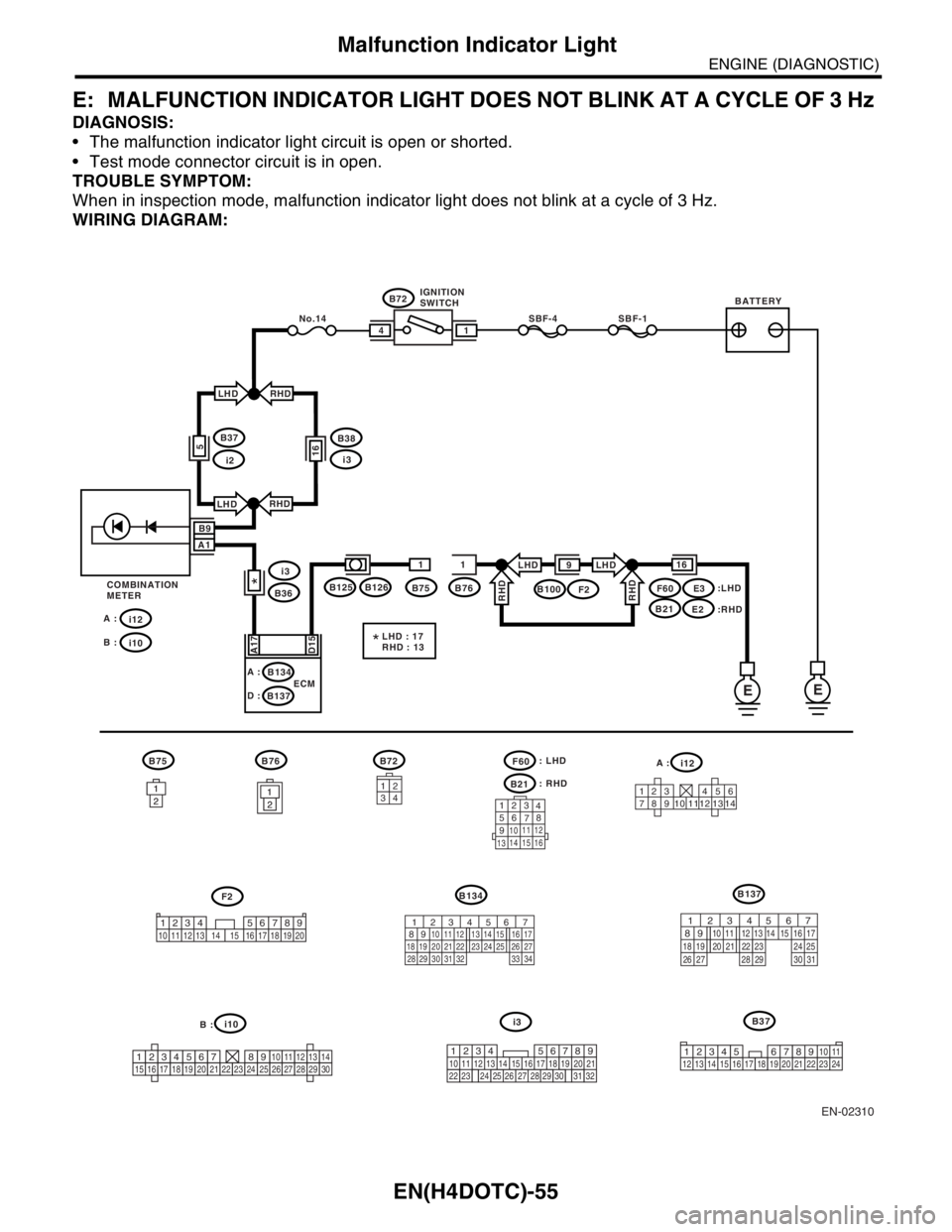
E: MALFUNCTION INDICATOR LIGHT DOES NOT BLINK AT A CYCLE OF 3 Hz
DIAGNOSIS:
The malfunction indicator light circuit is open or shorted.
Test mode connector circuit is in open.
TROUBLE SYMPTOM:
When in inspection mode, malfunction indicator light does not blink at a cycle of 3 Hz.
WIRING DIAGRAM:
EN-02310
BATTERYIGNITION
SWITCH
SBF-4SBF-1
B72
B36B75B76E3F2
E2
B134
B137ECM
i3
EE
14
1611
A17
D15
i12 A :
i10 B :
B125B100B126
A :LHD : 17
RHD : 13
*
D :
RHD
LHDLHD
RHD
9
B9
A1
:LHD
:RHD COMBINATION
METER
*
i2
B37
RHD
RHD
i3
B38
LHD
LHD
16
No.14
F60
B21
5
B72
B21
B75
B134
B76i12
i10
B137
i3: RHD
F60: LHD
34
12
123 456
789 121310 11 14
123
4
56
78
9
1011 12
1314 15 16
1
21
21
21
2
B37
56 7
82 1
94 310
24 22 23 25 11 12 13 14 15
26 27
2816 17
18 19 20 21
33 34 29
32 30 31
567
82 1
94 310
22 23 11 12 13 14 15
24 25
2616 17
18 19 20 21
27 28 29 30 31
123456789101112131415161718192021222324252627282930219
32
1234
5610 11 12 13 14 15716
23 3019 20
22 26 27 28 29817
24 3118
2534
12 8910 11
12 13 14 15 16 17 18 19 20 21 22 23 24567
A :
B :
1234 5678910 11 12 13 14 15 16 17 18 19 20
F2