check engine SUBARU FORESTER 2004 Service Repair Manual
[x] Cancel search | Manufacturer: SUBARU, Model Year: 2004, Model line: FORESTER, Model: SUBARU FORESTER 2004Pages: 2870, PDF Size: 38.67 MB
Page 2582 of 2870
4AT(H4DOTC)-6
AUTOMATIC TRANSMISSION (DIAGNOSTIC)
General Description
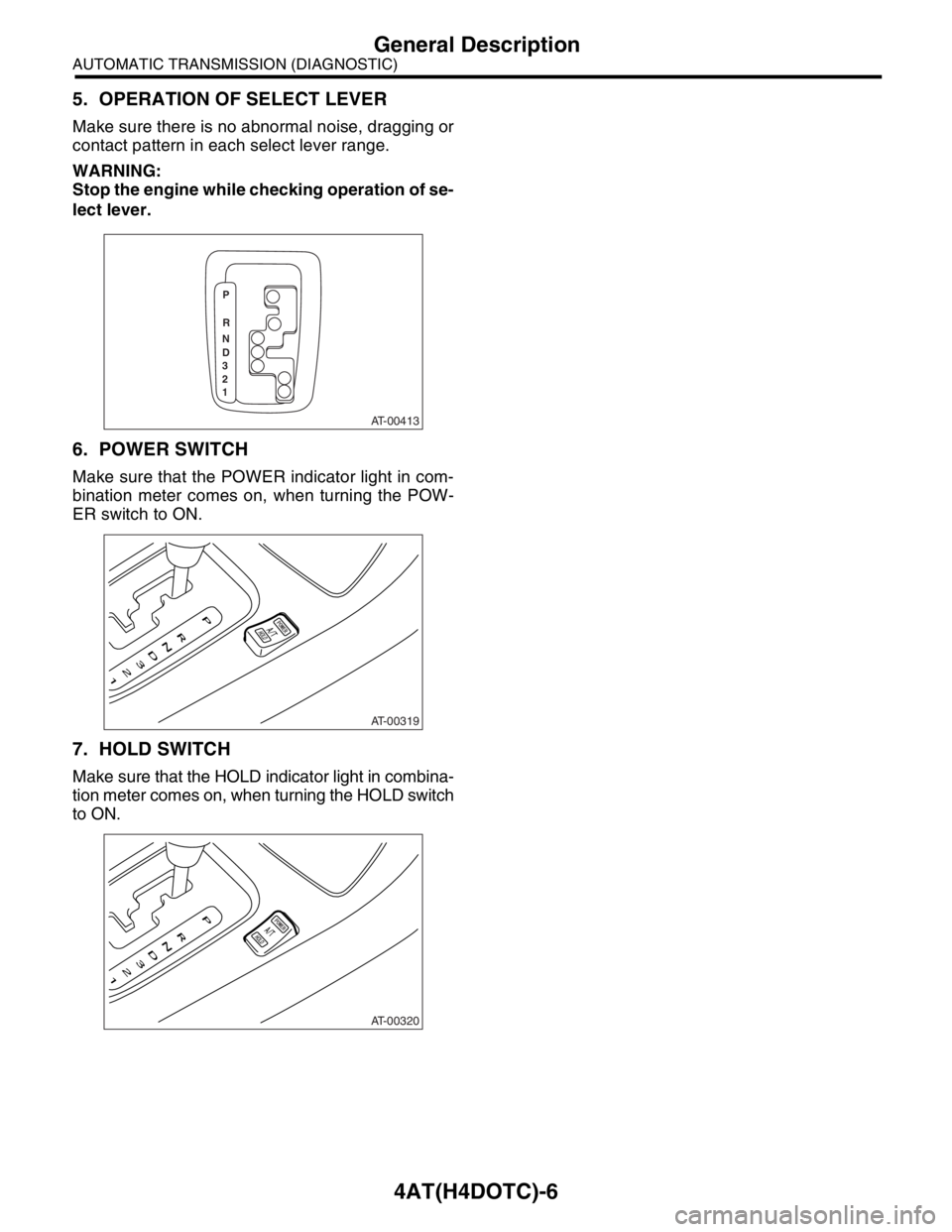
5. OPERATION OF SELECT LEVER
Make sure there is no abnormal noise, dragging or
contact pattern in each select lever range.
WARNING:
Stop the engine while checking operation of se-
lect lever.
6. POWER SWITCH
Make sure that the POWER indicator light in com-
bination meter comes on, when turning the POW-
ER switch to ON.
7. HOLD SWITCH
Make sure that the HOLD indicator light in combina-
tion meter comes on, when turning the HOLD switch
to ON.
AT-00413
P
R
N
D
3
2
1
AT-00319
AT-00320
Page 2588 of 2870
4AT(H4DOTC)-12
AUTOMATIC TRANSMISSION (DIAGNOSTIC)
Transmission Control Module (TCM) I/O Signal
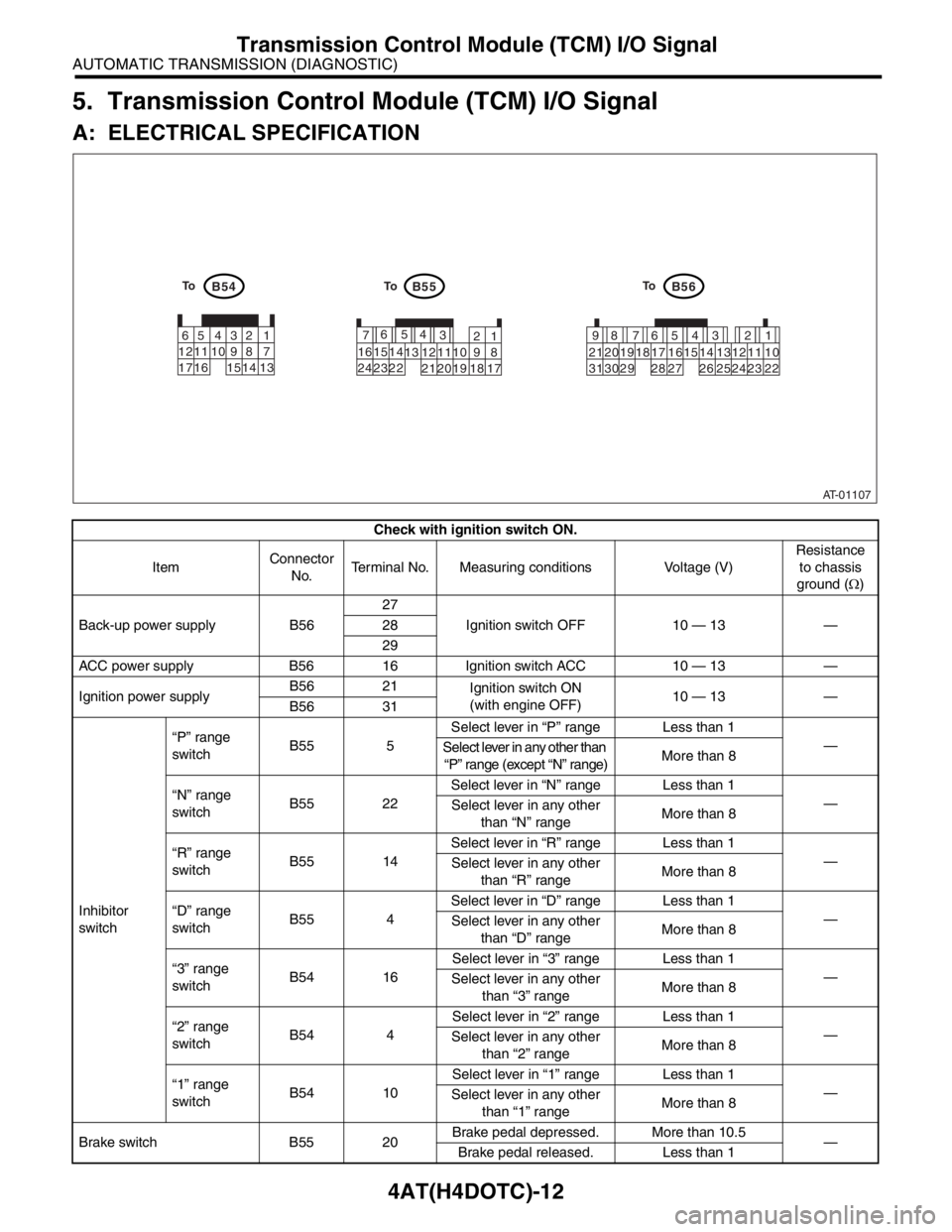
5. Transmission Control Module (TCM) I/O Signal
A: ELECTRICAL SPECIFICATION
Check with ignition switch ON.
ItemConnector
No.Terminal No. Measuring conditions Voltage (V)Resistance
to chassis
ground (Ω)
Back-up power supply B5627
Ignition switch OFF 10 — 13 — 28
29
ACC power supply B56 16 Ignition switch ACC 10 — 13 —
Ignition power supplyB56 21
Ignition switch ON
(with engine OFF)10 — 13 —
B56 31
Inhibitor
switch“P” range
switchB55 5Select lever in “P” range Less than 1
—
Select lever in any other than
“P” range (except “N” range)More than 8
“N” range
switchB55 22Select lever in “N” range Less than 1
—
Select lever in any other
than “N” rangeMore than 8
“R” range
switchB55 14Select lever in “R” range Less than 1
—
Select lever in any other
than “R” rangeMore than 8
“D” range
switchB55 4Select lever in “D” range Less than 1
—
Select lever in any other
than “D” rangeMore than 8
“3” range
switchB54 16Select lever in “3” range Less than 1
—
Select lever in any other
than “3” rangeMore than 8
“2” range
switchB54 4Select lever in “2” range Less than 1
—
Select lever in any other
than “2” rangeMore than 8
“1” range
switchB54 10Select lever in “1” range Less than 1
—
Select lever in any other
than “1” rangeMore than 8
Brake switch B55 20Brake pedal depressed. More than 10.5
—
Brake pedal released. Less than 1
AT-01107
B54B55B56
1 2 7
8 9 5 6
3 4
10 11 12
19 20 21 13 14 15 16
17 18 22 23
241 2 7 8 95634
10 11 12 19 20 21
29 30 3113 14 15 16 17
27
28 18
22 23 24 25 26 1 2 3
8 9 104
11 12
13 14 15
165 6
7
17To
ToTo
Page 2589 of 2870

4AT(H4DOTC)-13
AUTOMATIC TRANSMISSION (DIAGNOSTIC)
Transmission Control Module (TCM) I/O Signal
Accelerator pedal position
sensor (2.5 L model)
B55 19Throttle fully closed. More than 0.2
—
Throttle position sensor (2.0
L model)Throttle fully open. Less than 4.6
Accelerator pedal position
sensor power supply (2.5 L
model)B55 10 Ignition switch ON
(with engine OFF)Approx. 5 —
Throttle position sensor
power supply (2.0 L model)
ATF temperature sensor B55 21ATF temperature 20°C
(68°F)3.5 — 4.3 3.9 k — 4.7 k
ATF temperature 80°C
(176°F)1.5 — 1.9 500 — 600
Rear vehicle speed sensor B55 24Vehicle speed at least
20 km/h (12 MPH)More than 2 (AC range) —
Front vehicle speed sensor B55 6Vehicle stopped. 0
450 — 750
Vehicle speed at least
20 km/h (12 MPH)More than 1 (AC range)
Torque converter turbine
speed sensorB55 7Engine idling after warm-
up. (“D” range)0
450 — 750
Engine idling after warm-
up. (“N” range)More than 1 (AC range)
Vehicle speed output signal B56 1Vehicle speed at least
10 km/h (6 MPH)Less than 1←
→More than 4—
Engine speed signal B55 13Ignition switch ON
(with engine OFF)Less than 1
—
Ignition switch ON
(with engine ON)More than 5
(AC range)
Line pressure linear solenoid B56 20Ignition switch ON
(with engine OFF)
“R” range and throttle fully
closed after warm-up.5 — 7
4.0 — 8.0
Ignition switch ON
(with engine OFF)
“R” range and throttle fully
open after warm-up.3 — 5
Lock-up duty solenoid B56 5When lock up occurs. More than 10.5
2.0 — 4.5
When lock up is released. Less than 1
Transfer duty solenoid B56 4“P” or “N” range Less than 1
2.0 — 4.5
Throttle fully open and with
select lever in 1st gear.More than 10.5
2-4 brake duty solenoid B56 6“P” or “N” range More than 10.5
2.0 — 4.5
2nd or 4th gear Less than 1
High clutch duty solenoid B56 83rd or 4th gear Less than 1
2.0 — 4.5
“P” or “N” range More than 10.5
Low clutch duty solenoid B56 91st or 2nd gear Less than 1
2.0 — 4.5
“P” or “N” range More than 10.5
Low & reverse duty solenoid B56 7“P” or “N” range More than 10.5
2.0 — 4.5
“1” range More than 5
HOLD switch B54 2HOLD switch ON Less than 1
—
HOLD switch OFF More than 10.5 Check with ignition switch ON.
ItemConnector
No.Terminal No. Measuring conditions Voltage (V)Resistance
to chassis
ground (Ω)
Page 2591 of 2870
4AT(H4DOTC)-15
AUTOMATIC TRANSMISSION (DIAGNOSTIC)
Subaru Select Monitor
6. Subaru Select Monitor
A: OPERATION
1. READ DIAGNOSTIC TROUBLE CODE
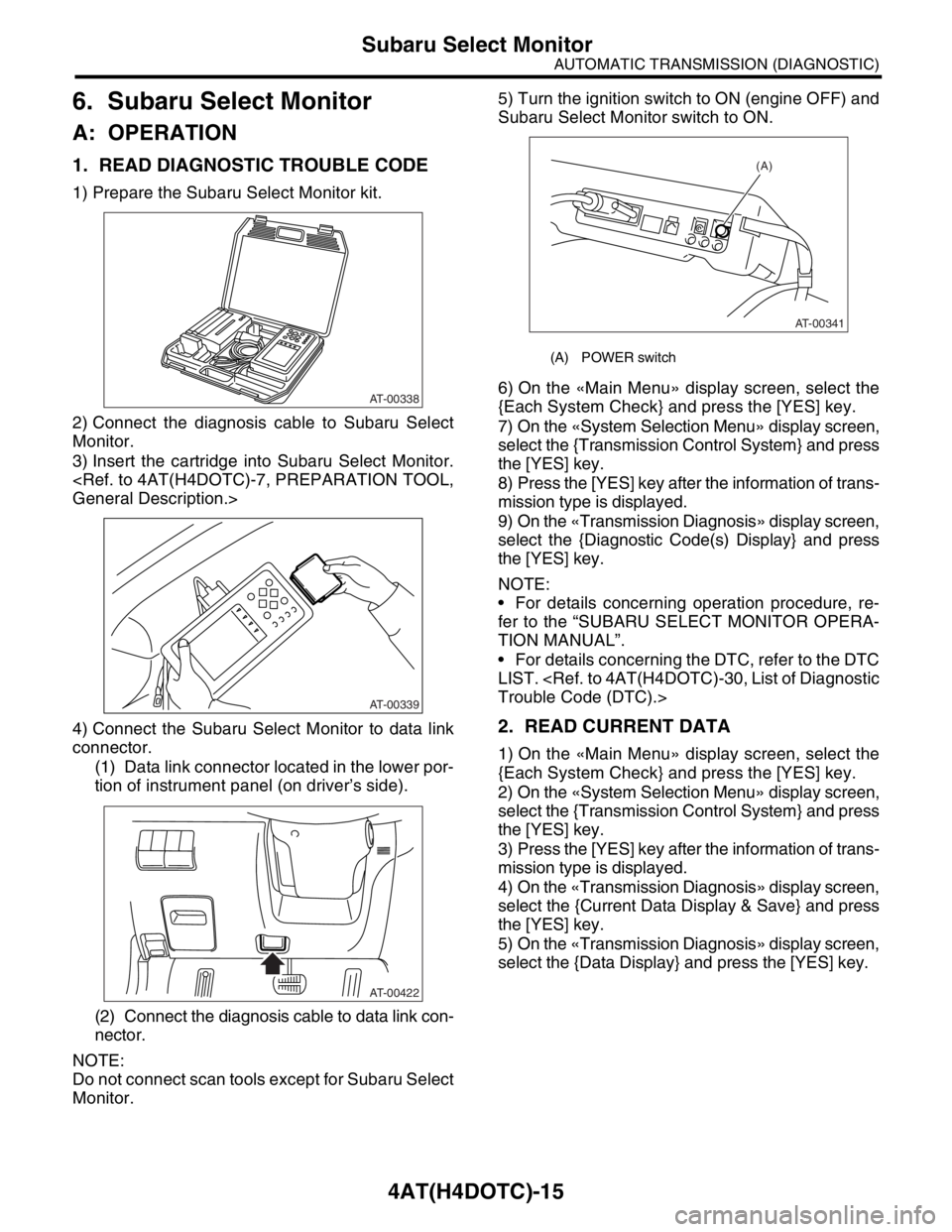
1) Prepare the Subaru Select Monitor kit.
2) Connect the diagnosis cable to Subaru Select
Monitor.
3) Insert the cartridge into Subaru Select Monitor.
4) Connect the Subaru Select Monitor to data link
connector.
(1) Data link connector located in the lower por-
tion of instrument panel (on driver’s side).
(2) Connect the diagnosis cable to data link con-
nector.
NOTE:
Do not connect scan tools except for Subaru Select
Monitor.5) Turn the ignition switch to ON (engine OFF) and
Subaru Select Monitor switch to ON.
6) On the «Main Menu» display screen, select the
{Each System Check} and press the [YES] key.
7) On the «System Selection Menu» display screen,
select the {Transmission Control System} and press
the [YES] key.
8) Press the [YES] key after the information of trans-
mission type is displayed.
9) On the «Transmission Diagnosis» display screen,
select the {Diagnostic Code(s) Display} and press
the [YES] key.
NOTE:
For details concerning operation procedure, re-
fer to the “SUBARU SELECT MONITOR OPERA-
TION MANUAL”.
For details concerning the DTC, refer to the DTC
LIST.
2. READ CURRENT DATA
1) On the «Main Menu» display screen, select the
{Each System Check} and press the [YES] key.
2) On the «System Selection Menu» display screen,
select the {Transmission Control System} and press
the [YES] key.
3) Press the [YES] key after the information of trans-
mission type is displayed.
4) On the «Transmission Diagnosis» display screen,
select the {Current Data Display & Save} and press
the [YES] key.
5) On the «Transmission Diagnosis» display screen,
select the {Data Display} and press the [YES] key.
AT-00338
AT-00339
AT-00422
(A) POWER switch
(A)
AT-00341
Page 2593 of 2870
![SUBARU FORESTER 2004 Service Repair Manual 4AT(H4DOTC)-17
AUTOMATIC TRANSMISSION (DIAGNOSTIC)
Subaru Select Monitor
3. CLEAR MEMORY MODE
1) On the «Main Menu» display screen, select the
{2. Each System Check} and press the [YES] key.
2) On t](/img/17/57426/w960_57426-2592.png "SUBARU FORESTER 2004 Service Repair Manual 4AT(H4DOTC)-17
AUTOMATIC TRANSMISSION (DIAGNOSTIC)
Subaru Select Monitor
3. CLEAR MEMORY MODE
1) On the «Main Menu» display screen, select the
{2. Each System Check} and press the [YES] key.
2) On t")
4AT(H4DOTC)-17
AUTOMATIC TRANSMISSION (DIAGNOSTIC)
Subaru Select Monitor
3. CLEAR MEMORY MODE
1) On the «Main Menu» display screen, select the
{2. Each System Check} and press the [YES] key.
2) On the «System Selection Menu» display screen,
select the {Transmission Control System} and press
the [YES] key.
3) Press the [YES] key after the information of
transmission type is displayed.
4) On the «Transmission Diagnosis» display screen,
select the {Clear Memory} and press the [YES] key.
5) When the “Done” is shown on display screen,
turn the Subaru Select Monitor and ignition switch
to OFF.
NOTE:
For details concerning operation procedure, refer
to the SUBARU SELECT MONITOR OPERATION
MANUAL.
When {Clear Memory 2} is selected and executed,
DTC and learned control memory is cleared. If Clear
Memory 2 is performed, execute the learning con-
trol.
Select Monitor.>
4. FACILITATION OF LEARNING CON-
TROL
1) Shift the select lever to “P” range, and apply
parking brake.
2) Lift-up the vehicle.
3) Connect the Subaru Select Monitor to data link
connector, and then turn the ignition switch to ON.
4) Perform the {Clear Memory 2} using Subaru Select
Monitor.
5) Using Subaru Select Monitor, check that the DTC
is not output.
aru Select Monitor.>
6) Warm-up the engine until the ATF temperature
which is displayed on the Subaru Select Monitor is
within 60 — 90°C (140 — 194°F).
ERATION, Subaru Select Monitor.>
7) Shift the select lever to “R” range.
8) Turn all switches including headlight, air condi-
tioner, seat heater, rear defogger and etc. to OFF.
9) Turn the ignition switch to OFF.
10) Depress the brake pedal fully until the facilitation
of learning control is completed when the “Communi-
cation Failed!” is displayed on Subaru Select Monitor.
11) Turn the ignition switch to ON.
12) Check that the Subaru Select Monitor is re-
turned to normal operation.
13) Shift the select lever to “P” range, and then wait
for more than 3 seconds.14) Shift the select lever to “R” range, and then wait
for more than 3 seconds.
15) Shift the select lever to “N” range, and then wait
for more than 3 seconds.
16) Shift the select lever to “D” range, and then wait
for more than 3 seconds.
17) Shift the select lever to “N” range, and then wait
for more than 3 seconds.
18) Slightly depress the accelerator pedal fully.
19) Slightly release the accelerator pedal fully.
20) Start the engine, and idle it.
21) Shift the select lever to “D” range.
22) Start the facilitation of learning control. At this
time, the POWER indicator light in combination meter
blinks at 2 Hz. When the POWER indicator light does
not blink, turn the ignition switch to OFF and repeat
the procedures from step 4). When the POWER indi-
cator light which blinking at 2 Hz changes to blink at
0.5 Hz, facilitation of learning control is completed.
NOTE:
When blinking of POWER indicator light changes
from 2 Hz to 4 Hz during facilitation of learning con-
trol, repeat the procedure from step 4).
23) Shift the select lever to “N” range, and then turn
the ignition switch to OFF.
24) Shift the select lever to the “P” range, and then
complete the facilitation of learning control.
Page 2597 of 2870
4AT(H4DOTC)-21
AUTOMATIC TRANSMISSION (DIAGNOSTIC)
Power Indicator Light Display
10.Power Indicator Light Display
A: OPERATION
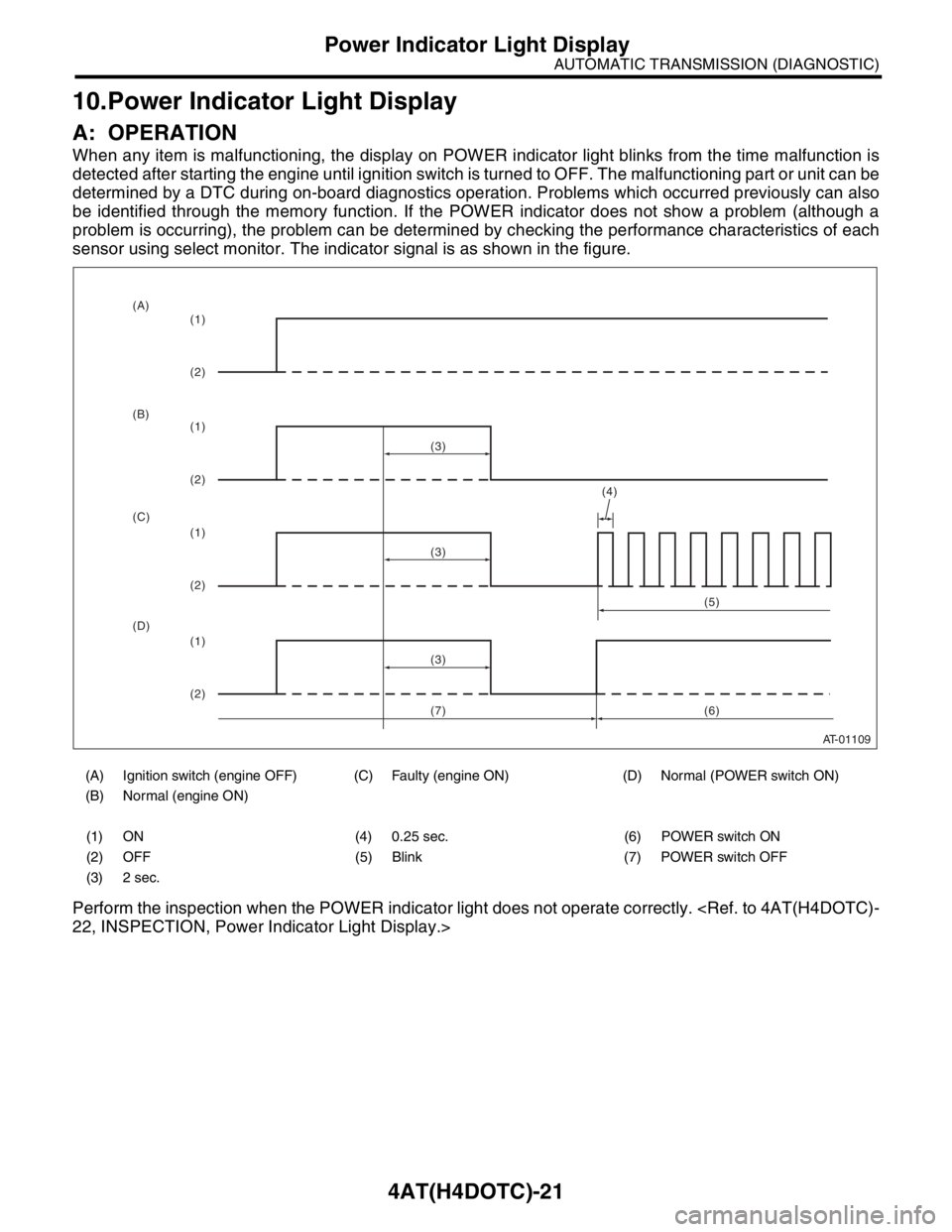
When any item is malfunctioning, the display on POWER indicator light blinks from the time malfunction is
detected after starting the engine until ignition switch is turned to OFF. The malfunctioning part or unit can be
determined by a DTC during on-board diagnostics operation. Problems which occurred previously can also
be identified through the memory function. If the POWER indicator does not show a problem (although a
problem is occurring), the problem can be determined by checking the performance characteristics of each
sensor using select monitor. The indicator signal is as shown in the figure.
Perform the inspection when the POWER indicator light does not operate correctly.
(A) Ignition switch (engine OFF) (C) Faulty (engine ON) (D) Normal (POWER switch ON)
(B) Normal (engine ON)
(1) ON (4) 0.25 sec. (6) POWER switch ON
(2) OFF (5) Blink (7) POWER switch OFF
(3) 2 sec.
AT-01109
(4)
(3)
(1)
(2)
(1)
(2)
(1)
(2)
(1)
(2)(3)
(3)(5)
(6) (A)
(B)
(C)
(D)
(7)
Page 2598 of 2870
4AT(H4DOTC)-22
AUTOMATIC TRANSMISSION (DIAGNOSTIC)
Power Indicator Light Display
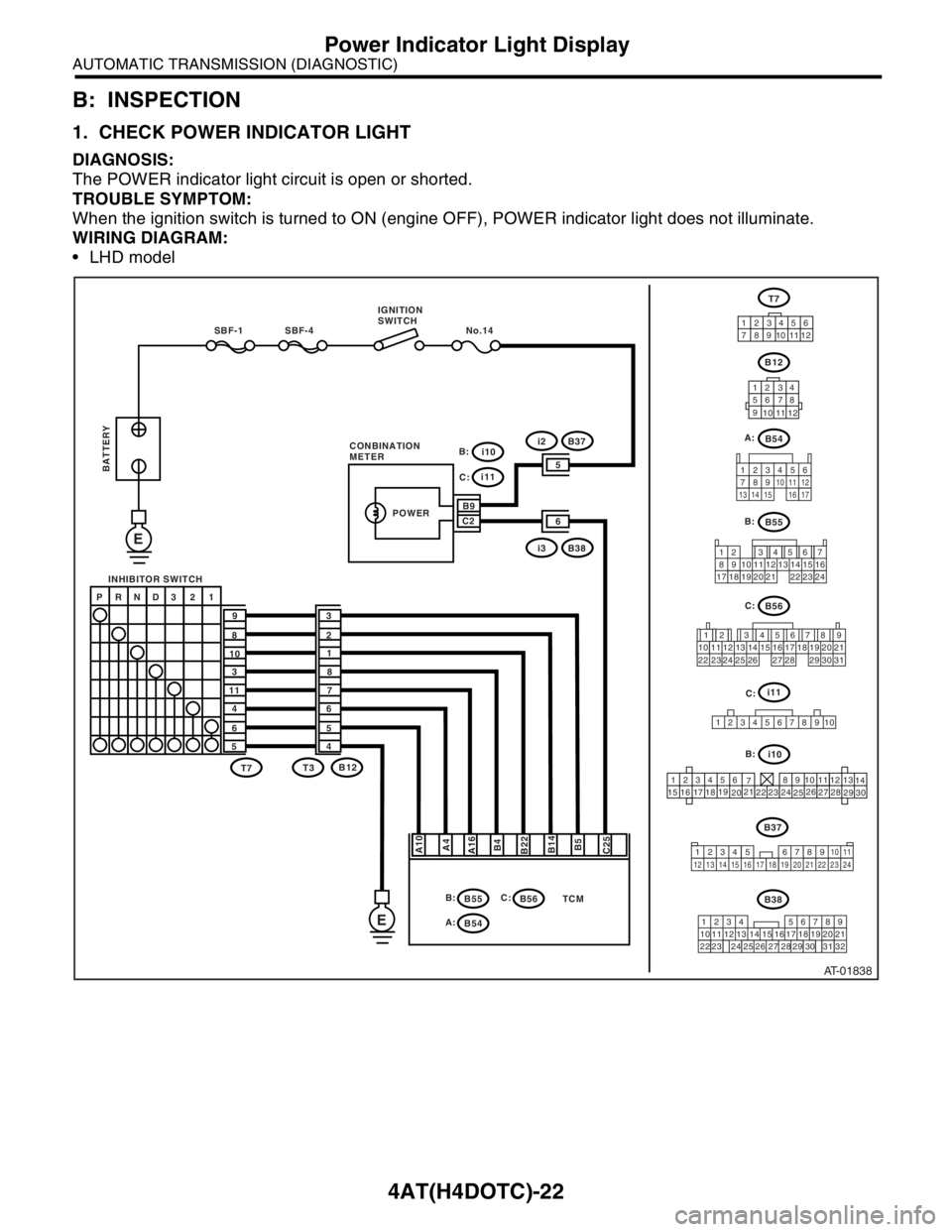
B: INSPECTION
1. CHECK POWER INDICATOR LIGHT
DIAGNOSIS:
The POWER indicator light circuit is open or shorted.
TROUBLE SYMPTOM:
When the ignition switch is turned to ON (engine OFF), POWER indicator light does not illuminate.
WIRING DIAGRAM:
LHD model
AT-01838
B55
B56
12 7
8956 34
10 11 12
19 20 2113 14 15 16
17 18 22 23 24
12 78 956 34
10 11 12 19 20 21
29 30 31 13 14 15 16 17
27 2818
22 23 24 25 26
TCM
SBF-4 No.14 SBF-1
E
E
A10
A4
A16
B4
B22
B5 B14
C25
P RND3 2 1
9
8
10
3
11
4
6
53
2
1
8
7
6
5
4
T7T7
B12
B55 T3B12
12 34
56 78
9
10
11
12
12 3456
789101112
123456
78 9 10 1112
13
14
15
1617
1819
2021
2223
24
2526
2728
29
30
i10
i11
B9
65
C2
i3B38
i2B37
POWER
B:
B54 A:
B56 C: B:
i10 B: C:
i11
C:
1234
5678910
C: B:
B54 A:
B38
219
32 1234 56
10 11 12 13 14 157
16
23 3019 20
22 26 27 28 298
17
24 3118
25
B37 IGNITION
SWITCH
INHIBITOR SWITCH
BATTERY
CONBINATION
METER
123
8910411 12
13 14 15 1656
7
17
34 12 8910 11
12 13 14 15 16 17 18 19 20 21 22 23 24567
Page 2599 of 2870
4AT(H4DOTC)-23
AUTOMATIC TRANSMISSION (DIAGNOSTIC)
Power Indicator Light Display
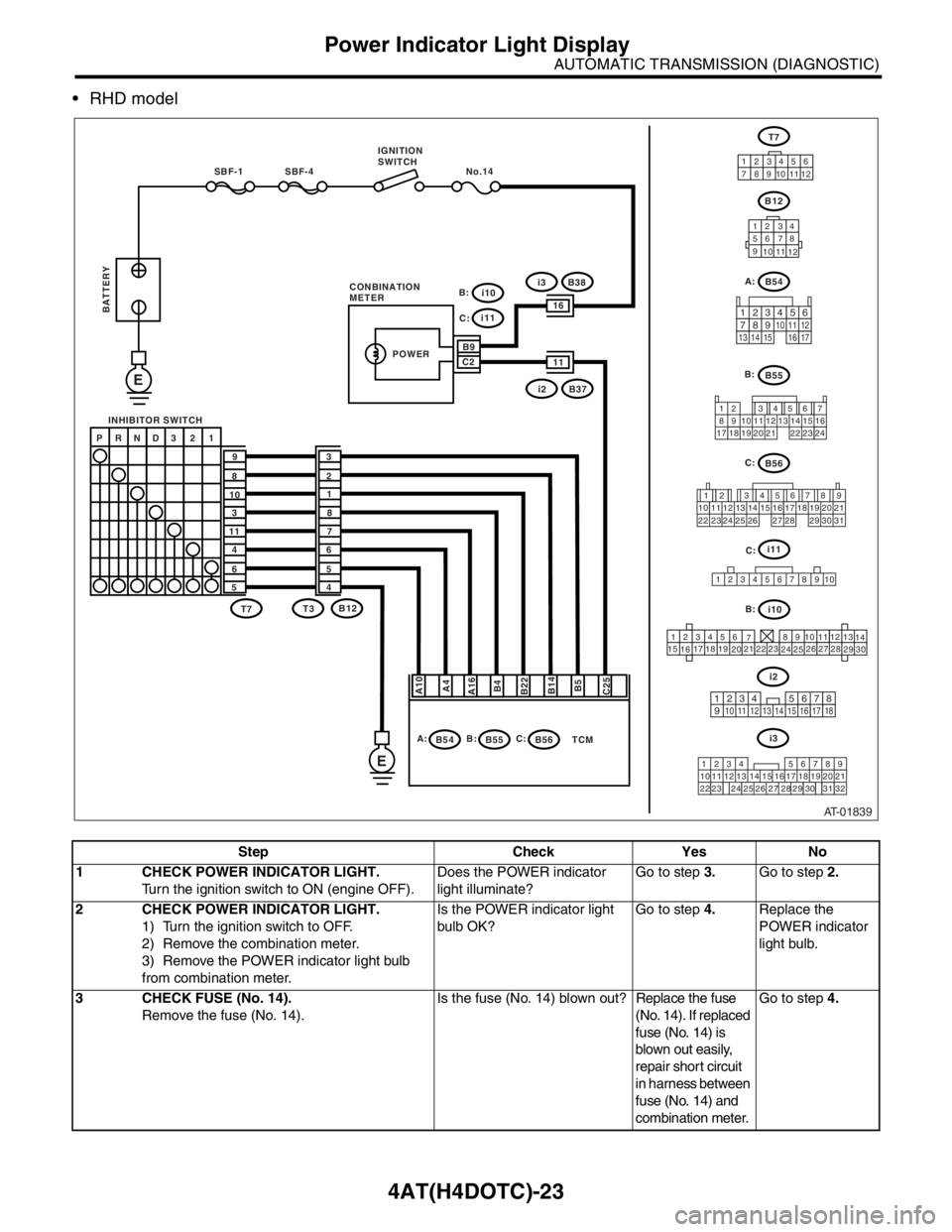
RHD model
Step Check Yes No
1 CHECK POWER INDICATOR LIGHT.
Turn the ignition switch to ON (engine OFF).Does the POWER indicator
light illuminate?Go to step 3.Go to step 2.
2 CHECK POWER INDICATOR LIGHT.
1) Turn the ignition switch to OFF.
2) Remove the combination meter.
3) Remove the POWER indicator light bulb
from combination meter.Is the POWER indicator light
bulb OK?Go to step 4.Replace the
POWER indicator
light bulb.
3 CHECK FUSE (No. 14).
Remove the fuse (No. 14).Is the fuse (No. 14) blown out? Replace the fuse
(No. 14). If replaced
fuse (No. 14) is
blown out easily,
repair short circuit
in harness between
fuse (No. 14) and
combination meter.Go to step 4.
AT-01839
TCM
SBF-4 No.14 SBF-1
E
E
A10
A4
A16
B4
B22
B5 B14
C25
P RND3 2 1
9
8
10
3
11
4
6
53
2
1
8
7
6
5
4
T7T7
B12
B55 T3B12
12 34
56 78
9
10
11
12
12 3456
789101112
i10
i11
B9
1116
C2
i2B37
i3B38
POWER
B:
B54 A:B56 C: B:
123456
78 9 10 1112
13
14
15
1617
1819
2021
2223
24
2526
2728
29
30
i10 B: C:
i11
C:
1234
5678910
B56
12 78 956 34
10 11 12 19 20 21
29 30 31 13 14 15 16 17
27 2818
22 23 24 25 26
C:
B55
12 7
8956 34
10 11 12
19 20 2113 14 15 16
17 18 22 23 24
B:
i3
219
32 1234 56
10 11 12 13 14 157
16
23 3019 20
22 26 27 28 298
17
24 3118
25
IGNITION
SWITCH
INHIBITOR SWITCH
BATTERY
CONBINATION
METERB54 A:
123
8910411 12
13 14 15 1656
7
17
i2
123 8
910411 12 13 14 15 165671718
Page 2600 of 2870

4AT(H4DOTC)-24
AUTOMATIC TRANSMISSION (DIAGNOSTIC)
Power Indicator Light Display
4 CHECK HARNESS CONNECTOR BETWEEN
COMBINATION METER AND IGNITION
SWITCH.
1) Turn the ignition switch to ON (engine OFF).
2) Measure the voltage between combination
meter connector and chassis ground.
Connector & terminal
(i10) No. 9 (+) — Chassis ground (
−):Is the voltage more than 9 V? Go to step 5.Repair the open
circuit in harness
between combina-
tion meter and bat-
tery.
5 CHECK COMBINATION METER.
Measure the voltage between combination
meter connector and chassis ground.
Connector & terminal
(i11) No. 2 (+) — Chassis ground (
−):Is the voltage less than 9 V? Repair the combi-
nation meter.
Meter Assembly.>Go to step 6.
6 CHECK OPEN CIRCUIT OF HARNESS.
1) Turn the ignition switch to OFF.
2) Disconnect the connector from combination
meter connector.
3) Measure the resistance of harness
between combination meter.
Connector & terminal
(B56) No. 25 — (i11) No. 2:Is the resistance less than 1
Ω?Go to step 7.Repair the open
circuit in harness
between TCM and
combination
meter, and poor
contact in cou-
pling connector.
7 CHECK INPUT SIGNAL FOR TCM.
1) Connect the connector to TCM and combi-
nation meter.
2) Turn the ignition switch to ON (engine OFF).
3) Measure the voltage between TCM con-
nector and chassis ground.
Connector & terminal
(B56) No. 25 (+) — Chassis ground (
−):Is the voltage less than 1 V? Go to step 8.Replace the TCM.
trol Module
(TCM).>
8 INSPECT POWER INDICATOR LIGHT.Does the POWER indicator
light illuminate?Diagnose accord-
ing to basic diag-
nostic procedure.Inspect power sup-
ply and ground cir-
cuit. Step Check Yes No
Page 2602 of 2870

4AT(H4DOTC)-26
AUTOMATIC TRANSMISSION (DIAGNOSTIC)
Power Indicator Light Display
2 CHECK POWER SUPPLY OF TCM.
1) Disconnect the connector from TCM.
2) Turn the ignition switch to ON.
3) Measure the voltage between TCM con-
nector and chassis ground.
Connector & terminal
(B56) No. 27 (+) — Chassis ground (
−):
(B56) No. 28 (+) — Chassis ground (
−):
(B56) No. 29 (+) — Chassis ground (
−):Is the voltage 10 — 13 V? Go to step 4.Go to step 3.
3 CHECK FUSE (No. 4).
1) Turn the ignition switch to OFF.
2) Remove the fuse (No. 4).Is the fuse (No. 4) blown out? Replace the fuse
(No. 4). If replaced
fuse (No. 4) has
blown out easily,
repair short circuit
in harness between
fuse (No. 4) and
TCM.Repair the open
circuit in harness
between fuse (No.
4) and TCM, or
fuse (No. 4) and
battery, and poor
contact in cou-
pling connector.
4 CHECK IGNITION POWER SUPPLY CIR-
CUIT.
1) Turn the ignition switch to ON (engine OFF).
2) Measure the ignition power supply voltage
between TCM connector and chassis ground.
Connector & terminal
(B56) No. 21 (+) — Chassis ground (–):
(B56) No. 31 (+) — Chassis ground (–):Is the voltage 10 — 13 V? Go to step 6.Go to step 5.
5 CHECK FUSE (No. 11).
Remove the fuse (No. 11).Is the fuse (No. 11) blown out? Replace the fuse
(No. 11). If
replaced fuse (No.
11) has blown out
easily, repair short
circuit in harness
between fuse (No.
11) and TCM.Repair the open
circuit in harness
between fuse (No.
11) and TCM, or
fuse (No. 11) and
battery, and poor
contact in cou-
pling connector.
6 CHECK HARNESS CONNECTOR BETWEEN
TCM AND TRANSMISSION.
1) Turn the ignition switch to OFF.
2) Disconnect the connector from TCM and
transmission.
3) Measure the resistance of harness
between TCM and transmission connector.
Connector & terminal
(B55) No. 8 — (B11) No. 19:
(B55) No. 17 — (B11) No. 19:
(B56) No. 2 — (B11) No. 20:
(B56) No. 3 — (B11) No. 20:Is the resistance less than 1
Ω?Go to step 7.Repair the open
circuit in harness
between TCM,
transmission har-
ness connector,
and poor contact
in coupling con-
nector.
7 CHECK HARNESS CONNECTOR BETWEEN
TRANSMISSION AND TRANSMISSION
GROUND.
Measure the resistance of harness between
transmission and transmission ground.
Connector & terminal
(T4) No. 19 — Transmission ground:
(T4) No. 20 — Transmission ground:Is the resistance less than 1
Ω?Go to step 8.Repair the open
circuit in harness
between transmis-
sion and transmis-
sion ground.
8 CHECK POOR CONTACT IN CONNECTORS.Is there poor contact in TCM
power supply, ground line and
data link connector?Repair the con-
nector.Replace the TCM.
trol Module
(TCM).> Step Check Yes No