key battery SUBARU FORESTER 2004 Service Repair Manual
[x] Cancel search | Manufacturer: SUBARU, Model Year: 2004, Model line: FORESTER, Model: SUBARU FORESTER 2004Pages: 2870, PDF Size: 38.67 MB
Page 427 of 2870
SL-7
SECURITY AND LOCK
General Description
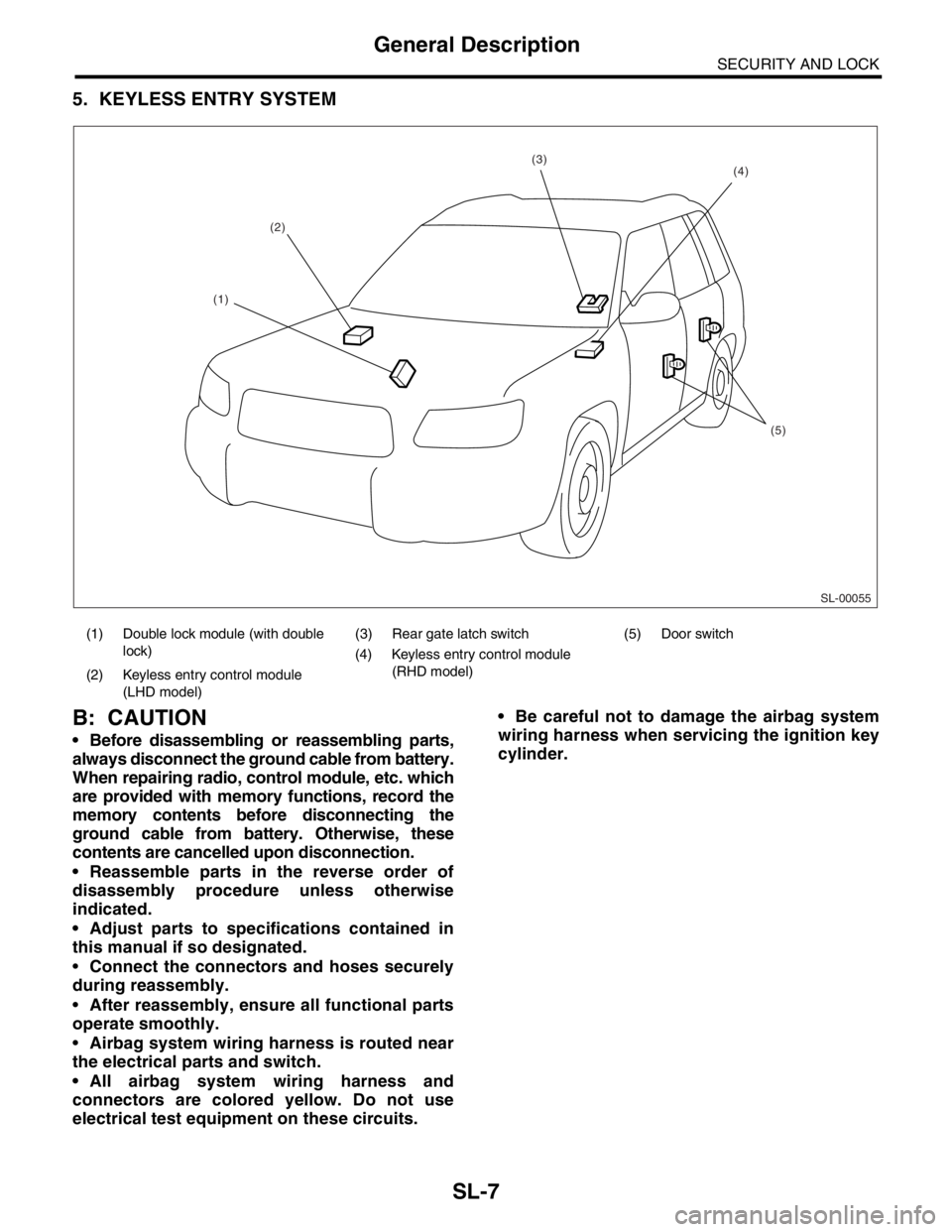
5. KEYLESS ENTRY SYSTEM
B: CAUTION
Before disassembling or reassembling parts,
always disconnect the ground cable from battery.
When repairing radio, control module, etc. which
are provided with memory functions, record the
memory contents before disconnecting the
ground cable from battery. Otherwise, these
contents are cancelled upon disconnection.
Reassemble parts in the reverse order of
disassembly procedure unless otherwise
indicated.
Adjust parts to specifications contained in
this manual if so designated.
Connect the connectors and hoses securely
during reassembly.
After reassembly, ensure all functional parts
operate smoothly.
Airbag system wiring harness is routed near
the electrical parts and switch.
All airbag system wiring harness and
connectors are colored yellow. Do not use
electrical test equipment on these circuits. Be careful not to damage the airbag system
wiring harness when servicing the ignition key
cylinder.
(1) Double lock module (with double
lock)(3) Rear gate latch switch (5) Door switch
(4) Keyless entry control module
(RHD model)
(2) Keyless entry control module
(LHD model)
SL-00055
(2)
(5)
(4)(3)
(1)
Page 434 of 2870
SL-14
SECURITY AND LOCK
Keyless Entry System
3. Keyless Entry System
A: WIRING DIAGRAM
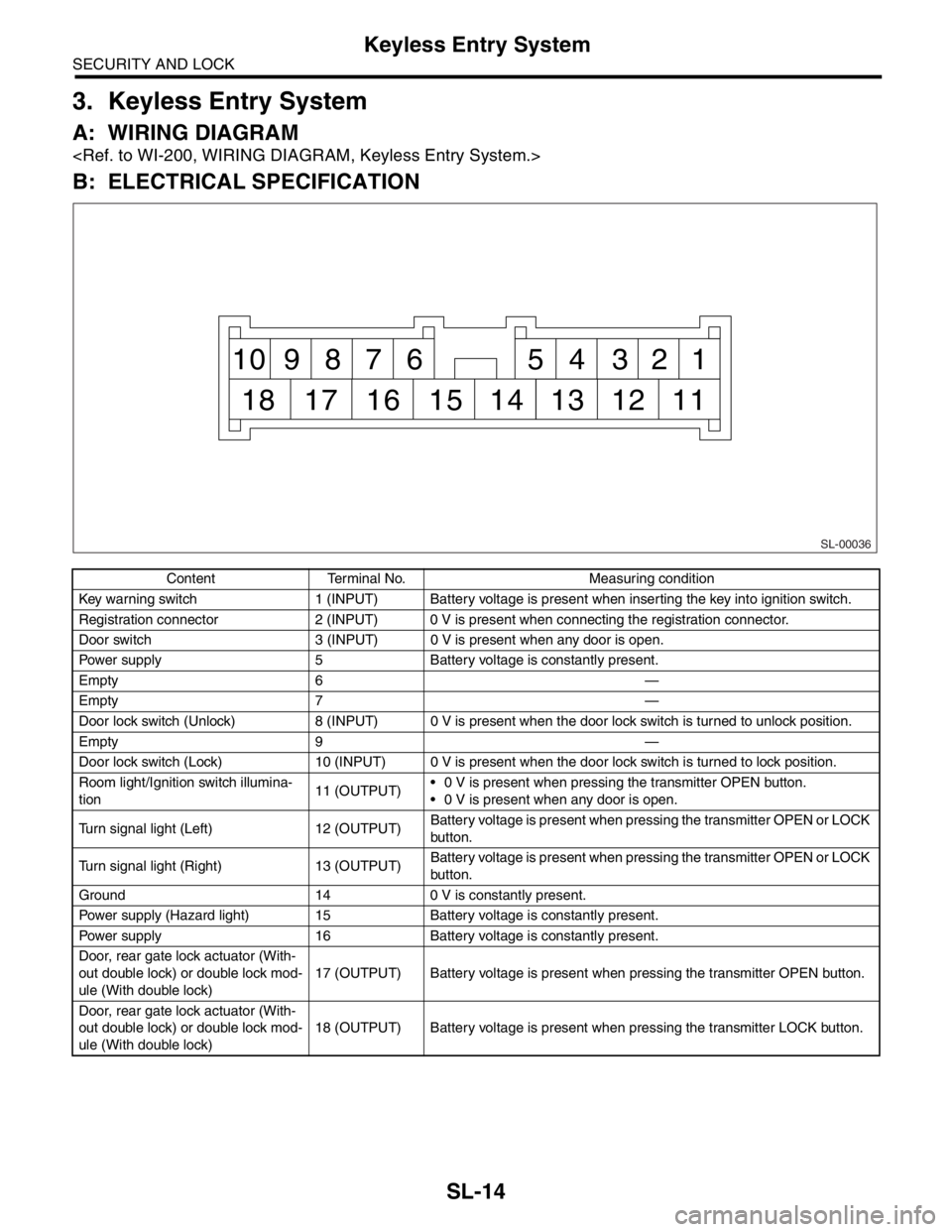
B: ELECTRICAL SPECIFICATION
Content Terminal No. Measuring condition
Key warning switch 1 (INPUT) Battery voltage is present when inserting the key into ignition switch.
Registration connector 2 (INPUT) 0 V is present when connecting the registration connector.
Door switch 3 (INPUT) 0 V is present when any door is open.
Power supply 5 Battery voltage is constantly present.
Empty 6 —
Empty 7 —
Door lock switch (Unlock) 8 (INPUT) 0 V is present when the door lock switch is turned to unlock position.
Empty 9 —
Door lock switch (Lock) 10 (INPUT) 0 V is present when the door lock switch is turned to lock position.
Room light/Ignition switch illumina-
tion11 (OUTPUT) 0 V is present when pressing the transmitter OPEN button.
0 V is present when any door is open.
Turn signal light (Left) 12 (OUTPUT)Battery voltage is present when pressing the transmitter OPEN or LOCK
button.
Turn signal light (Right) 13 (OUTPUT)Battery voltage is present when pressing the transmitter OPEN or LOCK
button.
Ground 14 0 V is constantly present.
Power supply (Hazard light) 15 Battery voltage is constantly present.
Power supply 16 Battery voltage is constantly present.
Door, rear gate lock actuator (With-
out double lock) or double lock mod-
ule (With double lock)17 (OUTPUT) Battery voltage is present when pressing the transmitter OPEN button.
Door, rear gate lock actuator (With-
out double lock) or double lock mod-
ule (With double lock)18 (OUTPUT) Battery voltage is present when pressing the transmitter LOCK button.
SL-00036
1 2 3 4 5 6 7 8 9 10
11 12 13 14 15 16 17 18
Page 435 of 2870

SL-15
SECURITY AND LOCK
Keyless Entry System
C: INSPECTION
1. SYMPTOM CHART
Symptom Repair order Reference
None of the functions of keyless entry
system operate.1. Check the transmitter battery.
less Entry System.>
2. Check the fuse.
tem.>
3. Check the keyless entry control module power
supply and ground circuit.
INSPECTION, Keyless Entry Sys-
tem.>
4. Replace the keyless entry control module.
The transmitter cannot be registered. 1. Check the transmitter battery.
less Entry System.>
2. Check the registration connector circuit.
INSPECTION, Keyless Entry Sys-
tem.>
3. Check the door lock switch and circuit.
Entry System.>
4. Replace the keyless entry control module.
The door lock or unlock does not
operate.
N
OTE:
If the door lock control system does
not operate when using the door lock
switch, check the door lock control
system.
less Entry System.>
2. Make sure the registration connector is not
connected.Make sure the registration connector
is not connected because keyless
entry system does not operate during
the registration connector connected.
3. Check the key warning switch.
Entry System.>
4. Check the door switch.
Entry System.>
5. Check output signal to double lock module.
(With double lock)
ULE, INSPECTION, Keyless Entry
System.>
6. Replace the keyless entry control module.
The hazard light does not operate. 1. Check the hazard light operation.
Keyless Entry System.>
2. Replace the keyless entry control module.
Page 436 of 2870

SL-16
SECURITY AND LOCK
Keyless Entry System
2. CHECK TRANSMITTER BATTERY
3. CHECK FUSE
The room light and ignition switch illu-
mination operation does not activate.1. Check the room light operation.
Keyless Entry System.>
2. Check the ignition switch illumination circuit.
INSPECTION, Keyless Entry Sys-
tem.>
3. Replace the keyless entry control module.
(without double lock)
4. Replace the double lock module. (with double
lock)
Step Check Yes No
1 CHECK TRANSMITTER BATTERY.
1) Remove the battery from transmitter.
2) Check the battery voltage.
NOTE:
If the transmitter battery voltage is 2.5 V or less,
the range of transmission becomes very short.Is the voltage more than 2.5 V? If further inspec-
tion is necessary,
refer to “SYMP-
TOM CHART”.
CHART, INSPEC-
TION, Keyless
Entry System.>Replace the trans-
mitter battery.
Step Check Yes No
1 CHECK FUSE.
Remove and visually check the fuse No. 2 (in
the main fuse box), No. 3 (in the fuse and relay
box) and SBF-6 (in the main fuse box)Is the fuse blown out? Replace the fuse
with a new one.Check the power
supply and ground
circuit.
POWER SUPPLY
AND GROUND
CIRCUIT,
INSPECTION,
Keyless Entry Sys-
tem.> Symptom Repair order Reference
Page 455 of 2870
SL-35
SECURITY AND LOCK
Ignition Key Lock
17.Ignition Key Lock
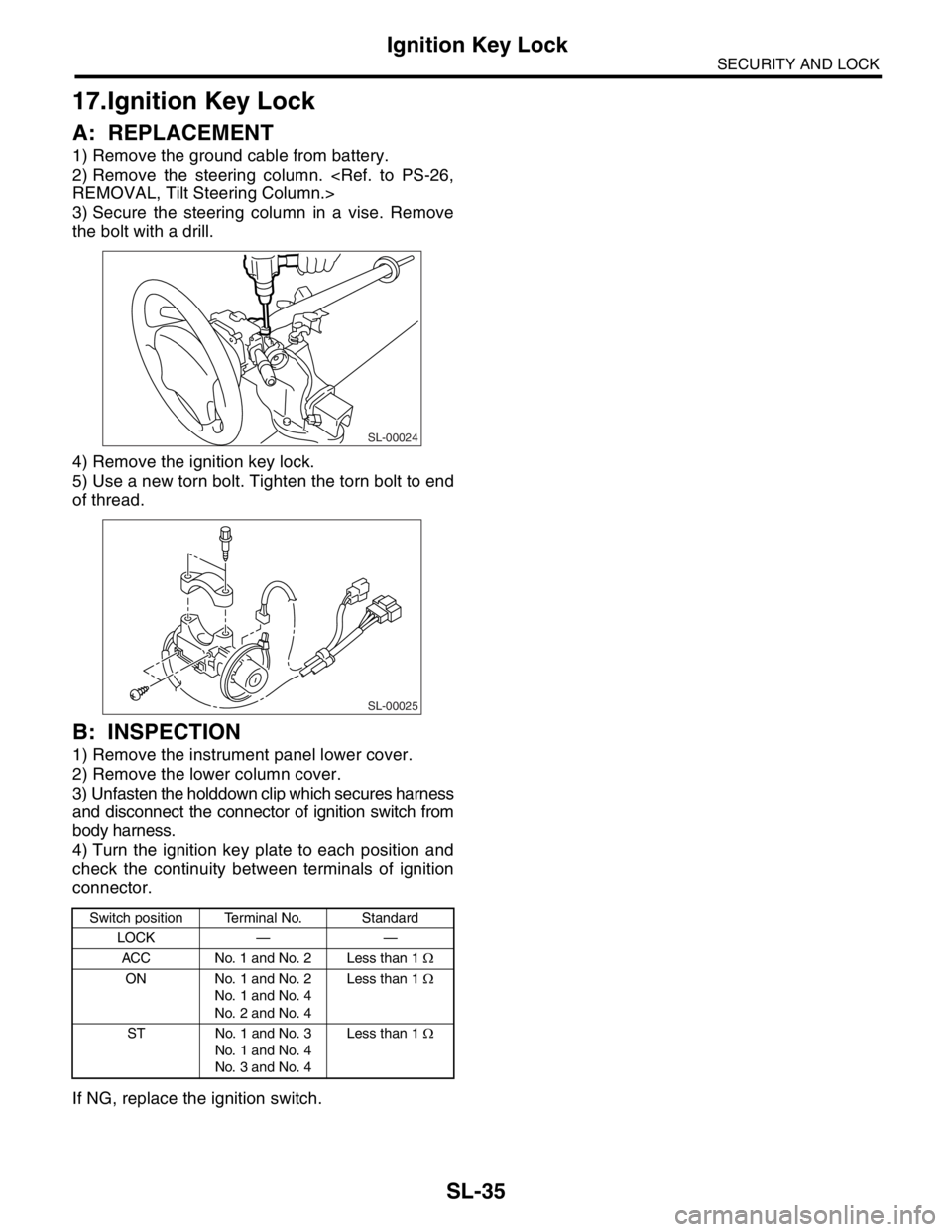
A: REPLACEMENT
1) Remove the ground cable from battery.
2) Remove the steering column.
3) Secure the steering column in a vise. Remove
the bolt with a drill.
4) Remove the ignition key lock.
5) Use a new torn bolt. Tighten the torn bolt to end
of thread.
B: INSPECTION
1) Remove the instrument panel lower cover.
2) Remove the lower column cover.
3) Unfasten the holddown clip which secures harness
and disconnect the connector of ignition switch from
body harness.
4) Turn the ignition key plate to each position and
check the continuity between terminals of ignition
connector.
If NG, replace the ignition switch.
Switch position Terminal No. Standard
LOCK — —
ACC No. 1 and No. 2 Less than 1 Ω
ON No. 1 and No. 2
No. 1 and No. 4
No. 2 and No. 4Less than 1 Ω
ST No. 1 and No. 3
No. 1 and No. 4
No. 3 and No. 4Less than 1 Ω
SL-00024
SL-00025
Page 459 of 2870
SL-39
SECURITY AND LOCK
Keyless Entry Control Module
21.Keyless Entry Control Mod-
ule
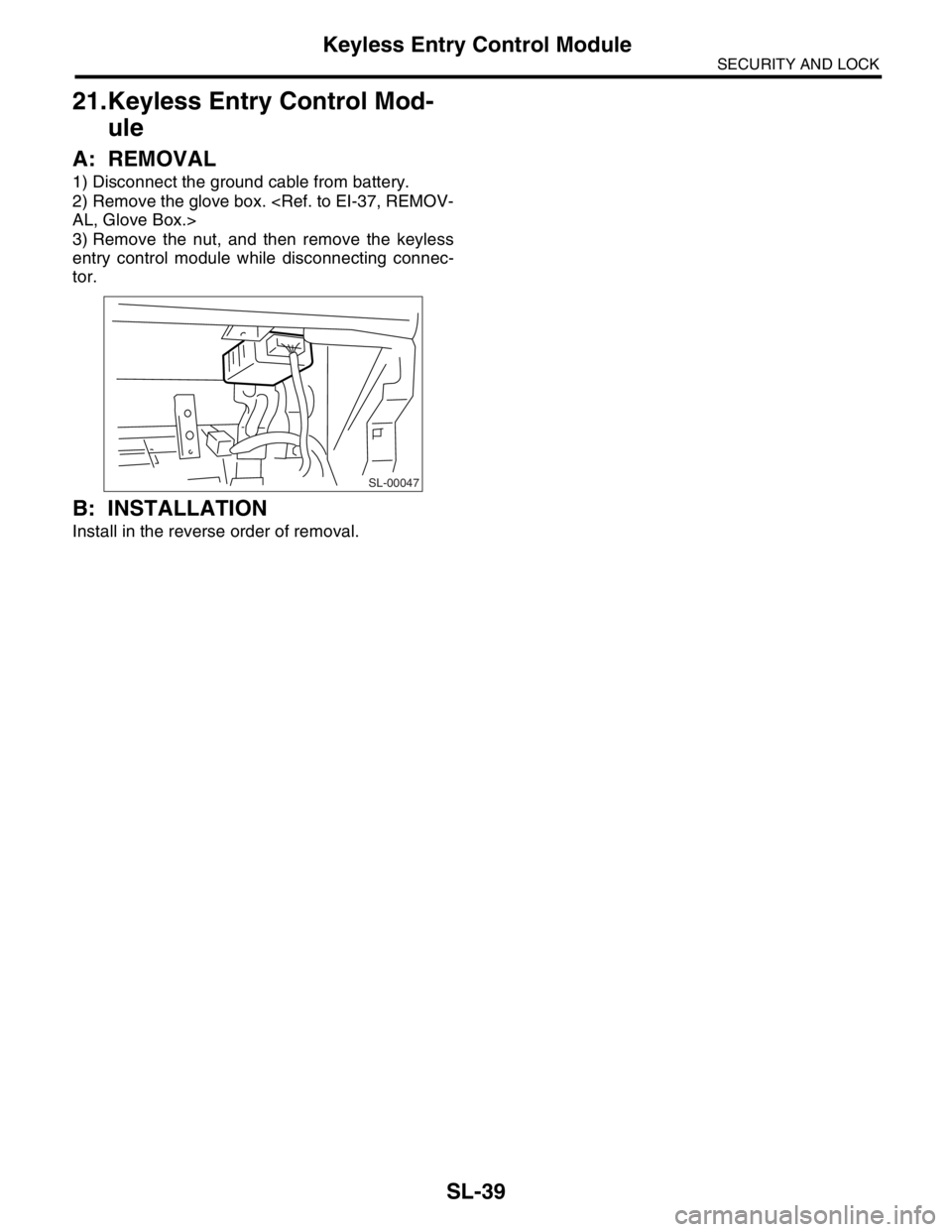
A: REMOVAL
1) Disconnect the ground cable from battery.
2) Remove the glove box.
3) Remove the nut, and then remove the keyless
entry control module while disconnecting connec-
tor.
B: INSTALLATION
Install in the reverse order of removal.
SL-00047
Page 461 of 2870

SL-41
SECURITY AND LOCK
Keyless Transmitter
23.Keyless Transmitter
A: REMOVAL
1. TRANSMITTER BATTERY
Remove the battery from transmitter.
NOTE:
To prevent static electricity damage to transmitter
printed circuit board, touch the steel area of building
with hand to discharge the static electricity carried
on body or clothes before disassembling transmitter.
B: INSTALLATION
1. TRANSMITTER BATTERY
Install in the reverse order of removal.
C: INSPECTION
1. TRANSMITTER BATTERY
Measure the voltage between battery (+) terminal
and (–) terminal.
NOTE:
Battery discharge occurs during measurement.
Complete the measurement within 5 seconds.
During battery voltage measurement, voltage
falls more than 1.8 volts in 3 seconds period.If NG, replace the battery. (Use CR1620 or equiva-
lent.)
D: REPLACEMENT
1. TRANSMITTER REGISTRATION
NOTE:
A maximum of three transmitters can be regis-
tered for each individual vehicle.
When replacing the transmitter (key), registration
to immobilizer system is also necessary.
1) Remove the side sill cover at driver’s side, then
connect the registration connectors at front pillar
lower section.
2) Unlock the door lock.
3) Press any button of the transmitter twice while
pressing driver’s door lock switch to unlock side to
be registered.
4) The door lock will automatically lock and unlock
in sequence. This indicates the completion of trans-
mitter registration for first transmitter.
5) If the registration of second and third transmitter
is now to be carried out, repeat the procedure 3)
and 4).
6) Disconnect the registration connectors after the
completion of all registration operations. After con-
firming the operation of door lock using newly reg-
istered transmitter(s), reinstall the side sill cover at
driver’s side.
(A) Resistance 300 Ω
Tester connection
Standard
(+) (–)
Battery (+) termi-
nalBattery (–) termi-
nal2.5 — 3.0 V
SL-00065
SL-00066
(A)
Page 654 of 2870
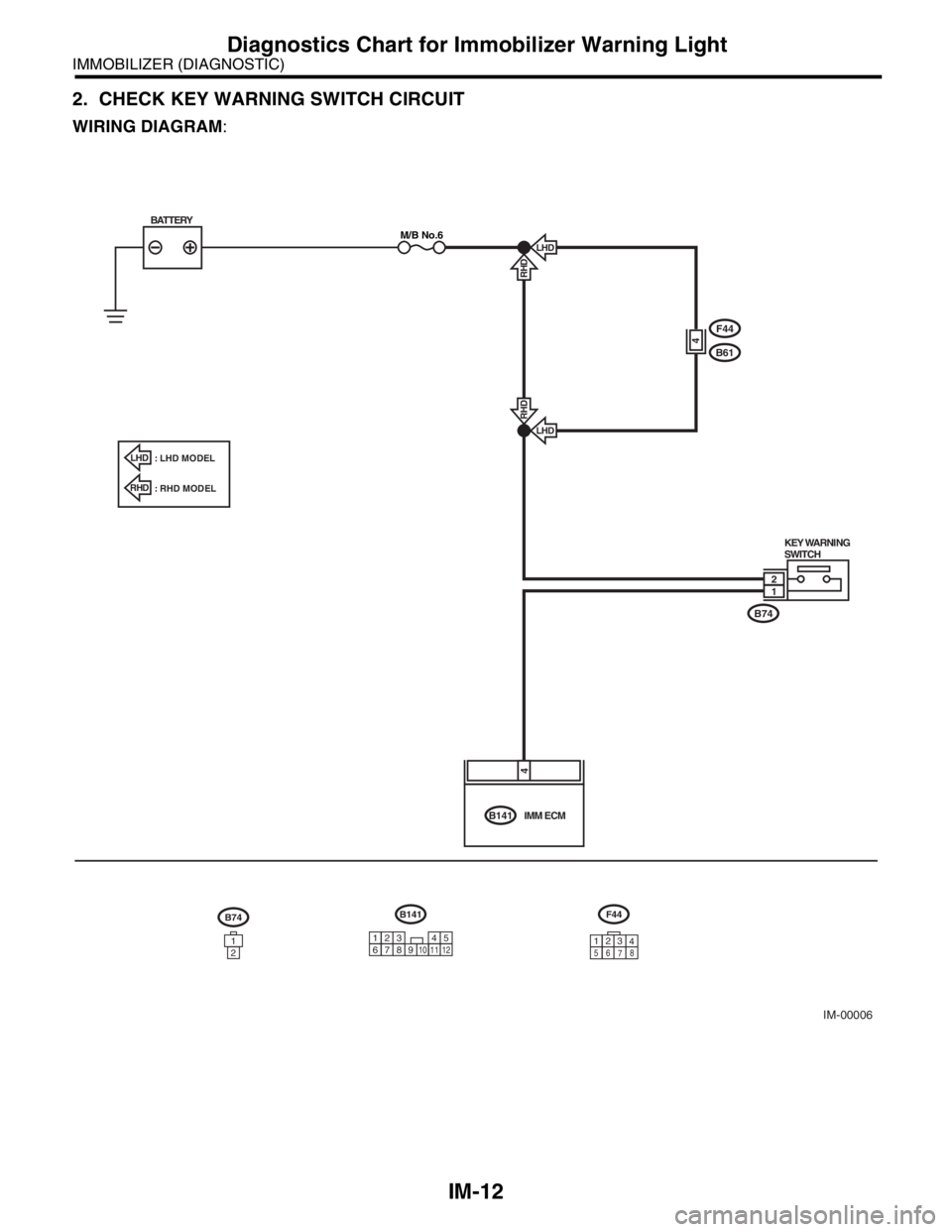
IM-12
IMMOBILIZER (DIAGNOSTIC)
Diagnostics Chart for Immobilizer Warning Light
2. CHECK KEY WARNING SWITCH CIRCUIT
WIRING DIAGRAM:
IM-00006
B74
B61
F44
KEY WARNING
SWITCH
B141IMM ECM
LHD
RHDLHD
RHD
BATTERYM/B No.6
4
12
4
B74
1
2
B141
34 12
89
10 11125
67
F44
3
1
56
78
LHD: LHD MODEL
: RHD MODEL
RHD
2
4
Page 660 of 2870

IM-18
IMMOBILIZER (DIAGNOSTIC)
Diagnostics Procedure with Diagnostic Trouble Code (DTC)
6 CHECK HARNESS OF COMMUNICATION
LINE.
1) Turn the ignition switch to ON. (engine
OFF.)
2) Measure the voltage between IMM ECM
harness connector terminal and chassis
ground.
Connector & terminal
(B141) No. 1, No. 6 (+) — Chassis ground
(
−):Is the voltage 0 V? Go to step 7.Repair the har-
ness between IMM
ECM and ECM,
because there is
short circuit with
battery voltage line
or ignition switch
“ON” line.
7 CHECK HARNESS OF COMMUNICATION
LINE.
Measure the voltage between ECM harness
connector terminal and engine ground.
Connector & terminal
Non-turbo model
(B137) No. 17, No. 18 (+) — Engine
ground(
−):
Turbo model
(B137) No. 19, No. 27 (+) — Engine
ground(
−):Is the voltage 0 V? Go to step 8.Repair the har-
ness between IMM
ECM and ECM,
because there is
short circuit with
battery voltage line
or ignition switch
“ON” line.
8 CHECK ECM BY COMMUNICATION LINE
CHECK.
1) Connect the harness connector to ECM.
2) Disconnect the harness connector from
IMM ECM.
3) Perform communication line check.
OPERATION, Subaru Select Monitor.>Does “Communication Line not
Shorted” appear on the
screen?Replace the IMM
ECM
Control Module.>
and then replace
all ignition keys
(including the tran-
sponder). Then
perform teaching
operation. Refer to
the teaching oper-
ation manual (Pub.
No. S0820GZ).Replace the ECM.
Engine Control
Module (ECM).>
Engine Control
Module (ECM).>
41, Engine Con-
trol Module
(ECM).> Then per-
form teaching
operation. Refer to
the teaching oper-
ation manual (Pub.
No. S0820GZ). Step Check Yes No
Page 726 of 2870

PI-3
PRE-DELIVERY INSPECTION
Pre-delivery Inspection
B: PDI PROCEDURE
Follow the procedures shown in the table below.
Static Checks Just After Vehicle Receipt
Step Check point
1. Appearance check (1) If the vehicle is covered with protective coating, visually check the vehicle
body for damage and dents. If the protective coating has been removed,
visually check the body paints for small areas of damage or stains.
(2) Visually check the glass and light lenses for any damage and cracks or
excessive gaps to the body sheet metal.
(3) Visually check the plated parts for any damage.
2. Tire check (1) Check the tires for damage, abnormal conditions, and dents on the
wheels.
(2) Check the tire air pressure.
3. Fuse installation If the vehicle is about to be delivered to the customer, attach a room light
fuse.
4. Connection of air conditioner harness If the vehicle is about to be delivered to the customer, connect the air condi-
tioner harness.
5. Check the doors for lock/unlock and open/close
operations.(1) Using the key, check if the door can be locked and unlocked normally.
(2) Open and close all doors to see that there are no abnormal conditions.
6. Operation check of double lock Check that the double lock operates normally.
7. Operation check of the child safety lock system. Check the child safety lock system operates normally.
8. Check the rear gate for lock/unlock and open/
close operations.(1) Check if the rear gate can be unlocked normally from the emergency
door.
(2) Open and close the rear gate to see that there are no abnormal condi-
tions.
(3) Operate the power door locking switch to check that the rear gate is
locked and unlocked normally.
9. Operation check of fuel lid opener lock release
leverOperate the fuel lid opener to check that the fuel lid is unlocked normally.
10. Accessory check Check that the following accessories are provided:
Owner’s manual
Warranty booklet
Service booklet
Spare key
Jack
Tool set
Spare tire
11. Operation check of hood lock release system Operate the hood lock release lever to check that the hood opens normally.
12. Battery Check the battery for any abnormal conditions such as rust and trace of bat-
tery fluid leaks.
13. Brake fluid Check the fluid amount.
14. Engine oil Check the oil amount.
15. Transmission fluid (1) Check the fluid amount.
(2) For AT, check the front differential oil.
16. AT front differential oil Check the AT front differential oil amount.
17. Coolant Check the coolant amount.
18. Clutch fluid Check the clutch fluid amount.
19. Window washer fluid Check the window washer fluid amount.
20. Hood latch check Check that the hood is closed and latched securely.
21. Keyless entry system Check that the keyless entry system operates normally.
22. Security system Check that the security system operates normally.
23. Seat (1) Check the seat surfaces for smears or dirt.
(2) Check the seat installation conditions and functionality.
24. Seat belt Check the seat belt installation conditions and functionality.
25. Wheel alignment Check that the wheel alignments are properly adjusted.