light SUBARU FORESTER 2006 Owners Manual
[x] Cancel search | Manufacturer: SUBARU, Model Year: 2006, Model line: FORESTER, Model: SUBARU FORESTER 2006Pages: 355, PDF Size: 5.49 MB
Page 203 of 355
7-8
Starting and operating1) Turn the ignition switch to the “OFF”
position and wait for at least 10 sec-
onds. After checking that the parking
brake is firmly set, turn the ignition
switch to the “START” position while de-
pressing the accelerator pedal slightly
(about a quarter of the full stroke). Re-
lease the accelerator pedal as soon as
the engine starts.
2) If this fails to start the engine, turn the
ignition switch back to the “OFF” posi-
tion and wait for at least 10 seconds.
Then fully depress the accelerator ped-
al and turn the ignition switch to the
“START” position. If the engine starts,
quickly release the accelerator pedal.
3) If this fails to start the engine, turn the
ignition switch again to the “OFF” posi-
tion. After waiting for 10 seconds or
longer, turn the ignition switch to the
“START” position without depressing
the accelerator pedal.
4) If the engine still refuses to start, con-
tact your nearest SUBARU dealer for
assistance.
6. Confirm that all warning and indicator
lights have gone out after the engine has
started. The fuel injection system auto-
matically lowers the idle speed as the en-
gine warms up.
While the engine is warming up, make
sure that the selector lever is at the “P” or “N” position and that the parking brake is
applied.
NOTEThe engine may be difficult to start
when the battery has been disconnect-
ed and reconnected (for maintenance
or other purposes). This difficulty is
caused by the electronically controlled
throttle’s self-diagnosis function. To
overcome it, keep the ignition switch in
the “ON” position for approximately 10
seconds before starting the engine.
Stopping the engineThe ignition switch should be turned off
only when the vehicle is stopped and the
engine is idling.
If you restart the engine while the
vehicle is moving, shift the selector
lever into the “N” position. Do not
attempt to place the selector lever of
a moving vehicle into the “P” posi-
tion.
Do not stop the engine when the ve-
hicle is moving. This will cause loss
of power to the power steering and
the brake booster, making steering
and braking more difficult. It could
also result in accidental activation
of the “LOCK” position on the igni-
tion switch, causing the steering
wheel to lock.
ProCarManuals.com
Page 207 of 355
7-12
Starting and operating
sure safe starting of the vehicle.
To shift the selector lever from the “P” to
the any other position, you have to de-
press the brake pedal fully when the igni-
tion switch is in the “ON” position. This
prevents the vehicle from lurching when it
is started.
If the shift lever does not move from the
“P” position with the brake pedal de-
pressed, refer to the “Shift lock release”
section in this chapter.
TR (Reverse)
This position is for backing the vehicle.
To shift from the “N” to “R” position, first
stop the vehicle completely then move the
lever to the “R” position.
T N (Neutral)
This position is for restarting a stalled en-
gine.
In this position the wheels and transmis-
sion are not locked. In this position, the
transmission is neutral; the vehicle will roll
freely, even on the slightest incline unless
the parking brake or foot brake is on.
Avoid coasting with the transmission neu-
tral.
During coasting, there is no engine brak-
ing effect.
NOTEIf you stop the engine with the selector
lever in the “N” position, move the se-
lector lever to the “P” position immedi-
ately. Otherwise, you may find that the
selector lever soon cannot be moved
to the “P” position. If you find that the
selector lever cannot be moved from
the “N” position to the “P” position,
turn the ignition switch to the “ON” po-
sition and try again.T D (Drive)
This position is for normal driving.
The transmission automatically shifts into
a suitable gear from 1st to 4th according to
the vehicle speed and the acceleration
you require.
When more acceleration is required in this
position, press the accelerator pedal fully
to the floor and hold that position. The
transmission will automatically downshift
to 3rd, 2nd or 1st gear. When you release
the pedal, the transmission will return to the original gear position.
V
While climbing a grade
When driving up hill, undesired upshift to
4th gear is prevented from taking place
when the accelerator pedal is released.
This minimizes the chances of subse-
quent downshifting to a lower gear when
accelerating again. This prevents repeat-
ed upshifting and downshifting resulting in
a smoother operation of the vehicle.
NOTEThe transmission may downshift to
2nd or 1st gear, depending on the way
the accelerator pedal is pressed to ac-
celerate the vehicle again.
V While going down a hill
When descending a steep hill, depressing
the brake pedal will cause the transmis-
sion to downshift to 3rd gear, thus apply-
ing engine braking. Reacceleration for a
short time will cause the transmission to
upshift normally.NOTEIn some cases, depressing the brake
pedal on a downhill grade does not re-
sult in an automatic downshift to 3rd
gear. This can happen when the auto-
matic transmission fluid temperature is
very low, for example, during driving
Do not drive the vehicle with the se-
lector lever in the “N” (neutral) posi-
tion. Engine braking has no effect in
this condition and the risk of an ac-
cident is consequently increased.
ProCarManuals.com
Page 210 of 355
Starting and operating
7-15
– CONTINUED –
Power steeringThe power steering system operates only
when the engine is running.
If you lose power steering assist because
the engine stops or the system fails to
function, you can steer but it will take
much more effort.NOTERight after the engine has been started
and before it has warmed up, you may
hear a noise coming from areas adja-
cent to the power steering pump which
is located at the right-front area of the
engine compartment. This noise is nor-
mal. It does not indicate power steering
system trouble.
Braking„Braking tipsT When the brakes get wet
When driving in rain or after washing the
vehicle, the brakes may get wet. As a re-
sult, brake stopping distance will be long-
er. To dry the brakes, drive the vehicle at
a safe speed while lightly depressing the
brake pedal to heat up the brakes.
T Use of engine braking
Remember to make use of engine braking
in addition to foot braking. When descend-
ing a grade, if only the foot brake is used,
the brakes may start working improperly
because of brake fluid overheating,
caused by overheated brake pads. To
help prevent this, shift into a lower gear to
get stronger engine braking.
T Braking when a tire is punctured
Do not depress the brake pedal suddenly when a tire is punctured. This could cause
a loss of control of the vehicle. Keep driv-
ing straight ahead while gradually reduc-
ing speed. Then slowly pull off the road to
a safe place.
„
Brake systemT Two separate circuits
Your vehicle has two separate circuit
brake systems. Each circuit works diago-
nally across the vehicle. If one circuit of
the brake system should fail, the other half
of the system still works. If one circuit fails,
the brake pedal will go down much closer
to the floor than usual and you will need to
press it down much harder. And a much
longer distance will be needed to stop the
vehicle.
T Brake booster
The brake booster uses engine manifold
vacuum to assist braking force. Do not
turn off the engine while driving because
that will turn off the brake booster, result-
ing in poor braking power.
The brakes will continue to work even
when the brake booster completely stops
functioning. If this happens, however, you
will have to push the pedal much harder
than normal and the braking distance will
increase.
Do not hold the steering wheel at the
fully locked position left or right for
more than five seconds. This may
damage the power steering pump.
Never rest your foot on the brake
pedal while driving. This can cause
dangerous overheating of the
brakes and needless wear on the
brake pads and linings.
ProCarManuals.com
Page 211 of 355
7-16
Starting and operating
„Disc brake pad wear warning
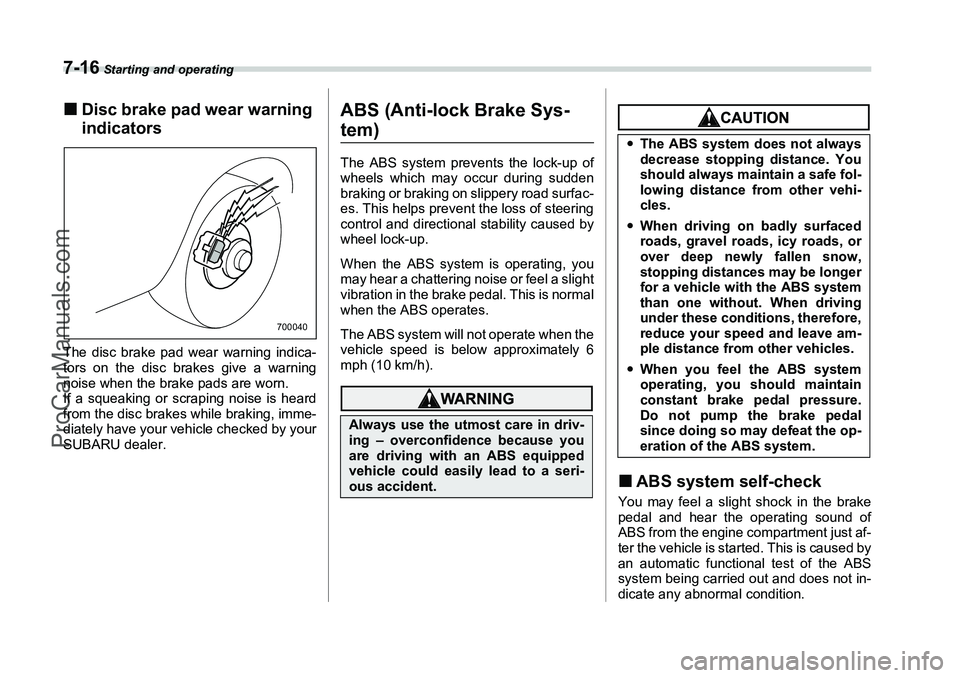
indicatorsThe disc brake pad wear warning indica-
tors on the disc brakes give a warning
noise when the brake pads are worn.
If a squeaking or scraping noise is heard
from the disc brakes while braking, imme-
diately have your vehicle checked by your
SUBARU dealer.
ABS (Anti-lock Brake Sys-tem)The ABS system prevents the lock-up of
wheels which may occur during sudden
braking or braking on slippery road surfac-
es. This helps prevent the loss of steering
control and directional stability caused by
wheel lock-up.
When the ABS system is operating, you
may hear a chattering noise or feel a slight
vibration in the brake pedal. This is normal
when the ABS operates.
The ABS system will not operate when the
vehicle speed is below approximately 6
mph (10 km/h).
„ABS system self-checkYou may feel a slight shock in the brake
pedal and hear the operating sound of
ABS from the engine compartment just af-
ter the vehicle is started. This is caused by
an automatic functional test of the ABS
system being carried out and does not in-
dicate any abnormal condition.
700040
Always use the utmost care in driv-
ing – overconfidence because you
are driving with an ABS equipped
vehicle could easily lead to a seri-
ous accident.
yThe ABS system does not always
decrease stopping distance. You
should always maintain a safe fol-
lowing distance from other vehi-
cles.
y When driving on badly surfaced
roads, gravel roads, icy roads, or
over deep newly fallen snow,
stopping distances may be longer
for a vehicle with the ABS system
than one without. When driving
under these conditions, therefore,
reduce your speed and leave am-
ple distance from other vehicles.
y When you feel the ABS system
operating, you should maintain
constant brake pedal pressure.
Do not pump the brake pedal
since doing so may defeat the op-
eration of the ABS system.
ProCarManuals.com
Page 212 of 355
Starting and operating
7-17
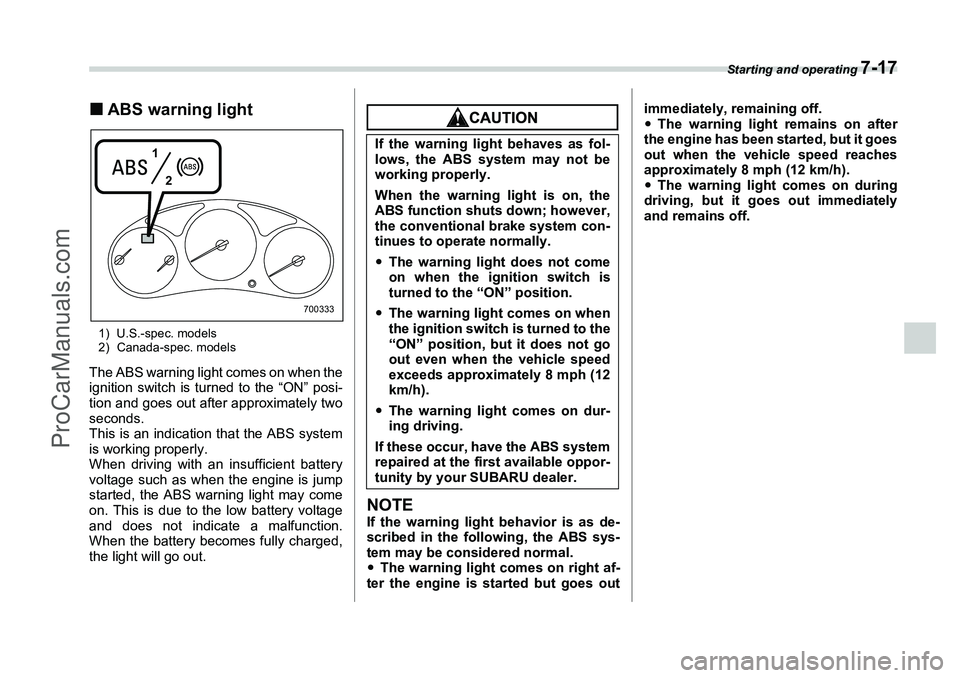
„ABS warning light1) U.S.-spec. models
2) Canada-spec. modelsThe ABS warning light comes on when the
ignition switch is turned to the “ON” posi-
tion and goes out after approximately two
seconds.
This is an indication that the ABS system
is working properly.
When driving with an insufficient battery
voltage such as when the engine is jump
started, the ABS warning light may come
on. This is due to the low battery voltage
and does not indicate a malfunction.
When the battery becomes fully charged,
the light will go out.
NOTEIf the warning light behavior is as de-
scribed in the following, the ABS sys-
tem may be considered normal.
yThe warning light comes on right af-
ter the engine is started but goes out immediately, remaining off.
y
The warning light remains on after
the engine has been started, but it goes
out when the vehicle speed reaches
approximately 8 mph (12 km/h).
y The warning light comes on during
driving, but it goes out immediately
and remains off.
1
2
700333
If the warning light behaves as fol-
lows, the ABS system may not be
working properly.
When the warning light is on, the
ABS function shuts down; however,
the conventional brake system con-
tinues to operate normally.
yThe warning light does not come
on when the ignition switch is
turned to the “ON” position.
y The warning light comes on when
the ignition switch is turned to the
“ON” position, but it does not go
out even when the vehicle speed
exceeds approximately 8 mph (12
km/h).
y The warning light comes on dur-
ing driving.
If these occur, have the ABS system
repaired at the first available oppor-
tunity by your SUBARU dealer.
ProCarManuals.com
Page 213 of 355
7-18
Starting and operating
Electronic Brake Force Dis-
tribution (EBD) system (if equipped)The EBD system maximizes the effective-
ness of the brakes by allowing the rear
brakes to supply a greater proportion of
the braking force. It functions by adjusting
the distribution of braking force to the rear
wheels in accordance with the vehicle’s
loading condition and speed.
The EBD system is an integral part of the
ABS system and uses some of the ABS
system’s components to perform its func-
tion of optimizing the distribution of brak-
ing force. If any of the ABS components
used by the EBD function fails, the EBD
system also stops working.
When the EBD system is operating, you
may hear a chattering noise or feel a slight
vibration in the brake pedal. This is normal
and does not indicate a malfunction.
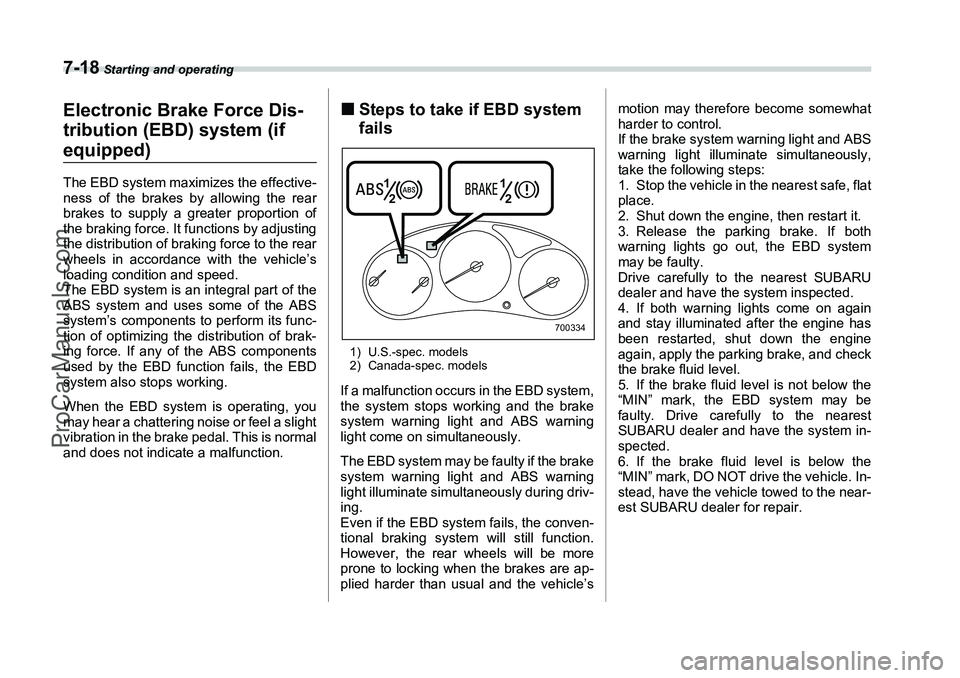
„Steps to take if EBD system
fails1) U.S.-spec. models
2) Canada-spec. modelsIf a malfunction occurs in the EBD system,
the system stops working and the brake
system warning light and ABS warning
light come on simultaneously.
The EBD system may be faulty if the brake
system warning light and ABS warning
light illuminate simultaneously during driv-
ing.
Even if the EBD system fails, the conven-
tional braking system will still function.
However, the rear wheels will be more
prone to locking when the brakes are ap-
plied harder than usual and the vehicle’s motion may therefore become somewhat
harder to control.
If the brake system warning light and ABS
warning light illuminate simultaneously,
take the following steps:
1. Stop the vehicle in the nearest safe, flat
place.
2. Shut down the engine, then restart it.
3. Release the parking brake. If both
warning lights go out, the EBD system
may be faulty.
Drive carefully to the nearest SUBARU
dealer and have the system inspected.
4. If both warning lights come on again
and stay illuminated after the engine has
been restarted, shut down the engine
again, apply the parking brake, and check
the brake fluid level.
5. If the brake fluid level is not below the
“MIN” mark, the EBD system may be
faulty. Drive carefully to the nearest
SUBARU dealer and have the system in-
spected.
6. If the brake fluid level is below the
“MIN” mark, DO NOT drive the vehicle. In-
stead, have the vehicle towed to the near-
est SUBARU dealer for repair.
1
2 1
2
700334
ProCarManuals.com
Page 214 of 355
Starting and operating
7-19
– CONTINUED –
Vehicle Dynamics Control system (if equipped)
yDriving with the brake system
warning light on is dangerous.
This indicates your brake system
may not be working properly. If
the light remains on, have the
brakes inspected by a SUBARU
dealer immediately.yIf at all in doubt about whether the
brakes are operating properly, do
not drive the vehicle. Have your
vehicle towed to the nearest
SUBARU dealer for repair.
Always use the utmost care in driv-
ing – overconfidence because you
are driving with a Vehicle Dynamics
Control system equipped vehicle
could easily lead to a serious acci-
dent.
yEven if your vehicle is equipped
with Vehicle Dynamics Control,
winter tires or snow chains
should be used when driving on
snow-covered or icy roads; in ad-
dition, vehicle speed should be re-
duced considerably. Simply hav-
ing a Vehicle Dynamics Control
system does not guarantee that
the vehicle will be able to avoid
accidents in any situation.
yActivation of the Vehicle Dynam-
ics Control system is an indica-
tion that the road being travelled
on has a slippery surface; since
having Vehicle Dynamics Control
is no guarantee that full vehicle
control will be maintained at all
times and under all conditions, its
activation should be seen as a
sign that the speed of the vehicle
should be reduced considerably.
y Whenever suspension compo-
nents, steering components, or an
axle are removed from a vehicle
equipped with Vehicle Dynamics
Control, have an authorized
SUBARU dealer perform an in-
spection of that system.
y The following precautions should
be observed in order to ensure
that the Vehicle Dynamics Control
system is operating properly:
– All four wheels should be fitted
with tires of the same size, type,
and brand. Furthermore, the
amount of wear should be the
same for all four tires.
ProCarManuals.com
Page 215 of 355
7-20
Starting and operating
In the event of wheelspin and/or skidding
on a slippery road surface and/or during
cornering and/or an evasive maneuver,
the Vehicle Dynamics Control system ad-
justs the engine’s output and the wheels’
respective braking forces to help maintain
traction and directional control.
yTraction Control Function
The traction control function is designed to
prevent spinning of the driving wheels on
slippery road surfaces, thereby helping to
maintain traction and directional control.
Activation of this function is shown by
steady illumination of the Vehicle Dynam-
ics Control operation indicator light.
y Skid Suppression Function
The skid suppression function is designed
to help maintain directional stability by suppressing the wheels’ tendency to slide
sideways during steering operations. Acti-
vation of this function is shown by flashing
of the Vehicle Dynamics Control operation
indicator light.
NOTEy
Slight twitching of the brake pedal
may be felt when the Vehicle Dynamics
Control system operates; a small de-
gree of vehicle or steering wheel shak-
ing may also be noticed in this situa-
tion. These are normal characteristics
of Vehicle Dynamics Control operation
and are no cause for alarm.
y When driving off immediately after
starting the engine, a short-lived oper-
ation noise may be noticed coming
from the engine compartment. This
noise is generated as a result of a
check being performed on the Vehicle
Dynamics Control system and is nor-
mal.
y Depending on the timing of activa-
tion of the brakes, certain situations
may occur just after driving off where
the brake pedal seems to exhibit a jolt-
ing motion. This too is a consequence
of the Vehicle Dynamics Control opera-
tional check and is normal.
y In the circumstances listed in the fol-
lowing, the vehicle may be more unsta- ble than it feels to the driver. The Vehi-
cle Dynamics Control System may
therefore operate. Such operation does
not indicate a system fault.
y on gravel-covered or rutted roads
y on unfinished roads
y when the vehicle is towing a trailer
y when the vehicle is fitted with
snow tires or winter tires
y Activation of the Vehicle Dynamics
Control system will cause operation of
the steering wheel to feel slightly dif-
ferent compared to that for normal con-
ditions.
y Even if the vehicle is equipped with a
Vehicle Dynamics Control system, it is
important that winter tires be used
when driving on snow-covered or icy
roads. (All four wheels should be fitted
with tires of the same size and brand).
Furthermore, if snow chains are to be
used, they should be fitted on the front
wheels. When a vehicle is fitted with
snow chains, however, the effective-
ness of the Vehicle Dynamics Control
system is reduced and this should be
taken into account when driving the ve-
hicle in such a condition.
y It is always important to reduce
speed when approaching a corner,
even if the vehicle is equipped with Ve-
hicle Dynamics Control.
– Keep the tire pressure at the
proper level as shown on the
placard attached to the vehi-
cle’s door pillar.
– Use only the special temporary spare tire to replace a flat tire.
With a temporary spare tire, the
effectiveness of the Vehicle Dy-
namics Control system is re-
duced and this should be taken
into account when driving the
vehicle in such a condition.
ProCarManuals.com
Page 216 of 355
Starting and operating
7-21
– CONTINUED –
yAll four wheels should be fitted with
tires of the same size, type, and brand;
furthermore, the amount of wear
should be the same for all four tires. If
these precautions are not observed
and non-matching tires are used, it is
quite possible that the Vehicle Dynam-
ics Control system will be unable to op-
erate correctly as intended.
y Always turn off the engine before re-
placing a tire as failure to do so may
render the Vehicle Dynamics Control
system unable to operate correctly.„ Vehicle Dynamics Control
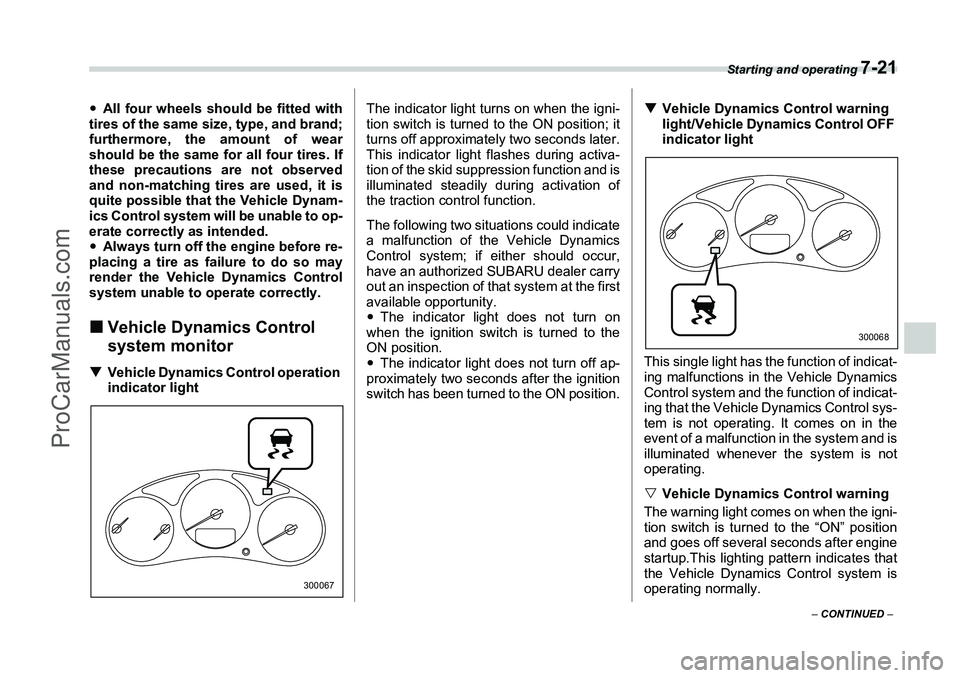
system monitorT Vehicle Dynamics Control operation
indicator light The indicator light turns on when the igni-
tion switch is turned to the ON position; it
turns off approximately two seconds later.
This indicator light flashes during activa-
tion of the skid suppression function and is
illuminated steadily during activation of
the traction control function.
The following two situations could indicate
a malfunction of the Vehicle Dynamics
Control system; if either should occur,
have an authorized SUBARU dealer carry
out an inspection of that system at the first
available opportunity.
y
The indicator light does not turn on
when the ignition switch is turned to the
ON position.
y The indicator light does not turn off ap-
proximately two seconds after the ignition
switch has been turned to the ON position. T
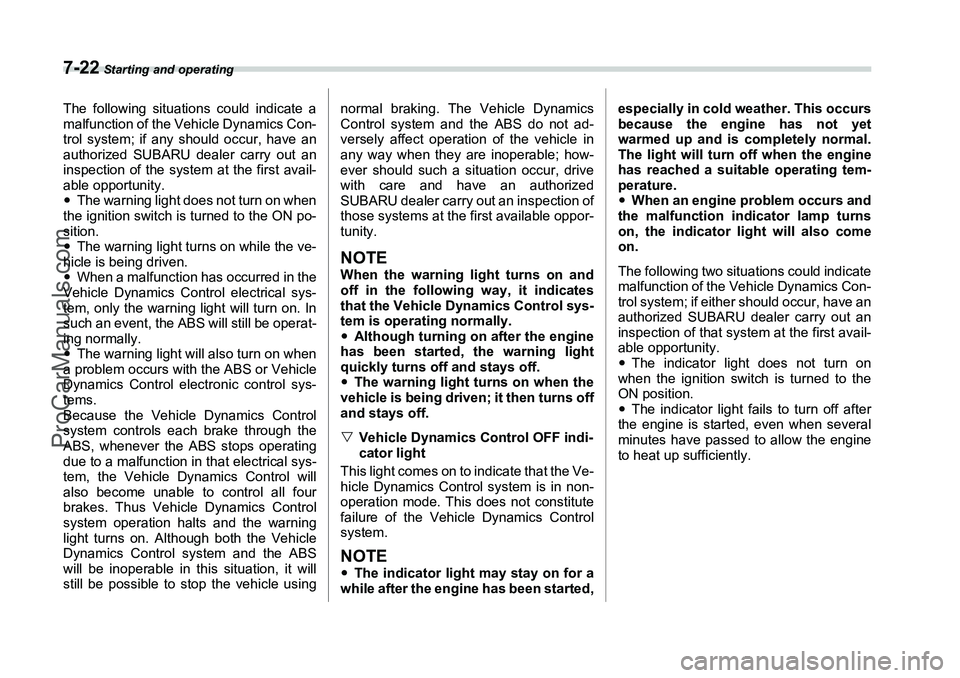
Vehicle Dynamics Control warning
light/Vehicle Dynamics Control OFF
indicator light
This single light has the function of indicat-
ing malfunctions in the Vehicle Dynamics
Control system and the function of indicat-
ing that the Vehicle Dynamics Control sys-
tem is not operating. It comes on in the
event of a malfunction in the system and is
illuminated whenever the system is not
operating.
V Vehicle Dynamics Control warning
The warning light comes on when the igni-
tion switch is turned to the “ON” position
and goes off several seconds after engine
startup.This lighting pattern indicates that
the Vehicle Dynamics Control system is
operating normally.
300067
300068
ProCarManuals.com
Page 217 of 355
7-22
Starting and operating
The following situations could indicate a
malfunction of the Vehicle Dynamics Con-
trol system; if any should occur, have an
authorized SUBARU dealer carry out an
inspection of the system at the first avail-
able opportunity.
yThe warning light does not turn on when
the ignition switch is turned to the ON po-
sition.
y The warning light turns on while the ve-
hicle is being driven.
y When a malfunction has occurred in the
Vehicle Dynamics Control electrical sys-
tem, only the warning light will turn on. In
such an event, the ABS will still be operat-
ing normally.
y The warning light will also turn on when
a problem occurs with the ABS or Vehicle
Dynamics Control electronic control sys-
tems.
Because the Vehicle Dynamics Control
system controls each brake through the
ABS, whenever the ABS stops operating
due to a malfunction in that electrical sys-
tem, the Vehicle Dynamics Control will
also become unable to control all four
brakes. Thus Vehicle Dynamics Control
system operation halts and the warning
light turns on. Although both the Vehicle
Dynamics Control system and the ABS
will be inoperable in this situation, it will
still be possible to stop the vehicle using normal braking. The Vehicle Dynamics
Control system and the ABS do not ad-
versely affect operation of the vehicle in
any way when they are inoperable; how-
ever should such a situation occur, drive
with care and have an authorized
SUBARU dealer carry out an inspection of
those systems at the first available oppor-
tunity.
NOTEWhen the warning light turns on and
off in the following way, it indicates
that the Vehicle Dynamics Control sys-
tem is operating normally.
y
Although turning on after the engine
has been started, the warning light
quickly turns off and stays off.
y The warning light turns on when the
vehicle is being driven; it then turns off
and stays off.
V Vehicle Dynamics Control OFF indi-
cator light
This light comes on to indicate that the Ve-
hicle Dynamics Control system is in non-
operation mode. This does not constitute
failure of the Vehicle Dynamics Control
system.NOTEy The indicator light may stay on for a
while after the engine has been started, especially in cold weather. This occurs
because the engine has not yet
warmed up and is completely normal.
The light will turn off when the engine
has reached a suitable operating tem-
perature.
y
When an engine problem occurs and
the malfunction indicator lamp turns
on, the indicator light will also come
on.
The following two situations could indicate
malfunction of the Vehicle Dynamics Con-
trol system; if either should occur, have an
authorized SUBARU dealer carry out an
inspection of that system at the first avail-
able opportunity.
y The indicator light does not turn on
when the ignition switch is turned to the
ON position.
y The indicator light fails to turn off after
the engine is started, even when several
minutes have passed to allow the engine
to heat up sufficiently.
ProCarManuals.com