display SUBARU FORESTER 2011 SH / 3.G Workshop Manual
[x] Cancel search | Manufacturer: SUBARU, Model Year: 2011, Model line: FORESTER, Model: SUBARU FORESTER 2011 SH / 3.GPages: 446, PDF Size: 15.93 MB
Page 254 of 446
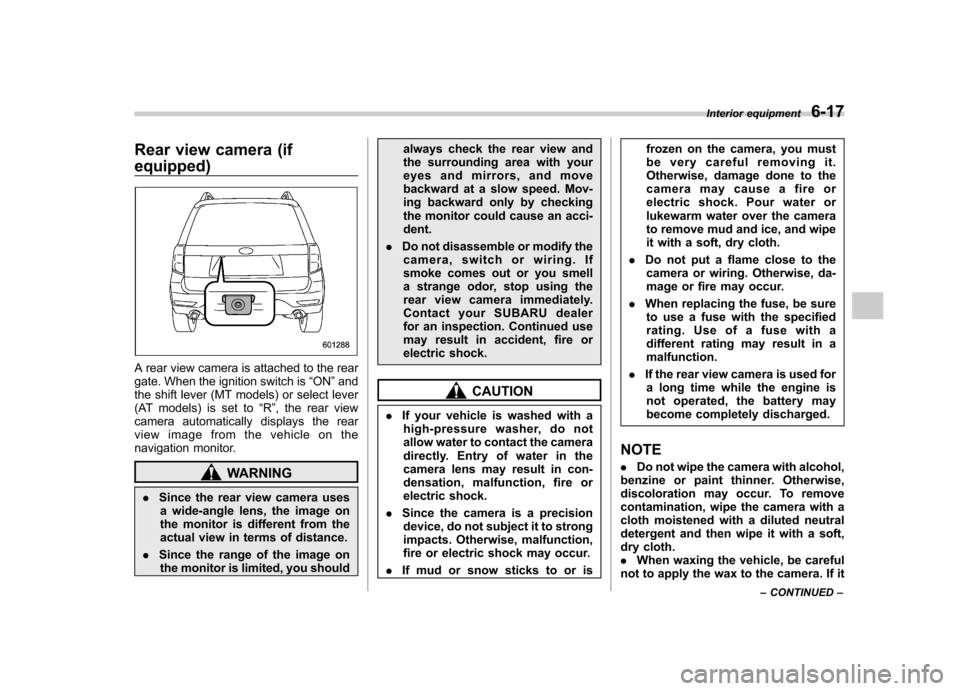
Rear view camera (if equipped)
A rear view camera is attached to the rear
gate. When the ignition switch is“ON ”and
the shift lever (MT models) or select lever
(AT models) is set to “R ”, the rear view
camera automatically displays the rear
view image from the vehicle on the
navigation monitor.
WARNING
. Since the rear view camera uses
a wide-angle lens, the image on
the monitor is different from the
actual view in terms of distance.
. Since the range of the image on
the monitor is limited, you should always check the rear view and
the surrounding area with your
eyes and mirrors, and move
backward at a slow speed. Mov-
ing backward only by checking
the monitor could cause an acci-dent.
. Do not disassemble or modify the
camera, switch or wiring. If
smoke comes out or you smell
a strange odor, stop using the
rear view camera immediately.
Contact your SUBARU dealer
for an inspection. Continued use
may result in accident, fire or
electric shock.
CAUTION
. If your vehicle is washed with a
high-pressure washer, do not
allow water to contact the camera
directly. Entry of water in the
camera lens may result in con-
densation, malfunction, fire or
electric shock.
. Since the camera is a precision
device, do not subject it to strong
impacts. Otherwise, malfunction,
fire or electric shock may occur.
. If mud or snow sticks to or is frozen on the camera, you must
be very careful removing it.
Otherwise, damage done to the
camera may cause a fire or
electric shock. Pour water or
lukewarm water over the camera
to remove mud and ice, and wipe
it with a soft, dry cloth.
. Do not put a flame close to the
camera or wiring. Otherwise, da-
mage or fire may occur.
. When replacing the fuse, be sure
to use a fuse with the specified
rating. Use of a fuse with a
different rating may result in amalfunction.
. If the rear view camera is used for
a long time while the engine is
not operated, the battery may
become completely discharged.
NOTE . Do not wipe the camera with alcohol,
benzine or paint thinner. Otherwise,
discoloration may occur. To remove
contamination, wipe the camera with a
cloth moistened with a diluted neutral
detergent and then wipe it with a soft,
dry cloth.. When waxing the vehicle, be careful
not to apply the wax to the camera. If it Interior equipment
6-17
– CONTINUED –
Page 255 of 446
6-18Interior equipment
comes in contact with the camera,
moisten a clean cloth with a diluted
neutral detergent to remove the wax.. The camera lens has hard coating to
help prevent scratches. However, when
washing the vehicle or cleaning the
camera lens, be careful not to scratch
the camera lens. Do not use a washing
brush directly on the camera lens. The
monitor screen may be adversely af-fected.. Strong light shined on the camera
lens may develop white light stripes
around the light source. This is not amalfunction.. Under fluorescent light, the display
may flicker. However, this is not amalfunction.. The image of the rear view camera
may be slightly different from the
actual color of the objects. & How to use the rear view camera
When the shift lever or select lever is set to “R ”, the rear view camera automatically
displays the rear view image from the
vehicle. When the lever is set to other
positions, the image before setting to “R ”
is displayed.
1. Set the ignition switch to “ON ”.
2. Set the shift lever or select lever to “R ”. NOTE .
For models with the genuine
SUBARU navigation system, the image
of the rear view camera has priority
over other screen displays. Therefore,
while the rear view camera is in opera-
tion, the operations of other screens
are disabled. To operate other screens,
set the shift lever or select lever to a
position other than “R ”.
. The image of the rear view camera is
horizontally reversed as is the case
with the vehicle rearview mirror or the
side view mirror.. It may be difficult to see the image of
the rearview camera in the following
cases. This is not a malfunction of thecamera.
–The vehicle is in a dark place (at
night, in a tunnel, etc.). – The vehicle is in an extremely hot
or cold place.– An object (such as raindrops,
snow, dirt, etc.) that disturbs the
view of the rear view camera sticks
to the lens of the camera. – Strong light shined directly on
the camera lens (occasionally, there
are vertical lines on the screen). &
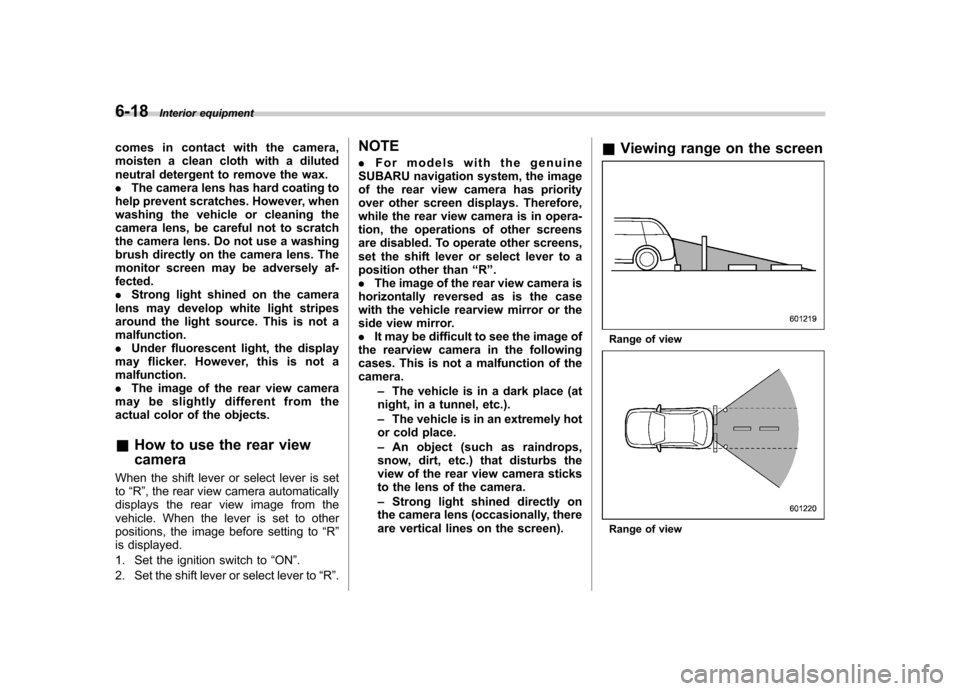
Viewing range on the screen
Range of view
Range of view
Page 258 of 446
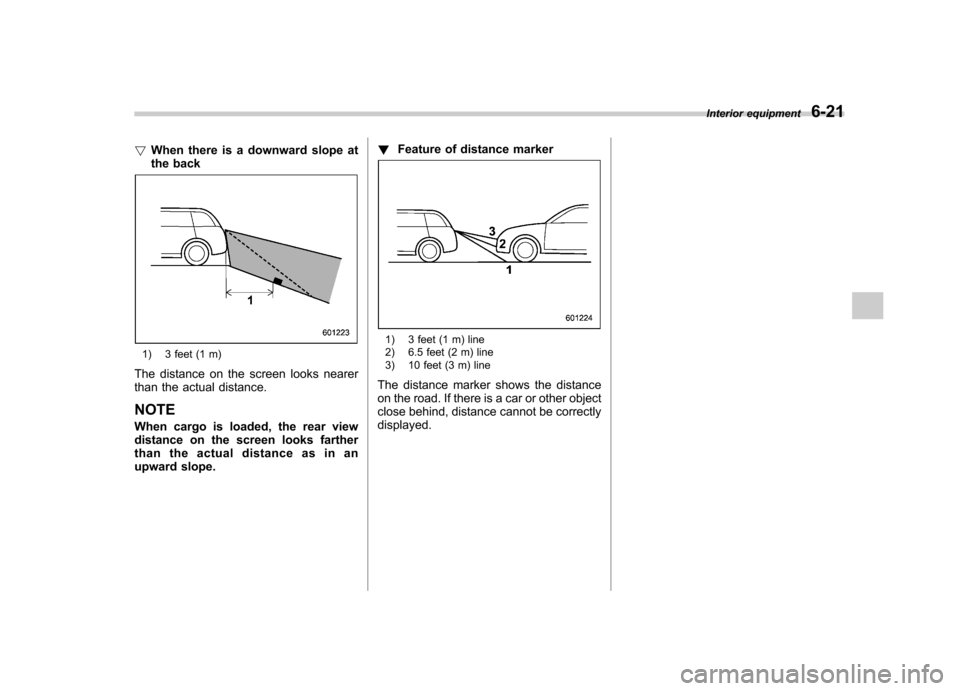
!When there is a downward slope at
the back
1) 3 feet (1 m)
The distance on the screen looks nearer
than the actual distance. NOTE
When cargo is loaded, the rear view
distance on the screen looks farther
than the actual distance as in an
upward slope. !
Feature of distance marker
1) 3 feet (1 m) line
2) 6.5 feet (2 m) line
3) 10 feet (3 m) line
The distance marker shows the distance
on the road. If there is a car or other object
close behind, distance cannot be correctlydisplayed. Interior equipment
6-21
Page 439 of 446

14-6Index
Hill start assist (MT models) ............................... 7-31, 11-29
Warning light ......................................................... 3-21
HomeLink
®................................................................ 3-38
Hook Cargo tie-down ...................................................... 6-15
Coat ..................................................................... 6-13
Shopping bag ........................................................ 6-13
Towing and tie-down ............................................... 9-14
Horn ......................................................................... 3-47
Hose and connections ............................................... 11-13
I
Ignition switch .............................................................. 3-3
Light ....................................................................... 3-5
Illuminated entry .......................................................... 2-9
Illumination brightness control ...................................... 3-32
Immobilizer. ................................................................. 2-2
Indicator light (security indicator light) ....................... 3-23
Indicator light Coolant temperature low ......................................... 3-16
Cruise control ........................................................ 3-25
Cruise control set ................................................... 3-25
Front fog light ........................................................ 3-25
Headlight .............................................................. 3-25
High beam ............................................................ 3-25
Immobilizer. ........................................................... 3-23
Security ................................................................ 3-23
Select lever/Gear position ....................................... 3-24
SPORT mode ........................................................ 3-24
Turn signal ............................................................ 3-25
Vehicle Dynamics Control OFF ................................ 3-23 Vehicle Dynamics Control operation ..
........................ 3-23
Information display ...................................................... 3-26
Inside mirror .............................................................. 3-36
Interior lights ............................................................... 6-2
iPod
®operations ........................................................ 5-33
J
Jack and jack handle ................................................... 9-5
Jack-up point .............................................................. 9-6
Jump starting ............................................................. 9-10
K
Key............................................................................ 2-2 Number .................................................................. 2-2
Reminder chime ...................................................... 3-5
Replacement. .......................................................... 2-3
Keyless entry system ................................................... 2-7
L
Leather seat materials ................................................. 10-5
License plate light ..................................................... 11-51
Light Cargo area .................................................... 6-3, 11-51
Control switch ........................................................ 3-29
Dome ............................................................ 6-2, 11-51
Door step ............................................................ 11-51
Front fog ............................................................... 3-32
Front position ......................................................... 3-30
Ignition switch ......................................................... 3-5
License plate ....................................................... 11-51
Map .............................................................. 6-3, 11-51