climate control SUBARU FORESTER 2013 SH / 3.G Owners Manual
[x] Cancel search | Manufacturer: SUBARU, Model Year: 2013, Model line: FORESTER, Model: SUBARU FORESTER 2013 SH / 3.GPages: 436, PDF Size: 15.3 MB
Page 5 of 436
2
Chapter 4: Climate control
This chapter informs you how to operate
the climate control.
Chapter 5: Audio
This chapter informs you how to operate
your audio system.
Chapter 6: Interior equipment
This chapter informs you how to operate
interior equipment.
Chapter 7: Starting and operating
This chapter informs you how to start and
operate your SUBARU.
Chapter 8: Driving tips
This chapter informs you how to drive your
SUBARU in various conditions and ex-
plains some safety tips on driving.
Chapter 9: In case of emergency
This chapter informs you what to do if you
have a problem while driving, such as a
flat tire or engine overheating.
Chapter 10: Appearance care
This chapter informs you how to keep your
SUBARU looking good.
Chapter 11: Maintenance and service
This chapter informs you when you need
to take your SUBARU to the dealer for
scheduled maintenance and informs you
how to keep your SUBARU running
properly.Chapter 12: Specifications
This chapter informs you about dimen-
sions and capacities of your SUBARU.
Chapter 13: Consumer information and
Reporting safety defects
This chapter informs you about Uniform
tire quality grading standards and Report-
ing safety defects.
Chapter 14: Index
This is an alphabetical listing of all that
’sin
this manual. You can use it to quickly find
something you want to read.
& Safety warnings
You will find a number of WARNINGs,
CAUTIONs and NOTEs in this manual.
These safety warnings alert you to poten-
tial hazards that could result in injury to
you or others.
Please read these safety warnings as well
as all other portions of this manual care-
fully in order to gain a better understand-
ing of how to use your SUBARU vehicle
safely.
WARNING
A WARNING indicates a situation in
which serious injury or death could
result if the warning is ignored.
CAUTION
A CAUTION indicates a situation in
which injury or damage to your
vehicle, or both, could result if the
caution is ignored.
NOTE
A NOTE gives information or sugges-
tions how to make better use of yourvehicle. & Safety symbol
You will find a circle with a slash through it
in this manual. This symbol means “Do
not ”, “Do not do this ”,or “Do not let this
happen ”, depending upon the context.
Page 14 of 436

Table of contents
Seat, seatbelt and SRS airbags1
Keys and doors2
Instruments and controls
Climate control4
Audio5
Interior equipment6
Starting and operating7
Driving tips8
In case of emergency9
Appearance care10
Maintenance and service11
Specifications12
Consumer information and Reporting safety defects13
Index14
3
Page 19 of 436

16 &Instrument panel
1) Door locks (page 2-4)
2) Outside mirror switch (page 3-43)
3) Illumination brightness control
(page 3-31)
4) Light control lever (page 3-29)
5) Combination meter (page 3-6)
6) Wiper control lever (page 3-33)
7) Hazard warning flasher switch (page 3-5)
8) Audio (page 5-1)
9) Shift lever (MT) (page 7-13)/ Select lever (AT) (page 7-15)
10) Climate control (page 4-1)
11) Cruise control (page 7-32)
12) Horn (page 3-47)
13) SRS airbag (page 1-33)
14) Tilt/telescopic steering (page 3-46)
15) Hands-free switches (page 5-42)
16) Audio control buttons (page 5-37)
17) Fuse box (page 11-44)
18) Vehicle Dynamics Control OFF switch (page 7-27)
19) Hood lock release knob (page 11-5)
20) Power windows (page 2-20)
Page 156 of 436
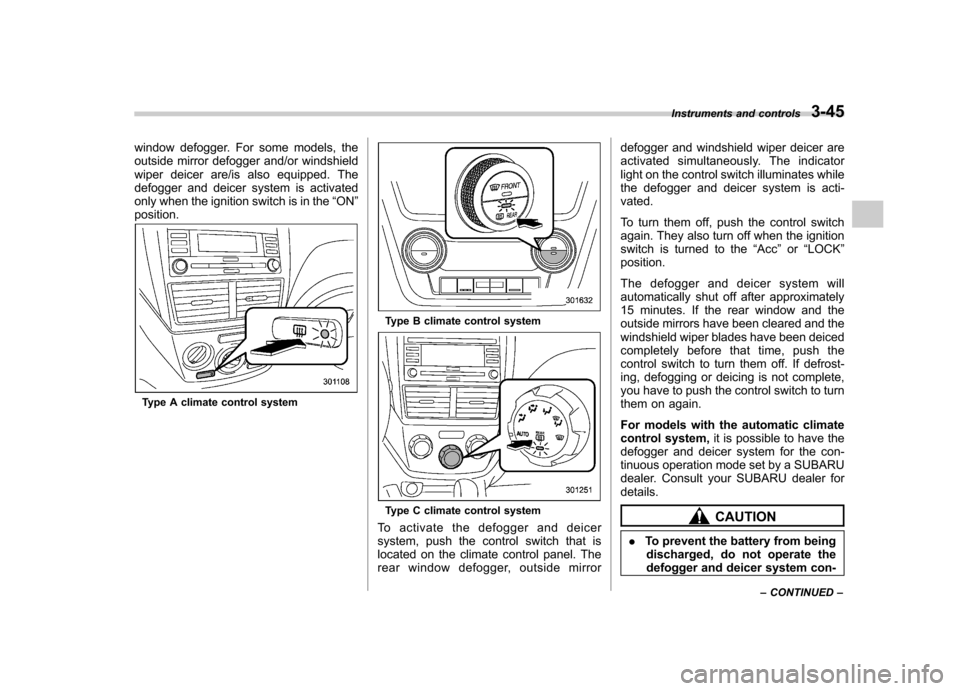
window defogger. For some models, the
outside mirror defogger and/or windshield
wiper deicer are/is also equipped. The
defogger and deicer system is activated
only when the ignition switch is in the“ON ”
position.
Type A climate control system
Type B climate control system
Type C climate control system
To activate the defogger and deicer
system, push the control switch that is
located on the climate control panel. The
rear window defogger, outside mirror defogger and windshield wiper deicer are
activated simultaneously. The indicator
light on the control switch illuminates while
the defogger and deicer system is acti-vated.
To turn them off, push the control switch
again. They also turn off when the ignition
switch is turned to the
“Acc ”or “LOCK ”
position.
The defogger and deicer system will
automatically shut off after approximately
15 minutes. If the rear window and the
outside mirrors have been cleared and the
windshield wiper blades have been deiced
completely before that time, push the
control switch to turn them off. If defrost-
ing, defogging or deicing is not complete,
you have to push the control switch to turn
them on again.
For models with the automatic climate
control system, it is possible to have the
defogger and deicer system for the con-
tinuous operation mode set by a SUBARU
dealer. Consult your SUBARU dealer fordetails.CAUTION
. To prevent the battery from being
discharged, do not operate the
defogger and deicer system con- Instruments and controls
3-45
– CONTINUED –
Page 160 of 436

Ventilator control................................................. 4-2
Center ventilators ................................................ 4-2
Side ventilators ................................................... 4-2
Climate control panel .......................................... 4-2
Type A ................................................................ 4-3
Type B ................................................................ 4-4
Type C ................................................................ 4-5
Automatic climate control system (type B and C) ............................................................... 4-6
Type B ................................................................ 4-6
Type C ................................................................ 4-7
Temperature sensors ........................................... 4-7
Manual climate control ....................................... 4-8
Airflow mode selection ........................................ 4-8
Temperature control ............................................ 4-9
Fan speed control ............................................... 4-9
Air conditioner control ........................................ 4-9
Air inlet selection ................................................ 4-9 Defrosting
........................................................... 4-10
Operating tips for heater and air conditioner ...................................................... 4-10
Cleaning ventilation grille ................................... 4-10
Efficient cooling after parking in direct sunlight ........................................................... 4-10
Lubrication oil circulation in the refrigerant circuit .............................................................. 4-11
Checking air conditioning system before summer season ............................................................ 4-11
Cooling and dehumidifying in high humidity and low temperature weather conditions ................. 4-11
Air conditioner compressor shut-off when engine is heavily loaded .............................................. 4-11
Refrigerant for your climate control system ... ..... 4-11
Air filtration system ........................................... 4-11
Replacing an air filter ......................................... 4-12Climate control
4
Page 161 of 436

4-2Climate control
Ventilator control &Center ventilators
Move the tab to adjust the flow direction. &
Side ventilators
1) Open
2) Close
3) Thumb-wheel
Move the tab to adjust the flow direction.
To open or close the ventilator, turn the
thumb-wheel up or down. Climate control panel
Type A panel is used for the manual
climate control system.
Refer to
“Manual climate control ”F 4-8.
Type B and C panels are used for the
automatic climate control systems.
Refer to “Automatic climate control system
(type B and C) ”F4-6 for automatic
operation.
Refer to “Manual climate control ”F 4-8 for
manual operation.
Page 162 of 436

&Type A1) Temperature control dial (Refer to “Tem-
perature control ”F 4-9.)
2) Fan speed control dial (Refer to “Fan
speed control ”F 4-9.)
3) Airflow control dial (Refer to “Airflow
mode selection ”F 4-8.)
4) Control switch of the defogger and deicer system (Refer to “Defogger and deicer ”
F 3-44.)
5) Air conditioner button (Refer to “Air
conditioner control ”F 4-9.)
6) Air inlet selection button (Refer to “Air
inlet selection ”F 4-9.)
Climate control
4-3
– CONTINUED –
Page 163 of 436

4-4Climate control
& Type B
1) Temperature control dial (driver ’s side)
(Refer to “Temperature control ”F 4-9.)
2) AUTO button (Refer to “Automatic cli-
mate control system (type B and C) ”F 4-
6.)
3) DUAL mode button (Refer to “Automatic
climate control system (type B and C) ”
F 4-6 and “Temperature control ”F 4-9.)
4) OFF button (Refer to “Automatic climate
control system (type B and C) ”F 4-6.)
5) Air inlet selection button (Refer to “Air
inlet selection ”F 4-9.)
6) Fan speed control button (Refer to “Fan
speed control ”F 4-9.)
7) Airflow mode selection button (Refer to “Airflow mode selection ”F 4-8.)
8) Air conditioner button (Refer to “Air
conditioner control ”F 4-9.)
9) Temperature control dial (passenger ’s
side) (Refer to “Temperature control ”
F 4-9.)
10) Defroster button (Refer to “Airflow mode
selection ”F 4-8 and “Defrosting ”F 4-10.)
11) Rear window defogger button (Refer to “Defogger and deicer ”F 3-44.)
Page 164 of 436

&Type C1) Temperature control dial (Refer to “Tem-
perature control ”F 4-9.)
2) Fan speed control dial (Refer to “Auto-
matic climate control system (type B and C) ”F 4-6 and “Fan speed control ”F 4-9.)
3) Airflow control dial (Refer to “Automatic
climate control system (type B and C) ”
F 4-6, “Airflow mode selection ”F 4-8 and
“ Defrosting ”F 4-10.)
4) Control switch of the defogger and deicer system (Refer to “Defogger and deicer ”
F 3-44.)
5) Air inlet selection button (Refer to “Air
inlet selection ”F 4-9.)
6) Air conditioner button (Refer to “Air
conditioner control ”F 4-9.)
NOTE
The controllable temperature range
may differ depending on the model. Climate control
4-5
Page 165 of 436

4-6Climate control
Automatic climate control
system (type B and C)
When the automatic climate control mode
is selected, the outlet air temperature, the
fan speed, airflow distribution, air-inlet
control and air conditioner compressor
operation are automatically controlled.
To activate this mode, perform the follow-
ing procedure. NOTE .Operate the automatic climate con-
trol system when the engine is running. . The blower fan rotates at a low
speed when the engine coolant tem-
perature is low.. The air conditioner may not operate
in the following cases:
–When the cabin temperature is
low – When the ambient temperature
decreases to close to 32 8F(0 8C)
. For efficient defogging or dehumidi-
fying in cold weather, press the “A/C ”
button. &
Type B
1) Temperature control dial (driver ’s side)
2) AUTO button
3) Temperature control dial (front passen- ger’s side)
1. Set the preferred temperature using
temperature control dial.
2. Press the “AUTO ”button. The FULL
AUTO mode is selected and the indicator light “FULL AUTO ”on the display illumi-
nates. NOTE . When the “DUAL ”button is pressed,
separate temperature settings for the driver ’s side and passenger ’s side can
be enabled (DUAL mode). To cancel the
DUAL mode, press the “DUAL ”button
again. The temperature setting for the passenger
’s side becomes the same as
the setting for the driver ’s side.
. If you operate any of the buttons on
the control panel other than the “OFF ”
button, rear window defogger button
and temperature control dials during
FULL AUTO mode operation, the indi-
cator light “FULL ”on the control panel
will turn off and the indicator light“ AUTO ”will remain illuminated. You
can then manually control the system
as desired using the button you oper-
ated. To change the system back to the
FULL AUTO mode, press the “AUTO ”
button.
3. To turn off the climate control system,
press the “OFF ”button.