phone SUBARU FORESTER 2017 SJ / 4.G Owner's Guide
[x] Cancel search | Manufacturer: SUBARU, Model Year: 2017, Model line: FORESTER, Model: SUBARU FORESTER 2017 SJ / 4.GPages: 634, PDF Size: 11.77 MB
Page 352 of 634
Bluetooth®settings
WARNING
Be sure to park the vehicle in a safe
location before connecting or oper-
ating a Bluetooth phone or audio
device. Failure to do so may result
in loss of control of your vehicle and
cause an accident or serious injury.
&Regulatory information
The Bluetooth®word mark and logos are
registered trademarks owned by Bluetooth
SIG, Inc.
& Registering/connecting
Bluetooth®device
You can register up to five devices,
regardless of whether they are Bluetooth
phones or audio devices.
NOTE
. Once the phone has been regis-
tered, it is possible to use the hands-
free system or Bluetooth audio.
. Devices cannot be registered during driving.
!
Registering a Bluetooth phone for
the first time
To use the hands-free system, it is
necessary to register a Bluetooth phone
with the system.
For details about registering a Bluetooth
device: Refer to “Registering a Bluetooth
Audio device for the first time ”F 5-66.
1. Turn the Bluetooth connection setting
of your cell phone on. .This function is not available when
Bluetooth connection setting of your
cell phone is set to off.
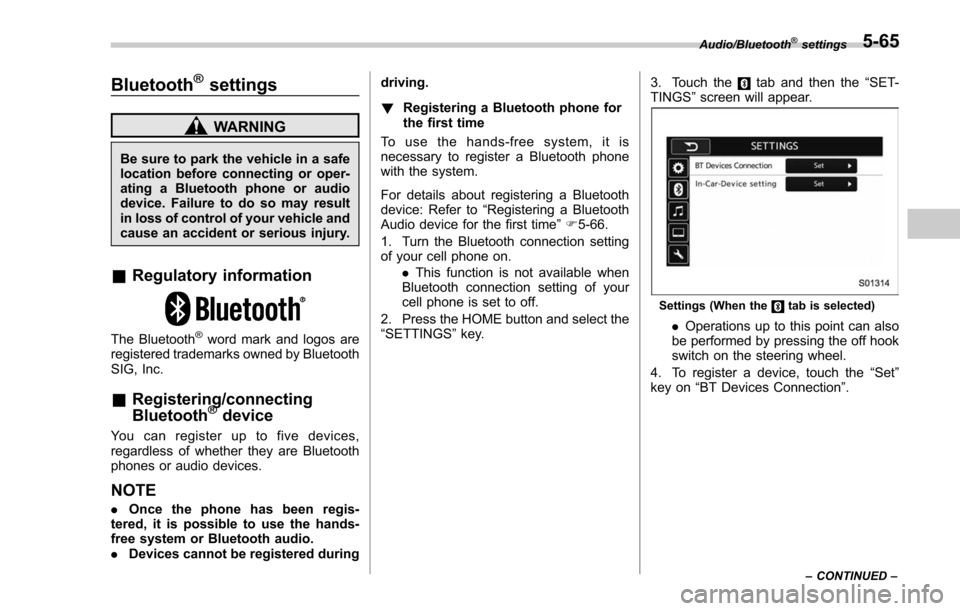
2. Press the HOME button and select the
“SETTINGS ”key. 3. Touch the
tab and then the
“SET-
TINGS ”screen will appear.
Settings (When thetab is selected)
. Operations up to this point can also
be performed by pressing the off hook
switch on the steering wheel.
4. To register a device, touch the “Set”
key on “BT Devices Connection ”.
Audio/Bluetooth®settings
– CONTINUED –5-65
Page 353 of 634
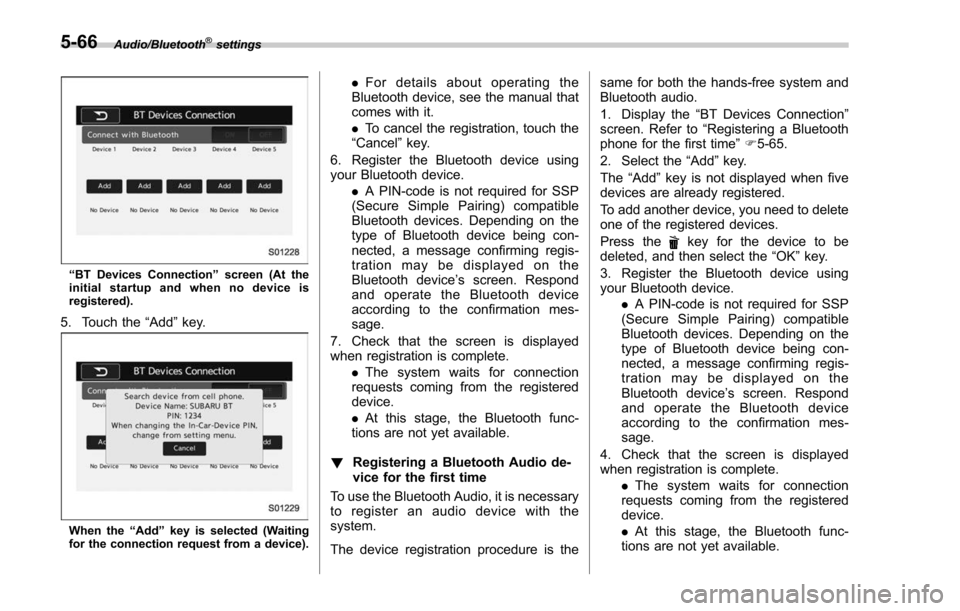
Audio/Bluetooth®settings
“BT Devices Connection ”screen (At the
initial startup and when no device is
registered).
5. Touch the “Add”key.
When the “Add ”key is selected (Waiting
for the connection request from a device).
. For details about operating the
Bluetooth device, see the manual that
comes with it.
. To cancel the registration, touch the
“Cancel” key.
6. Register the Bluetooth device using
your Bluetooth device. .A PIN-code is not required for SSP
(Secure Simple Pairing) compatible
Bluetooth devices. Depending on the
type of Bluetooth device being con-
nected, a message confirming regis-
tration may be displayed on the
Bluetooth device ’s screen. Respond
and operate the Bluetooth device
according to the confirmation mes-
sage.
7. Check that the screen is displayed
when registration is complete. .The system waits for connection
requests coming from the registered
device.
. At this stage, the Bluetooth func-
tions are not yet available.
! Registering a Bluetooth Audio de-
vice for the first time
To use the Bluetooth Audio, it is necessary
to register an audio device with the
system.
The device registration procedure is the same for both the hands-free system and
Bluetooth audio.
1. Display the
“BT Devices Connection ”
screen. Refer to “Registering a Bluetooth
phone for the first time ”F 5-65.
2. Select the “Add”key.
The “Add” key is not displayed when five
devices are already registered.
To add another device, you need to delete
one of the registered devices.
Press the
key for the device to be
deleted, and then select the “OK”key.
3. Register the Bluetooth device using
your Bluetooth device. .A PIN-code is not required for SSP
(Secure Simple Pairing) compatible
Bluetooth devices. Depending on the
type of Bluetooth device being con-
nected, a message confirming regis-
tration may be displayed on the
Bluetooth device ’s screen. Respond
and operate the Bluetooth device
according to the confirmation mes-
sage.
4. Check that the screen is displayed
when registration is complete. .The system waits for connection
requests coming from the registered
device.
. At this stage, the Bluetooth func-
tions are not yet available.
5-66
Page 354 of 634
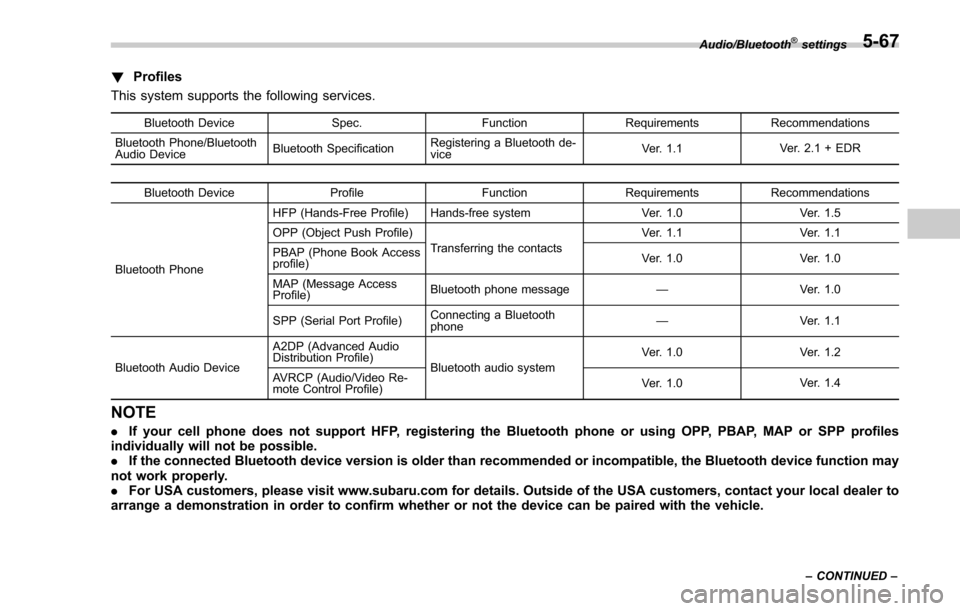
!Profiles
This system supports the following services.
Bluetooth Device Spec.FunctionRequirements Recommendations
Bluetooth Phone/Bluetooth
Audio Device Bluetooth SpecificationRegistering a Bluetooth de-
vice Ver. 1.1
Ver. 2.1 + EDR
Bluetooth Device ProfileFunctionRequirements Recommendations
Bluetooth Phone HFP (Hands-Free Profile) Hands-free system
Ver. 1.0Ver. 1.5
OPP (Object Push Profile) Transferring the contacts Ver. 1.1
Ver. 1.1
PBAP (Phone Book Access
profile) Ver. 1.0
Ver. 1.0
MAP (Message Access
Profile) Bluetooth phone message
—Ver. 1.0
SPP (Serial Port Profile) Connecting a Bluetooth
phone —
Ver. 1.1
Bluetooth Audio Device A2DP (Advanced Audio
Distribution Profile)
Bluetooth audio system Ver. 1.0
Ver. 1.2
AVRCP (Audio/Video Re-
mote Control Profile) Ver. 1.0
Ver. 1.4
NOTE
.
If your cell phone does not support HFP, registering the Bluetooth phone or using OPP, PBAP, MAP or SPP profiles
individually will not be possible.
. If the connected Bluetooth device version is older than recommended or incompatible, the Bluetooth device function may
not work properly.
. For USA customers, please visit www.subaru.com for details. Outside of the USA customers, contact your local dealer to
arrange a demonstration in order to confirm whether or not the device can be paired with the vehicle.
Audio/Bluetooth®settings
– CONTINUED –5-67
Page 355 of 634
Audio/Bluetooth®settings
&Setting Bluetooth details
! BT Devices Connection screen
1. Press the HOME button.
2. Touch the “SETTINGS”key and then
touch the
tab.
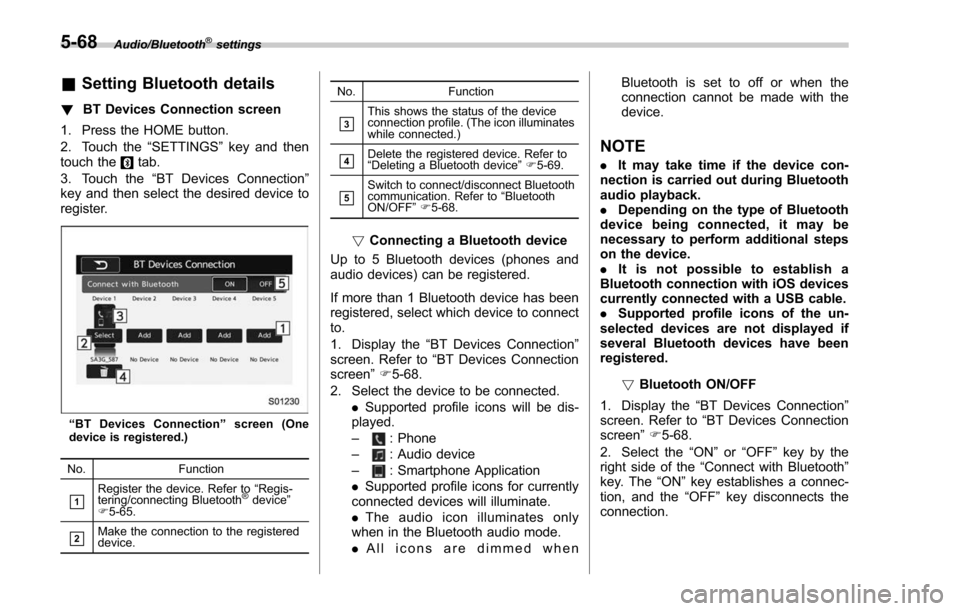
3. Touch the “BT Devices Connection ”
key and then select the desired device to
register.
“ BT Devices Connection ”screen (One
device is registered.)
No. Function
&1Register the device. Refer to “Regis-
tering/connecting Bluetooth®device ”
F 5-65.
&2Make the connection to the registered
device. No. Function
&3This shows the status of the device
connection profile. (The icon illuminates
while connected.)
&4Delete the registered device. Refer to
“
Deleting a Bluetooth device ”F 5-69.
&5Switch to connect/disconnect Bluetooth
communication. Refer to “Bluetooth
ON/OFF ”F 5-68.
! Connecting a Bluetooth device
Up to 5 Bluetooth devices (phones and
audio devices) can be registered.
If more than 1 Bluetooth device has been
registered, select which device to connect
to.
1. Display the “BT Devices Connection ”
screen. Refer to “BT Devices Connection
screen” F5-68.
2. Select the device to be connected. .Supported profile icons will be dis-
played.
–
: Phone
–: Audio device
–: Smartphone Application
. Supported profile icons for currently
connected devices will illuminate.
. The audio icon illuminates only
when in the Bluetooth audio mode.
. All icons are dimmed when Bluetooth is set to off or when the
connection cannot be made with the
device.
NOTE
.
It may take time if the device con-
nection is carried out during Bluetooth
audio playback.
. Depending on the type of Bluetooth
device being connected, it may be
necessary to perform additional steps
on the device.
. It is not possible to establish a
Bluetooth connection with iOS devices
currently connected with a USB cable.
. Supported profile icons of the un-
selected devices are not displayed if
several Bluetooth devices have been
registered.
!Bluetooth ON/OFF
1. Display the “BT Devices Connection ”
screen. Refer to “BT Devices Connection
screen” F5-68.
2. Select the “ON”or “OFF ”key by the
right side of the “Connect with Bluetooth ”
key. The “ON”key establishes a connec-
tion, and the “OFF”key disconnects the
connection.
5-68
Page 356 of 634
NOTE
The setting is fixed as the“OFF ”key
when no device is registered.
!Deleting a Bluetooth device
1. Display the “BT Devices Connection ”
screen. Refer to “BT Devices Connection
screen” F5-68.
2. Select the desired device.
3. Touch the
key for the device to be
deleted, and then select the “OK ”key.
NOTE
When deleting a Bluetooth phone, the
contact data will be deleted at the same
time.
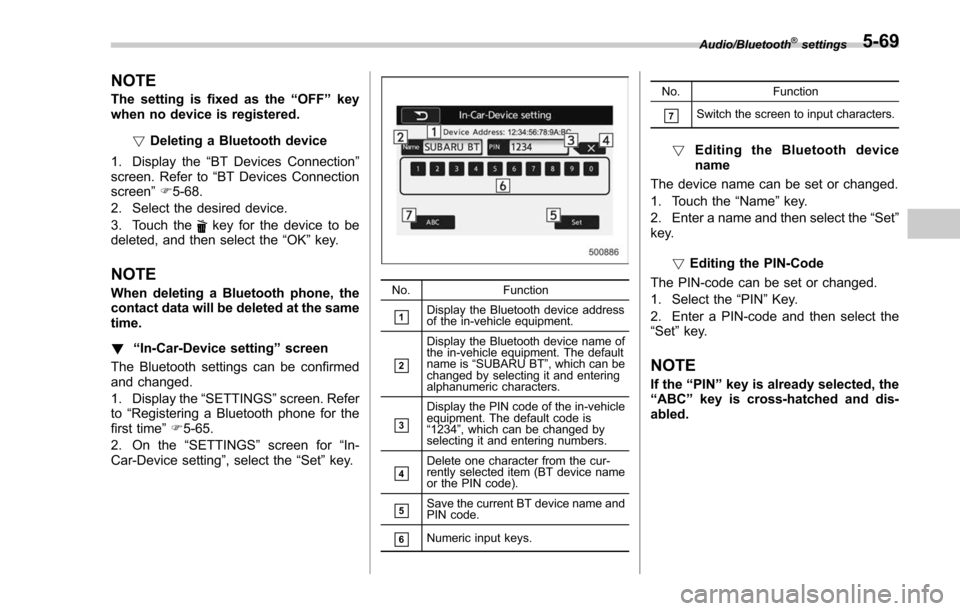
! “In-Car-Device setting ”screen
The Bluetooth settings can be confirmed
and changed.
1. Display the “SETTINGS”screen. Refer
to “Registering a Bluetooth phone for the
first time ”F 5-65.
2. On the “SETTINGS”screen for “In-
Car-Device setting ”, select the“Set”key.No. Function
&1Display the Bluetooth device address
of the in-vehicle equipment.
&2
Display the Bluetooth device name of
the in-vehicle equipment. The default
name is“SUBARU BT ”, which can be
changed by selecting it and entering
alphanumeric characters.
&3
Display the PIN code of the in-vehicle
equipment. The default code is
“ 1234 ”, which can be changed by
selecting it and entering numbers.
&4Delete one character from the cur-
rently selected item (BT device name
or the PIN code).
&5Save the current BT device name and
PIN code.
&6Numeric input keys. No. Function
&7Switch the screen to input characters.
!
Editing the Bluetooth device
name
The device name can be set or changed.
1. Touch the “Name”key.
2. Enter a name and then select the “Set”
key.
!Editing the PIN-Code
The PIN-code can be set or changed.
1. Select the “PIN”Key.
2. Enter a PIN-code and then select the
“Set ”key.
NOTE
If the “PIN ”key is already selected, the
“ ABC ”key is cross-hatched and dis-
abled.
Audio/Bluetooth®settings5-69
Page 357 of 634
Audio/Hands–free phone system
Hands-free phone system
The hands-free system enables calls to be
made and received without having to take
your hands off the steering wheel.
This system supports Bluetooth. Bluetooth
is a wireless data system that enables cell
phones to be used without being con-
nected by a cable or placed in a cradle.
The operating procedure of the phone is
explained here.
WARNING
. While driving, do not use a cell
phone or connect the Bluetooth
phone. Doing so may result in
loss of control of your vehicle
and cause an accident or serious
injury.
. Your audio unit is fitted with
Bluetooth antennas. People with
implantable cardiac pacemakers,
cardiac resynchronization ther-
apy-pacemakers or implantable
cardioverter defibrillators should
maintain a reasonable distance
between themselves and the
Bluetooth antennas. The radio
waves may affect the operation
of such devices. .
Before using Bluetooth devices,
users of any electrical medical
device other than implantable
cardiac pacemakers, cardiac re-
synchronization therapy-pace-
makers or implantable cardiover-
ter defibrillators should consult
the manufacturer of the device
for information about its opera-
tion under the influence of radio
waves. Radio waves could have
unexpected effects on the opera-
tion of such medical devices.CAUTION
Do not leave your cell phone in the
vehicle. The temperature inside may
rise to a level that could damage the
phone.
NOTE
. If your cell phone does not support
Bluetooth, this system cannot function.
. In the following conditions, the sys-
tem may not function:
–The cell phone is turned off.
– The current position is outside
the communication area.
– The cell phone is not connected.
– The cell phone has a low battery. .
When using the hands free function
and other Bluetooth functions at the
same time, the following problems may
occur:
–The Bluetooth connection may
be cut.
– Noise may be heard when play-
ing back voice with the Bluetooth
function.
. The other party’ s voice will be heard
from the front speakers. The audio/
visual system will be muted during
phone calls or when hands-free voice
commands are used.
. Talk alternately with the other party
on the phone. If both parties speak at
the same time, the other party may not
hear what has been said. (This is not a
malfunction.)
. Keep call volume down. Otherwise,
the other party’ s voice may be audible
outside the vehicle and voice echo may
increase. When talking on the phone,
speak clearly towards the microphone.
. The other party may not hear you
clearly when:
–Drivingonanunpavedroad.
(Making excessive traffic noise.)
– Driving at high speeds.
– The moonroof or windows are
open.
– The air conditioning vents are
5-70
Page 358 of 634
pointed towards the microphone.
–The sound of the air conditioning
fan is loud.
– Thereisanegativeeffecton
sound quality due to the phone
and/or network being used.
. When another phone is connected,
the following registered data cannot be
read:
–Contact data
– Call history data
– All phone settings
. When selling or disposing of the
vehicle, initialize the data. Refer to
“ Unit settings ”F 5-18.
. Once initialized, the data and set-
tings will be erased. Take extra caution
when initializing the data.
. The voice command system sup-
ports phone commands, so dialing a
phone number using your voice is
possible. Refer to “Vo i c e c o m m a n d
system ”F 5-80.
. The images shown in this Owner ’s
Manual are sample images. The actual
images may vary depending on the
market and specifications of your ve-
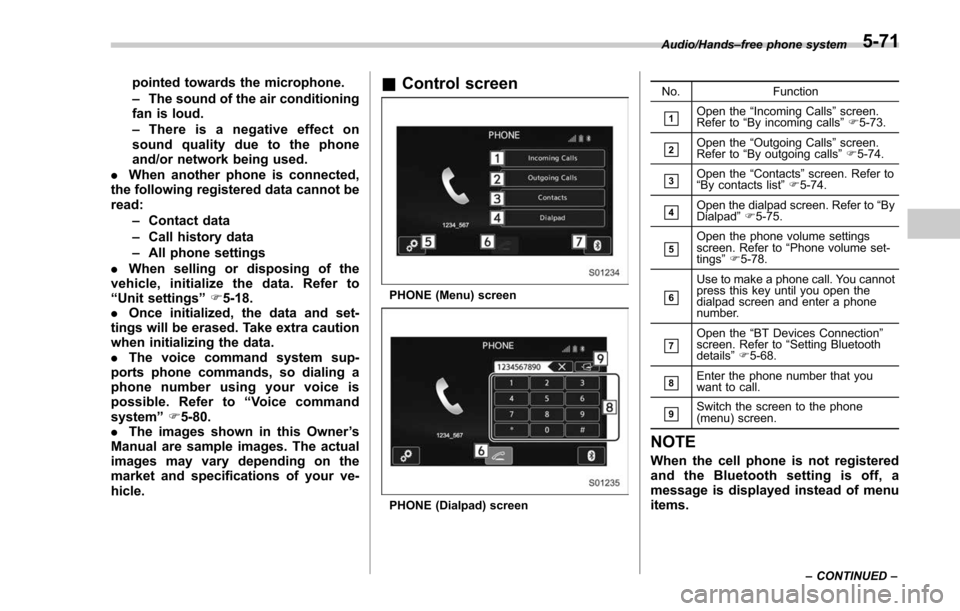
hicle.& Control screen
PHONE (Menu) screen
PHONE (Dialpad) screen No. Function
&1Open the
“Incoming Calls ”screen.
Refer to “By incoming calls ”F 5-73.
&2Open the “Outgoing Calls ”screen.
Refer to “By outgoing calls ”F 5-74.
&3Open the “Contacts ”screen. Refer to
“ By contacts list ”F 5-74.
&4Open the dialpad screen. Refer to “By
Dialpad ”F 5-75.
&5Open the phone volume settings
screen. Refer to “Phone volume set-
tings ”F 5-78.
&6
Use to make a phone call. You cannot
press this key until you open the
dialpad screen and enter a phone
number.
&7Open the “BT Devices Connection ”
screen. Refer to “Setting Bluetooth
details ”F 5-68.
&8Enter the phone number that you
want to call.
&9Switch the screen to the phone
(menu) screen.
NOTE
When the cell phone is not registered
and the Bluetooth setting is off, a
message is displayed instead of menu
items.
Audio/Hands –free phone system
–CONTINUED –5-71
Page 359 of 634
Audio/Hands–free phone system
& Registering/connecting a
Bluetooth phone
To use the hands-free system for cell
phones, it is necessary to register a cell
phone with the system. Refer to “Register-
ing/connecting Bluetooth
®device ”F 5-65.
! Bluetooth phone condition display
The condition of the Bluetooth phone
appears on the upper right side of the
screen.
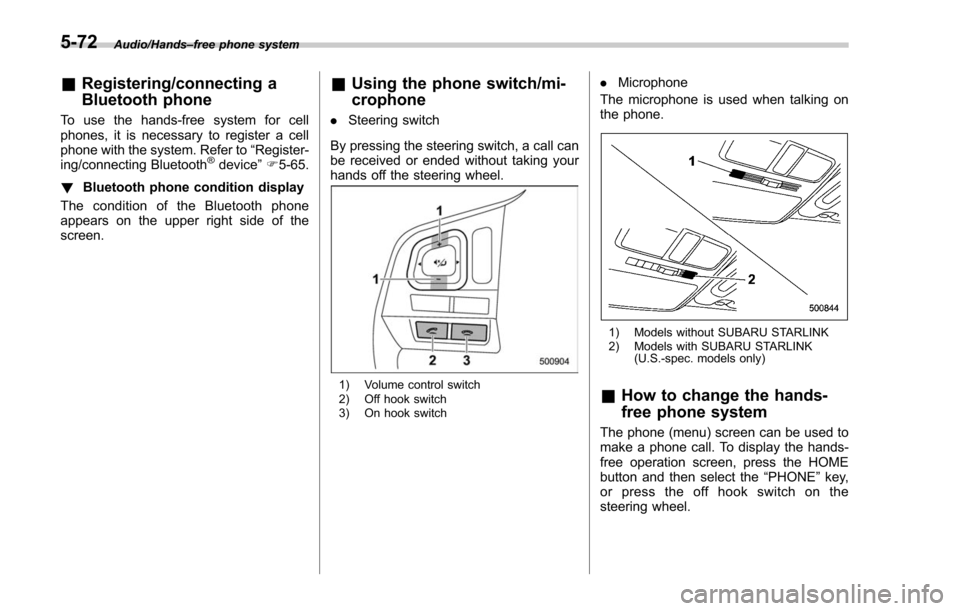
& Using the phone switch/mi-
crophone
. Steering switch
By pressing the steering switch, a call can
be received or ended without taking your
hands off the steering wheel.
1) Volume control switch
2) Off hook switch
3) On hook switch
. Microphone
The microphone is used when talking on
the phone.
1) Models without SUBARU STARLINK
2) Models with SUBARU STARLINK (U.S.-spec. models only)
&How to change the hands-
free phone system
The phone (menu) screen can be used to
make a phone call. To display the hands-
free operation screen, press the HOME
button and then select the “PHONE”key,
or press the off hook switch on the
steering wheel.
5-72
Page 360 of 634
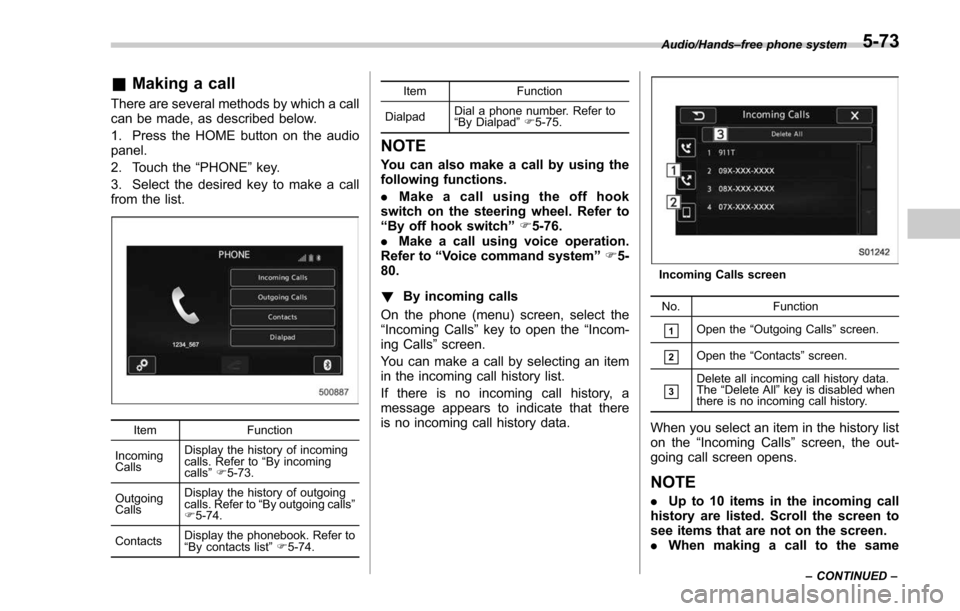
&Making a call
There are several methods by which a call
can be made, as described below.
1. Press the HOME button on the audio
panel.
2. Touch the “PHONE”key.
3. Select the desired key to make a call
from the list.
Item Function
Incoming
Calls Display the history of incoming
calls. Refer to
“By incoming
calls ”F 5-73.
Outgoing
Calls Display the history of outgoing
calls. Refer to
“By outgoing calls ”
F 5-74.
Contacts Display the phonebook. Refer to
“
By contacts list ”F 5-74. Item
Function
Dialpad Dial a phone number. Refer to
“
By Dialpad ”F 5-75.
NOTE
You can also make a call by using the
following functions.
. Make a call using the off hook
switch on the steering wheel. Refer to
“ By off hook switch ”F 5-76.
. Make a call using voice operation.
Refer to “Voice command system ”F 5-
80.
! By incoming calls
On the phone (menu) screen, select the
“Incoming Calls ”key to open the “Incom-
ing Calls ”screen.
You can make a call by selecting an item
in the incoming call history list.
If there is no incoming call history, a
message appears to indicate that there
is no incoming call history data.
Incoming Calls screen
No. Function
&1Open the“Outgoing Calls ”screen.
&2Open the “Contacts ”screen.
&3Delete all incoming call history data.
The “Delete All ”key is disabled when
there is no incoming call history.
When you select an item in the history list
on the “Incoming Calls ”screen, the out-
going call screen opens.
NOTE
. Up to 10 items in the incoming call
history are listed. Scroll the screen to
see items that are not on the screen.
. When making a call to the same
Audio/Hands –free phone system
–CONTINUED –5-73
Page 361 of 634
Audio/Hands–free phone system
number continuously, only the most
recent call is listed in call history.
. When a phone number registered in
the contact list is received, the name is
displayed.
. Number-withheld calls are also
memorized in the system.
. International phone calls may not be
made depending on the type of cell
phone you have.
. The list should group together con-
secutive entries with the same phone
number and same call type.
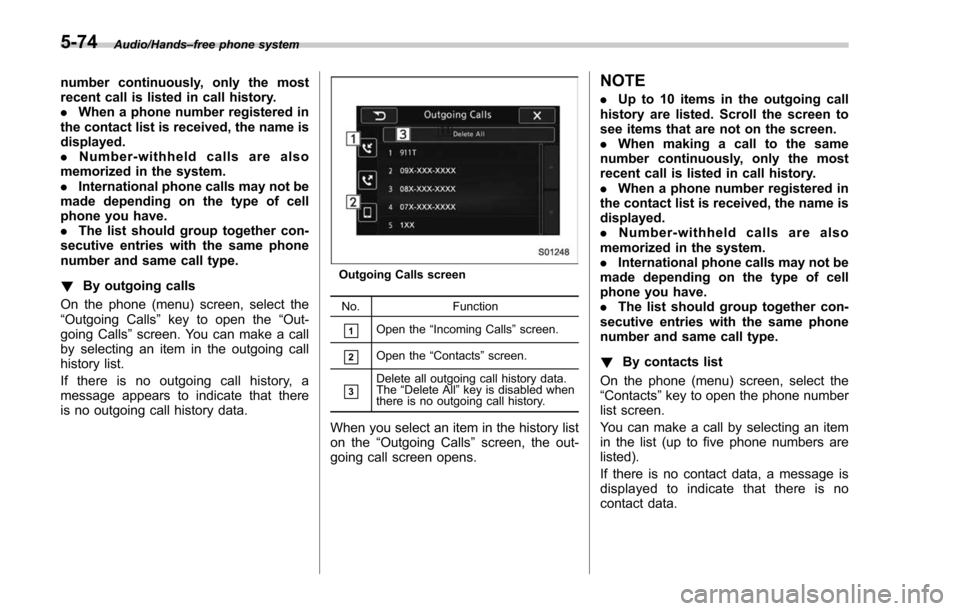
! By outgoing calls
On the phone (menu) screen, select the
“Outgoing Calls ”key to open the “Out-
going Calls ”screen. You can make a call
by selecting an item in the outgoing call
history list.
If there is no outgoing call history, a
message appears to indicate that there
is no outgoing call history data.
Outgoing Calls screen
No. Function
&1Open the“Incoming Calls ”screen.
&2Open the “Contacts ”screen.
&3Delete all outgoing call history data.
The “Delete All” key is disabled when
there is no outgoing call history.
When you select an item in the history list
on the “Outgoing Calls ”screen, the out-
going call screen opens.
NOTE
. Up to 10 items in the outgoing call
history are listed. Scroll the screen to
see items that are not on the screen.
. When making a call to the same
number continuously, only the most
recent call is listed in call history.
. When a phone number registered in
the contact list is received, the name is
displayed.
. Number-withheld calls are also
memorized in the system.
. International phone calls may not be
made depending on the type of cell
phone you have.
. The list should group together con-
secutive entries with the same phone
number and same call type.
! By contacts list
On the phone (menu) screen, select the
“Contacts ”key to open the phone number
list screen.
You can make a call by selecting an item
in the list (up to five phone numbers are
listed).
If there is no contact data, a message is
displayed to indicate that there is no
contact data.
5-74