change time SUBARU FORESTER 2017 SJ / 4.G Service Manual
[x] Cancel search | Manufacturer: SUBARU, Model Year: 2017, Model line: FORESTER, Model: SUBARU FORESTER 2017 SJ / 4.GPages: 634, PDF Size: 11.77 MB
Page 335 of 634
Audio/Audio set
necting an Android device: Refer to
“Registering/connecting Bluetooth®
device ”F 5-65.
NOTE
When iPhone/iPod touch and Android
devices are connected at the same
time, iPhone/iPod touch is prioritized.
! How to change the source
. Select the “aha”key on the source
select screen. Refer to “Basic operation ”
F 5-17.
. Select the “aha”key on the APPS
screen. Refer to “SUBARU STARLINK ”
F 5-25.
NOTE
When starting-up “aha ”,thereare
some smartphone models for which
“ aha ”application does not start up
automatically. !
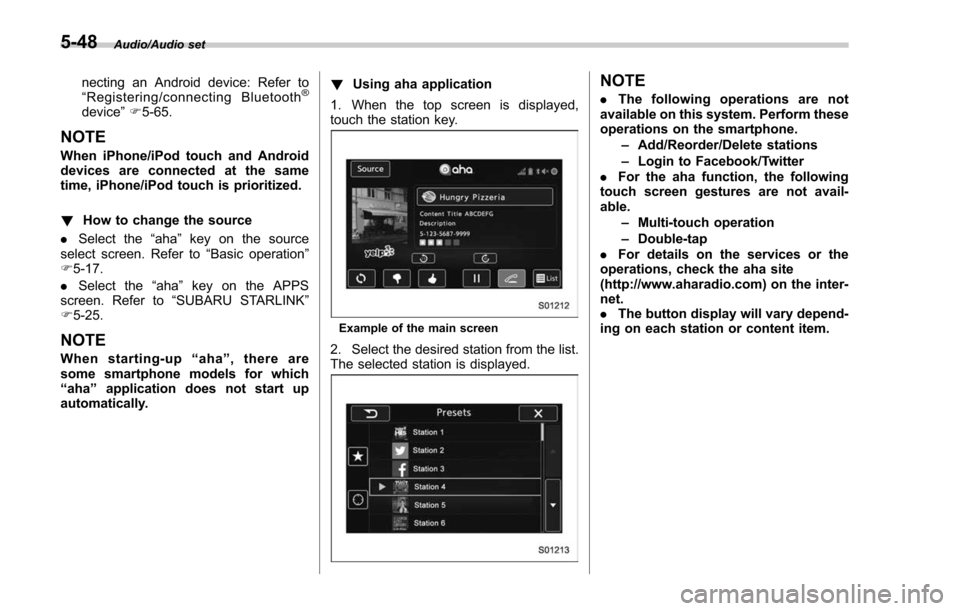
Using aha application
1. When the top screen is displayed,
touch the station key.
Example of the main screen
2. Select the desired station from the list.
The selected station is displayed.
NOTE
. The following operations are not
available on this system. Perform these
operations on the smartphone.
–Add/Reorder/Delete stations
– Login to Facebook/Twitter
. For the aha function, the following
touch screen gestures are not avail-
able.
–Multi-touch operation
– Double-tap
. For details on the services or the
operations, check the aha site
(http://www.aharadio.com) on the inter-
net.
. The button display will vary depend-
ing on each station or content item.
5-48
Page 346 of 634
NOTE
.Depending on the Bluetooth device
that is connected to the system, the
music may start playing when selecting
the
key while it is paused. Con-
versely, the music may pause when
selecting the
key while it is playing.
. In the following conditions, the sys-
tem may not function:
–The Bluetooth device is turned
off.
– The Bluetooth device is not con-
nected.
– The Bluetooth device has a low
battery.
. It may take time to connect the
phone when Bluetooth audio is being
played.
. For operating the portable player,
see the instruction manual that comes
with it.
. If the Bluetooth device is discon-
nected due to poor reception from the
Bluetooth network when the ignition
switch is in the “ACC ”or “ON ”posi-
tion, the system will automatically
reconnect to the portable player.
. If the Bluetooth device is discon-
nected on purpose, such as it was
turned off, this does not happen.
Reconnect the portable player manu-
ally. .
Bluetooth device information is re-
gistered when the Bluetooth device is
connected to the Bluetooth audio sys-
tem. When selling or disposing of the
vehicle, remove the Bluetooth audio
information from the system. Refer to
“ Bluetooth®settings ”F 5-65.
! Connecting a Bluetooth device
To use the Bluetooth audio system, it is
necessary to register a Bluetooth device
with the system.
. Registering an additional device
1. Select the “Add”key on the Bluetooth
devices connection screen.
2. For more information: Refer to “Regis-
tering/connecting Bluetooth
®device ”F 5-
65.
. Selecting a registered device
1. S e l e c t t h e “Select ”key on the
Bluetooth devices connection screen.
2. For more information: Refer to “BT
Devices Connection screen” F5-68.
! How to change the source
Select the “BT Audio”key on the source
select screen. Refer to “Selecting an audio
source” F5-17.
NOTE
Depending on the type of portable
player connected, some functions
may not be available and/or the screen
may look differently than shown in this
manual.
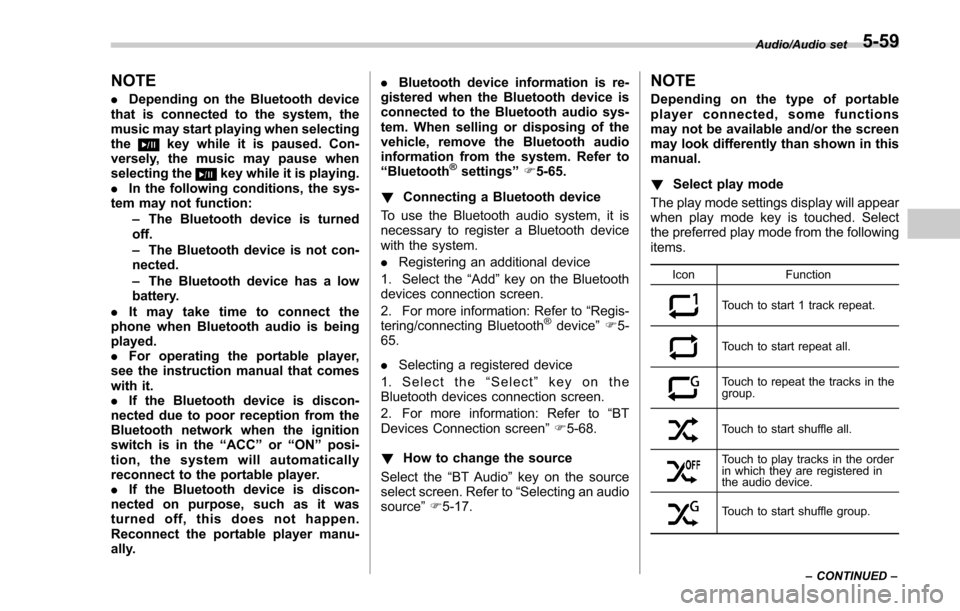
! Select play mode
The play mode settings display will appear
when play mode key is touched. Select
the preferred play mode from the following
items.
Icon Function
Touch to start 1 track repeat.
Touch to start repeat all.
Touch to repeat the tracks in the
group.
Touch to start shuffle all.
Touch to play tracks in the order
in which they are registered in
the audio device.
Touch to start shuffle group.Audio/Audio set
–CONTINUED –
5-59
Page 356 of 634
NOTE
The setting is fixed as the“OFF ”key
when no device is registered.
!Deleting a Bluetooth device
1. Display the “BT Devices Connection ”
screen. Refer to “BT Devices Connection
screen” F5-68.
2. Select the desired device.
3. Touch the
key for the device to be
deleted, and then select the “OK ”key.
NOTE
When deleting a Bluetooth phone, the
contact data will be deleted at the same
time.
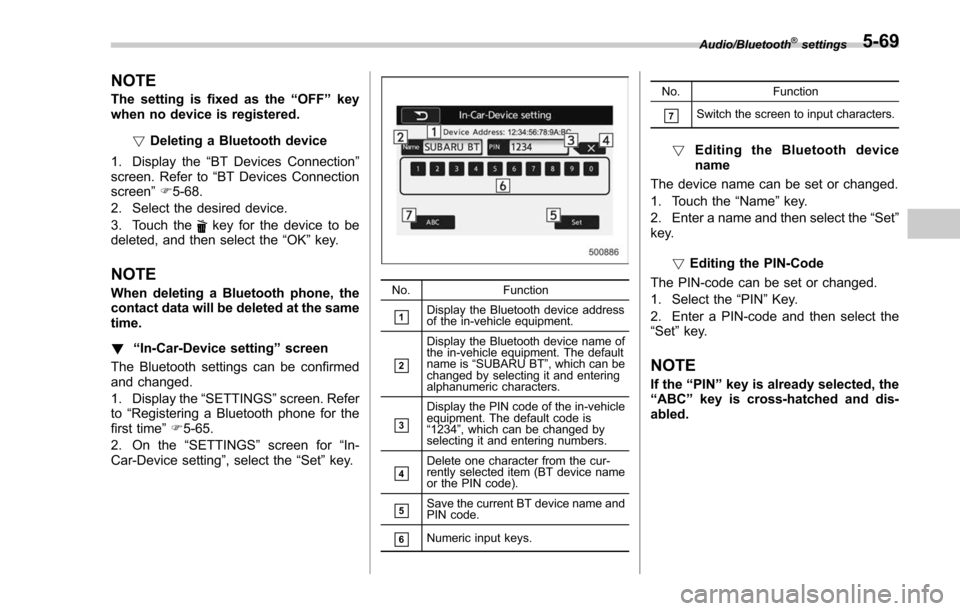
! “In-Car-Device setting ”screen
The Bluetooth settings can be confirmed
and changed.
1. Display the “SETTINGS”screen. Refer
to “Registering a Bluetooth phone for the
first time ”F 5-65.
2. On the “SETTINGS”screen for “In-
Car-Device setting ”, select the“Set”key.No. Function
&1Display the Bluetooth device address
of the in-vehicle equipment.
&2
Display the Bluetooth device name of
the in-vehicle equipment. The default
name is“SUBARU BT ”, which can be
changed by selecting it and entering
alphanumeric characters.
&3
Display the PIN code of the in-vehicle
equipment. The default code is
“ 1234 ”, which can be changed by
selecting it and entering numbers.
&4Delete one character from the cur-
rently selected item (BT device name
or the PIN code).
&5Save the current BT device name and
PIN code.
&6Numeric input keys. No. Function
&7Switch the screen to input characters.
!
Editing the Bluetooth device
name
The device name can be set or changed.
1. Touch the “Name”key.
2. Enter a name and then select the “Set”
key.
!Editing the PIN-Code
The PIN-code can be set or changed.
1. Select the “PIN”Key.
2. Enter a PIN-code and then select the
“Set ”key.
NOTE
If the “PIN ”key is already selected, the
“ ABC ”key is cross-hatched and dis-
abled.
Audio/Bluetooth®settings5-69
Page 364 of 634
No.Function
&2
Put the incoming call on hold. This
function may not work on some cell
phone models. This function is the
same as pressing the on hook switch
on the steering wheel for a short
period of time.
&3Open the call screen. This function is
the same as pressing the off hook
switch on the steering wheel.
&4
Reject the incoming call. This function
is the same as pressing and holding
the on hook switch on the steering
wheel.
NOTE
.During international phone calls, the
other party’ s name or number may not
be displayed correctly depending on
the type of cell phone you have.
. The ringtone that has been set in the
phone setting screen sounds when
there is an incoming call. Depending
on the type of Bluetooth phone, both
the system and Bluetooth phone may
sound simultaneously when there is an
incoming call. Refer to “Phone volume
settings ”F 5-78. !
By off/on hook switch
When you receive a call, you can also
answer it by pressing the off hook switch
on the steering wheel. To end a call, press
the on hook switch.
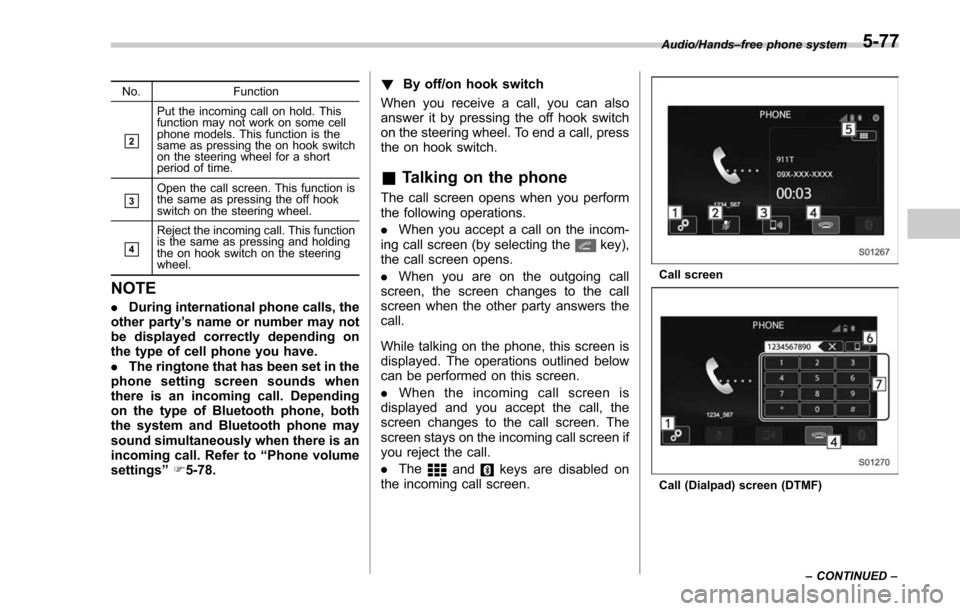
& Talking on the phone
The call screen opens when you perform
the following operations.
. When you accept a call on the incom-
ing call screen (by selecting the
key),
the call screen opens.
. When you are on the outgoing call
screen, the screen changes to the call
screen when the other party answers the
call.
While talking on the phone, this screen is
displayed. The operations outlined below
can be performed on this screen.
. When the incoming call screen is
displayed and you accept the call, the
screen changes to the call screen. The
screen stays on the incoming call screen if
you reject the call.
. The
andkeys are disabled on
the incoming call screen.
Call screen
Call (Dialpad) screen (DTMF) Audio/Hands
–free phone system
–CONTINUED –
5-77
Page 369 of 634
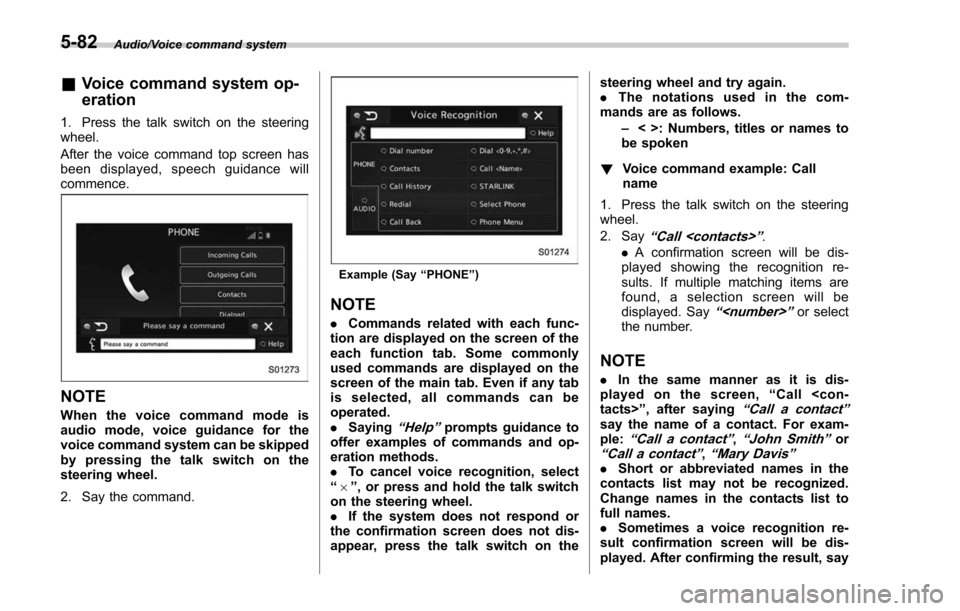
Audio/Voice command system
&Voice command system op-
eration
1. Press the talk switch on the steering
wheel.
After the voice command top screen has
been displayed, speech guidance will
commence.
NOTE
When the voice command mode is
audio mode, voice guidance for the
voice command system can be skipped
by pressing the talk switch on the
steering wheel.
2. Say the command.
Example (Say “PHONE ”)
NOTE
. Commands related with each func-
tion are displayed on the screen of the
each function tab. Some commonly
used commands are displayed on the
screen of the main tab. Even if any tab
is selected, all commands can be
operated.
. Saying
“Help ”prompts guidance to
offer examples of commands and op-
eration methods.
. To cancel voice recognition, select
“ 6 ”, or press and hold the talk switch
on the steering wheel.
. If the system does not respond or
the confirmation screen does not dis-
appear, press the talk switch on the steering wheel and try again.
.
The notations used in the com-
mands are as follows.
–< >: Numbers, titles or names to
be spoken
! Voice command example: Call
name
1. Press the talk switch on the steering
wheel.
2. Say
“ Call
. A confirmation screen will be dis-
played showing the recognition re-
sults. If multiple matching items are
found, a selection screen will be
displayed. Say
“
the number.
NOTE
. In the same manner as it is dis-
played on the screen, “Call
“Call a contact ”say the name of a contact. For exam-
ple:“Call a contact ”,“John Smith ”or“Call a contact ”,“Mary Davis ”.Short or abbreviated names in the
contacts list may not be recognized.
Change names in the contacts list to
full names.
. Sometimes a voice recognition re-
sult confirmation screen will be dis-
played. After confirming the result, say
5-82
Page 385 of 634
Interior equipment/Sun visors
the lights turn off immediately.
.The ignition switch is turned from the
“LOCK”/ “OFF ”position to the “ACC”or
“ON ”position.
. All doors and the rear gate are locked
using the keyless access function (if
equipped).
. All doors and the rear gate are locked
using the remote keyless entry system.
The setting for the period of time in which
the lights remain on (OFF delay timer) can
be changed by a SUBARU dealer. Con-
tact your SUBARU dealer for details. For
models with multi function display, the
setting can be changed by operating the
multi function display. For details, refer to
“Interior light off delay timer setting ”F 3-
84.Sun visors
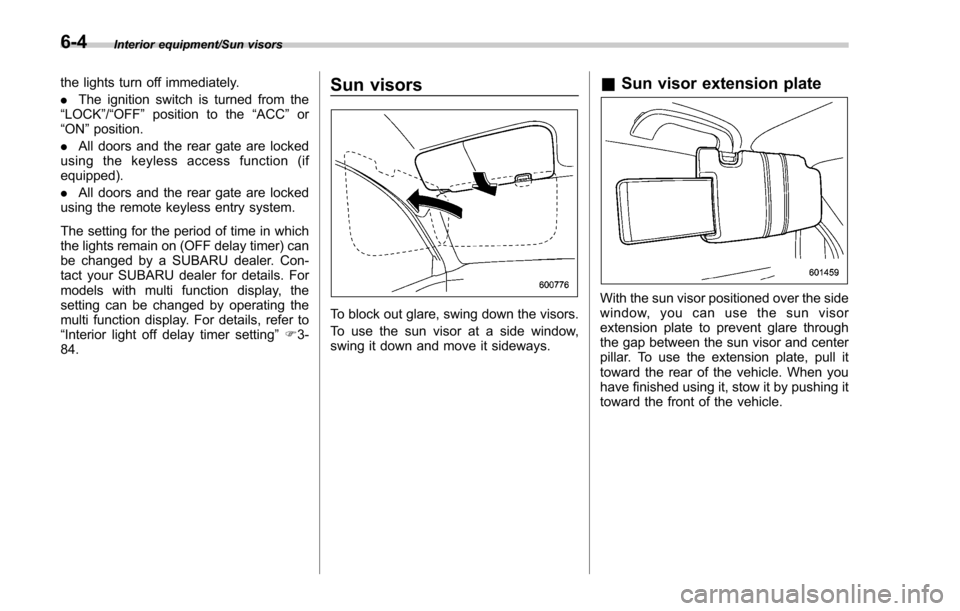
To block out glare, swing down the visors.
To use the sun visor at a side window,
swing it down and move it sideways.
& Sun visor extension plate
With the sun visor positioned over the side
window, you can use the sun visor
extension plate to prevent glare through
the gap between the sun visor and center
pillar. To use the extension plate, pull it
toward the rear of the vehicle. When you
have finished using it, stow it by pushing it
toward the front of the vehicle.
6-4
Page 413 of 634
Starting and operating/Starting and stopping the engine (models without push–button start system)
. When starting the engine, be sure
to sit in the driver ’s seat (except
when using the remote engine
start system).
NOTE
. Avoid rapid racing and rapid accel-
eration immediately after the engine
has started.
. For a short time after the engine has
started, the engine speed is kept high.
When the warm-up is completed, the
engine speed lowers automatically.
. On rare occasions, it may be difficult
to start the engine depending on the
fuel and the usage condition (repeated
driving of a distance in which the
engine has not warmed up sufficiently).
In such a case, it is recommended that
you change to a different brand of fuel.
. On rare occasions, transient knock-
ing may be heard from the engine when
the accelerator is operated rapidly
such as a rapid start-up and a rapid
acceleration. This is not a malfunction.
. The engine starts more easily when
the headlights, air conditioner and rear
window defogger are turned off.
. After the engine starts, the engine
speed will be kept high until the engine
has warmed up sufficiently. !
MT models
1. Apply the parking brake.
2. Turn off unnecessary lights and ac-
cessories.
3. Depress the clutch pedal to the floor
and shift the shift lever into neutral. Hold
the clutch pedal to the floor while starting
the engine.
The starter motor will only operate when
the clutch pedal is depressed fully to the
floor.
4. Turn the ignition switch to the “ON”
position and check the operation of the
warning and indicator lights. Refer to
“Warning and indicator lights ”F 3-13.
5. Turn the ignition switch to the “START”
position without depressing the accelera-
tor pedal. Release the key immediately
after the engine has started.
If the engine does not start, try the
following procedure.
(1) Turn the ignition switch to the
“OFF ”position and wait for at least
10 seconds. After checking that the
parking brake is firmly set, turn the
ignition switch to the “START”position
while depressing the accelerator pedal
slightly (approximately a quarter of the
full stroke). Release the accelerator
pedal as soon as the engine starts.
(2) If this fails to start the engine, turn the ignition switch back to the
“OFF”
position and wait for at least 10
seconds. Then fully depress the accel-
erator pedal and turn the ignition
switch to the “START”position. If the
engine starts, quickly release the
accelerator pedal.
(3) If this fails to start the engine, turn
the ignition switch again to the “OFF”
position. After waiting for 10 seconds
or longer, turn the ignition switch to the
“START ”position without depressing
the accelerator pedal.
(4) If the engine still does not start,
contact your nearest SUBARU dealer
for assistance.
6. Confirm that all warning and indicator
lights have turned off after the engine has
started. The fuel injection system auto-
matically lowers the idle speed as the
engine warms up.
! CVT models
1. Apply the parking brake.
2. Turn off unnecessary lights and ac-
cessories.
3. Shift the select lever to the “P”or “N
”
position (preferably the “P”position).
The
starter motor will only operate when
the select lever is at the “P”or “N”position.
4. Turn the ignition switch to the “ON”
7-10
Page 418 of 634
follows.
!Before starting the engine
Before using the remote engine start
system to start the engine, confirm the
following conditions.
. The select lever is in the “P”position.
. All doors including the rear gate are
closed.
. The engine hood is closed.
. The push-button ignition switch is in the
“OFF ”position.
! Starting the engine
To start the engine with remote engine
start system, briefly press the lock button
twice within 2 seconds, then press and
hold the lock button for 3 seconds.
1. Press the lock button briefly. The
hazard warning flashers then flash once.
2. Within 2 seconds, press the lock
button briefly again. The hazard warning
flashers then flash once again.
3. After step 2, immediately press and
hold the lock button. The hazard warning
flashers then flash once.
4. Approximately 3 seconds after step 3,
release the lock button. The engine will
then start successfully. !
Stopping the engine
Press and hold the lock button to stop the
engine with remote engine start system.
! Automatic engine shutdown
Theremoteenginestartsystemwill
automatically shut down or will not start
the engine under the following conditions.
. The total run-time has exceeded 20
minutes.
. Any door or the rear gate is opened.
. The select lever is moved to any
position other than “P”.
. The engine hood is opened.
. Thepush-buttonignitionswitchis
pressed.
. The brake pedal is depressed.
. The engine speed is 3,000 rpm or
more.
The time setting until the engine auto-
matically stops can be changed. To
change it, please contact your SUBARU
dealer. Note that some settings may
violate state, provincial, or local laws and
regulations. Check the laws in your area to
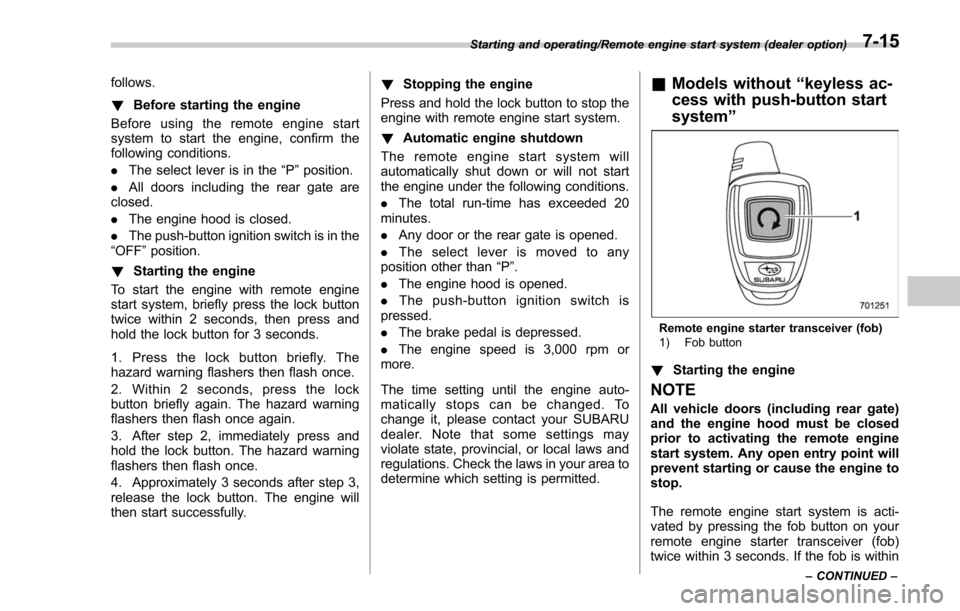
determine which setting is permitted.& Models without “keyless ac-
cess with push-button start
system ”
Remote engine starter transceiver (fob)
1) Fob button
!Starting the engine
NOTE
All vehicle doors (including rear gate)
and the engine hood must be closed
prior to activating the remote engine
start system. Any open entry point will
prevent starting or cause the engine to
stop.
The remote engine start system is acti-
vated by pressing the fob button on your
remote engine starter transceiver (fob)
twice within 3 seconds. If the fob is within
Starting and operating/Remote engine start system (dealer option)
–CONTINUED –7-15
Page 437 of 634
Starting and operating/Power steering
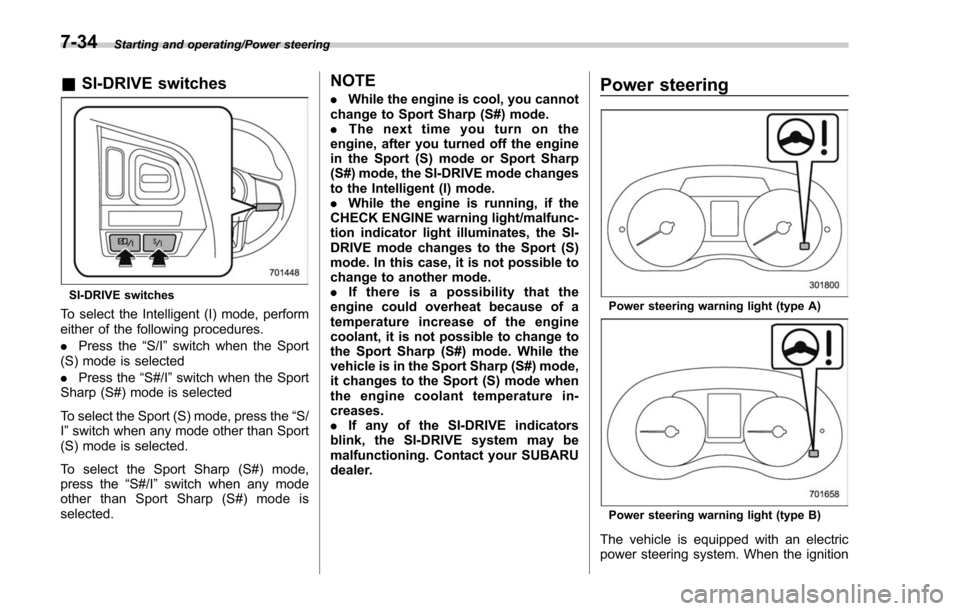
&SI-DRIVE switches
SI-DRIVE switches
To select the Intelligent (I) mode, perform
either of the following procedures.
. Press the “S/I”switch when the Sport
(S) mode is selected
. Press the “S#/I”switch when the Sport
Sharp (S#) mode is selected
To select the Sport (S) mode, press the “S/
I ” switch when any mode other than Sport
(S) mode is selected.
To select the Sport Sharp (S#) mode,
press the “S#/I”switch when any mode
other than Sport Sharp (S#) mode is
selected.
NOTE
. While the engine is cool, you cannot
change to Sport Sharp (S#) mode.
. The next time you turn on the
engine, after you turned off the engine
in the Sport (S) mode or Sport Sharp
(S#) mode, the SI-DRIVE mode changes
to the Intelligent (I) mode.
. While the engine is running, if the
CHECK ENGINE warning light/malfunc-
tion indicator light illuminates, the SI-
DRIVE mode changes to the Sport (S)
mode. In this case, it is not possible to
change to another mode.
. If there is a possibility that the
engine could overheat because of a
temperature increase of the engine
coolant, it is not possible to change to
the Sport Sharp (S#) mode. While the
vehicle is in the Sport Sharp (S#) mode,
it changes to the Sport (S) mode when
the engine coolant temperature in-
creases.
. If any of the SI-DRIVE indicators
blink, the SI-DRIVE system may be
malfunctioning. Contact your SUBARU
dealer.Power steering
Power steering warning light (type A)
Power steering warning light (type B)
The vehicle is equipped with an electric
power steering system. When the ignition
7-34
Page 447 of 634
Starting and operating/X–mode
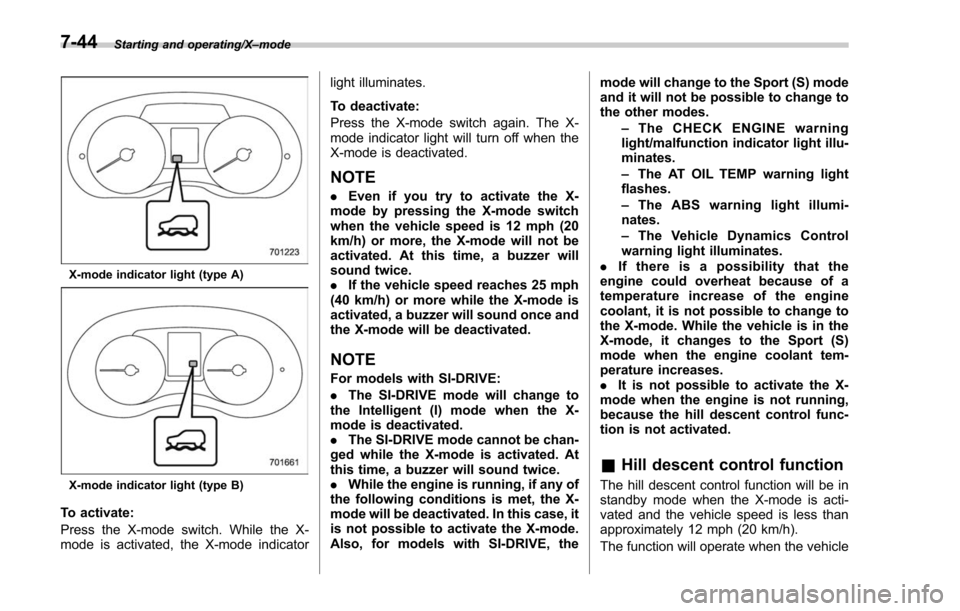
X-mode indicator light (type A)
X-mode indicator light (type B)
To activate:
Press the X-mode switch. While the X-
mode is activated, the X-mode indicator light illuminates.
To deactivate:
Press the X-mode switch again. The X-
mode indicator light will turn off when the
X-mode is deactivated.
NOTE
.
Even if you try to activate the X-
mode by pressing the X-mode switch
when the vehicle speed is 12 mph (20
km/h) or more, the X-mode will not be
activated. At this time, a buzzer will
sound twice.
. If the vehicle speed reaches 25 mph
(40 km/h) or more while the X-mode is
activated, a buzzer will sound once and
the X-mode will be deactivated.
NOTE
For models with SI-DRIVE:
. The SI-DRIVE mode will change to
the Intelligent (I) mode when the X-
mode is deactivated.
. The SI-DRIVE mode cannot be chan-
ged while the X-mode is activated. At
this time, a buzzer will sound twice.
. While the engine is running, if any of
the following conditions is met, the X-
mode will be deactivated. In this case, it
is not possible to activate the X-mode.
Also, for models with SI-DRIVE, the mode will change to the Sport (S) mode
and it will not be possible to change to
the other modes.
–The CHECK ENGINE warning
light/malfunction indicator light illu-
minates.
– The AT OIL TEMP warning light
flashes.
– The ABS warning light illumi-
nates.
– The Vehicle Dynamics Control
warning light illuminates.
. If there is a possibility that the
engine could overheat because of a
temperature increase of the engine
coolant, it is not possible to change to
the X-mode. While the vehicle is in the
X-mode, it changes to the Sport (S)
mode when the engine coolant tem-
perature increases.
. It is not possible to activate the X-
mode when the engine is not running,
because the hill descent control func-
tion is not activated.
& Hill descent control function
The hill descent control function will be in
standby mode when the X-mode is acti-
vated and the vehicle speed is less than
approximately 12 mph (20 km/h).
The function will operate when the vehicle
7-44