ignition SUBARU FORESTER 2017 SJ / 4.G Manual PDF
[x] Cancel search | Manufacturer: SUBARU, Model Year: 2017, Model line: FORESTER, Model: SUBARU FORESTER 2017 SJ / 4.GPages: 634, PDF Size: 11.77 MB
Page 208 of 634
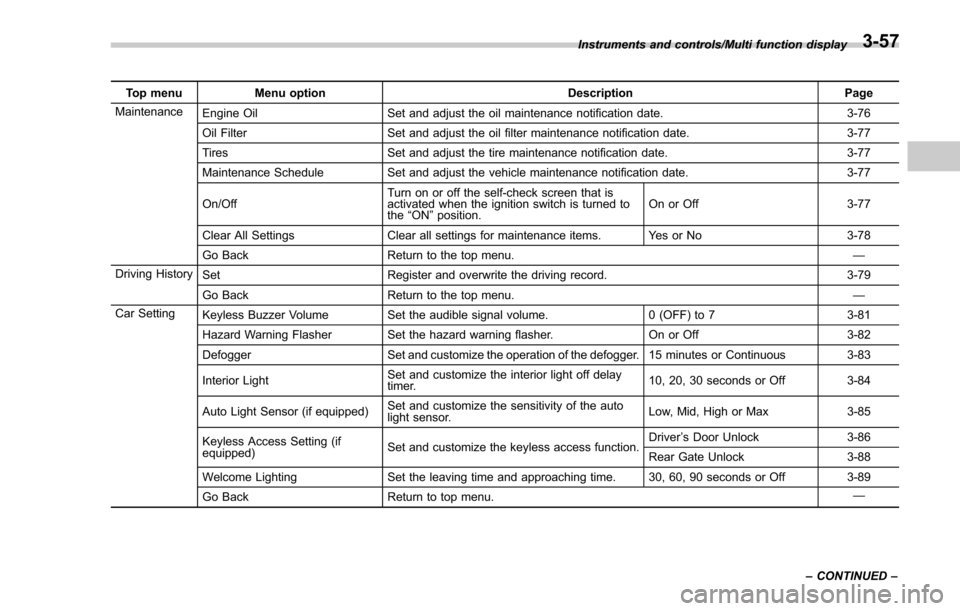
Top menuMenu option DescriptionPage
Maintenance Engine Oil Set and adjust the oil maintenance notification date. 3-76
Oil Filter Set and adjust the oil filter maintenance notification date. 3-77
Tires Set and adjust the tire maintenance notification date. 3-77
Maintenance Schedule Set and adjust the vehicle maintenance notification date. 3-77
On/Off Turn on or off the self-check screen that is
activated when the ignition switch is turned to
the
“ON ”position. On or Off
3-77
Clear All Settings Clear all settings for maintenance items. Yes or No 3-78
Go Back Return to the top menu. —
Driving History Set Register and overwrite the driving record. 3-79
Go Back Return to the top menu. —
Car Setting Keyless Buzzer Volume Set the audible signal volume. 0 (OFF) to 73-81
Hazard Warning Flasher Set the hazard warning flasher. On or Off3-82
Defogger Set and customize the operation of the defogger. 15 minutes or Continuous 3-83
Interior Light Set and customize the interior light off delay
timer. 10, 20, 30 seconds or Off
3-84
Auto Light Sensor (if equipped) Set and customize the sensitivity of the auto
light sensor. Low, Mid, High or Max
3-85
Keyless Access Setting (if
equipped) Set and customize the keyless access function. Driver
’s Door Unlock 3-86
Rear Gate Unlock 3-88
Welcome Lighting Set the leaving time and approaching time. 30, 60, 90 seconds or Off 3-89
Go Back Return to top menu. —
Instruments and controls/Multi function display
–CONTINUED –
3-57
Page 210 of 634
&Date and time settings
The items in the date and time settings
can be set. To change the items, operate
the “
”or “”switch.
NOTE
. The “Time/Date ”item must be set to
display the “Birthday ”, “Anniversary ”
and notifications for vehicle mainte-
nance.
. The “Birthday ”and “Anniversary ”
items can be entered after the “Time/
Date ”item has been set.
. Dates that do not exist in the
Gregorian calendar cannot be set (for
example, April 31).
. If your vehicle is equipped with
genuine SUBARU navigation system,
the clock of navigation system must be
set separately.
! Preparation for date setting
1. Turn the ignition switch to the “ON”
position.
2. Push and hold the
button to show
the selection screen.
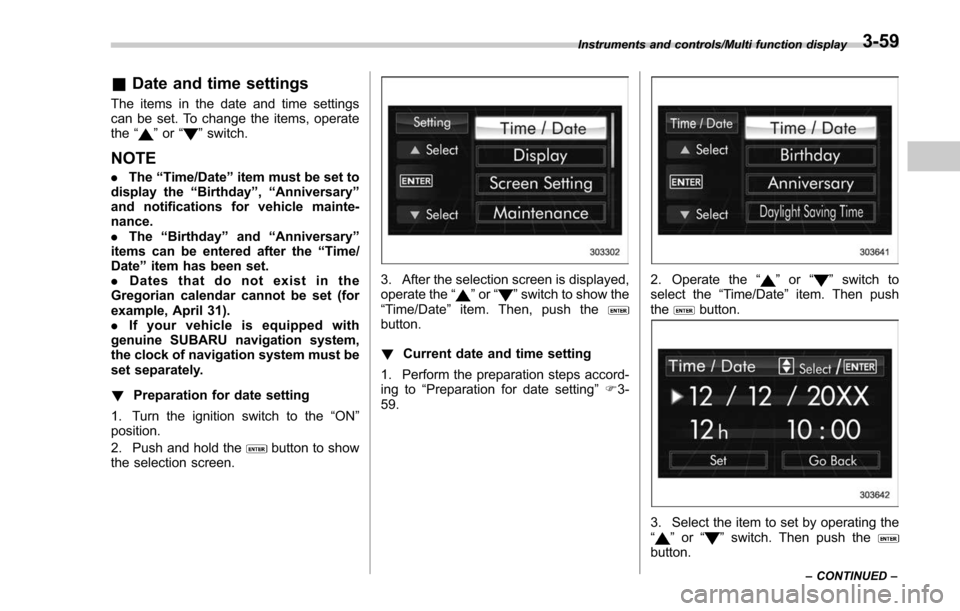
3. After the selection screen is displayed,
operate the “”or “”switch to show the
“Time/Date ”item. Then, push the
button.
! Current date and time setting
1. Perform the preparation steps accord-
ing to “Preparation for date setting ”F 3-
59.
2. Operate the “”or “”switch to
select the “Time/Date”item. Then push
the
button.
3. Select the item to set by operating the
“” or “”switch. Then push thebutton.
Instruments and controls/Multi function display
–CONTINUED –3-59
Page 213 of 634
Instruments and controls/Multi function display
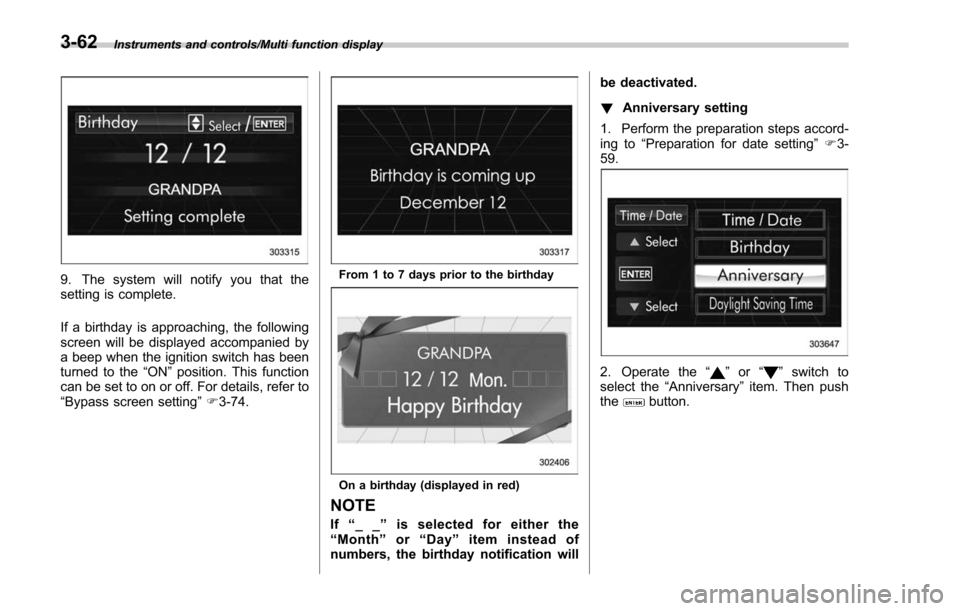
9. The system will notify you that the
setting is complete.
If a birthday is approaching, the following
screen will be displayed accompanied by
a beep when the ignition switch has been
turned to the“ON”position. This function
can be set to on or off. For details, refer to
“Bypass screen setting ”F 3-74.From 1 to 7 days prior to the birthday
On a birthday (displayed in red)
NOTE
If “__ ”is selected for either the
“ Month ”or “Day ”item instead of
numbers, the birthday notification will be deactivated.
!
Anniversary setting
1. Perform the preparation steps accord-
ing to “Preparation for date setting ”F 3-
59.
2. Operate the “”or “”switch to
select the “Anniversary ”item. Then push
the
button.
3-62
Page 215 of 634
Instruments and controls/Multi function display
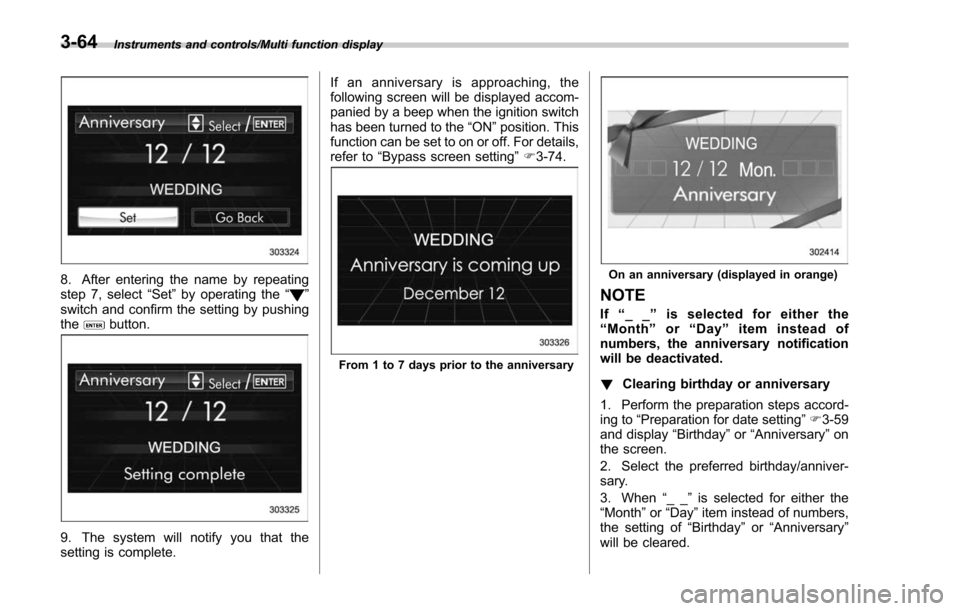
8. After entering the name by repeating
step 7, select“Set”by operating the “”
switch and confirm the setting by pushing
the
button.
9. The system will notify you that the
setting is complete. If an anniversary is approaching, the
following screen will be displayed accom-
panied by a beep when the ignition switch
has been turned to the
“ON ”position. This
function can be set to on or off. For details,
refer to “Bypass screen setting ”F 3-74.
From 1 to 7 days prior to the anniversary
On an anniversary (displayed in orange)
NOTE
If “__ ”is selected for either the
“ Month ”or “Day ”item instead of
numbers, the anniversary notification
will be deactivated.
! Clearing birthday or anniversary
1. Perform the preparation steps accord-
ing to “Preparation for date setting ”F 3-59
and display “Birthday ”or “Anniversary ”on
the screen.
2. Select the preferred birthday/anniver-
sary.
3. When “__ ”is selected for either the
“Month ”or “Day” item instead of numbers,
the setting of “Birthday ”or “Anniversary ”
will be cleared.
3-64
Page 217 of 634
Instruments and controls/Multi function display
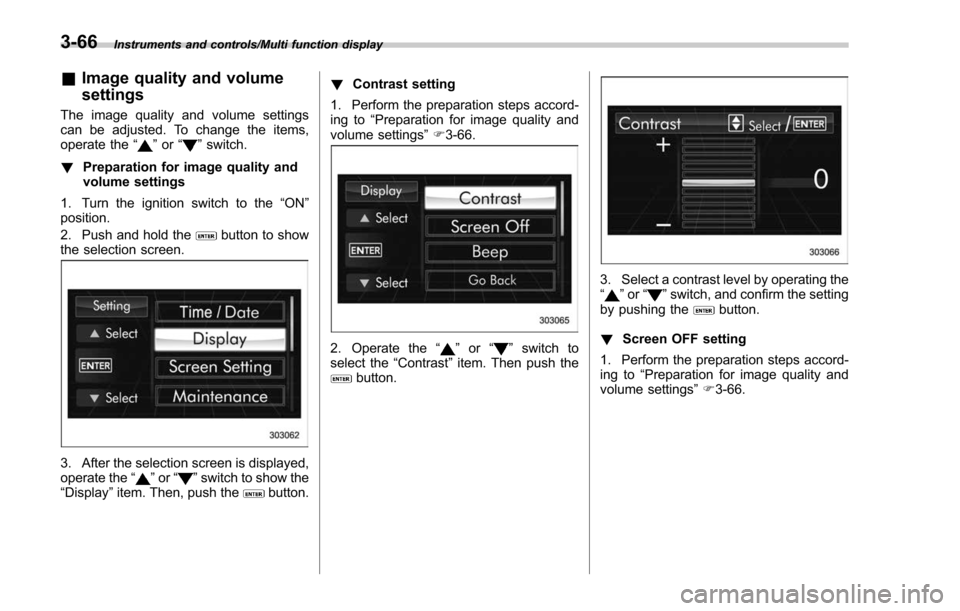
&Image quality and volume
settings
The image quality and volume settings
can be adjusted. To change the items,
operate the “
”or “”switch.
! Preparation for image quality and
volume settings
1. Turn the ignition switch to the “ON”
position.
2. Push and hold the
button to show
the selection screen.
3. After the selection screen is displayed,
operate the “”or “”switch to show the
“Display ”item. Then, push thebutton. !
Contrast setting
1. Perform the preparation steps accord-
ing to “Preparation for image quality and
volume settings” F3-66.
2. Operate the “”or “”switch to
select the “Contrast”item. Then push the
button.
3. Select a contrast level by operating the
“”or “”switch, and confirm the setting
by pushing thebutton.
! Screen OFF setting
1. Perform the preparation steps accord-
ing to “Preparation for image quality and
volume settings” F3-66.
3-66
Page 218 of 634
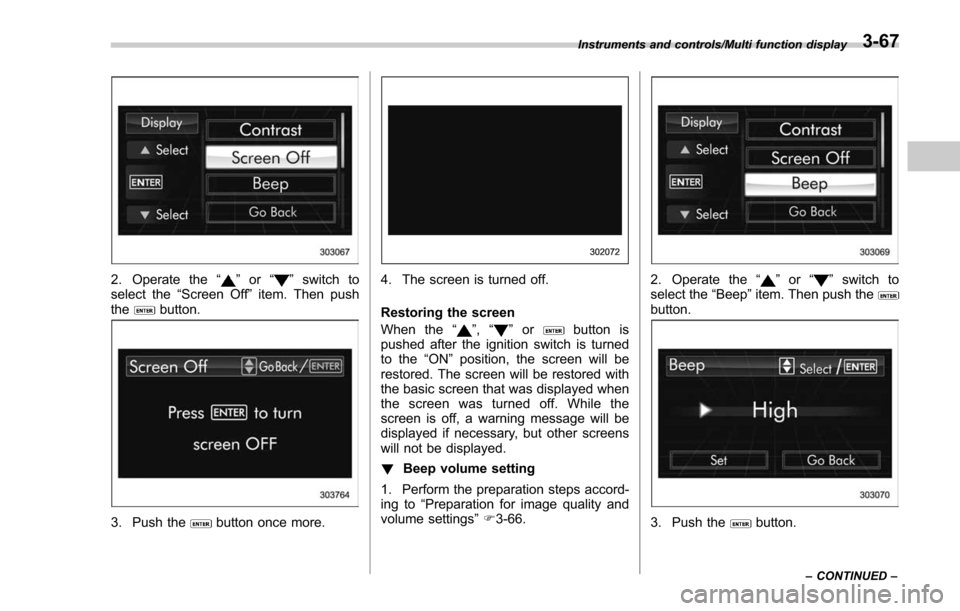
2. Operate the“”or “”switch to
select the “Screen Off ”item. Then push
the
button.
3. Push thebutton once more.
4. The screen is turned off.
Restoring the screen
When the “
”,“”orbutton is
pushed after the ignition switch is turned
to the “ON ”position, the screen will be
restored. The screen will be restored with
the basic screen that was displayed when
the screen was turned off. While the
screen is off, a warning message will be
displayed if necessary, but other screens
will not be displayed.
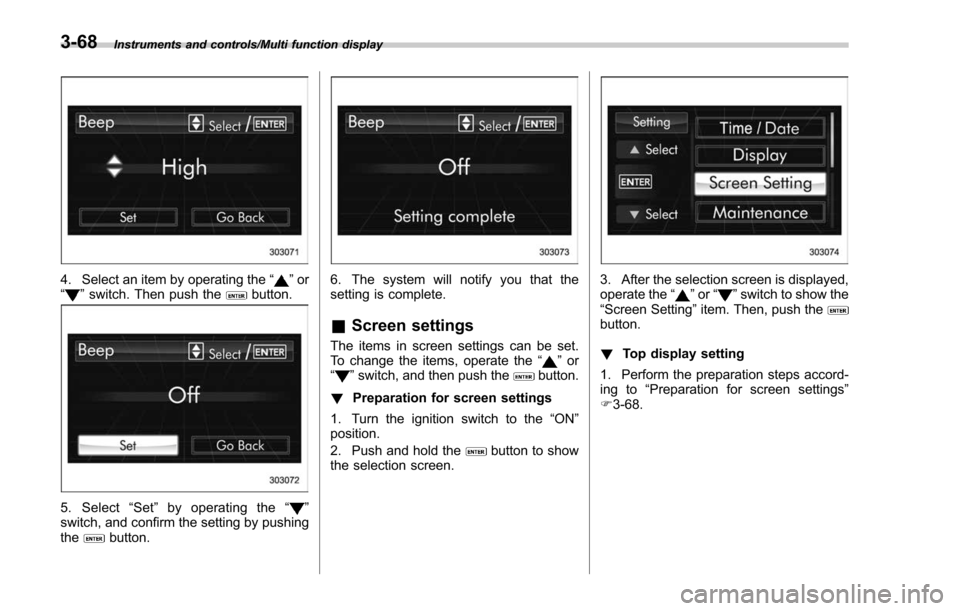
! Beep volume setting
1. Perform the preparation steps accord-
ing to “Preparation for image quality and
volume settings” F3-66.
2. Operate the “”or “”switch to
select the “Beep ”item. Then push the
button.
3. Push thebutton.
Instruments and controls/Multi function display
–CONTINUED –3-67
Page 219 of 634
Instruments and controls/Multi function display
4. Select an item by operating the“”or
“” switch. Then push thebutton.
5. Select “Set ”by operating the “”
switch, and confirm the setting by pushing
the
button.
6. The system will notify you that the
setting is complete.
& Screen settings
The items in screen settings can be set.
To change the items, operate the “”or
“” switch, and then push thebutton.
! Preparation for screen settings
1. Turn the ignition switch to the “ON”
position.
2. Push and hold the
button to show
the selection screen.
3. After the selection screen is displayed,
operate the “”or “”switch to show the
“ Screen Setting ”item. Then, push the
button.
! Top display setting
1. Perform the preparation steps accord-
ing to “Preparation for screen settings”
F 3-68.
3-68
Page 227 of 634
Instruments and controls/Multi function display
6. The system will notify you that the
setting is complete.
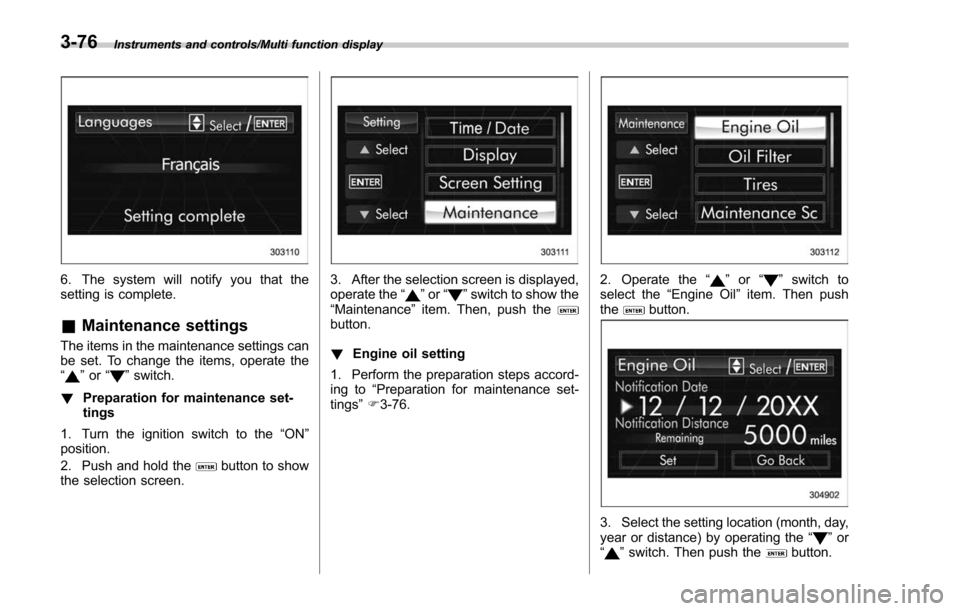
&Maintenance settings
The items in the maintenance settings can
be set. To change the items, operate the
“
”or “”switch.
! Preparation for maintenance set-
tings
1. Turn the ignition switch to the “ON”
position.
2. Push and hold the
button to show
the selection screen.
3. After the selection screen is displayed,
operate the “”or “”switch to show the
“Maintenance ”item. Then, push the
button.
! Engine oil setting
1. Perform the preparation steps accord-
ing to “Preparation for maintenance set-
tings ”F 3-76.
2. Operate the “”or “”switch to
select the “Engine Oil ”item. Then push
the
button.
3. Select the setting location (month, day,
year or distance) by operating the “”or
“” switch. Then push thebutton.
3-76
Page 230 of 634
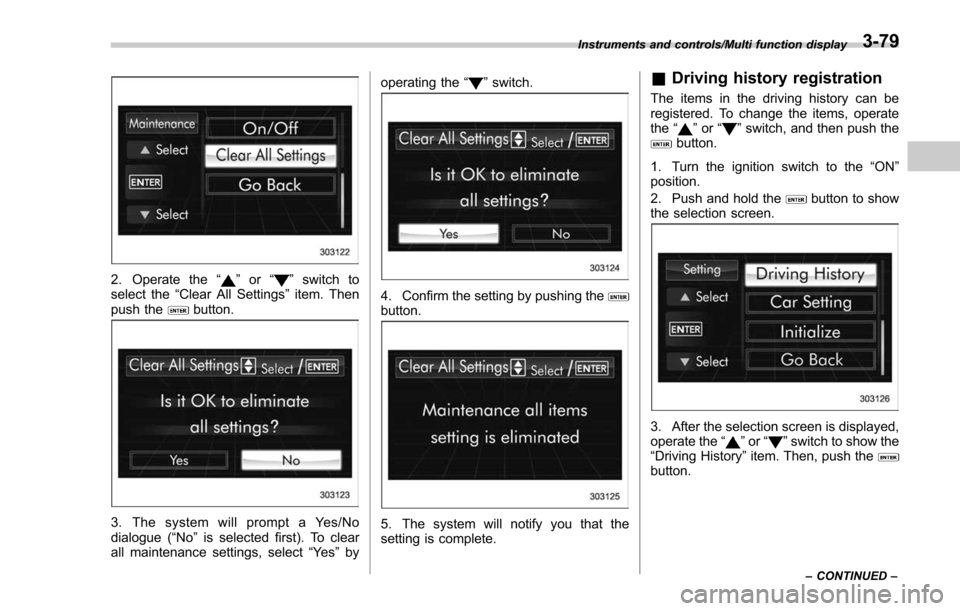
2. Operate the“”or “”switch to
select the “Clear All Settings ”item. Then
push the
button.
3. The system will prompt a Yes/No
dialogue (“ No”is selected first). To clear
all maintenance settings, select “Ye s”by operating the
“
”switch.
4. Confirm the setting by pushing thebutton.
5. The system will notify you that the
setting is complete.
& Driving history registration
The items in the driving history can be
registered. To change the items, operate
the “
”or “”switch, and then push thebutton.
1. Turn the ignition switch to the “ON”
position.
2. Push and hold the
button to show
the selection screen.
3. After the selection screen is displayed,
operate the “”or “”switch to show the
“Driving History ”item. Then, push the
button.
Instruments and controls/Multi function display
–CONTINUED –3-79
Page 232 of 634
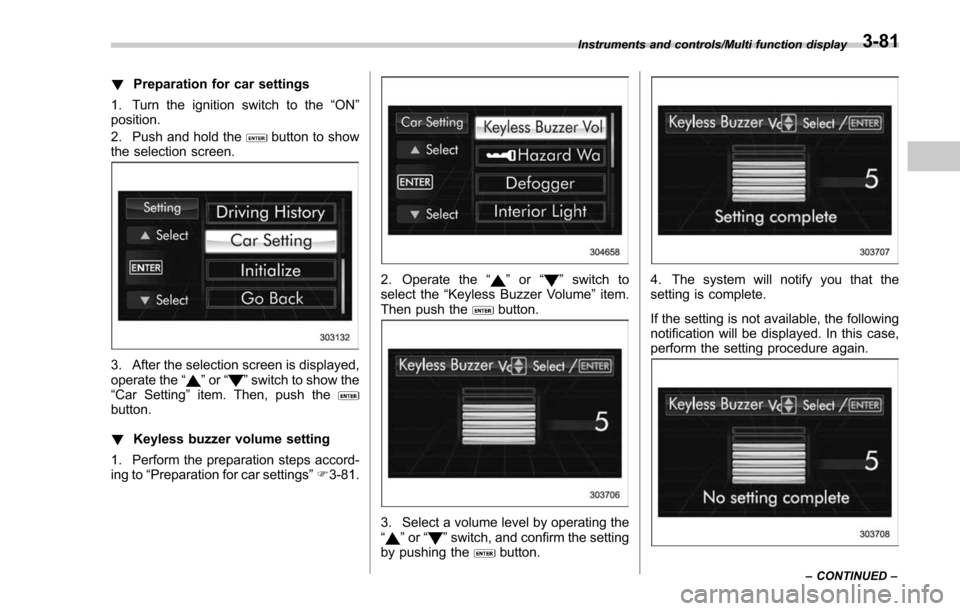
!Preparation for car settings
1. Turn the ignition switch to the “ON”
position.
2. Push and hold the
button to show
the selection screen.
3. After the selection screen is displayed,
operate the “”or “”switch to show the
“Car Setting ”item. Then, push the
button.
! Keyless buzzer volume setting
1. Perform the preparation steps accord-
ing to “Preparation for car settings” F3-81.
2. Operate the “”or “”switch to
select the “Keyless Buzzer Volume ”item.
Then push the
button.
3. Select a volume level by operating the
“” or “”switch, and confirm the setting
by pushing thebutton.
4. The system will notify you that the
setting is complete.
If the setting is not available, the following
notification will be displayed. In this case,
perform the setting procedure again.
Instruments and controls/Multi function display
–CONTINUED –3-81