keyless SUBARU FORESTER 2017 SJ / 4.G Owners Manual
[x] Cancel search | Manufacturer: SUBARU, Model Year: 2017, Model line: FORESTER, Model: SUBARU FORESTER 2017 SJ / 4.GPages: 634, PDF Size: 11.77 MB
Page 13 of 634
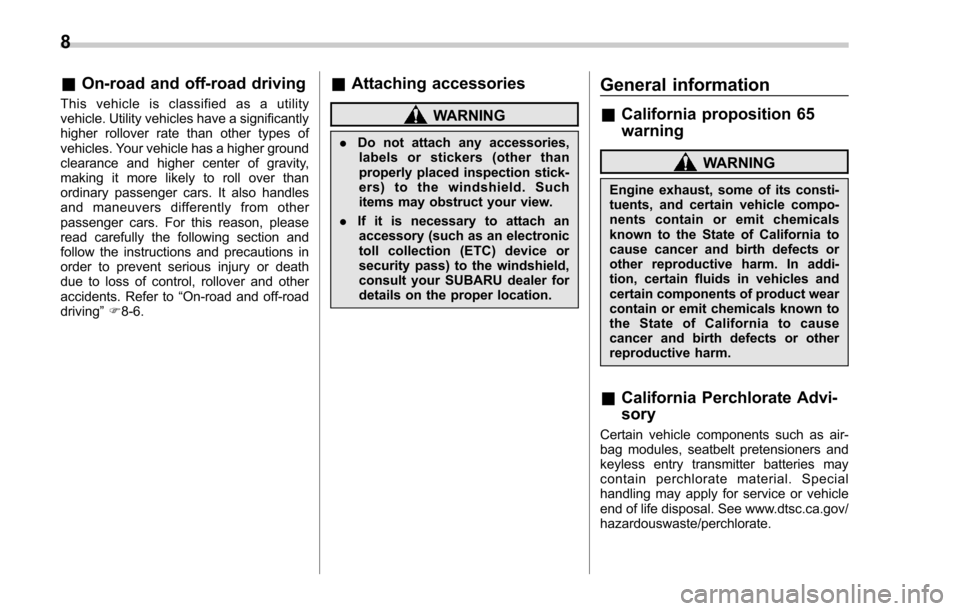
&On-road and off-road driving
This vehicle is classified as a utility
vehicle. Utility vehicles have a significantly
higher rollover rate than other types of
vehicles. Your vehicle has a higher ground
clearance and higher center of gravity,
making it more likely to roll over than
ordinary passenger cars. It also handles
and maneuvers differently from other
passenger cars. For this reason, please
read carefully the following section and
follow the instructions and precautions in
order to prevent serious injury or death
due to loss of control, rollover and other
accidents. Refer to “On-road and off-road
driving ”F 8-6.
& Attaching accessories
WARNING
. Do not attach any accessories,
labels or stickers (other than
properly placed inspection stick-
ers) to the windshield. Such
items may obstruct your view.
. If it is necessary to attach an
accessory (such as an electronic
toll collection (ETC) device or
security pass) to the windshield,
consult your SUBARU dealer for
details on the proper location.
General information
& California proposition 65
warning
WARNING
Engine exhaust, some of its consti-
tuents, and certain vehicle compo-
nents contain or emit chemicals
known to the State of California to
cause cancer and birth defects or
other reproductive harm. In addi-
tion, certain fluids in vehicles and
certain components of product wear
contain or emit chemicals known to
the State of California to cause
cancer and birth defects or other
reproductive harm.
&California Perchlorate Advi-
sory
Certain vehicle components such as air-
bag modules, seatbelt pretensioners and
keyless entry transmitter batteries may
contain perchlorate material. Special
handling may apply for service or vehicle
end of life disposal. See www.dtsc.ca.gov/
hazardouswaste/perchlorate.
8
Page 30 of 634
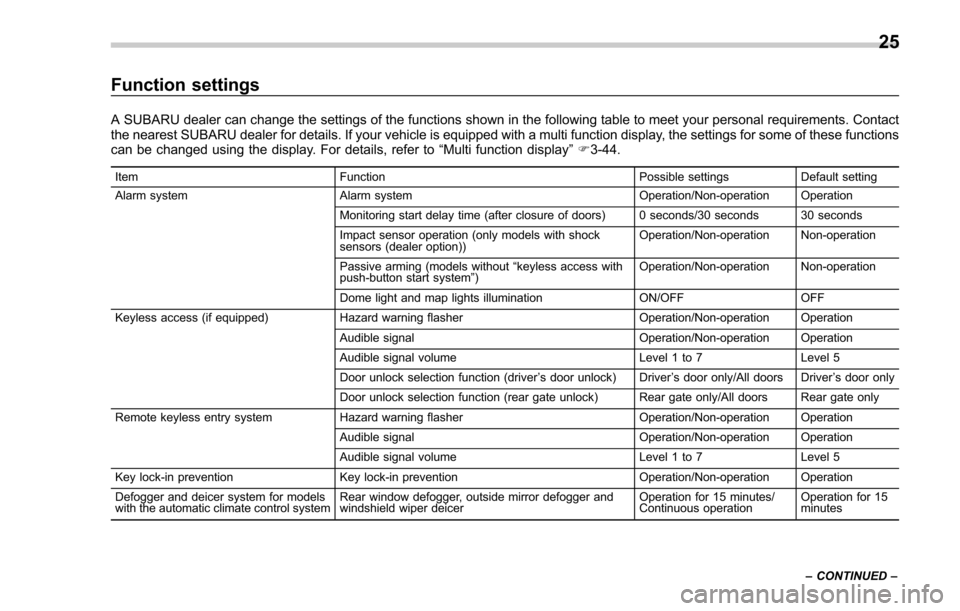
Function settings
A SUBARU dealer can change the settings of the functions shown in the following table to meet your personal requirements. Contact
the nearest SUBARU dealer for details. If your vehicle is equipped with a multi function display, the settings for some of these functions
can be changed using the display. For details, refer to“Multi function display”F 3-44.
Item Function Possible settingsDefault setting
Alarm system Alarm system Operation/Non-operation Operation
Monitoring start delay time (after closure of doors) 0 seconds/30 seconds 30 seconds
Impact sensor operation (only models with shock
sensors (dealer option)) Operation/Non-operation Non-operation
Passive arming (models without “keyless access with
push-button start system ”) Operation/Non-operation Non-operation
Dome light and map lights illumination ON/OFFOFF
Keyless access (if equipped) Hazard warning flasher Operation/Non-operation Operation
Audible signal Operation/Non-operation Operation
Audible signal volume Level 1 to 7Level 5
Door unlock selection function (driver ’s door unlock) Driver ’s door only/All doors Driver ’s door only
Door unlock selection function (rear gate unlock) Rear gate only/All doors Rear gate only
Remote keyless entry system Hazard warning flasher Operation/Non-operation Operation
Audible signal Operation/Non-operation Operation
Audible signal volume Level 1 to 7Level 5
Key lock-in prevention Key lock-in prevention Operation/Non-operation Operation
Defogger and deicer system for models
with the automatic climate control system Rear window defogger, outside mirror defogger and
windshield wiper deicer Operation for 15 minutes/
Continuous operationOperation for 15
minutes
– CONTINUED –
25
Page 38 of 634
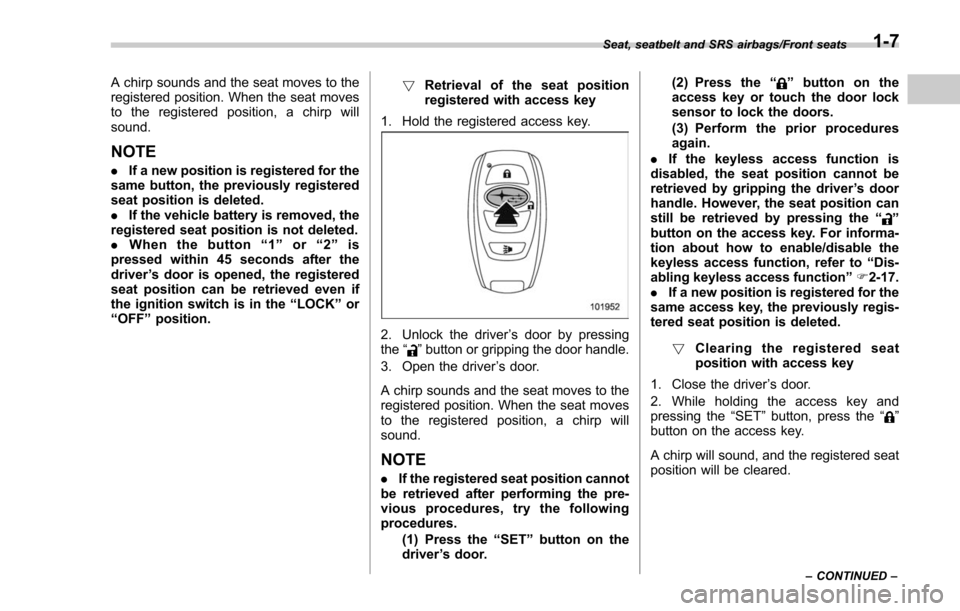
A chirp sounds and the seat moves to the
registered position. When the seat moves
to the registered position, a chirp will
sound.
NOTE
.If a new position is registered for the
same button, the previously registered
seat position is deleted.
. If the vehicle battery is removed, the
registered seat position is not deleted.
. When the button “1 ” or “2 ” is
pressed within 45 seconds after the
driver ’s door is opened, the registered
seat position can be retrieved even if
the ignition switch is in the “LOCK ”or
“ OFF ”position. !
Retrieval of the seat position
registered with access key
1. Hold the registered access key.
2. Unlock the driver ’s door by pressing
the “”button or gripping the door handle.
3. Open the driver ’s door.
A chirp sounds and the seat moves to the
registered position. When the seat moves
to the registered position, a chirp will
sound.
NOTE
. If the registered seat position cannot
be retrieved after performing the pre-
vious procedures, try the following
procedures.
(1) Press the “SET ”button on the
driver ’s door. (2) Press the
“
”button on the
access key or touch the door lock
sensor to lock the doors.
(3) Perform the prior procedures
again.
. If the keyless access function is
disabled, the seat position cannot be
retrieved by gripping the driver ’s door
handle. However, the seat position can
still be retrieved by pressing the “
”
button on the access key. For informa-
tion about how to enable/disable the
keyless access function, refer to “Dis-
abling keyless access function ”F 2-17.
. If a new position is registered for the
same access key, the previously regis-
tered seat position is deleted.
! Clearing the registered seat
position with access key
1. Close the driver ’s door.
2. While holding the access key and
pressing the “SET ”button, press the “
”
button on the access key.
A chirp will sound, and the registered seat
position will be cleared.
Seat, seatbelt and SRS airbags/Front seats
–CONTINUED –1-7
Page 104 of 634
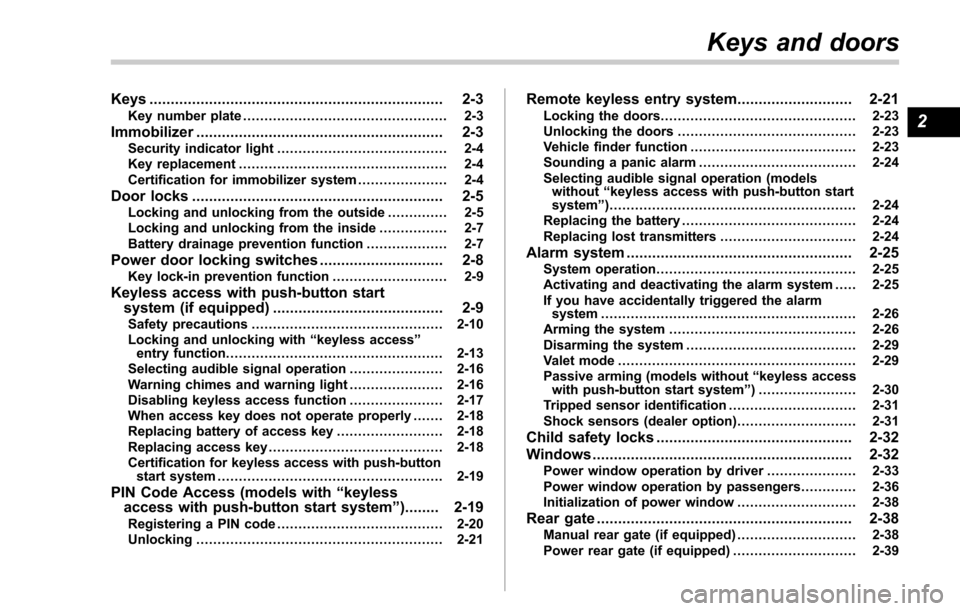
Keys..................................................................... 2-3Key number plate ................................................ 2-3
Immobilizer.......................................................... 2-3Security indicator light ........................................ 2-4
Key replacement ................................................. 2-4
Certification for immobilizer system ..................... 2-4
Door locks........................................................... 2-5Locking and unlocking from the outside .. ............ 2-5
Locking and unlocking from the inside ................ 2-7
Battery drainage prevention function ................... 2-7
Power door locking switches............................. 2-8Key lock-in prevention function ........................... 2-9
Keyless access with push-button start
system (if equipped) ........................................ 2-9
Safety precautions............................................. 2-10
Locking and unlocking with “keyless access ”
entry function. .................................................. 2-13
Selecting audible signal operation ...................... 2-16
Warning chimes and warning light ...................... 2-16
Disabling keyless access function ...................... 2-17
When access key does not operate properly ....... 2-18
Replacing battery of access key ......................... 2-18
Replacing access key ......................................... 2-18
Certification for keyless access with push-button start system ..................................................... 2-19
PIN Code Access (models with “keyless
access with push-button start system ”)........ 2-19
Registering a PIN code ....................................... 2-20
Unlocking .......................................................... 2-21
Remote keyless entry system ........................... 2-21Locking the doors.............................................. 2-23
Unlocking the doors .......................................... 2-23
Vehicle finder function ....................................... 2-23
Sounding a panic alarm ..................................... 2-24
Selecting audible signal operation (models without “keyless access with push-button start
system ”).......................................................... 2-24
Replacing the battery ......................................... 2-24
Replacing lost transmitters ................................ 2-24
Alarm system..................................................... 2-25System operation ............................................... 2-25
Activating and deactivating the alarm system ..... 2-25
If you have accidentally triggered the alarm system ............................................................ 2-26
Arming the system ............................................ 2-26
Disarming the system ........................................ 2-29
Valet mode ........................................................ 2-29
Passive arming (models without “keyless access
with push-button start system ”) ....................... 2-30
Tripped sensor identification .............................. 2-31
Shock sensors (dealer option).. .......................... 2-31
Child safety locks.............................................. 2-32
Windows ............................................................. 2-32
Power window operation by driver ..................... 2-33
Power window operation by passengers ............. 2-36
Initialization of power window .. .......................... 2-38
Rear gate............................................................ 2-38Manual rear gate (if equipped) .. .......................... 2-38
Power rear gate (if equipped) ... .......................... 2-39
Keys and doors
2
Page 106 of 634
Keys
NOTE
For models with“keyless access with
push-button start system ”, refer to
“ Keyless access with push-button start
system ”F 2-9.
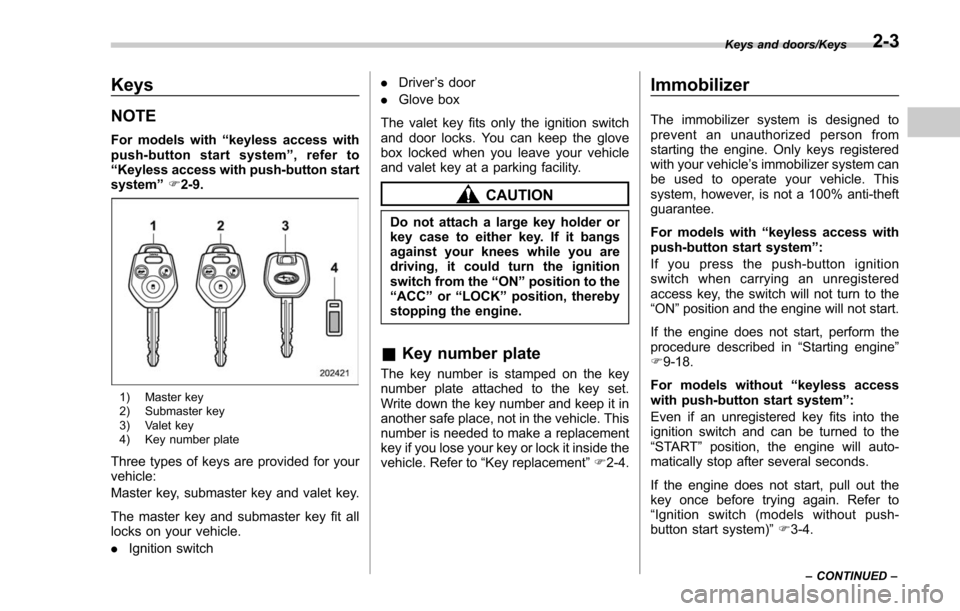
1) Master key
2) Submaster key
3) Valet key
4) Key number plate
Three types of keys are provided for your
vehicle:
Master key, submaster key and valet key.
The master key and submaster key fit all
locks on your vehicle.
. Ignition switch .
Driver ’s door
. Glove box
The valet key fits only the ignition switch
and door locks. You can keep the glove
box locked when you leave your vehicle
and valet key at a parking facility.
CAUTION
Do not attach a large key holder or
key case to either key. If it bangs
against your knees while you are
driving, it could turn the ignition
switch from the “ON ”position to the
“ ACC ”or “LOCK ”position, thereby
stopping the engine.
& Key number plate
The key number is stamped on the key
number plate attached to the key set.
Write down the key number and keep it in
another safe place, not in the vehicle. This
number is needed to make a replacement
key if you lose your key or lock it inside the
vehicle. Refer to “Key replacement ”F 2-4.
Immobilizer
The immobilizer system is designed to
prevent an unauthorized person from
starting the engine. Only keys registered
with your vehicle’ s immobilizer system can
be used to operate your vehicle. This
system, however, is not a 100% anti-theft
guarantee.
For models with “keyless access with
push-button start system ”:
If you press the push-button ignition
switch when carrying an unregistered
access key, the switch will not turn to the
“ ON ”position and the engine will not start.
If the engine does not start, perform the
procedure described in “Starting engine”
F 9-18.
For models without “keyless access
with push-button start system ”:
Even if an unregistered key fits into the
ignition switch and can be turned to the
“ START ”position, the engine will auto-
matically stop after several seconds.
If the engine does not start, pull out the
key once before trying again. Refer to
“ Ignition switch (models without push-
button start system) ”F 3-4.
Keys and doors/Keys
–CONTINUED –2-3
Page 107 of 634
Keys and doors/Immobilizer
CAUTION
.Do not place the key under direct
sunlight or anywhere it may
become hot.
. Do not get the key wet. If the key
gets wet, wipe it dry with a cloth
immediately.
. Donotmodifyorremovethe
system. If modified or removed,
the proper operation of the sys-
tem cannot be guaranteed.
NOTE
. To protect your vehicle from theft,
please pay close attention to the fol-
lowing security precautions:
–Never leave your vehicle unat-
tended with its keys inside.
– Before leaving your vehicle,
close all windows and the moon-
roof, and lock the doors and rear
gate.
– Do not leave spare keys or any
record of your key number in the
vehicle.
. The vehicle has a maintenance-free
type immobilizer system.
& Security indicator light
Refer to “Security indicator light ”F 3-30.
& Key replacement
Your key number plate will be required if
you ever need a replacement key made.
Any new key must be registered for use
with your vehicle ’s immobilizer system
before it can be used. The maximum
number of keys that can be registered
for use with one vehicle is as follows.
. Four (models without “keyless access
with push-button start system ”)
. Seven (models with “keyless access
with push-button start system ”)
One key that has already been registered
is required in order to register a new key.
If you lose a key, the lost key ’s ID code still
remains in the memory of the vehicle’ s
immobilizer system. For security reasons,
the lost key ’s ID code should be erased
from the memory. To erase the lost key ’s
ID code, all keys that will be used are
required.
For details about new key registration and
erasing the lost key ’s ID code, contact
your SUBARU dealer.
& Certification for immobilizer
system
. For models with “keyless access
with push-button start system ”:
Refer to “Certification for keyless access
with push-button start system ”F 2-19.
. For models without “keyless access
with push-button start system ”:
– U.S.-spec. models
FCC ID: MOZRI-38BFH
CAUTION
FCC WARNING
Changes or modifications not ex-
pressly approved by the party re-
sponsible for compliance could void
the user ’s authority to operate the
equipment.
This device complies with Part 15 of
the FCC Rules. Operation is subject to
the following two conditions: (1) This
device may not cause harmful inter-
ference, and (2) this device must
accept any interference received, in-
cluding interference that may cause
undesired operation.
2-4
Page 108 of 634
–Canada-spec. models
NOTE
This device complies with Industry
Canada licence-exempt RSS standard
(s). Operation is subject to the follow-
ing two conditions: (1) this device may
not cause interference, and (2) this
device must accept any interference,
including interference that may cause
undesired operation of the device.
NOTE
Le présent appareil est conforme aux
CNR d’ Industrie Canada applicables
aux appareils radio exempts de licence.
L ’exploitation est autorisée aux deux
conditions suivantes: (1) l ’appareil ne
doit pas produire de brouillage, et (2)
l ’utilisateur de l ’appareil doit accepter
tout brouillage radioélectrique subi,
même si le brouillage est susceptible
d ’en compromettre le fonctionnement. –
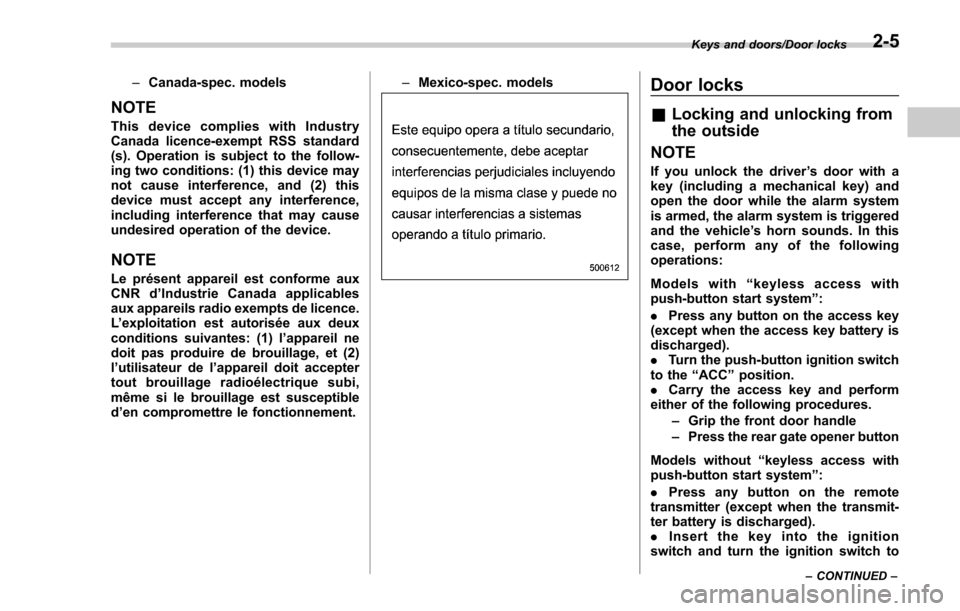
Mexico-spec. models
Door locks
& Locking and unlocking from
the outside
NOTE
If you unlock the driver ’s door with a
key (including a mechanical key) and
open the door while the alarm system
is armed, the alarm system is triggered
and the vehicle ’s horn sounds. In this
case, perform any of the following
operations:
Models with “keyless access with
push-button start system ”:
. Press any button on the access key
(except when the access key battery is
discharged).
. Turn the push-button ignition switch
to the “ACC ”position.
. Carry the access key and perform
either of the following procedures.
–Grip the front door handle
– Press the rear gate opener button
Models without “keyless access with
push-button start system ”:
. Press any button on the remote
transmitter (except when the transmit-
ter battery is discharged).
. Insert the key into the ignition
switch and turn the ignition switch to
Keys and doors/Door locks
–CONTINUED –2-5
Page 109 of 634
Keys and doors/Door locks
the“ON ”position.
For details about the alarm system,
refer to “Alarm system ”F 2-25.
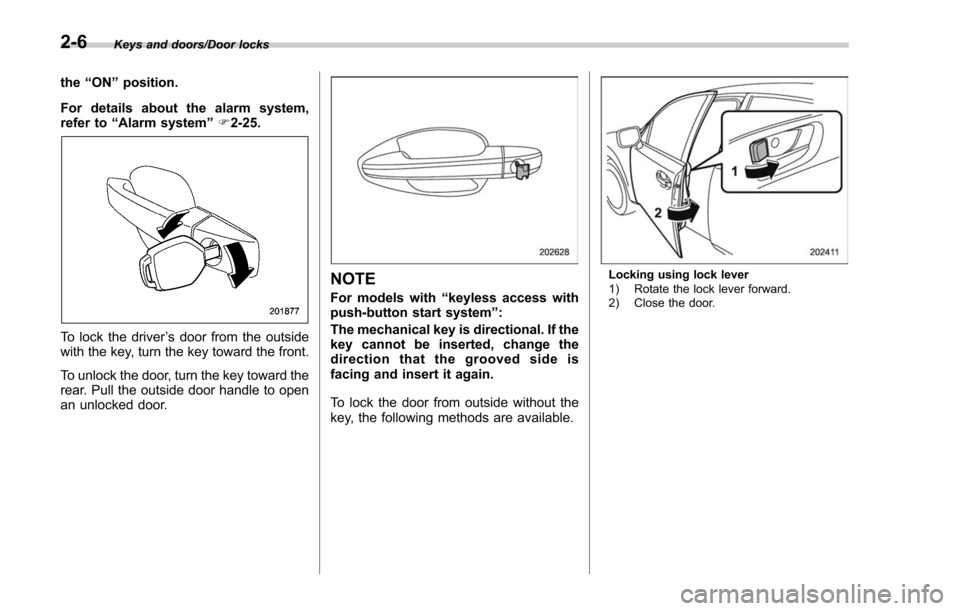
To lock the driver ’s door from the outside
with the key, turn the key toward the front.
To unlock the door, turn the key toward the
rear. Pull the outside door handle to open
an unlocked door.
NOTE
For models with “keyless access with
push-button start system ”:
The mechanical key is directional. If the
key cannot be inserted, change the
direction that the grooved side is
facing and insert it again.
To lock the door from outside without the
key, the following methods are available.
Locking using lock lever
1) Rotate the lock lever forward.
2) Close the door.
2-6
Page 112 of 634
NOTE
Make sure that you do not leave the key
inside the vehicle before locking the
doors from the outside using the power
door locking switches.
&Key lock-in prevention func-
tion
This function prevents the doors from
being locked under the following condi-
tions.
. The key is still in the ignition switch
(models without “keyless access with
push-button start system ”)
. The ignition switch is in the “ON ”
position (models with “keyless access with
push-button start system ”)
This function ’s operational/non-opera-
tional setting can be changed by a
SUBARU dealer. Contact a SUBARU
dealer for details.
NOTE
. The factory setting (default setting)
for this function is set as “operational ”.
. When leaving the vehicle, make sure
you are holding the key before locking
the doors. !
Behavior with key lock-in preven-
tion function operational
With the driver ’s door open, the doors are
automatically kept unlocked even if the
front side of the power door locking switch
is pressed.
! Behavior with key lock-in preven-
tion function non-operational
. If the lock lever is turned to the front
(“LOCK” ) position with the driver ’s door
open and the driver ’s door is then closed
with the lock lever in that position, the
driver ’s door is locked.
. If the spare key is used to lock the
driver ’s door from the outside of the
vehicle, the door is locked.
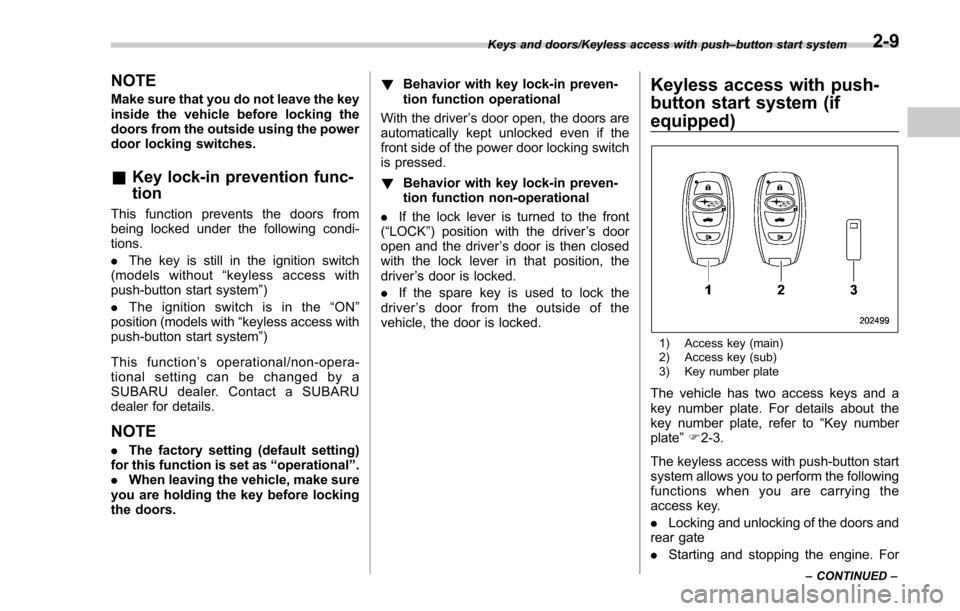
Keyless access with push-
button start system (if
equipped)
1) Access key (main)
2) Access key (sub)
3) Key number plate
The vehicle has two access keys and a
key number plate. For details about the
key number plate, refer to “Key number
plate ”F 2-3.
The keyless access with push-button start
system allows you to perform the following
functions when you are carrying the
access key.
. Locking and unlocking of the doors and
rear gate
. Starting and stopping the engine. For
Keys and doors/Keyless access with push –button start system
–CONTINUED –2-9
Page 113 of 634
Keys and doors/Keyless access with push–button start system
detailed information, refer to “Starting and
stopping engine (models with push-button
start system) ”F 7-12.
. Arming and disarming the alarm sys-
tem. For detailed information, refer to
“ Alarm system ”F 2-25.
Locking and unlocking by the remote
keyless entry system can also be con-
trolled with the buttons on the access key.
For detailed information, refer to “Remote
keyless entry system ”F 2-21.
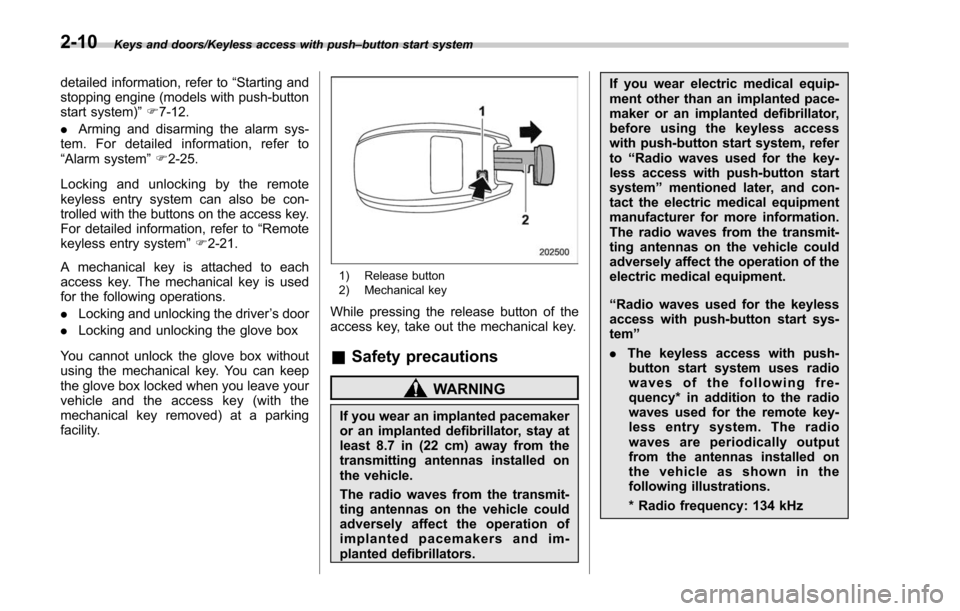
A mechanical key is attached to each
access key. The mechanical key is used
for the following operations.
. Locking and unlocking the driver ’s door
. Locking and unlocking the glove box
You cannot unlock the glove box without
using the mechanical key. You can keep
the glove box locked when you leave your
vehicle and the access key (with the
mechanical key removed) at a parking
facility.
1) Release button
2) Mechanical key
While pressing the release button of the
access key, take out the mechanical key.
& Safety precautions
WARNING
If you wear an implanted pacemaker
or an implanted defibrillator, stay at
least 8.7 in (22 cm) away from the
transmitting antennas installed on
the vehicle.
The radio waves from the transmit-
ting antennas on the vehicle could
adversely affect the operation of
implanted pacemakers and im-
planted defibrillators. If you wear electric medical equip-
ment other than an implanted pace-
maker or an implanted defibrillator,
before using the keyless access
with push-button start system, refer
to
“Radio waves used for the key-
less access with push-button start
system ”mentioned later, and con-
tact the electric medical equipment
manufacturer for more information.
The radio waves from the transmit-
ting antennas on the vehicle could
adversely affect the operation of the
electric medical equipment.
“ Radio waves used for the keyless
access with push-button start sys-
tem ”
. The keyless access with push-
button start system uses radio
waves of the following fre-
quency* in addition to the radio
waves used for the remote key-
less entry system. The radio
waves are periodically output
from the antennas installed on
the vehicle as shown in the
following illustrations.
* Radio frequency: 134 kHz
2-10