change SUBARU IMPREZA 2003 2.G User Guide
[x] Cancel search | Manufacturer: SUBARU, Model Year: 2003, Model line: IMPREZA, Model: SUBARU IMPREZA 2003 2.GPages: 425, PDF Size: 5.75 MB
Page 139 of 425
Instruments and controls
3-18
CAUTION
Do not hold the lever in the flashing position for more than just a few seconds.
Daytime running light system
The low beam headlights will automatically come on
at reduced brightness when the engine has started,
under the following conditions: The parking brake is fully released.
The light switch is in the “OFF” or “p ” position.
The automatic transmission selector lever is set at
other than the “P” position.
WARNING
The tail lights, parking lights, and side marker
lights are not turned on by the daytime run-ning light system. The light switch must al-ways be turned to the “a ” position when it
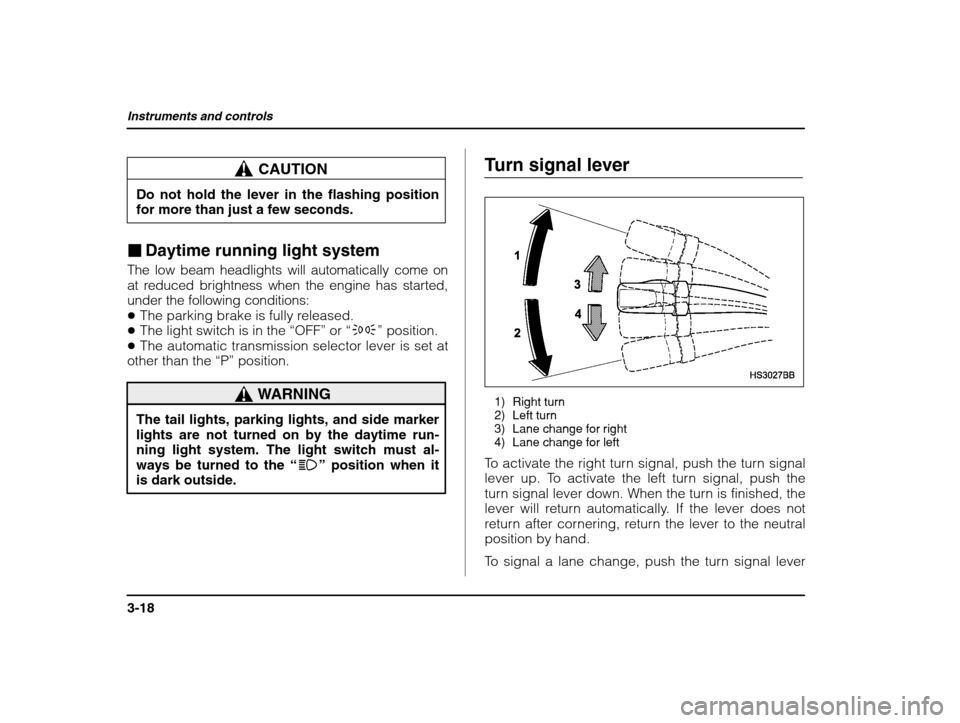
is dark outside. Turn signal lever
1) Right turn
2) Left turn
3) Lane change for right
4) Lane change for left
To activate the right turn signal, push the turn signal
lever up. To activate the left turn signal, push the
turn signal lever down. When the turn is finished, the
lever will return automatically. If the lever does not
return after cornering, return the lever to the neutralposition by hand.
To signal a lane change, push the turn signal lever
Page 140 of 425
Instruments and controls
3-19
– CONTINUED –
up or down slightly and hold it during the lane
change. The turn signal indicator lights will flash in
the direction of the turn or lane change. The lever
will return automatically to the neutral position when
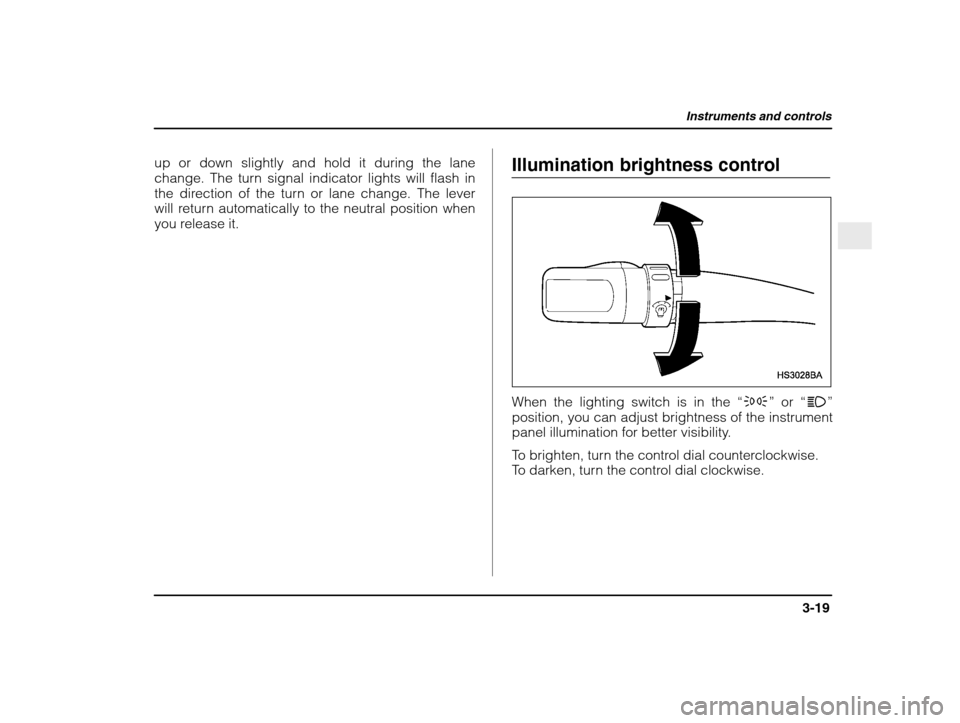
you release it. Illumination brightness control
When the lighting switch is in the
“p ” or “a ”
position, you can adjust brightness of the instrument
panel illumination for better visibility.
To brighten, turn the control dial counterclockwise.
To darken, turn the control dial clockwise.
Page 168 of 425

5
5-1
– CONTINUED –
Antenna system 5-2 . . . . . . . . . . . . . . . . . . . . . . . . . . . . . . . . . . . . .
FM reception 5-2
. . . . . . . . . . . . . . . . . . . . . . . . . . . . . . . . . . . . . . .
Installation of accessories 5-2 . . . . . . . . . . . . . . . . . . . . . . .
Audio set 5-3
. . . . . . . . . . . . . . . . . . . . . . . . . . . . . . . . . . . . . . . . . . . . . .
Type A audio set 5-3 . . . . . . . . . . . . . . . . . . . . . . . . . . . . . . . . . . .
Type B audio set 5-3 . . . . . . . . . . . . . . . . . . . . . . . . . . . . . . . . . . .
In-dash 6 CD auto changer 1 (Optional audio unit – if equipped) 5-4 . . . . . . . . . . . . . . . . . . . . . . . . . . . . . . . . . . . . .
Type A audio set (if equipped) 5-5 . . . . . . . . . . . . . . . . .
Radio operation 5-5 . . . . . . . . . . . . . . . . . . . . . . . . . . . . . . . . . . . .
Compact disc player operation 5-10 . . . . . . . . . . . . . . . . .
CD changer control (If optional in-dash CD
changer is connected) 5-12 . . . . . . . . . . . . . . . . . . . . . . . . . .
Type B audio set (if equipped) 5-16 . . . . . . . . . . . . . . . . .
Radio operation 5-16 . . . . . . . . . . . . . . . . . . . . . . . . . . . . . . . . . . . .
Cassette player operation 5-22 . . . . . . . . . . . . . . . . . . . . . . . .
Built in CD changer operation 5-26 . . . . . . . . . . . . . . . . . . .
In-dash 6 CD auto changer 1 (if equipped) 5-31 .
Loading and unloading compact discs 5-31 . . . . . . . .
Precautions to observe when handling
a compact disc (CD) 5-34 . . . . . . . . . . . . . . . . . . . . . . . . . . . . .
Audio
Page 170 of 425

Audio
5-3
– CONTINUED –
Audio set
Your SUBARU may be equipped with one of the fol- lowing audio sets. See the pages indicated in thissection for operating details. Type A audio set
Radio operation: refer to page 5-5
Compact disc player operation: refer to page 5-10
CD changer control: refer to page 5-12
Type B audio set
Radio operation: refer to page 5-16
Cassette player operation: refer to page 5-22
Built-in CD changer operation: refer to page 5-26
Page 171 of 425

Audio
5-4
In-dash 6 CD auto changer 1 (Optional audio unit – if equipped)
Inserting and removing a disc or all discs: refer to
page 5-31
Page 173 of 425

Audio
5-6
Power switch and volume/bass/treble/fader/ balance control (PWR/VOL)
The dial (2) is used for both power (ON/OFF) and
volume control. The radio is turned ON and OFF by
pushing the dial and the volume is controlled by
turning the dial.
n Tone and balance control
The “VOLUME” control knob normally function as
volume control. This knob become a control for
Treble, Bass, Fader or Balance when you select the
appropriate audio mode.
Choose desired volume level for each mode by turn-ing the “VOLUME” control knob. The control function
returns to volume control mode after about 5seconds. To change control modes
: Each brief press of the
“T/B” button changes control modes in the following
sequence starting from volume control mode. (When
the radio is first turned on, the control mode is in the
volume control.)
Volume(VOL)
Bass (BAS) Treble(TRE)
Fader
(FAD)
Balance(BAL)
Page 175 of 425

Audio
5-8
FM/AM selection button (FM/AM)
Push the “FM/AM” button (4) when the radio is off to
turn on the radio. Push the “FM/AM” button when the radio is on to
select FM1, FM2 or AM reception. Each time this
button is pressed, the band will change in the fol-
lowing order:
FM1
FM2 AM
The display indicates which one is currently selected. Stereo indicator
The stereo indicator “ST” will come on when an FM
stereo broadcast is received.
Manual tuning (TUNE)
Push the tuning button (3) marked “ ” to increase
the tuning frequency and press the tuning button
marked “ ” to decrease it.
Each time the button is pressed, the frequency
changes 10 KHz in the AM waveband and 0.2 MHzin the FM waveband.
Constant pressure on the button causes a continu-
ous change in the frequency.
Automatic tuning (SCAN)
Press the “SCAN” button (1) to change the radio to
the SCAN mode. In this mode, the radio scans
through the radio band until a station is found. Theradio will stop at the station for five seconds while
displaying the frequency, after which scanning will
continue until the entire band has been scanned
from the low end to the high end.
Press the “SCAN” button again to cancel the SCAN
mode and to stop on any displayed frequency.
When the “SCAN” button is pressed for automatic
tuning, stations are scanned in the direction of low
frequencies to high frequencies only.
Automatic tuning may not function properly if the sta-
tion reception is weakened by distance from the sta-
tion or proximity to tall buildings and hills.
Selecting preset stations
Presetting a station with a preset button (5) allowsyou to select that station in a single operation. Up to
six AM, FM1 and FM2 stations each may be preset.
How to preset stations
1. Press the “FM/AM” selection button to select AM,
FM1 or FM2 reception.
2. Press the “SCAN” button (1) or tune the radio
manually until the desired station frequency is dis-played.
Page 179 of 425

Audio
5-12
cel the repeat mode, press the button again. Then the “RPT” indicator goes out, and normal playback
mode is restored.
Random playback
Press the “RPT/RDM” button (10) and hold it in for
more than 2 seconds while a disc is being played
back to play all songs on the disc in a random order. The “RDM” indicator will come on and all songs on
the disc will be played in a random order.
To cancel the random mode, press the button again.
Then the “RDM” indicator goes out, and normal
playback mode is restored.
To eject a disc from the player
When a disc is being played back or when a disc is
in the player, press the eject button “
” (7). The
disc will be ejected.
The disc may be removed even when the ignitionswitch is in the “LOCK” position.
NOTE
Avoid driving the vehicle with a CD sticking out,
because vibration might make it fall out.
CD changer control (If optional in- dash CD changer is connected)
An optional CD changer can be connected to this
audio unit. Consult the instructions that accompany the CD changer for operating the CD changer itself(e.g., how to load or unload CDs). See your
SUBARU dealer for more information.
Page 181 of 425

Audio
5-14
To start playback
When the “CD” button (13) is pressed, the CD
changer will start playback. The display shows the
current disc number, track number and the elapsed
time during playback. NOTE If a disc is in the player, the “DISC” button is
used to change from CD player operation to DISC changer operation. Each time the “DISC”
button is pressed, the operating mode will
change alternately. At the end of the disc, the player automatically
continues with the next disc. After playback on the last disc finishes, play-
back will automatically return to the first disc. If you have loaded fewer than 6 discs, any mis-
sing disc is automatically skipped.
Selection of a desired disc
You can select a desired disc from among the discs
contained in the CD changer only by pressing the
corresponding number on one of the disc select
buttons. If you are to listen to the 5th disc in the CD
changer, press the “5” button of the disc select but-
tons. All other discs in the CD changer can also be
selected in a similar way. NOTE
No disc change takes place if the button corre-
sponding to the storage tray in which no disc is loaded is pressed. If the disc select button corresponding to the
disc now in playback is pressed again, the discwill be replayed from its beginning.
To select a song from its beginning
n Forward direction
Briefly press the “
” button (12) to skip to the begin-
ning of the next track. Each time the button is
pressed, the indicated track number will increase.
n Backward direction
Briefly press the “ ” button (12) to skip to the begin-
ning of the current track. Each time the button is
pressed, the indicated track number will decrease.
Fast forwarding and fast reverse
n Fast forwarding
Press the “
” button (12) continuously for more than
1 second to fast forward the disc.
Release the button to stop fast forwarding.
If you continue fast forwarding to the end of the disc,
the CD changer will automatically stop fast forward-
Page 182 of 425
Audio
5-15
– CONTINUED –
ing and start playback beginning with the first track
on the current disc.
n Fast reverse
Press the “ ” button (12) continuously for more than
1 second to fast reverse the disc.
Release the button to stop fast reverse.
If you continue fast reverse to the beginning of the disc, the CD changer will automatically stop fast
reverse and start playback beginning with the first
track on the current disc.
Repeat playback
Use this to play a certain track repeatedly. During
playback, press the “RPT/RDM” button (14) and re-
lease it in less than 2 seconds. The “RPT” indicator
will come on and the song will be played continu-
ously. To cancel the repeat mode, press the buttonagain. Then the “RPT” indicator goes out, and nor-
mal playback mode is restored.
Random playback
Use this to play the tracks on the disc in random or-
der. During playback, press the “RPT/RDM” button
(14) and hold it in for more than 2 seconds. The
“RDM” indicator will come on and all songs on the
disc will be played in a random order.
To cancel the random mode, press the button again. Then the
“RDM” indicator goes out, and normal
playback mode is restored.