lights SUBARU IMPREZA 2004 2.G Owner's Guide
[x] Cancel search | Manufacturer: SUBARU, Model Year: 2004, Model line: IMPREZA, Model: SUBARU IMPREZA 2004 2.GPages: 491, PDF Size: 5.93 MB
Page 241 of 491
5-28
Audio
“TAPE” (12), the player will enter standby mode. Press
the “CD” button to start playback. "
Loading all the magazine (Full disc loading mode)
1. If you continue to press the “LOAD” button for more
than 1.5 seconds, the player will produce beep sound
and will enter the full disc loading mode.
2. A “DISC” indicator will blink, and the “IN” will be on
display for a period of 15 seconds. If a disc is success-
fully loaded during this period, the “DISC” indicator will
stop blinking and will steadily light.
3. When the loading of a disc is complete, the next
“DISC” indicator will blink. Then repeat Step 2.
4. When the magazine is filled with discs by repeating
Steps 2 and 3, the player will start playback of the
discs, beginning with the one inserted first.
If you fail to insert any disc during each 15-second in-
terval, the full disc loading mode will be canceled, and
the player will start playback of the disc inserted first. ! How to play back a CD or make a pause
" When there is no CD inserted:
Insert a CD by referring to “How to Insert a CD(s)”.
When a CD is loaded, the player will start playback of
the CD, beginning with the first number. "
When there are CDs loaded:
Press a desired one of the “DISC SELECT” buttons
(26) the “DISC” indicator of which steadily lights up.
The player will then start playback of the selected CD,
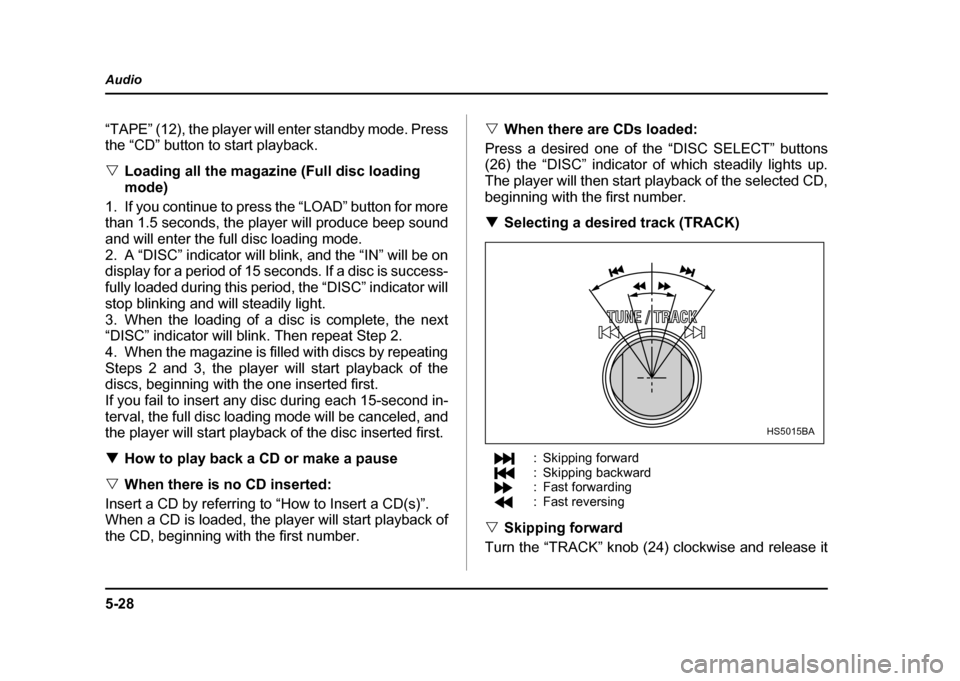
beginning with the first number. ! Selecting a desired track (TRACK)
: Skipping forward
: Skipping backward
: Fast forwarding
: Fast reversing
" Skipping forward
Turn the “TRACK” knob (24) clockwise and release it
HS5015BA
Page 245 of 491
5-32
Audio
"
Do not attempt to insert two or more discs
into the slot at a time. Doing so can cause me-
chanical damage to the CD changer." Use only music CDs identified by
am ark .
" Do not use CDs listed below which could
cause damage to the CD player. "3-inch (8 cm) compact disc.
" Any disc with a peel-off or seal on it.
" Any disc with scratches and/or dust.
" Bent disc.
" Cleaning disc.
" CD accessory. (E.g., 3-inch (8 cm) disc
adapter)
" Do not insert or remove any disc when the
automatic transmission selector lever is in the
park position; the selector lever in that position
can interfere with disc insertion or removal,
causing scratches on the disc surface (for AT
vehicles).
! To insert a disc
1. Press one of the “Disc select” buttons (3) (num-
bered from 1 to 6) for which the disc indicator light (2) is “OFF”.
The Disc indicator lights are located directly above the
corresponding “Disc select” buttons.
2. The indicator will begin blinking. The blinking will last for 15 seconds.
During this period, insert a desired disc, and the disc
will begin to play. (If any disc is not inserted during this
period, the “Disc slot” (1) door will close. Repeat step
1.)
Be sure to hold a disc with the label side (the side
where titles are printed) up.
3. To insert another disc, repeat step 1 and 2 choos-
ing a different disc select button. !
To insert six discs at a time
1. Press and hold the “Disc select” button number 1
until all disc indicators begin blinking (about 1.5 sec-
onds).
2. The indicators will blink for 15 seconds. During this
period, insert desired six discs.
3. When all discs are loaded, the first disc will begin to
play. (If no disc is inserted within this 15 seconds, the
entire disc load sequence will be canceled.) ! To remove a disc
1. Press the desired one of the “Disc select” buttons
(3) (numbered from 1 to 6) for which the disc indicator
light is on.
Page 275 of 491
7-6
Starting and operating
weather, which may cause injury.
3. Stop filling the tank after the fuel filler pump auto-
matically stops. Do not add any more fuel.
4. Put the cap back on, turn it clockwise until you hear
a clicking noise. Be certain not to catch the tether un-
der the cap while tightening.
5. Close the fuel filler lid completely.
If you spill any fuel on the painted surface, rinse it off
immediately. Otherwise, the painted surface could be
damaged.
NOTE
If the fuel filler cap is not tightened until it clicks or
if the tether is caught under the cap, the CHECK
ENGINE warning light may come on. Refer to the
“Warning and indicator lights” section located in
chapter 3.
" Never add any cleaning agents to the fuel
tank. The addition of a cleaning agent may
cause damage to the fuel system." Make sure that the cap is tightened until it
clicks to prevent fuel spillage in the event of an
accident. "
Do not let fuel spill on the exterior surfaces of
the vehicle.
Fuels may cause paint damage, which is not
covered under the SUBARU Limited Warranty. " Always use a genuine SUBARU fuel filler cap.
If you use the wrong cap, it may not fit or have
proper venting, and your fuel tank and emis-
sion control system might be damaged.
Page 278 of 491
7-9
Starting and operating
– CONTINUED –
Preparing to drive
You should perform the following checks and adjust-
ments every day before you start driving.
1. Check that all windows, mirrors, and lights are
clean and unobstructed.
2. Check the appearance and condition of the tires.
Also check tires for proper inflation.
3. Look under the vehicle for any sign of leaks.
4. Check that the hood, trunk and rear gate are fully
closed.
5. Check the adjustment of the seat.
6. Check the adjustment of the inside and outside mir-
rors.
7. Fasten your seatbelt. Check that your passengers
have fastened their seatbelts.
8. Check the operation of the warning and indicator
lights when the ignition switch is turned to the “ON” po-sition.
9. Check the gauges, indicator and warning lights af-
ter starting the engine.
NOTE
Engine oil, engine coolant, brake fluid, washer flu-
id and other fluid levels should be checked daily,
weekly or at fuel stops.
Starting the engine
Do not operate the starter motor continuously
for more than ten seconds. If the engine fails to
start after operating the starter for five to ten
seconds, wait for ten seconds or more before
trying again.
! Manual transmission vehicle
1. Apply the parking brake.
2. Turn off unnecessary lights and accessories.
3. Press the clutch pedal to the floor and shift the shift
lever into neutral. Hold the clutch pedal to the floor
while starting the engine.
The starter motor will only operate when the clutch
pedal is pressed fully to the floor.
4. Turn the ignition switch to the “ON” position and
check the operation of the warning and indicator lights.
Refer to the “Warning and indicator lights” section (chapter 3).
5. Turn the ignition switch to the “START” position
without depressing the accelerator pedal. Release
the key immediately after the engine has started.
Page 279 of 491
7-10
Starting and operating
If the engine does not start within ten seconds, wait a
while and then turn the ignition switch to the “START”
position again while depressing the accelerator pedal
half way down.
6. Confirm that all warning and indicator lights have
gone off after the engine has started. The fuel injection
system automatically lowers the idle speed as the en-
gine warms up. !
Automatic transmission vehicle
1. Apply the parking brake.
2. Turn off unnecessary lights and accessories.
3. Shift the selector lever to the “P” or “N” position
(preferably “P” position).
The starter motor will only operate when the select le-
ver is at the “P” or “N” position.
4. Turn the ignition switch to the “ON” position and
check the operation of the warning and indicator lights.
Refer to the “Warning and indicator lights” section
(chapter 3).
5. Turn the ignition switch to the “START” position
without depressing the accelerator pedal. Release
the key immediately after the engine has started.
If the engine does not start within ten seconds, wait a
while and then turn the ignition switch to the “START”
position again while depressing the accelerator pedal half way down.
6. Confirm that all warning and indicator lights have
gone out after the engine has started. The fuel injec-
tion system automatically lowers the idle speed as the
engine warms up.
While the engine is warming up, make sure that the
selector lever is at the “P” or “N” position and that the
parking brake is applied.
If you restart the engine while the vehicle is
moving, shift the selector lever into the “N” po-
sition. Do not attempt to place the selector lever
of a moving vehicle into the “P” position.
! Starting the engine during cold weath- er below −4 °F ( −20 °C)
If the engine is difficult to start using the normal meth-
od (without depressing the accelerator pedal), turn the
ignition switch to the “START” position while slightly
depressing the accelerator pedal.
Page 288 of 491
7-19
Starting and operating
– CONTINUED –
suit driving and road-surface conditions. When the ig-
nition switch is turned ON, the “AUTO” indicator light
in the combination meter comes on. The system can
be switched to a manual mode. !Manual mode
The manual mode allows the driver to set the differen-
tial-action limiting factor of the center differential as
desired to suit driving and road-surface conditions.
When this mode is selected, the “AUTO” indicator light
in the combination meter goes off. ! Manual switch
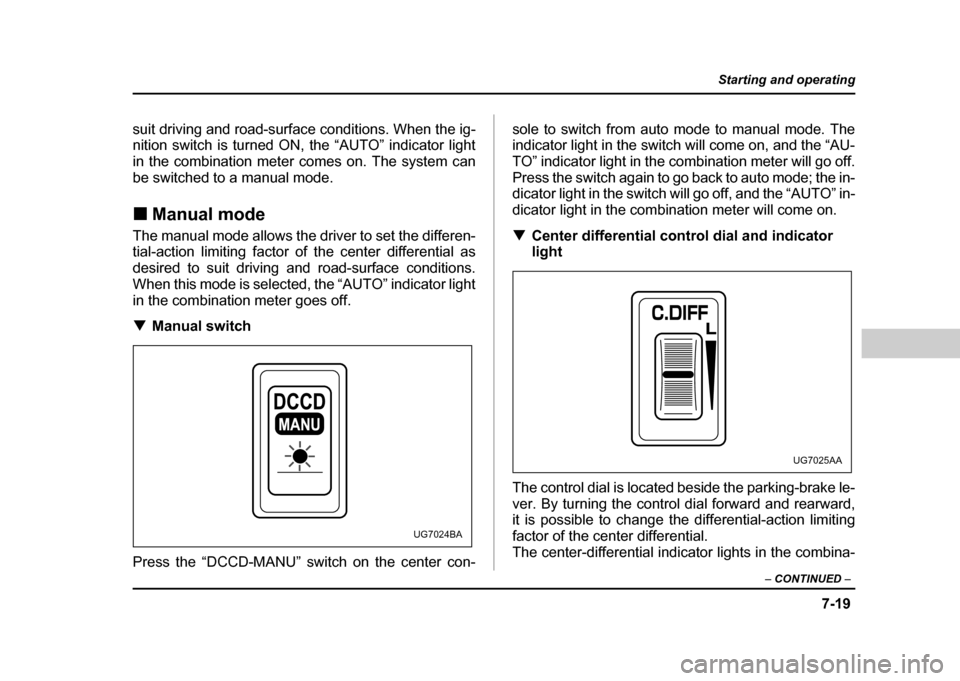
Press the “DCCD-MANU” switch on the center con- sole to switch from auto mode to manual mode. The
indicator light in the switch will come on, and the “AU-
TO” indicator light in the combination meter will go off.
Press the switch again to go back to auto mode; the in-
dicator light in the switch will go off, and the “AUTO” in-
dicator light in the combination meter will come on. !
Center differential control dial and indicator
light
The control dial is located beside the parking-brake le-
ver. By turning the control dial forward and rearward,
it is possible to change the differential-action limiting
factor of the center differential.
The center-differential indicator lights in the combina-
MANU
UG7024BA
UG7025AA
Page 289 of 491
7-20
Starting and operating
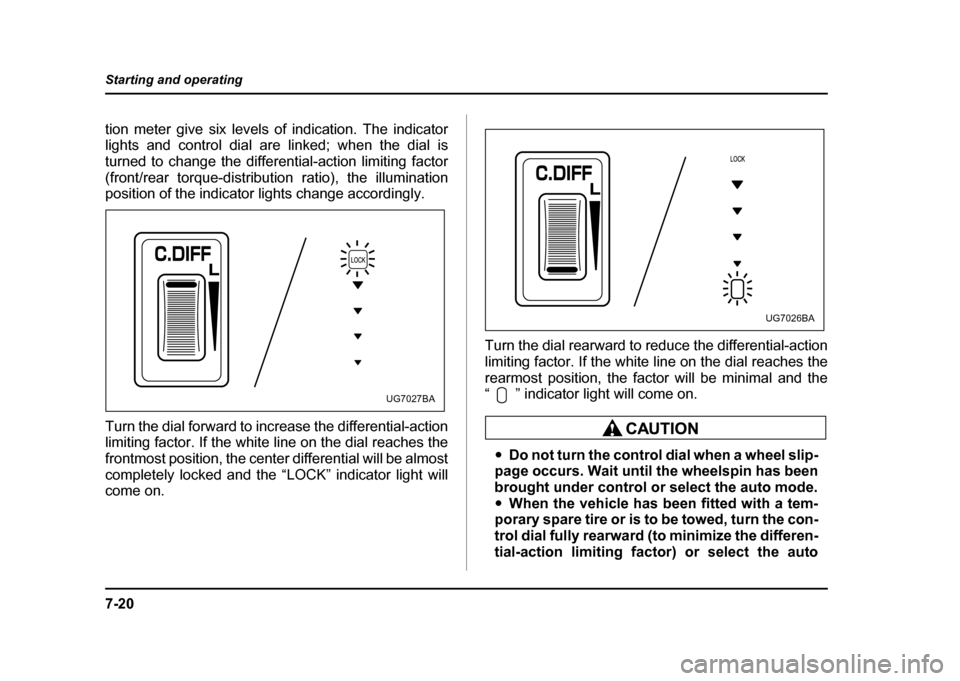
tion meter give six levels of indication. The indicator
lights and control dial are linked; when the dial is
turned to change the differential-action limiting factor
(front/rear torque-distribution ratio), the illumination
position of the indicator lights change accordingly.
Turn the dial forward to increase the differential-action
limiting factor. If the white line on the dial reaches the
frontmost position, the center differential will be almost
completely locked and the “LOCK” indicator light will come on.
Turn the dial rearward to reduce the differential-action
limiting factor. If the white line on the dial reaches the
rearmost position, the factor will be minimal and the
“ ” indicator light will come on.
"
Do not turn the control dial when a wheel slip-
page occurs. Wait until the wheelspin has been
brought under control or select the auto mode." When the vehicle has been fitted with a tem-
porary spare tire or is to be towed, turn the con-
trol dial fully rearward (to minimize the differen-
tial-action limiting factor) or select the auto
UG7027BA
UG7026BA
Page 302 of 491
7-33
Starting and operating
– CONTINUED –
!Steps to take if EBD system fails
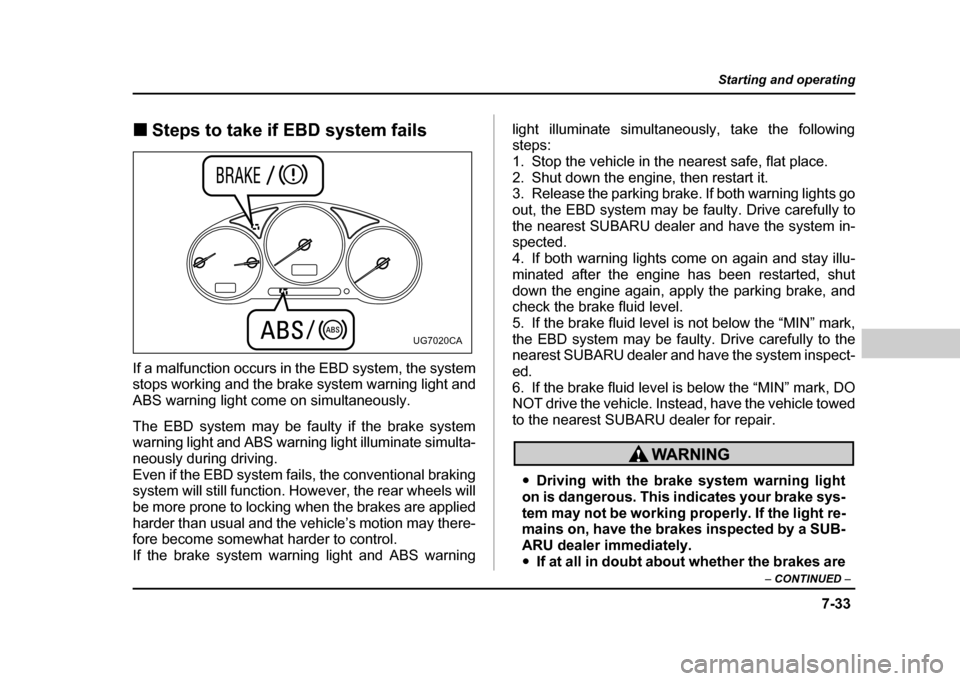
If a malfunction occurs in the EBD system, the system
stops working and the brake system warning light and
ABS warning light come on simultaneously.
The EBD system may be faulty if the brake system
warning light and ABS warning light illuminate simulta-
neously during driving.
Even if the EBD system fails, the conventional braking
system will still function. However, the rear wheels will
be more prone to locking when the brakes are applied
harder than usual and the vehicle’s motion may there-
fore become somewhat harder to control. If the brake system warning light and ABS warning light illuminate simultaneously, take the following steps:
1. Stop the vehicle in the nearest safe, flat place.
2. Shut down the engine, then restart it.
3. Release the parking brake. If both warning lights go
out, the EBD system may be faulty. Drive carefully to
the nearest SUBARU dealer and have the system in- spected.
4. If both warning lights come on again and stay illu-
minated after the engine has been restarted, shut
down the engine again, apply the parking brake, and
check the brake fluid level.
5. If the brake fluid level is not below the “MIN” mark,
the EBD system may be faulty. Drive carefully to the
nearest SUBARU dealer and have the system inspect- ed.
6. If the brake fluid level is below the “MIN” mark, DO
NOT drive the vehicle. Instead, have the vehicle towed
to the nearest SUBARU dealer for repair.
"
Driving with the brake system warning light
on is dangerous. This indicates your brake sys-
tem may not be working properly. If the light re-
mains on, have the brakes inspected by a SUB-
ARU dealer immediately." If at all in doubt about whether the brakes are
UG7020CA
Page 304 of 491
7-35
Starting and operating
– CONTINUED –
“Warning and indicator lights” section (chapter 3).
Never drive while the parking brake is set be-
cause this will cause unnecessary wear on the
brake linings. Before starting to drive, always
make sure that the parking brake has been fully
released.
! Parking tips
When parking your vehicle, always set the parking
brake firmly and put the shift lever in the “1” (1st) for an
upgrade or “R” (Reverse) for a downgrade for manual
transmission vehicles, or in the “P” (Park) position for
automatic transmission vehicles. Always set the park-
ing brake firmly when parking your vehicle. Never rely
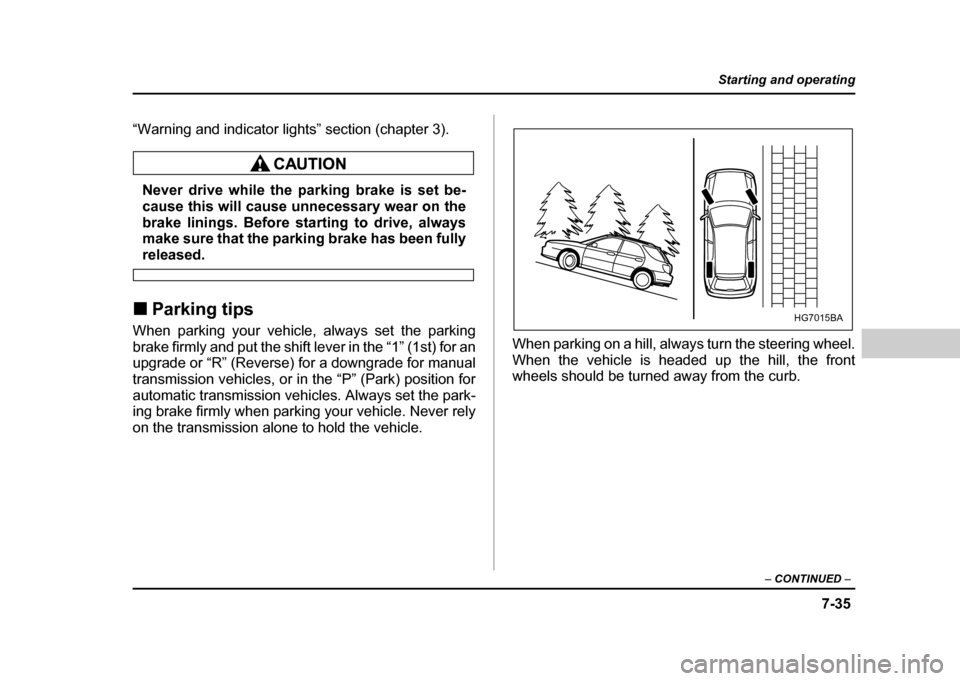
on the transmission alone to hold the vehicle. When parking on a hill, always turn the steering wheel.
When the vehicle is headed up the hill, the front
wheels should be turned away from the curb.
HG7015BA
Page 339 of 491
8-28
Driving tips
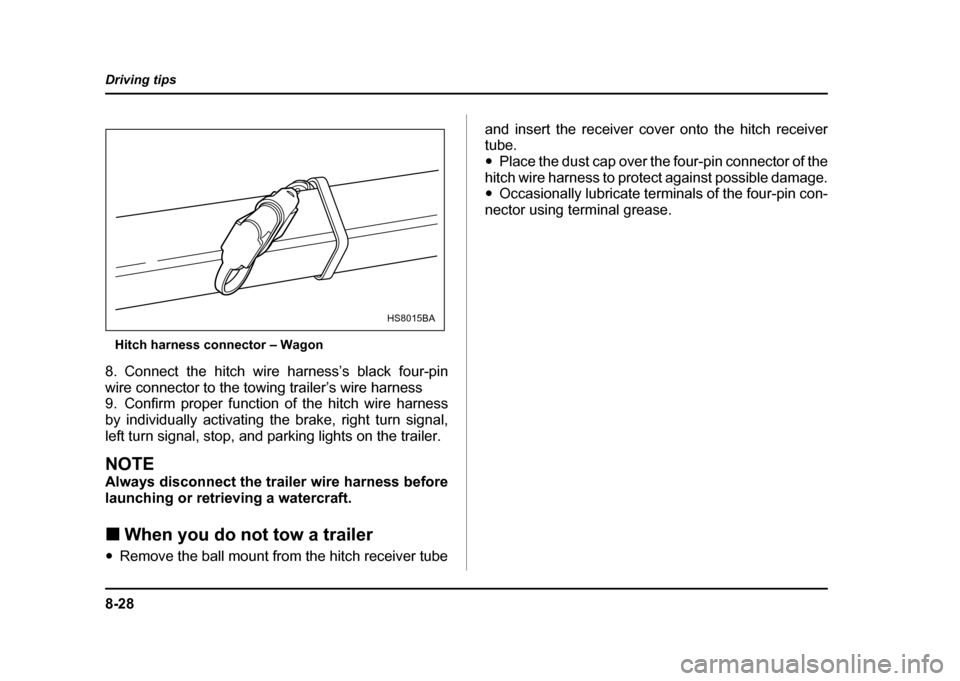
Hitch harness connector – Wagon
8. Connect the hitch wire harness’s black four-pin
wire connector to the towing trailer’s wire harness
9. Confirm proper function of the hitch wire harness
by individually activating the brake, right turn signal,
left turn signal, stop, and parking lights on the trailer.
NOTE
Always disconnect the trailer wire harness before
launching or retrieving a watercraft. ! When you do not tow a trailer
" Remove the ball mount from the hitch receiver tube and insert the receiver cover onto the hitch receiver tube. "
Place the dust cap over the four-pin connector of the
hitch wire harness to protect against possible damage. " Occasionally lubricate terminals of the four-pin con-
nector using terminal grease.
HS8015BA