light SUBARU IMPREZA 2006 2.G Owners Manual
[x] Cancel search | Manufacturer: SUBARU, Model Year: 2006, Model line: IMPREZA, Model: SUBARU IMPREZA 2006 2.GPages: 365, PDF Size: 7.09 MB
Page 176 of 365
Audio 5-13
CONTINUED
starting from bass control mode. (When
the radio is first turned on, the control
mode is in the volume control.)
Fader and balance control
The volume control dial (8) normally func-
tion as volume control. The dial become
the controls for Fader or Balance when
you select the appropriate fader and bal-
ance control mode.
Choose desired setting for each mode by
turning the volume control dial. The con-
trol function returns to volume control
mode after approximately 5 seconds.
To change control modes: Each brief
press of the BAL button (4) changes
control modes in the following sequence
starting from fader control mode. (When
the radio is turned on, the control mode is
in the volume control.)
Display illumination dimness can-
cellation (BRIGHT)
The brightness of the radio display dims
when the light switch is in the or
positions. If this makes the display
difficult to read, press the volume dial for
more than 1.5 seconds to return the dis-
play to original brightness.
Subsequently pressing the volume dial
again for more than 1.5 seconds or if you
can safely do so, turning the light switch to
the OFF position and back to the
or position makes the radio display
dim again.
FM/AM selection button
Push the FM (1) or AM (2) button when
the radio is off to turn on the radio.
Push the FM or AM button when the ra-
dio is on to select FM1, FM2 or AM recep-
tion.
Stereo indicator
The stereo indicator ST will come on
when an FM stereo broadcast is received.
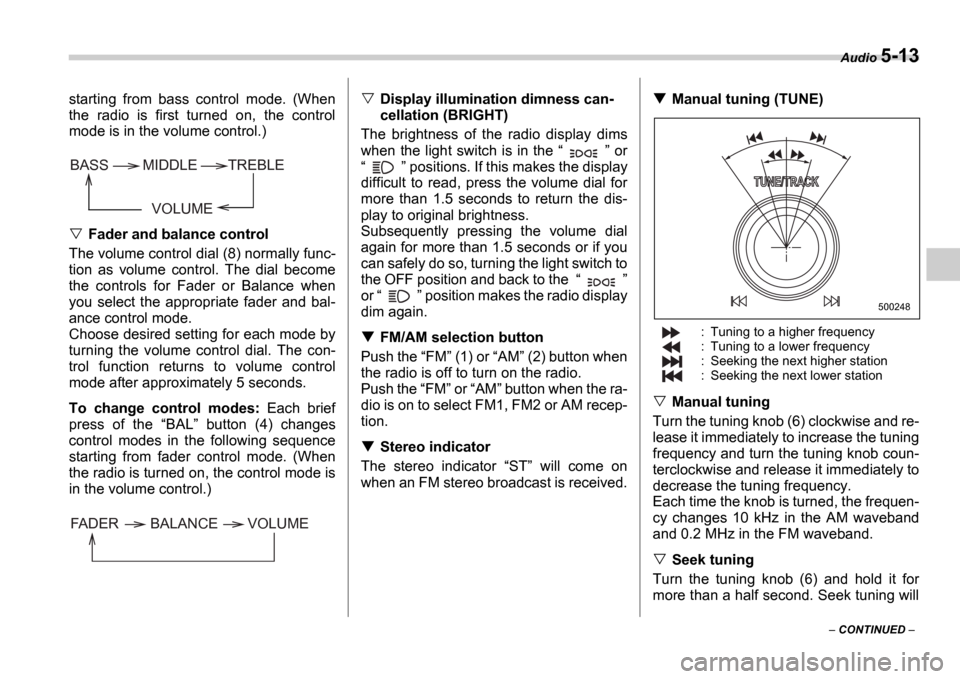
Manual tuning (TUNE)
: Tuning to a higher frequency
: Tuning to a lower frequency
: Seeking the next higher station
: Seeking the next lower station
Manual tuning
Turn the tuning knob (6) clockwise and re-
lease it immediately to increase the tuning
frequency and turn the tuning knob coun-
terclockwise and release it immediately to
decrease the tuning frequency.
Each time the knob is turned, the frequen-
cy changes 10 kHz in the AM waveband
and 0.2 MHz in the FM waveband.
Seek tuning
Turn the tuning knob (6) and hold it for
more than a half second. Seek tuning will
VOLUME
BASS TREBLE
MIDDLE
FADER BALANCE VOLUME
500248
Page 179 of 365
5-16 Audio
begin to play back the first track of the
disc.
To insert more discs in succession, re-
peat Steps 1 and 2. The magazine will be
loaded with discs in the ascending order
of position number.
If you do not insert any disc in 15 seconds
after you have pressed the LOAD but-
ton, the player will begin to play back the
first track of the last disc you have insert-
ed.
The disc indicator steadily lights up if a
disc is already inserted in the correspond-
ing position of the magazine.
While the player is in the loading mode,
if you press any of the other mode buttons FM (1), AM (2), the player will enter the
standby mode. Press the CD button (14)
to start playback.
Inserting a disc in a desired position
1. Press the LOAD button (9). If the
magazine in the player has an idle posi-
tion where you can insert a disc, the DISC indicator associated with the idle
position will blink.
The positions in the magazine the indica-
tor of which steadily lights up are already
loaded with discs.
2. Press the Disc select button (17) at
the position where you want to insert a
disc. The associated DISC indicator will blink, and the
LOAD will be displayed.
3. If you insert a disc during the 15-sec-
ond period while the LOAD is on display,
the disc will be automatically drawn in,
and the player will start playback of the
disc, beginning with the first track.
To insert more discs in succession, re-
peat Steps 1 and 2.
While the player is in the loading mode,
if you press any of the other mode buttons FM (1), AM (2), the player will enter
standby mode. Press the CD button (14)
to start playback.
Loading all the magazine (Full disc
loading mode)
1. If you continue to press the LOAD
button (9) for more than 1.5 seconds, the
player will produce beep sound and will
enter the full disc loading mode.
2. A DISC indicator will blink, and the
ALL LOAD will be on display for a period
of 15 seconds. If a disc is successfully
loaded during this period, the DISC indi-
cator will stop blinking and will steadily
light.
3. When the loading of a disc is complete,
the next DISC indicator will blink. Then
repeat Step 2.
4. When the magazine is filled with discs
by repeating Steps 2 and 3, the player will
start playback of the discs, beginning with the one inserted first.
If you fail to insert any disc during each 15
seconds interval, the full disc loading
mode will be canceled, and the player will
start playback of the disc inserted first.
How to play back a CD or make a
pause
When there is no CD inserted:
Insert a CD by referring to How to Insert
a CD(s) .
When a CD is loaded, the player will start
playback of the CD, beginning with the
first track.
When there are CDs loaded:
Press a desired one of the Disc select
buttons (17) the DISC indicator of which
steadily lights up. The player will then start
playback of the selected CD, beginning
with the first track.
Page 183 of 365

5-20 Audio
To insert a disc
1. Press one of the Disc select buttons
(3) (numbered from 1 to 6) for which the
disc indicator light (2) is OFF .
The disc indicator lights are located direct-
ly above the corresponding Disc select
buttons.
2. The indicator will begin blinking. The
blinking will last for 15 seconds.
During this period, insert a desired disc,
and the disc will begin to play. (If any disc
is not inserted during this period, the Disc
slot (1) door will close. Repeat Step 1.)
Be sure to hold a disc with the label side
(the side where titles are printed) up.
3. To insert another disc, repeat Steps 1
and 2 choosing a different disc select but-
ton.
To insert six discs at a time
1. Press and hold the Disc select button
number 1 until all disc indicators begin
blinking (approximately 1.5 seconds). 2. The indicators will blink for 15 seconds.
During this period, insert desired six discs.
3. When all discs are loaded, the first disc
will begin to play. (If no disc is inserted
within this 15 seconds, the entire disc load
sequence will be canceled.)
To remove a disc
1. Press the desired one of the Disc se-
lect buttons (3) (numbered from 1 to 6) for
which the disc indicator light is on.
2. Press the Eject button (4). The select-
ed disc will be ejected and the indicator
light will begin blinking.
3. To remove another disc, repeat Steps
1 and 2 choosing a different Disc select
button.
(To remove discs when the ignition switch
is in the Lock position, press the Eject
button, and the first disc will be ejected.
Press the Eject button again, and the
next disc will be ejected and so on. At this
time, the Disc select buttons are dis-
abled.)
To remove all discs at one time
1. Press and hold the Eject button (4)
until all Disc indicators begin blinking
(approximately 1.5 seconds), and the first
disc will be ejected.
2. When the disc is removed, the next
one will be ejected, and so on.
To replace a playing disc with an-
other
Simply press the desired one of Disc se-
lect buttons (3) (numbered from 1 to 6) or
press the Disc select button on the radio
unit to select the desired disc, and the disc
will begin to play.
Disc indicators
Lit: when the corresponding storage tray
is occupied by a disc.
Blinking: Disc player is either in loading,
eject or changing mode.
OFF: No disc is loaded or the ignition
switch is in the LOCK position.
Open/Closed disc slot indicator
When the disc slot is open, the disc indica-
tors on both sides of the slot illuminate.
Function control
Refer to CD changer control operating in-
structions described in the Type B audio
set (if equipped) section.
Do not insert or remove any disc
when the automatic transmission
selector lever is in the park posi-
tion; the selector lever in that po-
sition can interfere with disc in-
sertion or removal, causing
scratches on the disc surface (for
AT vehicles).
Page 184 of 365
Audio 5-21
CONTINUED
Precautions to observe when
handling a compact disc
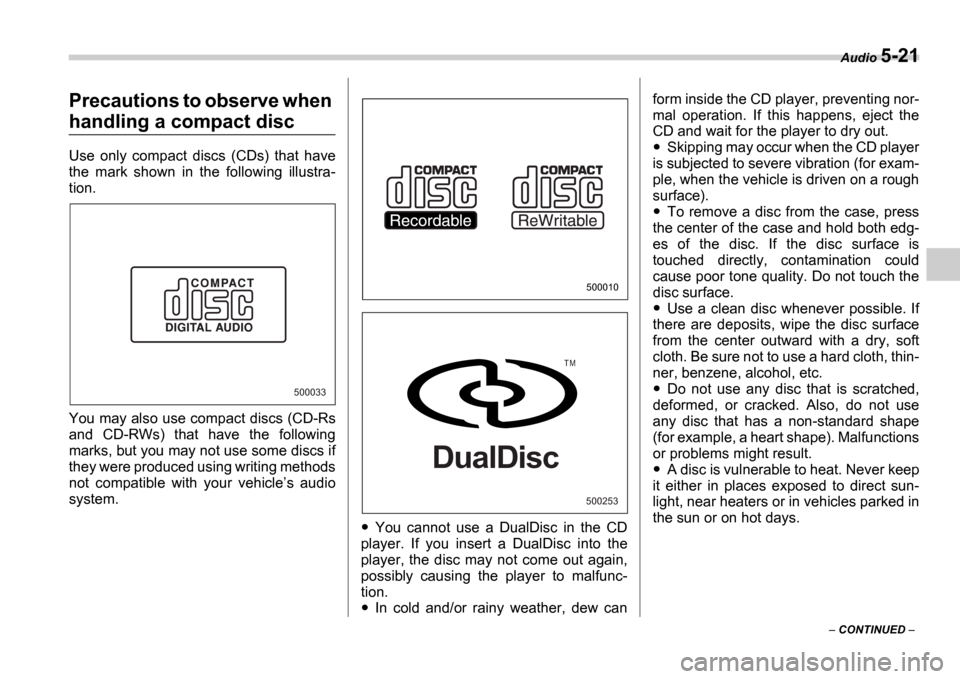
Use only compact discs (CDs) that have
the mark shown in the following illustra-
tion.
You may also use compact discs (CD-Rs
and CD-RWs) that have the following
marks, but you may not use some discs if
they were produced using writing methods
not compatible with your vehicle s audio
system.
You cannot use a DualDisc in the CD
player. If you insert a DualDisc into the
player, the disc may not come out again,
possibly causing the player to malfunc-
tion.
In cold and/or rainy weather, dew can form inside the CD player, preventing nor-
mal operation. If this happens, eject the
CD and wait for the player to dry out.
Skipping may occur when the CD player
is subjected to severe vibration (for exam-
ple, when the vehicle is driven on a rough
surface).
To remove a disc from the case, press
the center of the case and hold both edg-
es of the disc. If the disc surface is
touched directly, contamination could
cause poor tone quality. Do not touch the
disc surface.
Use a clean disc whenever possible. If
there are deposits, wipe the disc surface
from the center outward with a dry, soft
cloth. Be sure not to use a hard cloth, thin-
ner, benzene, alcohol, etc.
Do not use any disc that is scratched,
deformed, or cracked. Also, do not use
any disc that has a non-standard shape
(for example, a heart shape). Malfunctions
or problems might result.
A disc is vulnerable to heat. Never keep
it either in places exposed to direct sun-
light, near heaters or in vehicles parked in
the sun or on hot days.
500033
500010
500253
T M
DualDisc
Page 186 of 365

6
Interior equipment
Interior light ........................................................ 6-2
Dome light ........................................ ....................... 6-2
Cargo area light (if equipped) .................... ............ 6-2
Map light (if equipped) ........................... ............ 6-2
Sun visors ........................................ ................... 6-3
Vanity mirror (if equipped) ....................... .............. 6-3
Storage compartments .............................. ........ 6-4
Glove box ......................................... ....................... 6-4
Center console .................................... .................... 6-4
Coin tray ......................................... ......................... 6-4
Cup holder ........................................ .................. 6-5
Front passenger s cup holder ............................... 6-5
Rear passenger s cup holder ................................ 6-5
Accessory power outlet (if equipped) .............. 6-5
Cigarette lighter socket .......................... ........... 6-6
Use with a cigarette lighter ...................... .............. 6-7
Using as an accessory power outlet ................ ..... 6-7
Ashtray ........................................... ..................... 6-8
Floor mat (if equipped) ........................... ........... 6-9
Coat hook ......................................... ................... 6-9
Cargo area cover (Wagon if equipped) ......... 6-10
Using the cover ................................... .................... 6-10
To remove the cover ............................... ............... 6-10
Stowage of the cover .............................. ............... 6-10
To install the cover housing ...................... ............ 6-11
Cargo tie-down hooks (Wagon if equipped) .................................... 6 -11Cargo area bars ...................................
............... 6-12
Under-floor storage compartment (if equipped) ..................................... ................ 6-12
Page 187 of 365
6-2 Interior equipment
Interior equipm entInterior light
When leaving your vehicle, make sure the
light goes out to avoid battery discharge.
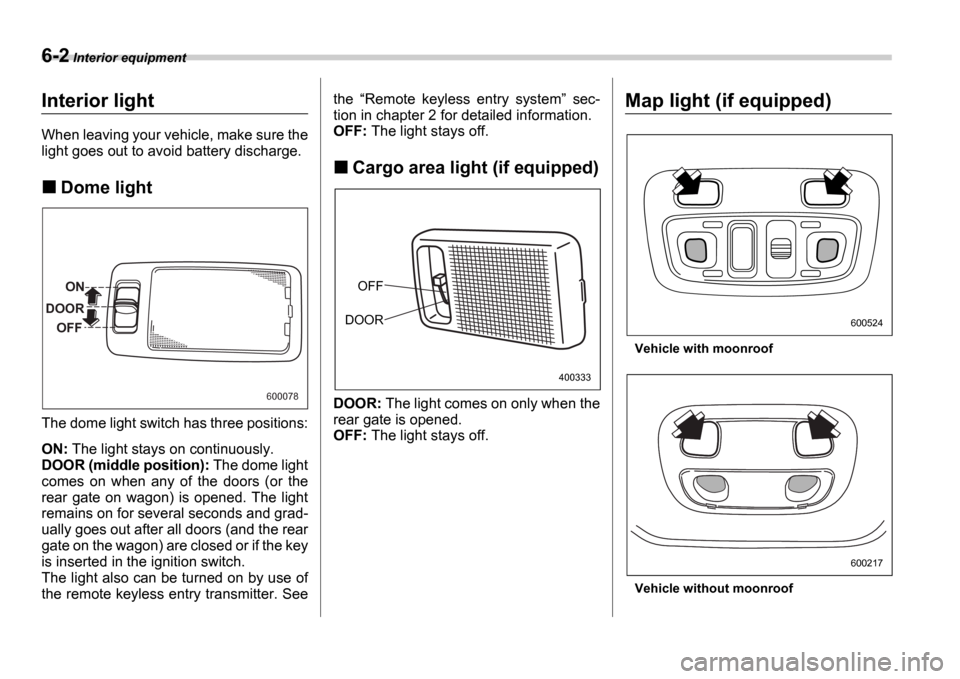
Dome light
The dome light switch has three positions:
ON: The light stays on continuously.
DOOR (middle position): The dome light
comes on when any of the doors (or the
rear gate on wagon) is opened. The light
remains on for several seconds and grad-
ually goes out after all doors (and the rear
gate on the wagon) are closed or if the key
is inserted in the ignition switch.
The light also can be turned on by use of
the remote keyless entry transmitter. See the
Remote keyless entry system sec-
tion in chapter 2 for detailed information.
OFF: The light stays off.
Cargo area light (if equipped)
DOOR: The light comes on only when the
rear gate is opened.
OFF: The light stays off.
Map light (if equipped)
Vehicle with moonroof
Vehicle without moonroof
ON
DOOR OFF
600078
OFF
DOOR
400333
600524
600217
Page 188 of 365
Interior equipment 6-3
To turn on the map light, push the switch.
To turn it off, push the switch again.
When leaving the vehicle, make sure the
light is turned off to avoid battery dis-
charge.Sun visors
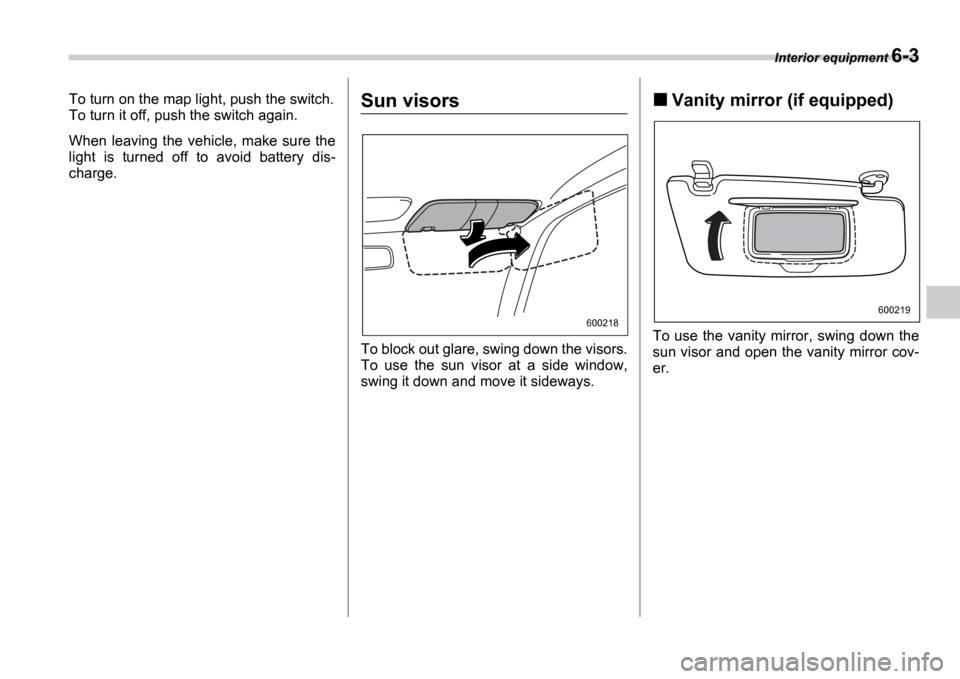
To block out glare, swing down the visors.
To use the sun visor at a side window,
swing it down and move it sideways.
Vanity mirror (if equipped)
To use the vanity mirror, swing down the
sun visor and open the vanity mirror cov-
er.
600218
600219
Page 190 of 365
Interior equipment 6-5
CONTINUED
Cup holder
Front passenger s cup holder
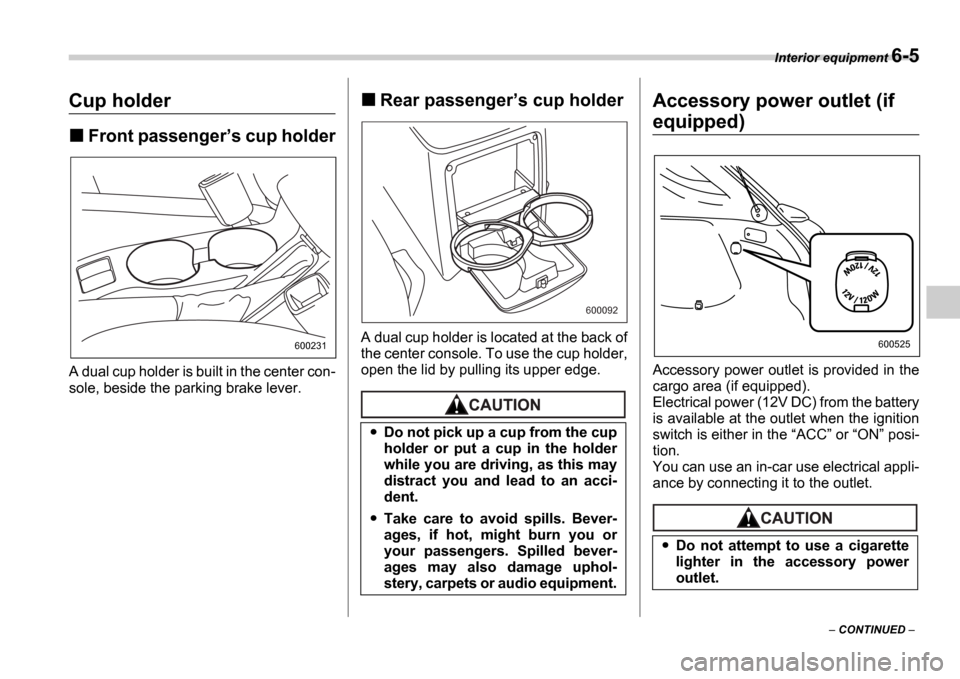
A dual cup holder is built in the center con-
sole, beside the parking brake lever.
Rear passenger s cup holder
A dual cup holder is located at the back of
the center console. To use the cup holder,
open the lid by pulling its upper edge.
Accessory power outlet (if
equipped)
Accessory power outlet is provided in the
cargo area (if equipped).
Electrical power (12V DC) from the battery
is available at the outlet when the ignition
switch is either in the ACC or ON posi-
tion.
You can use an in-car use electrical appli-
ance by connecting it to the outlet.
600231
Do not pick up a cup from the cup
holder or put a cup in the holder
while you are driving, as this may
distract you and lead to an acci-
dent.
Take care to avoid spills. Bever-
ages, if hot, might burn you or
your passengers. Spilled bever-
ages may also damage uphol-
stery, carpets or audio equipment.
600092
Do not attempt to use a cigarette
lighter in the accessory power
outlet.
600525
Page 191 of 365
6-6 Interior equipment
Cigarette lighter socket
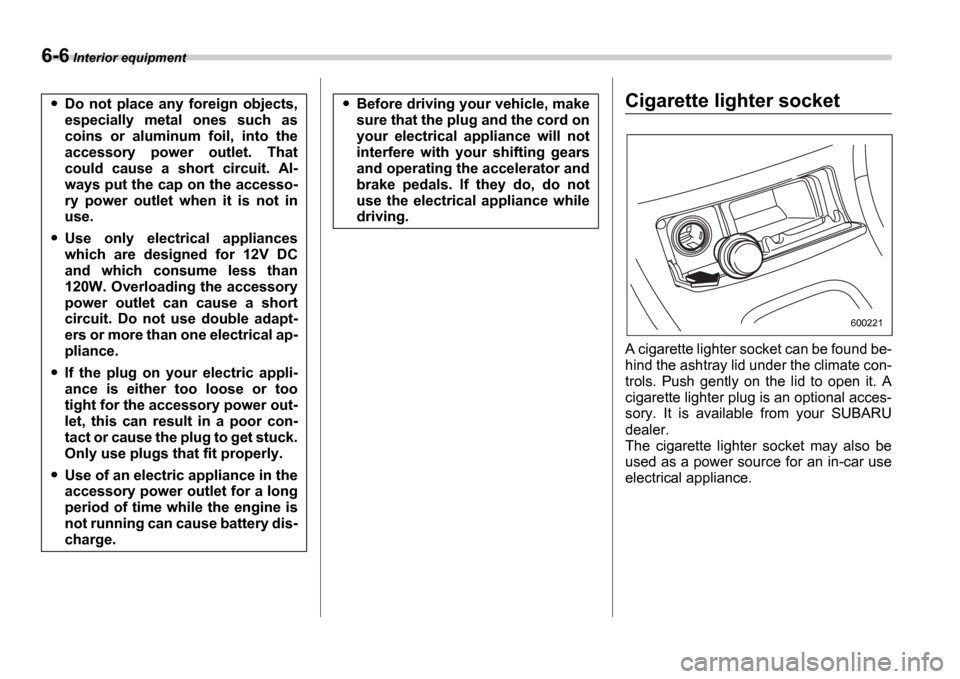
A cigarette lighter socket can be found be-
hind the ashtray lid under the climate con-
trols. Push gently on the lid to open it. A
cigarette lighter plug is an optional acces-
sory. It is available from your SUBARU
dealer.
The cigarette lighter socket may also be
used as a power source for an in-car use
electrical appliance.
Do not place any foreign objects,
especially metal ones such as
coins or aluminum foil, into the
accessory power outlet. That
could cause a short circuit. Al-
ways put the cap on the accesso-
ry power outlet when it is not in
use.
Use only electrical appliances
which are designed for 12V DC
and which consume less than
120W. Overloading the accessory
power outlet can cause a short
circuit. Do not use double adapt-
ers or more than one electrical ap-
pliance.
If the plug on your electric appli-
ance is either too loose or too
tight for the accessory power out-
let, this can result in a poor con-
tact or cause the plug to get stuck.
Only use plugs that fit properly.
Use of an electric appliance in the
accessory power outlet for a long
period of time while the engine is
not running can cause battery dis-
charge.
Before driving your vehicle, make
sure that the plug and the cord on
your electrical appliance will not
interfere with your shifting gears
and operating the accelerator and
brake pedals. If they do, do not
use the electrical appliance while
driving.
600221
Page 192 of 365
Interior equipment 6-7
CONTINUED
Use with a cigarette lighter
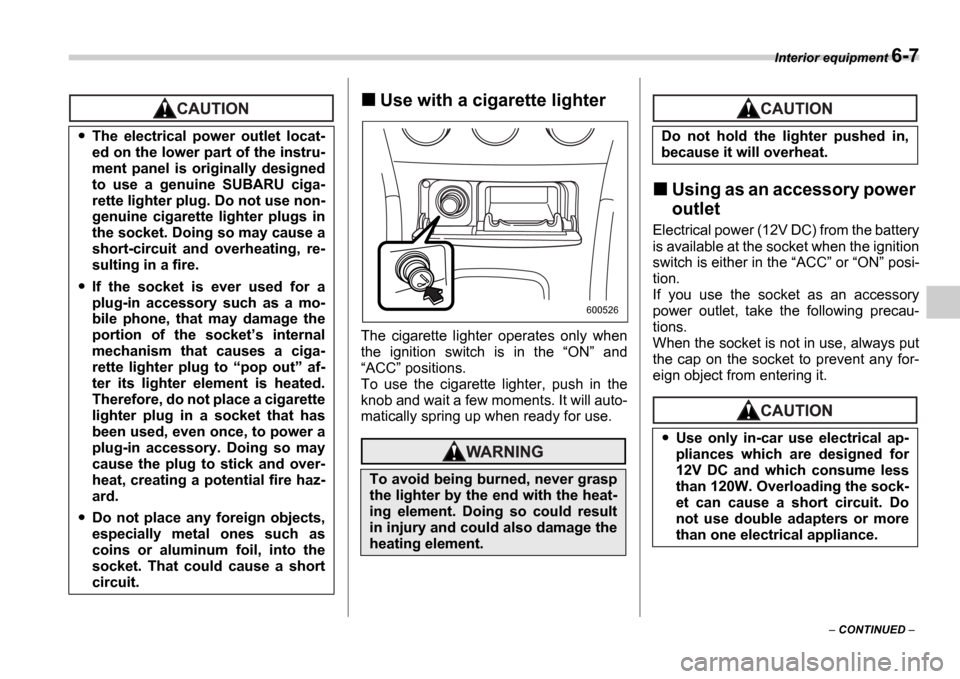
The cigarette lighter operates only when
the ignition switch is in the ON and
ACC positions.
To use the cigarette lighter, push in the
knob and wait a few moments. It will auto-
matically spring up when ready for use.
Using as an accessory power
outlet
Electrical power (12V DC) from the battery
is available at the socket when the ignition
switch is either in the ACC or ON posi-
tion.
If you use the socket as an accessory
power outlet, take the following precau-
tions.
When the socket is not in use, always put
the cap on the socket to prevent any for-
eign object from entering it.
The electrical power outlet locat-
ed on the lower part of the instru-
ment panel is originally designed
to use a genuine SUBARU ciga-
rette lighter plug. Do not use non-
genuine cigarette lighter plugs in
the socket. Doing so may cause a
short-circuit and overheating, re-
sulting in a fire.
If the socket is ever used for a
plug-in accessory such as a mo-
bile phone, that may damage the
portion of the socket s internal
mechanism that causes a ciga-
rette lighter plug to pop out af-
ter its lighter element is heated.
Therefore, do not place a cigarette
lighter plug in a socket that has
been used, even once, to power a
plug-in accessory. Doing so may
cause the plug to stick and over-
heat, creating a potential fire haz-
ard.
Do not place any foreign objects,
especially metal ones such as
coins or aluminum foil, into the
socket. That could cause a short
circuit.
To avoid being burned, never grasp
the lighter by the end with the heat-
ing element. Doing so could result
in injury and could also damage the
heating element.
600526
Do not hold the lighter pushed in,
because it will overheat.
Use only in-car use electrical ap-
pliances which are designed for
12V DC and which consume less
than 120W. Overloading the sock-
et can cause a short circuit. Do
not use double adapters or more
than one electrical appliance.