lock SUBARU IMPREZA 2006 2.G Manual Online
[x] Cancel search | Manufacturer: SUBARU, Model Year: 2006, Model line: IMPREZA, Model: SUBARU IMPREZA 2006 2.GPages: 365, PDF Size: 7.09 MB
Page 201 of 365
7-4 Starting and operating
Fuel filler lid and cap
Refueling0
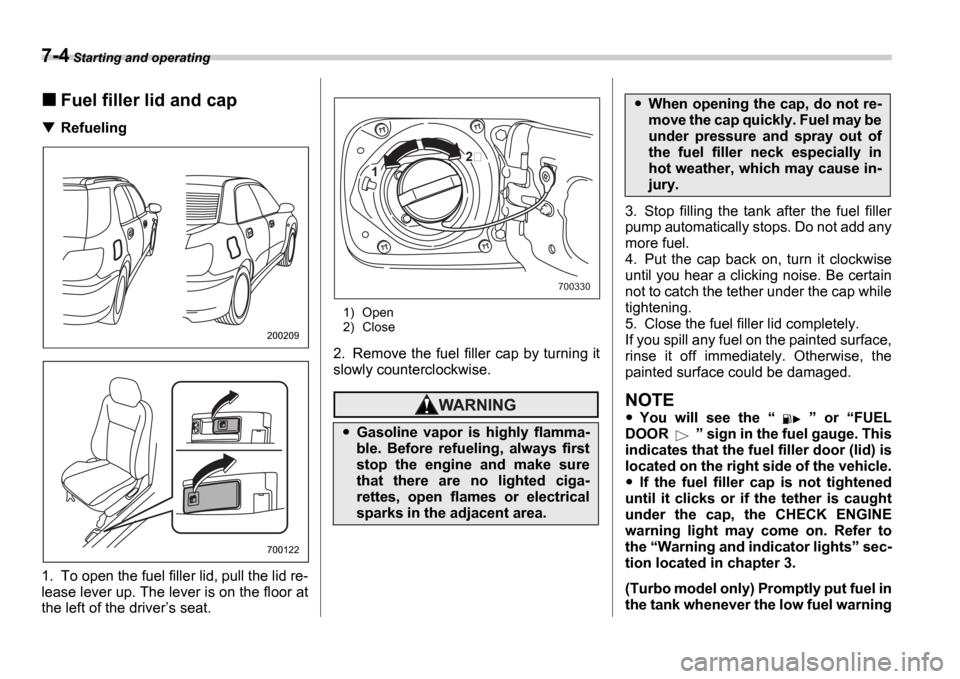
1. To open the fuel filler lid, pull the lid re-
lease lever up. The lever is on the floor at
the left of the driver s seat.
1) Open
2) Close
2. Remove the fuel filler cap by turning it
slowly counterclockwise.
3. Stop filling the tank after the fuel filler
pump automatically stops. Do not add any
more fuel.
4. Put the cap back on, turn it clockwise
until you hear a clicking noise. Be certain
not to catch the tether under the cap while
tightening.
5. Close the fuel filler lid completely.
If you spill any fuel on the painted surface,
rinse it off immediately. Otherwise, the
painted surface could be damaged.
NOTE
You will see the or FUEL
DOOR sign in the fuel gauge. This
indicates that the fuel filler door (lid) is
located on the right side of the vehicle.
If the fuel filler cap is not tightened
until it clicks or if the tether is caught
under the cap, the CHECK ENGINE
warning light may come on. Refer to
the Warning and indicator lights sec-
tion located in chapter 3.
(Turbo model only) Promptly put fuel in
the tank whenever the low fuel warning
200209
700122
Gasoline vapor is highly flamma-
ble. Before refueling, always first
stop the engine and make sure
that there are no lighted ciga-
rettes, open flames or electrical
sparks in the adjacent area.
1
700330
When opening the cap, do not re-
move the cap quickly. Fuel may be
under pressure and spray out of
the fuel filler neck especially in
hot weather, which may cause in-
jury.
Page 205 of 365
7-8 Starting and operating
ing.
1) Turn the ignition switch to the OFF
position and wait for at least 10 sec-
onds. After checking that the parking
brake is firmly set, turn the ignition
switch to the START position while de-
pressing the accelerator pedal slightly
(approximately a quarter of the full
stroke). Release the accelerator pedal
as soon as the engine starts.
2) If this fails to start the engine, turn the
ignition switch back to the OFF posi-
tion and wait for at least 10 seconds.
Then fully depress the accelerator ped-
al and turn the ignition switch to the START position. If the engine starts,
quickly release the accelerator pedal.
3) If this fails to start the engine, turn the
ignition switch again to the OFF posi-
tion. After waiting for 10 seconds or
longer, turn the ignition switch to the START position without depressing
the accelerator pedal.
4) If the engine still refuses to start, con-
tact your nearest SUBARU dealer for
assistance.
6. Confirm that all warning and indicator
lights have gone out after the engine has
started. The fuel injection system auto-
matically lowers the idle speed as the en-
gine warms up.
While the engine is warming up, make sure that the selector lever is at the
P or
N position and that the parking brake is
applied.
NOTE
The engine may be difficult to start
when the battery has been disconnect-
ed and reconnected (for maintenance
or other purposes). This difficulty is
caused by the electronically controlled
throttle s self-diagnosis function. To
overcome it, keep the ignition switch in
the ON position for approximately 10
seconds before starting the engine.
Stopping the engine
The ignition switch should be turned off
only when the vehicle is stopped and the
engine is idling.
If you restart the engine while the
vehicle is moving, shift the selector
lever into the N position. Do not
attempt to place the selector lever of
a moving vehicle into the P posi-
tion.
Do not stop the engine when the ve-
hicle is moving. This will cause loss
of power to the power steering and
the brake booster, making steering
and braking more difficult. It could
also result in accidental activation
of the LOCK position on the igni-
tion switch, causing the steering
wheel to lock.
Page 207 of 365
7-10 Starting and operating
Maximum allowable speeds
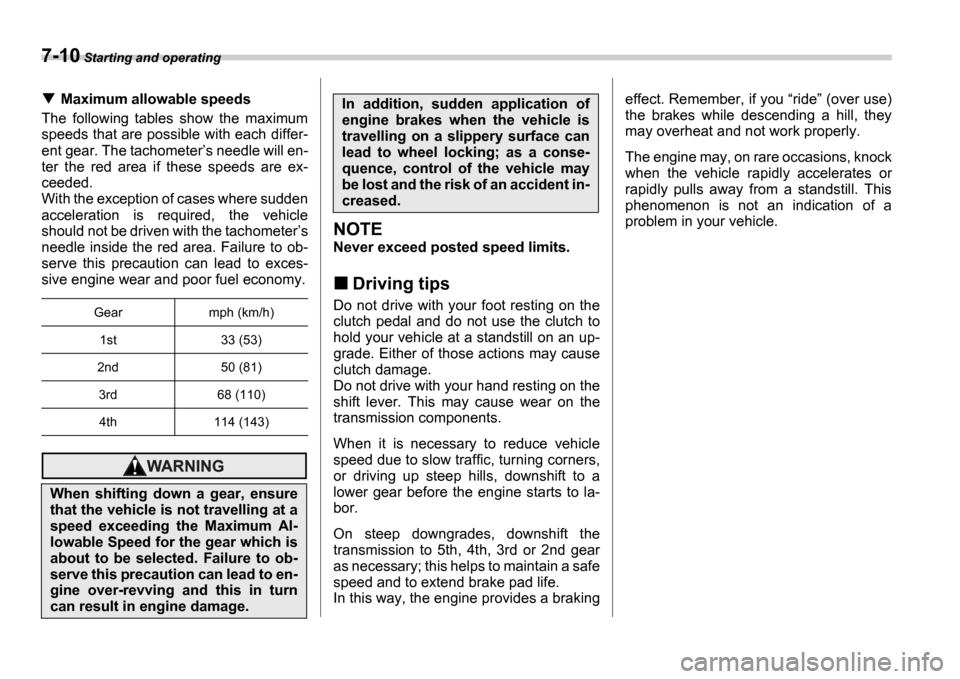
The following tables show the maximum
speeds that are possible with each differ-
ent gear. The tachometer s needle will en-
ter the red area if these speeds are ex-
ceeded.
With the exception of cases where sudden
acceleration is required, the vehicle
should not be driven with the tachometer s
needle inside the red area. Failure to ob-
serve this precaution can lead to exces-
sive engine wear and poor fuel economy.
NOTE
Never exceed posted speed limits.
Driving tips
Do not drive with your foot resting on the
clutch pedal and do not use the clutch to
hold your vehicle at a standstill on an up-
grade. Either of those actions may cause
clutch damage.
Do not drive with your hand resting on the
shift lever. This may cause wear on the
transmission components.
When it is necessary to reduce vehicle
speed due to slow traffic, turning corners,
or driving up steep hills, downshift to a
lower gear before the engine starts to la-
bor.
On steep downgrades, downshift the
transmission to 5th, 4th, 3rd or 2nd gear
as necessary; this helps to maintain a safe
speed and to extend brake pad life.
In this way, the engine provides a braking effect. Remember, if you
ride (over use)
the brakes while descending a hill, they
may overheat and not work properly.
The engine may, on rare occasions, knock
when the vehicle rapidly accelerates or
rapidly pulls away from a standstill. This
phenomenon is not an indication of a
problem in your vehicle.Gear mph (km/h)
1st 33 (53)
2nd 50 (81)
3rd 68 (110)4th 114 (143)
When shifting down a gear, ensure
that the vehicle is not travelling at a
speed exceeding the Maximum Al-
lowable Speed for the gear which is
about to be selected. Failure to ob-
serve this precaution can lead to en-
gine over-revving and this in turn
can result in engine damage.
In addition, sudden application of
engine brakes when the vehicle is
travelling on a slippery surface can
lead to wheel locking; as a conse-
quence, control of the vehicle may
be lost and the risk of an accident in-
creased.
Page 209 of 365
7-12 Starting and operating
Turbo models
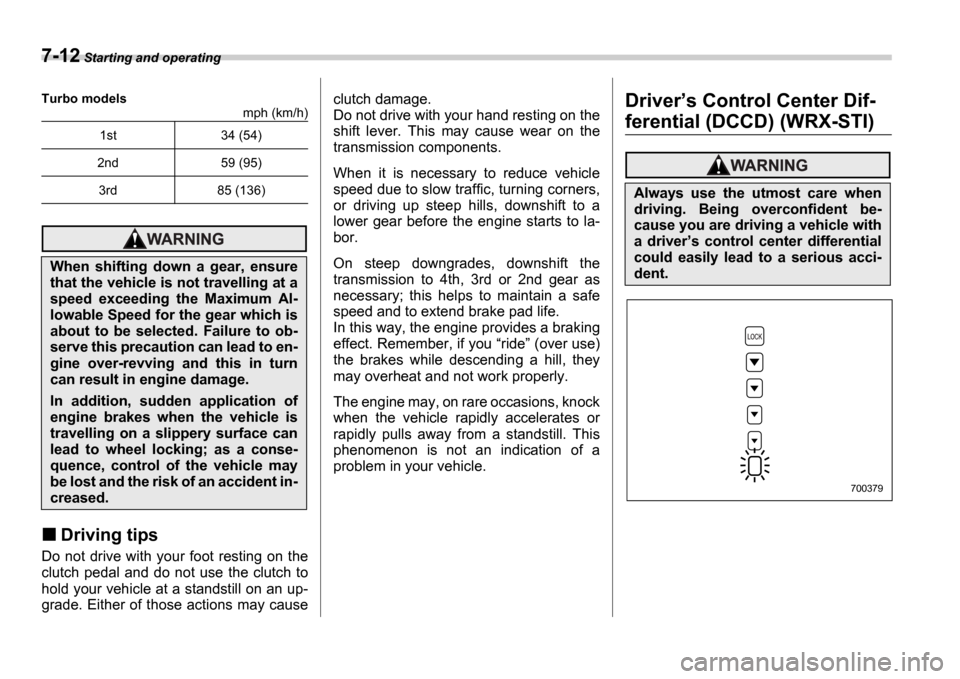
mph (km/h)
Driving tips
Do not drive with your foot resting on the
clutch pedal and do not use the clutch to
hold your vehicle at a standstill on an up-
grade. Either of those actions may cause clutch damage.
Do not drive with your hand resting on the
shift lever. This may cause wear on the
transmission components.
When it is necessary to reduce vehicle
speed due to slow traffic, turning corners,
or driving up steep hills, downshift to a
lower gear before the engine starts to la-
bor.
On steep downgrades, downshift the
transmission to 4th, 3rd or 2nd gear as
necessary; this helps to maintain a safe
speed and to extend brake pad life.
In this way, the engine provides a braking
effect. Remember, if you
ride (over use)
the brakes while descending a hill, they
may overheat and not work properly.
The engine may, on rare occasions, knock
when the vehicle rapidly accelerates or
rapidly pulls away from a standstill. This
phenomenon is not an indication of a
problem in your vehicle.
Driver s Control Center Dif-
ferential (DCCD) (WRX-STI)1st 34 (54)
2nd 59 (95)
3rd 85 (136)
When shifting down a gear, ensure
that the vehicle is not travelling at a
speed exceeding the Maximum Al-
lowable Speed for the gear which is
about to be selected. Failure to ob-
serve this precaution can lead to en-
gine over-revving and this in turn
can result in engine damage.
In addition, sudden application of
engine brakes when the vehicle is
travelling on a slippery surface can
lead to wheel locking; as a conse-
quence, control of the vehicle may
be lost and the risk of an accident in-
creased.
Always use the utmost care when
driving. Being overconfident be-
cause you are driving a vehicle with
a driver s control center differential
could easily lead to a serious acci-
dent.
700379
Page 210 of 365
Starting and operating 7-13
CONTINUED
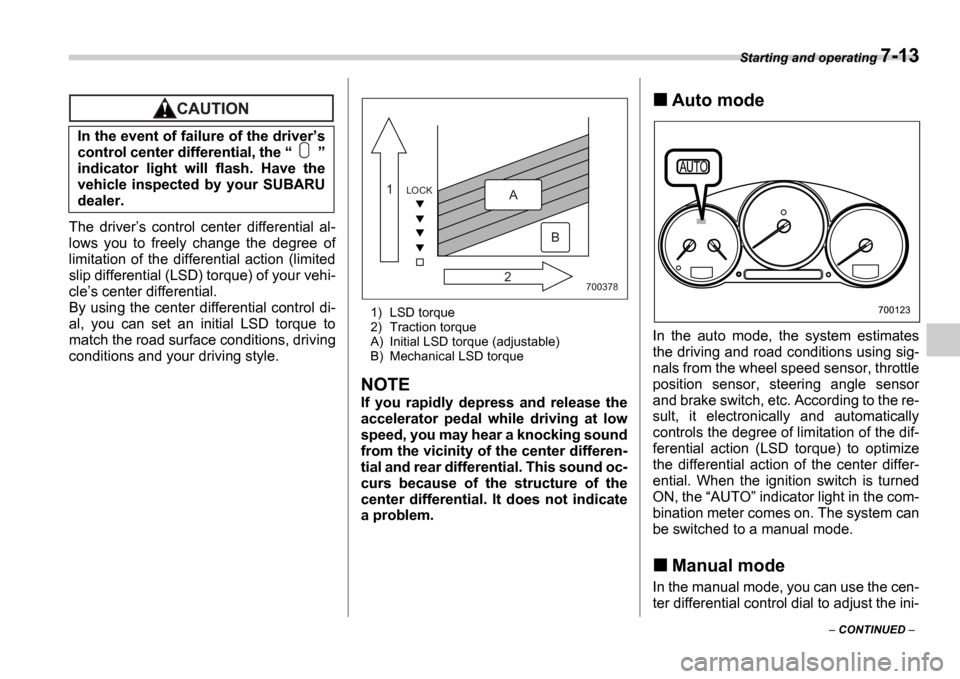
The drivers control center differential al-
lows you to freely change the degree of
limitation of the differential action (limited
slip differential (LSD) torque) of your vehi-
cle s center differential.
By using the center differential control di-
al, you can set an initial LSD torque to
match the road surface conditions, driving
conditions and your driving style.
1) LSD torque
2) Traction torque
A) Initial LSD torque (adjustable)
B) Mechanical LSD torque
NOTE
If you rapidly depress and release the
accelerator pedal while driving at low
speed, you may hear a knocking sound
from the vicinity of the center differen-
tial and rear differential. This sound oc-
curs because of the structure of the
center differential. It does not indicate
a problem.
Auto mode
In the auto mode, the system estimates
the driving and road conditions using sig-
nals from the wheel speed sensor, throttle
position sensor, steering angle sensor
and brake switch, etc. According to the re-
sult, it electronically and automatically
controls the degree of limitation of the dif-
ferential action (LSD torque) to optimize
the differential action of the center differ-
ential. When the ignition switch is turned
ON, the AUTO indicator light in the com-
bination meter comes on. The system can
be switched to a manual mode.
Manual mode
In the manual mode, you can use the cen-
ter differential control dial to adjust the ini-
In the event of failure of the driver
s
control center differential, the
indicator light will flash. Have the
vehicle inspected by your SUBARU
dealer.
700378
LOCK1
2A
B
700123
Page 211 of 365
7-14 Starting and operating
tial LSD torque as desired. When this
mode is selected, the AUTO indicator
light in the combination meter goes off.
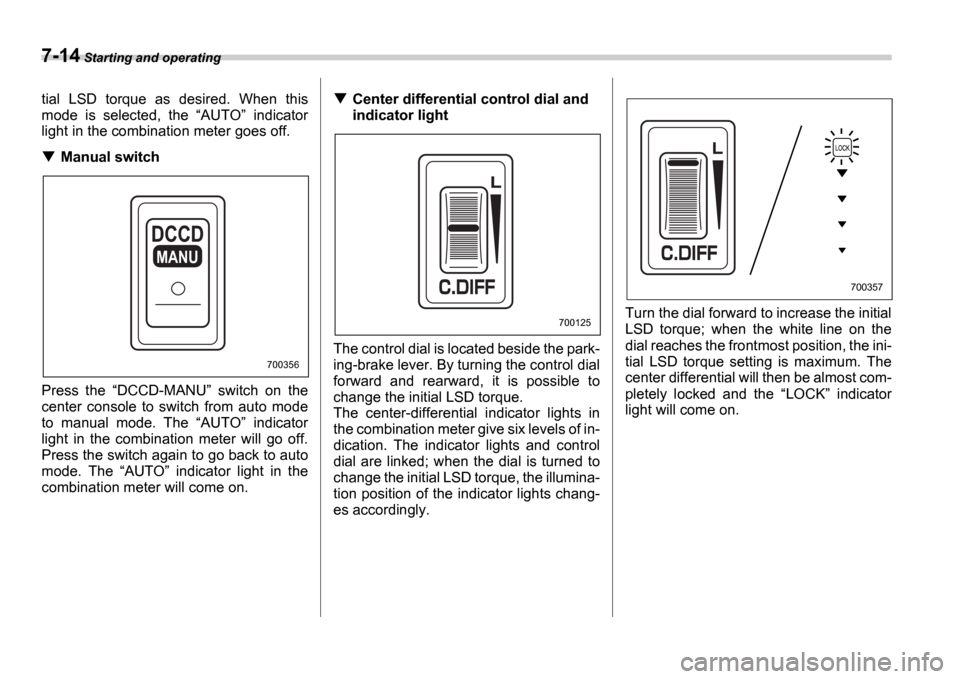
Manual switch
Press the DCCD-MANU switch on the
center console to switch from auto mode
to manual mode. The AUTO indicator
light in the combination meter will go off.
Press the switch again to go back to auto
mode. The AUTO indicator light in the
combination meter will come on.
Center differential control dial and
indicator light
The control dial is located beside the park-
ing-brake lever. By turning the control dial
forward and rearward, it is possible to
change the initial LSD torque.
The center-differential indicator lights in
the combination meter give six levels of in-
dication. The indicator lights and control
dial are linked; when the dial is turned to
change the initial LSD torque, the illumina-
tion position of the indicator lights chang-
es accordingly. Turn the dial forward to increase the initial
LSD torque; when the white line on the
dial reaches the frontmost position, the ini-
tial LSD torque setting is maximum. The
center differential will then be almost com-
pletely locked and the
LOCK indicator
light will come on.
MANU
700356
700125
700357
Page 212 of 365
Starting and operating 7-15
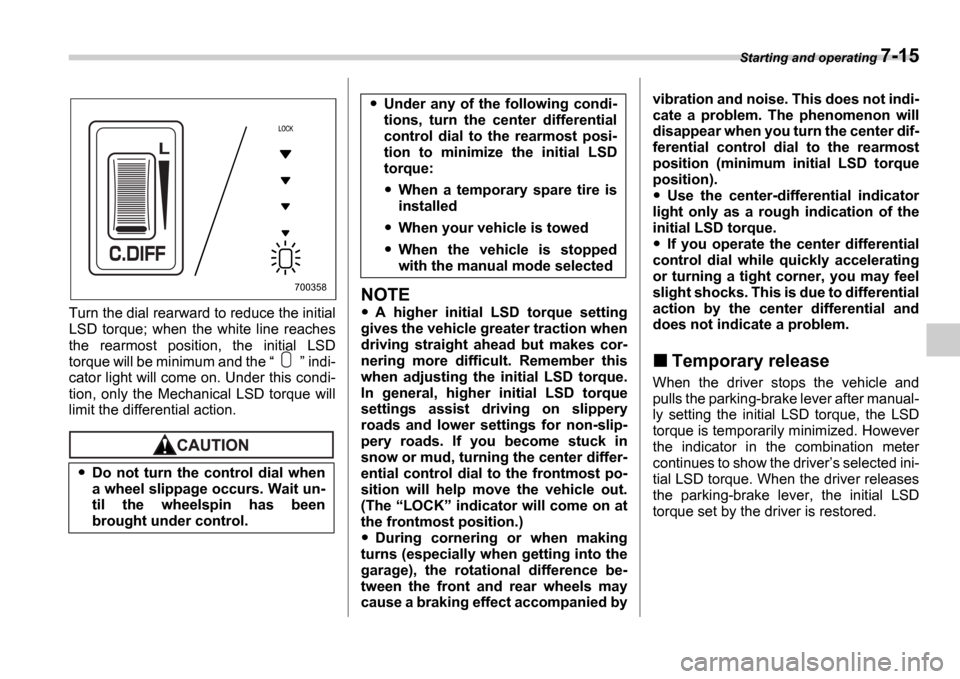
Turn the dial rearward to reduce the initial
LSD torque; when the white line reaches
the rearmost position, the initial LSD
torque will be minimum and the indi-
cator light will come on. Under this condi-
tion, only the Mechanical LSD torque will
limit the differential action.
NOTE
A higher initial LSD torque setting
gives the vehicle greater traction when
driving straight ahead but makes cor-
nering more difficult. Remember this
when adjusting the initial LSD torque.
In general, higher initial LSD torque
settings assist driving on slippery
roads and lower settings for non-slip-
pery roads. If you become stuck in
snow or mud, turning the center differ-
ential control dial to the frontmost po-
sition will help move the vehicle out.
(The LOCK indicator will come on at
the frontmost position.)
During cornering or when making
turns (especially when getting into the
garage), the rotational difference be-
tween the front and rear wheels may
cause a braking effect accompanied by vibration and noise. This does not indi-
cate a problem. The phenomenon will
disappear when you turn the center dif-
ferential control dial to the rearmost
position (minimum initial LSD torque
position).
Use the center-differential indicator
light only as a rough indication of the
initial LSD torque.
If you operate the center differential
control dial while quickly accelerating
or turning a tight corner, you may feel
slight shocks. This is due to differential
action by the center differential and
does not indicate a problem.
Temporary release
When the driver stops the vehicle and
pulls the parking-brake lever after manual-
ly setting the initial LSD torque, the LSD
torque is temporarily minimized. However
the indicator in the combination meter
continues to show the driver s selected ini-
tial LSD torque. When the driver releases
the parking-brake lever, the initial LSD
torque set by the driver is restored.
Do not turn the control dial when
a wheel slippage occurs. Wait un-
til the wheelspin has been
brought under control.
700358
Under any of the following condi-
tions, turn the center differential
control dial to the rearmost posi-
tion to minimize the initial LSD
torque:
When a temporary spare tire is
installed
When your vehicle is towed
When the vehicle is stopped
with the manual mode selected
Page 214 of 365
Starting and operating 7-17
CONTINUED
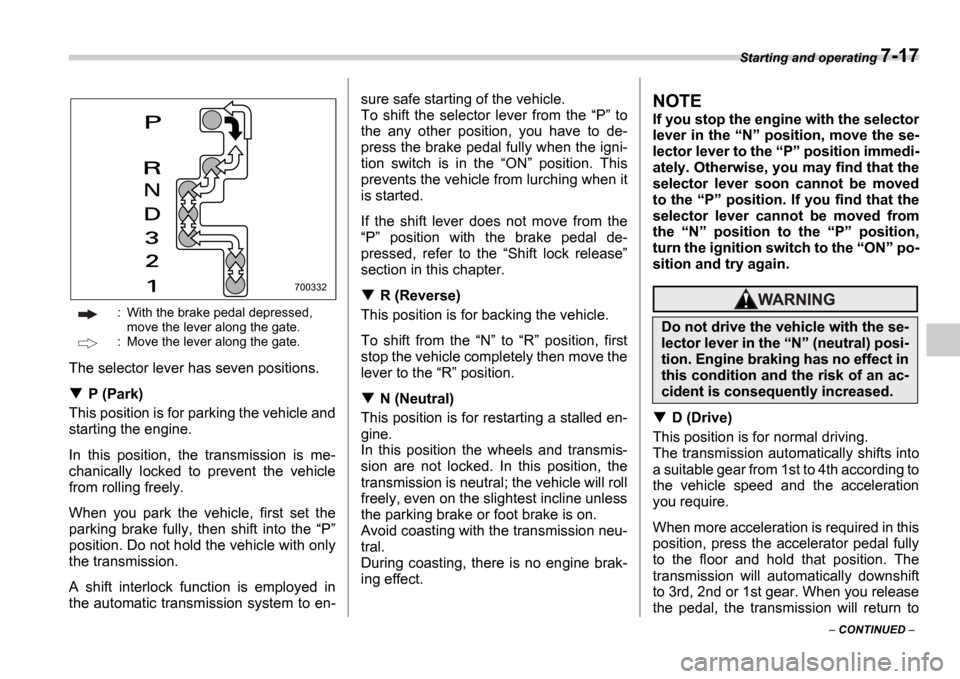
: With the brake pedal depressed,
move the lever along the gate.
: Move the lever along the gate.
The selector lever has seven positions.
P (Park)
This position is for parking the vehicle and
starting the engine.
In this position, the transmission is me-
chanically locked to prevent the vehicle
from rolling freely.
When you park the vehicle, first set the
parking brake fully, then shift into the P
position. Do not hold the vehicle with only
the transmission.
A shift interlock function is employed in
the automatic transmission system to en- sure safe starting of the vehicle.
To shift the selector lever from the
P to
the any other position, you have to de-
press the brake pedal fully when the igni-
tion switch is in the ON position. This
prevents the vehicle from lurching when it
is started.
If the shift lever does not move from the P position with the brake pedal de-
pressed, refer to the Shift lock release
section in this chapter.
R (Reverse)
This position is for backing the vehicle.
To shift from the N to R position, first
stop the vehicle completely then move the
lever to the R position.
N (Neutral)
This position is for restarting a stalled en-
gine.
In this position the wheels and transmis-
sion are not locked. In this position, the
transmission is neutral; the vehicle will roll
freely, even on the slightest incline unless
the parking brake or foot brake is on.
Avoid coasting with the transmission neu-
tral.
During coasting, there is no engine brak-
ing effect.
NOTE
If you stop the engine with the selector
lever in the N position, move the se-
lector lever to the P position immedi-
ately. Otherwise, you may find that the
selector lever soon cannot be moved
to the P position. If you find that the
selector lever cannot be moved from
the N position to the P position,
turn the ignition switch to the ON po-
sition and try again.
D (Drive)
This position is for normal driving.
The transmission automatically shifts into
a suitable gear from 1st to 4th according to
the vehicle speed and the acceleration
you require.
When more acceleration is required in this
position, press the accelerator pedal fully
to the floor and hold that position. The
transmission will automatically downshift
to 3rd, 2nd or 1st gear. When you release
the pedal, the transmission will return to
700332
Do not drive the vehicle with the se-
lector lever in the N (neutral) posi-
tion. Engine braking has no effect in
this condition and the risk of an ac-
cident is consequently increased.
Page 216 of 365
Starting and operating 7-19
CONTINUED
NOTE
In order to prevent over-revving during
deceleration of the vehicle, the trans-
mission will remain in the current gear
if the speed of the vehicle is in excess
of the Maximum Allowable Speed for
the gear to which the selector lever has
been moved.
Driving tips
Always apply the foot or parking brake
when the vehicle is stopped in the D , 3 ,
2 , 1 or R position.
Always set the parking brake when parking your vehicle. Do not hold the vehi-
cle with only the transmission.
Do not keep the vehicle in a stationary
position on an uphill grade by using the D , 3 , 2 , or 1 position. Use the brake
instead.
The engine may, on rare occasions, knock
when the vehicle rapidly accelerates or
rapidly pulls away from a standstill. This
phenomenon is not an indication of a
problem in your vehicle.
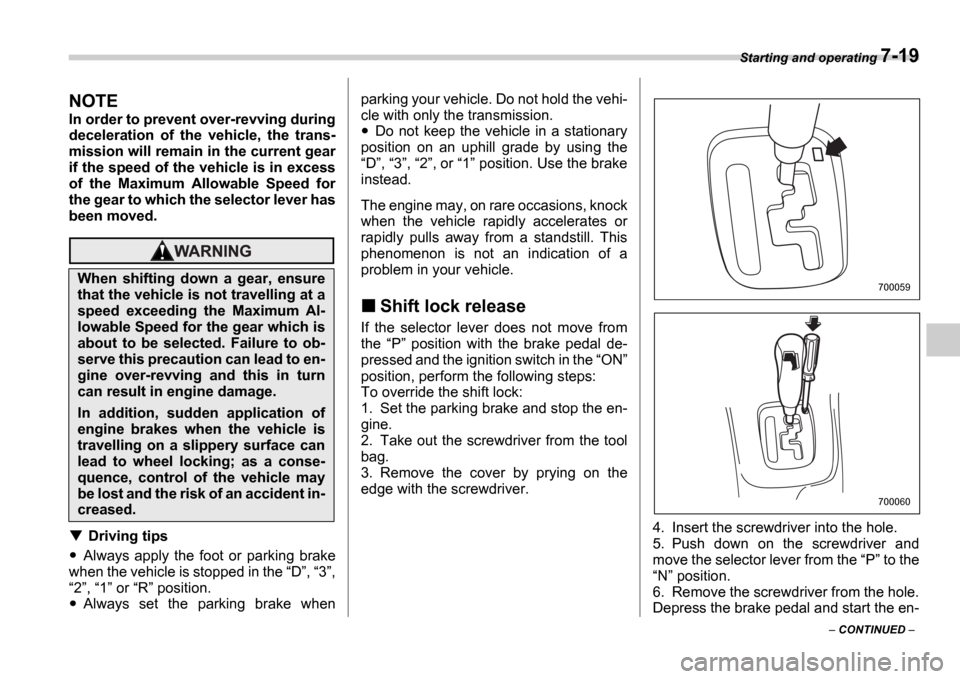
Shift lock release
If the selector lever does not move from
the P position with the brake pedal de-
pressed and the ignition switch in the ON
position, perform the following steps:
To override the shift lock:
1. Set the parking brake and stop the en-
gine.
2. Take out the screwdriver from the tool
bag.
3. Remove the cover by prying on the
edge with the screwdriver.
4. Insert the screwdriver into the hole.
5. Push down on the screwdriver and
move the selector lever from the P to the
N position.
6. Remove the screwdriver from the hole.
Depress the brake pedal and start the en-
When shifting down a gear, ensure
that the vehicle is not travelling at a
speed exceeding the Maximum Al-
lowable Speed for the gear which is
about to be selected. Failure to ob-
serve this precaution can lead to en-
gine over-revving and this in turn
can result in engine damage.
In addition, sudden application of
engine brakes when the vehicle is
travelling on a slippery surface can
lead to wheel locking; as a conse-
quence, control of the vehicle may
be lost and the risk of an accident in-
creased.
700059
700060
Page 218 of 365
Starting and operating 7-21
CONTINUED
Power steering
The power steering system operates only
when the engine is running.
If you lose power steering assist because
the engine stops or the system fails to
function, you can steer but it will take
much more effort.
NOTE
Right after the engine has been started
and before it has warmed up, you may
hear a noise coming from areas adja-
cent to the power steering pump which
is located at the right-front area of the
engine compartment. This noise is nor-
mal. It does not indicate power steering
system trouble.
Braking
Braking tips
When the brakes get wet
When driving in rain or after washing the
vehicle, the brakes may get wet. As a re-
sult, brake stopping distance will be long-
er. To dry the brakes, drive the vehicle at
a safe speed while lightly depressing the
brake pedal to heat up the brakes.
Use of engine braking
Remember to make use of engine braking
in addition to foot braking. When descend-
ing a grade, if only the foot brake is used,
the brakes may start working improperly
because of brake fluid overheating,
caused by overheated brake pads. To
help prevent this, shift into a lower gear to
get stronger engine braking.
Braking when a tire is punctured
Do not depress the brake pedal suddenly when a tire is punctured. This could cause
a loss of control of the vehicle. Keep driv-
ing straight ahead while gradually reduc-
ing speed. Then slowly pull off the road to
a safe place.
Brake system
Two separate circuits
Your vehicle has two separate circuit
brake systems. Each circuit works diago-
nally across the vehicle. If one circuit of
the brake system should fail, the other half
of the system still works. If one circuit fails,
the brake pedal will go down much closer
to the floor than usual and you will need to
press it down much harder. And a much
longer distance will be needed to stop the
vehicle.
Brake booster
The brake booster uses engine manifold
vacuum to assist braking force. Do not
turn off the engine while driving because
that will turn off the brake booster, result-
ing in poor braking power.
The brakes will continue to work even
when the brake booster completely stops
functioning. If this happens, however, you
will have to push the pedal much harder
than normal and the braking distance will
increase.
Do not hold the steering wheel at the
fully locked position left or right for
more than five seconds. This may
damage the power steering pump.
Never rest your foot on the brake
pedal while driving. This can cause
dangerous overheating of the
brakes and needless wear on the
brake pads and linings.