ESP SUBARU IMPREZA 2007 3.G User Guide
[x] Cancel search | Manufacturer: SUBARU, Model Year: 2007, Model line: IMPREZA, Model: SUBARU IMPREZA 2007 3.GPages: 364, PDF Size: 11.91 MB
Page 88 of 364
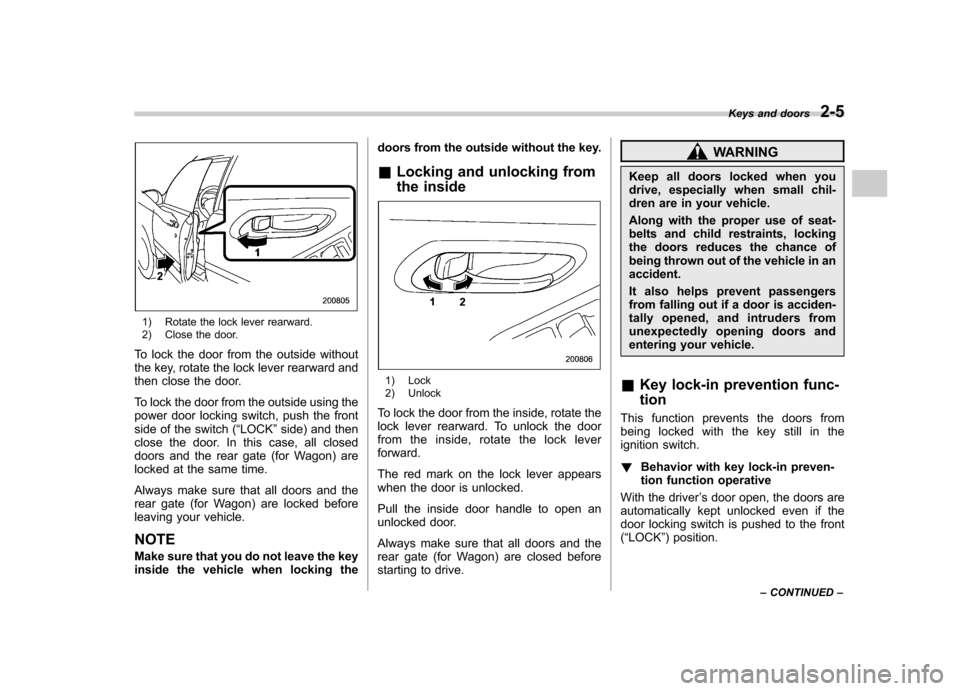
1) Rotate the lock lever rearward.
2) Close the door.
To lock the door from the outside without
the key, rotate the lock lever rearward and
then close the door.
To lock the door from the outside using the
power door locking switch, push the front
side of the switch ( “LOCK ”side) and then
close the door. In this case, all closed
doors and the rear gate (for Wagon) are
locked at the same time.
Always make sure that all doors and the
rear gate (for Wagon) are locked before
leaving your vehicle. NOTE
Make sure that you do not leave the key
inside the vehicle when locking the doors from the outside without the key.
& Locking and unlocking from
the inside
1) Lock
2) Unlock
To lock the door from the inside, rotate the
lock lever rearward. To unlock the door
from the inside, rotate the lock leverforward.
The red mark on the lock lever appears
when the door is unlocked.
Pull the inside door handle to open an
unlocked door.
Always make sure that all doors and the
rear gate (for Wagon) are closed before
starting to drive.
WARNING
Keep all doors locked when you
drive, especially when small chil-
dren are in your vehicle.
Along with the proper use of seat-
belts and child restraints, locking
the doors reduces the chance of
being thrown out of the vehicle in anaccident.
It also helps prevent passengers
from falling out if a door is acciden-
tally opened, and intruders from
unexpectedly opening doors and
entering your vehicle.
& Key lock-in prevention func- tion
This function prevents the doors from
being locked with the key still in the
ignition switch. ! Behavior with key lock-in preven-
tion function operative
With the driver ’s door open, the doors are
automatically kept unlocked even if the
door locking switch is pushed to the front( “ LOCK ”) position. Keys and doors
2-5
– CONTINUED –
Page 90 of 364
Remote keyless entry system
Two transmitters are provided for your vehicle.
The remote keyless entry system has the
following functions. .Locking and unlocking the doors (and
rear gate on the Wagon) without a key. Sounding a panic alarm
. Arming and disarming the alarm sys-
tem. See the next section “Alarm system ”
for detailed information.
This device complies with Part 15 of
the FCC Rules and with RSS-210 of
Industry Canada. Operation is subject
to the following two conditions: (1) This
device may not cause harmful inter-
ference, and (2) this device must
accept any interference received, in-
cluding interference that may cause
undesired operation.
Changes or modifications not ex-
pressly approved by the party respon-
sible for compliance could void theuser ’s authority to operate the equip-
ment.
The operable distance of the keyless entry
system is approximately 30 feet (10
meters). However, this distance will vary
depending on environmental conditions. The system
’s operable distance will be
shorter in areas near a facility or electronic
equipment emitting strong radio waves
such as a power plant, broadcast station,
TV tower, or remote controller of home
electronic appliances.
The remote keyless entry system does not
operate when the key is inserted in the
ignition switch to prevent accidental lock-out.
CAUTION
. Do not expose the transmitter to
severe shocks, such as those
experienced as a result of drop-
ping or throwing.
. Do not take the transmitter apart
except when replacing the bat-
tery.
. Do not get the transmitter wet. If it
gets wet, wipe it dry with a cloth
immediately.
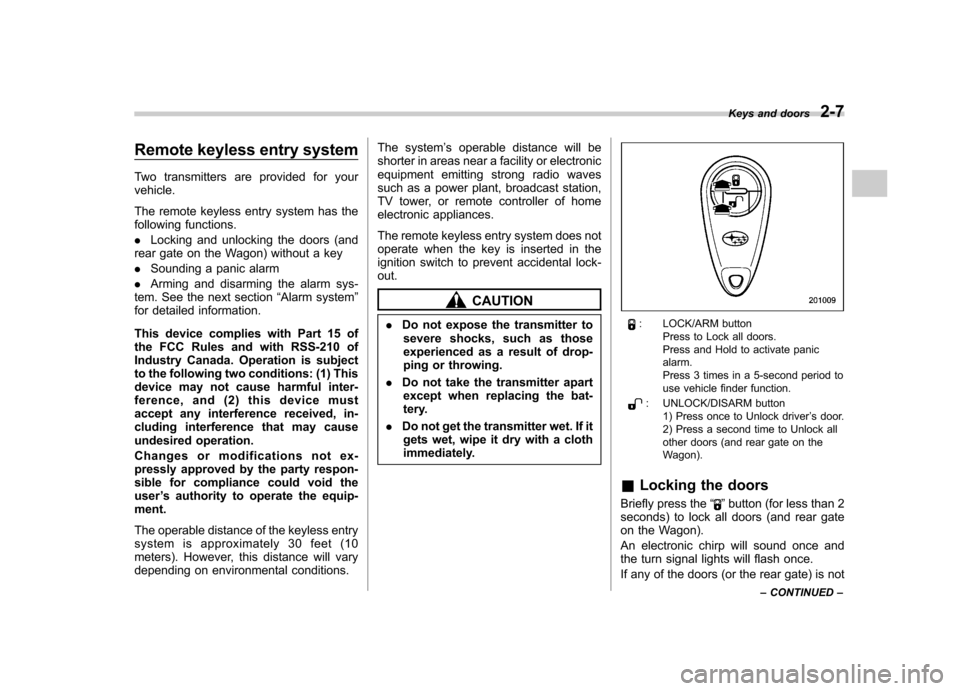
: LOCK/ARM button Press to Lock all doors.
Press and Hold to activate panic alarm.
Press 3 times in a 5-second period to
use vehicle finder function.
: UNLOCK/DISARM button1) Press once to Unlock driver ’s door.
2) Press a second time to Unlock all
other doors (and rear gate on the
Wagon).
& Locking the doors
Briefly press the “
”button (for less than 2
seconds) to lock all doors (and rear gate
on the Wagon).
An electronic chirp will sound once and
the turn signal lights will flash once.
If any of the doors (or the rear gate) is not Keys and doors
2-7
– CONTINUED –
Page 91 of 364
2-8Keys and doors
fully closed, an electronic chirp will sound
five times and the turn signal lights will
flash five times to alert you that the doors
(or the rear gate) are not properly closed.
When you close the door, it will automa-
tically lock. NOTE
If the “
”button is pressed for 2
seconds or longer, the panic alarm will
sound. When locking the doors in
normal circumstances, press the “
”
button for less than 2 seconds. For
details on the panic alarm, refer to“ Sounding a panic alarm ”.
& Unlocking the doors
Briefly press the “
”button (for less than
2 seconds) to unlock the driver ’s door. An
electronic chirp will sound twice and the
turn signal lights will flash twice.
To unlock all other doors (and rear gate on
the Wagon), briefly press the “
”button a
second time within 5 seconds. NOTE
If the interval between the first and
second presses of the “
”button (for
unlocking of all of the doors and the
rear gate) is extremely short, the sys-
tem may not respond. &
Illuminated entry
The interior lights (dome and cargo area
lights) will illuminate when the “
”button
is pressed. These lights stay illuminated
for approximately 30 seconds if any of the
doors (or the rear gate on the Wagon) is
not opened.
If the “
”button is pressed before 30
seconds have elapsed, these lights will go
out. Also, these lights will go out if the key
is turned to the “ON ”position. The interior
light switch must be set to the DOOR
position in order for this function to
operate. & Vehicle finder function
Use this function to find your vehicle
parked among many vehicles in a large
parking lot. Provided you are within 30 feet
(10 meters) of the vehicle, pressing the “
”
button three times in a five-second period
will cause your vehicle ’s horn to sound
once and its turn signal lights to flash threetimes. NOTE
If the interval between presses is too
short when you press the “
”button
three times, the system may not re-
spond to the signals from the remote
transmitter. &
Sounding a panic alarm
To activate the alarm, keep the “
”button
pressed for more than 2 seconds . The
horn will sound and the turn signal lights
will flash.
To deactivate it, press the “
”button or
“” button. Unless a button on the remote
is pressed, the alarm will be deactivated
after approximately 30 seconds.
& Selecting audible signal op- eration
Using an electronic chirp, the system will
give you an audible signal when the doors
lock and unlock. If desired, you may turn
the audible signal off.
Do the following to deactivate the audible
signal. You can also use the same steps
to restore the function.
1. Sit in the driver ’s seat and shut all
doors and the rear gate.
2. Open the driver ’s door, then remove
the key from the ignition switch.
3. Hold down the “UNLOCK ”side of the
power door locking switch.
4. While holding down the “UNLOCK ”
side of the power door locking switch,
insert the key into the ignition switch and
remove it again at least 6 times within 10
seconds after Step 3.
5. While still holding down the “UNLOCK ”
Page 123 of 364
3-14Instruments and controls
Warning and indicator lights
Several of the warning and indicator lights
come on momentarily and then go out
when the ignition switch is initially turned
to the“ON ”position. This permits check-
ing the operation of the bulbs.
Apply the parking brake and turn the
ignition switch to the “ON ”position. The
following lights come on: . Seatbelt warning light
. SRS airbag system warning light
. Front passenger ’s frontal airbag ON
indicator light. Front passenger ’s frontal airbag OFF
indicator light. CHECK ENGINE warning light/Mal-
function indicator lamp. Charge warning light
. Oil pressure warning light
. AT OIL temperature warning light (AT
vehicles). ABS warning light
. Brake system warning light
. All-Wheel Drive warning light (AWD AT
vehicles). Cruise control indicator light
. Cruise control set indicator light
If any lights fail to come on, it indicates a
burned-out bulb or a malfunction of the corresponding system.
Consult your authorized SUBARU dealer
for repair. &
Seatbelt warning light
and chime
Your vehicle is equipped with a seatbelt
warning device at the driver ’s seat, as
required by current safety standards.
There is a seatbelt warning light in the
combination meter.
If the driver has not yet fastened the
seatbelt when the ignition switch is turned
to the “ON ”position, the seatbelt warning
light will flash for 6 seconds, to warn that
the seatbelt is unfastened. If the driver ’s
seatbelt is not fastened, a chime will also
sound simultaneously.
If the driver ’s seatbelt is still not fastened 6
seconds later, the warning light will remain
lit for 15 seconds. If the driver ’s seatbelt is
still not fastened even 15 seconds later
(21 seconds after turning ON the ignition
switch), the warning lights will alternate
between flashing and steady illumination
at 15-second intervals, and the chime will
sound while the warning light is flashing.
Alternate flashing and steady illumination
of the warning lights and sounding of the
chime will continue until the driver fastens
the seatbelt. NOTE .
If the driver unfastens the seatbelt
after fastening, the seatbelt warning
device operates as follows according
to the vehicle speed.
.At speeds lower than approxi-
mately 9 mph (15 km/h)
The warning light will alternate
between flashing and steady illumi-
nation at 15-second intervals. The
chime will not sound. . At speeds higher than approxi-
mately 9 mph (15 km/h)
The warning light will alternate
between flashing and steady illumi-
nation at 15-second intervals and
the chime will sound while the
warning light is flashing.
. It is possible to cancel the warning
operation that follows the 6-second
warning after turning ON the ignition
switch. When the ignition switch is
turned ON next time, however, the
complete sequence of the warning
operation resumes. For further details
about canceling the warning operation,
please contact your SUBARU dealer. & SRS airbag system
warning light
When the ignition switch is turned to the
Page 168 of 364
5-10Audio
! Selection of a desired disc
You can select a desired disc from among
the discs contained in the CD changer
only by pressing the corresponding num-
ber on one of the disc selection buttons
(15). If you are to listen to the 5th disc in
the CD changer, press the “5 ” button of the
disc selection buttons (15). All other discs
in the CD changer can also be selected in
a similar way. NOTE . No disc change takes place if the
button corresponding to the storage
tray in which no disc is loaded is pressed.. If the disc selection button (15)
corresponding to the disc now in play-
back is pressed again, the disc will be
replayed from its beginning. ! To select a song from its beginning
! Forward direction
Briefly press the “
”side of the button
(12) to skip to the beginning of the next
track. Each time this side of the button is
pressed, the indicated track number willincrease. ! Backward direction
Briefly press the “
”side of the button
(12) to skip to the beginning of the current track. Each time this side of the button is
pressed, the indicated track number willdecrease. !
Fast-forwarding and fast-reversing
! Fast-forwarding
Press the “
”side of the button (12)
continuously to fast-forward the disc.
Release the button to stop fast-forwarding.
If you continue fast-forwarding to the end
of the disc, the CD changer will auto-
matically stop fast-forwarding and start
playback beginning with the first track on
the current disc. ! Fast-reversing
Press the “
”side of the button (12)
continuously to fast-reverse the disc.
Release the button to stop fast-reversing.
If you continue fast-reverse to the begin-
ning of the disc, the CD changer will
automatically stop fast-reverse and start
playback beginning with the first track on
the current disc. ! Repeat playback
Use this to play a certain track repeatedly.
During playback, press the “RPT ”button
(14) and release it in less than 2 seconds.The “RPT ”indicator will come on and the
song will be played continuously. To
cancel the repeat mode, press the button again. Then the
“RPT ”indicator goes out,
and normal playback mode is restored. ! Random playback
Use this to play the tracks on the disc in
random order. During playback, press the“ RDM ”button (14) and hold it in for more
than 2 seconds. The “RDM ”indicator will
come on and all songs on the disc will be
played in a random order.
To cancel the random mode, press the
button again. Then the “RDM ”indicator
goes out, and normal playback mode isrestored.
Page 182 of 364
5-24Audio
! To insert a disc
1. Press one of the disc selection buttons
(3) (numbered from 1 to 6) for which the
disc indicator light (2) is off.
The disc indicator lights are located
directly above the corresponding disc
selection buttons.
2. The indicator will begin blinking. The
blinking will last for 15 seconds.
During this period, insert a desired disc,
and the disc will begin to play. (If any disc
is not inserted during this period, the disc
slot (1) door will close. Repeat Step 1.)
Be sure to hold a disc with the label side
(the side where titles are printed) up.
3. To insert another disc, repeat Steps 1
and 2 choosing a different disc selectionbutton. ! To insert six discs at a time
1. Press and hold the disc selection
button (3) number 1 until all disc indicators
begin blinking (approximately 1.5 sec-onds).
2. The indicators will blink for 15 sec-
onds. During this period, insert six discs.
3. When all discs are loaded, the first
disc will begin to play. (If no disc is
inserted within this 15 seconds, the entire
disc load sequence will be canceled.) !
To remove a disc
1. Press the desired disc selection button
(3) (numbered from 1 to 6) for which the
disc indicator light is on.
2. Press the eject button “
”(4). The
selected disc will be ejected and the
indicator light will begin blinking.
3. To remove another disc, repeat Steps
1 and 2 choosing a different disc selectionbutton.
(To remove discs when the ignition switch
is in the “LOCK ”position, press the eject
button “
”, and the first disc will be
ejected. Press the eject button “”again,
and the next disc will be ejected and so
on. At this time, the disc selection buttons
are disabled.) ! To remove all discs at one time
1. Press and hold the eject button “
”(4)
until all disc indicators begin blinking
(approximately 1.5 seconds), and the first
disc will be ejected.
2. When the disc is removed, the next
one will be ejected, and so on. ! To replace a playing disc with another
Simply press the desired one of disc
selection buttons (3) (numbered from 1 to 6) or press the disc selection button on
the radio unit to select the desired disc,
and the disc will begin to play. !
Disc indicators
Lit: when the corresponding storage tray is
occupied by a disc.
Blinking: Disc player is either in loading,
eject or changing mode.
OFF: No disc is loaded or the ignition
switch is in the “LOCK ”position.
! Open/Closed disc slot indicator
When the disc slot is open, the disc
indicators on both sides of the slotilluminate. ! Function control
Refer to CD changer control operating
instructions described in the “Type A audio
set ”or “Type B audio set ”section.
Page 190 of 364
6-6Interior equipment
&Rear passenger ’s cup holder
(if equipped)
CAUTION
When not in use, always keep the
cup holder stored while driving to
reduce the risk of injury in the event
of a sudden stop or an accident.
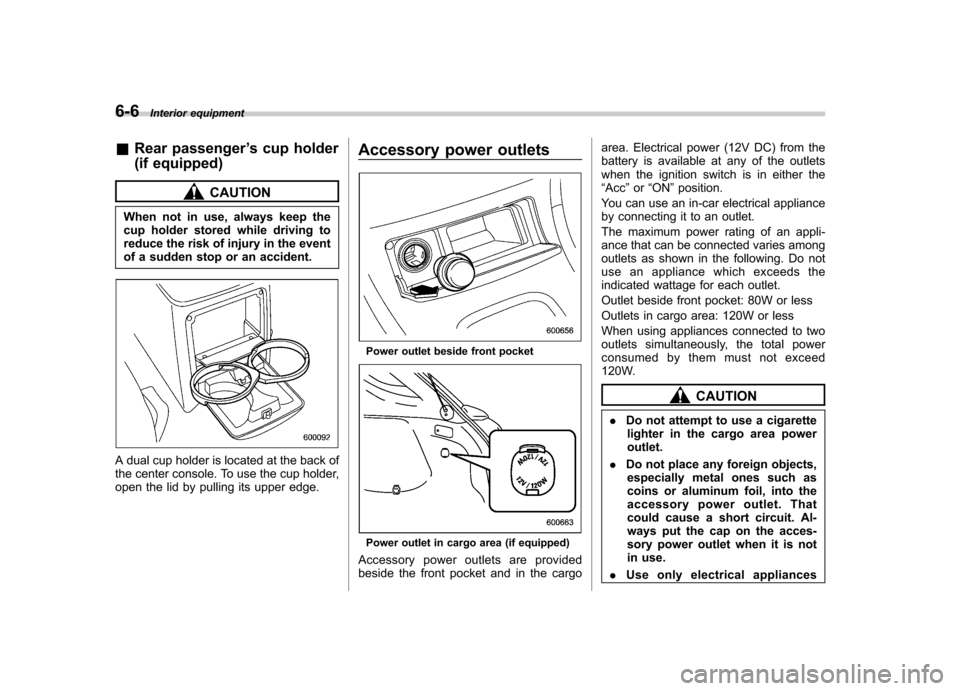
A dual cup holder is located at the back of
the center console. To use the cup holder,
open the lid by pulling its upper edge. Accessory power outlets
Power outlet beside front pocket
Power outlet in cargo area (if equipped)
Accessory power outlets are provided
beside the front pocket and in the cargo area. Electrical power (12V DC) from the
battery is available at any of the outlets
when the ignition switch is in either the“
Acc ”or “ON ”position.
You can use an in-car electrical appliance
by connecting it to an outlet.
The maximum power rating of an appli-
ance that can be connected varies among
outlets as shown in the following. Do not
use an appliance which exceeds the
indicated wattage for each outlet.
Outlet beside front pocket: 80W or less
Outlets in cargo area: 120W or less
When using appliances connected to two
outlets simultaneously, the total power
consumed by them must not exceed
120W.
CAUTION
. Do not attempt to use a cigarette
lighter in the cargo area power outlet.
. Do not place any foreign objects,
especially metal ones such as
coins or aluminum foil, into the
accessory power outlet. That
could cause a short circuit. Al-
ways put the cap on the acces-
sory power outlet when it is not
in use.
. Use only electrical appliances
Page 199 of 364
7-2Starting and operating
Fuel
CAUTION
Use of a fuel which is low in quality
or use of an inappropriate fuel
additive may cause engine damage.
& Fuel requirements
! 2.5-liter non-turbo models
The 2.5-liter non-turbo engine is designed
to operate using unleaded gasoline with
an octane rating of 87 AKI or higher. ! WRX
The 2.5-liter turbo engine is designed to
operate using premium unleaded gasoline
with an octane rating of 91 AKI or higher. If
premium unleaded gasoline is not avail-
able, regular unleaded gasoline with an
octane rating of 87 AKI or higher may be
temporarily used. For optimum engine
performance and driveability, it is required
that you use premium grade unleadedgasoline. NOTE
Be sure to use premium unleaded
gasoline of 91 AKI or higher for WRX.
If other gasoline (lower than 91 AKI) is used, knocking, reduced output and
poor accelerator response will result. !
WRX-STI
The 2.5-liter turbo engine is designed to
operate using super-premium unleaded
gasoline with an octane rating of 93 AKI or
higher. If super-premium unleaded gaso-
line with an octane rating of 93 AKI or
higher is not available, premium unleaded
gasoline with an octane rating of 91 AKI or
higher may be temporarily used. For
optimum engine performance and drive-
ability, it is required that you use super-
premium grade unleaded gasoline with an
octane rating of 93 AKI or higher.
NOTE
Be sure to use super-premium un-
leaded gasoline of 93 AKI or higher
for WRX-STI. If other gasoline (lower
than 93 AKI) is used, knocking, re-
duced output and poor accelerator
response will result. ! Fuel octane rating
This octane rating is the average of the
Research Octane and Motor Octane
numbers and is commonly referred to as
the Anti Knock Index (AKI).
Using a gasoline with a lower octane
rating can cause persistent and heavy knocking, which can damage the engine.
Do not be concerned if your vehicle
sometimes knocks lightly when you drive
up a hill or when you accelerate. See your
dealer or a qualified service technician if
you use a fuel with the specified octane
rating and your vehicle knocks heavily or
persistently. !
Unleaded gasoline
The neck of the fuel filler pipe is designed
to accept only an unleaded gasoline filler
nozzle. Under no circumstances should
leaded gasoline be used because it will
damage the emission control system and
may impair driveability and fuel economy. ! Gasoline for California-certified LEV
If your vehicle was certified to California ’s
low emission vehicle (LEV) standards as
indicated on the underhood tune-up label,
it is designed to optimize engine and
emission performance with gasoline that
meets the clean burning low-sulfur Cali-
fornia gasoline specifications. If you live in
any other state than California, your
vehicle will operate on gasoline meeting
Federal specifications. Gasoline sold out-
side California is permitted to have higher
sulfur levels, which may affect the perfor-
mance of your vehicle ’s catalytic converter
and may produce a sulfur exhaust odor or
Page 201 of 364
7-4Starting and operating
&Fuel filler lid and cap
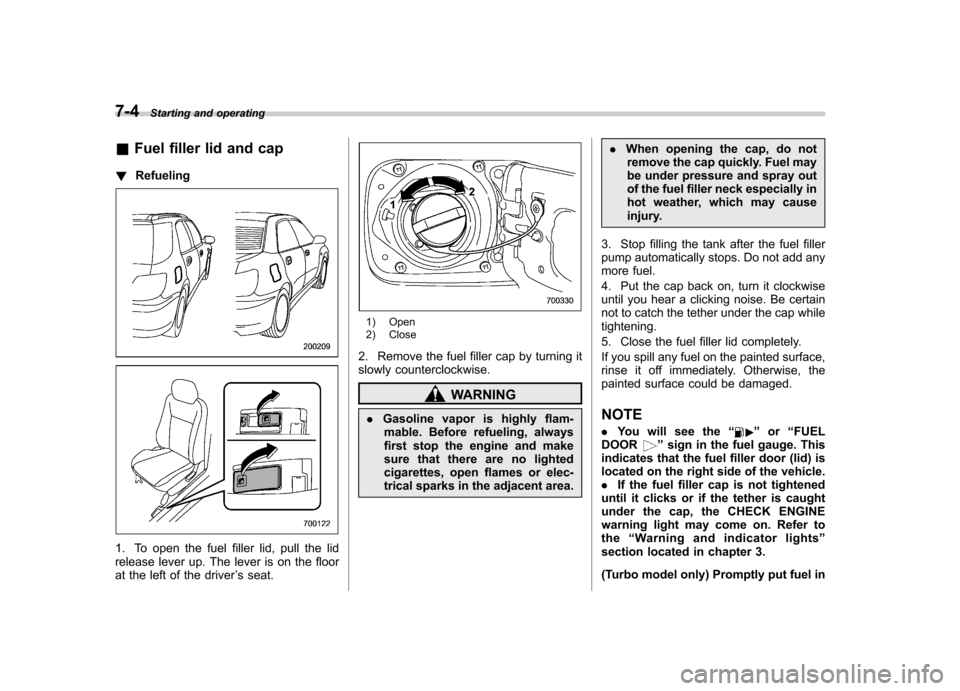
! Refueling
1. To open the fuel filler lid, pull the lid
release lever up. The lever is on the floor
at the left of the driver ’s seat.
1) Open
2) Close
2. Remove the fuel filler cap by turning it
slowly counterclockwise.
WARNING
. Gasoline vapor is highly flam-
mable. Before refueling, always
first stop the engine and make
sure that there are no lighted
cigarettes, open flames or elec-
trical sparks in the adjacent area. .
When opening the cap, do not
remove the cap quickly. Fuel may
be under pressure and spray out
of the fuel filler neck especially in
hot weather, which may cause
injury.
3. Stop filling the tank after the fuel filler
pump automatically stops. Do not add any
more fuel.
4. Put the cap back on, turn it clockwise
until you hear a clicking noise. Be certain
not to catch the tether under the cap whiletightening.
5. Close the fuel filler lid completely.
If you spill any fuel on the painted surface,
rinse it off immediately. Otherwise, the
painted surface could be damaged. NOTE . You will see the “
”or “FUEL
DOOR” sign in the fuel gauge. This
indicates that the fuel filler door (lid) is
located on the right side of the vehicle.. If the fuel filler cap is not tightened
until it clicks or if the tether is caught
under the cap, the CHECK ENGINE
warning light may come on. Refer tothe “Warning and indicator lights ”
section located in chapter 3.
(Turbo model only) Promptly put fuel in
Page 203 of 364
7-6Starting and operating
CAUTION
Resultant vehicle damage due to
improper testing is not covered
under the SUBARU Limited War-
ranty and is the responsibility of
the state inspection program or its
contractors or licensees.
The EPA has issued regulations for
inspecting the On-Board Diagnostic
(OBD) system as part of the state emis-
sions inspection. The OBD system is
designed to detect engine and transmis-
sion problems that might cause vehicle
emissions to exceed allowable limits.
These inspections apply to all 1996 model
year and newer passenger cars and light
trucks. Over 30 states plus the District of
Columbia have implemented the OBD
system inspection. . The inspection of the OBD system
consists of a visual operational check of the “CHECK ENGINE ”warning light/mal-
function indicator lamp (MIL) and an
examination of the OBD system with an
electronic scan tool while the engine isrunning. . Avehicle
passes the OBD system
inspection if proper the “CHECK ENGINE ”
warning light/MIL illumination is observed,
there is nostored diagnostic trouble codes, and the OBD system readiness
monitors are complete. .
A vehicle
fails the OBD inspection if the
“ CHECK ENGINE ”warning light/MIL is
not properly operating or there are one or
more diagnostic trouble codes stored in
the vehicle ’s computer with the “CHECK
ENGINE ”warning light/MIL illuminated.
. A state emission inspection may reject
(not pass or fail) a vehicle if the number of
OBD system readiness monitors “Not
Ready ”is greater than one. Under this
condition, the vehicle operator should be
instructed to drive his/her vehicle for a few
days to set the monitors and return for an
emission re-inspection. . Owners of rejected or failing vehicles
should contact their SUBARU Dealer for service. Preparing to drive
You should perform the following checks
and adjustments every day before you
start driving.
1. Check that all windows, mirrors, and
lights are clean and unobstructed.
2. Check the appearance and condition
of the tires. Also check tires for properinflation.
3. Look under the vehicle for any sign of leaks.
4. Check that the hood, trunk (Sedan)
and rear gate (Wagon) are fully closed.
5. Check the adjustment of the seat.
6. Check the adjustment of the inside
and outside mirrors.
7. Fasten your seatbelt. Check that your
passengers have fastened their seatbelts.
8. Check the operation of the warning
and indicator lights when the ignition
switch is turned to the
“ON ”position.
9. Check the gauges, indicator and warn-
ing lights after starting the engine.
NOTE
Engine oil, engine coolant, brake fluid,
washer fluid and other fluid levels
should be checked daily, weekly or at
fuel stops.