air SUBARU IMPREZA 2022 Getting Started Guide
[x] Cancel search | Manufacturer: SUBARU, Model Year: 2022, Model line: IMPREZA, Model: SUBARU IMPREZA 2022Pages: 124, PDF Size: 33.04 MB
Page 4 of 124
PASSENGER/CARGO AREAS
FOLDING THE REAR SEATS...40
CHILD SAFETY LOCKS .......40
LATCH/ANCHOR ............41
REAR SEAT REMINDER .......42
TRUNK LID OPENER
(Sedan Models) ..............42
INTERNAL SAFETY TRUNK
RELEASE WITH SELF-
ILLUMINATING HANDLE
(Sedan Models) ..............43
CARGO COVER .............43
SPARE TIRE AND JACK .......44
ENGINE COMPARTMENT
HOOD PROP................45
2.0L ENGINE ................46
ADDITIONAL SPECIFICATIONS
NEW VEHICLE BREAK-IN ......47
ENGINE OIL ................47
ENGINE OIL CAPACITY .......47
ROOF RAIL CAPACITY .......48
TRAILER TOWING CAPACITY . . 48
TIRE PRESSURE MONITORING
SYSTEM (TPMS) .............48
STARLINK OVERVIEW
OVERVIEW OF YOUR
MULTIMEDIA SYSTEM ........50
BUTTONS ..................50
TOUCHSCREEN .............52
STEERING WHEEL
CONTROLS .................53
VOICE RECOGNITION ........54
STARLINK HOME
HOME SCREEN ICONS .......56
REARRANGING ICONS .......56
ADDING SHORTCUTS ........57
DRIVER PROFILE
CREATING A DRIVER
PROFILE...................58
MULTIMEDIA
RADIO.....................60
MEDIA .....................61
PHONE
PAIRING A PHONE ...........62
MAKING A CALL .............62
RECEIVING A CALL ..........63
TEXT MESSAGES ............64
APPS
SUBARU STARLINK®
IN-VEHICLE APPS ...........65
SUBARU STARLINK®
MOBILE APP ................67
MYSUBARU ................68
MAPS (if equipped)
MAPS OVERVIEW ............69
CREATING HOME AND WORK
PROFILES ..................69
STARLINK SAFETY AND
SECURITY
SAFETY AND SECURITY
OVERVIEW .................70
ENROLLMENT ..............71
MYSUBARU INTEGRATION ....72
SUBARU STARLINK
®
WI-FI HOTSPOT .............72
SETTINGS AND UPDATES
SETTINGS AND UPDATES
OVERVIEW.................73
SOUND ....................74
PHONE ....................74
MAPS/NAVIGATION ..........75
CLOCK ....................76
EYESIGHT
EYESIGHT®OVERVIEW .......79
OPERATION ................79
FUNCTIONS ................80
STEERING WHEEL
CONTROLS .................85
LANE DEPARTURE WARNING
AND PRE-COLLISION BRAKING
SYSTEM OFF SWITCHES ......86
TABLE OF CONTENTS
2
Page 5 of 124
DRIVER ASSIST
TECHNOLOGIES
REAR-VISION CAMERA.......87
BLIND SPOT DETECTION (BSD) /
REAR CROSS TRAFFIC ALERT
(RCTA) ....................87
HIGH BEAM ASSIST (HBA) ....89
STEERING RESPONSIVE
HEADLIGHTS (SRH) ..........89
REVERSE AUTOMATIC
BRAKING (RAB) .............90
CARE AND LIMITATIONS
STEREO CAMERA
PRECAUTIONS..............91
WINDSHIELD GLASS AND
DASHBOARD ...............91
FRONT VIEW
Impreza....................92
EYESIGHT DISCLAIMER
EYESIGHT®DISCLAIMER .....93
HOW TO APPENDIX
HOW TO OVERVIEW ..........94
BLUETOOTH®PAIRING .......94
ANDROID AUTO™ ..........102
APPLE CARPLAY
®..........104
WI-FI .....................106
MAPS ....................108
FIRMWARE AND SOFTWARE
UPDATES .................116
INDEX.....................117
TABLE OF CONTENTS
3
Page 31 of 124
CLIMATE CONTROL
Manual Climate Control
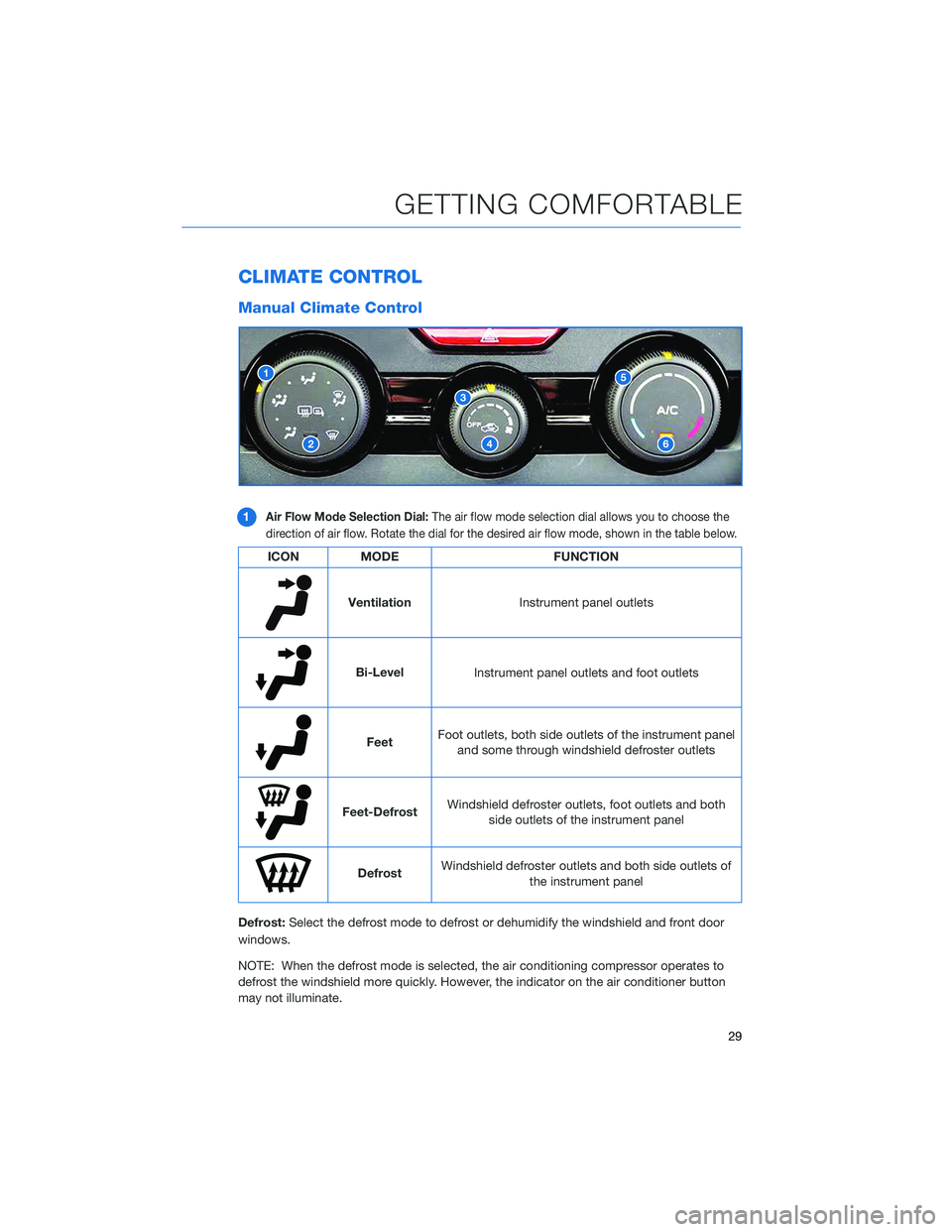
1Air Flow Mode Selection Dial:The air flow mode selection dial allows you to choose the
direction of air flow. Rotate the dial for the desired air flow mode, shown in the table below.
ICON MODE FUNCTION
Ventilation
Instrument panel outlets
Bi-LevelInstrument panel outlets and foot outlets
FeetFoot outlets, both side outlets of the instrument panel
and some through windshield defroster outlets
Feet-Defrost Windshield defroster outlets, foot outlets and both
side outlets of the instrument panel
Defrost Windshield defroster outlets and both side outlets of
the instrument panel
Defrost: Select the defrost mode to defrost or dehumidify the windshield and front door
windows.
NOTE: When the defrost mode is selected, the air conditioning compressor operates to
defrost the windshield more quickly. However, the indicator on the air conditioner button
may not illuminate.
GETTING COMFORTABLE
29
Page 32 of 124
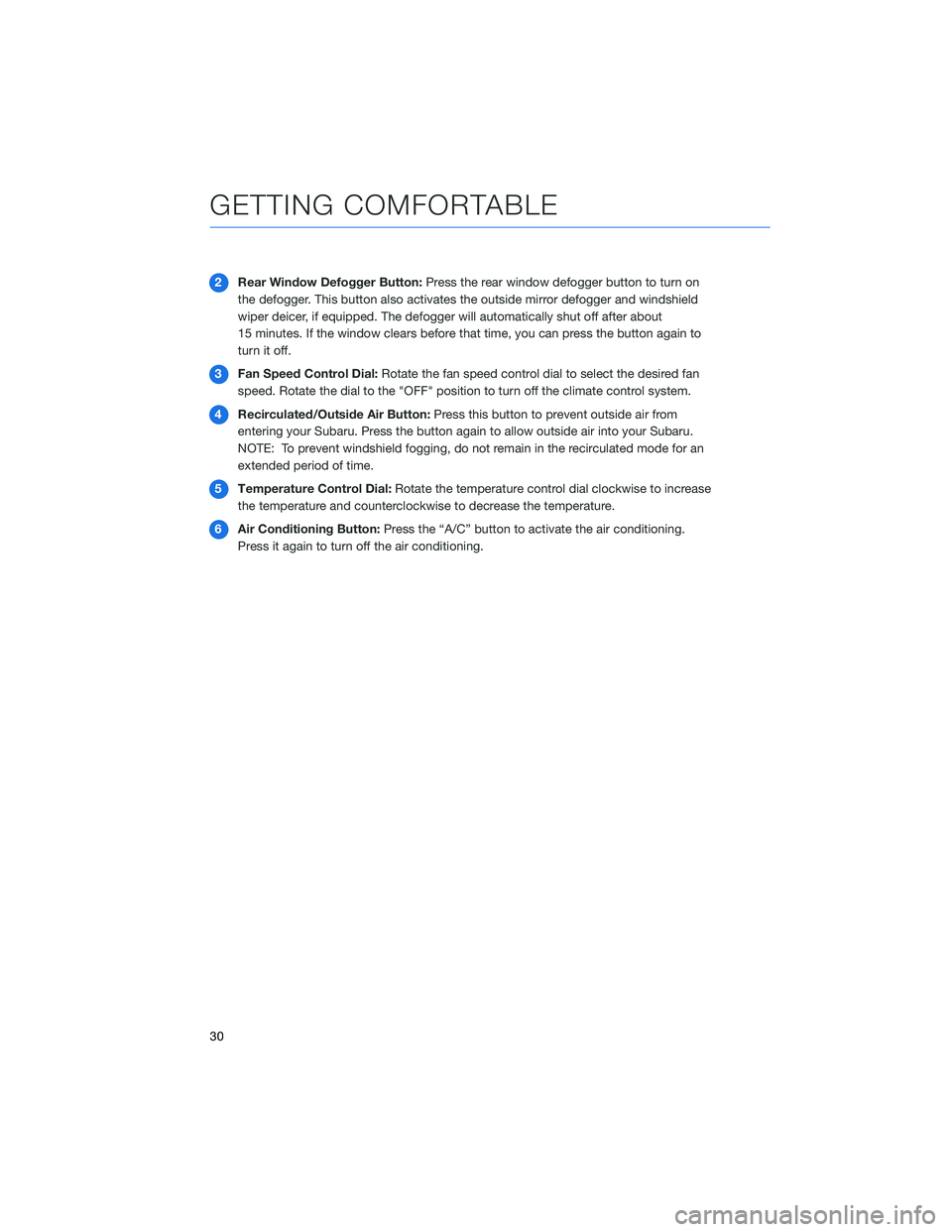
2Rear Window Defogger Button: Press the rear window defogger button to turn on
the defogger. This button also activates the outside mirror defogger and windshield
wiper deicer, if equipped. The defogger will automatically shut off after about
15 minutes. If the window clears before that time, you can press the button again to
turnitoff.
3 Fan Speed Control Dial: Rotate the fan speed control dial to select the desired fan
speed. Rotate the dial to the "OFF" position to turn off the climate control system.
4 Recirculated/Outside Air Button: Press this button to prevent outside air from
entering your Subaru. Press the button again to allow outside air into your Subaru.
NOTE: To prevent windshield fogging, do not remain in the recirculated mode for an
extended period of time.
5 Temperature Control Dial: Rotate the temperature control dial clockwise to increase
the temperature and counterclockwise to decrease the temperature.
6 Air Conditioning Button: Press the “A/C” button to activate the air conditioning.
Press it again to turn off the air conditioning.
GETTING COMFORTABLE
30
Page 33 of 124
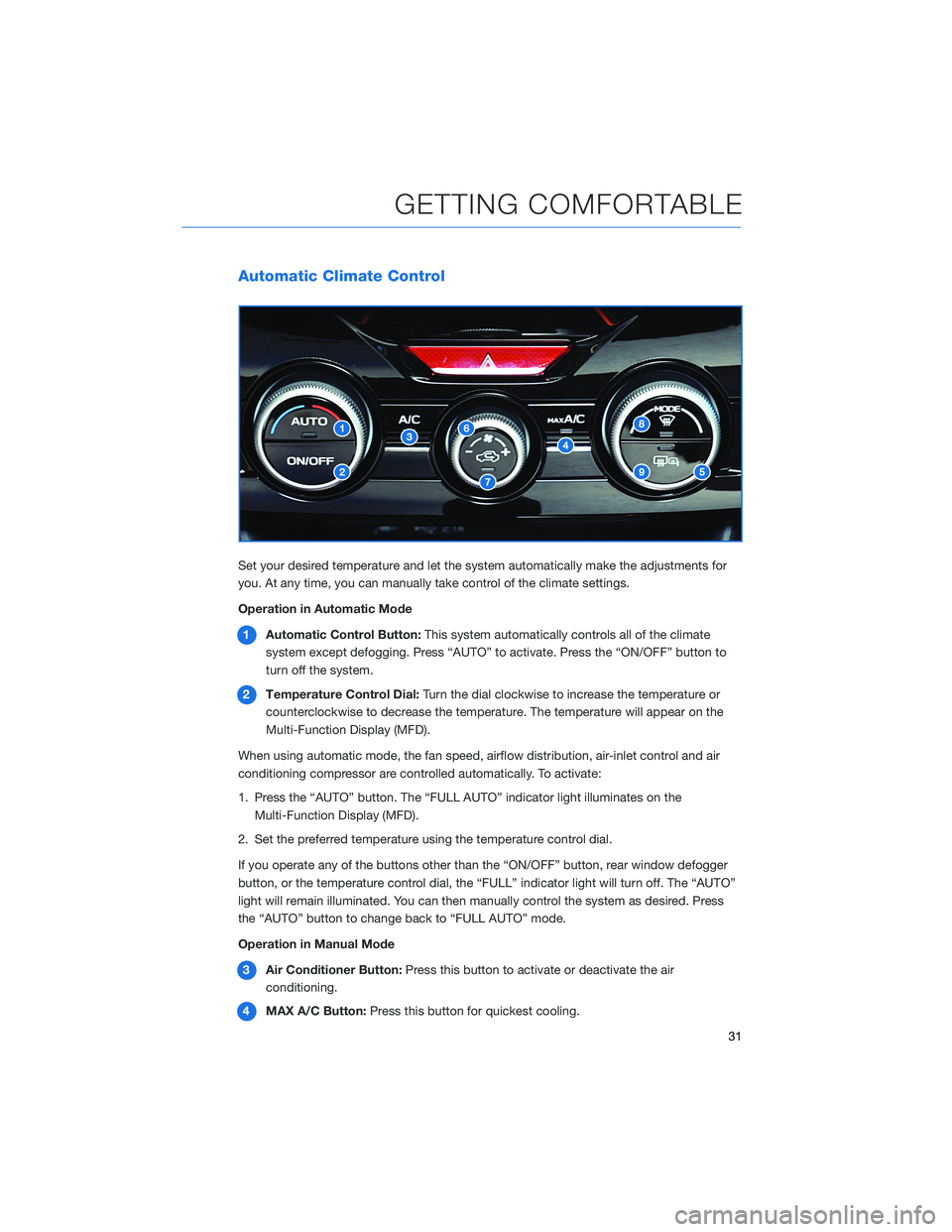
Automatic Climate Control
Set your desired temperature and let the system automatically make the adjustments for
you. At any time, you can manually take control of the climate settings.
Operation in Automatic Mode1 Automatic Control Button: This system automatically controls all of the climate
system except defogging. Press “AUTO” to activate. Press the “ON/OFF” button to
turn off the system.
2 Temperature Control Dial: Turn the dial clockwise to increase the temperature or
counterclockwise to decrease the temperature. The temperature will appear on the
Multi-Function Display (MFD).
When using automatic mode, the fan speed, airflow distribution, air-inlet control and air
conditioning compressor are controlled automatically. To activate:
1. Press the “AUTO” button. The “FULL AUTO” indicator light illuminates on the Multi-Function Display (MFD).
2. Set the preferred temperature using the temperature control dial.
If you operate any of the buttons other than the “ON/OFF” button, rear window defogger
button, or the temperature control dial, the “FULL” indicator light will turn off. The “AUTO”
light will remain illuminated. You can then manually control the system as desired. Press
the “AUTO” button to change back to “FULL AUTO” mode.
Operation in Manual Mode
3 Air Conditioner Button: Press this button to activate or deactivate the air
conditioning.
4 MAX A/C Button: Press this button for quickest cooling.
GETTING COMFORTABLE
31
Page 34 of 124
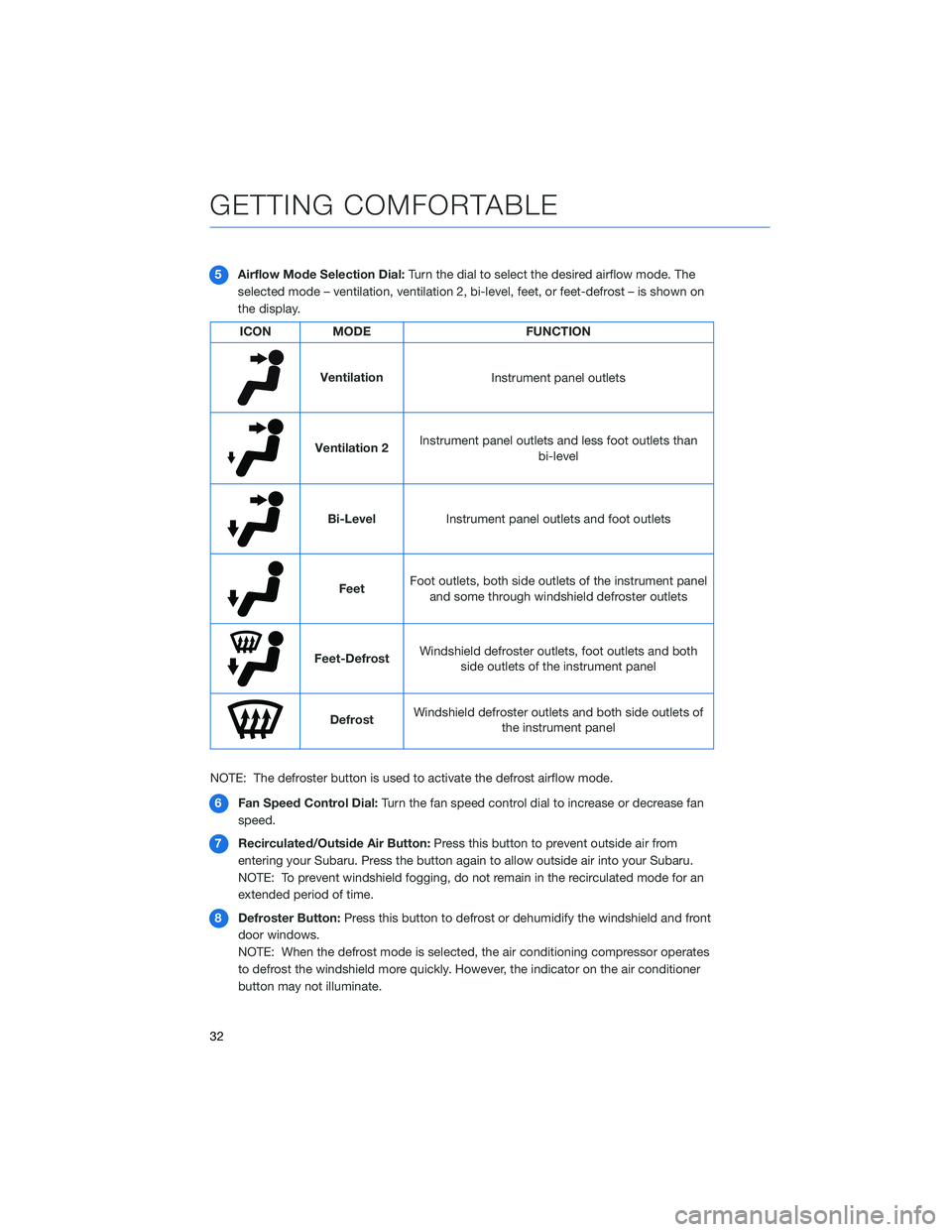
5Airflow Mode Selection Dial: Turn the dial to select the desired airflow mode. The
selected mode – ventilation, ventilation 2, bi-level, feet, or feet-defrost – is shown on
the display.
ICON MODE FUNCTION
Ventilation
Instrument panel outlets
Ventilation 2Instrument panel outlets and less foot outlets than
bi-level
Bi-LevelInstrument panel outlets and foot outlets
FeetFoot outlets, both side outlets of the instrument panel
and some through windshield defroster outlets
Feet-Defrost Windshield defroster outlets, foot outlets and both
side outlets of the instrument panel
Defrost Windshield defroster outlets and both side outlets of
the instrument panel
NOTE: The defroster button is used to activate the defrost airflow mode. 6 Fan Speed Control Dial: Turn the fan speed control dial to increase or decrease fan
speed.
7 Recirculated/Outside Air Button: Press this button to prevent outside air from
entering your Subaru. Press the button again to allow outside air into your Subaru.
NOTE: To prevent windshield fogging, do not remain in the recirculated mode for an
extended period of time.
8 Defroster Button: Press this button to defrost or dehumidify the windshield and front
door windows.
NOTE: When the defrost mode is selected, the air conditioning compressor operates
to defrost the windshield more quickly. However, the indicator on the air conditioner
button may not illuminate.
GETTING COMFORTABLE
32
Page 43 of 124
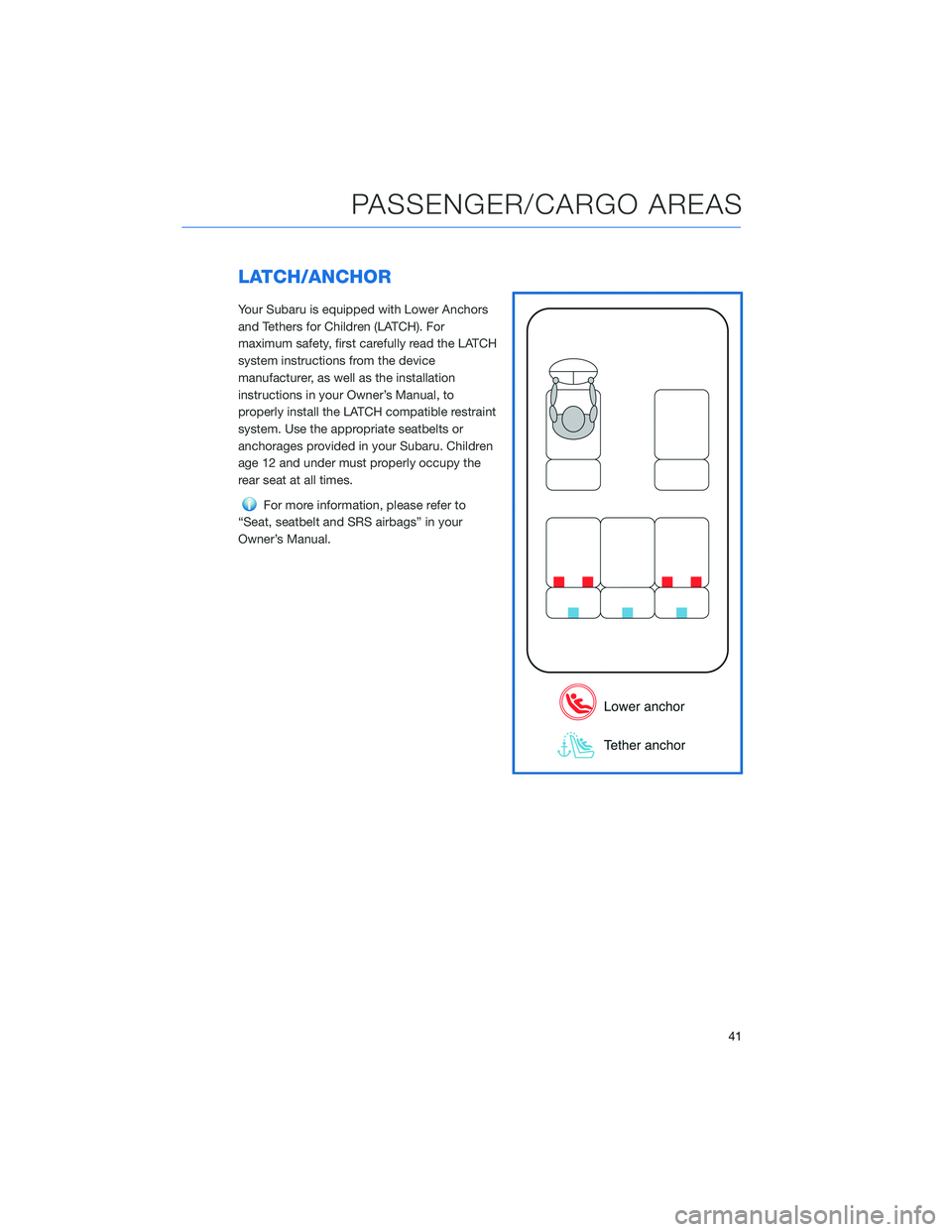
LATCH/ANCHOR
Your Subaru is equipped with Lower Anchors
and Tethers for Children (LATCH). For
maximum safety, first carefully read the LATCH
system instructions from the device
manufacturer, as well as the installation
instructions in your Owner’s Manual, to
properly install the LATCH compatible restraint
system. Use the appropriate seatbelts or
anchorages provided in your Subaru. Children
age 12 and under must properly occupy the
rear seat at all times.
For more information, please refer to
“Seat, seatbelt and SRS airbags” in your
Owner’s Manual.
PASSENGER/CARGO AREAS
41
Page 48 of 124
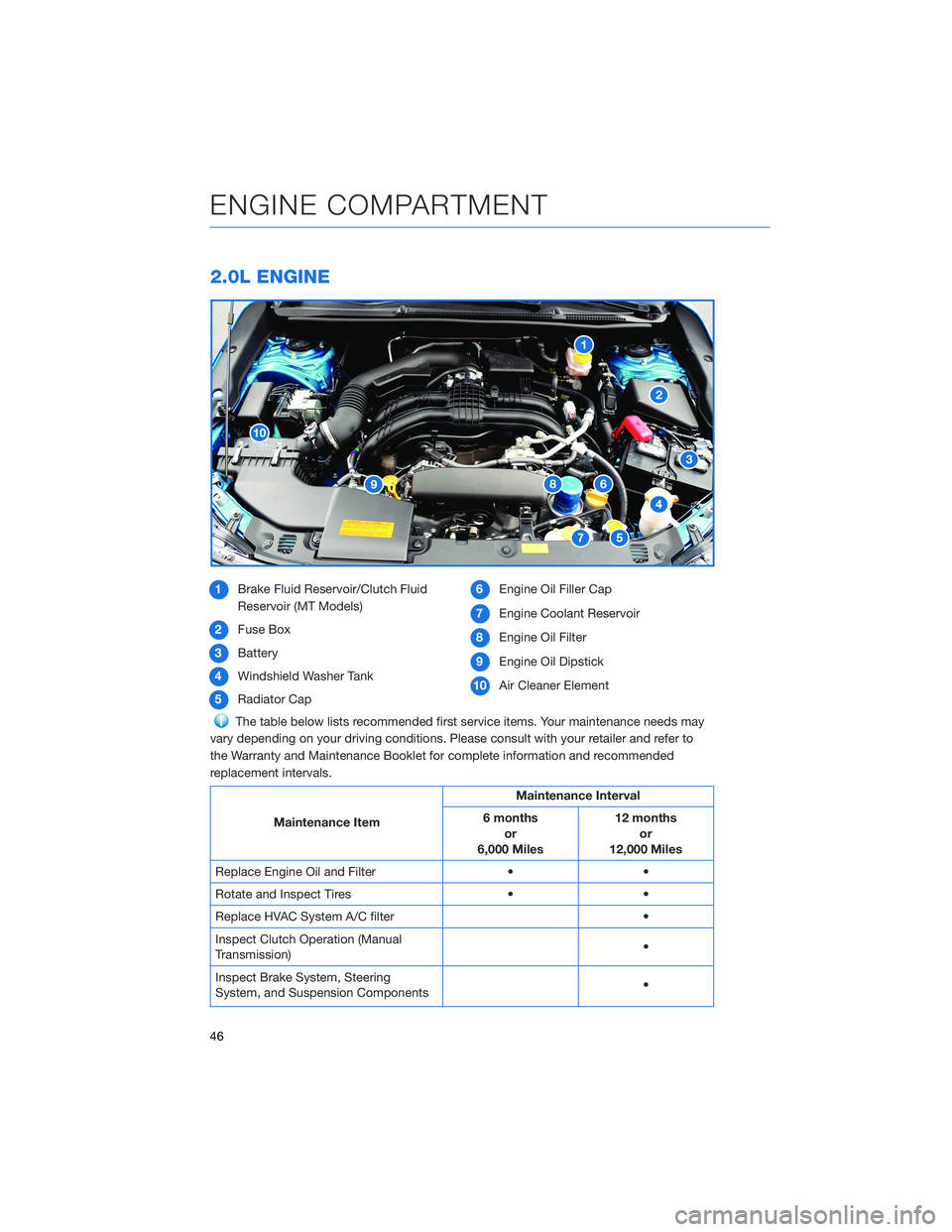
2.0L ENGINE
1Brake Fluid Reservoir/Clutch Fluid
Reservoir (MT Models)
2 Fuse Box
3 Battery
4 Windshield Washer Tank
5 Radiator Cap 6
Engine Oil Filler Cap
7 Engine Coolant Reservoir
8 Engine Oil Filter
9 Engine Oil Dipstick
10 Air Cleaner Element
The table below lists recommended first service items. Your maintenance needs may
vary depending on your driving conditions. Please consult with your retailer and refer to
the Warranty and Maintenance Booklet for complete information and recommended
replacement intervals.
Maintenance Item Maintenance Interval
6 months or
6,000 Miles 12 months
or
12,000 Miles
Replace Engine Oil and Filter • •
Rotate and Inspect Tires • •
Replace HVAC System A/C filter •
Inspect Clutch Operation (Manual
Transmission) •
Inspect Brake System, Steering
System, and Suspension Components •
ENGINE COMPARTMENT
46
Page 60 of 124
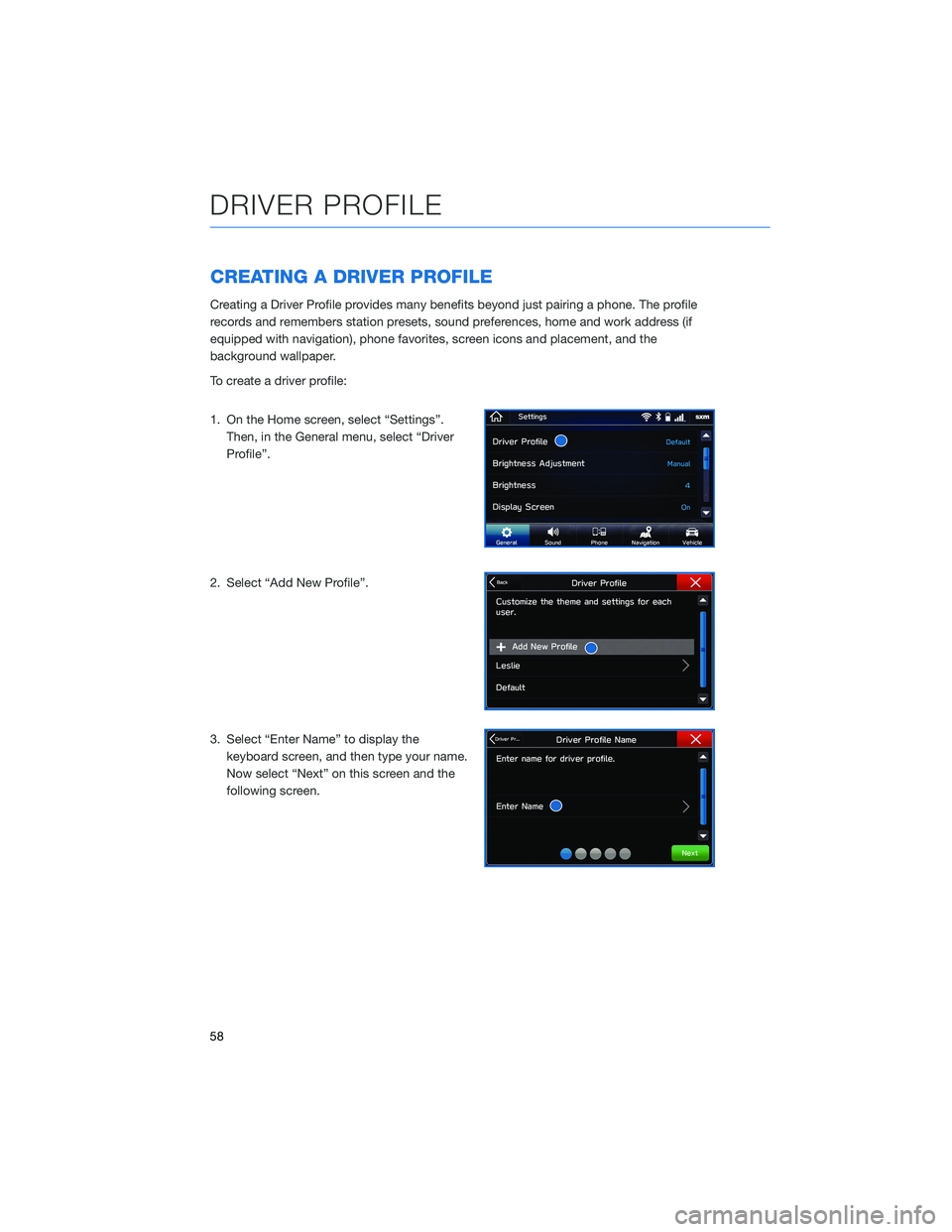
CREATING A DRIVER PROFILE
Creating a Driver Profile provides many benefits beyond just pairing a phone. The profile
records and remembers station presets, sound preferences, home and work address (if
equipped with navigation), phone favorites, screen icons and placement, and the
background wallpaper.
To create a driver profile:
1. On the Home screen, select “Settings”.Then, in the General menu, select “Driver
Profile”.
2. Select “Add New Profile”.
3. Select “Enter Name” to display the keyboard screen, and then type your name.
Now select “Next” on this screen and the
following screen.
DRIVER PROFILE
58
Page 61 of 124
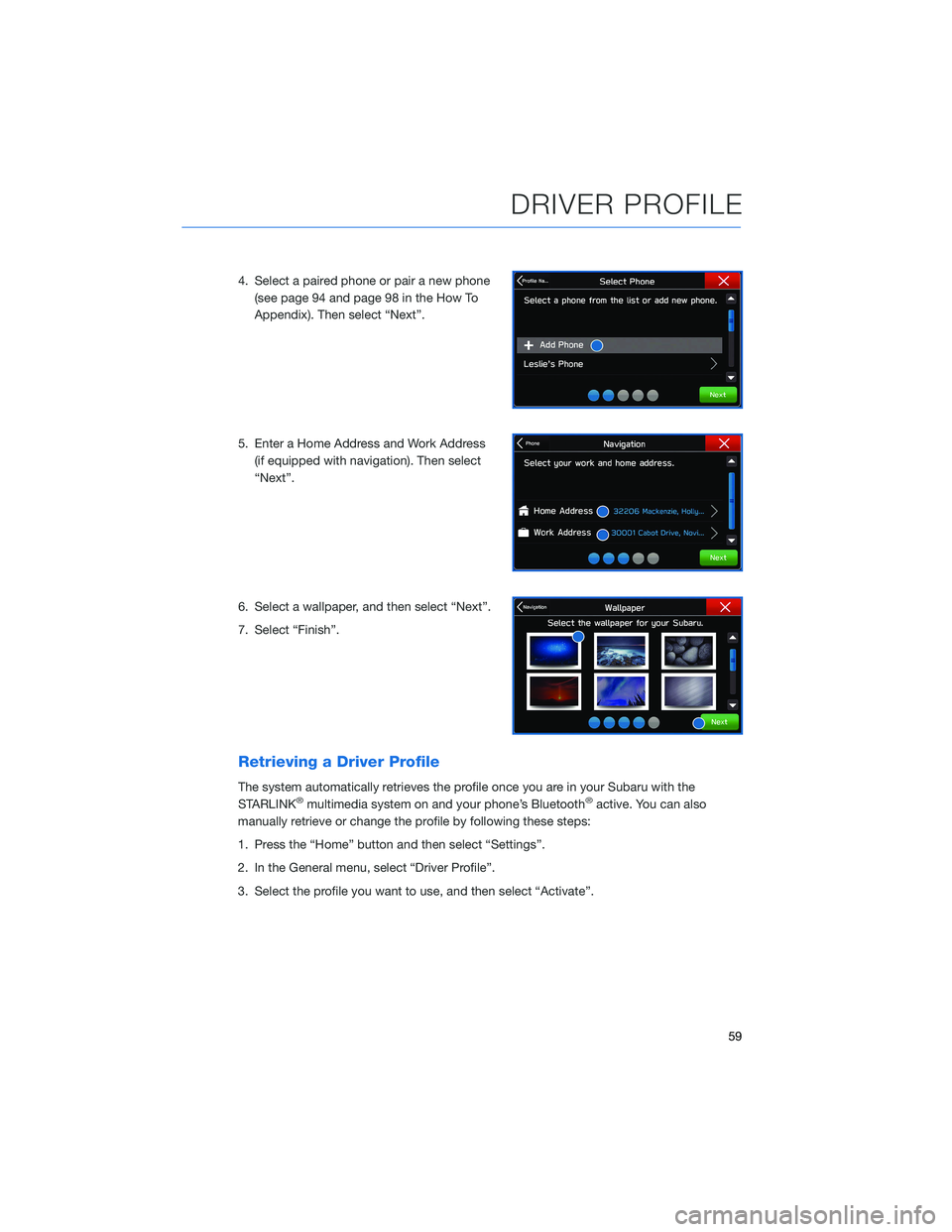
4. Select a paired phone or pair a new phone(see page 94 and page 98 in the How To
Appendix). Then select “Next”.
5. Enter a Home Address and Work Address (if equipped with navigation). Then select
“Next”.
6. Select a wallpaper, and then select “Next”.
7. Select “Finish”.
Retrieving a Driver Profile
The system automatically retrieves the profile once you are in your Subaru with the
STARLINK®multimedia system on and your phone’s Bluetooth®active. You can also
manually retrieve or change the profile by following these steps:
1. Press the “Home” button and then select “Settings”.
2. In the General menu, select “Driver Profile”.
3. Select the profile you want to use, and then select “Activate”.
DRIVER PROFILE
59