lock SUBARU LEGACY 2005 4.G Owners Manual
[x] Cancel search | Manufacturer: SUBARU, Model Year: 2005, Model line: LEGACY, Model: SUBARU LEGACY 2005 4.GPages: 627, PDF Size: 6.42 MB
Page 322 of 627
6-5
Interior equipment
– CONTINUED –
Sun visors
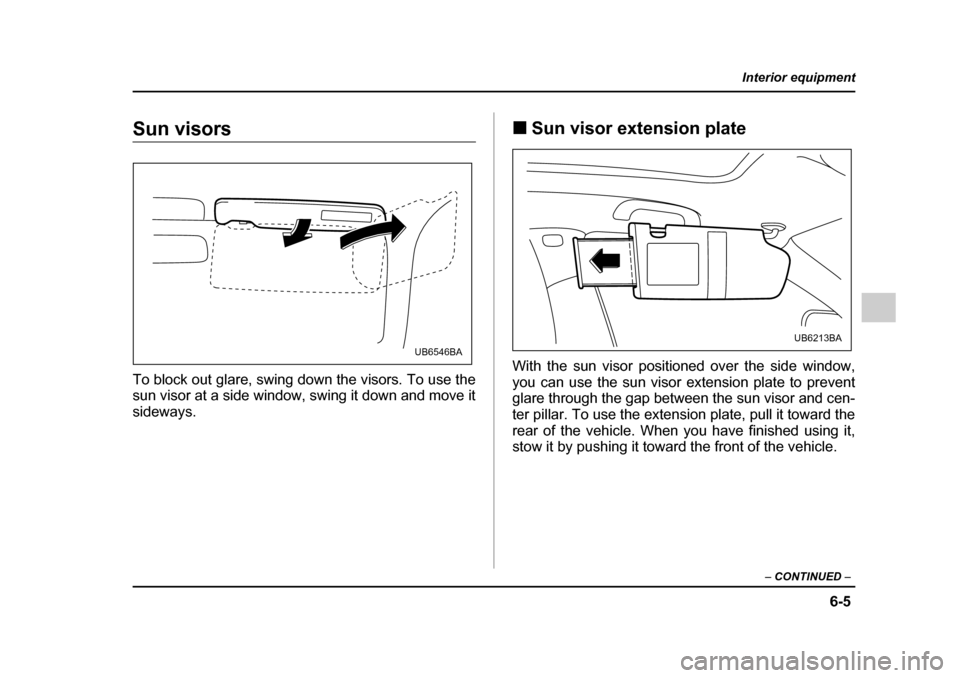
To block out glare, swing down the visors. To use the
sun visor at a side window, swing it down and move it
sideways. !
Sun visor extension plate
With the sun visor positioned over the side window,
you can use the sun visor extension plate to prevent
glare through the gap between the sun visor and cen-
ter pillar. To use the extension plate, pull it toward the
rear of the vehicle. When you have finished using it,
stow it by pushing it toward the front of the vehicle.
UB6546BAUB6213BA
Page 324 of 627
6-7
Interior equipment
– CONTINUED –
Storage compartment
"Always keep the storage compartment
closed while driving to reduce the risk of injury
in the event of sudden stops or an accident. " Do not store spray cans, containers with
flammable or corrosive liquids or any other
dangerous items in the storage compartment. !
Glove box
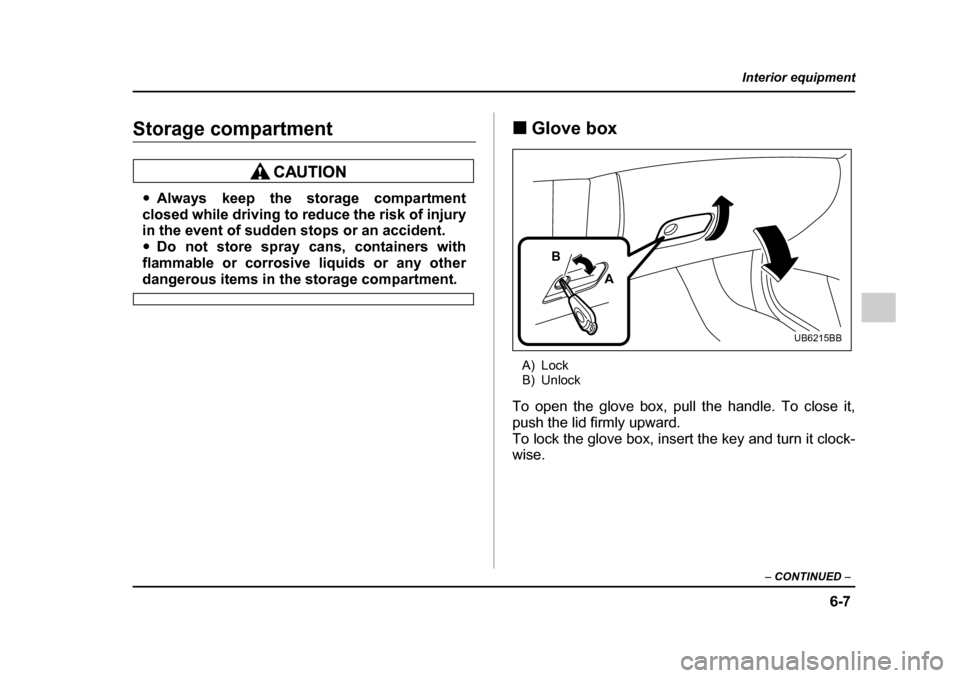
A) Lock
B) Unlock
To open the glove box, pull the handle. To close it,
push the lid firmly upward.
To lock the glove box, insert the key and turn it clock-wise.A
B
UB6215BB
Page 326 of 627
6-9
Interior equipment
– CONTINUED –
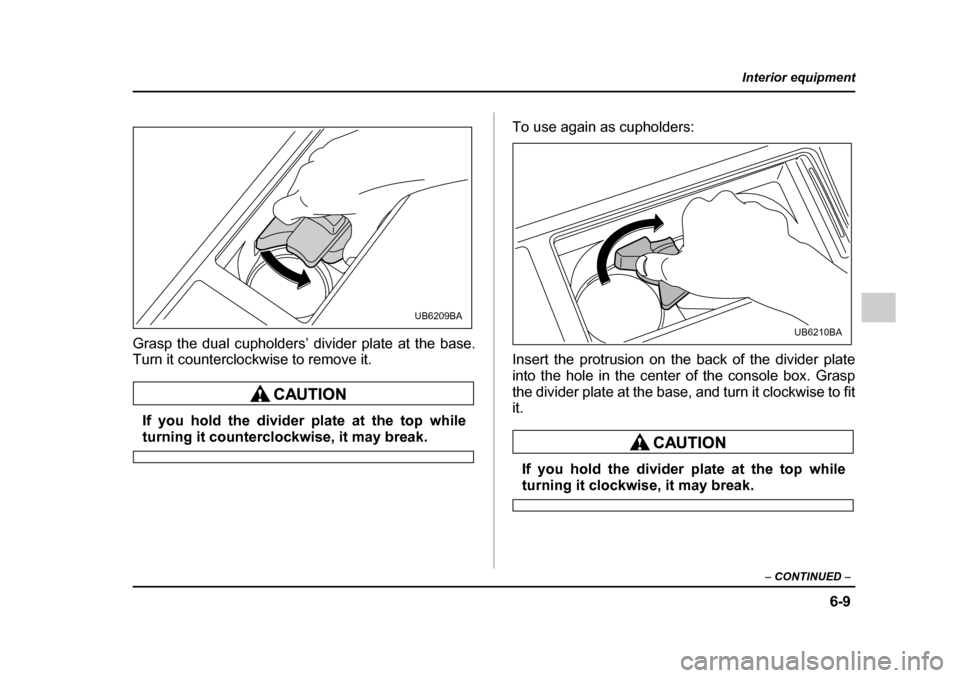
Grasp the dual cupholders’ divider plate at the base.
Turn it counterclockwise to remove it.
If you hold the divider plate at the top while
turning it counterclockwise, it may break. To use again as cupholders:
Insert the protrusion on the back of the divider plate
into the hole in the center of the console box. Grasp
the divider plate at the base, and turn it clockwise to fit it.
If you hold the divider plate at the top while
turning it clockwise, it may break.
UB6209BA
UB6210BA
Page 327 of 627
6-10
Interior equipment
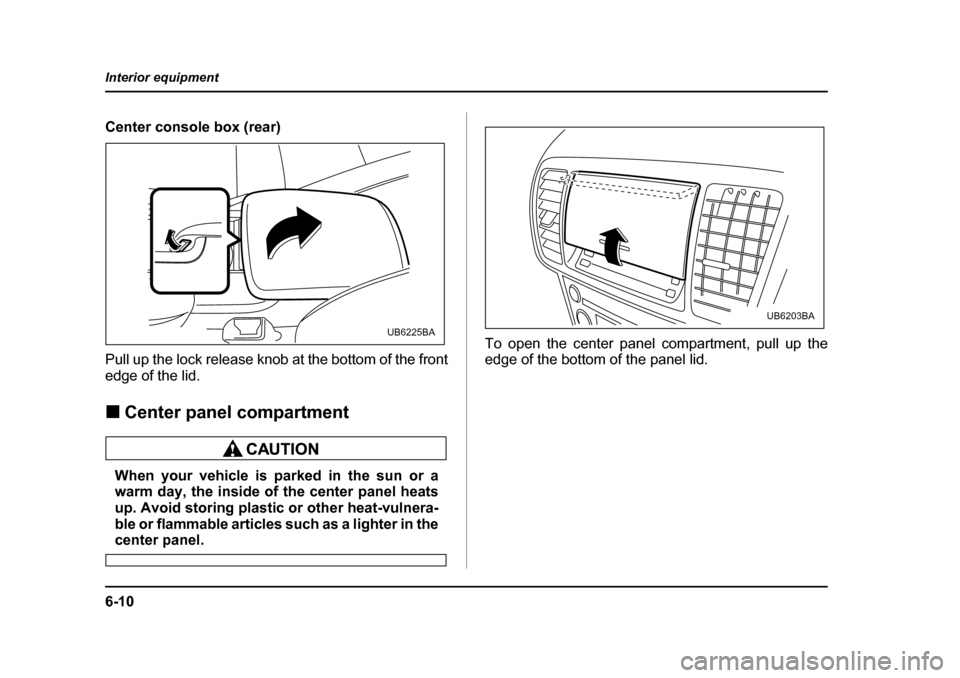
Center console box (rear)
Pull up the lock release knob at the bottom of the front
edge of the lid. !
Center panel compartment
When your vehicle is parked in the sun or a
warm day, the inside of the center panel heats
up. Avoid storing plastic or other heat-vulnera-
ble or flammable articles such as a lighter in the
center panel. To open the center panel compartment, pull up the
edge of the bottom of the panel lid.
UB6225BA
UB6203BA
Page 348 of 627
6-31
Interior equipment
– CONTINUED –
!Station wagon
Hang the hook provided on the underside of the lid on
the rear edge of the roof to keep the lid open. HomeLink® Wireless Control System
(if equipped)
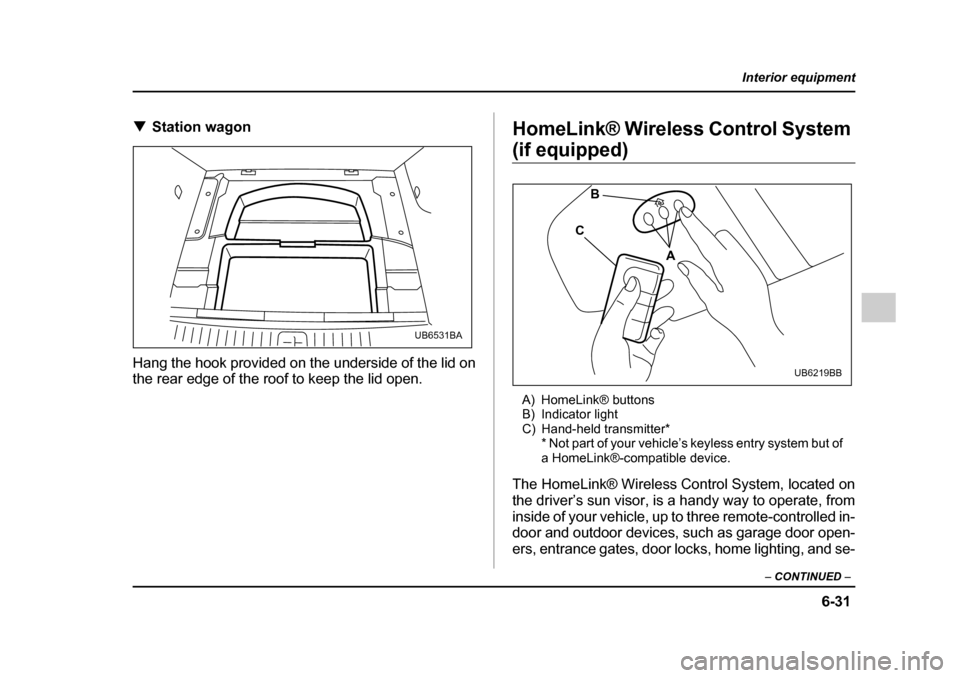
A) HomeLink® buttons
B) Indicator light
C) Hand-held transmitter* * Not part of your vehicle’s keyless entry system but of
a HomeLink®-compatible device.
The HomeLink® Wireless Control System, located on
the driver’s sun visor, is a handy way to operate, from
inside of your vehicle, up to three remote-controlled in-
door and outdoor devices, such as garage door open-
ers, entrance gates, door locks, home lighting, and se-
UB6531BA
A
B
C
UB6219BB
Page 354 of 627
6-37
Interior equipment
– CONTINUED –
rapidly after several seconds, release both buttons.
7. Plug the motor of the entrance gate/garage door
opener to the outlet.
8. Test your entrance gate/garage door opener by
pressing the programmed HomeLink® button. !Programming other devices
To program other devices such as door locks, home
lighting and security systems, contact HomeLink at
www.homelink.com or call 1-800-355-3515. ! Operating the HomeLink® Wireless
Control System
Once programmed, the HomeLink® Wireless Control
System can be used to remote-control the devices to
which its buttons are programmed. To activate a de-
vice, simply press the appropriate button. The indica-
tor light illuminates, indicating that the signal is being
transmitted. ! Reprogramming a single HomeLink® button
1. Press and hold the HomeLink® button you wish to
reprogram. DO NOT release the button until step 4
has been completed. 2. When the HomeLink® indicator light begins to flash
slowly (after 20 seconds), position the hand-held
transmitter of the device for which you wish to program the button at 1 to 3 inches (25 to 76 mm) away from
the HomeLink® button surface.
3. Press and hold the hand-held transmitter button.
The HomeLink® indicator light will flash, first slowly
and then rapidly.
4. When the indicator light begins to flash rapidly, re-
lease both buttons.
The programming for the previous device is now
erased and the new device can be operated by push-
ing the HomeLink® button. !
Erasing HomeLink® button memory
NOTE "Performing this procedure erases the memory
of all the preprogrammed buttons simultaneously.
The memory of individual buttons cannot be
erased. " It is recommended that upon the sale of the ve-
hicle, the memory of all programmed HomeLink®
buttons be erased for security purposes.
1. Press and hold the two outside buttons until the in-
dicator light begins to flash (after 20 seconds).
Page 356 of 627

7-1
7
Starting and operating
Fuel ................................................................ 7-2 Fuel requirements ............................................. 7-2
Fuel filler lid and cap ........................................ 7-4
State emission testing (U.S. only) ............... 7-8
Preparing to drive ......................................... 7-10
Starting the engine ....................................... 7-10 Manual transmission vehicle ........................... 7-10
Automatic transmission vehicle ...................... 7-11
Stopping the engine ..................................... 7-12
Manual transmission .................................... 7-13 Shifting speeds ................................................. 7-14
Driving tips ........................................................ 7-15
Automatic transmission – 4 speed ............. 7-16 Selector lever .................................................... 7-17
Selector lever reverse inhibiting function ...... 7-19
Selection of manual mode ............................... 7-20
Maximum speeds .............................................. 7-21
Driving tips ........................................................ 7-23
SPORT mode ..................................................... 7-23
Shift lock release .............................................. 7-24
Automatic transmission – 5 speed ............. 7-25 Selector lever .................................................... 7-26
Selector lever reverse inhibiting function ...... 7-28
Selection of manual mode ............................... 7-30
Maximum speeds .............................................. 7-32
Driving tips ........................................................ 7-33
SPORT mode ..................................................... 7-34
Shift lock release .............................................. 7-35
Rear viscous limited slip differential (LSD) (if equipped) .............................................. 7-36 Power steering .............................................. 7-36
Braking ........................................................... 7-37
Braking tips ....................................................... 7-37
Brake system .................................................... 7-37
Disc brake pad wear warning indicators ........ 7-38
ABS (Anti-lock Brake System) ..................... 7-38 ABS system self-check .................................... 7-39
ABS warning light ............................................. 7-39
Electronic Brake Force Distribution (EBD) system ........................................................ 7-41Steps to take if EBD system fails .................... 7-41
Vehicle Dynamics Control system (if equipped) ............................................... 7-43Vehicle Dynamics Control system monitor .... 7-45
Vehicle Dynamics Control OFF switch ........... 7-48
Tire pressure monitoring system (TPMS) (if equipped) ............................................... 7-49
Parking your vehicle ..................................... 7-51
Cruise control ................................................ 7-53 To set cruise control ........................................ 7-53
To temporarily cancel the cruise control ....... 7-55
To turn off the cruise control ........................... 7-56
To change the cruising speed ......................... 7-56
Cruise control indicator light ........................... 7-57
Cruise control set indicator light .................... 7-58
Page 361 of 627
7-6
Starting and operating
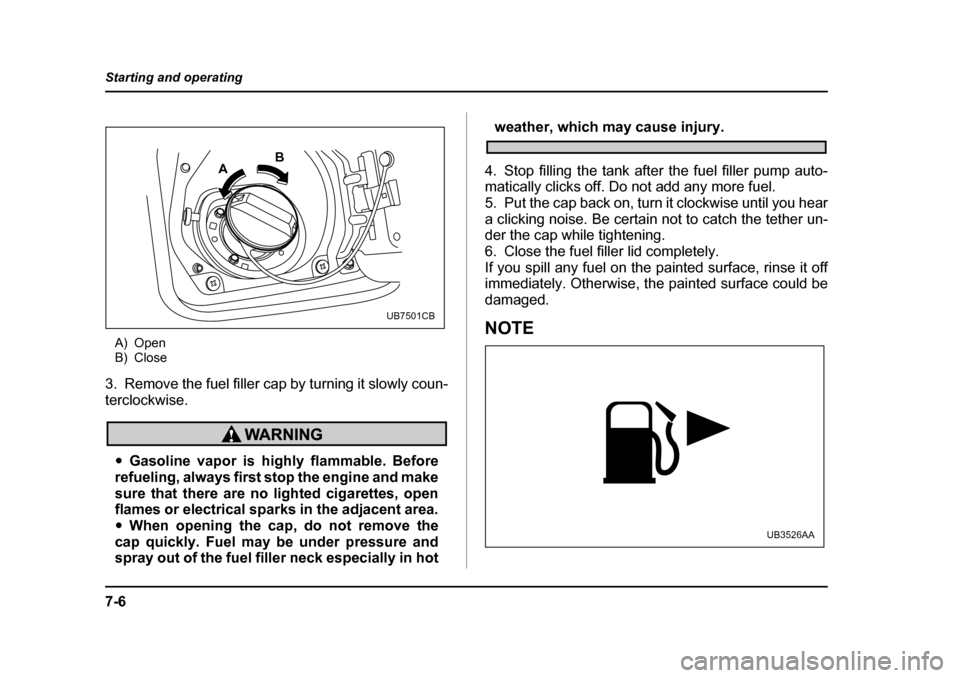
A) Open
B) Close
3. Remove the fuel filler cap by turning it slowly coun-
terclockwise.
" Gasoline vapor is highly flammable. Before
refueling, always first stop the engine and make
sure that there are no lighted cigarettes, open
flames or electrical sparks in the adjacent area. " When opening the cap, do not remove the
cap quickly. Fuel may be under pressure and
spray out of the fuel filler neck especially in hot
weather, which may cause injury.
4. Stop filling the tank after the fuel filler pump auto-
matically clicks off. Do not add any more fuel.
5. Put the cap back on, turn it clockwise until you hear
a clicking noise. Be certain not to catch the tether un-
der the cap while tightening.
6. Close the fuel filler lid completely.
If you spill any fuel on the painted surface, rinse it off
immediately. Otherwise, the painted surface could be
damaged.
NOTE
A B
UB7501CB
UB3526AA
Page 367 of 627
7-12
Starting and operating
Release the accelerator pedal as soon as the en-
gine starts.
2) If this fails to start the engine, turn the ignition
switch back to the “OFF” position and wait for at
least 10 seconds. Then fully depress the accelerator
pedal and turn the ignition switch to the “START”
position. If the engine starts, quickly release the ac-
celerator pedal.
3) If this fails to start the engine, turn the ignition
switch again to the “OFF” position. After waiting for
10 seconds or longer, turn the ignition switch to the
“START” position without depressing the accelera-
tor pedal.
4) If the engine still refuses to start, contact your
nearest SUBARU dealer for assistance.
6. Confirm that all warning and indicator lights have
gone out after the engine has started. The fuel injec-
tion system automatically lowers the idle speed as the
engine warms up.
While the engine is warming up, make sure that the
selector lever is at the “P” or “N” position and that the
parking brake is applied.Stopping the engine
Do not stop the engine when the vehicle is mov-
ing. This will cause loss of power to the power
steering and the brake booster, making steer-
ing and braking more difficult. It could also re-
sult in accidental activation of the “LOCK” po-
sition on the ignition switch, causing the steer-
ing wheel to lock.
The ignition switch should be turned off only when the
engine is idling.
Page 369 of 627
7-14
Starting and operating
!
Shifting speeds
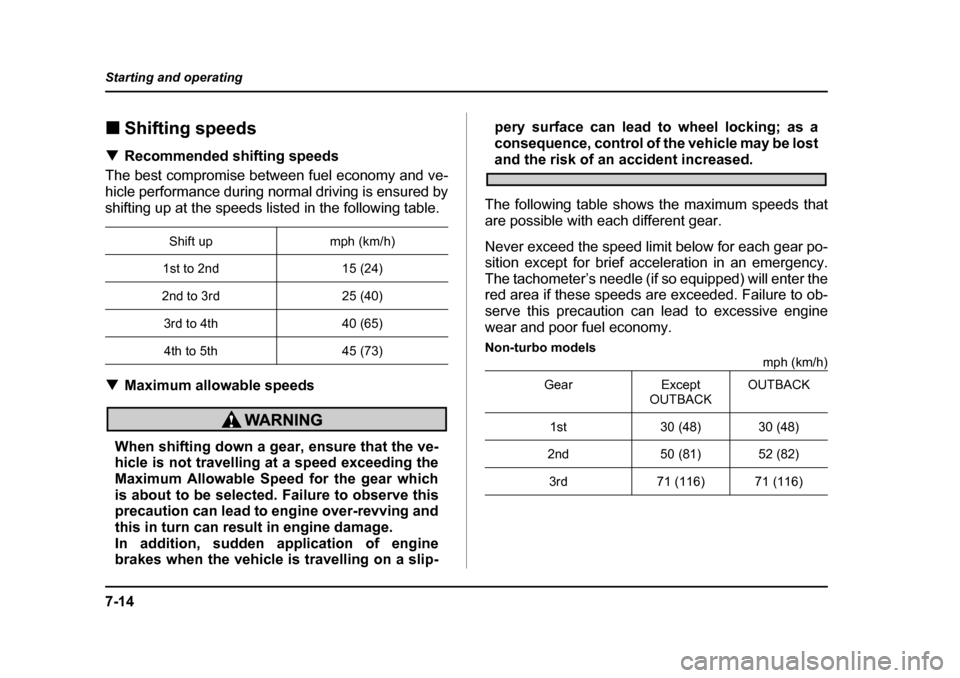
! Recommended shifting speeds
The best compromise between fuel economy and ve-
hicle performance during normal driving is ensured by
shifting up at the speeds listed in the following table. ! Maximum allowable speeds
When shifting down a gear, ensure that the ve-
hicle is not travelling at a speed exceeding the
Maximum Allowable Speed for the gear which
is about to be selected. Failure to observe this
precaution can lead to engine over-revving and
this in turn can result in engine damage.
In addition, sudden application of engine
brakes when the vehicle is travelling on a slip- pery surface can lead to wheel locking; as a
consequence, control of the vehicle may be lost
and the risk of an accident increased.
The following table shows the maximum speeds that
are possible with each different gear.
Never exceed the speed limit below for each gear po-
sition except for brief acceleration in an emergency.
The tachometer’s needle (if so equipped) will enter the
red area if these speeds are exceeded. Failure to ob-
serve this precaution can lead to excessive engine
wear and poor fuel economy.
Non-turbo models mph (km/h)
Shift up mph (km/h)
1st to 2nd 15 (24)
2nd to 3rd 25 (40)
3rd to 4th 40 (65)4th to 5th 45 (73)
Gear Except OUTBACKOUTBACK
1st 30 (48) 30 (48)
2nd 50 (81) 52 (82)
3rd 71 (116) 71 (116)