buttons SUBARU LEGACY 2010 5.G User Guide
[x] Cancel search | Manufacturer: SUBARU, Model Year: 2010, Model line: LEGACY, Model: SUBARU LEGACY 2010 5.GPages: 448, PDF Size: 7.36 MB
Page 195 of 448

If no indicator blinks, it means that there is
no idle position in the magazine.
2. When the“LOAD ”indicator illumi-
nates, insert the disc. Once you have
inserted the disc, the “LOAD ”indicator will
turn off and the “LOADING ”indicator will
illuminate. The disc will then be automa-
tically drawn in, the player will begin to
play back the first track of the disc, the“ LOADING ”indicator will turn off and the
“ READING ”indicator will illuminate.
. To insert more discs in succession,
repeat steps 1 and 2. The magazine will
be loaded with discs in the ascending
order of position number. . If you do not insert any disc in 15
seconds after you have pressed the “ LOAD ”button, the player will return to
the original mode that was selected beforethe “LOAD ”button was pressed.
. The disc indicator steadily lights up if a
disc is already inserted in the correspond-
ing position of the magazine. . While the player is in the loading mode,
if you press “FM ”, “AM ”or “SAT ”button,
the player will enter the standby mode.
Press the “CD/AUX ”button to start play-
back. !
Inserting a disc in a desired posi-tion
1. Briefly press the “LOAD ”button. If the
magazine in the player has an idle
position where you can insert a disc, the
disc number indicator associated with the
idle position will blink.
The positions in the magazine the indica-
tor of which steadily lights up are already
loaded with discs.
Disc select buttons
2. Press the disc select button at the
position where you want to insert a disc.
3. When the “LOAD ”indicator illumi-
nates, insert the disc. Once you have
inserted the disc, the “LOAD ”indicator will
turn off. The disc will then be automatically
drawn in, and the player will begin to play
the first track on the disc. . If you wish to insert another disc,
repeat the procedure beginning with step 1. . If you do not insert any disc in 15
seconds after you have pressed the “ LOAD ”button, the player will return to
the original mode that was selected beforethe “LOAD ”button was pressed.
. While the player is in the loading mode, Audio
5-19
– CONTINUED –
Page 197 of 448

!When selecting a CD to play (type B)
Disc select buttons
Press a desired one of the disc select
buttons the disc number indicator of which
steadily lights up. The player will then start
playback of the selected CD, beginning
with the first track. &
To select a track from its beginning
! Forward direction
Turn the “TUNE/TRACK/CH ”dial clock-
wise to skip to the beginning of the next
track/file (track). Each time the dial is
turned, the indicated track/file (track)
number will increase. NOTE
In an MP3, WMA or AAC folder, skip-
ping past the last track/file (track) will
take you back to the first track/file
(track) in the folder. !
Backward direction
Turn the “TUNE/TRACK/CH ”dial counter-
clockwise to skip to the beginning of the
current track/file (track). Each time the dial
is turned, the indicated track/file (track)
number will decrease. NOTE
In an MP3, WMA or AAC folder, skip-
ping past the first track/file (track) will
take you to the last track/file (track) in
the folder. Audio
5-21
– CONTINUED –
Page 202 of 448

5-26Audio
“ FOLDER ”button starts playback be-
ginning with the first track/file (track).
& How to eject a CD from the
player (type A)
When a disc is being played back or when
a disc is in the player, press the ejectbutton “
”. The disc will be ejected.
NOTE . Avoid driving the vehicle with a CD
sticking out, because vibration might
make it fall out.. If you do not remove the ejected
disc within approximately 15 seconds,
a disc protection function will operate,
automatically reloading the disc. In this
case, the disc is not played. &
How to eject CDs from the
player (type B)
NOTE . Avoid driving the vehicle with a CD
sticking out, because vibration might
make it fall out.. If you do not remove the ejected
disc within approximately 15 seconds,
a disc protection function will operate,
automatically reloading the disc. In this
case, the disc is not played. ! Ejecting a CD from the player
Disc select buttons
1. Use the disc select button to select the
disc to be ejected.
2. Briefly press the “”button. The
selected disc will be ejected. The disc
number indicator will flash at this time.
When you remove the ejected disc, the
disc number indicator will turn off.
To remove more discs in succession,
repeat steps 1 and 2.
Page 206 of 448
5-30Audio
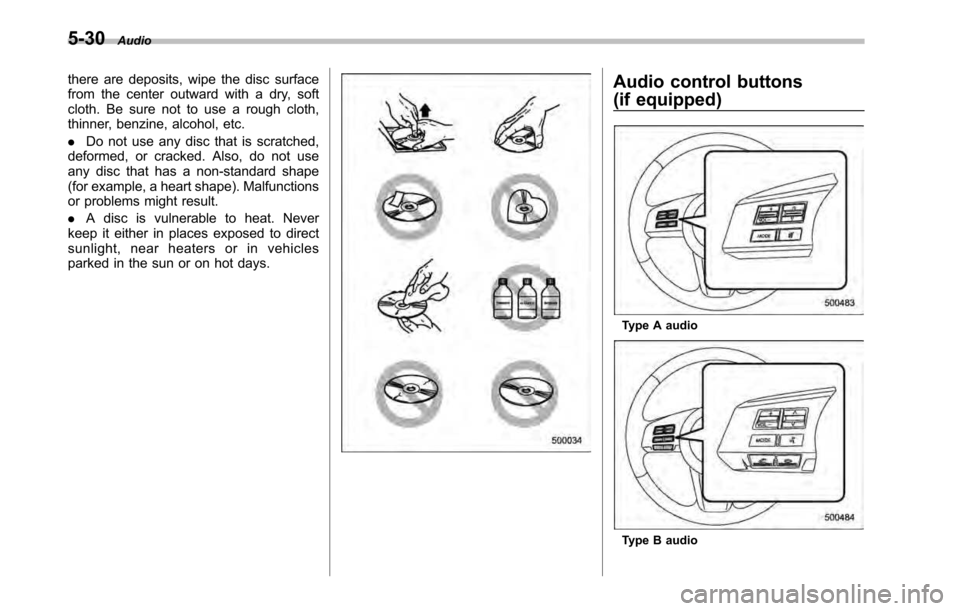
there are deposits, wipe the disc surface
from the center outward with a dry, soft
cloth. Be sure not to use a rough cloth,
thinner, benzine, alcohol, etc. .Do not use any disc that is scratched,
deformed, or cracked. Also, do not use
any disc that has a non-standard shape
(for example, a heart shape). Malfunctions
or problems might result. . A disc is vulnerable to heat. Never
keep it either in places exposed to direct
sunlight, near heaters or in vehicles
parked in the sun or on hot days.Audio control buttons
(if equipped)
Type A audio
Type B audio
Page 207 of 448
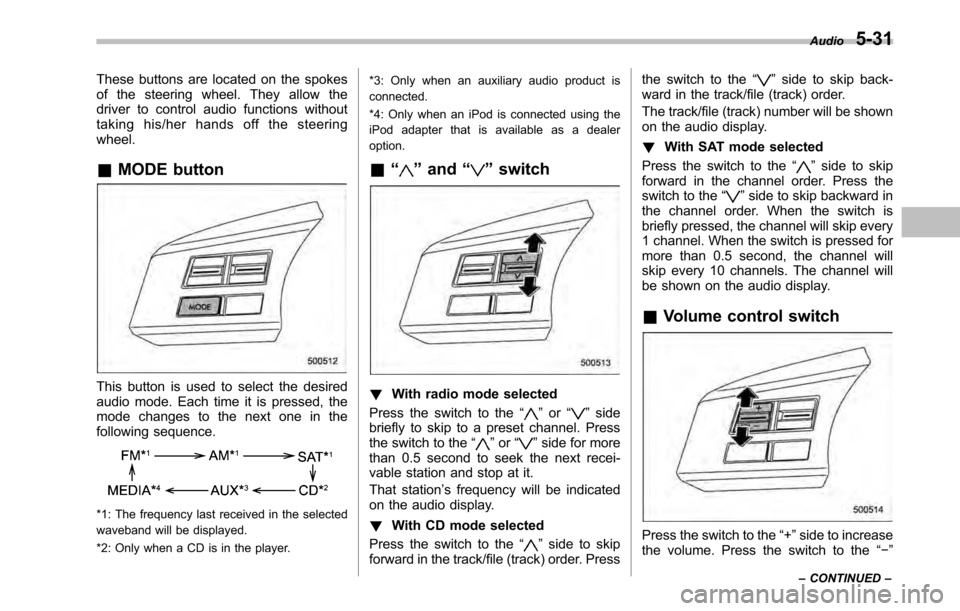
These buttons are located on the spokes
of the steering wheel. They allow the
driver to control audio functions without
taking his/her hands off the steeringwheel. &MODE button
This button is used to select the desired
audio mode. Each time it is pressed, the
mode changes to the next one in the
following sequence.
*1: The frequency last received in the selected
waveband will be displayed.
*2: Only when a CD is in the player. *3: Only when an auxiliary audio product is
connected.
*4: Only when an iPod is connected using the
iPod adapter that is available as a dealeroption.
& “
”and “”switch
! With radio mode selected
Press the switch to the “
”or “”side
briefly to skip to a preset channel. Press
the switch to the “
”or “”side for more
than 0.5 second to seek the next recei-
vable station and stop at it.
That station ’s frequency will be indicated
on the audio display. ! With CD mode selected
Press the switch to the “
”side to skip
forward in the track/file (track) order. Press the switch to the
“
”side to skip back-
ward in the track/file (track) order.
The track/file (track) number will be shown
on the audio display. ! With SAT mode selected
Press the switch to the “
”side to skip
forward in the channel order. Press the
switch to the “
”side to skip backward in
the channel order. When the switch is
briefly pressed, the channel will skip every
1 channel. When the switch is pressed for
more than 0.5 second, the channel will
skip every 10 channels. The channel will
be shown on the audio display.
& Volume control switch
Press the switch to the “+ ”side to increase
the volume. Press the switch to the “ ”
Audio
5-31
– CONTINUED –
Page 211 of 448

“TUNE/TRACK/CH ”dial.
4. Select “Pair phone ”by operating the
“ TUNE/TRACK/CH ”dial.
5. Press the talk switch. Refer to “Voice
command system ”F 5-40.
6. Say the name to be registered.
7. Select “Confirm ”by operating the
“ TUNE/TRACK/CH ”dial or say “Confirm ”.
Then a pass key is displayed.
8. Input the displayed pass key into the
cell phone while “PASS KEY: **** ”is
displayed. If you input the correct pass
key, “Paired ”is displayed and the register-
ing procedure is finished. If you input an
incorrect pass key, “Failed ”is displayed
and the registering procedure was not successful. ! Inputting the phone number
1. Press the OFF hook switch.
2. Select “Phonebook ”by operating the
“ TUNE/TRACK/CH ”dial.
3. Select “Add Entry ”by operating the
“ TUNE/TRACK/CH ”dial.
4. Select “Manual Input ”by operating the
“ TUNE/TRACK/CH ”dial.
5. Input the phone number to be regis- tered. NOTE
While inputting the phone numbers, if “
Go Back ”is chosen using the “TUNE/
TRACK/CH ”dial, the character that was
input last is deleted. ! Registering the phonebook data.
1. Input the phone number to be regis-
tered. Refer to “Inputting the phone
number ”F 5-35.
2. Say the name to be registered. 3. “Confirm ”is displayed.
4. Press the “TUNE/TRACK/CH ”dial.
5. “Stored ”is displayed.
6. Select “Speed Dial ”by operating the
“ TUNE/TRACK/CH ”dial.
7. Select the phone number to be regis- tered.
Preset buttons
8. Press the preset button in which you
want to register the number. The number
is then registered. ! Page scroll
Audio 5-35
– CONTINUED –
Page 212 of 448
5-36Audio
If the registered name or phone number
has more than 12 characters, press the“TEXT ”button for more than 1.5 seconds
to scroll the name or phone number. ! Making a phone call
! Making a phone call from the phone book
It is possible to select a phone number
from the phonebook registered with the in-
vehicle equipment to make a phone call.
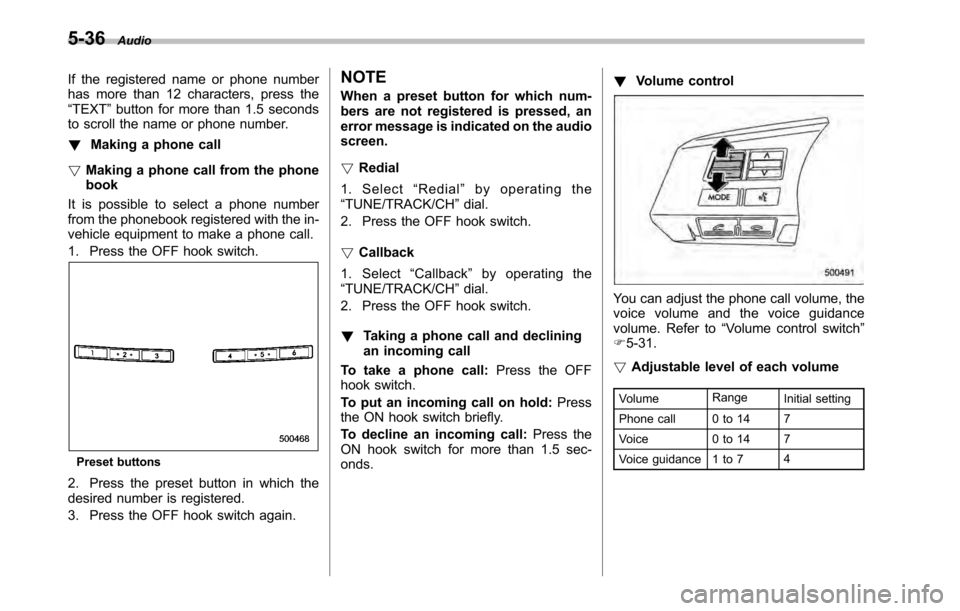
1. Press the OFF hook switch.
Preset buttons
2. Press the preset button in which the
desired number is registered.
3. Press the OFF hook switch again. NOTE
When a preset button for which num-
bers are not registered is pressed, an
error message is indicated on the audioscreen. !
Redial
1. Select “Redial ”by operating the
“ TUNE/TRACK/CH ”dial.
2. Press the OFF hook switch. ! Callback
1. Select “Callback ”by operating the
“ TUNE/TRACK/CH ”dial.
2. Press the OFF hook switch. ! Taking a phone call and declining
an incoming call
To take a phone call: Press the OFF
hook switch.
To put an incoming call on hold: Press
the ON hook switch briefly.
To decline an incoming call: Press the
ON hook switch for more than 1.5 sec- onds. !
Volume control
You can adjust the phone call volume, the
voice volume and the voice guidance
volume. Refer to “Volume control switch ”
F 5-31.
! Adjustable level of each volume
Volume Range
Initial setting
Phone call 0 to 14 7
Voice 0 to 14 7
Voice guidance 1 to 7 4