tow SUBARU LEGACY 2016 6.G User Guide
[x] Cancel search | Manufacturer: SUBARU, Model Year: 2016, Model line: LEGACY, Model: SUBARU LEGACY 2016 6.GPages: 572
Page 170 of 572
Instruments and controls/Warning and indicator lights
odically (at least monthly) using a
tire gauge. After any change to tire
pressure(s), the tire pressure mon-
itoring system will not re-check tire
inflation pressures until the vehicle
is first driven more than 20 mph (32
km/h). After adjusting the tire pres-
sures, increase the vehicle speed to
at least 20 mph (32 km/h) to start the
TPMS re-checking of the tire infla-
tion pressures. If the tire pressures
are now above the severe low
pressure threshold, the low tire
pressure warning light should turn
off a few minutes later. Therefore, be
sure to install the specified size for
the front and rear tires.
&ABS warning light
CAUTION
.If any of the following conditions
occur, we recommend that you
have the ABS repaired at the first
available opportunity by your
SUBARU dealer.
–The warning light does not
illuminate when the ignition
switch is turned to the“ON”
position.–The warning light illuminates
when the ignition switch is
turned to the“ON”position,
but it does not turn off even
after starting the vehicle.
–The warning light illuminates
during driving.
.When the warning light is on (and
brake system warning light is
off), the ABS function shuts
down; however, the conventional
brake system continues to oper-
ate normally.
The ABS warning light illuminates to-
gether with the brake system warning light
if the EBD system malfunctions. For
further details of the EBD system mal-
function warning, refer to“Brake system
warning light”F3-18.
NOTE
If the warning light behavior is as
described in the following conditions,
the ABS may be considered normal.
.The warning light illuminates right
after the engine is started but turns off
immediately, remaining off.
.The warning light remains illumi-
nated after the engine has been started,
but it turns off while driving.
.The warning light illuminates duringdriving, but it turns off immediately and
remains off.
When driving with an insufficient battery
voltage such as when the engine is jump
started, the ABS warning light may illumi-
nate. This is due to the low battery voltage
and does not indicate a malfunction.
When the battery becomes fully charged,
the light will turn off.
&Brake system
warning light
WARNING
.Driving with the brake system
warning light on is dangerous.
This indicates your brake system
may not be working properly. If
the light remains illuminated,
have the brakes inspected by a
SUBARU dealer immediately.
.If at all in doubt about whether
the brakes are operating prop-
erly, do not drive the vehicle.
Have your vehicle towed to the
nearest SUBARU dealer for re-
pair.
.If the brake system warning light
illuminates, the electronic park-
ing brake system may be mal-
functioning. Immediately stop
3-18
Page 171 of 572
your vehicle in a safe location,
use tire stops under the tires to
prevent the vehicle from moving
and contact your SUBARU deal-
er. For details, refer to“Electro-
nic parking brake”F7-42.
NOTE
.Even if the brake system warning
light illuminates, if the warning light
behavior is as described in the follow-
ing examples, the electronic parking
brake system is not malfunctioning.
–The warning light turns off when
the electronic parking brake is ap-
plied or released.
–The warning light turns off when
the ignition switch is turned to the
“ON”position again.
.The brake system warning light may
illuminate immediately after the engine
is started. However, it is not malfunc-
tioning if the warning light turns off
after the electronic parking brake is
released.
.The brake system warning light may
illuminate after the electronic parking
brake is frequently applied and re-
leased. However, the electronic parking
brake system is not malfunctioning if
the light turns off after a short period oftime.
.When the engine is started while the
electronic parking brake is applied/
released, the system may judge an
abnormal situation and the warning
light may illuminate. If the warning light
illuminates, turn the ignition switch
once to the“LOCK”/“OFF”position
and then restart the engine. Then,
apply/release the electronic parking
brake. If the warning light turns off,
the system will be restored.
This light has the following functions.
!Brake fluid level warning
This light illuminates when the brake fluid
level has dropped to near the“MIN”level
of the brake fluid reservoir with the ignition
switch in the“ON”position and with the
parking brake fully released.
If the brake system warning light should
illuminate while driving (with the parking
brake fully released and with the ignition
switch positioned in“ON”), it could be an
indication of leaking of brake fluid or worn
brake pads. If this occurs, immediately
stop the vehicle at the nearest safe place
and check the brake fluid level. If the fluid
level is below the“MIN”mark in the
reservoir, do not drive the vehicle. Have
the vehicle towed to the nearest SUBARU
dealer for repair.!Electronic Brake Force Distribution
(EBD) system warning
The brake system warning light also
illuminates if a malfunction occurs in the
EBD system. In that event, it illuminates
together with the ABS warning light.
The EBD system may be malfunctioning if
the brake system warning light and ABS
warning light illuminate simultaneously
during driving.
Even if the EBD system fails, the conven-
tional braking system will still function.
However, the rear wheels will be more
prone to locking when the brakes are
applied harder than usual and the vehi-
cle’s motion may therefore become some-
what harder to control.
If the brake system warning light and ABS
warning light illuminate simultaneously,
take the following steps.
1. Stop the vehicle in the nearest safe,
flat place.
2. Shut down the engine, apply the
parking brake and then restart it.
3. Release the parking brake. If both
warning lights turn off, the EBD system
may be malfunctioning. Drive carefully to
the nearest SUBARU dealer and have the
system inspected.
4. If both warning lights illuminate again
and remain illuminated after the engine
Instruments and controls/Warning and indicator lights
–CONTINUED–3-19
Page 172 of 572
Instruments and controls/Warning and indicator lights
has been restarted, shut down the engine
again, apply the parking brake, and check
the brake fluid level.
5. If the brake fluid level is not below the
“MIN”mark, the EBD system may be
malfunctioning. Drive carefully to the
nearest SUBARU dealer and have the
system inspected.
6. If the brake fluid level is below the
“MIN”mark, DO NOT drive the vehicle.
Instead, have the vehicle towed to the
nearest SUBARU dealer for repair.
!Electronic parking brake system
warning
The brake system warning light illumi-
nates when the electronic parking brake
system is malfunctioning. If the warning
light illuminates, promptly park in a safe
location as soon as possible and contact
your SUBARU dealer.
The brake system warning light remains
illuminated when the parking brake cannot
be released even if the parking brake
switch is pushed. For details, refer to
“Electronic parking brake”F7-42.
!Frequent operation warning
The brake system warning light illumi-
nates and a chirp sound will be heard if
the parking brake switch is operated too
frequently. In this case, the operation ofthe parking brake switch is restricted to
protect the electronic parking brake sys-
tem.
&Electronic parking
brake indicator light
!Parking brake indicator
The light illuminates with the parking
brake applied while the ignition switch is
in the“ON”position. It turns off when the
parking brake is fully released.
!Electronic parking brake system
warning
WARNING
.When you release the electronic
parking brake while the engine is
running, the electronic parking
brake indicator light will turn off.
However, if the light still illumi-
nates, stop the vehicle in a safe
location immediately and have
the system inspected by a
SUBARU dealer.
.If at all in doubt about whether
the brakes are operating prop-
erly, do not drive the vehicle.
Have your vehicle towed to the
nearest SUBARU dealer for re-
pair..If the electronic parking brake
indicator light flashes, the elec-
tronic parking brake system may
be malfunctioning. Immediately
stop your vehicle in a safe loca-
tion, use tire stops under the
tires to prevent the vehicle from
moving and contact your
SUBARU dealer. For details, refer
to“Electronic parking brake”
F7-42.
NOTE
.When the ignition switch is turned to
the“LOCK”/“OFF”position with the
electronic parking brake applied, the
electronic parking brake indicator light
remains illuminated for approximately
30 seconds and then turns off.
.When the electronic parking brake
switch is pulled to apply the electronic
parking brake while the ignition switch
is in the“LOCK”/“OFF”position, the
electronic parking brake indicator light
illuminates, remains illuminated for
approximately 30 seconds and then
turns off.
.Even if the electronic parking brake
indicator light flashes, if the warning
light behavior is as described in the
following examples, the electronic
parking brake system is not malfunc-
3-20
Page 186 of 572
Instruments and controls/Multi information display
Multi information display
WARNING
Always pay adequate attention to
safe driving when operating the
multi information display while the
vehicle is in motion. When operation
of the multi information display
interferes with your ability to con-
centrate on driving, stop the vehicle
before performing operations on the
screen. Also, do not concentrate on
the display while driving. Doing so
may cause you to look away from
the road and could result in an
accident.
Various information will be shown on the
multi information display. Also, a warning
message will appear on the display if a
malfunction, etc. is detected. In addition,
several settings for the displayed content
can be performed.
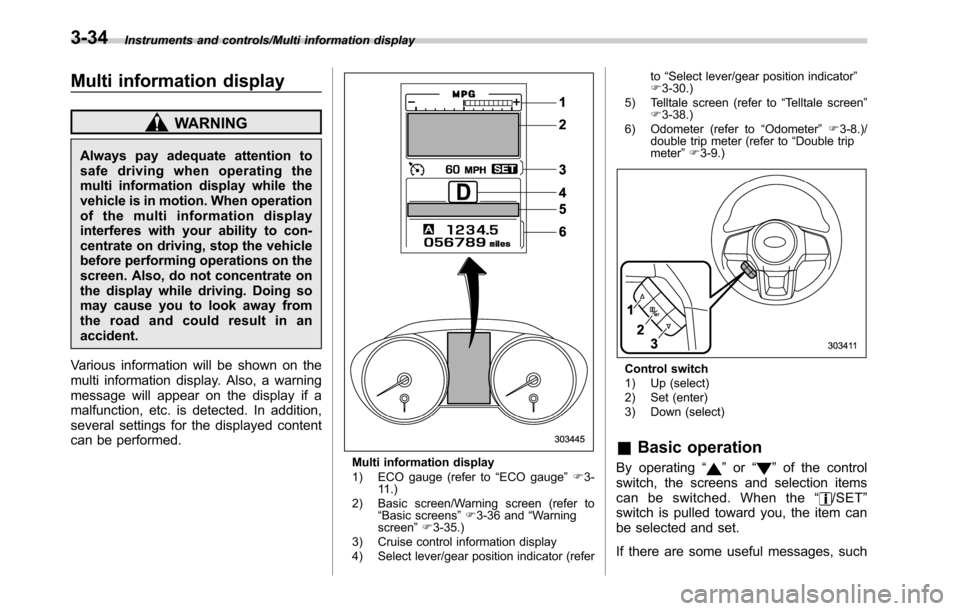
Multi information display
1) ECO gauge (refer to“ECO gauge”F3-
11.)
2) Basic screen/Warning screen (refer to
“Basic screens”F3-36 and“Warning
screen”F3-35.)
3) Cruise control information display
4) Select lever/gear position indicator (referto“Select lever/gear position indicator”
F3-30.)
5) Telltale screen (refer to“Telltale screen”
F3-38.)
6) Odometer (refer to“Odometer”F3-8.)/
double trip meter (refer to“Double trip
meter”F3-9.)
Control switch
1) Up (select)
2) Set (enter)
3) Down (select)
&Basic operation
By operating“”or“”of the control
switch, the screens and selection items
can be switched. When the“
/SET”
switch is pulled toward you, the item can
be selected and set.
If there are some useful messages, such
3-34
Page 187 of 572

as vehicle information, warning informa-
tion, etc., they will interrupt the current
screen, and appear on the display accom-
panied by a beep. If such a screen is
displayed, take proper action according to
the message shown on the screen.
The warning screen will return to the
original screen after a few seconds. While
the“
”information reminder is shown on
the display, it may be possible to display
the warning screen again. To recall the
message marked with“
”on the display,
pull the“/SET”switch on the steering
wheel toward you.
&Welcome screen and Good-
bye screen
When the driver’s door is opened and
closed after unlocking the door, the
welcome screen will appear on the multi
information display for approximately 20
seconds.
When the ignition switch is turned to the
“LOCK”/“OFF”position, the multi informa-
tion display gradually turns off (Good-bye
screen).
NOTE
.The basic screen will be shown
when the ignition switch is turned to
the“ON”position while the welcomescreen is displayed.
.Once the welcome screen appears,
it takes a certain period of time to
display it again.
.If the ignition switch is operated
after unlocking the driver’s door, the
welcome screen will not appear even
when the driver’s door is opened and
closed.
.The welcome screen will disappear
when you lock the driver’s door by
using the remote keyless entry system
(all models) or the keyless access
function (if equipped) while the wel-
come screen is displayed.
.If any of the doors (including the
rear gate) is opened while the welcome
screen is displayed, the door ajar
warning will appear.
.The welcome screen can be set to
on or off. For details, refer to“Welcome
Screen”F3-41.
.The Good-bye screen can be set to
on or off. For details, refer to“Good-
bye Screen”F3-41.
&Warning screen
Example of warning
If there is a warning message or a
maintenance notification, it will appear for
approximately 5 seconds. Take the appro-
priate actions based on the messages
indicated.
Instruments and controls/Multi information display
–CONTINUED–3-35
Page 198 of 572
Instruments and controls/Light control switch
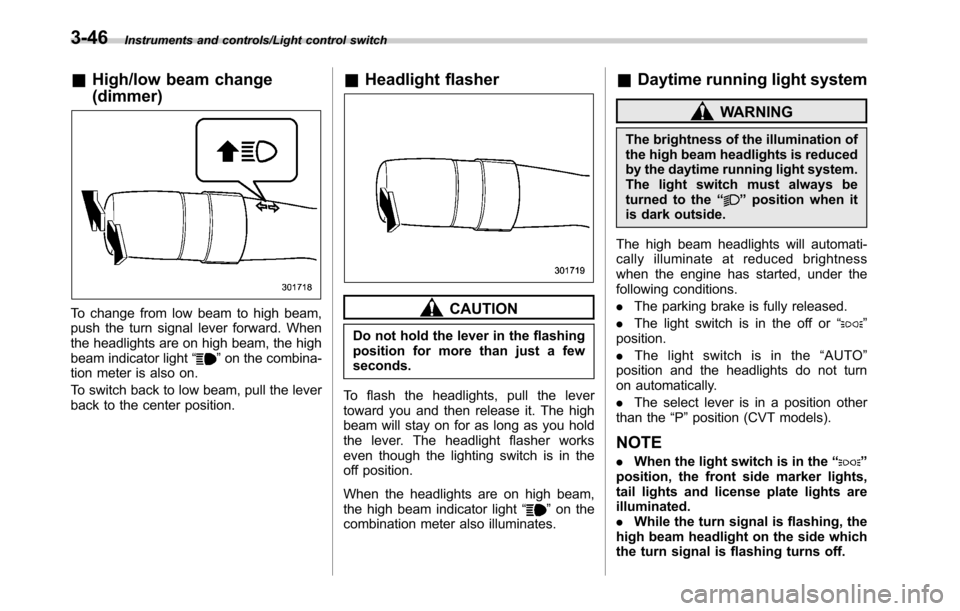
&High/low beam change
(dimmer)
To change from low beam to high beam,
push the turn signal lever forward. When
the headlights are on high beam, the high
beam indicator light“
”on the combina-
tion meter is also on.
To switch back to low beam, pull the lever
back to the center position.
&Headlight flasher
CAUTION
Do not hold the lever in the flashing
position for more than just a few
seconds.
To flash the headlights, pull the lever
toward you and then release it. The high
beam will stay on for as long as you hold
the lever. The headlight flasher works
even though the lighting switch is in the
off position.
When the headlights are on high beam,
the high beam indicator light“
”on the
combination meter also illuminates.
&Daytime running light system
WARNING
The brightness of the illumination of
the high beam headlights is reduced
by the daytime running light system.
The light switch must always be
turned to the“
”position when it
is dark outside.
The high beam headlights will automati-
cally illuminate at reduced brightness
when the engine has started, under the
following conditions.
.The parking brake is fully released.
.The light switch is in the off or“
”
position.
.The light switch is in the“AUTO”
position and the headlights do not turn
on automatically.
.The select lever is in a position other
than the“P”position (CVT models).
NOTE
.When the light switch is in the“”
position, the front side marker lights,
tail lights and license plate lights are
illuminated.
.While the turn signal is flashing, the
high beam headlight on the side which
the turn signal is flashing turns off.
3-46
Page 204 of 572
Instruments and controls/Wiper and washer
&Windshield wiper and washer
switches
The wiper operates only when the ignition
switch is in the“ON”position.
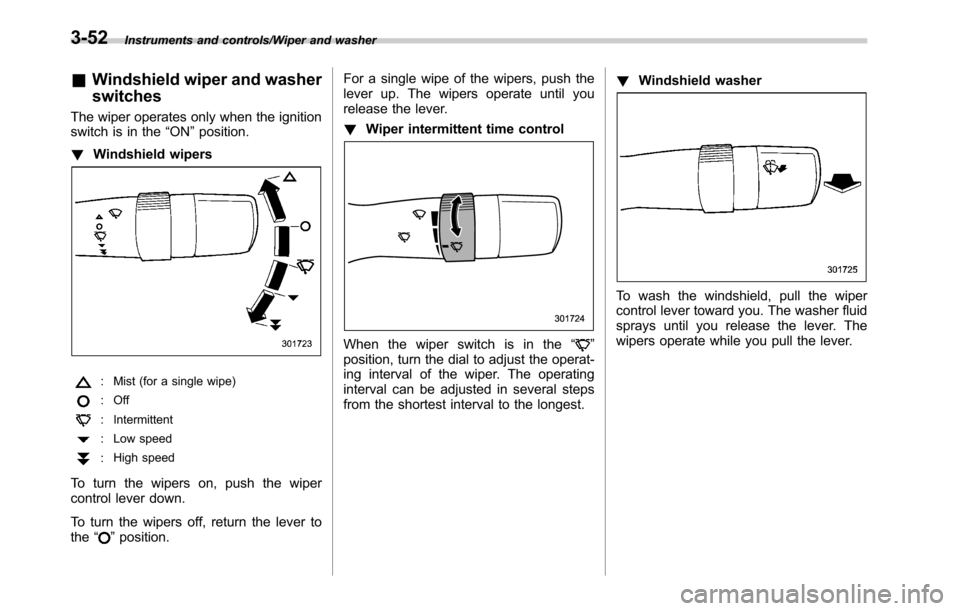
!Windshield wipers
: Mist (for a single wipe)
: Off
: Intermittent
: Low speed
:High speed
To turn the wipers on, push the wiper
control lever down.
To turn the wipers off, return the lever to
the“
”position.For a single wipe of the wipers, push the
lever up. The wipers operate until you
release the lever.
!Wiper intermittent time control
When the wiper switch is in the“”
position, turn the dial to adjust the operat-
ing interval of the wiper. The operating
interval can be adjusted in several steps
from the shortest interval to the longest.!Windshield washer
To wash the windshield, pull the wiper
control lever toward you. The washer fluid
sprays until you release the lever. The
wipers operate while you pull the lever.
3-52
Page 208 of 572
Instruments and controls/Mirrors
Mirrors
Always check that the inside and outside
mirrors are properly adjusted before you
start driving.
&Inside mirror (without auto-
dimming function) (if
equipped)
The mirror has a day and night position.
Pull the tab at the bottom of the mirror
toward you for the night position. Push it
away for the day position. The night
position reduces glare from headlights.
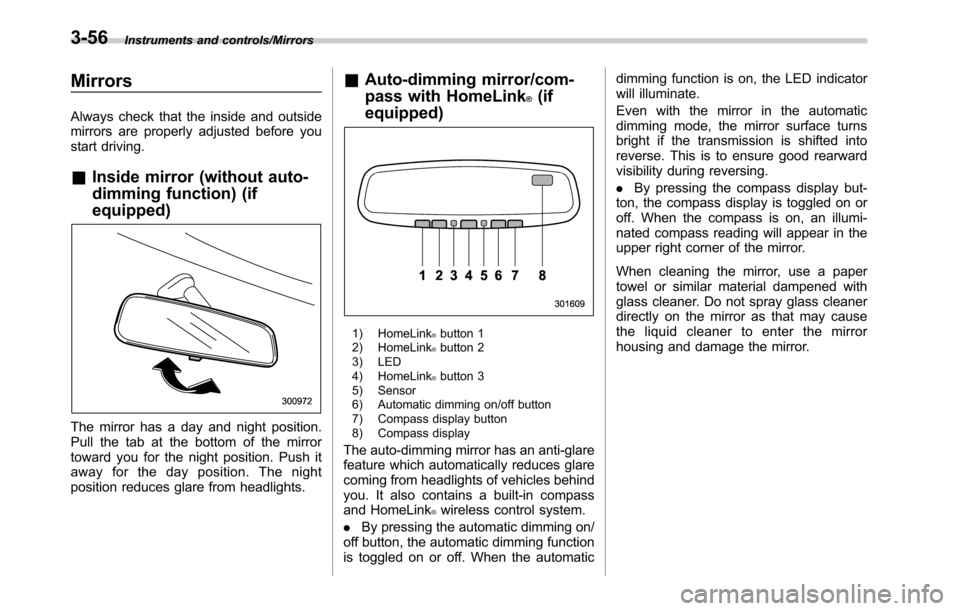
&Auto-dimming mirror/com-
pass with HomeLink
®(if
equipped)
1) HomeLink®button 1
2) HomeLink®button 2
3) LED
4) HomeLink
®button 3
5) Sensor
6) Automatic dimming on/off button
7) Compass display button
8) Compass display
The auto-dimming mirror has an anti-glare
feature which automatically reduces glare
coming from headlights of vehicles behind
you. It also contains a built-in compass
and HomeLink
®wireless control system.
.By pressing the automatic dimming on/
off button, the automatic dimming function
is toggled on or off. When the automaticdimming function is on, the LED indicator
will illuminate.
Even with the mirror in the automatic
dimming mode, the mirror surface turns
bright if the transmission is shifted into
reverse. This is to ensure good rearward
visibility during reversing.
.By pressing the compass display but-
ton, the compass display is toggled on or
off. When the compass is on, an illumi-
nated compass reading will appear in the
upper right corner of the mirror.
When cleaning the mirror, use a paper
towel or similar material dampened with
glass cleaner. Do not spray glass cleaner
directly on the mirror as that may cause
the liquid cleaner to enter the mirror
housing and damage the mirror.
3-56
Page 274 of 572

Audio/Audio set
Audio panel
No. Function
&1Turn to adjust volume.
Press to turn the audio system on/off.
&2Press to display the sound setting
screen. Refer to“Unit settings”F5-19.
&3Press to display the station operation
screen.
Press to select an audio mode.
&4
Turn to display the next/previous con-
tent item.
Press to select an audio source. Refer
to“Selecting an audio source”F5-18.
&5Press to display the next/previous con-
tent item.
NOTE
.For safety reasons, certain func-
tions are not available while your
vehicle is in motion.
.In order to maximize signal recep-
tion, performance and precision of the
smartphone, please ensure the smart-
phone is placed as close to the system
as possible, while ensuring it is stowed
and secure while driving.
.When the ignition switch is in the
“ACC”or“ON”position, the battery of
the connected iPhone/iPod touch is
charged.
.iPhone/iPod touch may not be re-
cognized when the ignition switch is in
the“ACC”or“ON”position. In this
case, remove the iPhone/iPod touch
and reconnect it.
.The accuracy of the displayed in-
formation or the signal reception per-
formance depends on the smartphone
or the connected device, and it’s wire-
less connection.
.Since the aha application uses sig-
nals from GPS satellites and wireless
communication lines, it may not work
properly in the following locations.
–In a tunnel
–In underground parking lots
5-46
Page 299 of 572
Hands-free phone system
The hands-free system enables calls to be
made and received without having to take
your hands off the steering wheel.
This system supports Bluetooth. Bluetooth
is a wireless data system that enables cell
phones to be used without being con-
nected by a cable or placed in a cradle.
The operating procedure of the phone is
explained here.
WARNING
.While driving, do not use a cell
phone or connect the Bluetooth
phone. Doing so may result in
loss of control of your vehicle
and cause an accident or serious
injury.
.Your audio unit is fitted with
Bluetooth antennas. People with
implantable cardiac pacemakers,
cardiac resynchronization ther-
apy-pacemakers or implantable
cardioverter defibrillators should
maintain a reasonable distance
between themselves and the
Bluetooth antennas. The radio
waves may affect the operation
of such devices..Before using Bluetooth devices,
users of any electrical medical
device other than implantable
cardiac pacemakers, cardiac re-
synchronization therapy-pace-
makers or implantable cardiover-
ter defibrillators should consult
the manufacturer of the device
for information about its opera-
tion under the influence of radio
waves. Radio waves could have
unexpected effects on the opera-
tion of such medical devices.CAUTION
Do not leave your cell phone in the
vehicle. The temperature inside may
rise to a level that could damage the
phone.
NOTE
.If your cell phone does not support
Bluetooth, this system cannot function.
.In the following conditions, the sys-
tem may not function:
–The cell phone is turned off.
–The current position is outside
the communication area.
–The cell phone is not connected.
–The cell phone has a low battery..When using the hands free function
and other Bluetooth functions at the
same time, the following problems may
occur:
–The Bluetooth connection may
be cut.
–Noise may be heard when play-
ing back voice with the Bluetooth
function.
.The other party’s voice will be heard
from the front speakers. The audio/
visual system will be muted during
phone calls or when hands-free voice
commands are used.
.Talk alternately with the other party
on the phone. If both parties speak at
the same time, the other party may not
hear what has been said. (This is not a
malfunction.)
.Keep call volume down. Otherwise,
the other party’s voice may be audible
outside the vehicle and voice echo may
increase. When talking on the phone,
speak clearly towards the microphone.
.The other party may not hear you
clearly when:
–Drivingonanunpavedroad.
(Making excessive traffic noise.)
–Driving at high speeds.
–The moonroof or windows are
open.
–The air conditioning vents are
Audio/Hands–free phone system
–CONTINUED–5-71