Trunk opening SUBARU LEGACY 2016 6.G Owners Manual
[x] Cancel search | Manufacturer: SUBARU, Model Year: 2016, Model line: LEGACY, Model: SUBARU LEGACY 2016 6.GPages: 572
Page 42 of 572
Seat, seatbelt and SRS airbags/Rear seats
cargo area cover when you re-
cline the rear seat.
.Move the front cover of the cargo
area cover backward so that the
cover is not damaged by the
reclined seatback. Refer to“Car-
go area cover (Outback–if
equipped)”F6-16.
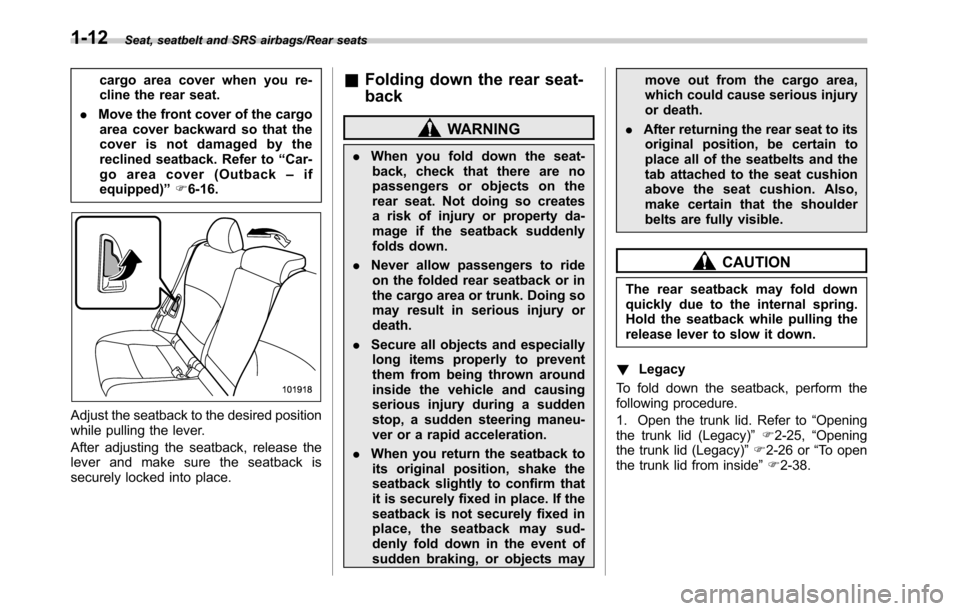
Adjust the seatback to the desired position
while pulling the lever.
After adjusting the seatback, release the
lever and make sure the seatback is
securely locked into place.
&Folding down the rear seat-
back
WARNING
.When you fold down the seat-
back, check that there are no
passengers or objects on the
rear seat. Not doing so creates
a risk of injury or property da-
mage if the seatback suddenly
folds down.
.Never allow passengers to ride
on the folded rear seatback or in
the cargo area or trunk. Doing so
may result in serious injury or
death.
.Secure all objects and especially
long items properly to prevent
them from being thrown around
inside the vehicle and causing
serious injury during a sudden
stop, a sudden steering maneu-
ver or a rapid acceleration.
.When you return the seatback to
its original position, shake the
seatback slightly to confirm that
it is securely fixed in place. If the
seatback is not securely fixed in
place, the seatback may sud-
denly fold down in the event of
sudden braking, or objects maymove out from the cargo area,
which could cause serious injury
or death.
.After returning the rear seat to its
original position, be certain to
place all of the seatbelts and the
tab attached to the seat cushion
above the seat cushion. Also,
make certain that the shoulder
belts are fully visible.
CAUTION
The rear seatback may fold down
quickly due to the internal spring.
Hold the seatback while pulling the
release lever to slow it down.
!Legacy
To fold down the seatback, perform the
following procedure.
1. Open the trunk lid. Refer to“Opening
the trunk lid (Legacy)”F2-25,“Opening
the trunk lid (Legacy)”F2-26 or“To open
the trunk lid from inside”F2-38.
1-12
Page 112 of 572
Keys and doors/Keyless access with push–button start system
Keyless access with push-
button start system (if
equipped)
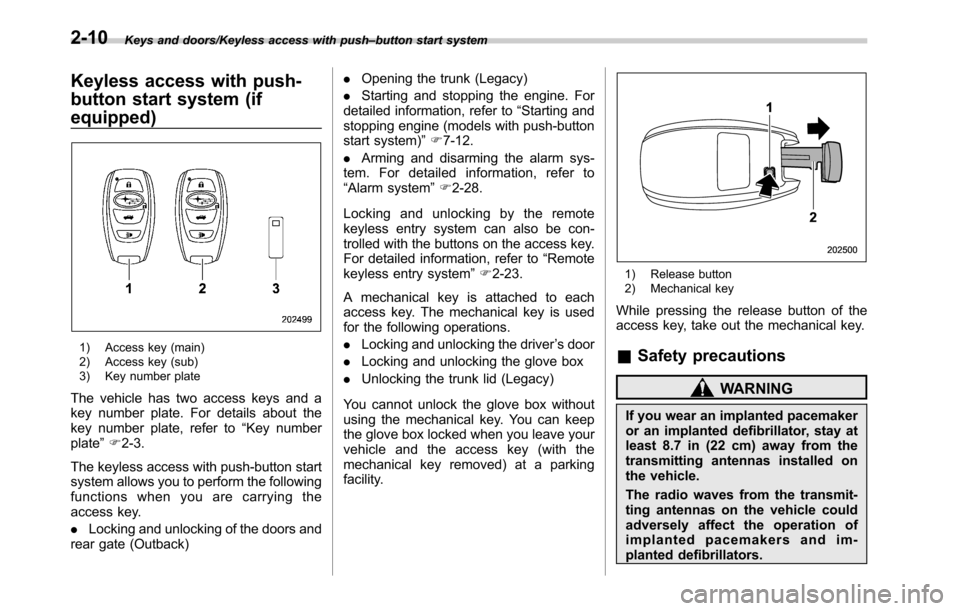
1) Access key (main)
2) Access key (sub)
3) Key number plate
The vehicle has two access keys and a
key number plate. For details about the
key number plate, refer to“Key number
plate”F2-3.
The keyless access with push-button start
system allows you to perform the following
functions when you are carrying the
access key.
.Locking and unlocking of the doors and
rear gate (Outback).Opening the trunk (Legacy)
.Starting and stopping the engine. For
detailed information, refer to“Starting and
stopping engine (models with push-button
start system)”F7-12.
.Arming and disarming the alarm sys-
tem. For detailed information, refer to
“Alarm system”F2-28.
Locking and unlocking by the remote
keyless entry system can also be con-
trolled with the buttons on the access key.
For detailed information, refer to“Remote
keyless entry system”F2-23.
A mechanical key is attached to each
access key. The mechanical key is used
for the following operations.
.Locking and unlocking the driver’s door
.Locking and unlocking the glove box
.Unlocking the trunk lid (Legacy)
You cannot unlock the glove box without
using the mechanical key. You can keep
the glove box locked when you leave your
vehicle and the access key (with the
mechanical key removed) at a parking
facility.
1) Release button
2) Mechanical key
While pressing the release button of the
access key, take out the mechanical key.
&Safety precautions
WARNING
If you wear an implanted pacemaker
or an implanted defibrillator, stay at
least 8.7 in (22 cm) away from the
transmitting antennas installed on
the vehicle.
The radio waves from the transmit-
ting antennas on the vehicle could
adversely affect the operation of
implanted pacemakers and im-
planted defibrillators.
2-10
Page 116 of 572

Keys and doors/Keyless access with push–button start system
Outback
1) Antenna
2) Operating range
.The operating range of the door lock-
ing/unlocking function is approximately 16
to 32 in (40 to 80 cm) from the respective
door handle.
.For Legacy,the operating range of the
trunk opening function is approximately 16
to 32 in (40 to 80 cm) from the trunk
opener button.
.For Outback,the operating range of
the rear gate locking/unlocking function is
approximately 16 to 32 in (40 to 80 cm)
from the rear gate ornament.
1) LED indicator
When the access key is within either of the
operating ranges of the front doors, the
LED indicator on the access key flashes.
When the keyless access functions are
disabled, the LED indicator does not flash
unless a button on the access key is
pressed.
!Operating range tips
.Locking by using the keyless access
function can be operated only by the door
lock sensor in the operating range in
which the access key is detected.
.Unlocking by using the keyless access
function can be operated only by the door
handle in the operating range in which the
access key is detected.
.If the access key is placed too close tothe vehicle body, the keyless access
functions may not operate properly. If they
do not operate properly, repeat the opera-
tion from further away.
.If the access key is placed near the
ground or in an elevated location from the
ground, even if it is in the indicated
operating range, the keyless access func-
tion may not operate properly.
.When the access key is within the
operating range, it is possible for anyone,
even someone who is not carrying the
access key, to operate the keyless access
function. Note that the keyless access
function can be operated only by the door
handle, door lock sensor, rear gate opener
button, trunk opener button or rear lock
button in the operating range in which the
access key is detected.
.It is not possible to lock the doors and
rear gate using the keyless access func-
tion when the access key is inside the
vehicle. However, depending on the status
of the access key and the environmental
conditions, the access key may be locked
inside the vehicle. Before locking, make
sure that you have the access key.
.When the battery of the access key is
discharged, or when operating it in a
location with strong radio waves or noise
(e.g., near a radio tower, power plant,
broadcast station or an area where wire-
2-14
Page 118 of 572
Keys and doors/Keyless access with push–button start system
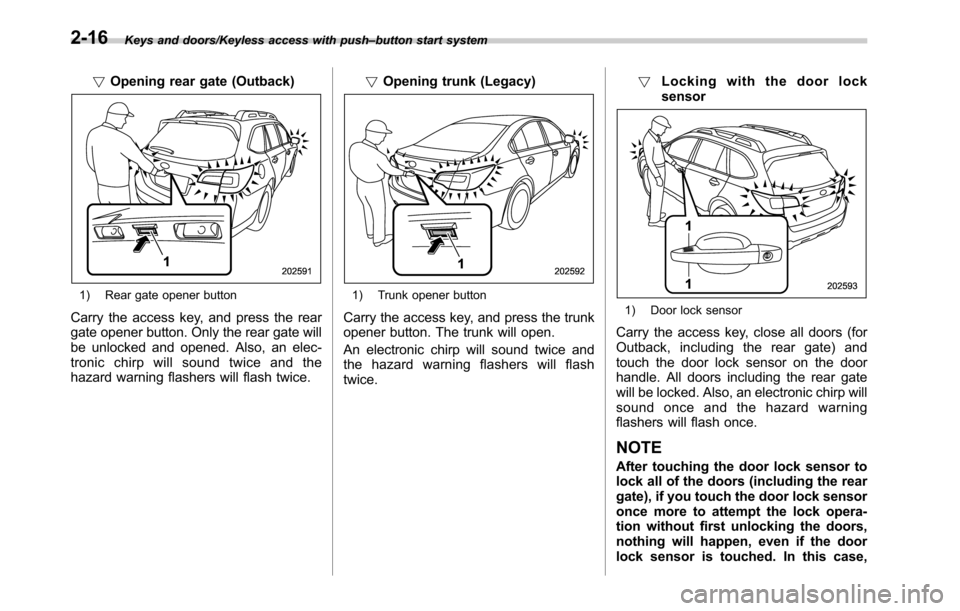
!Opening rear gate (Outback)
1) Rear gate opener button
Carry the access key, and press the rear
gate opener button. Only the rear gate will
be unlocked and opened. Also, an elec-
tronic chirp will sound twice and the
hazard warning flashers will flash twice.!Opening trunk (Legacy)
1) Trunk opener button
Carry the access key, and press the trunk
opener button. The trunk will open.
An electronic chirp will sound twice and
the hazard warning flashers will flash
twice.!Locking with the door lock
sensor1) Door lock sensor
Carry the access key, close all doors (for
Outback, including the rear gate) and
touch the door lock sensor on the door
handle. All doors including the rear gate
will be locked. Also, an electronic chirp will
sound once and the hazard warning
flashers will flash once.
NOTE
After touching the door lock sensor to
lock all of the doors (including the rear
gate), if you touch the door lock sensor
once more to attempt the lock opera-
tion without first unlocking the doors,
nothing will happen, even if the door
lock sensor is touched. In this case,
2-16
Page 119 of 572
perform the unlocking operation once
first. You can then touch the door lock
sensor to lock the doors.
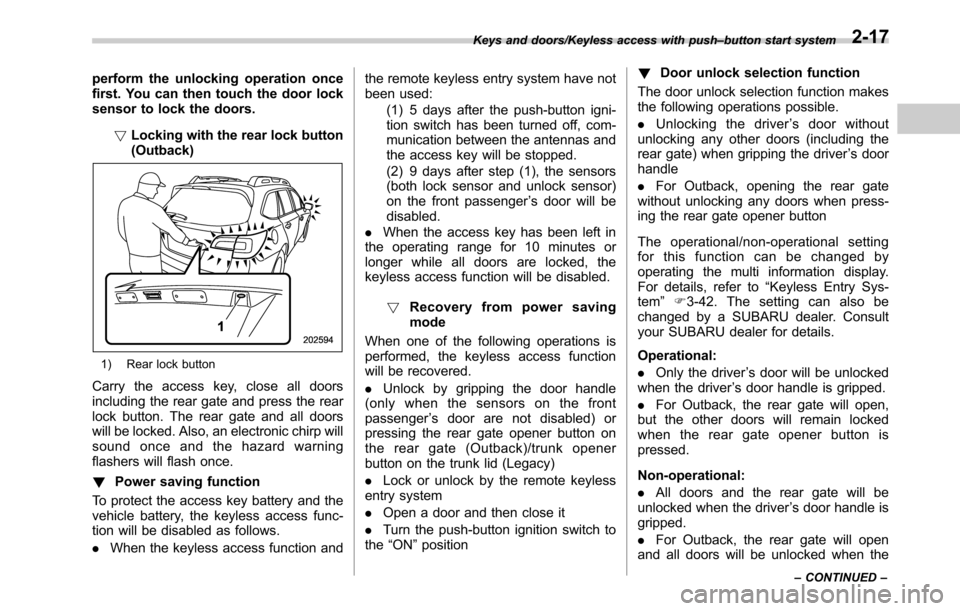
!Locking with the rear lock button
(Outback)
1) Rear lock button
Carry the access key, close all doors
including the rear gate and press the rear
lock button. The rear gate and all doors
will be locked. Also, an electronic chirp will
sound once and the hazard warning
flashers will flash once.
!Power saving function
To protect the access key battery and the
vehicle battery, the keyless access func-
tion will be disabled as follows.
.When the keyless access function andthe remote keyless entry system have not
been used:
(1) 5 days after the push-button igni-
tion switch has been turned off, com-
munication between the antennas and
the access key will be stopped.
(2) 9 days after step (1), the sensors
(both lock sensor and unlock sensor)
on the front passenger’s door will be
disabled.
.When the access key has been left in
the operating range for 10 minutes or
longer while all doors are locked, the
keyless access function will be disabled.
!Recovery from power saving
mode
When one of the following operations is
performed, the keyless access function
will be recovered.
.Unlock by gripping the door handle
(only when the sensors on the front
passenger’s door are not disabled) or
pressing the rear gate opener button on
the rear gate (Outback)/trunk opener
button on the trunk lid (Legacy)
.Lock or unlock by the remote keyless
entry system
.Open a door and then close it
.Turn the push-button ignition switch to
the“ON”position!Door unlock selection function
The door unlock selection function makes
the following operations possible.
.Unlocking the driver’s door without
unlocking any other doors (including the
rear gate) when gripping the driver’s door
handle
.For Outback, opening the rear gate
without unlocking any doors when press-
ing the rear gate opener button
The operational/non-operational setting
for this function can be changed by
operating the multi information display.
For details, refer to“Keyless Entry Sys-
tem”F3-42. The setting can also be
changed by a SUBARU dealer. Consult
your SUBARU dealer for details.
Operational:
.Only the driver’s door will be unlocked
when the driver’s door handle is gripped.
.For Outback, the rear gate will open,
but the other doors will remain locked
when the rear gate opener button is
pressed.
Non-operational:
.All doors and the rear gate will be
unlocked when the driver’s door handle is
gripped.
.For Outback, the rear gate will open
and all doors will be unlocked when the
Keys and doors/Keyless access with push–button start system
–CONTINUED–2-17
Page 126 of 572
Keys and doors/Remote keyless entry system
key is used as the transmitter for the
remote keyless entry system. For models
without“keyless access with push-button
start system”, the transmitter for the
remote keyless entry system is located
inside the key head.
The remote keyless entry system has the
following functions.
.Locking and unlocking the doors (and
rear gate for Outback) without a key
.Opening the trunk lid (Legacy) without
key
.Sounding a panic alarm
.Arming and disarming the alarm sys-
tem. For detailed information, refer to
“Alarm system”F2-28.
The operable distance of the remote
keyless entry system is approximately 30
feet (10 meters). However, this distance
will vary depending on environmental
conditions. The system’s operable dis-
tance will be shorter in areas near a
facility or electronic equipment emitting
strong radio waves such as a power plant,
broadcast station, TV tower, or remote
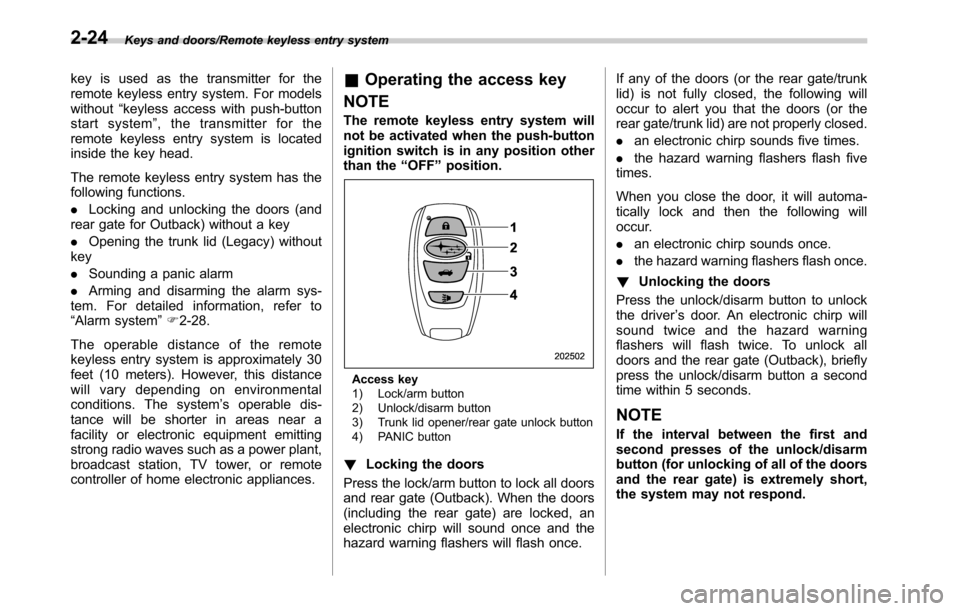
controller of home electronic appliances.&Operating the access key
NOTE
The remote keyless entry system will
not be activated when the push-button
ignition switch is in any position other
than the“OFF”position.
Access key
1) Lock/arm button
2) Unlock/disarm button
3) Trunk lid opener/rear gate unlock button
4) PANIC button
!Locking the doors
Press the lock/arm button to lock all doors
and rear gate (Outback). When the doors
(including the rear gate) are locked, an
electronic chirp will sound once and the
hazard warning flashers will flash once.If any of the doors (or the rear gate/trunk
lid) is not fully closed, the following will
occur to alert you that the doors (or the
rear gate/trunk lid) are not properly closed.
.an electronic chirp sounds five times.
.the hazard warning flashers flash five
times.
When you close the door, it will automa-
tically lock and then the following will
occur.
.an electronic chirp sounds once.
.the hazard warning flashers flash once.
!Unlocking the doors
Press the unlock/disarm button to unlock
the driver’s door. An electronic chirp will
sound twice and the hazard warning
flashers will flash twice. To unlock all
doors and the rear gate (Outback), briefly
press the unlock/disarm button a second
time within 5 seconds.
NOTE
If the interval between the first and
second presses of the unlock/disarm
button (for unlocking of all of the doors
and the rear gate) is extremely short,
the system may not respond.
2-24
Page 127 of 572
!Opening the trunk lid (Legacy)
Press and hold the trunk lid opener button
to open the trunk lid. An electronic chirp
will sound twice and the hazard warning
flashers will flash twice.
!Unlocking the rear gate (Outback)
Press the rear gate unlock button to
unlock the rear gate. An electronic chirp
will sound twice and the hazard warning
flashers will flash twice.
!Selecting audible signal operation
Using an electronic chirp, the system will
give you an audible signal when the doors
are locked or unlocked. If desired, you can
turn the audible signal off by operating the
multi information display. For details, refer
to“Keyless Entry System”F3-42.
Furthermore, the volume setting of the
audible signal can also be changed by a
SUBARU dealer. Consult your SUBARU
dealer for details.
!Selecting hazard warning flasher
operation
Using the hazard warning flasher, the
system will give you a visible signal when
the doors are locked or unlocked. If
desired, you can turn the hazard warning
flashers off by operating the multi informa-
tion display. For details, refer to“Keyless
Entry System”F3-42. The setting canalso be changed by a SUBARU dealer.
Consult your SUBARU dealer for details.
!Vehicle finder function
Use this function to find your vehicle
parked among many vehicles in a large
parking lot. Provided you are within 30 feet
(10 meters) of the vehicle, pressing the
lock/arm button three times in a 5-second
period will cause your vehicle’s horn to
sound once and its hazard warning
flashers to flash three times.
NOTE
If the interval between presses is too
short when you press the lock/arm
button three times, the system may
not respond to the signals from the
remote transmitter.
!Sounding a panic alarm
To activate the alarm, press the“PANIC”
button once.
The horn will sound and the hazard
warning flashers will flash.
To deactivate the panic alarm, press any
button on the remote transmitter. If a
button on the remote transmitter is not
pressed, the alarm will be deactivated
after approximately 30 seconds.
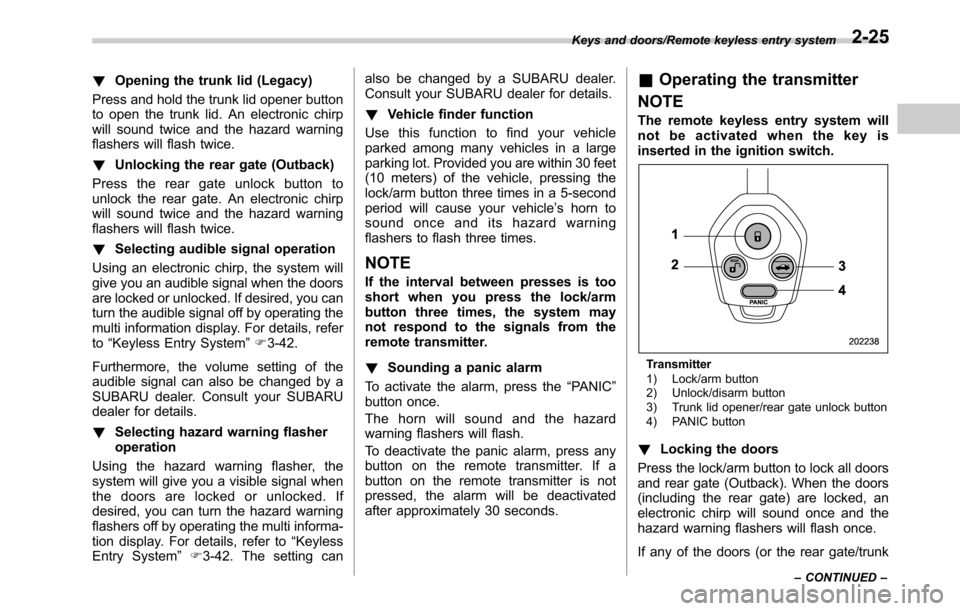
&Operating the transmitter
NOTE
The remote keyless entry system will
not be activated when the key is
inserted in the ignition switch.
Transmitter
1) Lock/arm button
2) Unlock/disarm button
3) Trunk lid opener/rear gate unlock button
4) PANIC button
!Locking the doors
Press the lock/arm button to lock all doors
and rear gate (Outback). When the doors
(including the rear gate) are locked, an
electronic chirp will sound once and the
hazard warning flashers will flash once.
If any of the doors (or the rear gate/trunk
Keys and doors/Remote keyless entry system
–CONTINUED–2-25
Page 128 of 572

Keys and doors/Remote keyless entry system
lid) is not fully closed, the following will
occur to alert you that the doors (or the
rear gate/trunk lid) are not properly closed.
.an electronic chirp sounds five times.
.the hazard warning flashers flash five
times.
When you close the door, it will automa-
tically lock and then the following will
occur.
.an electronic chirp sounds once.
.the hazard warning flashers flash once.
!Unlocking the doors
Press the unlock/disarm button to unlock
the driver’s door. An electronic chirp will
sound twice and the hazard warning
flashers will flash twice. To unlock all
doors and the rear gate (Outback), briefly
press the unlock/disarm button a second
time within 5 seconds.
NOTE
If the interval between the first and
second presses of the unlock/disarm
button (for unlocking of all of the doors
and the rear gate) is extremely short,
the system may not respond.!Opening the trunk lid (Legacy)
Press and hold the trunk lid opener button
to open the trunk lid. An electronic chirp
will sound twice and the hazard warning
flashers will flash twice.
!Unlocking the rear gate (Outback)
Press the rear gate unlock button to
unlock the rear gate. An electronic chirp
will sound twice and the hazard warning
flashers will flash twice.
!Selecting audible signal operation
Using an electronic chirp, the system will
give you an audible signal when the doors
are locked or unlocked.
If desired, the audible signal ON/OFF
setting and the audible signal volume
can be customized by a SUBARU dealer.
Consult your SUBARU dealer for details.
!Selecting hazard warning flasher
operation
Using the hazard warning flasher, the
system will give you a visible signal when
the doors are locked or unlocked. If
desired, you can turn the hazard warning
flashers off by operating the multi informa-
tion display. For details, refer to“Keyless
Entry System”F3-42. The setting can
also be changed by a SUBARU dealer.
Consult your SUBARU dealer for details.!Vehicle finder function
Use this function to find your vehicle
parked among many vehicles in a large
parking lot. Provided you are within 30 feet
(10 meters) of the vehicle, pressing the
lock/arm button three times in a 5-second
period will cause your vehicle’s horn to
sound once and its hazard warning
flashers to flash three times.
NOTE
If the interval between presses is too
short when you press the lock/arm
button three times, the system may
not respond to the signals from the
remote transmitter.
!Sounding a panic alarm
To activate the alarm, press the“PANIC”
button once.
The horn will sound and the hazard
warning flashers will flash.
To deactivate the panic alarm, press any
button on the remote transmitter. If a
button on the remote transmitter is not
pressed, the alarm will be deactivated
after approximately 30 seconds.
&Replacing the battery
Refer to“Replacing battery”F11-49.
2-26
Page 130 of 572

Keys and doors/Alarm system
Alarm system
The alarm system helps to protect your
vehicle and valuables from theft. The horn
sounds and the hazard warning flashers
flash if someone attempts to break into
your vehicle.
For models with“keyless access with
push-button start system”:
The system can be armed or disarmed
with the keyless access function or access
key.
The system will not be activated when the
push-button ignition switch is in the“ACC”
or“ON”position.
For models without“keyless access
with push-button start system”:
The system can be armed and disarmed
with the remote transmitter.
The system will not be activated when the
key is inserted into the ignition switch.
Your vehicle’s alarm system has been set
for activation at the time of shipment from
the factory. You can set the system for
deactivation yourself or have it done by
your SUBARU dealer.
&System alarm operation
The alarm system will give the following
alarms when triggered.
.The vehicle’s horn will sound for 30
seconds.
.The hazard warning flashers will flash
for 30 seconds.
If any of the doors (or the rear gate/trunk
lid) remains open after the 30-second
period, the horn will continue to sound
for a maximum of 3 minutes. If the door (or
the rear gate/trunk lid) is closed while the
horn is sounding, the horn will stop
sounding with a delay of up to 30 seconds.
The alarm is triggered by:
.Opening any of the doors, rear gate or
the trunk lid
.Physical impact to the vehicle, such as
forced entry (only models with shock
sensors (dealer option))
NOTE
The alarm system can be set to trigger
the illumination of the following interior
lights.
.Map lights
.Dome light (illuminates only when
the dome light switch is in the“DOOR”
position)
.Cargo area light (Outback)The notifications regarding the map
lights, dome light and cargo area light
(Outback) are deactivated as the fac-
tory setting. A SUBARU dealer can
activate the system. Contact your
SUBARU dealer for details.
&Activating and deactivating
the alarm system
To change the setting of your vehicle’s
alarm system for activation or deactiva-
tion, do the following.
1. Disarm the alarm system. Refer to
“Disarming the system”F2-32.
2. Sit in the driver’s seat and shut all
doors (and the rear gate (Outback)).
3. Turn the ignition switch to the“ON”
position.
4. Hold down the REAR (UNLOCK) side
of the driver’s power door locking switch,
open the driver’s door within the following
1 second, and wait 10 seconds without
releasing the switch. The setting will then
be changed as follows:
If the system was previously activated:
The odometer screen displays“ALOF”
and the horn sounds twice, indicating that
the system is now deactivated.
2-28
Page 140 of 572
Keys and doors/Trunk lid (Legacy)
Trunk lid (Legacy)
WARNING
.To prevent dangerous exhaust
gas from entering the vehicle,
always keep the trunk lid closed
while driving.
.Help prevent children, adults or
animals from locking themselves
in the trunk. On hot or sunny
days, the temperature in the
trunk could quickly become high
enough to cause death or serious
heat-related injuries including
brain damage to anyone locked
inside, particularly for small chil-
dren.
.When leaving the vehicle, close
all windows and lock all doors.
Also make certain that the trunk
is closed.
&To open and close the trunk
lid from outside
The trunk lid can be opened using the
keyless access function or remote keyless
entry system. For details, refer to the
following section.
.For models with“keyless access with
push-button start system”, refer to“Open-
ing trunk (Legacy)”F2-16,“Opening the
trunk lid (Legacy)”F2-25 or“Opening the
trunk lid (Legacy)”F2-26.
.For models without“keyless access
with push-button start system”, refer to
“Opening the trunk lid (Legacy)”F2-25 or
“Opening the trunk lid (Legacy)”F2-26.
To close the trunk lid, lightly press the
trunk lid down until the latch engages.
NOTE
.Do not leave your valuables in the
trunk when you leave your vehicle.
.Even when the trunk lid cannot be
opened using the remote keyless entry
system, you can open the trunk lid by
using the key. Refer to“Trunk lid
(Legacy)–if the trunk lid cannot be
opened”F9-19.
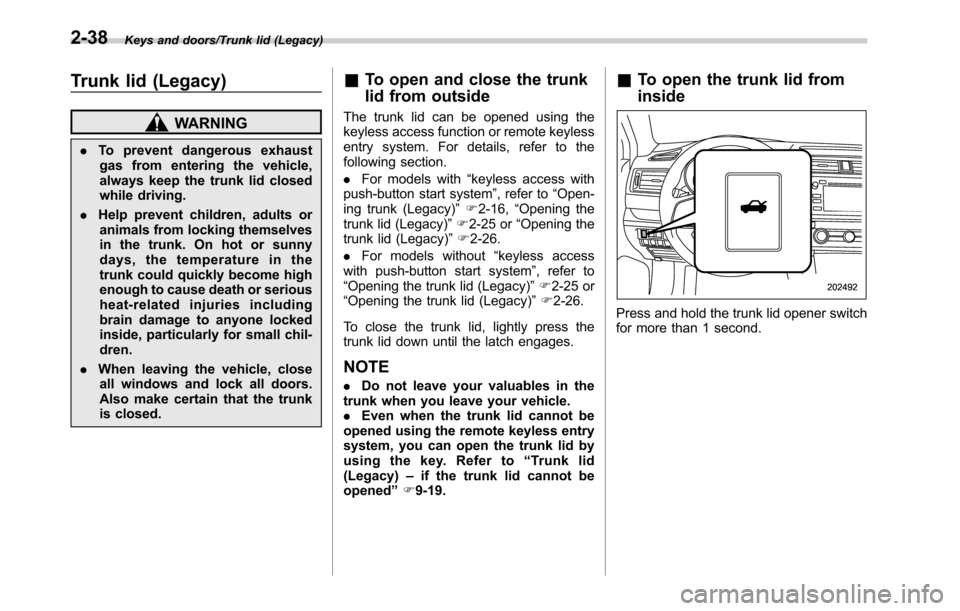
&To open the trunk lid from
inside
Press and hold the trunk lid opener switch
for more than 1 second.
2-38