lock SUBARU OUTBACK 2004 4.G Workshop Manual
[x] Cancel search | Manufacturer: SUBARU, Model Year: 2004, Model line: OUTBACK, Model: SUBARU OUTBACK 2004 4.GPages: 525, PDF Size: 5.68 MB
Page 136 of 525
2-29
Keys and doors
– CONTINUED –
play with the release handle. If the driver starts
the vehicle without knowing that a child is in-
side the trunk and the child opens the lid using
the release handle, the child could fall out and
be killed or seriously injured.
yDo not close the lid while gripping the release
handle. The handle may be damaged. y Do not use the handle as a hook to fasten
straps or ropes to secure your cargo in the
trunk. Such use may result in damage of the
handle. y Load the trunk so that cargo can not strike
the release handle. If the cargo hits the handle
while the vehicle is being driven, the handle
may be pushed down and the trunk lid may
open. That may cause cargo to fall out of the
trunk, which could create a traffic safety haz-
ard.
T Inspection
Perform the following steps at least twice a year to
check the release handle for correct operation. 1. Open the trunk lid.
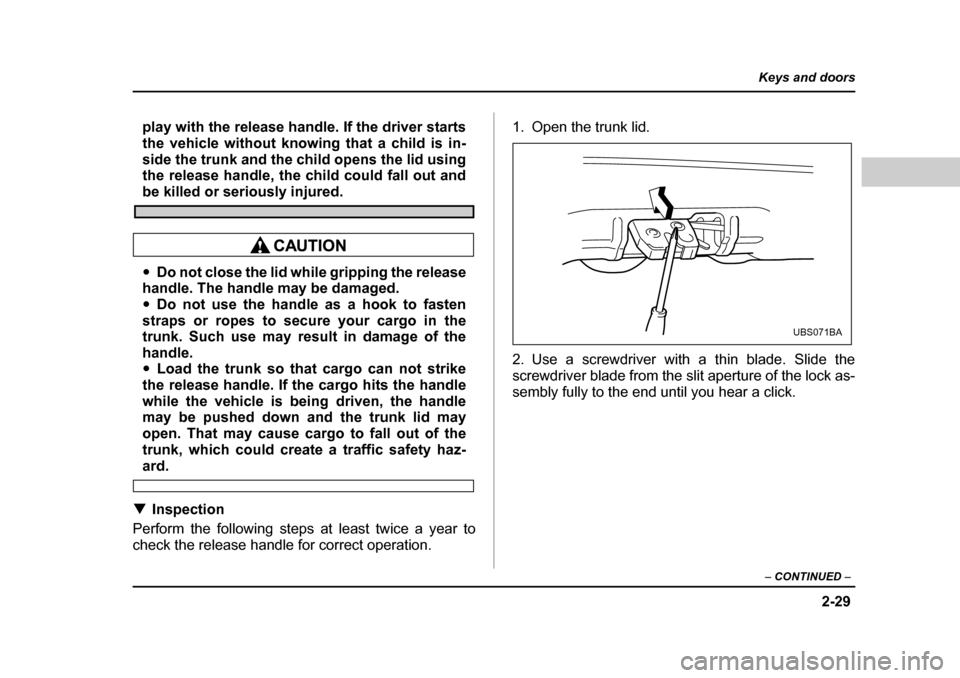
2. Use a screwdriver with a thin blade. Slide the
screwdriver blade from the slit aperture of the lock as-
sembly fully to the end until you hear a click.
UBS071BA
Page 137 of 525
2-30
Keys and doors
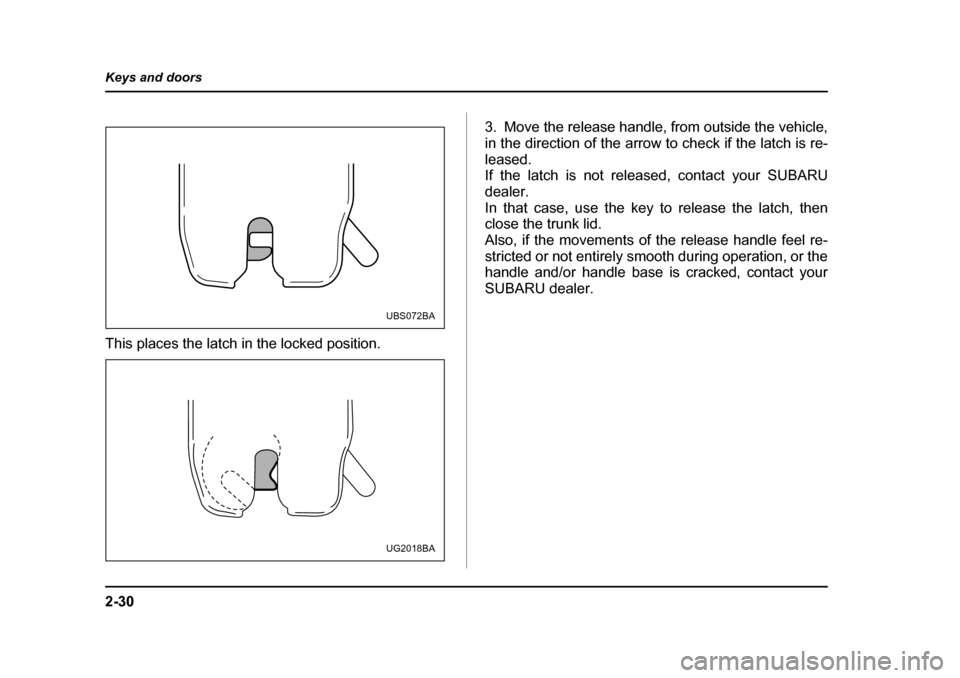
This places the latch in the locked position.
3. Move the release handle, from outside the vehicle,
in the direction of the arrow to check if the latch is re-
leased.
If the latch is not released, contact your SUBARU
dealer.
In that case, use the key to release the latch, then
close the trunk lid.
Also, if the movements of the release handle feel re-
stricted or not entirely smooth during operation, or the
handle and/or handle base is cracked, contact your SUBARU dealer.
UBS072BA
UG2018BA
Page 138 of 525
2-31
Keys and doors
– CONTINUED –
Rear gate (Station wagon)
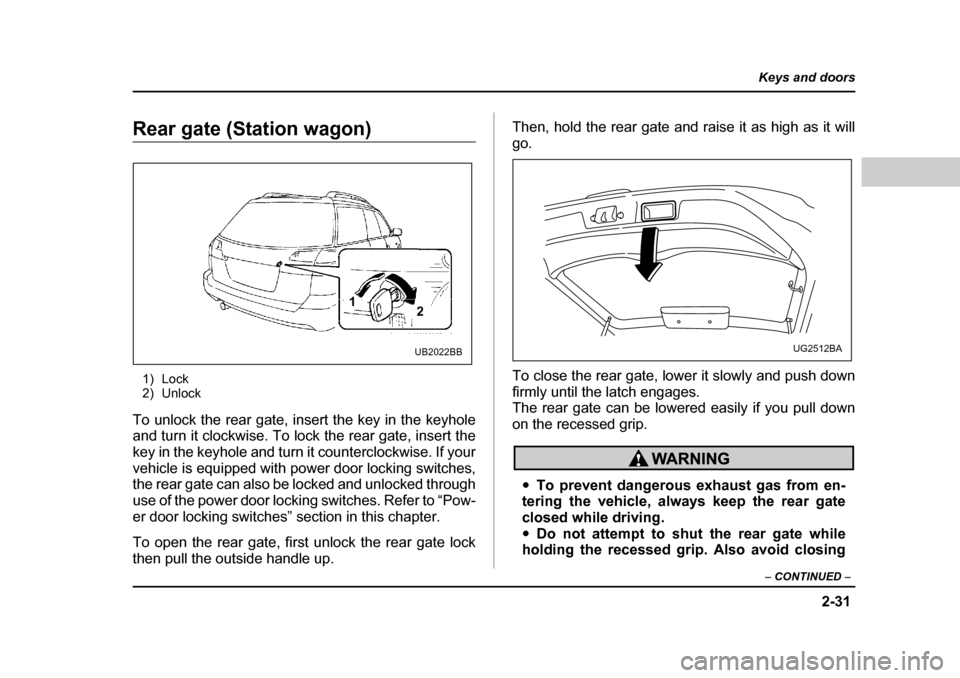
1) Lock
2) Unlock
To unlock the rear gate, insert the key in the keyhole
and turn it clockwise. To lock the rear gate, insert the
key in the keyhole and turn it counterclockwise. If your
vehicle is equipped with power door locking switches,
the rear gate can also be locked and unlocked through
use of the power door locking switches. Refer to “Pow-
er door locking switches” section in this chapter.
To open the rear gate, first unlock the rear gate lock
then pull the outside handle up. Then, hold the rear gate and raise it as high as it willgo.
To close the rear gate, lower it slowly and push down
firmly until the latch engages.
The rear gate can be lowered easily if you pull down
on the recessed grip.
y
To prevent dangerous exhaust gas from en-
tering the vehicle, always keep the rear gate
closed while driving.y Do not attempt to shut the rear gate while
holding the recessed grip. Also avoid closing
1 2
UB2022BBUG2512BA
Page 144 of 525

3-1
3
Instruments and controls
Ignition switch .............................................. 3-3 LOCK .................................................................. 3-3
ACC .................................................................... 3-4
ON ....................................................................... 3-5
START ................................................................ 3-5
Key reminder chime .......................................... 3-5
Ignition switch light .......................................... 3-5
Key interlock release (AT vehicles only) ........ 3-5
Hazard warning flasher ................................ 3-6
Meters and gauges ....................................... 3-7 Speedometer ..................................................... 3-7
Odometer/Trip meter ........................................ 3-7
Tachometer ........................................................ 3-8
Outside temperature indicator (if equipped) .. 3-8
Fuel gauge ......................................................... 3-8
Temperature gauge ........................................... 3-9
Warning and indicator lights ....................... 3-10 Seatbelt warning light and chime .................... 3-10
SRS airbag system warning light .................... 3-10
CHECK ENGINE warning light/Malfunction indicator lamp ................................................. 3-11
Charge warning light ........................................ 3-12
Oil pressure warning light ................................ 3-12
AT OIL TEMPerature warning light (for AT vehicles) ............................................. 3-12
ABS warning light ............................................. 3-13
VDC (Vehicle Dynamics Control) warning light (if equipped) ........................................... 3-13
Brake system warning light ............................. 3-14
Door open warning lights ................................. 3-15
Low fuel warning light ...................................... 3-15 Front-wheel drive warning light (for AT
vehicles except GT and vehicle with VDC) .. 3-15
VDC (Vehicle Dynamics Control) operation indicator light (if equipped) ........................... 3-15
VDC (Vehicle Dynamics Control) OFF indicator light (if equipped) ........................... 3-16
Security system status indicator light
(if equipped) .................................................... 3-16
Selector lever position indicator (AT vehicles) ................................................... 3-17
Gear position indicator (AT vehicle with SPORTSHIFT) ................................................. 3-17
Turn signal indicator lights .............................. 3-17
High beam indicator light ................................. 3-18
Cruise control set indicator light .................... 3-18
Clock .............................................................. 3-18
Light control switch ...................................... 3-19 Headlights ......................................................... 3-19
High/low beam change (dimmer) .................... 3-20
Headlight flasher ............................................... 3-20
Daytime running light system ......................... 3-21
Turn signal lever ........................................... 3-21
Illumination brightness control ................... 3-22
Parking light switch ...................................... 3-23
Fog light switch (if equipped) ...................... 3-24
Wiper and washer ......................................... 3-24 Windshield wiper and washer switches ......... 3-26
Rear window wiper and washer switch (if equipped) .................................................... 3-27
Rear window defogger switch ..................... 3-28
Page 146 of 525
3-3
Instruments and controls
– CONTINUED –
Instruments and controlsIgnition switch
Never turn the ignition switch to “LOCK” while
the vehicle is being driven or towed because
that will lock the steering wheel, preventing
steering control. And when the engine is turned
off, it takes a much greater effort than usual to
steer.
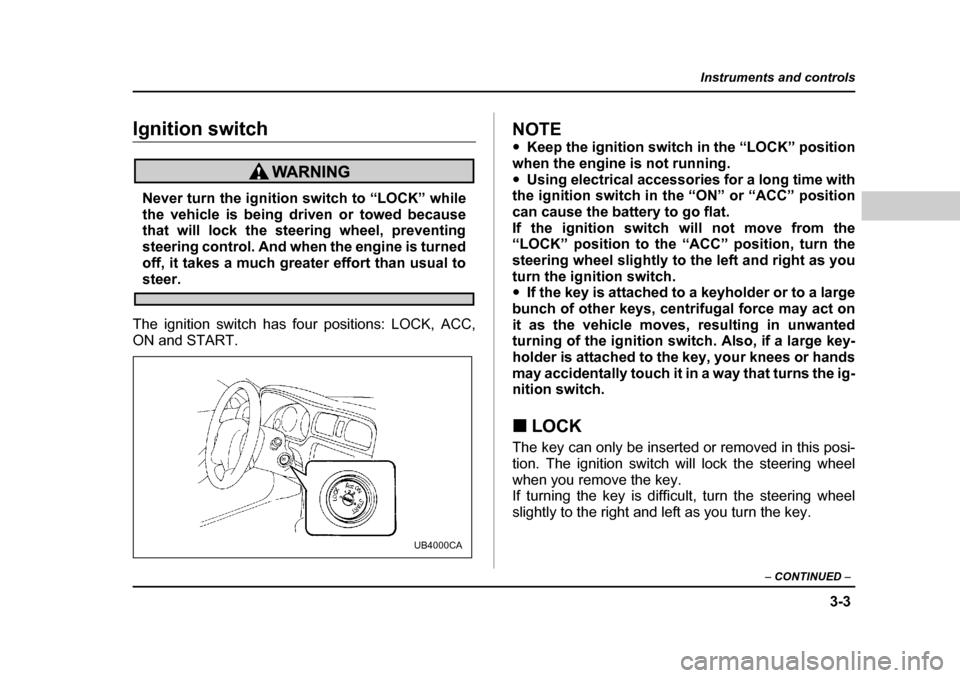
The ignition switch has four positions: LOCK, ACC,
ON and START.
NOTE y Keep the ignition switch in the “LOCK” position
when the engine is not running. y Using electrical accessories for a long time with
the ignition switch in the “ON” or “ACC” position
can cause the battery to go flat.
If the ignition switch will not move from the “LOCK” position to the “ACC” position, turn the
steering wheel slightly to the left and right as youturn the ignition switch. y If the key is attached to a keyholder or to a large
bunch of other keys, centrifugal force may act on
it as the vehicle moves, resulting in unwanted
turning of the ignition switch. Also, if a large key-
holder is attached to the key, your knees or hands
may accidentally touch it in a way that turns the ig-
nition switch. „ LOCK
The key can only be inserted or removed in this posi-
tion. The ignition switch will lock the steering wheel
when you remove the key.
If turning the key is difficult, turn the steering wheel
slightly to the right and left as you turn the key.
UB4000CA
Page 147 of 525
3-4
Instruments and controls
T
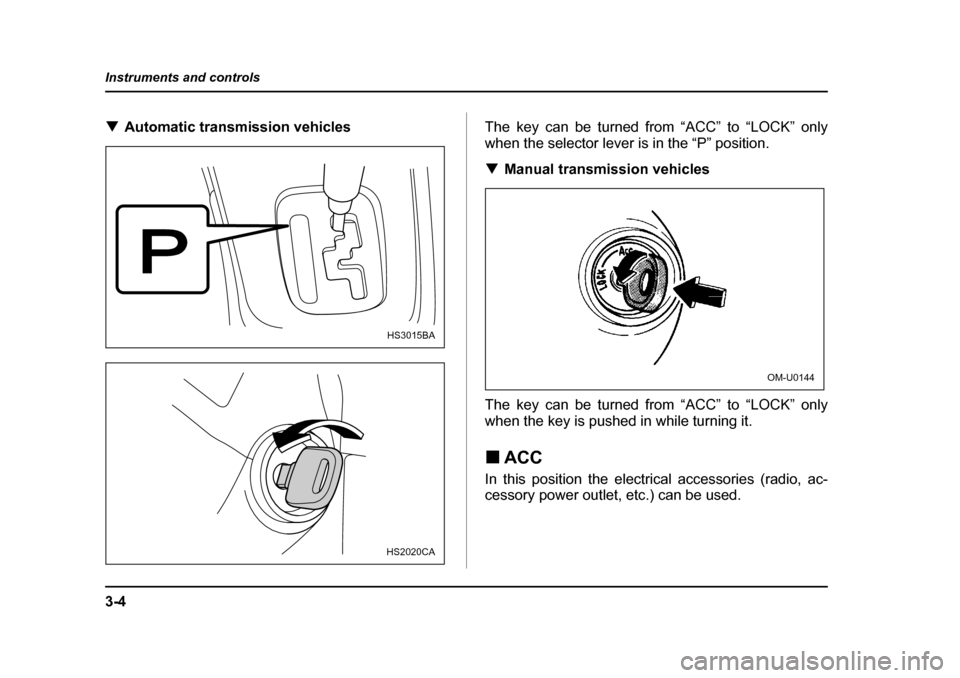
Automatic transmission vehicles The key can be turned from “ACC” to “LOCK” only
when the selector lever is in the “P” position. TManual transmission vehicles
The key can be turned from “ACC” to “LOCK” only
when the key is pushed in while turning it. „ ACC
In this position the electrical accessories (radio, ac-
cessory power outlet, etc.) can be used.
HS3015BA
HS2020CA
OM-U0144
Page 148 of 525
3-5
Instruments and controls
– CONTINUED –
„ON
This is the normal operating position after the engine
is started. „ START
Do not turn the ignition switch to the “START”position while the engine is running.
The engine is started in this position. The starter
cranks the engine to start it. When the key is released
(after the engine has started), the key automatically
returns to the “ON” position. „ Key reminder chime
The reminder chime sounds when the driver’s door
opens and the key is in the “LOCK” or “ACC” positions.
The chime stops when the key is removed from the ig- nition switch. „ Ignition switch light
For easy access to the ignition switch in the dark, the
ignition switch light comes on when driver’s door is opened. The light remains on for 10 seconds and goes
out after driver’s door is closed or if the key is turned
to the “ON” position. „
Key interlock release (AT vehicles
only)
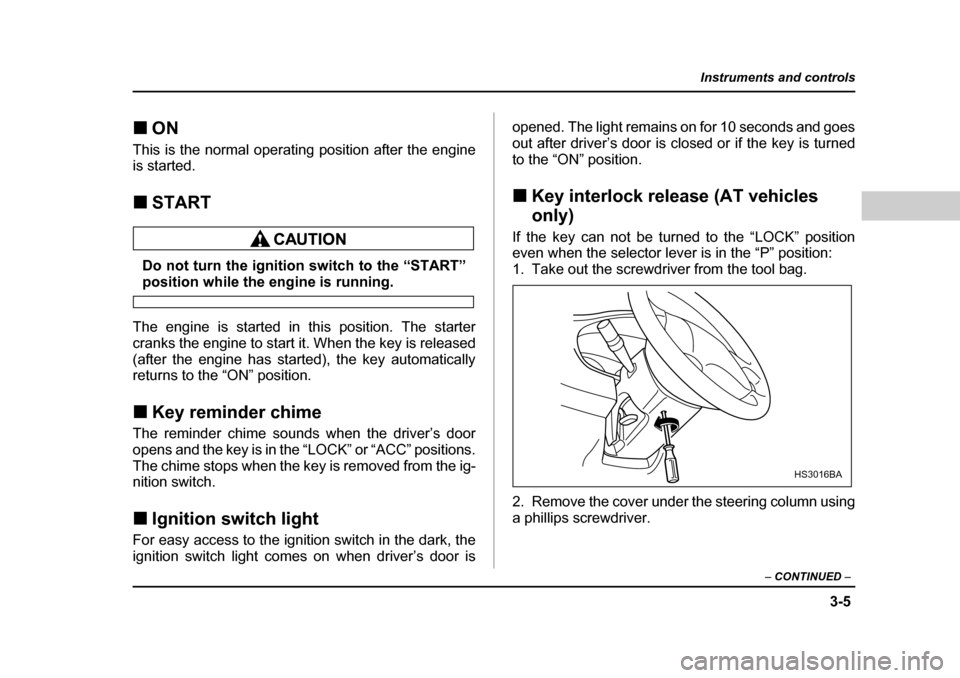
If the key can not be turned to the “LOCK” position
even when the selector lever is in the “P” position:
1. Take out the screwdriver from the tool bag.
2. Remove the cover under the steering column using
a phillips screwdriver.
HS3016BA
Page 149 of 525
3-6
Instruments and controls
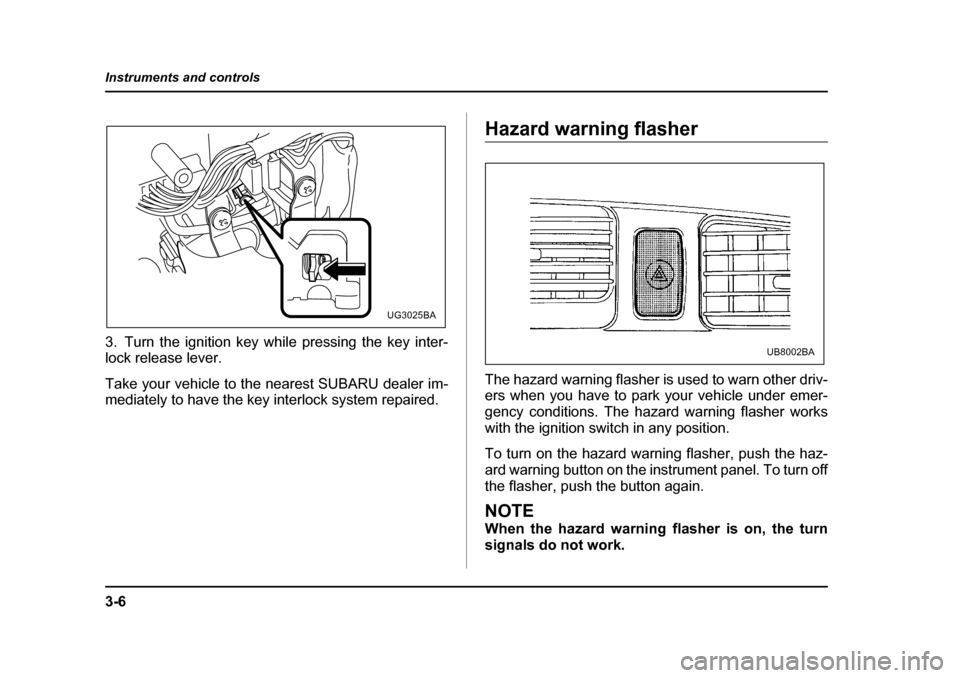
3. Turn the ignition key while pressing the key inter-
lock release lever.
Take your vehicle to the nearest SUBARU dealer im-
mediately to have the key interlock system repaired.
Hazard warning flasher
The hazard warning flasher is used to warn other driv-
ers when you have to park your vehicle under emer-
gency conditions. The hazard warning flasher works with the ignition switch in any position.
To turn on the hazard warning flasher, push the haz-
ard warning button on the instrument panel. To turn off
the flasher, push the button again.
NOTE
When the hazard warning flasher is on, the turn
signals do not work.
UG3025BA
UB8002BA
Page 152 of 525
3-9
Instruments and controls
– CONTINUED –
nition switch is in the “ACC” or “LOCK” position.
The gauge may move slightly during braking, turning
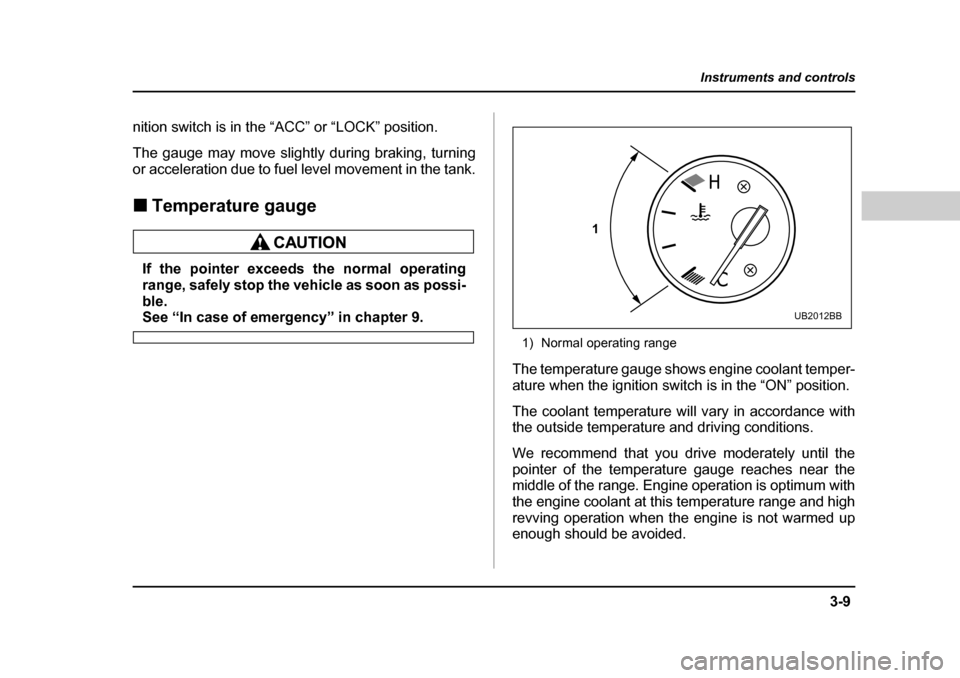
or acceleration due to fuel level movement in the tank. „Temperature gauge
If the pointer exceeds the normal operating
range, safely stop the vehicle as soon as possi-
ble.
See “In case of emergency” in chapter 9.
1) Normal operating range
The temperature gauge shows engine coolant temper-
ature when the ignition switch is in the “ON” position.
The coolant temperature will vary in accordance with
the outside temperature and driving conditions.
We recommend that you drive moderately until the
pointer of the temperature gauge reaches near the
middle of the range. Engine operation is optimum with
the engine coolant at this temperature range and high
revving operation when the engine is not warmed up
enough should be avoided.
1
UB2012BB
Page 157 of 525
3-14
Instruments and controls
y
The VDC warning light does not come on when the
ignition switch is turned to the “ON” position. y The VDC warning light remains on after the engine
has started and stays lit even when the vehicle speed
reaches about 8 mph (12 km/h).y The VDC warning light comes on while the vehicle
is running.y If the electrical circuit of the VDC system itself be-
comes faulty, the VDC warning light only comes on. At
this time, the ABS (Anti-lock Brake System) remains
fully operational.y The warning light comes on when the electronic
control system of the ABS/VDC system becomesfaulty.
The VDC system provides its ABS control through the
electrical circuit of the ABS system. Accordingly, if the ABS is inoperative, the VDC system also becomes un-
able to provide ABS control. As a result, the VDC sys-
tem becomes inoperative, causing the VDC warning
light to come on. Though both the VDC and ABS sys-
tems are inoperative in this case, the ordinary func-
tions of the brake system are still available. You will be
safe while driving with this condition, but you should
have your vehicle checked at a SUBARU dealer as
soon as possible.NOTE
If the warning light behavior is as described be-
low, the VDC system may be considered normal.y The warning light comes on right after the en-
gine is started but goes out immediately, remain-
ing off.y The warning light remains on after the engine
has been started, but it goes out when the vehicle
speed reaches 8 mph about (12 km/h).y The warning light comes on during driving, but
it goes out immediately and remains off. „ Brake system warning light
yDriving with the brake system warning light
on is dangerous. This indicates your brake sys-
tem may not be working properly. If the light re-
mains on, have the brakes inspected by a
SUBARU dealer immediately. y If at all in doubt about whether the brakes are
operating properly, do not drive the vehicle.
Have your vehicle towed to the nearest
SUBARU dealer for repair.
(U.S.) (Canada)