light SUBARU OUTBACK 2005 4.G Owners Manual
[x] Cancel search | Manufacturer: SUBARU, Model Year: 2005, Model line: OUTBACK, Model: SUBARU OUTBACK 2005 4.GPages: 627, PDF Size: 6.42 MB
Page 340 of 627
6-23
Interior equipment
– CONTINUED –
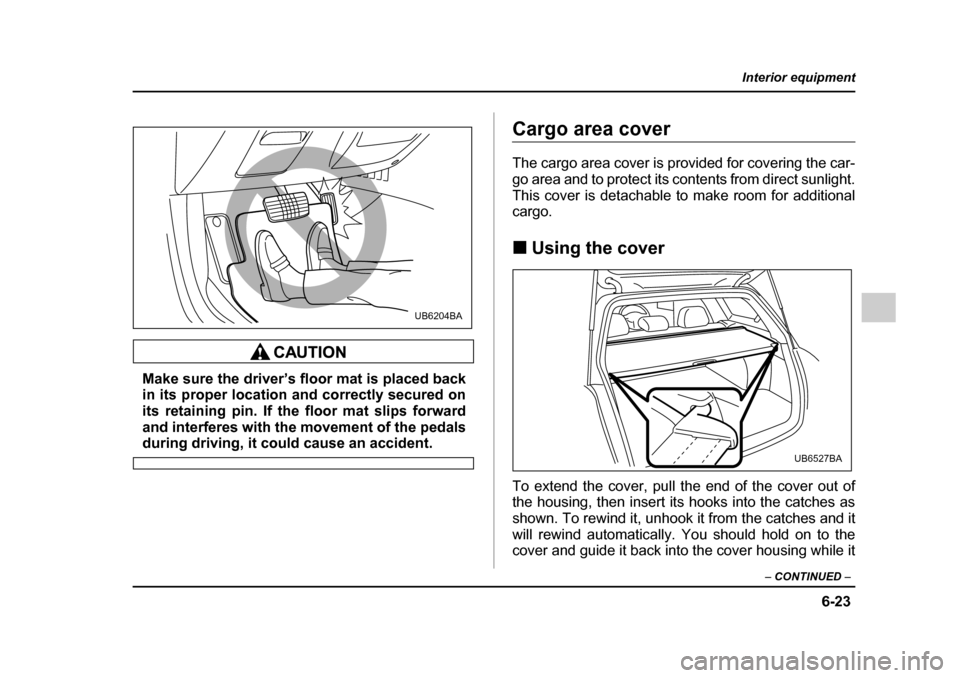
Make sure the driver’s floor mat is placed back
in its proper location and correctly secured on
its retaining pin. If the floor mat slips forward
and interferes with the movement of the pedals
during driving, it could cause an accident.
Cargo area cover
The cargo area cover is provided for covering the car-
go area and to protect its contents from direct sunlight.
This cover is detachable to make room for additional cargo. !Using the cover
To extend the cover, pull the end of the cover out of
the housing, then insert its hooks into the catches as
shown. To rewind it, unhook it from the catches and it
will rewind automatically. You should hold on to the
cover and guide it back into the cover housing while it
UB6204BA
UB6527BA
Page 346 of 627
6-29
Interior equipment
– CONTINUED –
Convenient tie-down hooks (if
equipped)
The convenient tie-down hooks are designed
only for securing light cargo. Never try to se-
cure cargo that exceeds the capacity of the
hooks. The maximum load capacity is 44 lbs (20
kg) per hook.
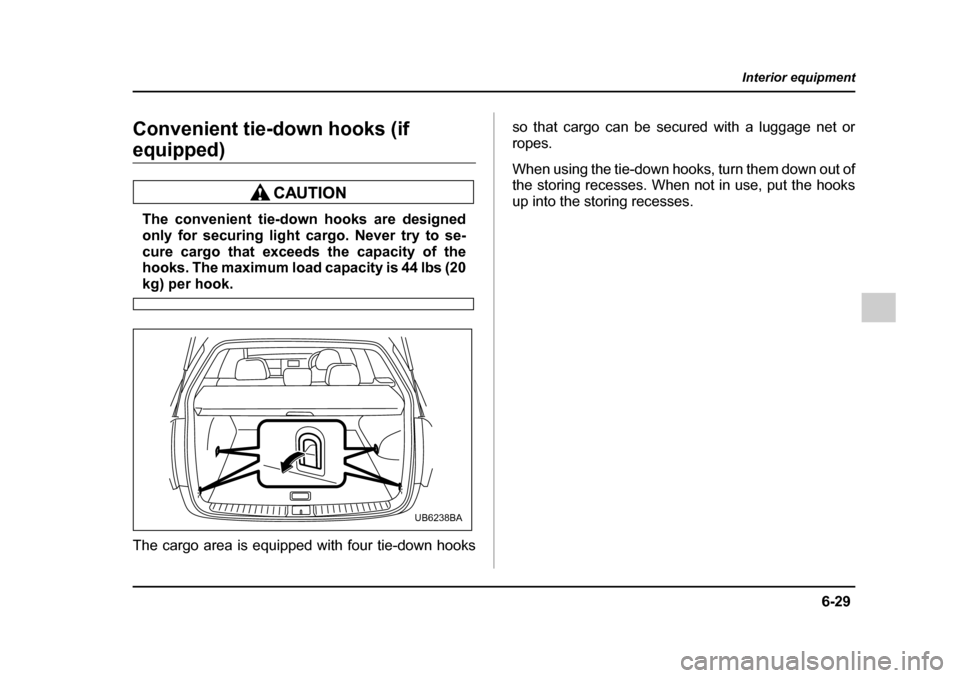
The cargo area is equipped with four tie-down hooks so that cargo can be secured with a luggage net or
ropes.
When using the tie-down hooks, turn them down out of
the storing recesses. When not in use, put the hooks
up into the storing recesses.
UB6238BA
Page 348 of 627
6-31
Interior equipment
– CONTINUED –
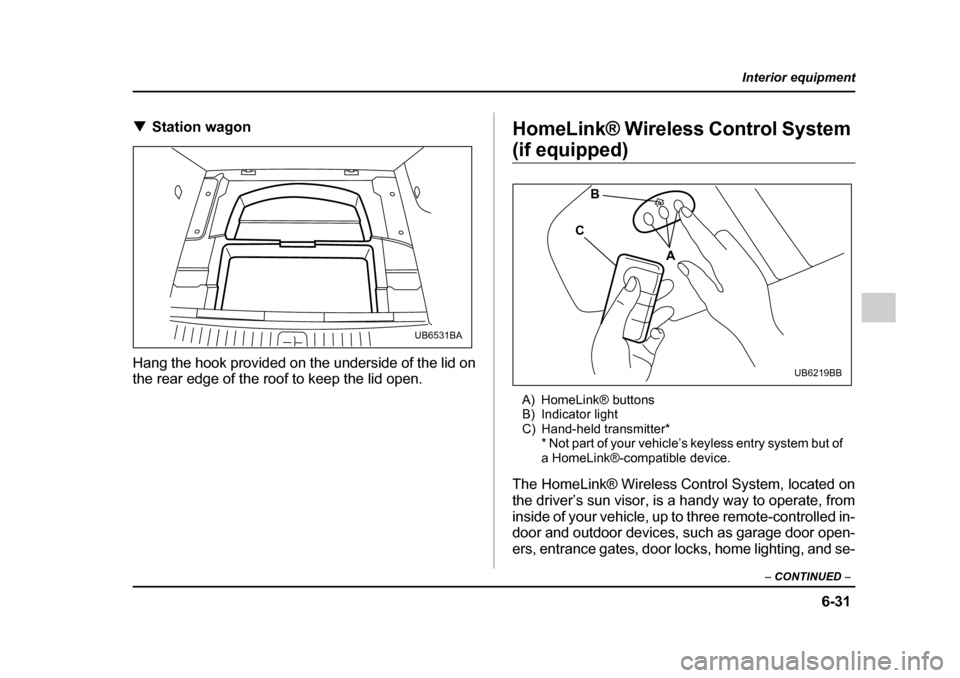
!Station wagon
Hang the hook provided on the underside of the lid on
the rear edge of the roof to keep the lid open. HomeLink® Wireless Control System
(if equipped)
A) HomeLink® buttons
B) Indicator light
C) Hand-held transmitter* * Not part of your vehicle’s keyless entry system but of
a HomeLink®-compatible device.
The HomeLink® Wireless Control System, located on
the driver’s sun visor, is a handy way to operate, from
inside of your vehicle, up to three remote-controlled in-
door and outdoor devices, such as garage door open-
ers, entrance gates, door locks, home lighting, and se-
UB6531BA
A
B
C
UB6219BB
Page 350 of 627
6-33
Interior equipment
– CONTINUED –
hand-held transmitters for further programming or
device testing in the event of a problem."It is recommended to insert a new battery in the
hand-held transmitter of a device to ensure cor-
rect programming. ! Garage door opener programming in the U.S.A.
NOTE
When programming the HomeLink® Wireless
Control System for a garage door opener, it is sug-
gested that you park the vehicle outside the ga-
rage.
1. Unplug the motor of the garage door opener from
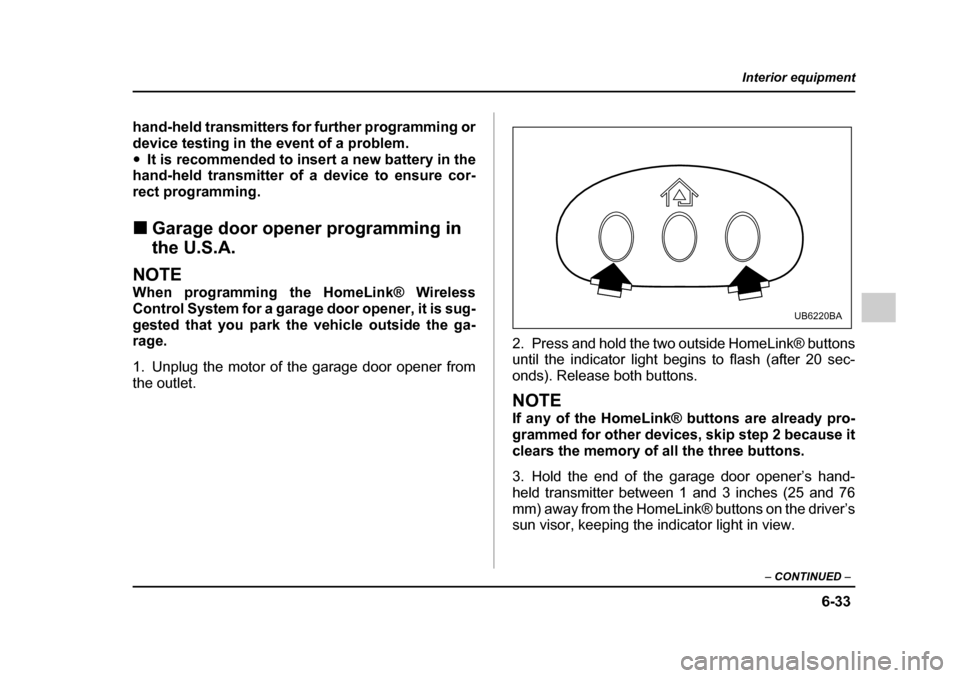
the outlet. 2. Press and hold the two outside HomeLink® buttons
until the indicator light begins to flash (after 20 sec-
onds). Release both buttons.
NOTE
If any of the HomeLink® buttons are already pro-
grammed for other devices, skip step 2 because it
clears the memory of all the three buttons.
3. Hold the end of the garage door opener’s hand-
held transmitter between 1 and 3 inches (25 and 76
mm) away from the HomeLink® buttons on the driver’s
sun visor, keeping the indicator light in view.
UB6220BA
Page 351 of 627
6-34
Interior equipment
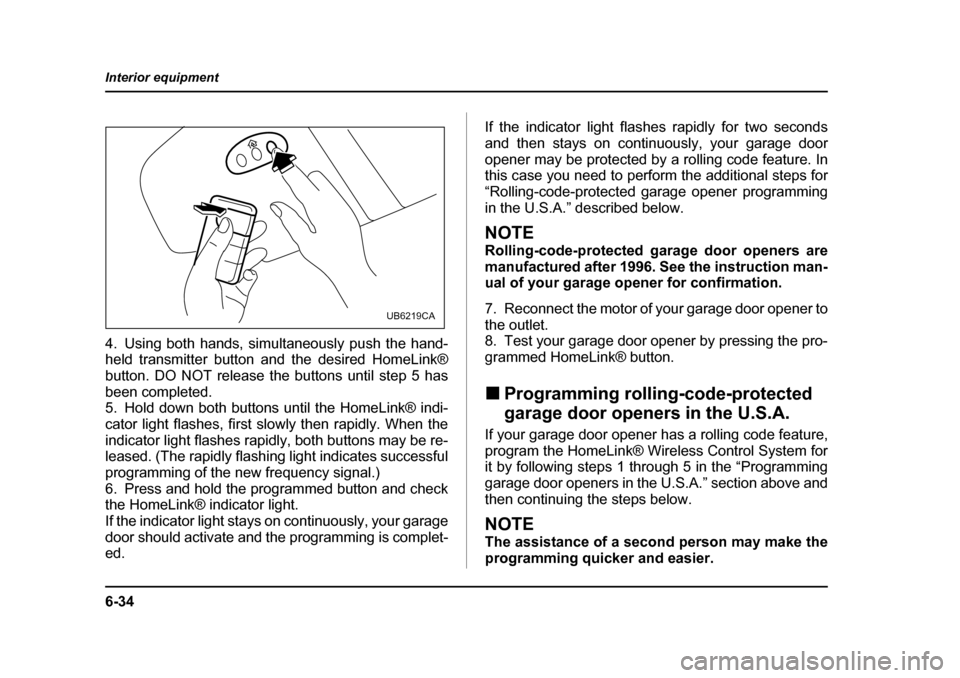
4. Using both hands, simultaneously push the hand-
held transmitter button and the desired HomeLink®
button. DO NOT release the buttons until step 5 has
been completed.
5. Hold down both buttons until the HomeLink® indi-
cator light flashes, first slowly then rapidly. When the
indicator light flashes rapidly, both buttons may be re-
leased. (The rapidly flashing light indicates successful
programming of the new frequency signal.)
6. Press and hold the programmed button and check
the HomeLink® indicator light.
If the indicator light stays on continuously, your garage
door should activate and the programming is complet-
ed.
If the indicator light flashes rapidly for two seconds
and then stays on continuously, your garage door
opener may be protected by a rolling code feature. In
this case you need to perform the additional steps for
“Rolling-code-protected garage opener programming
in the U.S.A.” described below.
NOTE
Rolling-code-protected garage door openers are
manufactured after 1996. See the instruction man-
ual of your garage opener for confirmation.
7. Reconnect the motor of your garage door opener to
the outlet.
8. Test your garage door opener by pressing the pro-
grammed HomeLink® button. !
Programming rolling-code-protected
garage door openers in the U.S.A.
If your garage door opener has a rolling code feature,
program the HomeLink® Wireless Control System for
it by following steps 1 through 5 in the “Programming
garage door openers in the U.S.A.” section above and
then continuing the steps below.
NOTE
The assistance of a second person may make the
programming quicker and easier.
UB6219CA
Page 352 of 627
6-35
Interior equipment
– CONTINUED –
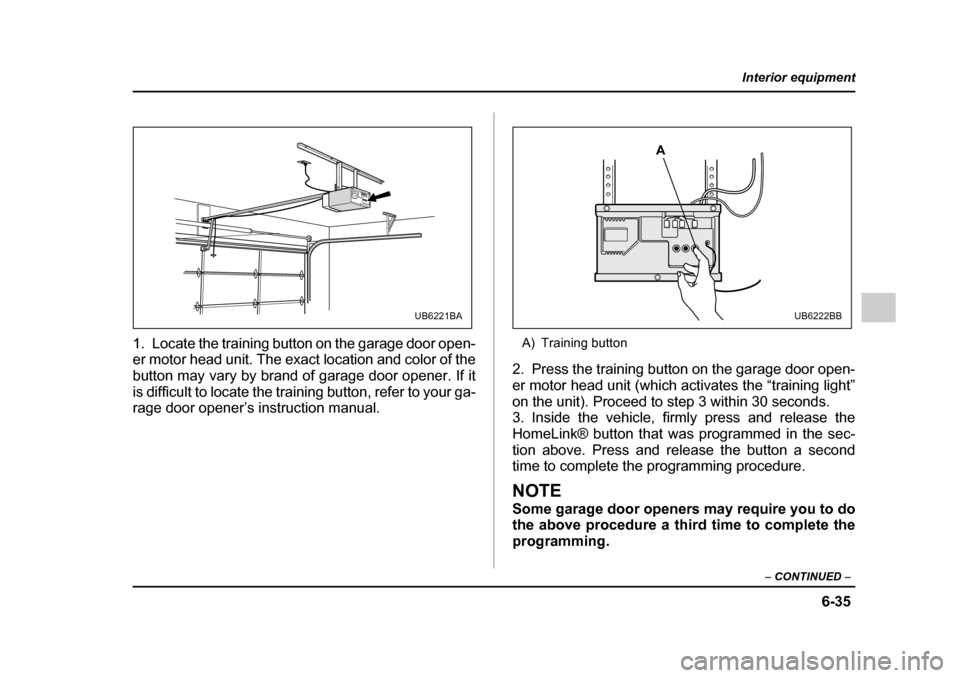
1. Locate the training button on the garage door open-
er motor head unit. The exact location and color of the
button may vary by brand of garage door opener. If it
is difficult to locate the training button, refer to your ga-
rage door opener’s instruction manual. A) Training button
2. Press the training button on the garage door open-
er motor head unit (which activates the “training light”
on the unit). Proceed to step 3 within 30 seconds.
3. Inside the vehicle, firmly press and release the
HomeLink® button that was programmed in the sec-
tion above. Press and release the button a second
time to complete the programming procedure.
NOTE
Some garage door openers may require you to do
the above procedure a third time to complete the
programming.
UB6221BA
A
UB6222BB
Page 353 of 627
6-36
Interior equipment
4. The garage door opener should now recognize the
HomeLink® Wireless Control System and your garage
door opener should activate when the HomeLink®
button is pressed. !
Programming for entrance gates and
garage door openers in Canada
1. Unplug the motor of the entrance gate or garage
door opener from the outlet.
2. Press and hold the two outside buttons until the
HomeLink® indicator light begins to flash (after 20
seconds). Release both buttons.NOTE
If any of the HomeLink® buttons are already pro-
grammed for other devices, skip step 2 because it
clears the memory of all three buttons.
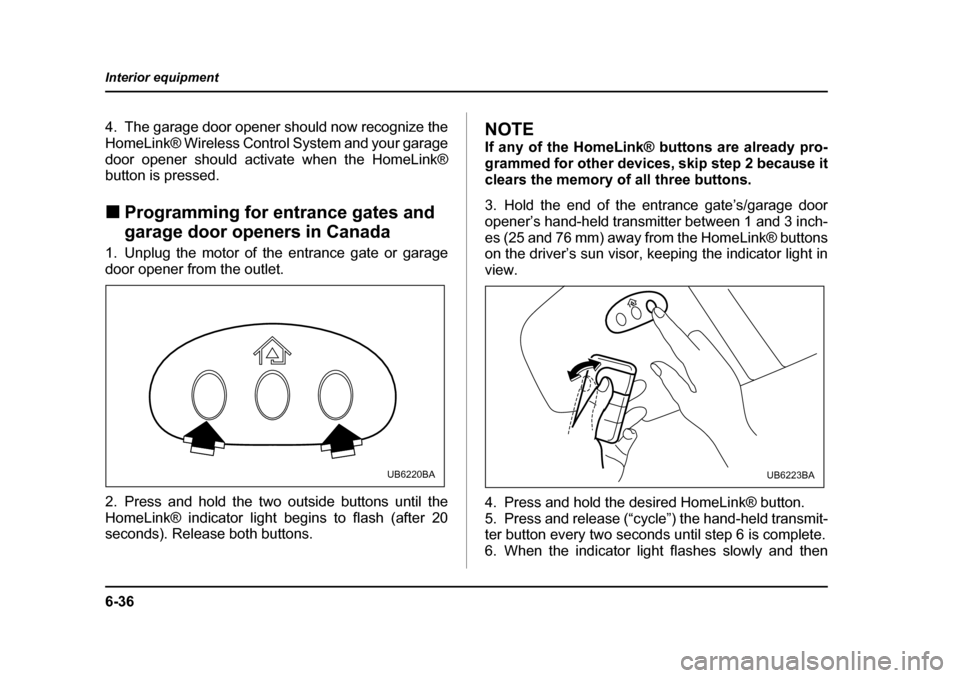
3. Hold the end of the entrance gate’s/garage door
opener’s hand-held transmitter between 1 and 3 inch-
es (25 and 76 mm) away from the HomeLink® buttons
on the driver’s sun visor, keeping the indicator light in view.
4. Press and hold the desired HomeLink® button.
5. Press and release (“cycle”) the hand-held transmit-
ter button every two seconds until step 6 is complete.
6. When the indicator light flashes slowly and then
UB6220BAUB6223BA
Page 354 of 627
6-37
Interior equipment
– CONTINUED –
rapidly after several seconds, release both buttons.
7. Plug the motor of the entrance gate/garage door
opener to the outlet.
8. Test your entrance gate/garage door opener by
pressing the programmed HomeLink® button. !Programming other devices
To program other devices such as door locks, home
lighting and security systems, contact HomeLink at
www.homelink.com or call 1-800-355-3515. ! Operating the HomeLink® Wireless
Control System
Once programmed, the HomeLink® Wireless Control
System can be used to remote-control the devices to
which its buttons are programmed. To activate a de-
vice, simply press the appropriate button. The indica-
tor light illuminates, indicating that the signal is being
transmitted. ! Reprogramming a single HomeLink® button
1. Press and hold the HomeLink® button you wish to
reprogram. DO NOT release the button until step 4
has been completed. 2. When the HomeLink® indicator light begins to flash
slowly (after 20 seconds), position the hand-held
transmitter of the device for which you wish to program the button at 1 to 3 inches (25 to 76 mm) away from
the HomeLink® button surface.
3. Press and hold the hand-held transmitter button.
The HomeLink® indicator light will flash, first slowly
and then rapidly.
4. When the indicator light begins to flash rapidly, re-
lease both buttons.
The programming for the previous device is now
erased and the new device can be operated by push-
ing the HomeLink® button. !
Erasing HomeLink® button memory
NOTE "Performing this procedure erases the memory
of all the preprogrammed buttons simultaneously.
The memory of individual buttons cannot be
erased. " It is recommended that upon the sale of the ve-
hicle, the memory of all programmed HomeLink®
buttons be erased for security purposes.
1. Press and hold the two outside buttons until the in-
dicator light begins to flash (after 20 seconds).
Page 356 of 627

7-1
7
Starting and operating
Fuel ................................................................ 7-2 Fuel requirements ............................................. 7-2
Fuel filler lid and cap ........................................ 7-4
State emission testing (U.S. only) ............... 7-8
Preparing to drive ......................................... 7-10
Starting the engine ....................................... 7-10 Manual transmission vehicle ........................... 7-10
Automatic transmission vehicle ...................... 7-11
Stopping the engine ..................................... 7-12
Manual transmission .................................... 7-13 Shifting speeds ................................................. 7-14
Driving tips ........................................................ 7-15
Automatic transmission – 4 speed ............. 7-16 Selector lever .................................................... 7-17
Selector lever reverse inhibiting function ...... 7-19
Selection of manual mode ............................... 7-20
Maximum speeds .............................................. 7-21
Driving tips ........................................................ 7-23
SPORT mode ..................................................... 7-23
Shift lock release .............................................. 7-24
Automatic transmission – 5 speed ............. 7-25 Selector lever .................................................... 7-26
Selector lever reverse inhibiting function ...... 7-28
Selection of manual mode ............................... 7-30
Maximum speeds .............................................. 7-32
Driving tips ........................................................ 7-33
SPORT mode ..................................................... 7-34
Shift lock release .............................................. 7-35
Rear viscous limited slip differential (LSD) (if equipped) .............................................. 7-36 Power steering .............................................. 7-36
Braking ........................................................... 7-37
Braking tips ....................................................... 7-37
Brake system .................................................... 7-37
Disc brake pad wear warning indicators ........ 7-38
ABS (Anti-lock Brake System) ..................... 7-38 ABS system self-check .................................... 7-39
ABS warning light ............................................. 7-39
Electronic Brake Force Distribution (EBD) system ........................................................ 7-41Steps to take if EBD system fails .................... 7-41
Vehicle Dynamics Control system (if equipped) ............................................... 7-43Vehicle Dynamics Control system monitor .... 7-45
Vehicle Dynamics Control OFF switch ........... 7-48
Tire pressure monitoring system (TPMS) (if equipped) ............................................... 7-49
Parking your vehicle ..................................... 7-51
Cruise control ................................................ 7-53 To set cruise control ........................................ 7-53
To temporarily cancel the cruise control ....... 7-55
To turn off the cruise control ........................... 7-56
To change the cruising speed ......................... 7-56
Cruise control indicator light ........................... 7-57
Cruise control set indicator light .................... 7-58
Page 357 of 627
7-2
Starting and operating
Starting and operatingFuel
Use of a fuel which is low in quality or use of an
inappropriate fuel additive may cause engine
damage.
! Fuel requirements
! 2.5-liter non-turbo models
The 2.5-liter non-turbo engine is designed to operate
using unleaded gasoline with an octane rating of 87
AKI or higher. ! 2.5-liter turbo models and 3.0-liter models
The 2.5-liter turbo engine and 3.0-liter engine are de-
signed to operate using premium unleaded gasoline
with an octane rating of 91 AKI or higher. If premium
unleaded gasoline is not available, regular unleaded
gasoline with an octane rating of 87 AKI or higher may
be temporarily used.
For optimum engine performance and driveability, it is
required (for 2.5-liter turbo models), and recommend-
ed (for 3.0-liter models) that you use premium grade
unleaded gasoline.
NOTE
Be sure to use premium unleaded gasoline of 91
AKI or higher for a 2.5-liter turbo engine model. If
other gasoline (lower than 91 AKI) is used, knock-
ing, reduced output and poor accelerator re-
sponse will result. ! Fuel octane rating
This octane rating is the average of the Research Oc-
tane and Motor Octane numbers and is commonly re-
ferred to as the Anti Knock Index (AKI).
Using a gasoline with a lower octane rating can cause
persistent and heavy knocking, which can damage the
engine. Do not be concerned if your vehicle some-
times knocks lightly when you drive up a hill or when
you accelerate. See your dealer or a qualified service
technician if you use a fuel with the specified octane
rating and your vehicle knocks heavily or persistently. ! Unleaded gasoline
The neck of the fuel filler pipe is designed to accept
only an unleaded gasoline filler nozzle. Under no cir-
cumstances should leaded gasoline be used because
it will damage the emission control system and may
impair driveability and fuel economy. ! California fuel
If your vehicle was certified to California Emission