tow SUBARU OUTBACK 2010 5.G User Guide
[x] Cancel search | Manufacturer: SUBARU, Model Year: 2010, Model line: OUTBACK, Model: SUBARU OUTBACK 2010 5.GPages: 448, PDF Size: 7.36 MB
Page 135 of 448
position and turns off after approximately 2 seconds.
This is an indication that the ABS system
is working properly.
CAUTION
If the warning light behaves as
follows, the ABS system may not
work properly.
When the warning light illuminates,
the ABS function shuts down; how-
ever, the conventional brake system
continues to operate normally. . The warning light does not illu-
minate when the ignition switch
is turned to the “ON ”position.
. The warning light illuminates
when the ignition switch is
turned to the “ON ”position, but
it does not turn off even when the
vehicle speed exceeds approxi-
mately 8 mph (12 km/h).
. The warning light illuminates dur-
ing driving.
If any of these conditions occur,
have the ABS system repaired at
the first available opportunity by
your SUBARU dealer.
The ABS warning light illuminates to- gether with the brake system warning light
if the EBD system malfunctions. For
further details of the EBD system mal-
function warning, refer to
“Brake system
warning light ”F 3-17.
NOTE
If the warning light behavior is as
described in the following conditions,
the ABS system may be considerednormal. . The warning light illuminates right
after the engine is started but turns off
immediately, remaining off.. The warning light remains illumi-
nated after the engine has been started,
but it turns off when the vehicle speed
reaches approximately 8 mph (12km/h).. The warning light illuminates during
driving, but it turns off immediately and
remains off.
When driving with an insufficient battery
voltage such as when the engine is jump
started, the ABS warning light may illumi-
nate. This is due to the low battery voltage
and does not indicate a malfunction.
When the battery becomes fully charged,
the light will turn off. &
Brake system
warning light
WARNING
. Driving with the brake system
warning light on is dangerous.
This indicates your brake system
may not be working properly. If
the light remains illuminated,
have the brakes inspected by a
SUBARU dealer immediately.
. If at all in doubt about whether
the brakes are operating prop-
erly, do not drive the vehicle.
Have your vehicle towed to the
nearest SUBARU dealer for re-
pair.
. If the brake system warning light
flashes, the electronic parking
brake system may be malfunc-
tioning. Immediately stop your
vehicle in a safe location, use
tire stops under the tires to
prevent the vehicle from moving
and contact your SUBARU deal-
er. For details, refer to “Electro-
nic parking brake ”F 7-34.
Instruments and controls
3-17
– CONTINUED –
Page 136 of 448

3-18Instruments and controls
NOTE . When the ignition switch is turned to
the “LOCK ”position with the electronic
parking brake applied, the brake sys-
tem warning light remains illuminated
for approximately 30 seconds and then
turns off.. When the electronic parking brake
switch is pressed to apply the electro-
nic parking brake while the ignition
switch is in the “LOCK ”position, the
brake system warning light illuminates,
remains illuminated for approximately
30 seconds and then turns off.. Even if the brake system warning
light flashes, if the warning light beha-
vior is as described in the following
examples, the electronic parking brake
system is not malfunctioning.
–The warning light turns off when
the electronic parking brake is ap-
plied or released. – The warning light turns off when
the ignition switch is turned to the “ ON ”position again.
. The brake system warning light may
flash when the engine is started im-
mediately after the electronic parking
brake is applied or released. However,
the electronic parking brake system is
not malfunctioning if the warning light
turns off after the electronic parking brake is applied or released after that. .
The brake system warning light may
flash after the electronic parking brake
is frequently applied and released.
However, the electronic parking brake
system is not malfunctioning if the light
turns off for a short period of time.
This light has the following functions: ! Parking brake warning
The light illuminates with the parking
brake applied while the ignition switch is
in the “ON ”position. It turns off when the
parking brake is fully released. ! Brake fluid level warning
This light illuminates when the brake fluid
level has dropped to near the “MIN ”level
of the brake fluid reservoir with the ignition
switch in the “ON ”position and with the
parking brake fully released.
If the brake system warning light should
illuminate while driving (with the parking
brake fully released and with the ignition
switch positioned in “ON ”), it could be an
indication of leaking of brake fluid or worn
brake pads. If this occurs, immediately
stop the vehicle at the nearest safe place
and check the brake fluid level. If the fluid
level is below the “MIN ”mark in the
reservoir, do not drive the vehicle. Have
the vehicle towed to the nearest SUBARU dealer for repair. !
Electronic Brake Force Distribution
(EBD) system warning
The brake system warning light also
illuminates if a malfunction occurs in the
EBD system. In that event, it illuminates
together with the ABS warning light.
The EBD system may be malfunctioning if
the brake system warning light and ABS
warning light illuminate simultaneously
during driving.
Even if the EBD system fails, the conven-
tional braking system will still function.
However, the rear wheels will be more
prone to locking when the brakes are
applied harder than usual and the vehi-cle ’s motion may therefore become some-
what harder to control.
If the brake system warning light and ABS
warning light illuminate simultaneously,
take the following steps:
1. Stop the vehicle in the nearest safe,
flat place.
2. Shut down the engine, then restart it.
3. Release the parking brake. If both
warning lights turn off, the EBD system
may be malfunctioning.
Drive carefully to the nearest SUBARU
dealer and have the system inspected.
4. If both warning lights illuminate again
and remain illuminated after the engine
Page 137 of 448
has been restarted, shut down the engine
again, apply the parking brake, and check
the brake fluid level.
5. If the brake fluid level is not below the “MIN ”mark, the EBD system may be
malfunctioning. Drive carefully to the
nearest SUBARU dealer and have the
system inspected.
6. If the brake fluid level is below the “ MIN ”mark, DO NOT drive the vehicle.
Instead, have the vehicle towed to the
nearest SUBARU dealer for repair. ! Electronic parking brake system warning
The brake system warning light flashes
when the electronic parking brake system
is malfunctioning. If the warning light
flashes, promptly park in a safe location
as soon as possible and contact your
SUBARU dealer.
The brake system warning light remains
illuminated when the parking brake cannot
be released even if the parking brake
switch is pulled. For details, refer to“ Electronic parking brake ”F 7-34.
! Parking brake apply inhibit warning
The brake system warning light flashes for
10 seconds and a chirp sound will be
heard if the parking brake switch is
operated when the parking brake cannot be applied. !
Frequent operation warning
The brake system warning light flashes for
20 seconds and a chirp sound will be
heard if the parking brake switch is
operated too frequently. In this case, the
operation of the parking brake switch is
restricted to protect the electronic parking
brake system.
NOTE
Wait until the warning light turns off. ! Emergency released warning
The brake system warning light flashes
when the parking brake is automatically
released in case of an emergency. & Hill Holder indicator light
WARNING
If the Hill Holder indicator light does
not illuminate even when the Hill
Holder switch is pressed to activate
the Hill Holder function, the electro-
nic parking brake system may be
malfunctioning. Immediately stop
the vehicle in a safe location and
contact your SUBARU dealer. The light illuminates when the ignition
switch is turned to the
“ON ”position and
turns off after approximately 2 seconds.
The light illuminates when the Hill Holder
switch is pressed to activate the Hill
Holder function.
& Low fuel warning light
The low fuel warning light illuminates
when the tank is nearly empty approxi-
mately 2.6 US gal (10.0 liters, or 2.2 Imp
gal). It only operates when the ignition
switch is in the “ON ”position.
NOTE
This light does not turn off unless the
tank is replenished up to an internal
fuel quantity of approximately 3.7 US
gal (14 liters, 3.1 Imp gal).
CAUTION
Promptly put fuel in the tank when-
ever the low fuel warning light
illuminates. Engine misfires as a
result of an empty tank could cause
damage to the engine. Instruments and controls
3-19
– CONTINUED –
Page 146 of 448
3-28Instruments and controls
:Auto on/off headlights
When the ignition switch is in the “ON ”
position, the headlights, instrument panel
illumination, front side marker lights, tail
lights and license plate lights are auto-
matically on or off depending on the level
of the ambient light.
NOTE
The sensitivity of the auto on/off head-
lights can be changed by your
SUBARU dealer. Contact your SUBARU
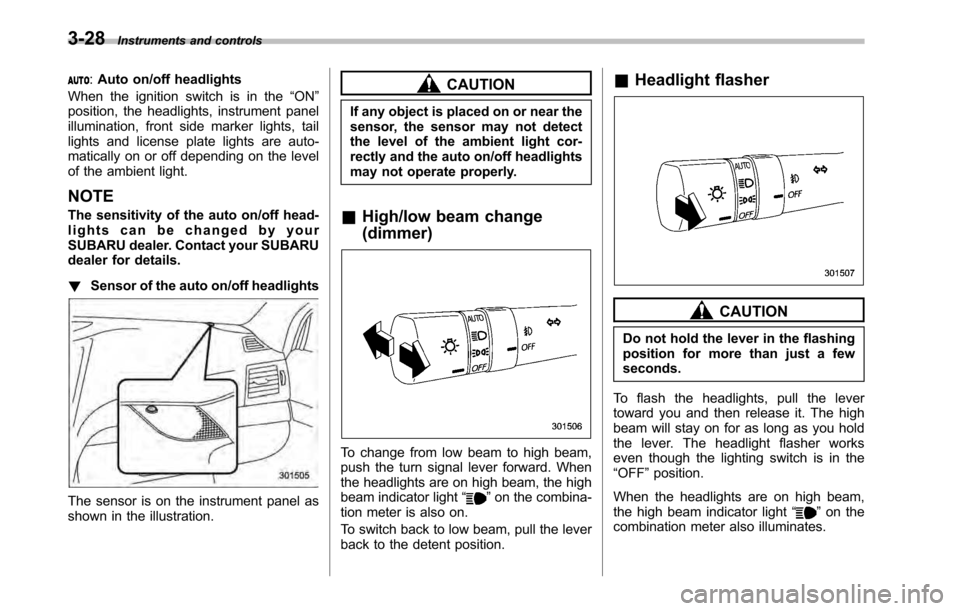
dealer for details. ! Sensor of the auto on/off headlights
The sensor is on the instrument panel as
shown in the illustration.
CAUTION
If any object is placed on or near the
sensor, the sensor may not detect
the level of the ambient light cor-
rectly and the auto on/off headlights
may not operate properly.
& High/low beam change (dimmer)
To change from low beam to high beam,
push the turn signal lever forward. When
the headlights are on high beam, the high
beam indicator light “
”on the combina-
tion meter is also on.
To switch back to low beam, pull the lever
back to the detent position. &
Headlight flasher
CAUTION
Do not hold the lever in the flashing
position for more than just a fewseconds.
To flash the headlights, pull the lever
toward you and then release it. The high
beam will stay on for as long as you hold
the lever. The headlight flasher works
even though the lighting switch is in the“ OFF ”position.
When the headlights are on high beam,
the high beam indicator light “
”on the
combination meter also illuminates.
Page 151 of 448
!Wiper intermittent time control
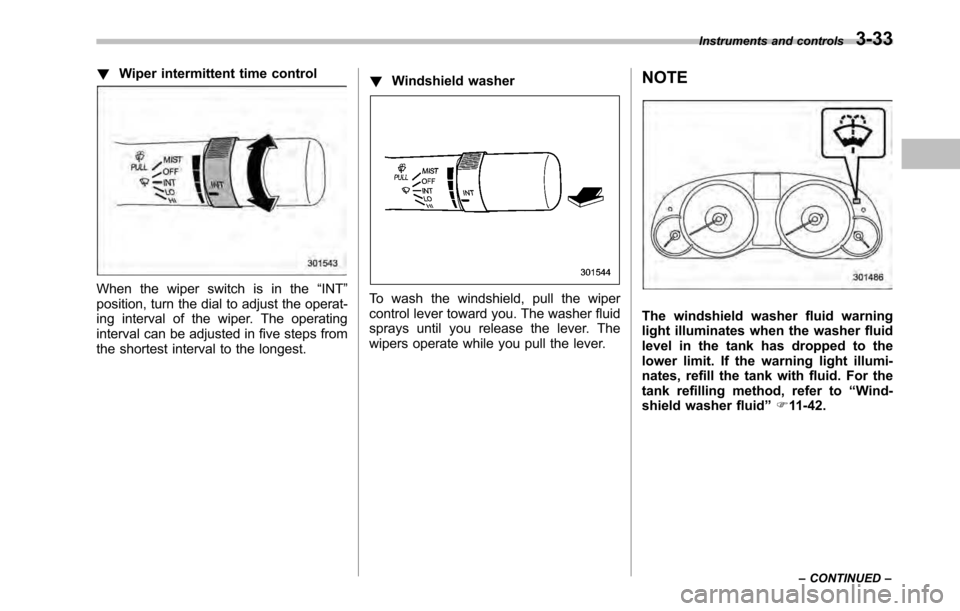
When the wiper switch is in the “INT ”
position, turn the dial to adjust the operat-
ing interval of the wiper. The operating
interval can be adjusted in five steps from
the shortest interval to the longest. !
Windshield washerTo wash the windshield, pull the wiper
control lever toward you. The washer fluid
sprays until you release the lever. The
wipers operate while you pull the lever. NOTE
The windshield washer fluid warning
light illuminates when the washer fluid
level in the tank has dropped to the
lower limit. If the warning light illumi-
nates, refill the tank with fluid. For the
tank refilling method, refer to
“Wind-
shield washer fluid ”F 11-42.
Instruments and controls
3-33
– CONTINUED –
Page 154 of 448
3-36Instruments and controls
NOTE .Turn on the defogger and deicer
system if the wipers are frozen to the windshield.. If the windshield is covered with
snow, remove the snow so that the
windshield wiper deicer works effec-
tively.. While the defogger and deicer sys-
tem is in the continuous operation
mode, if the vehicle speed remains at
9mph(15km/h)orlowerfor15
minutes, the windshield wiper deicer
automatically stops operating, though
the rear window defogger and outside
mirror defogger maintain continuous
operation in this condition. Mirrors
Always check that the inside and outside
mirrors are properly adjusted before you
start driving. &
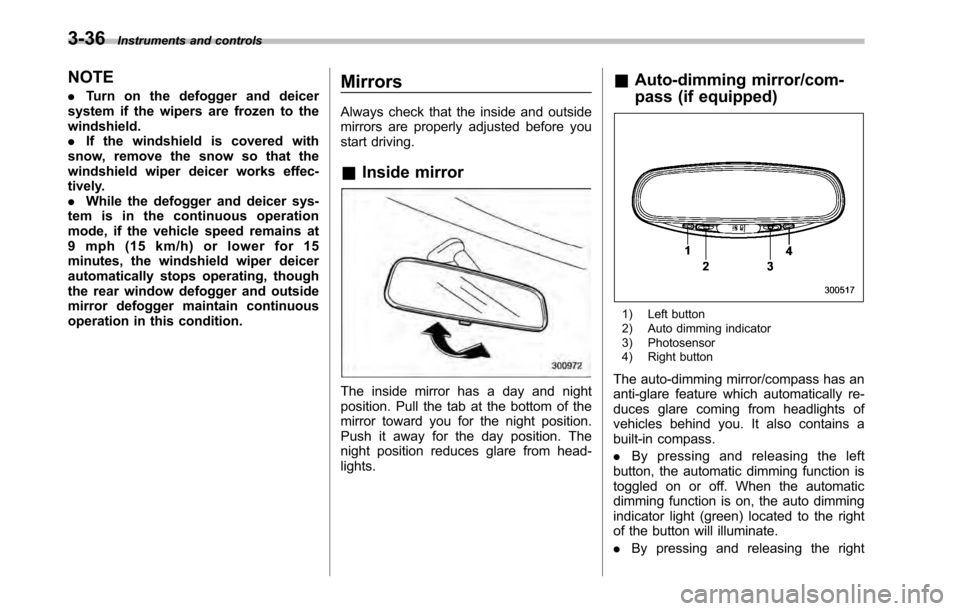
Inside mirror
The inside mirror has a day and night
position. Pull the tab at the bottom of the
mirror toward you for the night position.
Push it away for the day position. The
night position reduces glare from head-lights. &
Auto-dimming mirror/com-
pass (if equipped)
1) Left button
2) Auto dimming indicator
3) Photosensor
4) Right button
The auto-dimming mirror/compass has an
anti-glare feature which automatically re-
duces glare coming from headlights of
vehicles behind you. It also contains a
built-in compass. . By pressing and releasing the left
button, the automatic dimming function is
toggled on or off. When the automatic
dimming function is on, the auto dimming
indicator light (green) located to the right
of the button will illuminate. . By pressing and releasing the right
Page 165 of 448
3. Turn the temperature control dial all
the way to the right.
4. Set the fan speed control dial to the
highest speed. !Heating and defrosting
To direct warm air toward the floor and the windshield:
1. Set the air inlet selection button to the
OFF position.
2. Press the “
”button.
3. Set the temperature control dial to the
most comfortable level.
4. Set the fan speed control dial to the
desired speed. ! Heating
To direct warm air toward the floor:
1. Set the air inlet selection button to the
OFF position.
2. Press the “
”button.
3. Set the temperature control dial to the
most comfortable level.
4. Set the fan speed control dial to the
desired speed. ! Bi-level heating
This setting allows you to direct air of
different temperatures from the instrument
panel and foot outlets. The air from the foot outlets is slightly warmer than from
the instrument panel outlets.
1. Set the air inlet selection button to the
OFF position.
2. Press the
“
”button.
3. Set the temperature control dial to the
desired temperature level.
4. Set the fan speed control dial to the
desired speed.
Setting the temperature control dial fully
turned to the red area or blue area
decreases the temperature difference
between the air from the instrument panel
outlets and the air from the foot outlets. ! Ventilation
To force outside air through the instrument
panel outlets:
1. Set the air inlet selection button to the
OFF position.
2. Press the “
”button.
3. Set the temperature control dial all the
way left.
4. Set the fan speed control dial to the
desired speed.
When driving on a dusty road, set the air
inlet control button to the ON position.
WARNING
Continued operation in the ON posi-
tion may fog up the windows. Switch
to the OFF position as soon as the
outside dusty condition clears.
& Air conditioner operation
! Cooling or dehumidifying
For cooling and dehumidification of the
passenger compartment, air flows through
the instrument panel outlets:
1. Set the air inlet selection button to the
OFF position.
2. Press the “
”button.
3. Set the air conditioner button to the “ ON ”position.
4. Set the temperature control dial to the
blue side.
5. Set the fan speed control dial at the
desired speed. ! Defrosting or defogging
To direct warm air to the windshield and
front door windows:
1. Press the “
”button.
2. Set the temperature control dial to the
red side.
3. Set the fan speed control dial at the
highest speed. Climate control
4-7
– CONTINUED –
Page 169 of 448
button. To decrease the temperature
setting, press the“”side of the tempera-
ture control button.
Each temperature setting is shown on the
display. When the “LO ”is shown, the
system provides maximum cooling perfor-
mance. When the “HI ” is shown, the
system provides maximum heating perfor-mance. ! DUAL mode
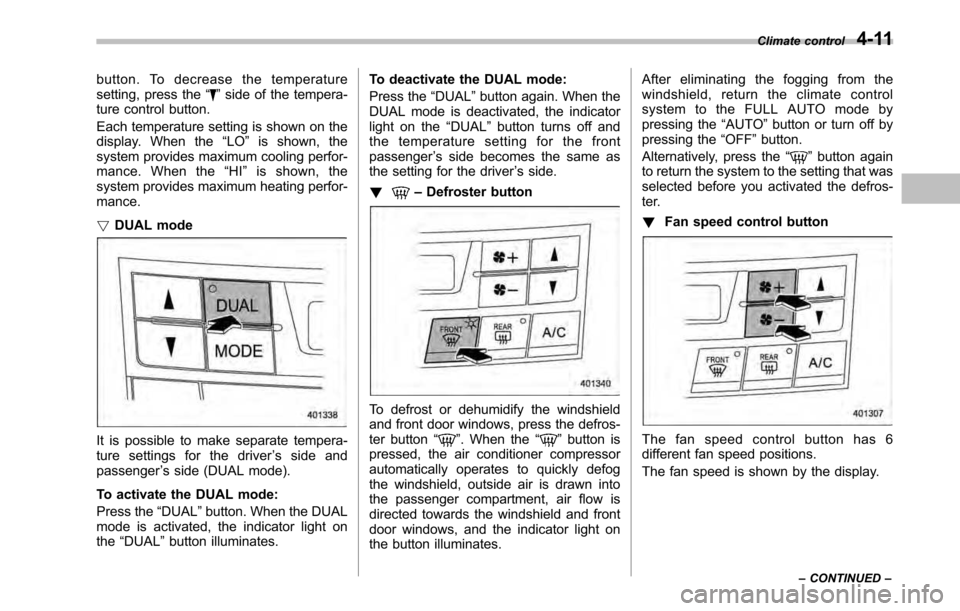
It is possible to make separate tempera-
ture settings for the driver ’s side and
passenger ’s side (DUAL mode).
To activate the DUAL mode:
Press the “DUAL ”button. When the DUAL
mode is activated, the indicator light on the “DUAL ”button illuminates. To deactivate the DUAL mode:
Press the
“DUAL ”button again. When the
DUAL mode is deactivated, the indicator
light on the “DUAL ”button turns off and
the temperature setting for the frontpassenger ’s side becomes the same as
the setting for the driver ’s side.
!
– Defroster button
To defrost or dehumidify the windshield
and front door windows, press the defros-
ter button “
”. When the “”button is
pressed, the air conditioner compressor
automatically operates to quickly defog
the windshield, outside air is drawn into
the passenger compartment, air flow is
directed towards the windshield and front
door windows, and the indicator light on
the button illuminates. After eliminating the fogging from the
windshield, return the climate control
systemtotheFULLAUTOmodeby
pressing the
“AUTO ”button or turn off by
pressing the “OFF ”button.
Alternatively, press the “
”button again
to return the system to the setting that was
selected before you activated the defros-
ter. ! Fan speed control button
The fan speed control button has 6
different fan speed positions.
The fan speed is shown by the display. Climate control
4-11
– CONTINUED –
Page 219 of 448

Interior light......................................................... 6-2
Dome light .......................................................... 6-2
Map light ............................................................. 6-2
Cargo area light (Outback) ................................... 6-3
Sun visors ........................................................... 6-4
Sun visor extension plate .................................... 6-4
Vanity mirror with light ........................................ 6-5
Storage compartment ......................................... 6-5
Glove box ........................................................... 6-6
Center console box ............................................. 6-6
Overhead console ............................................... 6-8
Pocket (if equipped) ............................................ 6-8
Cup holder ........................................................... 6-8
Front passenger ’s cup holder .............................. 6-9
Rear passenger ’s cup holder ............................... 6-9
Bottle holders ...................................................... 6-9
Accessory power outlets ................................... 6-10 Ashtray (if equipped)
......................................... 6-12
Coat hook ........................................................... 6-13
Shopping bag hook ........................................... 6-14
Legacy .............................................................. 6-14
Outback ............................................................ 6-14
Floor mat ............................................................ 6-14
Cargo area cover (if equipped) ......................... 6-15
Using the cover ................................................. 6-15
To remove the cover housing ... .......................... 6-16
Stowage of the cargo area cover ........................ 6-16
To install the cover housing ............................... 6-17
Convenient tie-down hooks (if equipped) ........ 6-17
Under-floor storage compartment .................... 6-18
Rear view camera (if equipped) ........................ 6-19
How to use the rear view camera ....................... 6-20
Viewing range on the screen .............................. 6-21
Help line ............................................................ 6-22 Interior equipment
6
Page 222 of 448
6-4Interior equipment
.The ignition switch is turned from the
“ LOCK ”position to the “Acc ”or “ON ”
position. . The rear gate is locked using the
remote keyless entry transmitter.
The setting of the period for which the
lights remain on (OFF delay timer) can be
changed by a SUBARU dealer. Contact
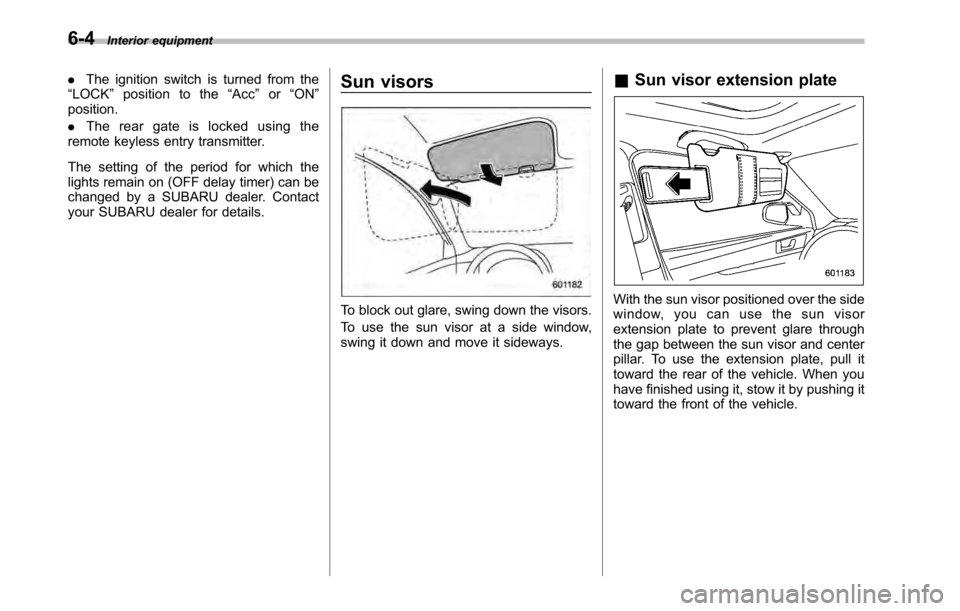
your SUBARU dealer for details. Sun visors
To block out glare, swing down the visors.
To use the sun visor at a side window,
swing it down and move it sideways.&
Sun visor extension plateWith the sun visor positioned over the side
window, you can use the sun visor
extension plate to prevent glare through
the gap between the sun visor and center
pillar. To use the extension plate, pull it
toward the rear of the vehicle. When you
have finished using it, stow it by pushing it
toward the front of the vehicle.