Radio SUBARU OUTBACK 2012 5.G User Guide
[x] Cancel search | Manufacturer: SUBARU, Model Year: 2012, Model line: OUTBACK, Model: SUBARU OUTBACK 2012 5.GPages: 474, PDF Size: 17.45 MB
Page 194 of 474
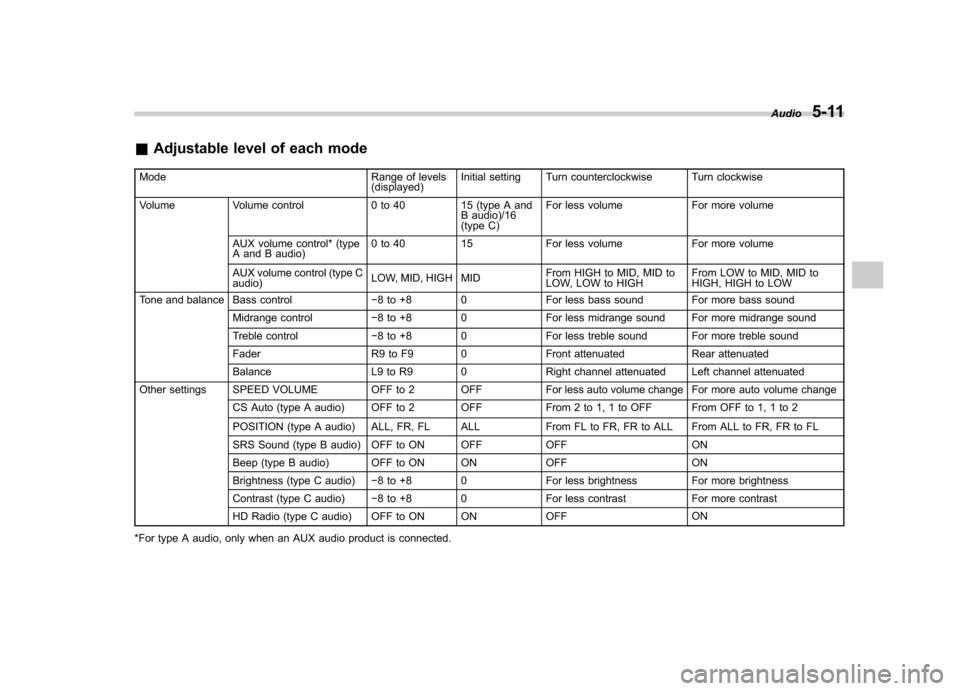
&Adjustable level of each mode
Mode Range of levels (displayed)Initial setting Turn counterclockwise Turn clockwise
Volume Volume control 0 to 40 15 (type A and B audio)/16
(type C)For less volume For more volume
AUX volume control* (type
A and B audio) 0 to 40 15 For less volume For more volume
AUX volume control (type Caudio) LOW, MID, HIGH MID From HIGH to MID, MID to
LOW, LOW to HIGHFrom LOW to MID, MID to
HIGH, HIGH to LOW
Tone and balance Bass control 8 to +8 0 For less bass sound For more bass sound
Midrange control 8 to +8 0 For less midrange sound For more midrange sound
Treble control 8 to +8 0 For less treble sound For more treble sound
Fader R9 to F9 0 Front attenuated Rear attenuated
Balance L9 to R9 0 Right channel attenuated Left channel attenuated
Other settings SPEED VOLUME OFF to 2 OFF For less auto volume change For more auto volume change
CS Auto (type A audio) OFF to 2 OFF From 2 to 1, 1 to OFF From OFF to 1, 1 to 2
POSITION (type A audio) ALL, FR, FL ALL From FL to FR, FR to ALL From ALL to FR, FR to FL
SRS Sound (type B audio) OFF to ON OFF OFF ON
Beep (type B audio) OFF to ON ON OFF ON
Brightness (type C audio) 8 to +8 0 For less brightness For more brightness
Contrast (type C audio) 8 to +8 0 For less contrast For more contrast
HD Radio (type C audio) OFF to ON ON OFF ON
*For type A audio, only when an AUX audio product is connected. Audio
5-11
Page 195 of 474
5-12Audio
FM/AM radio operation
Press the “FM ”or “AM ”button (type A and
B audio)/ “FM/AM ”button (type C audio)
when the radio is off to turn on the radio.
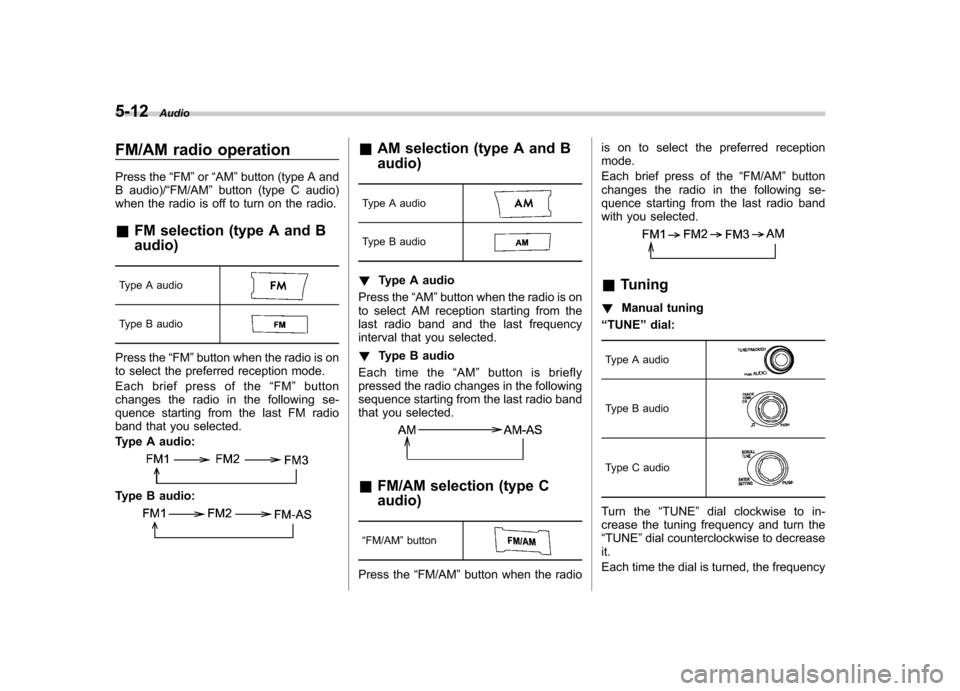
& FM selection (type A and B audio)
Type A audio
Type B audio
Press the “FM ”button when the radio is on
to select the preferred reception mode.
Each brief press of the “FM ”button
changes the radio in the following se-
quence starting from the last FM radio
band that you selected.
Type A audio:
Type B audio:
& AM selection (type A and B audio)
Type A audio
Type B audio
! Type A audio
Press the “AM ”button when the radio is on
to select AM reception starting from the
last radio band and the last frequency
interval that you selected. ! Type B audio
Each time the “AM ”button is briefly
pressed the radio changes in the following
sequence starting from the last radio band
that you selected.
& FM/AM selection (type C audio)
“ FM/AM ”button
Press the “FM/AM ”button when the radio is on to select the preferred reception mode.
Each brief press of the
“FM/AM ”button
changes the radio in the following se-
quence starting from the last radio band
with you selected.
& Tuning
! Manual tuning
“ TUNE ”dial:
Type A audio
Type B audio
Type C audio
Turn the “TUNE ”dial clockwise to in-
crease the tuning frequency and turn the “ TUNE ”dial counterclockwise to decrease
it.
Each time the dial is turned, the frequency
Page 196 of 474
interval can be changed between 10 kHz
in the AM mode and 0.2 MHz in the FMmode. !Stereo indicator (type A and B audio)
The stereo indicator “ST ”will illuminate
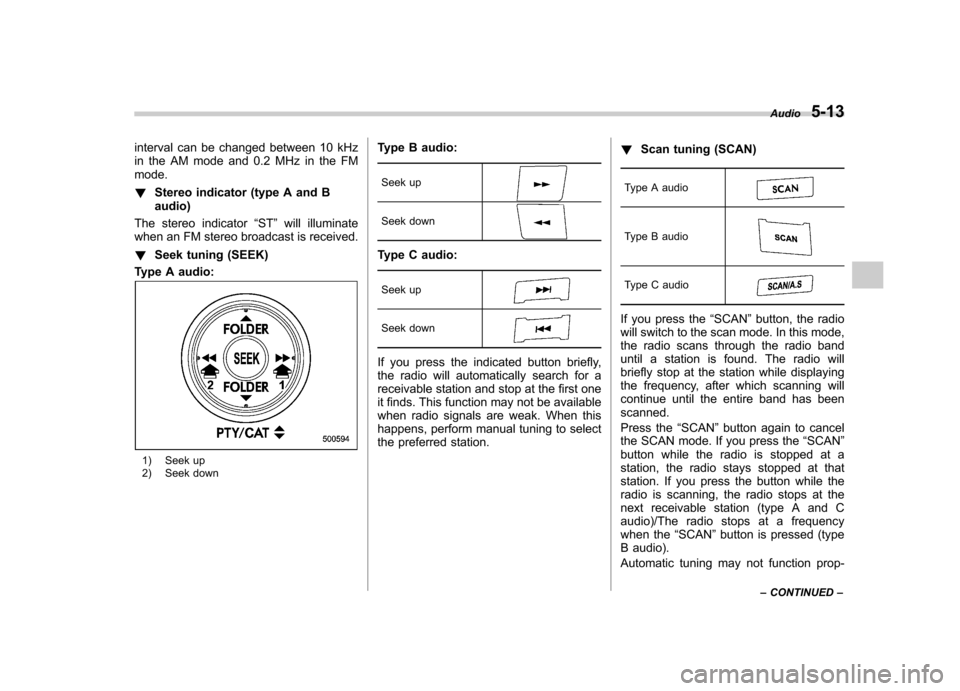
when an FM stereo broadcast is received. ! Seek tuning (SEEK)
Type A audio:
1) Seek up
2) Seek down Type B audio:
Seek up
Seek down
Type C audio:Seek up
Seek down
If you press the indicated button briefly,
the radio will automatically search for a
receivable station and stop at the first one
it finds. This function may not be available
when radio signals are weak. When this
happens, perform manual tuning to select
the preferred station. !
Scan tuning (SCAN)
Type A audio
Type B audio
Type C audio
If you press the “SCAN ”button, the radio
will switch to the scan mode. In this mode,
the radio scans through the radio band
until a station is found. The radio will
briefly stop at the station while displaying
the frequency, after which scanning will
continue until the entire band has beenscanned.
Press the “SCAN ”button again to cancel
the SCAN mode. If you press the “SCAN ”
button while the radio is stopped at a
station, the radio stays stopped at that
station. If you press the button while the
radio is scanning, the radio stops at the
next receivable station (type A and C
audio)/The radio stops at a frequency
when the “SCAN ”button is pressed (type
B audio).
Automatic tuning may not function prop- Audio
5-13
– CONTINUED –
Page 198 of 474

mode after approximately 10 seconds. &HD Radio
®Technology (Digi-
tal AM and FM Radio) (type C audio)
! HD Radio Technology Information
! What is HD Radio
®Technology and
how does it work?
HD Radio
TMTechnology is the digital
evolution of analog AM/FM radio. Your
radio product has a special receiver which
allows it to receive digital broadcasts
(where available) in addition to the analog
broadcasts it already receives. Digital
broadcasts have better sound quality than
analog broadcasts as digital broadcasts
provide free, crystal clear audio with no static or distortion. For more information,
and a guide to available radio stations and
programming, please visit www.hdradio.com. !
Using HD Radio
®Technology
As a consumer works through the analog
radio stations, (where applicable) the radio
receiver will automatically tune from an
analog signal to a digital signal within five
seconds. An orange
logo indicator will
be seen on the screen when in digital. NOTE The
logo will first appear in a gray
color indicating the station is indeed
(an analog and) a digital station. Once
the digital signal is acquired, the logo
will be a bright orange color. ! Benefits of HD Radio
®Technology
1.
Information: The song title, artist name
and music genre will appear on the screen
when available by the radio station. 2.
Multicast: On the FM radio frequency
most digital stations have “multiple ”or
supplemental programs on one FM sta-
tion. When the consumer pushes the
multicast button, they will move between
the multiple unique program content. 3.
Clear Reception: Unlike analog radio
signals, digital signals do not pass along static, hiss or pops. !
HD Radio
®Technology Trouble-
shooting
1.
Station blending: When acquiring a
radio station, as usual, the radio will play
content in analog. If the radio verifies the
broadcast is an HD Radio Technology
station, it will then shift or blend smoothly
to a digital signal within five seconds.
Depending on the station quality, the
consumer may hear a slight sound change
when the station switches from the analog
to digital signal. 2.
Reception area: Topography of the
earth can affect radio signals. For exam-
ple, when a vehicle is behind a hill or large
building from the radio tower location
analog reception will be poor and it is
highly likely that HD Radio reception will
not occur. When a consumer is on the
multicast or supplemental programming
(HD2/HD3/HD4) and the reception is
weak or lost, this will result in a “mute ”
condition. On the main or HD1 program, a
weak or lost digital signal will result in the
playing of an analog signal until a digital
signal is available. 3.
Station issues: In order to provide the
best experience, a contact form has been
developed to report any radio station
issues found while listening to a broad- Audio
5-15
– CONTINUED –
Page 199 of 474
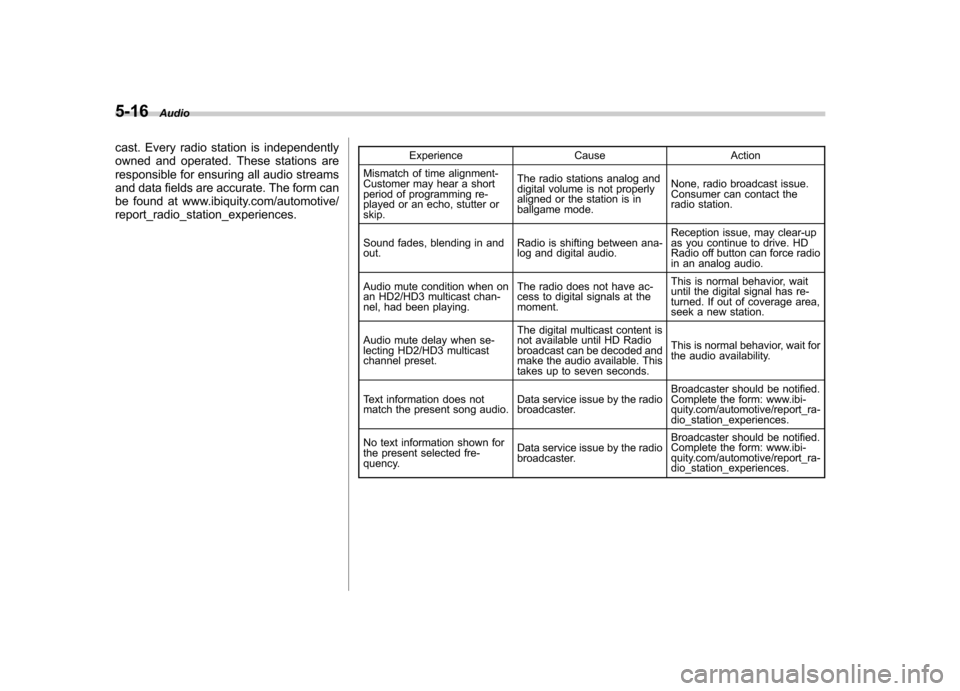
5-16Audio
cast. Every radio station is independently
owned and operated. These stations are
responsible for ensuring all audio streams
and data fields are accurate. The form can
be found at www.ibiquity.com/automotive/report_radio_station_experiences. Experience Cause Action
Mismatch of time alignment-
Customer may hear a short
period of programming re-
played or an echo, stutter or skip. The radio stations analog and
digital volume is not properly
aligned or the station is in
ballgame mode.
None, radio broadcast issue.
Consumer can contact the
radio station.
Sound fades, blending in andout. Radio is shifting between ana-
log and digital audio.Reception issue, may clear-up
as you continue to drive. HD
Radio off button can force radio
in an analog audio.
Audio mute condition when on
an HD2/HD3 multicast chan-
nel, had been playing. The radio does not have ac-
cess to digital signals at the moment.This is normal behavior, wait
until the digital signal has re-
turned. If out of coverage area,
seek a new station.
Audio mute delay when se-
lecting HD2/HD3 multicast
channel preset. The digital multicast content is
not available until HD Radio
broadcast can be decoded and
make the audio available. This
takes up to seven seconds.
This is normal behavior, wait for
the audio availability.
Text information does not
match the present song audio. Data service issue by the radio
broadcaster.Broadcaster should be notified.
Complete the form: www.ibi-
quity.com/automotive/report_ra-
dio_station_experiences.
No text information shown for
the present selected fre-
quency. Data service issue by the radio
broadcaster.Broadcaster should be notified.
Complete the form: www.ibi-
quity.com/automotive/report_ra-
dio_station_experiences.
Page 200 of 474
!Other information
HD Radio Technology manufactured un-
der license from iBiquity Digital Corpora-
tion. U.S. and Foreign Patents. HD Radio
®
and the HD, HD Radio, and “Arc ”logos
are proprietary trademarks of iBiquity
Digital Corp. ! HD Radio selection
Press the
button while receiving FM
radio (except analog broadcast). The next
channel of the station that is being
received will play. ! Mode selection
Turn the “SETTING ”dial and select the
HD Radio ON mode (hybrid mode) or OFF
mode (analog mode). For details, refer to“ Audio settings (type C audio) ”F 5-9.
NOTE
Depending on the broadcasting area,
the digital signal may not be received in
an area where the analog signal can be
properly received, or the system fre-
quently switches the channels between
the digital and analog signals. How-
ever, this does not indicate a malfunc-
tion. If this frequent switching between
digital and analog causes annoyance,
set the radio to the analog mode (HD
Radio off mode) that provides the same
radio broadcasting quality as a con- ventional radio. !
HD Radio indicator
The
indicator illuminates while the
digital broadcast is received during the
HD Radio ON mode. & RBDS text display
Type A audio
Type B audio
Type C audio
! Type A and B audio
If the PS (Program Service Name) and/or
RT (Radio Text) are available, pressingthe “TEXT ”button changes the display
among PS, RT and frequency. The initial
setting is “PS ”.
NOTE . The maximum number of characters
that can be displayed for PS is 8. . The maximum number of characters
that can be displayed for RT is 64.. If RT is 16 characters or longer,
press and hold the “TEXT ”button in order to change the page. !
Type C audio
Press and hold the “HD/TEXT ”button to
show the next page when the text is not
fully displayed while the PSD (Program
Service Data) or RT (Radio Text) service
is received.
NOTE . When the HD Radio function is
turned on, PSD provides additional
information about the broadcast. Text
data such as “Title ”and “Artist ”is
displayed on the screen. To display text
data other than that which is currently
being displayed, turn the “SETTING ”
dial.. When the HD Radio function is
turned off (HD Radio off mode), the
radio text is displayed on the screen
while receiving the broadcasting sta-
tion with RBDS (Radio Broadcast DataSystem).. The maximum number of characters
that can be displayed is 128. Audio
5-17
– CONTINUED –
Page 201 of 474
5-18Audio
&Station preset
! How to preset stations
1. Select the preferred reception mode.
2. Select the preferred station.
3. Press and hold one of the preset
buttons (from
to) to store the
frequency. If the button is pressed briefly,
the preceding selection will remain in the
memory.
NOTE . Up to six stations for each reception
mode may be preset. . If the connection between the radio
and battery is broken for any reason
such as vehicle maintenance or radio
removal, all stations stored in the
preset buttons are cleared. If this
occurs, it is necessary to reset the
preset buttons.. If a cell phone is placed near the
radio, it may cause the radio to emit
noise when a phone call is received.
This noise does not indicate a radiomalfunction.. For type C audio, if you press and
hold a preset button while receiving a
broadcasting station with SPS (Supple-
mental Program Service), the station
will be stored in the memory for that preset button. !
Selecting preset stations
1. Select the preferred reception mode.
2. Press the preferred preset button (from
to) briefly.
NOTE
For type C audio, if the preset button
which stores a broadcasting station
with SPS (Supplemental Program Ser-
vice) while the HD Radio OFF mode isselected, “No digital data available ”will
be displayed and the volume will be
reduced to zero. ! Auto-store
Auto-store button:
Type A audio
Type B audio
Type C audio
Using the Auto-store function, you can
automatically store 6 stations on the current waveband by pressing and holding
the Auto-store button. Use Auto-store to
quickly find the strongest stations, for
example when traveling through different
reception areas. NOTE .
When you use Auto-store, the new
stations replace any stations pre-
viously stored.. Interrupting Auto-store: If you acci-
dentally press the Auto-store button,
you can cancel the Auto-store function
before it has been completed as fol-lows.
–Switch to the other source mode.
– Switch to the other band.
– Press the Auto-store button.
– Press the “SCAN ”button (type A
and B audio). – Press the “SEEK ”button.
– Press any of the preset buttons.
– Turn the “TUNE ”dial.
– Turn off the audio system.
– Turn off the ignition switch.
. When you use the Auto-store func-
tion while selecting the FM mode, even
if you have selected the FM1 or FM2
station, the new stations are stored in
the FM3 (type A and C audio)/FM-AS
(type B audio) station memory. . For type B audio, when you use the
Page 202 of 474
Auto-store function while selecting the
AM mode, even if you have selected the“AM ”station, the new stations are
stored in the AM-AS station memory. . If it is only possible to receive less
than 6 stations, the available stations
are stored from preset 1 in order by
frequency and the unused preset but-
tons are not registered to a station. . For type A and C audio, the pre-
viously registered station memories of
the unused preset buttons are cleared. . For type B audio, the previously
registered station memories of the
unused preset buttons are not cleared. . If no stations can be received, the
previously stored stations are not re- placed. . After pressing the Auto-store but-
ton, if more than 1 station is stored, the
radio receives the station stored in
preset 1. . After pressing the Auto-store but-
ton, if no stations are stored, the radio
receives the band and station that the
radio received before pressing thebutton. Satellite radio operation (if equipped)
To receive satellite radio, it is necessary to
install the SUBARU genuine satellite
receiver for some models, and to enter
into a contract with a satellite radio
network service such as
“Sirius XM
TM
satellite radio ”(for U.S.A. only). For de-
tails, please contact your SUBARU dealer. & Sirius XM
TMSatellite Radio
Activation (for U.S.A. only)
Models with Sirius XM
TMare eligible for a
3-month complimentary subscription to
the Sirius XM
TMSatellite Radio service.
! Activation process
If you would like to activate your Satellite
Radio online, please visit
http://www.sir-iusxm.com/activationhelp and follow the
step-by-step instructions for easy activa- tion. & Satellite radio reception
Satellite radio signals are best received in
areas with a clear view of the open sky. In
areas where there are tall buildings, trees,
tunnels or other structures that may
obstruct the signal of the satellites, there
may be signal interruptions. Other circum- stances that may result in signal loss
include driving near a wall, steep cliff, hill
or driving on the lower level of a multi-
tiered road or inside of a parking garage.
To help reduce this condition, satellite
radio providers have installed ground-
based repeaters in heavily populated
areas. However, you may still experience
reception problems in some areas. !
Sirius XM
TMsatellite radio reception
tips (for U.S.A. only —if equipped)
The Sirius XM
TMsatellite radio receiver
that is fitted to your vehicle receives the
necessary signals from two specially
designated satellites that are in a geosta-
tionary orbit over the equator. One satellite
covers the east coast and the other covers
the west coast. Both of them direct their
signals north. These signals are then
relayed throughout the radio reception
area by a network of ground repeater
stations. The satellite radio signals are
transmitted as “line of sight ”signals. The
line of sight signals can be blocked by
objects such as buildings, but the network
of repeater stations allows signal cover-
age within urban areas such as cities.
You may experience problems in receiving
Sirius XM
TMsatellite radio signals in the
following situations. Audio
5-19
– CONTINUED –
Page 203 of 474
5-20Audio
.If you are driving northward in a coastal
area
Because the satellite radio antenna is
located on the windshield, the signal
comes from the south and may not be
able to reach the antenna in some
circumstances when you are driving north.
. If you are driving in a tunnel or a
covered parking area . If you are driving beneath the top level
of a multi-level freeway. If you drive under a bridge
. If you are driving next to a tall vehicle
(such as a truck or a bus) that blocks the signal . If you are driving in a valley where the
surrounding hills or peaks block the signal
from the south .
If you are driving on a mountain road
where the southern direction is blocked bymountains
. If you are driving in an area with tall
trees that block the signal (10 m or more),
for example on a road that goes through a
dense forest . The signal can become weak in some
areas that are not covered by the repeater
station network.
Please note that these may be other
unforeseen circumstances when there
are problems with the reception of SiriusXM
TMsatellite radio signals. &
Displaying satellite radio ID
of tuner
When you activate satellite radio, you
should have your satellite radio tuner ID
ready because each tuner is identified by
its unique satellite radio tuner ID.
The satellite radio ID will be needed when
you activate satellite radio and receive
satellite radio customer support.
For details, contact your SUBARU dealer. & Band selection
Type A audio
Type B audio
Type C audio
Press the “SAT ”button when the radio is
off to turn on the radio.
Press the “SAT ”button when the radio is
on to select SAT1, SAT2 or SAT3 recep- tion.
Page 205 of 474
5-22Audio
!Category selection (type C audio)
Change the cate-
gory up by one step
Change the cate-
gory down by one step
To activate the category search mode,
press the “”or “”button. When in the
category search mode, press the “”or
“” button to change the category up or
down.
When a category is selected, turning the “ TUNE ”dial selects channels only within
the selected category.
The control function returns to the normal
mode after approximately 6 seconds. ! Channel scan (type C audio)
“ SCAN/A.S ”button
Press the “SCAN/A.S ”button to change
the radio to the SCAN mode. In this mode,
under the selected category, the radio
scans through the channel until a station
is found. The radio will stop at the station
for 5 seconds while displaying the channel
number, after which scanning will continue
until the entire channel has been scanned. Press the
“SCAN/A.S ”button again to
cancel the SCAN mode and to stop on any
displayed channel.
& Channel preset
! How to preset channels
1. Press the “SAT ”button to select SAT1,
SAT2 and SAT3 reception.
2. Select the desired channel.
3. Press and hold one of the preset
buttons (from
to) to store the
channel. If the button is pressed briefly,
the preceding selection will remain in the
memory.
NOTE . Up to six SAT1, SAT2 and SAT3
channels each may be preset. . If the connection between the radio
and battery is broken for any reason
such as vehicle maintenance or radio
removal, all channels stored in the
preset buttons are cleared. If this
occurs, it is necessary to reset the
preset channels. !
Selecting preset channels
1. Press the “SAT ”button to select SAT1,
SAT2 or SAT3 reception.
2. Press the preferred preset button (from
to) briefly.
& When the following mes-
sages are displayed (type C audio)
If one of the following messages is
displayed when receiving XM signals,
determine the cause based on the follow-
ing information. If you cannot clear these
messages, contact your SUBARU dealer.