bluetooth SUBARU OUTBACK 2012 5.G User Guide
[x] Cancel search | Manufacturer: SUBARU, Model Year: 2012, Model line: OUTBACK, Model: SUBARU OUTBACK 2012 5.GPages: 474, PDF Size: 17.45 MB
Page 241 of 474

5-58Audio
First menu Second menu Third menu Details
Page
Setup Security*1Set PIN Setting a PIN code 5-67
Phonebook Lock Locking the phonebook 5-67
Phonebook Unlock Unlocking the phonebook 5-68
Go Back
Phone setup Pair Phone Registering a new cell phone
*35-53
Select Phone*1Selecting a cell phone to be used 5-68
Change Phone Name
*1Changing the registered name of the cell phone 5-68
List Phones
*1Showing the list of the registered cell phones 5-69
Set Passkey Changing the pass key 5-69
Delete Phone
*1Deleting the registered cell phone 5-69
Handsfree Power*1Turning the Hands-free power ON/OFF 5-69
Go Back
BT Audio Setup
*1Pair Audio Players Registering an audio player (device)*35-47
Select Audio Player*2Selecting the registered audio player (device) 5-47
Change Name*2Changing the name of the registered audio player (device) 5-47
List Audio Players*2Speaking the names of the registered audio players (devices) 5-47
Set Passkey Setting a new passkey for the registered audio player (device) 5-48
Delete Audio Player
*2Deleting the registered audio player (device) 5-48
Go Back
*1: If a cell phone is not registered, the menu described in the chart is not indicated.
*2: If a device is not registered, the menu described in the chart is not indicated.
*3: Up to 6 cell phones and Bluetooth
®audio devices can be registered.
Page 244 of 474

37 security sécurité
38 pair phonejumeler le télé- phone
39 change name modifier le nom
40 select phone sélectionner le tél- éphone
41 list phones lister les télé-phones
42 set pass key configurer le
passe-partout
43 add entry ajouter l ’entrée
44 delete entry supprimer l ’entrée
45 delete speed dial supprimer compo-
sition abrégée
46 by voice vocalement
47 by phone par téléphone
48 call history historique d ’appels
49 set speed dial configurer compo-
sition abrégée
50 incoming entrant
51 outgoing sortant
52 list names lister les noms
53 set PIN configurer NIP
54 phone book lock verrouiller le regis- tre!
Type C audio
Command
English Français
1 0 (zero, oh) 0 (zéro)
2 1 (one) 1 (un)
3 2 (two) 2 (deux)
4 3 (three) 3 (trois)
5 4 (four) 4 (quatre)
6 5 (five) 5 (cinq)
7 6 (six) 6 (six)
8 7 (seven) 7 (sept)
9 8 (eight) 8 (huit)
10 9 (nine) 9 (neuf)
11 * (star) * (étoile)
12 # (pound) # (dièse)
13 + (plus) + (plus)
14 add entry ajouter entrée 15 Bluetooth Audio setup configuration
Audio Bluetooth
16 BT-A setup configuration
Audio Bluetooth
17 BT-Audio setup configuration
Audio Bluetooth
18 by phone par téléphone
19 by voice par la voix 20 call history
historique des ap- pels
21 call transfer transfert d ’appel
22 callback rappel automatique
23 cancel annuler
24 change name changer nom
25 confirm valider
26 delete supprimer
27 delete audio supprimer audio
28 delete audio player supprimer lecteur audio
29 delete entry supprimer entrée
30 delete phone supprimer télé- phone
31 delete speed dial supprimer compo-
sition rapide
32 dial composer
33 dial by name composer par nom
34 dial by number composer par nu- méro
35 from audio depuis audio
36 from car depuis voiture
37 go back retour
38 hands free power alimentation mains libres
39 help aide
40 incoming appel d ’arrivée
Audio
5-61
– CONTINUED –
Page 250 of 474
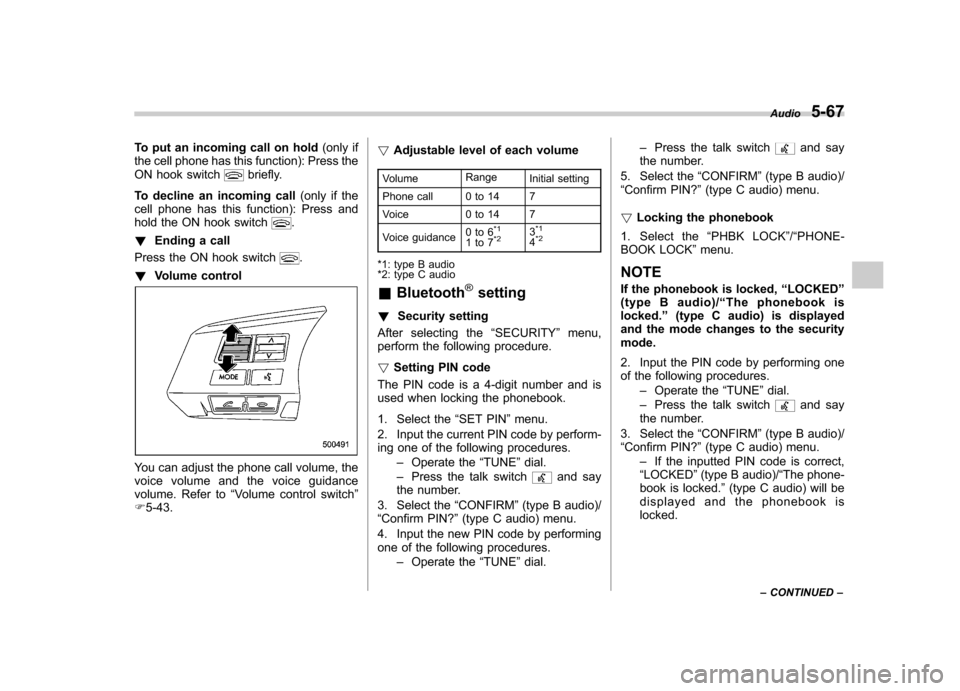
To put an incoming call on hold(only if
the cell phone has this function): Press the
ON hook switch
briefly.
To decline an incoming call (only if the
cell phone has this function): Press and
hold the ON hook switch
.
! Ending a call
Press the ON hook switch
.
! Volume control
You can adjust the phone call volume, the
voice volume and the voice guidance
volume. Refer to “Volume control switch ”
F 5-43. !
Adjustable level of each volume
Volume Range
Initial setting
Phone call 0 to 14 7
Voice 0 to 14 7
Voice guidance 0to6
*1
1to7*23*1
4*2
*1: type B audio
*2: type C audio &
Bluetooth
®setting
! Security setting
After selecting the “SECURITY ”menu,
perform the following procedure. ! Setting PIN code
The PIN code is a 4-digit number and is
used when locking the phonebook.
1. Select the “SET PIN ”menu.
2. Input the current PIN code by perform-
ing one of the following procedures. –Operate the “TUNE ”dial.
– Press the talk switch
and say
the number.
3. Select the “CONFIRM ”(type B audio)/
“ Confirm PIN? ”(type C audio) menu.
4. Input the new PIN code by performing
one of the following procedures. –Operate the “TUNE ”dial. –
Press the talk switch
and say
the number.
5. Select the “CONFIRM ”(type B audio)/
“ Confirm PIN? ”(type C audio) menu.
! Locking the phonebook
1. Select the “PHBK LOCK ”/“ PHONE-
BOOK LOCK ”menu.
NOTE
If the phonebook is locked, “LOCKED ”
(type B audio)/ “The phonebook is
locked. ”(type C audio) is displayed
and the mode changes to the security mode.
2. Input the PIN code by performing one
of the following procedures.
–Operate the “TUNE ”dial.
– Press the talk switch
and say
the number.
3. Select the “CONFIRM ”(type B audio)/
“ Confirm PIN? ”(type C audio) menu.
– If the inputted PIN code is correct,
“ LOCKED ”(type B audio)/ “The phone-
book is locked. ”(type C audio) will be
displayed and the phonebook is locked. Audio
5-67
– CONTINUED –
Page 463 of 474

14-2Index
A
ABS (Anti-lock Brake System) ..................................... 7-24
Warning light ......................................................... 3-16
Accessories ....................................................... 5-3, 11-45
Accessory power outlet ............................................... 6-10
Air cleaner element ................................................... 11-18
Air conditioner Manual climate control system ................................... 4-6
Air filtration system ....................................................... 4-9
Airflow selection Automatic climate control system ............................... 4-5
Manual climate control system ................................... 4-6
Alarm system ............................................................ 2-15
All-Wheel Drive warning light ....................................... 3-20
Aluminum wheel ....................................................... 11-37
Cleaning ............................................................... 10-3
Antenna system ........................................................... 5-3
Anti-lock Brake System (ABS) ..................................... 7-24
Arming the system ..................................................... 2-16
Armrest ..................................................................... 1-12
Ashtray ..................................................................... 6-12
AT OIL TEMP warning light ......................................... 3-14
Audio Antenna system ....................................................... 5-3
Auxiliary input jack ................................................. 5-30
Bluetooth
®audio .................................................... 5-43
CD player operation ............................................... 5-23
Control button ........................................................ 5-41
FM/AM radio operation ........................................... 5-12
iPod
®operations .................................................... 5-33
Satellite radio operations ......................................... 5-19 Set ........................................................................ 5-4
USB storage device operations
................................ 5-33
Auto on/off headlights ................................................. 3-27
Sensor .................................................................. 3-27
Auto-dimming mirror/compass ..................... 3-36, 3-43, 3-45
Automatic climate control system ................................... 4-5
Automatic rain sensing windshield wipers ...................... 3-32
Automatic transmission ............................................... 7-17
Fluid ........................................................... 11-21, 12-8
Manual mode ......................................................... 7-21
Oil temperature warning light (AT OIL TEMP) ............. 3-14
Select lever ........................................................... 7-18
Shift lock function ................................................... 7-20
Automatic/Emergency Locking Retractor (A/ELR) ........... 1-13
Auxiliary input jack ...................................................... 5-30
B Battery .................................................................... 11-43
Drainage prevention function ..................................... 2-6
Jump starting ......................................................... 9-10
Replacement (remote engine start transmitter) ........... 7-14
Replacement (remote keyless entry system) .............. 2-10
Bluetooth
®audio ........................................................ 5-43
Booster seat .............................................................. 1-29
Bottle holder ............................................................... 6-9
Brake Assist .................................................................... 7-24
Booster ....................................................... 7-23, 11-27
Fluid ........................................................... 11-25, 12-8
Pad and lining ...................................................... 11-30
Parking ................................................................. 7-31