bluetooth SUBARU OUTBACK 2012 5.G Owners Manual
[x] Cancel search | Manufacturer: SUBARU, Model Year: 2012, Model line: OUTBACK, Model: SUBARU OUTBACK 2012 5.GPages: 474, PDF Size: 17.45 MB
Page 185 of 474

AudioSelecting category (only when connectingiPod
®) ................................................................. 5-37
Display selection (type B audio) ............................. 5-39
Folder selection (only when connecting USB storage device) ................................................... 5-39
Selection from list (only when connecting USB storage device) (type C audio) ............................. 5-39
Setting the playing speed (only when the audiobook is playing) (type C audio) .................... 5-39
When the following messages are displayed . ......... 5-39
Audio control buttons ........................................... 5-41
MODE button ........................................................ 5-41
“
” and “”switch .............................................. 5-42
Volume control switch ........................................... 5-43 MUTE button (if equipped)
.................................... 5-43
Bluetooth
®audio (type B and C audio) ................5-43
Media format ........................................................ 5-44
Setting Bluetooth
®audio (type B audio) ................ 5-44
Setting Bluetooth®audio (type C audio) ................ 5-45
Bluetooth®audio operation ................................... 5-48
Hands-free system (if equipped) ..........................5-49
Tips for the Hands-free system ............................. 5-49
Certification for the Hands-free system .................. 5-50
Safety precautions ................................................ 5-52
Using the Hands-free system ................................ 5-52
Bluetooth
®setting ................................................ 5-67
Page 189 of 474

5-6Audio
& Type B audio set (if equipped)
The audio set will operate only when the
ignition switch is in the “Acc ”or “ON ”
position. . Power and audio controls: refer to page
5-8. Radio operation: refer to page 5-12
. Satellite radio operation (if equipped):
refer to page 5-19. CD (compact disc) player operation:
refer to page 5-23. Auxiliary input jack: refer to page 5-30
. USB storage device/iPod
®operation:
refer to page 5-33. Bluetooth
®audio: refer to page 5-43
. Hands-free system: refer to page 5-49
Page 190 of 474

&Type C audio set (if equipped)The audio set will operate only when the
ignition switch is in the “Acc ”or “ON ”
position. . Power and audio controls: refer to page
5-8. Radio operation: refer to page 5-12
. Satellite radio operation (if equipped):
refer to page 5-19. CD (compact disc) player operation:
refer to page 5-23. Auxiliary input jack: refer to page 5-30
. USB storage device/iPod
®operation:
refer to page 5-33. Bluetooth
®audio: refer to page 5-43
. Hands-free system: refer to page 5-49
NOTE
HD Radio Technology should be in-
cluded as a feature in the type C audio. Audio
5-7
Page 225 of 474
5-42Audio
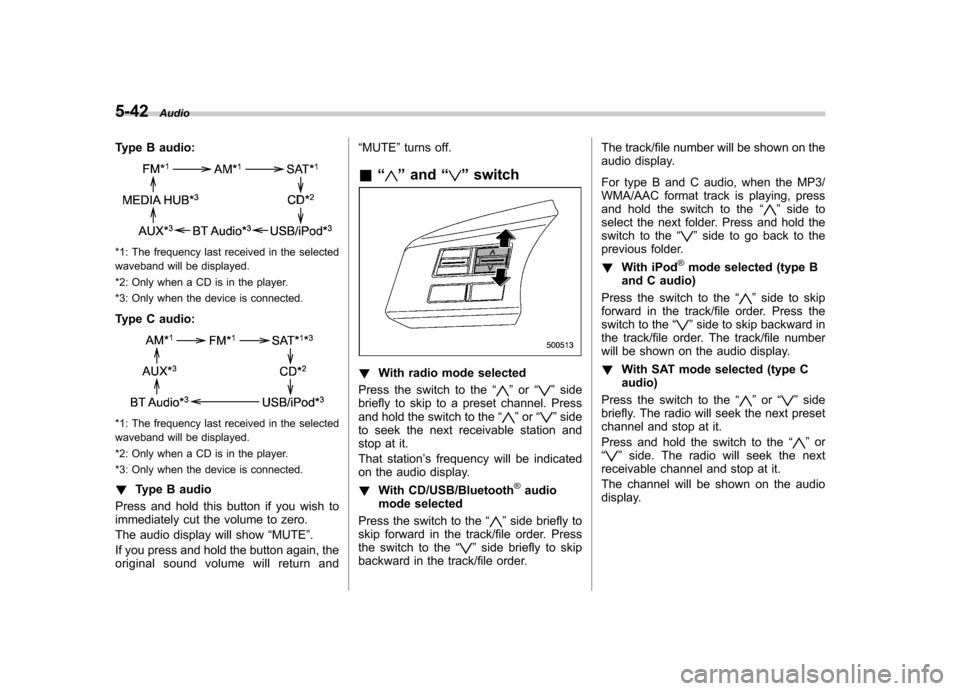
Type B audio:
*1: The frequency last received in the selected
waveband will be displayed.
*2: Only when a CD is in the player.
*3: Only when the device is connected.
Type C audio:
*1: The frequency last received in the selected
waveband will be displayed.
*2: Only when a CD is in the player.
*3: Only when the device is connected. ! Type B audio
Press and hold this button if you wish to
immediately cut the volume to zero.
The audio display will show “MUTE ”.
If you press and hold the button again, the
original sound volume will return and “
MUTE ”turns off.
& “
”and “”switch
! With radio mode selected
Press the switch to the “
”or “”side
briefly to skip to a preset channel. Press
and hold the switch to the “
”or “”side
to seek the next receivable station and
stop at it.
That station ’s frequency will be indicated
on the audio display. ! With CD/USB/Bluetooth
®audio
mode selected
Press the switch to the “
”side briefly to
skip forward in the track/file order. Press
the switch to the “
”side briefly to skip
backward in the track/file order. The track/file number will be shown on the
audio display.
For type B and C audio, when the MP3/
WMA/AAC format track is playing, press
and hold the switch to the
“
”side to
select the next folder. Press and hold the
switch to the “
”side to go back to the
previous folder. ! With iPod
®mode selected (type B
and C audio)
Press the switch to the “
”side to skip
forward in the track/file order. Press the
switch to the “
”side to skip backward in
the track/file order. The track/file number
will be shown on the audio display. ! With SAT mode selected (type C audio)
Press the switch to the “
”or “”side
briefly. The radio will seek the next preset
channel and stop at it.
Press and hold the switch to the “
”or
“” side. The radio will seek the next
receivable channel and stop at it.
The channel will be shown on the audio
display.
Page 226 of 474
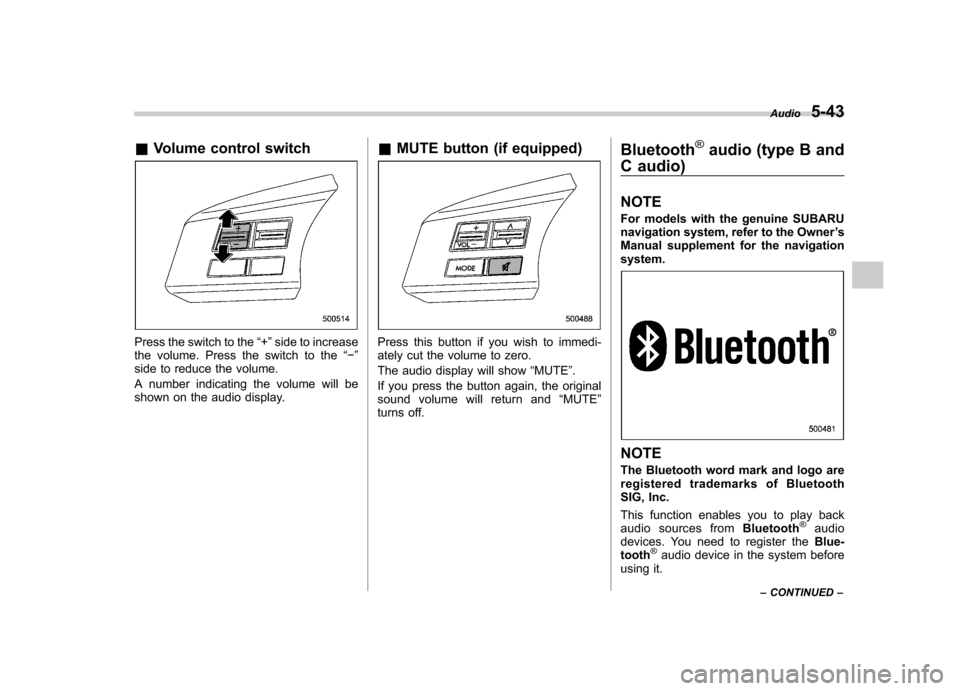
&Volume control switch
Press the switch to the “+ ”side to increase
the volume. Press the switch to the “ ”
side to reduce the volume.
A number indicating the volume will be
shown on the audio display. &
MUTE button (if equipped)Press this button if you wish to immedi-
ately cut the volume to zero.
The audio display will show “MUTE ”.
If you press the button again, the original
sound volume will return and “MUTE ”
turns off. Bluetooth
®audio (type B and
C audio) NOTE
For models with the genuine SUBARU
navigation system, refer to the Owner ’s
Manual supplement for the navigationsystem.
NOTE
The Bluetooth word mark and logo are
registered trademarks of Bluetooth
SIG, Inc.
This function enables you to play back
audio sources from Bluetooth
®audio
devices. You need to register the Blue-
tooth
®audio device in the system before
using it. Audio
5-43
– CONTINUED –
Page 227 of 474

5-44Audio
NOTE . The Bluetooth
®audio function may
not operate properly under the follow-
ing conditions.
–The device is turned off.
– The battery of the device has run
down. – The device is not connected to
the system.– The device is behind the seat or
in the glove box.– A metal material is covering or
touching the device.
. Depending on the type of device that
is used, operation and sound volume
may be different from normal use of
those devices. . The sound quality may degrade due
to the influence of the device that is
connected to the system or the circum-
stances of the Bluetooth network. . When another Bluetooth
®device is
simultaneously connected, noise may
be heard. & Media format
Bluetooth
®audio devices cannot be
connected if they are not compatible with
the following Bluetooth
®profiles.
. A2DP (Advanced Audio Distribution
Profile) .
AVRCP (Audio/Video Remote Control
Profile)
& Setting Bluetooth
®audio
(type B audio)
1. Select “BT-A SETUP ”by pressing the
“ MENU ”button.
2. Perform the following procedure by
operating the “TUNE ”dial while “BT-A ”is
displayed.
NOTE
You cannot set Bluetooth
®audio while
driving. ! Registering (pairing) device
NOTE
Only one device can be registered.
1. Select the “PAIR AUDIO ”menu.
– If a device is already registered,
“ MEMORY FULL ”is displayed and the
mode changes to the Bluetooth
®
audio setting mode.
2. After the passkey is shown on the
display, input the passkey into the device. –If the registering procedure is fin-
ished, “PAIRED ”and the name of the
device are displayed. – If the registering procedure was not
successful, “FAILED ”is displayed. After the name of the device or
“FAILED ”
is displayed, the mode changes to the Bluetooth
®audio setting mode.
NOTE
After the ignition switch is turned to the “ LOCK ”position, the registered device
is not automatically connected to the
system even if the ignition switch is
turned to the “Acc ”or “ON ”position.
! Selecting device
1. Select the “SELECT AUDIO ”menu.
– If no devices are registered,
“ EMPTY ”is displayed and the mode
changes to the Bluetooth
®audio
setting mode.
2. Select the “CONFIRM ”menu.
– Then the name of the selected
device is displayed. – If the device is connected, “SE-
LECTED ”is displayed and the mode
changes to the Bluetooth
®audio
setting mode.– If the device cannot be connected,
“ FAILED ”is displayed and the select-
ing procedure was not successful.
! Setting passkey
1. Select the “SET PASSKEY ”menu.
– After the currently set passkey is
displayed, a new passkey can be
Page 228 of 474
entered.
2. Input the new passkey (a 4 - 8 digit
number) by operating the “TUNE ”dial.
3. Select the “CONFIRM ”menu.
– The new passkey is displayed, the
passkey is changed and the mode
changes to the Bluetooth
®audio
setting mode.
! Deleting device
1. Select the “DELETE AUDIO ”menu.
– If no devices are registered,
“ EMPTY ”is displayed and the mode
changes to the Bluetooth
®audio
setting mode.
2. Select the “CONFIRM ”menu.
–“ DELETED ”is displayed and the
mode changes to the Bluetooth
®
audio setting mode.
& Setting Bluetooth
®audio
(type C audio)
1. Press the
button to select the
“ BT Audio ”mode.
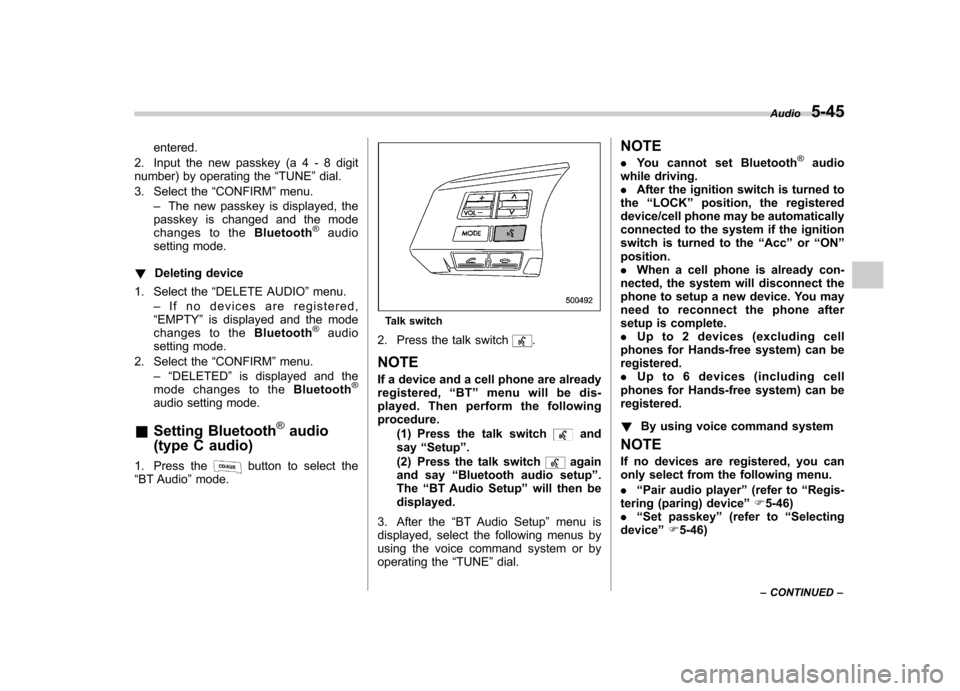
Talk switch
2. Press the talk switch
.
NOTE
If a device and a cell phone are already
registered, “BT ”menu will be dis-
played. Then perform the followingprocedure.
(1) Press the talk switch
and
say “Setup ”.
(2) Press the talk switch
again
and say “Bluetooth audio setup ”.
The “BT Audio Setup ”will then be
displayed.
3. After the “BT Audio Setup ”menu is
displayed, select the following menus by
using the voice command system or by
operating the “TUNE ”dial. NOTE .
You cannot set Bluetooth
®audio
while driving. . After the ignition switch is turned to
the “LOCK ”position, the registered
device/cell phone may be automatically
connected to the system if the ignition
switch is turned to the “Acc ”or “ON ”
position.. When a cell phone is already con-
nected, the system will disconnect the
phone to setup a new device. You may
need to reconnect the phone after
setup is complete.. Up to 2 devices (excluding cell
phones for Hands-free system) can beregistered.. Up to 6 devices (including cell
phones for Hands-free system) can beregistered. ! By using voice command system
NOTE
If no devices are registered, you can
only select from the following menu. . “Pair audio player ”(refer to “Regis-
tering (paring) device ”F 5-46)
. “Set passkey ”(refer to “Selecting
device ”F 5-46) Audio
5-45
– CONTINUED –
Page 231 of 474

5-48Audio
!Setting passkey
1. Select the “Set Passkey ”menu.
2. Press the “TUNE ”dial.
3. Input the new passkey (a 4 - 8 digit
number) by turning and pressing the“ TUNE ”dial.
4. After inputting the new passkey, pressthe “TUNE ”dial again.
– If the passkey is set, the new
passkey will be displayed.
! Deleting device
1. Select the “Delete Audio Player ”
menu.
2. Select the preferred device.
3. Select the “Confirm delete audio
Player? ”menu.
– If the device is deleted, “Audio
player has been deleted. ”will be
displayed.
& Bluetooth
®audio operation
NOTE
Depending on the connected device, it
may not activate as per the following
items or not work smoothly. Refer to
the instruction manual of the con-
nected device. !
How to play back
Type B audio
Type C audio
Press the “CD/AUX ”button and select the
“ BT-A ”(type B audio)/ “BT Audio ”(type C
audio) mode. ! To select a track from the beginning
Select a track in the same way as for a
CD. Refer to “To select a track from the
beginning ”F 5-24.
! Repeating (type B audio)
Repeating is operated in the same way as
for a CD. Refer to “Repeating ”F 5-26.
Each time you briefly press the
button, the mode changes in the following sequence.
! Random playback (type B audio)
Random playback is operated in the same
way as for a CD. Refer to “Random playback
”F 5-27. Each time you press
and hold the
button, the mode
changes in the following sequence.
! Display selection (type B audio)
Select an indication in the same way as
for a CD. Refer to “Display selection (type
A and B audio) ”F 5-28. Each time you
briefly press the
button, the indica-
tion changes in the following sequence.
! Fast-forwarding and rewinding
(type C audio)
Fast-forwarding and rewinding are oper-
ated in the same way as for a CD. Refer to“ Fast-forwarding and rewinding ”F 5-25.
! Folder selection
Select a folder in the same way as for a
CD. Refer to “Folder selection ”F 5-28.
Page 232 of 474

Hands-free system (if equipped) NOTE .For models with the genuine
SUBARU navigation system, refer to
the Owner ’s Manual supplement for the
navigation system.. When selling your vehicle, make
sure that you initialize the Hands-free
system to prevent personal data from
being improperly accessed.
The Hands-free system operates while the
ignition switch is in the “Acc ”or “ON ”
position.
& Tips for the Hands-free sys- tem
! Bluetooth
®
It is possible to connect a cell phone to the
in-vehicle equipment through the Blue-
tooth
®format (wireless) to make a phone
call from the in-vehicle equipment or take
an incoming phone call.
Since the Bluetooth
®format is wireless, a
connection between the in-vehicle equip-
ment and the cell phone can be made
without placing them in close vicinity of
each other. The cell phone can be used
with it left in the breast pocket or bag. NOTE .
The Hands-free system may not
operate properly under the following conditions.
–The cell phone is turned off.
– The cell phone is not in the
phone call area. – The battery of the cell phone has
run down.– The cell phone is not connected
to the Hands-free system.– The cell phone is behind the seat
or in the glove box.– A metal material covers or
touches the cell phone.
. Depending on the type of cell phone
that is used, the screen on the cell
phone may remain illuminated while
the ignition switch is in the “ON ”
position. If this occurs, turn the illumi-
nation off by adjusting the cell phonesettings. . Depending on the setting of the cell
phone, the dial lock function may be
activated after making a call. Deacti-
vate the automatic dial lock function of
the cell phone before using the Hands-
free system. . Depending on the type of cell phone
that is used, operation and the sound
volume may be different from those of
cell phones currently used. .
When the ignition switch is turned to
the “LOCK ”position during a call, the
call may be disconnected or continued
on the cell phone depending on the
type of cell phone that is used. Note
that operation of the cell phone may be
necessary if the call is continued on the
cell phone. . Do not speak at the same time as the
other party during a call. If you and the
party speak at the same time, it may be
difficult for the other party to hear your
voice and vice versa. This is normal. . The receiver sound volume should
be set as low as possible. Otherwise,
the party you are calling may notice an
undesirable echo sound. . Speak clearly and loudly.
. Your voice may be difficult to be
heard by the party under the following conditions.
–Driving on a rough road.
– Driving at a high speed.
– Driving with a window open.
– When air from the ventilator
blows directly towards the micro-phone. – When the sound coming from the
ventilator is loud.– When the cell phone is too close
to the microphone. Audio
5-49
– CONTINUED –
Page 233 of 474

5-50Audio
.The sound quality may degrade due
to the influence of the cell phone that is
connected to the system or the circum-
stances of the Bluetooth network. . When another Bluetooth
®device is
simultaneously connected, noise may
be heard in the voice coming from the
hands-free phone. ! Corresponding profiles for the cell phone
. HFP (Hands Free Profile): Ver. 1.0
. OPP (Object Push Profile): Ver. 1.1
& Certification for the Hands-
free system
CAUTION
FCC WARNING
Changes or modifications not ex-
pressly approved by the party re-
sponsible for compliance could void
the user ’s authority to operate the
equipment.
FCC ID: ACJ932C5ZZZ035
IC ID: 216J-C5ZZZ035
Made in Japan NOTE
This device complies with Part 15 of
the FCC Rules and Industry Canada
licence-exempt RSS standard(s). Op-
eration is subject to the following two
conditions: (1) this device may not
cause harmful interference, and (2) this
device must accept any interference,
including interference that may cause
undesired operation of this device. NOTE
This equipment has been tested and
found to comply with the limits for a
Class B digital device, pursuant to Part
15 of the FCC Rules. These limits are
designed to provide reasonable protec-
tion against harmful interference in a
residential installation. This equipment
may cause harmful interference to
radio communications, if it is not
installed and used in accordance with
the instructions. However, there is no
guarantee that interference will not
occur in a particular installation. If this
equipment does cause harmful inter-
ference to radio or television reception,
which can be determined by turning the
equipment off and on, the user is
encouraged to try to correct the inter-
ference by one or more of the followingmeasures..
Reorient or relocate the receiving
antenna.. Increase the separation between the
equipment and receiver.. Connect the equipment into an out-
let on a circuit different from that to
which the receiver is connected.. Consult the dealer or an experi-
enced radio/TV technician for help.. Changes or modifications not ex-
pressly approved by the party respon-
sible for compliance could void theuser ’s authority to operate the equip-
ment.. This equipment complies with FCC/
IC radiation exposure limits set forth
for an uncontrolled equipment and
meets the FCC radio frequency (RF)
Exposure Guidelines in Supplement C
to OET65 and RSS-102 of the IC radio
frequency (RF) Exposure rules. This
equipment has very low levels of RF
energy that it deemed to comply with-
out maximum permissive exposure
evaluation (MPE). But it is desirable
that it should be installed and operated
keeping the radiator at least 20 cm or
more away from person ’s body (ex-
cluding extremities: hands, wrists, feet
and ankles).