headlights SUBARU OUTBACK 2012 5.G User Guide
[x] Cancel search | Manufacturer: SUBARU, Model Year: 2012, Model line: OUTBACK, Model: SUBARU OUTBACK 2012 5.GPages: 474, PDF Size: 17.45 MB
Page 155 of 474
3-36Instruments and controls
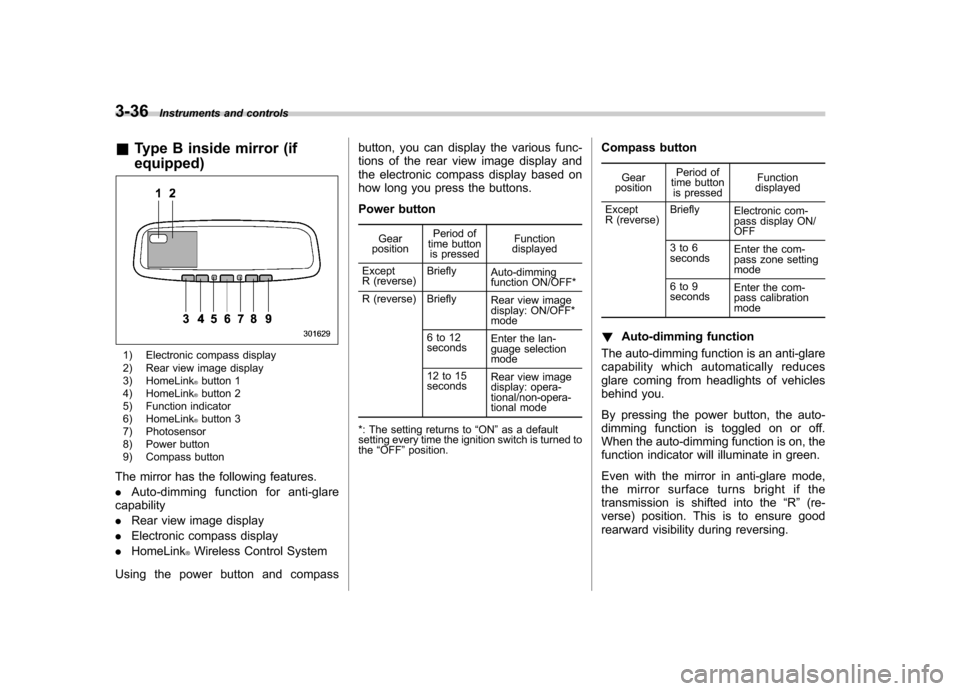
&Type B inside mirror (if equipped)
1) Electronic compass display
2) Rear view image display
3) HomeLink
®button 1
4) HomeLink®button 2
5) Function indicator
6) HomeLink
®button 3
7) Photosensor
8) Power button
9) Compass button
The mirror has the following features. . Auto-dimming function for anti-glare
capability. Rear view image display
. Electronic compass display
. HomeLink
®Wireless Control System
Using the power button and compass button, you can display the various func-
tions of the rear view image display and
the electronic compass display based on
how long you press the buttons.
Power button
Gear
position Period of
time button
is pressed Function
displayed
Except
R (reverse) Briefly
Auto-dimming
function ON/OFF*
R (reverse) Briefly Rear view image
display: ON/OFF* mode
6to12 seconds Enter the lan-
guage selection mode
12 to 15 seconds Rear view image
display: opera-
tional/non-opera-
tional mode
*: The setting returns to “ON ”as a default
setting every time the ignition switch is turned to the “OFF ”position. Compass button
Gear
position Period of
time button is pressed Function
displayed
Except
R (reverse) Briefly
Electronic com-
pass display ON/ OFF
3to6
seconds Enter the com-
pass zone setting mode
6to9
seconds Enter the com-
pass calibration mode
! Auto-dimming function
The auto-dimming function is an anti-glare
capability which automatically reduces
glare coming from headlights of vehicles
behind you.
By pressing the power button, the auto-
dimming function is toggled on or off.
When the auto-dimming function is on, the
function indicator will illuminate in green.
Even with the mirror in anti-glare mode,
the mirror surface turns bright if the
transmission is shifted into the “R ” (re-
verse) position. This is to ensure good
rearward visibility during reversing.
Page 156 of 474
The mirror has a photosensor attached on
both the front and back sides. During
nighttime driving, these sensors detect
distracting glare from vehicle headlights
behind you and automatically dim the
mirror to eliminate glare and preserve
your vision. For this reason, use care not
to cover the sensors with stickers, or other
similar items. Periodically wipe the sen-
sors clean using a piece of dry soft cotton
cloth or an applicator. NOTE
When cleaning the mirror, use a paper
towel or similar item dampened with
glass cleaner. Do not spray glass
cleaner directly on the mirror surface.
By doing so, the sprayed glass cleaner
could enter the inside of the mirrorhousing. That may cause a malfunction
in the mirror. !
Rear view image display
When the ignition switch is in the “ON ”
position and the transmission is in the “R ”
(reverse) position, the rear view camera
automatically displays the rear view image
behind the vehicle on the inside mirror.
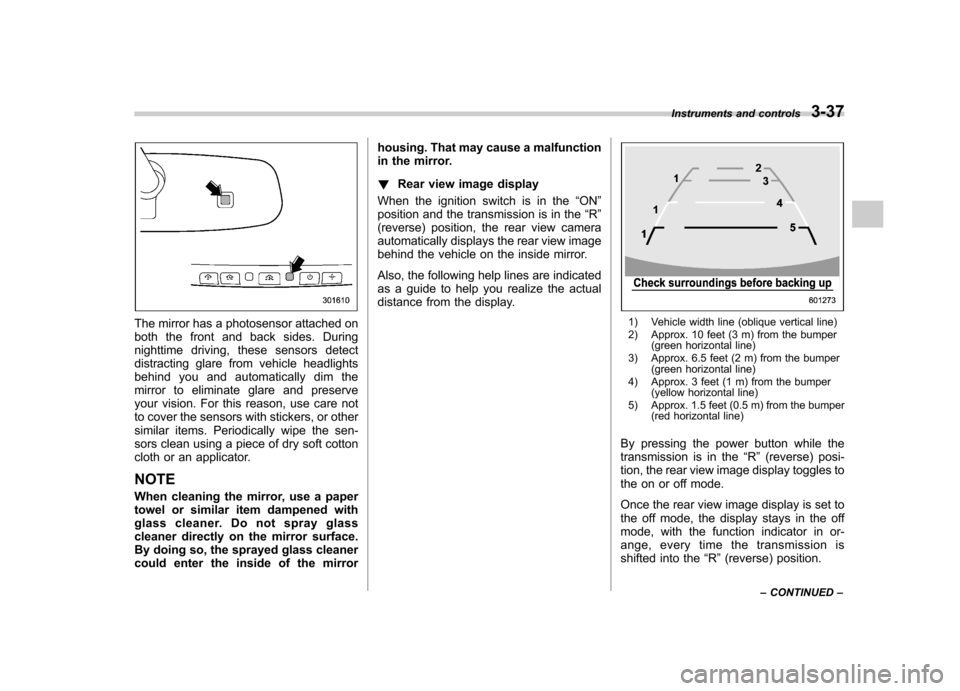
Also, the following help lines are indicated
as a guide to help you realize the actual
distance from the display.1) Vehicle width line (oblique vertical line)
2) Approx. 10 feet (3 m) from the bumper (green horizontal line)
3) Approx. 6.5 feet (2 m) from the bumper (green horizontal line)
4) Approx. 3 feet (1 m) from the bumper (yellow horizontal line)
5) Approx. 1.5 feet (0.5 m) from the bumper (red horizontal line)
By pressing the power button while the
transmission is in the “R ” (reverse) posi-
tion, the rear view image display toggles to
the on or off mode.
Once the rear view image display is set to
the off mode, the display stays in the off
mode, with the function indicator in or-
ange, every time the transmission is
shifted into the “R ”(reverse) position.
Instruments and controls
3-37
– CONTINUED –
Page 162 of 474
begins to flash slowly (after approximately
20 seconds), position the hand-held trans-
mitter of the device between 1 to 3 inches
(25 to 76 mm) away from the HomeLink
®button you wish to program.
3. Press and hold the hand-held trans-
mitter button. The HomeLink
®indicator
light will flash, first slowly and then rapidly.
4. When the indicator light begins to flash
rapidly, release both buttons.
The programming for the previous device
is now erased and the new device can be
operated by pressing the HomeLink
®button. ! Erasing HomeLink
®button memory
NOTE . Performing this procedure erases
the memory of all the preprogrammed
buttons simultaneously. The memory
of individual buttons cannot be erased.. It is recommended that upon the
sale of the vehicle, the memory of all
programmed HomeLink
®buttons be
erased for security purposes.
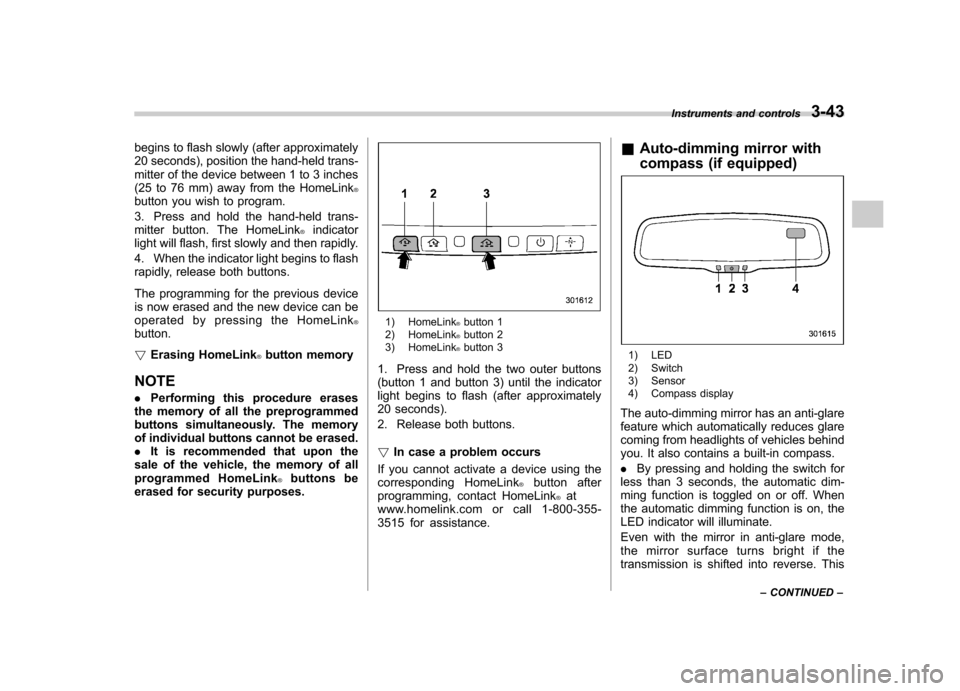
1) HomeLink®button 1
2) HomeLink®button 2
3) HomeLink®button 3
1. Press and hold the two outer buttons
(button 1 and button 3) until the indicator
light begins to flash (after approximately
20 seconds).
2. Release both buttons. ! In case a problem occurs
If you cannot activate a device using the
corresponding HomeLink
®button after
programming, contact HomeLink®at
www.homelink.com or call 1-800-355-
3515 for assistance. &
Auto-dimming mirror with
compass (if equipped)
1) LED
2) Switch
3) Sensor
4) Compass display
The auto-dimming mirror has an anti-glare
feature which automatically reduces glare
coming from headlights of vehicles behind
you. It also contains a built-in compass. . By pressing and holding the switch for
less than 3 seconds, the automatic dim-
ming function is toggled on or off. When
the automatic dimming function is on, the
LED indicator will illuminate.
Even with the mirror in anti-glare mode,
the mirror surface turns bright if the
transmission is shifted into reverse. This Instruments and controls
3-43
– CONTINUED –
Page 163 of 474
3-44Instruments and controls
is to ensure good reward visibility during reversing. . By pressing and releasing the switch
for 3 seconds, the compass display is
toggled on or off. When the compass is
on, an illuminated compass reading will
appear in the upper right corner of the
mirror.
When cleaning the mirror, use a paper
towel or similar material dampened with
glass cleaner. Do not spray glass cleaner
directly on the mirror as that may cause
theliquidcleanertoenterthemirror
housing and damage the mirror. ! Photosensors
The mirror has a photosensor attached on
the front and back sides. During nighttime
driving, these sensors detect distracting glare from vehicle headlights behind you
and automatically dim the mirror to elim-
inate glare and preserve your vision. For
this reason, use care not to cover the
sensors with stickers, or other similar
items. Periodically wipe the sensors clean
using a piece of dry soft cotton cloth or an
applicator. !
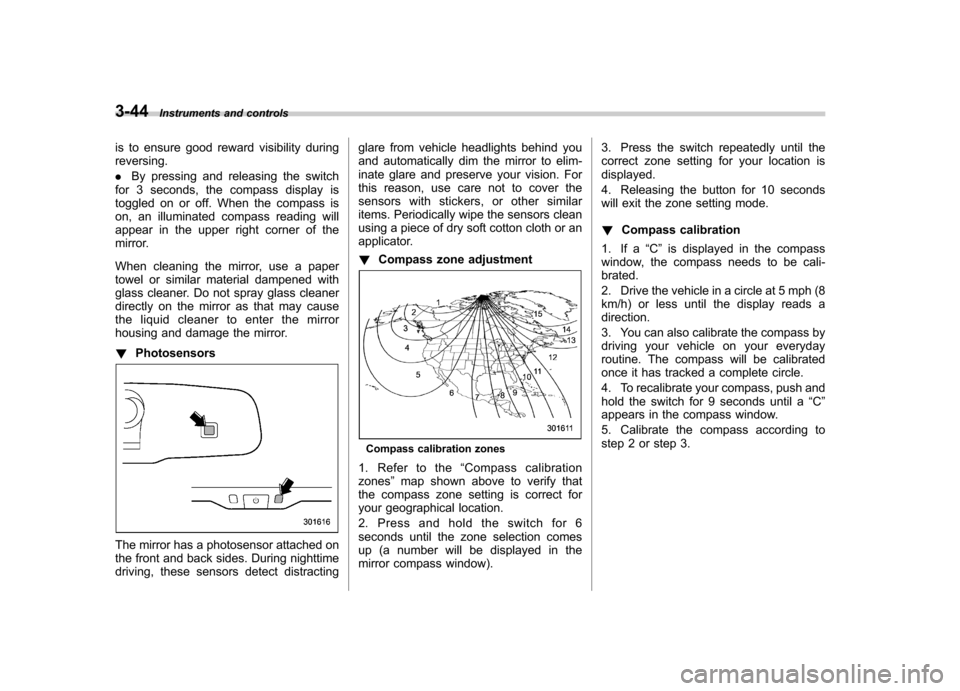
Compass zone adjustment
Compass calibration zones
1. Refer to the “Compass calibration
zones ”map shown above to verify that
the compass zone setting is correct for
your geographical location.
2. Press and hold the switch for 6
seconds until the zone selection comes
up (a number will be displayed in the
mirror compass window). 3. Press the switch repeatedly until the
correct zone setting for your location isdisplayed.
4. Releasing the button for 10 seconds
will exit the zone setting mode. !
Compass calibration
1. If a “C ” is displayed in the compass
window, the compass needs to be cali- brated.
2. Drive the vehicle in a circle at 5 mph (8
km/h) or less until the display reads adirection.
3. You can also calibrate the compass by
driving your vehicle on your everyday
routine. The compass will be calibrated
once it has tracked a complete circle.
4. To recalibrate your compass, push and
hold the switch for 9 seconds until a “C ”
appears in the compass window.
5. Calibrate the compass according to
step 2 or step 3.
Page 164 of 474
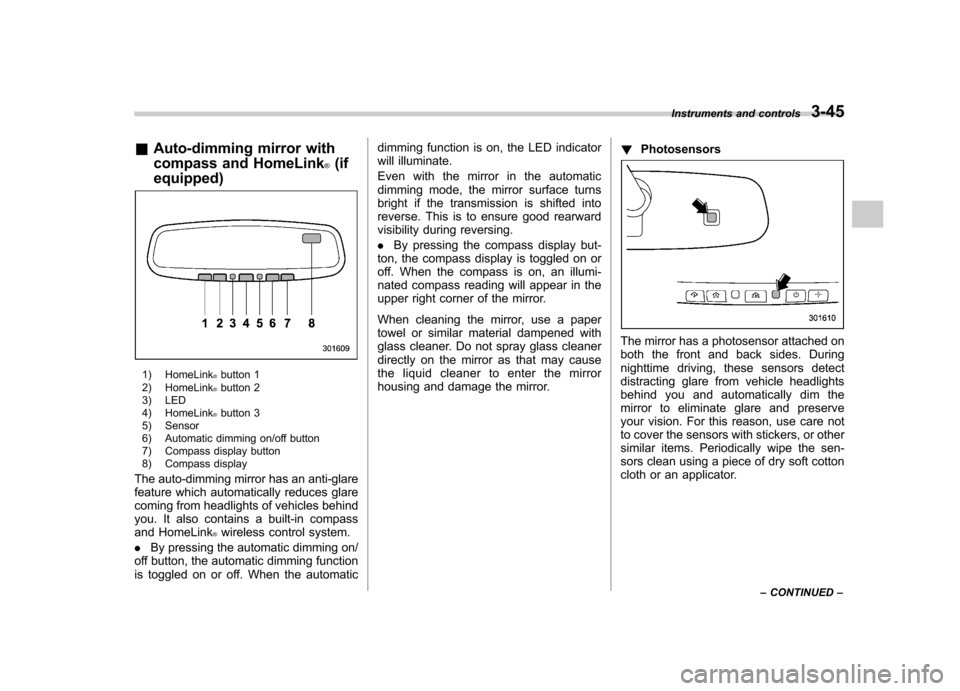
&Auto-dimming mirror with
compass and HomeLink
®(if
equipped)
1) HomeLink®button 1
2) HomeLink®button 2
3) LED
4) HomeLink
®button 3
5) Sensor
6) Automatic dimming on/off button
7) Compass display button
8) Compass display
The auto-dimming mirror has an anti-glare
feature which automatically reduces glare
coming from headlights of vehicles behind
you. It also contains a built-in compass
and HomeLink
®wireless control system.
. By pressing the automatic dimming on/
off button, the automatic dimming function
is toggled on or off. When the automatic dimming function is on, the LED indicator
will illuminate.
Even with the mirror in the automatic
dimming mode, the mirror surface turns
bright if the transmission is shifted into
reverse. This is to ensure good rearward
visibility during reversing. .
By pressing the compass display but-
ton, the compass display is toggled on or
off. When the compass is on, an illumi-
nated compass reading will appear in the
upper right corner of the mirror.
When cleaning the mirror, use a paper
towel or similar material dampened with
glass cleaner. Do not spray glass cleaner
directly on the mirror as that may cause
the liquid cleaner to enter the mirror
housing and damage the mirror. !
Photosensors
The mirror has a photosensor attached on
both the front and back sides. During
nighttime driving, these sensors detect
distracting glare from vehicle headlights
behind you and automatically dim the
mirror to eliminate glare and preserve
your vision. For this reason, use care not
to cover the sensors with stickers, or other
similar items. Periodically wipe the sen-
sors clean using a piece of dry soft cotton
cloth or an applicator. Instruments and controls
3-45
– CONTINUED –
Page 463 of 474

14-2Index
A
ABS (Anti-lock Brake System) ..................................... 7-24
Warning light ......................................................... 3-16
Accessories ....................................................... 5-3, 11-45
Accessory power outlet ............................................... 6-10
Air cleaner element ................................................... 11-18
Air conditioner Manual climate control system ................................... 4-6
Air filtration system ....................................................... 4-9
Airflow selection Automatic climate control system ............................... 4-5
Manual climate control system ................................... 4-6
Alarm system ............................................................ 2-15
All-Wheel Drive warning light ....................................... 3-20
Aluminum wheel ....................................................... 11-37
Cleaning ............................................................... 10-3
Antenna system ........................................................... 5-3
Anti-lock Brake System (ABS) ..................................... 7-24
Arming the system ..................................................... 2-16
Armrest ..................................................................... 1-12
Ashtray ..................................................................... 6-12
AT OIL TEMP warning light ......................................... 3-14
Audio Antenna system ....................................................... 5-3
Auxiliary input jack ................................................. 5-30
Bluetooth
®audio .................................................... 5-43
CD player operation ............................................... 5-23
Control button ........................................................ 5-41
FM/AM radio operation ........................................... 5-12
iPod
®operations .................................................... 5-33
Satellite radio operations ......................................... 5-19 Set ........................................................................ 5-4
USB storage device operations
................................ 5-33
Auto on/off headlights ................................................. 3-27
Sensor .................................................................. 3-27
Auto-dimming mirror/compass ..................... 3-36, 3-43, 3-45
Automatic climate control system ................................... 4-5
Automatic rain sensing windshield wipers ...................... 3-32
Automatic transmission ............................................... 7-17
Fluid ........................................................... 11-21, 12-8
Manual mode ......................................................... 7-21
Oil temperature warning light (AT OIL TEMP) ............. 3-14
Select lever ........................................................... 7-18
Shift lock function ................................................... 7-20
Automatic/Emergency Locking Retractor (A/ELR) ........... 1-13
Auxiliary input jack ...................................................... 5-30
B Battery .................................................................... 11-43
Drainage prevention function ..................................... 2-6
Jump starting ......................................................... 9-10
Replacement (remote engine start transmitter) ........... 7-14
Replacement (remote keyless entry system) .............. 2-10
Bluetooth
®audio ........................................................ 5-43
Booster seat .............................................................. 1-29
Bottle holder ............................................................... 6-9
Brake Assist .................................................................... 7-24
Booster ....................................................... 7-23, 11-27
Fluid ........................................................... 11-25, 12-8
Pad and lining ...................................................... 11-30
Parking ................................................................. 7-31