instrument panel SUBARU OUTBACK 2013 5.G Quick Reference Guide
[x] Cancel search | Manufacturer: SUBARU, Model Year: 2013, Model line: OUTBACK, Model: SUBARU OUTBACK 2013 5.GPages: 36, PDF Size: 1.05 MB
Page 20 of 36
17
Getting
Started Instrument
Panel Gauges
Personalize Controls
While
Operating Safety / In Case
of Emergency Additional
Information
17
Getting Started
Instrument Panel
Gauges
Personalize
Controls
While Operating
Safety / In Case of Emergency
Additional Information
Controls
4
78
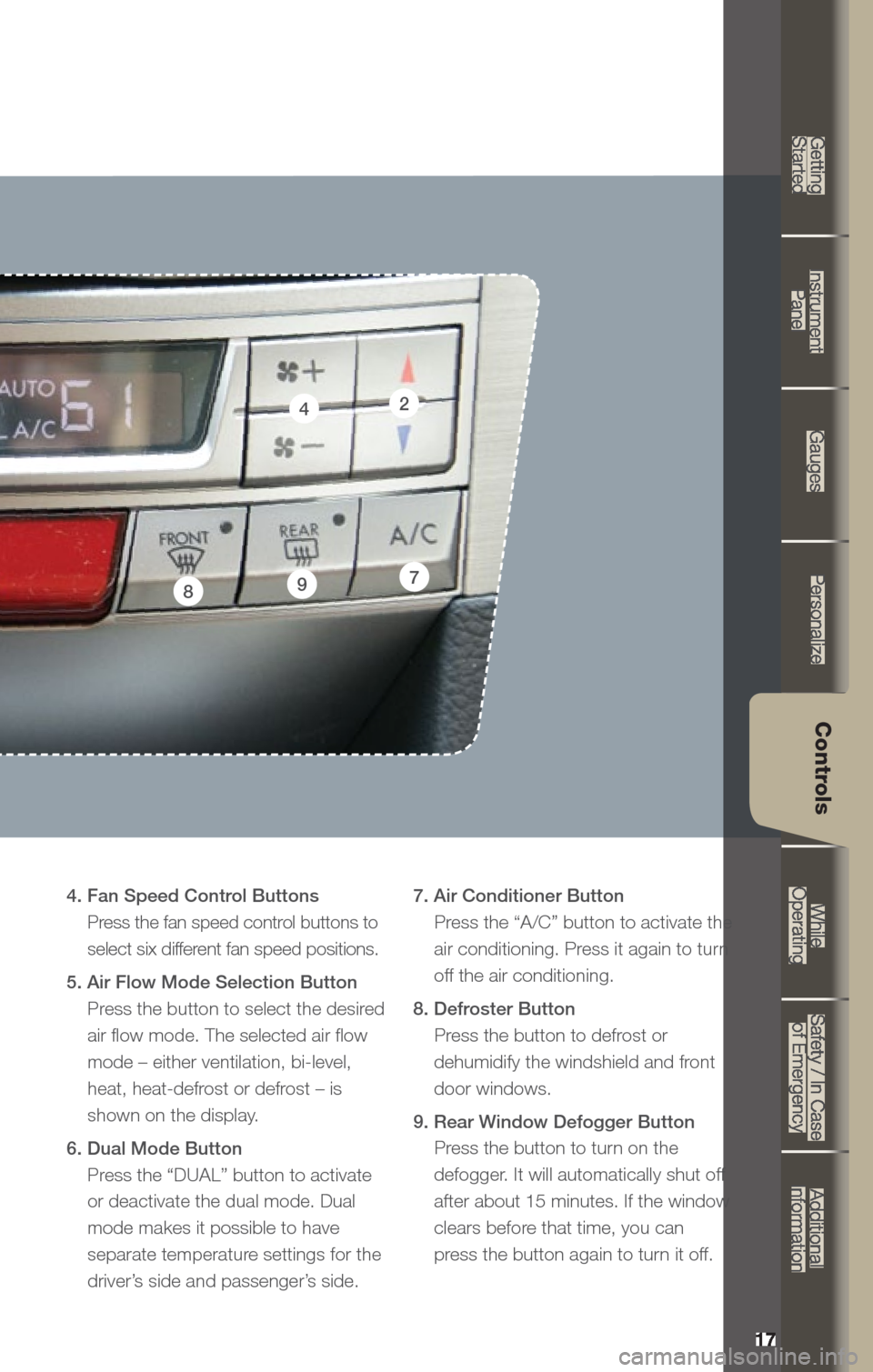
4. Fan Speed Control Buttons Press the fan speed control buttons to
select six different fan speed positions.
5. Air Flow Mode Selection Button Press the button to select the desired
air flow mode. The selected air flow
mode – either ventilation, bi-level,
heat, heat-defrost or defrost – is
shown on the display.
6. Dual Mode Button Press the “DUAL” button to activate
or deactivate the dual mode. Dual
mode makes it possible to have
separate temperature settings for the
driver’s side and passenger’s side. 7. Air Conditioner Button
Press the “A/C” button to activate the air conditioning. Press it again to turn
off the air conditioning.
8. Defroster Button Press the button to defrost or
dehumidify the windshield and front
door windows.
9. Rear Window Defogger Button Press the button to turn on the
defogger. It will automatically shut off
after about 15 minutes. If the window
clears before that time, you can
press the button again to turn it off.9
2
Page 22 of 36
19
Getting
Started Instrument
Panel Gauges
Personalize Controls
While
Operating Safety / In Case
of Emergency Additional
Information
19
Getting Started
Instrument Panel
Gauges
Personalize
Controls
While Operating
Safety / In Case of Emergency
Additional Information
Controls
CD Player functions
8. Load
Insert a disc into the slot. The CD
will automatically be drawn in and
will begin play at the first track.
9. Play CD
Press the “CD/AUX” button
and playback will begin.
10. Repeat / Random
Press the “RPT/RDM” button
once to repeat the current
track; press twice to repeat the
current folder.
Press and hold the “RPT/RDM”
button to randomize tracks on
a CD.
11. Eject
Press the button to eject the disc.
12. Forward / Reverse
Rotate the “TUNE/TRACK/CH”
knob clockwise to skip to the
beginning of the next track; rotate
the knob counter-clockwise to
skip to the beginning of the
current track. Rotate the knob
counter-clockwise again to go to
the previous selection.
13. Fast Forward / Fast Reverse
Press and hold the right arrow
of the “SEEK” button for more
than one second to fast forward.
Release the button to stop. To fast
reverse, press and hold the left
arrow for more than one second
and release the button to stop. 14.
Scan
Press the “SCAN” button to begin
previewing the first 10 seconds
of each track on the disc. Normal
playback will resume after all
tracks have been scanned. Press
the “SCAN” button again to stop
scanning and listen to the track
being previewed.
MP3/WMA Formatted CD
Player Functions
15. Folder Selection
Press the up arrow of the
“FOLDER” button to select the
next folder. Press the down
arrow to go back to the first
music file. Quickly press the
down arrow again to go back
to the previous folder.
16. Page Scroll
Press the “TEXT” button to select
title display. Press and hold again
to scroll through the title, 8
characters at a time. Up to a
maximum of 64 characters.
17. Display
Press and hold the “TEXT” button
during playback to change the
display to show the play time,
disc title, artist name and track
title. If the disc is formatted with
MP3/WMAs, press the “TEXT”
button to change the display to
show play time, folder name
and file name.
Page 24 of 36
21
Getting
Started Instrument
Panel Gauges
Personalize Controls
While
Operating Safety / In Case
of Emergency Additional
Information
21
Getting Started
Instrument Panel
Gauges
Personalize
Controls
While Operating
Safety / In Case of Emergency
Additional Information
Controls
CD Player functions
8. Load
Insert a disc into the slot. The CD
will automatically be drawn in and
will begin play at the first track.
9. Play CD
Press the “CD/AUX” button and
playback will begin.
10. Repeat / Random
Press the “RPT” button once to
repeat the current folder; press
twice to repeat the current track.
Press the “RDM” button once to
randomize tracks on a CD; press
twice to randomize all tracks in
a folder.
11. Eject
Press the button to eject the disc.
12. Forward / Reverse
Press the right arrow of the
“SEEK” button to skip to the
beginning of the next track.
Press the left arrow to skip to the
beginning of the current track;
press again to go to the previous
selection.
13. Fast Forward / Fast Reverse
Press and hold the right arrow
of the “SEEK” button for more
than one second to fast forward.
Release the button to stop. To fast
reverse, press and hold the left
arrow for more than one second
and release the button to stop. 14.
Scan
Press the “SCAN/A.S” button
to begin previewing the first 10
seconds of each track on the
disc. Normal playback will
resume after all tracks have
been scanned. Press the
“SCAN/A.S” button again to
stop scanning and listen to the
track being previewed.
MP3/WMA Formatted CD
Player Functions
15. Folder Selection
Rotate the “SCROLL/TUNE”
knob clockwise to select the
next folder. Rotate the knob
counter-clockwise to go to the
previous folder.
HD Radio® Functions
16. HD Radio® Selection
Press the “HD/TEXT” button while
listening to FM radio (will not
work in AM broadcast). The next
channel of the station that is being
received will play.
Yo u can change the HD Radio
®
settings by going into the
settings menu.
Page 26 of 36
Decrease speed
Push down the “RES/SET” switch
to the “SET” side; hold until your
vehicle slows to the desired speed
and release. To decrease the speed
using the brake pedal, press the
pedal to release cruise control
temporarily. When the speed
decreases to the desired speed,
push down the “RES/SET” switch
to the “SET” side to set the speed.
23
Getting
Started Instrument
Panel Gauges
Personalize Controls
While
Operating Safety / In Case
of Emergency Additional
Information
23
Getting Started
Instrument Panel
Gauges
Personalize
Controls
While Operating
Safety / In Case of Emergency
Additional Information
Controls
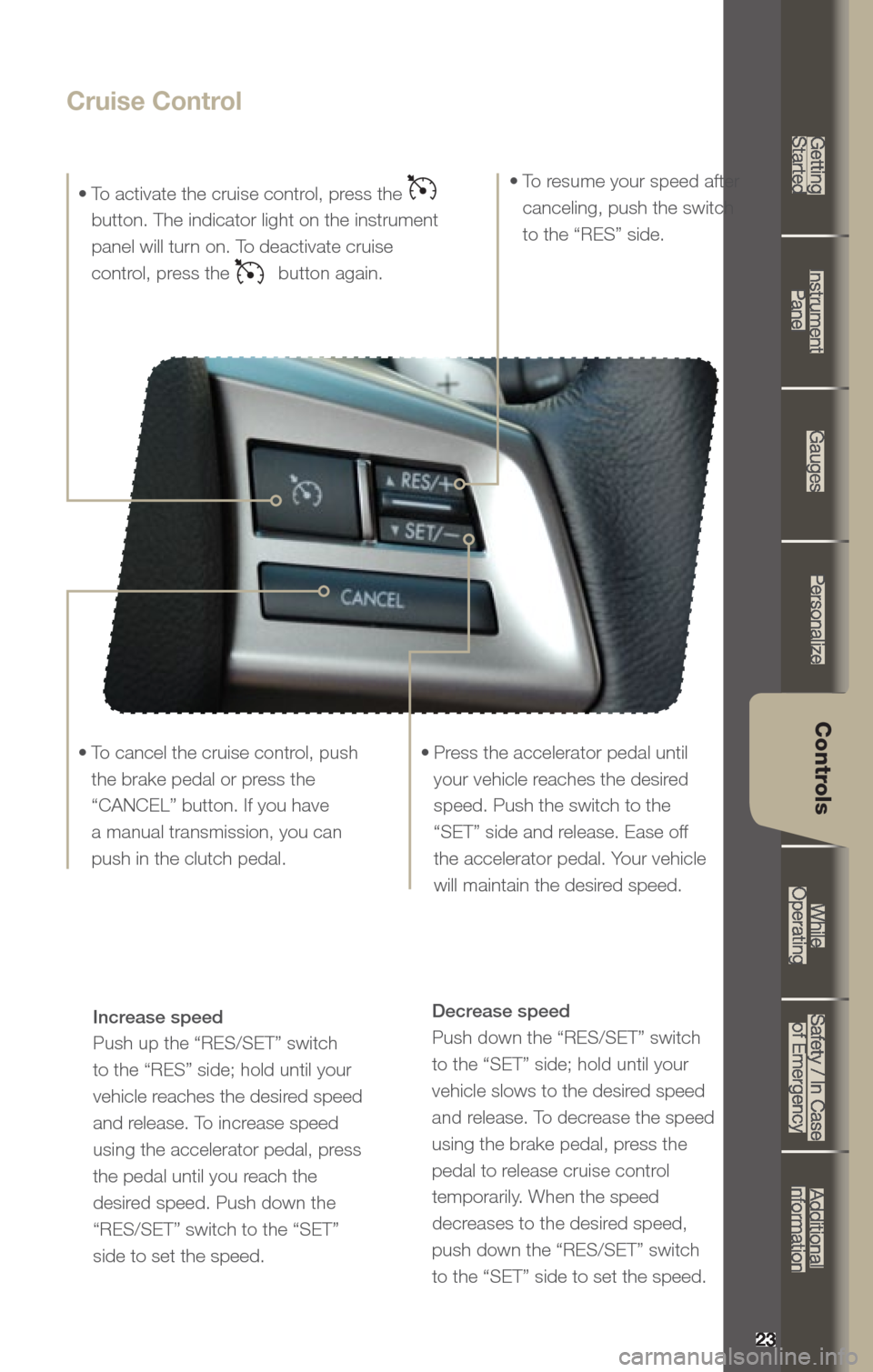
Cruise Control
• To activate the cruise control, press the
button. The indicator light on the instrument
panel will turn on. To deactivate cruise
control, press the
button again.
• Press the accelerator pedal until your vehicle reaches the desired
speed. Push the switch to the
“SET” side and release. Ease off
the accelerator pedal. Your vehicle
will maintain the desired speed.
•
To cancel the cruise control, push
the brake pedal or press the
“CANCEL” button. If you have
a manual transmission, you can
push in the clutch pedal. •
To resume your speed after
canceling, push the switch
to the “RES” side.
Increase speed
Push up the “RES/SET” switch
to the “RES” side; hold until your
vehicle reaches the desired speed
and release. To increase speed
using the accelerator pedal, press
the pedal until you reach the
desired speed. Push down the
“RES/SET” switch to the “SET”
side to set the speed.
Page 27 of 36
2424
While Operating
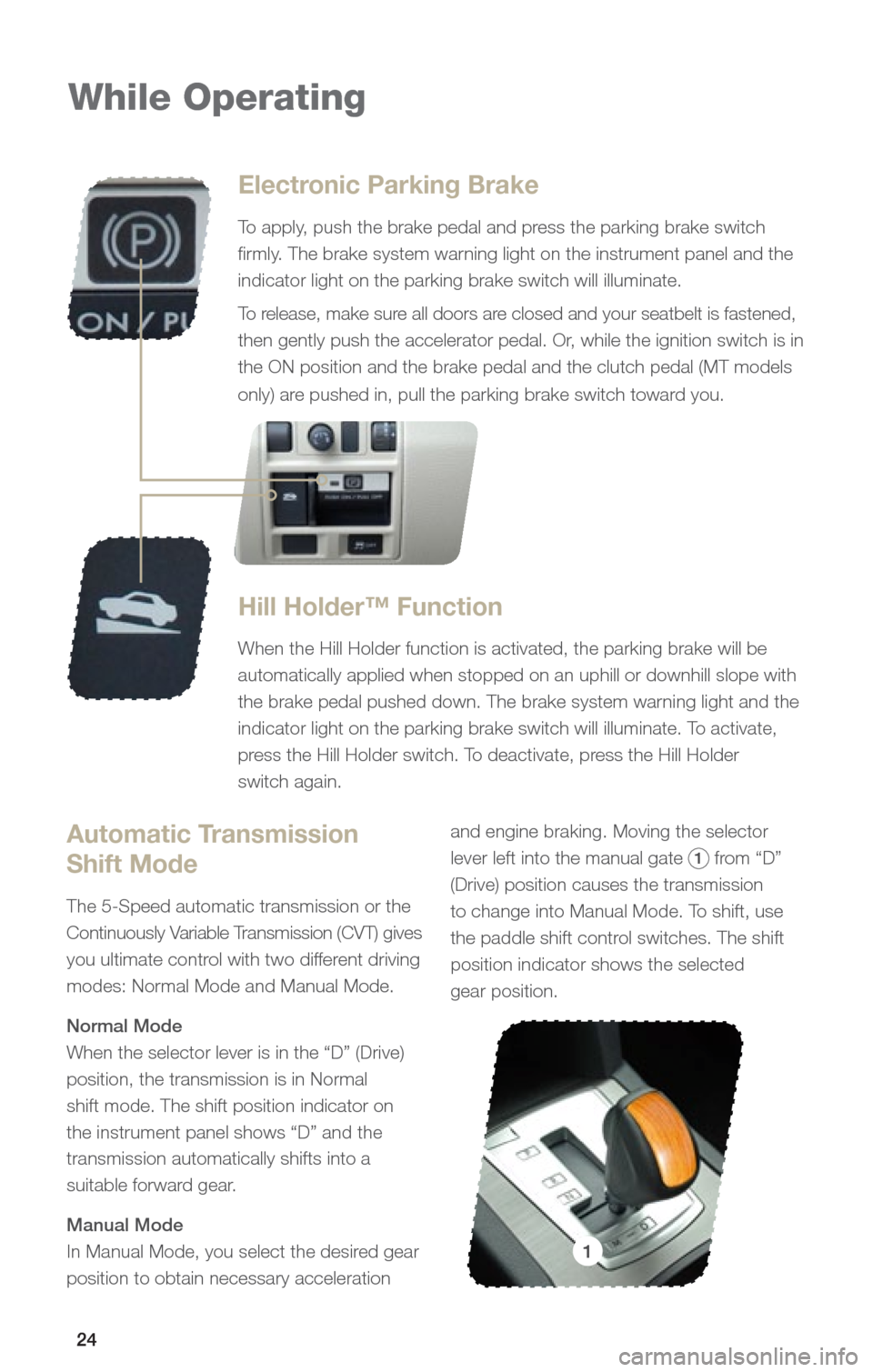
Electronic Parking Brake
To apply, push the brake pedal and press the parking brake switch
firmly. The brake system warning light on the instrument panel and the
indicator light on the parking brake switch will illuminate.
To release, make sure all doors are closed and your seatbelt is fastened,
then gently push the accelerator pedal. Or, while the ignition switch is in
the ON position and the brake pedal and the clutch pedal (MT models
only) are pushed in, pull the parking brake switch toward you.
Hill Holder™ Function
When the Hill Holder function is activated, the parking brake will be
automatically applied when stopped on an uphill or downhill slope with
the brake pedal pushed down. The brake system warning light and the
indicator light on the parking brake switch will illuminate. To activate,
press the Hill Holder switch. To deactivate, press the Hill Holder
switch again.
Automatic Transmission
Shift Mode
The 5-Speed automatic transmission or the
Continuously Variable Transmission (CVT) gives
you ultimate control with two different driving
modes: Normal Mode and Manual Mode.
Normal Mode
When the selector lever is in the “D” (Drive)
position, the transmission is in Normal
shift mode. The shift position indicator on
the instrument panel shows “D” and the
transmission automatically shifts into a
suitable forward gear.
Manual Mode
In Manual Mode, you select the desired gear
position to obtain necessary acceleration and engine braking. Moving the selector
lever left into the manual gate
1 from “D”
(Drive) position causes the transmission
to change into Manual Mode. To shift, use
the paddle shift control switches. The shift
position indicator shows the selected
gear position.
1
Page 28 of 36
25
Getting
Started Instrument
Panel Gauges
Personalize Controls
While
Operating Safety / In Case
of Emergency Additional
Information
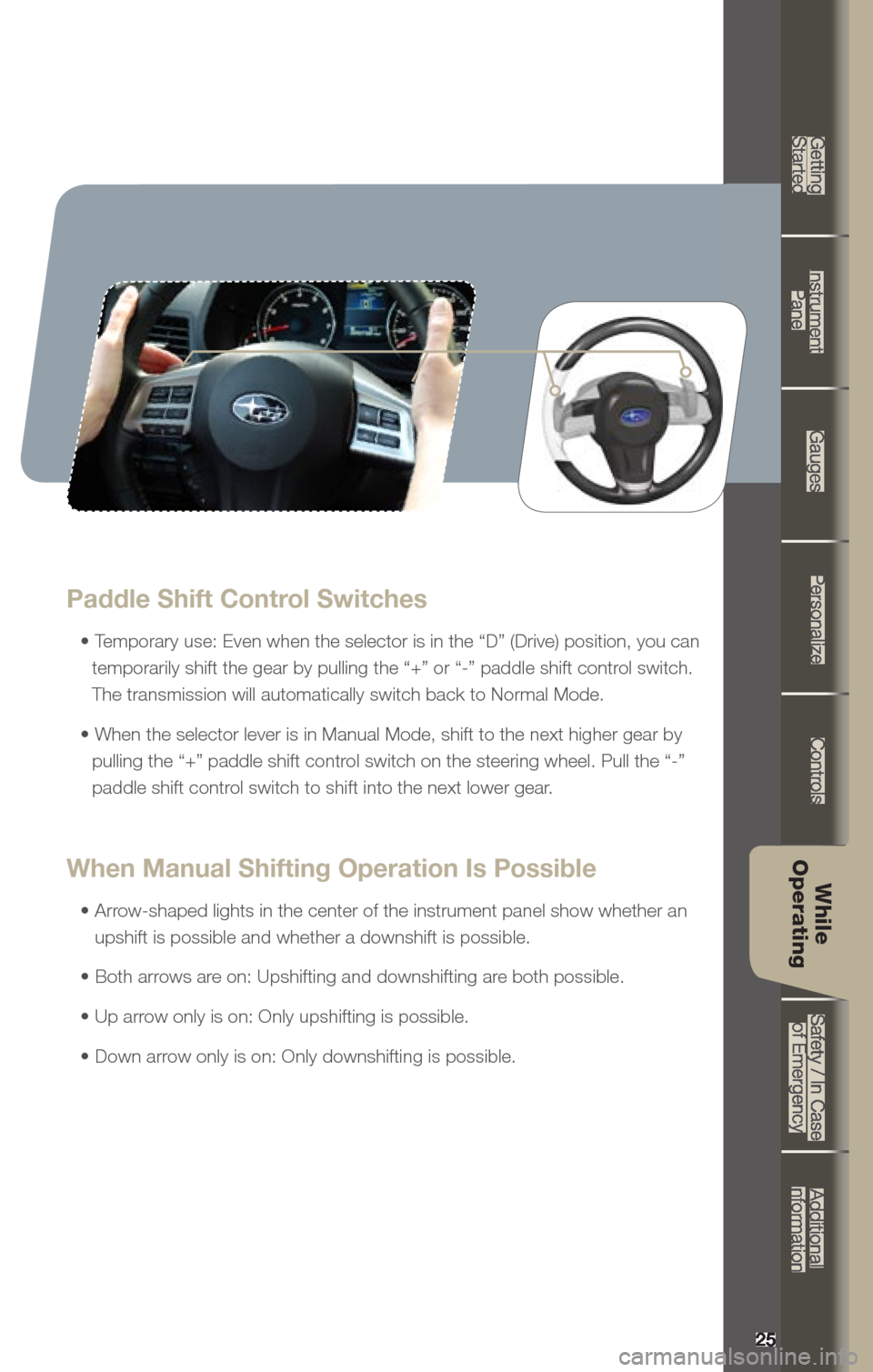
Paddle Shift Control Switches
• Temporary use: Even when the selector is in the “D” (Drive) position, you can
temporarily shift the gear by pulling the “+” or “-” paddle shift control switch.
The transmission will automatically switch back to Normal Mode.
• When the selector lever is in Manual Mode, shift to the next higher gear by pulling the “+” paddle shift control switch on the steering wheel. Pull the “-”
paddle shift control switch to shift into the next lower gear.
When Manual Shifting Operation Is Possible
• Arrow-shaped lights in the center of the instrument panel show whether an upshift is possible and whether a downshift is possible.
• Both arrows are on: Upshifting and downshifting are both possible.
• Up arrow only is on: Only upshifting is possible.
• Down arrow only is on: Only downshifting is possible.
25
Getting Started
Instrument Panel
Gauges
Personalize
Controls
While Operating
Safety / In Case of Emergency
Additional Information
While
Operating
Page 30 of 36
27
Getting
Started Instrument
Panel Gauges
Personalize Controls
While
Operating Safety / In Case
of Emergency Additional
Information
27
Getting Started
Instrument Panel
Gauges
Personalize
Controls
While Operating
Safety / In Case of Emergency
Additional Information
Safety /
In Case of
Emergency
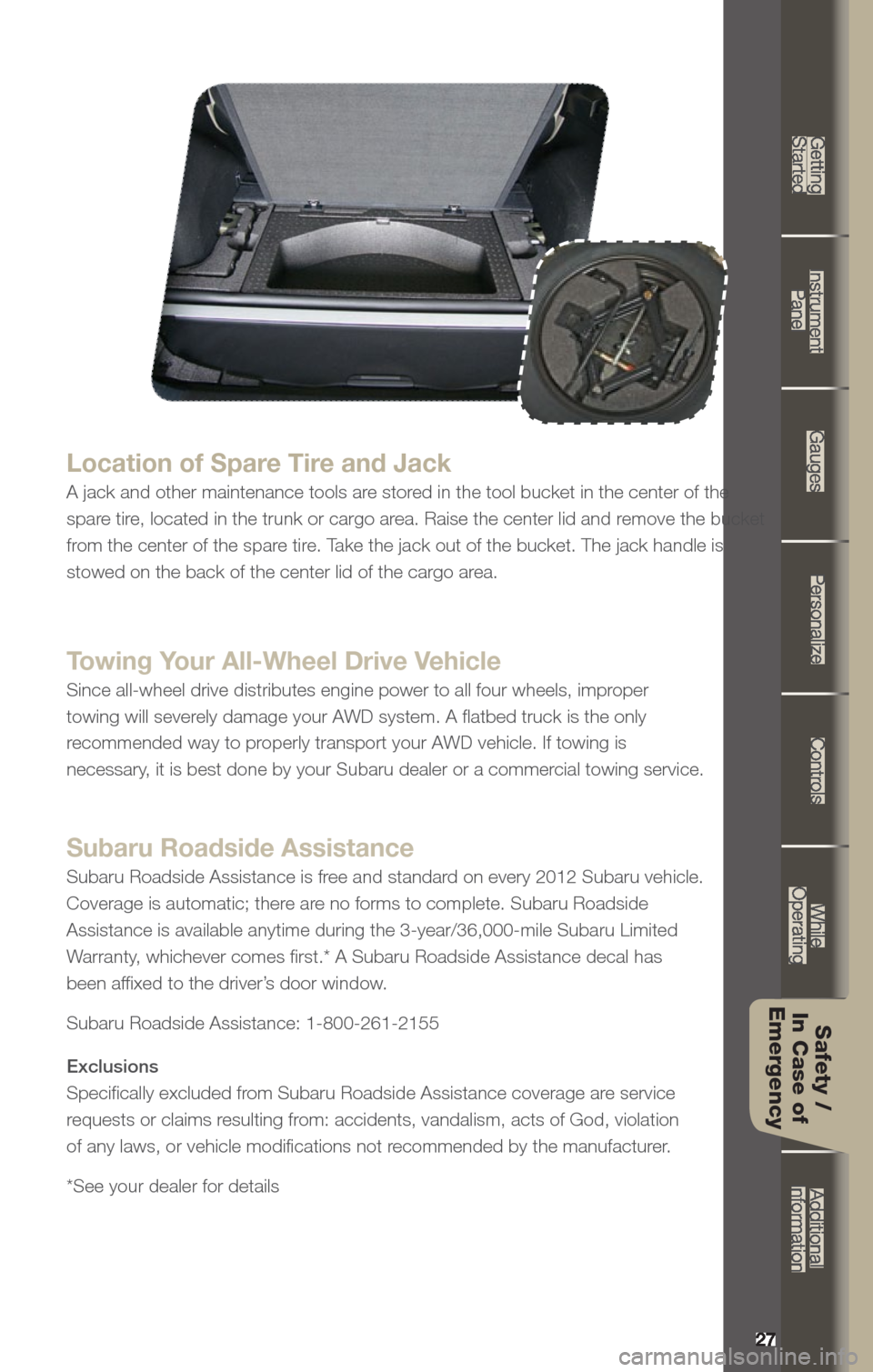
Location of Spare Tire and Jack
A jack and other maintenance tools are stored in the tool bucket in the center of the
spare tire, located in the trunk or cargo area. Raise the center lid and remove the bucket
from the center of the spare tire. Take the jack out of the bucket. The jack handle is
stowed on the back of the center lid of the cargo area.
Towing Your All-Wheel Drive Vehicle
Since all-wheel drive distributes engine power to all four wheels, improper
towing will severely damage your AWD system. A flatbed truck is the only
recommended way to properly transport your AWD vehicle. If towing is
necessary, it is best done by your Subaru dealer or a commercial towing service.
Subaru Roadside Assistance
Subaru Roadside Assistance is free and standard on every 2012 Subaru vehicle.
Coverage is automatic; there are no forms to complete. Subaru Roadside
Assistance is available anytime during the 3-year/36,000-mile Subaru Lim\
ited
Warranty, whichever comes first.* A Subaru Roadside Assistance decal has
been affixed to the driver’s door window.
Subaru Roadside Assistance: 1-800-261-2155
Exclusions
Specifically excluded from Subaru Roadside Assistance coverage are service
requests or claims resulting from: accidents, vandalism, acts of God, violation
of any laws, or vehicle modifications not recommended by the manufacturer.
*See your dealer for details
Page 32 of 36
29
Getting
Started Instrument
Panel Gauges
Personalize Controls
While
Operating Safety / In Case
of Emergency Additional
Information
29
Getting Started
Instrument Panel
Gauges
Personalize
Controls
While Operating
Safety / In Case of Emergency
Additional InformationAdditional
Information
Fuel
Use regular unleaded gasoline with an octane rating of 87 AKI
or higher.
Fuel Capacity
• 18.5 US gal (70 liters, 15.4 Imp gal)
• When the low fuel indicator light is displayed on the
instrument panel, approximately 2.6 U.S. gallons of fuel remain.
• If you have recently fueled your vehicle, the check
engine light on the instrument panel may stay on due
to a missing or loose fuel filler cap (the cap should be
tightened until a click is heard).
- 2.5 liter 4-cyl. DOHC models use 0W-20 synthetic.
- 3.6 liter 6-cyl. models use 5W-30.
Engine Oil
Use only the following oils:
• API classification SM or SN with the words “ENERGY
CONSERVING” or “RESOURCE CONSERVING”.
• Or ILSAC GF-4 or GF-5, which can be identified with the ILSAC
certification mark (Starburst mark).
Engine Oil Capacity
• 2.5 liter 4-cyl. models: 5.1 US qt (4.8 liters, 4.2 lmp qt)
• 3.6 liter 6-cyl. models: 6.9 US qt (6.5 liters, 5.7 Imp qt)
Page 35 of 36
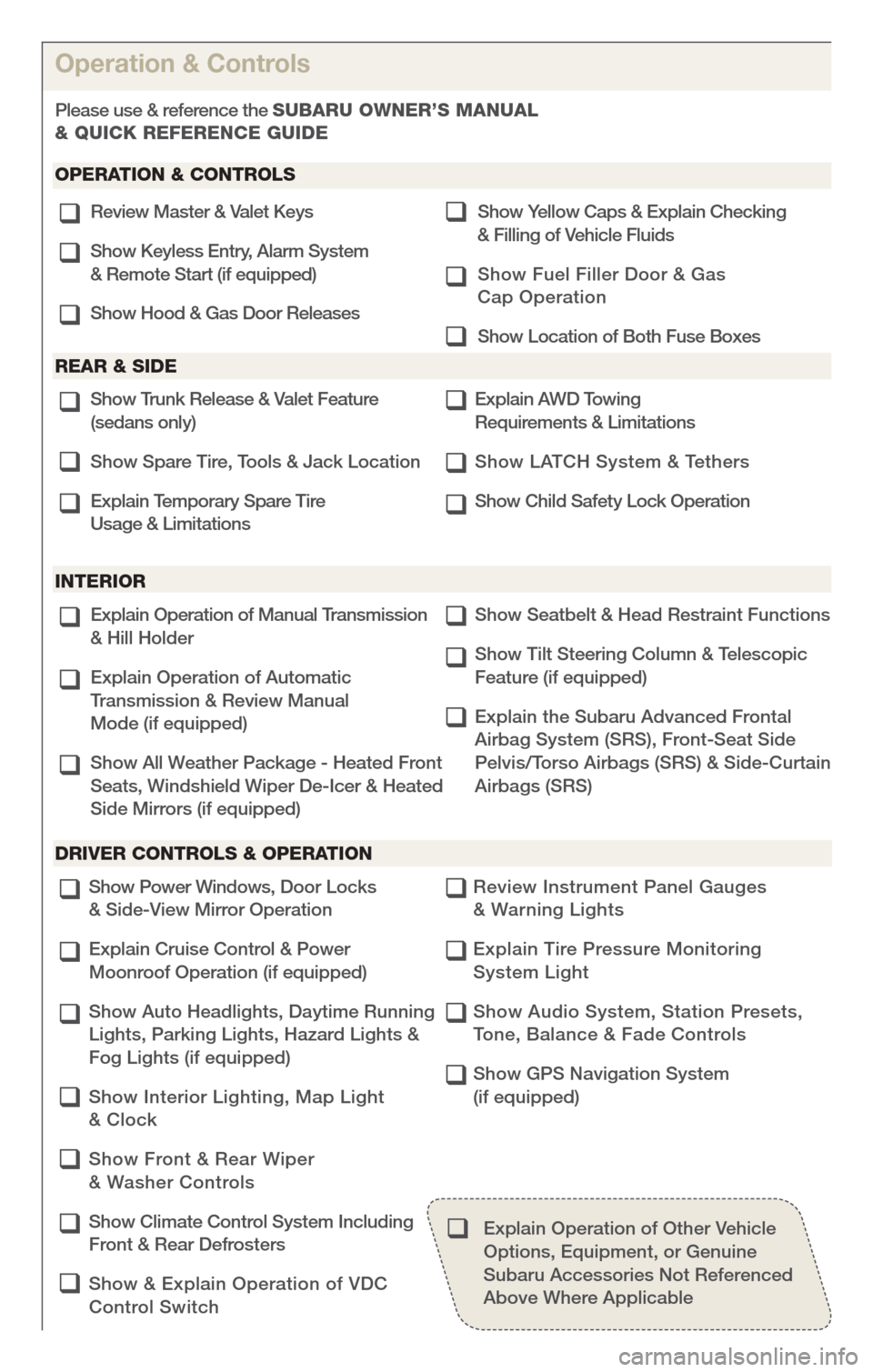
Explain Operation of Manual Transmission
& Hill Holder
Explain Operation of Automatic
Transmission & Review Manual
Mode (if equipped)
Show All Weather Package - Heated Front
Seats, Windshield Wiper De-Icer & Heated
Side Mirrors (if equipped) Show Seatbelt & Head Restraint Functions
Show Tilt Steering Column & Telescopic
Feature (if equipped)
Explain the Subaru Advanced Frontal
Airbag System (SRS), Front-Seat Side
Pelvis/Torso Airbags (SRS) & Side-Curtain
Airbags (SRS)q
q
q
q
q
q
Review Master & Valet Keys
Show Keyless Entry, Alarm System
& Remote Start (if equipped)
Show Hood & Gas Door Releases Show
yellow Caps & Explain Checking
& Filling of Vehicle Fluids
Show Fuel Filler Door & Gas
Cap Operation
Show Location of Both Fuse Boxesq
q
q q
q
q
Show Trunk Release & Valet Feature
(sedans only)
Show Spare Tire, Tools & Jack Location
Explain Temporary Spare Tire
Usage & Limitations Explain AWD Towing
Requirements & Limitations
Show LATCH System & Tethers
Show Child Safety Lock Operationq
q
q q
q
q
q
q
q
q
q
q
q
Operation & Controls
Please use & reference the SUBARU OWNER’S MANUAl
& QUICK REf ERENCE GUIDE
OPERAtION & CONtROlS
REAR & SIDE
INtERIOR
DRIvER CONtROlS & OPERAtION
q
q
q
q
Show Power Windows, Door Locks
& Side-View Mirror Operation
Explain Cruise Control & Power
Moonroof Operation (if equipped)
Show Auto Headlights, Daytime Running
Lights, Parking Lights, Hazard Lights &
Fog Lights (if equipped)
Show Interior Lighting, Map Light
& Clock
Show Front & Rear Wiper
& Washer Controls
Show Climate Control System Including
Front & Rear Defrosters
Show & Explain Operation of VDC
Control Switch Review Instrument Panel Gauges
& Warning Lights
Explain Tire Pressure Monitoring
System Light
Show Audio System, Station Presets,
Tone, Balance & Fade Controls
Show GPS Navigation System
(if equipped)
Explain Operation of Other Vehicle Options, Equipment, or Genuine
Subaru Accessories Not Referenced
Above Where Applicable
q