light SUBARU OUTBACK 2016 6.G Owners Manual
[x] Cancel search | Manufacturer: SUBARU, Model Year: 2016, Model line: OUTBACK, Model: SUBARU OUTBACK 2016 6.GPages: 572, PDF Size: 21.79 MB
Page 212 of 572
Instruments and controls/Mirrors
!Programming rolling-code-pro-
tected garage door openers in
the U.S.A.
If your garage door opener has a rolling
code feature, program the HomeLink
®Wireless Control System for it by following
steps 1 through 5 in“Garage door opener
programming in the U.S.A.”F3-59. Then
continue with the following steps.
NOTE
The assistance of a second person
may make the programming quicker
and easier.
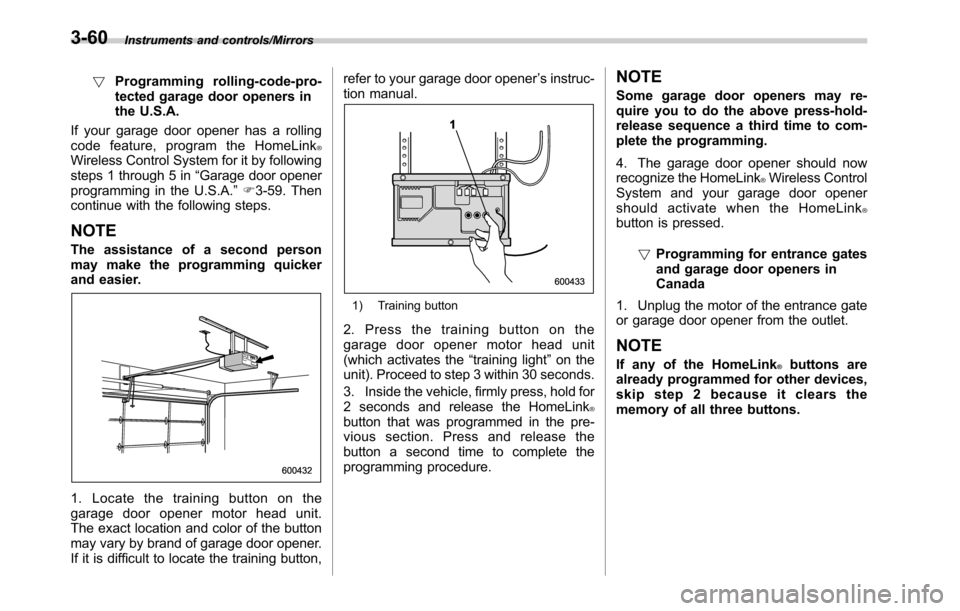
1. Locate the training button on the
garage door opener motor head unit.
The exact location and color of the button
may vary by brand of garage door opener.
If it is difficult to locate the training button,refer to your garage door opener’s instruc-
tion manual.
1) Training button
2. Press the training button on the
garage door opener motor head unit
(which activates the“training light”on the
unit). Proceed to step 3 within 30 seconds.
3. Inside the vehicle, firmly press, hold for
2 seconds and release the HomeLink
®button that was programmed in the pre-
vious section. Press and release the
button a second time to complete the
programming procedure.
NOTE
Some garage door openers may re-
quire you to do the above press-hold-
release sequence a third time to com-
plete the programming.
4. The garage door opener should now
recognize the HomeLink
®Wireless Control
System and your garage door opener
should activate when the HomeLink
®button is pressed.
!Programming for entrance gates
and garage door openers in
Canada
1. Unplug the motor of the entrance gate
or garage door opener from the outlet.
NOTE
If any of the HomeLink®buttons are
already programmed for other devices,
skip step 2 because it clears the
memory of all three buttons.
3-60
Page 213 of 572
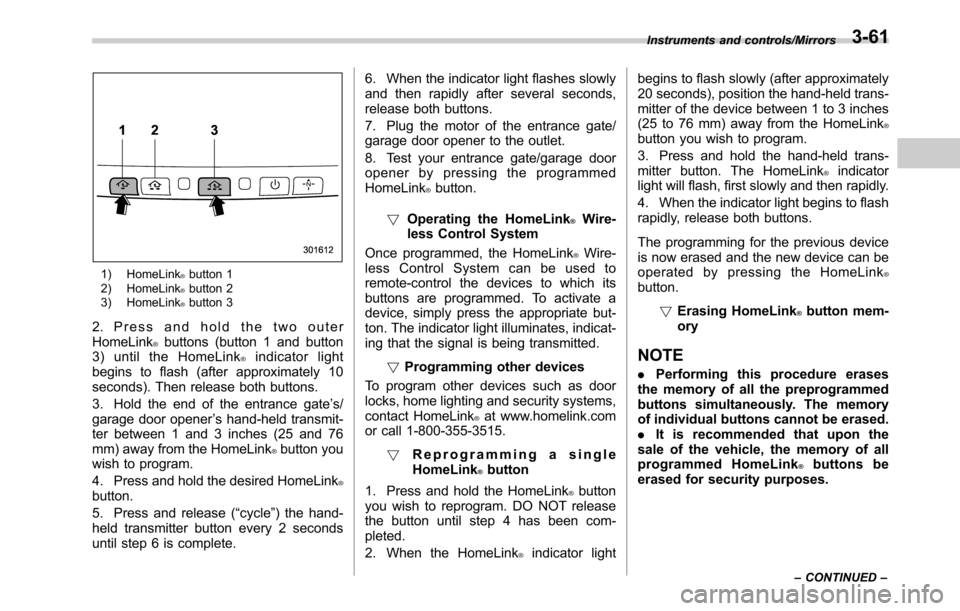
1) HomeLink®button 1
2) HomeLink®button 2
3) HomeLink®button 3
2. Press and hold the two outer
HomeLink®buttons (button 1 and button
3) until the HomeLink®indicator light
begins to flash (after approximately 10
seconds). Then release both buttons.
3. Hold the end of the entrance gate’s/
garage door opener’s hand-held transmit-
ter between 1 and 3 inches (25 and 76
mm) away from the HomeLink
®button you
wish to program.
4. Press and hold the desired HomeLink
®button.
5. Press and release (“cycle”) the hand-
held transmitter button every 2 seconds
until step 6 is complete.6. When the indicator light flashes slowly
and then rapidly after several seconds,
release both buttons.
7. Plug the motor of the entrance gate/
garage door opener to the outlet.
8. Test your entrance gate/garage door
opener by pressing the programmed
HomeLink
®button.
!Operating the HomeLink
®Wire-
less Control System
Once programmed, the HomeLink
®Wire-
less Control System can be used to
remote-control the devices to which its
buttons are programmed. To activate a
device, simply press the appropriate but-
ton. The indicator light illuminates, indicat-
ing that the signal is being transmitted.
!Programming other devices
To program other devices such as door
locks, home lighting and security systems,
contact HomeLink
®at www.homelink.com
or call 1-800-355-3515.
!Reprogramming a single
HomeLink
®button
1. Press and hold the HomeLink
®button
you wish to reprogram. DO NOT release
the button until step 4 has been com-
pleted.
2. When the HomeLink
®indicator lightbegins to flash slowly (after approximately
20 seconds), position the hand-held trans-
mitter of the device between 1 to 3 inches
(25 to 76 mm) away from the HomeLink
®button you wish to program.
3. Press and hold the hand-held trans-
mitter button. The HomeLink
®indicator
light will flash, first slowly and then rapidly.
4. When the indicator light begins to flash
rapidly, release both buttons.
The programming for the previous device
is now erased and the new device can be
operated by pressing the HomeLink
®button.
!Erasing HomeLink
®button mem-
ory
NOTE
.Performing this procedure erases
the memory of all the preprogrammed
buttons simultaneously. The memory
of individual buttons cannot be erased.
.It is recommended that upon the
sale of the vehicle, the memory of all
programmed HomeLink
®buttons be
erased for security purposes.
Instruments and controls/Mirrors
–CONTINUED–3-61
Page 214 of 572
Instruments and controls/Mirrors
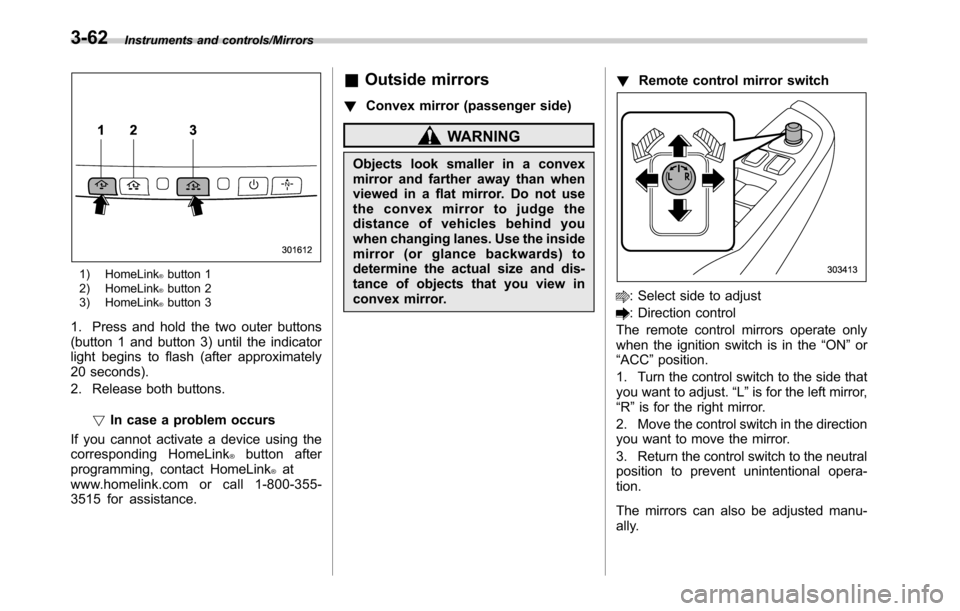
1) HomeLink®button 1
2) HomeLink®button 2
3) HomeLink®button 3
1. Press and hold the two outer buttons
(button 1 and button 3) until the indicator
light begins to flash (after approximately
20 seconds).
2. Release both buttons.
!In case a problem occurs
If you cannot activate a device using the
corresponding HomeLink
®button after
programming, contact HomeLink®at
www.homelink.com or call 1-800-355-
3515 for assistance.
&Outside mirrors
!Convex mirror (passenger side)
WARNING
Objects look smaller in a convex
mirror and farther away than when
viewed in a flat mirror. Do not use
the convex mirror to judge the
distance of vehicles behind you
when changing lanes. Use the inside
mirror (or glance backwards) to
determine the actual size and dis-
tance of objects that you view in
convex mirror.!Remote control mirror switch
: Select side to adjust
: Direction control
The remote control mirrors operate only
when the ignition switch is in the“ON”or
“ACC”position.
1. Turn the control switch to the side that
you want to adjust.“L”is for the left mirror,
“R”is for the right mirror.
2. Move the control switch in the direction
you want to move the mirror.
3. Return the control switch to the neutral
position to prevent unintentional opera-
tion.
The mirrors can also be adjusted manu-
ally.
3-62
Page 217 of 572

Ventilator control................................................. 4-2
Center ventilators................................................ 4-2
Side ventilators................................................... 4-2
Rear ventilators (if equipped)............................... 4-2
Climate control panel.......................................... 4-3
Type A ................................................................ 4-3
Type B ................................................................ 4-4
Automatic climate control system (type B)....... 4-5Temperature sensors........................................... 4-5
Manual climate control....................................... 4-6Airflow mode selection........................................ 4-6
Temperature control............................................ 4-7
Fan speed control............................................... 4-8
Air conditioner control........................................ 4-8
Air inlet selection................................................ 4-8
Defrosting............................................................ 4-9Operating tips for heater and air
conditioner........................................................ 4-9
Cleaning ventilator grille...................................... 4-9
Efficient cooling after parking in direct
sunlight............................................................. 4-9
Lubrication oil circulation in the refrigerant
circuit.............................................................. 4-10
Checking air conditioning system before summer
season............................................................ 4-10
Cooling and dehumidifying in high humidity and
low temperature weather condition................... 4-10
Air conditioner compressor shut-off when engine
is heavily loaded.............................................. 4-10
Refrigerant for your climate control system ........ 4-10
Air filtration system (if equipped)..................... 4-10Replacing an air filter......................................... 4-11
Climate control
4
Page 221 of 572
Automatic climate control
system (type B)
NOTE
.Operate the automatic climate con-
trol system when the engine is running.
.The blower fan rotates at a low
speed when the engine coolant tem-
perature is low.
.For efficient defogging or dehumidi-
fying in cold weather, press the“A/C”
button.
When the automatic climate control mode
is selected, the following items are auto-
matically controlled.
.Outlet air temperature
.Fan speed
.Airflow distribution
.Air inlet control
.Air conditioner compressor operation
To activate this mode, perform the follow-
ing procedure.
1. Set the preferred temperature using
the temperature control button.
2. Press the“AUTO”button. The FULL
AUTO mode is selected and the“FULL
AUTO”indicator light on the display
illuminates.
NOTE
If you operate any of the buttons on the
control panel other than the“OFF”
button, rear window defogger button
and temperature control buttons during
FULL AUTO mode operation, the
“FULL”indicator light on the control
panel will turn off and the“AUTO”
indicator light will remain illuminated.
You can then manually control the
system as desired. To change the
system back to the FULL AUTO mode,
press the“AUTO”button.
To turn off the climate control system,
press the“OFF”button. The air inlet
selection is then automatically switched
to the outside air mode.&Temperature sensors
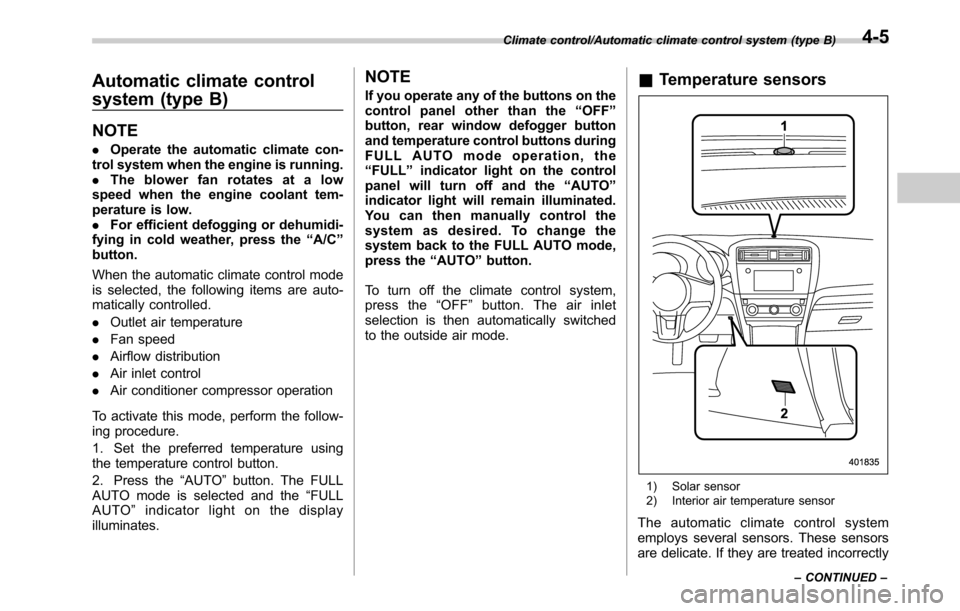
1) Solar sensor
2) Interior air temperature sensor
The automatic climate control system
employs several sensors. These sensors
are delicate. If they are treated incorrectly
Climate control/Automatic climate control system (type B)
–CONTINUED–4-5
Page 223 of 572

the instrument panel and some through
windshield defroster outlets (A small
amount of air flows to the windshield and
both side windows to prevent fogging.)
A) Models with rear ventilators
(Heat-def): Windshield defroster outlets,
foot outlets and both side outlets of the
instrument panel
A) Models with rear ventilators
(Defrost): Windshield defroster outlets and
both side outlets of the instrument panel
NOTE
.When the“”mode or“”mode
is selected, the air conditioner com-
pressor automatically operates to more
quickly defog the windshield. At the
same time, the air inlet selection is
automatically set to the outside air
mode.
In this state:
–The air conditioner indicator light
does not illuminate.
–You cannot stop the air condi-
tioner compressor by pressing the
air conditioner button.
&Temperature control
Turn the temperature control dial over a
range from the blue side (cool) to red side
(warm) to regulate the temperature of
airflow from the air outlets.
!MAX A/C mode
Perform the following operation to select
the MAX A/C mode.
.Turn the temperature control dial to the
“MAX A/C”position (models with type A
climate control system).
.Press the“MAX A/C”button (models
with type B climate control system).
When this mode is selected, some of the
settings will be changed as follows.
Type A climate control system:
.The air inlet selection mode will be
changed to the ON position (recirculation).
.The air conditioner will turn on.
Type B climate control system:
.The temperature setting will be chan-
ged to the maximum cooling mode.
.The fan speed setting will be changed
to the maximum speed.
.The airflow mode setting will be chan-
ged to the“
”(ventilation) mode.
.The air inlet selection mode will be
changed to the ON position (recirculation).
Climate control/Manual climate control
–CONTINUED–4-7
Page 224 of 572

Climate control/Manual climate control
.The air conditioner will turn on.
While the MAX A/C mode is selected,
performing the following operation returns
the system to the setting that had been
selected before the MAX A/C mode is
selected.
.Turn the temperature control dial to a
position other than“MAX A/C”position
(models with type A climate control sys-
tem).
.Press the“MAX A/C”button again
(models with type B climate control sys-
tem).
!“DUAL”mode (type B)
You can change the setting of the driver’s
side and front passenger’s side tempera-
ture independently by selecting the
“DUAL”mode.
You can select the“DUAL”mode by
performing either of the following proce-
dures.
.Press the“DUAL”button
.Turn the passenger’s side temperature
control dial
The“DUAL”mode can be canceled by
pressing the“DUAL”button.
When the“DUAL”mode is selected:
Turn the driver’ssidedialtosetthe
driver’s side temperature. Turn the frontpassenger’s side dial to set the front
passenger’s side temperature.
When the“DUAL”mode is canceled:
Set the desired temperature by turning the
driver’s side dial.
&Fan speed control
The fan operates only when the ignition
switch is in the“ON”position. Select the
preferred fan speed by turning the fan
speed control dial (type A), or by pressing
the fan speed control buttons (type B).
&Air conditioner control
The air conditioner operates only when
the engine is running.
Press the air conditioner button while the
fan is in operation to turn on the air
conditioner. When the air conditioner is
on, the“A/C”indicator light illuminates.
To turn off the air conditioner, press the
button again. The indicator light will turn
off.
NOTE
For efficient defogging or dehumidify-
ing in cold weather, turn on the air
conditioner. However, if the ambient
temperature decreases to approxi-
mately 328F(08C), the air conditioner
and dehumidification system may notwork properly.
&Air inlet selection
Select the air inlet by pressing the air inlet
selection button.
ON position (recirculation): Interior air is
recirculated inside the vehicle. Press the
air inlet selection button to the ON position
for fast cooling with the air conditioner or
when driving on a dusty road. When the
ON position is selected, the“
”indicator
light on the information display (type A)/
the indicator light on the air inlet selection
button (type B) illuminates.
OFF position (outside air): Outside air is
drawn into the passenger compartment.
Press the air inlet selection button to the
OFF position when the interior has cooled
to a comfortable temperature and the road
is no longer dusty. The indicator light will
turn off.
4-8
Page 225 of 572
WARNING
Continued operation in the ON posi-
tion may fog up the windows. Switch
to the OFF position as soon as the
outside dusty condition clears.
Defrosting
Select the desired“”mode or“”mode
to defrost or dehumidify the windshield
and front door windows by performing the
following procedures.
.To select the“
”mode, press the
defroster button.
.To select the“
”mode, press the
airflow mode selection button and select
the“
”mode.
NOTE
.When the“”mode or“”mode
is selected, the air conditioner com-
pressor automatically operates to more
quickly defog the windshield. (The air
conditioner indicator light does not
illuminate in this case.) At the same
time, the air inlet selection is automa-
tically set to the outside air mode. For
details, refer to“Airflow mode selec-
tion”F4-6.
.If the defroster button is pressed
while the“
”mode is selected, it will
return to the previous mode before
selecting the“
”mode.
Operating tips for heater and
air conditioner
&Cleaning ventilator grille
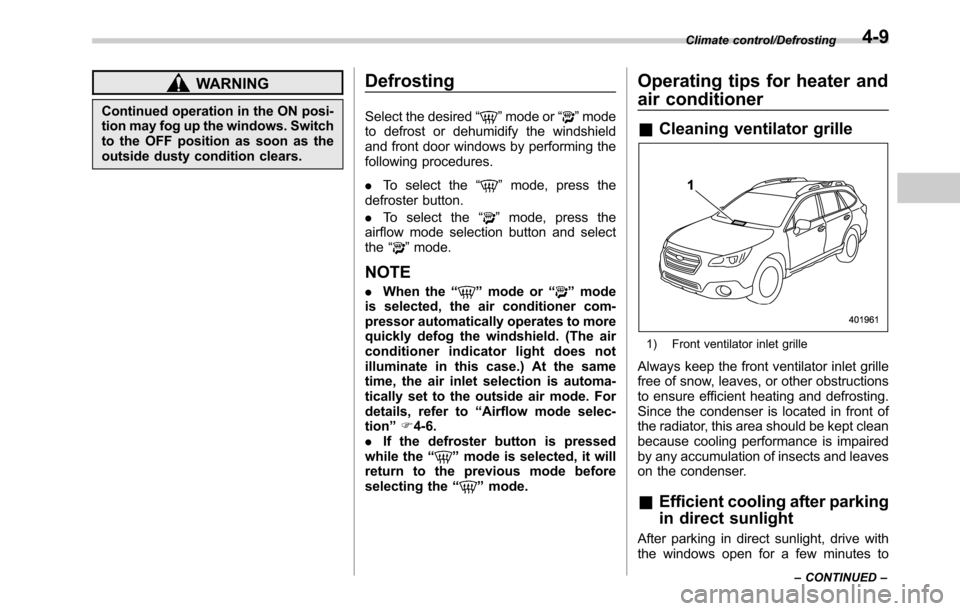
1) Front ventilator inlet grille
Always keep the front ventilator inlet grille
free of snow, leaves, or other obstructions
to ensure efficient heating and defrosting.
Since the condenser is located in front of
the radiator, this area should be kept clean
because cooling performance is impaired
by any accumulation of insects and leaves
on the condenser.
&Efficient cooling after parking
in direct sunlight
After parking in direct sunlight, drive with
the windows open for a few minutes to
Climate control/Defrosting
–CONTINUED–4-9
Page 235 of 572

&Tips for operating the audio/
visual system
CAUTION
To avoid damage to the audio/visual
system:
.Be careful not to spill beverages
over the audio/visual system.
.Do not put anything other than an
appropriate disc into the disc
slot.
NOTE
The use of a cell phone inside or near
the vehicle may cause a noise from the
speakers of the audio/visual system
which you are listening to. However,
this does not indicate a malfunction.
!Radio
Usually, a problem with radio reception
does not mean there is a problem with the
radio—it is just the normal result of
conditions outside the vehicle.
For example, nearby buildings and terrain
can interfere with FM reception. Power
lines or phone wires can interfere with AM
signals. And of course, radio signals have
a limited range. The farther the vehicle isfrom a station, the weaker its signal will
be. In addition, reception conditions
change constantly as the vehicle moves.
Here, some common reception problems
that probably do not indicate a problem
with the radio are described.
!FM
Fading and drifting stations: Generally, the
effective range of FM is about 25 miles (40
km). Once outside this range, you may
notice fading and drifting, which increase
with the distance from the radio transmit-
ter. They are often accompanied by
distortion.
Multi-path: FM signals are reflective,
making it possible for 2 signals to reach
the vehicle’s antenna at the same time. If
this happens, the signals will cancel each
other out, causing a momentary flutter or
loss of reception.
Static and fluttering: These occur when
signals are blocked by buildings, trees or
other large objects. Increasing the bass
level may reduce static and fluttering.
Station swapping: If the FM signal being
listened to is interrupted or weakened, and
there is another strong station nearby on
the FM band, the radio may tune in the
second station until the original signal can
be picked up again.!AM
Fading: AM broadcasts are reflected by
the upper atmosphere—especially at
night. These reflected signals can inter-
fere with those received directly from the
radio station, causing the radio station to
sound alternately strong and weak.
Station interference: When a reflected
signal and a signal received directly from
a radio station are very nearly the same
frequency, they can interfere with each
other, making it difficult to hear the broad-
cast.
Static: AM is easily affected by external
sources of electrical noise, such as high
tension power lines, lightening or electrical
motors. This results in static.
!SiriusXM (if equipped)
.Cargo loaded on the roof luggage
carrier, especially metal objects, may
adversely affect the reception of SiriusXM
Satellite Radio.
.Alternation or modifications carried out
without appropriate authorization may in-
validate the user’s right to operate the
equipment.
Audio/Audio set
–CONTINUED–5-7
Page 237 of 572
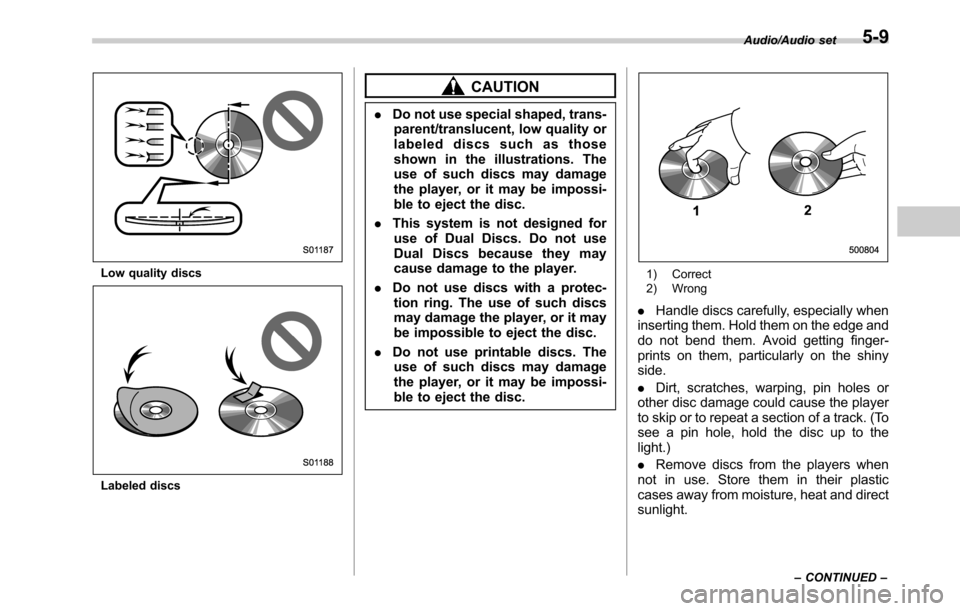
Low quality discs
Labeled discs
CAUTION
.Do not use special shaped, trans-
parent/translucent, low quality or
labeled discs such as those
shown in the illustrations. The
use of such discs may damage
the player, or it may be impossi-
ble to eject the disc.
.This system is not designed for
use of Dual Discs. Do not use
Dual Discs because they may
cause damage to the player.
.Do not use discs with a protec-
tion ring. The use of such discs
may damage the player, or it may
be impossible to eject the disc.
.Do not use printable discs. The
use of such discs may damage
the player, or it may be impossi-
ble to eject the disc.
1) Correct
2) Wrong
.Handle discs carefully, especially when
inserting them. Hold them on the edge and
do not bend them. Avoid getting finger-
prints on them, particularly on the shiny
side.
.Dirt, scratches, warping, pin holes or
other disc damage could cause the player
to skip or to repeat a section of a track. (To
see a pin hole, hold the disc up to the
light.)
.Remove discs from the players when
not in use. Store them in their plastic
cases away from moisture, heat and direct
sunlight.
Audio/Audio set
–CONTINUED–5-9