Security SUBARU OUTBACK 2016 6.G User Guide
[x] Cancel search | Manufacturer: SUBARU, Model Year: 2016, Model line: OUTBACK, Model: SUBARU OUTBACK 2016 6.GPages: 572, PDF Size: 21.79 MB
Page 156 of 572
Instruments and controls/Ignition switch (models without push–button start system)
while turning it (all models) and the select
lever is in the“P”position (CVT models).
&ACC
In this position the electrical accessories
(radio, accessory power outlet, etc.) can
be used.
&ON
This is the normal operating position after
the engine is started.
&START
CAUTION
Do not turn the ignition switch to the
“START”position while the engine
is running.
The engine is started in this position. The
starter cranks the engine to start it. When
the key is released (after the engine has
started), the key automatically returns to
the“ON”position.
If the engine does not start with your
registered key, pull out the key once (at
this time, the security indicator light will
blink), reinsert the key in the ignition
switch and then try to start the engine
again.
NOTE
The engine may not start in the follow-
ing cases:
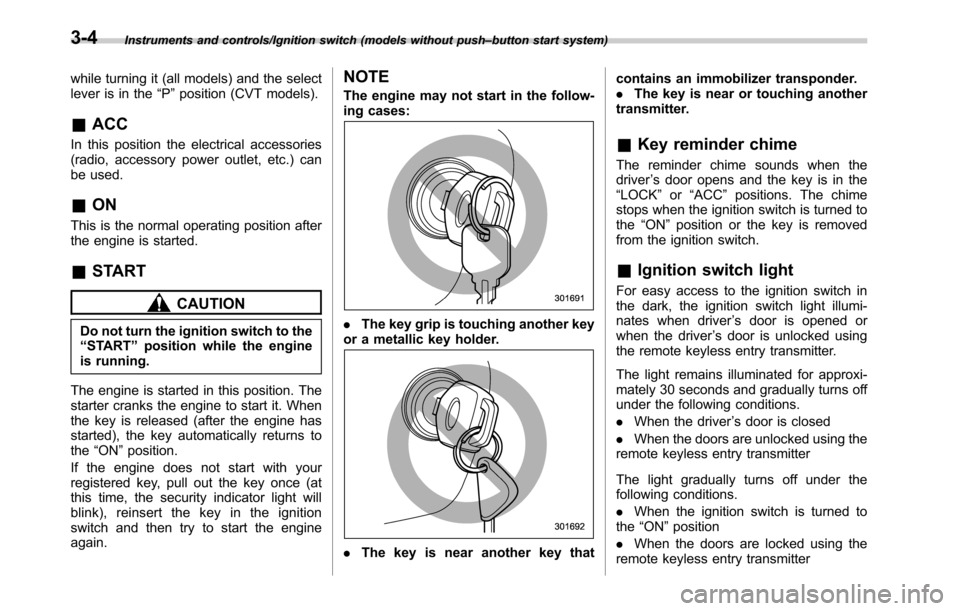
.The key grip is touching another key
or a metallic key holder.
.The key is near another key thatcontains an immobilizer transponder.
.The key is near or touching another
transmitter.
&Key reminder chime
The reminder chime sounds when the
driver’s door opens and the key is in the
“LOCK”or“ACC”positions. The chime
stops when the ignition switch is turned to
the“ON”position or the key is removed
from the ignition switch.
&Ignition switch light
For easy access to the ignition switch in
the dark, the ignition switch light illumi-
nates when driver’s door is opened or
when the driver’s door is unlocked using
the remote keyless entry transmitter.
The light remains illuminated for approxi-
mately 30 seconds and gradually turns off
under the following conditions.
.When the driver’s door is closed
.When the doors are unlocked using the
remote keyless entry transmitter
The light gradually turns off under the
following conditions.
.When the ignition switch is turned to
the“ON”position
.When the doors are locked using the
remote keyless entry transmitter
3-4
Page 181 of 572

&Security indicator light
This indicator light shows the status of the
alarm system. It also indicates operation
of the immobilizer system.
!Alarm system
It blinks to show the driver the operational
status of the alarm system. For detailed
information, refer to“Alarm system”F2-
28.
!Immobilizer system
The security indicator light starts blinking
in the following conditions.
For models with“keyless access with
push-button start system”:
.Immediately after the push-button igni-
tion switch is turned to the“OFF”position.
.Immediately after the driver’s door is
opened or closed when all of the following
conditions are met.
–The push-button ignition switch is in
the“ON”or“ACC”position.
–The access key is outside the
vehicle.
–The engine is not running.
–In the event that an unauthorized
key is used (for example, the key is
unregistered or the ID code does not
match), the power is not switched to
“ON”and the security indicator lightcontinues blinking.
For models without“keyless access
with push-button start system”:
.Approximately 60 seconds after the
ignition switch is turned from the“ON”
position to the“ACC”or“LOCK”position.
.Immediately after the key is pulled out.
If the indicator light does not blink in the
above conditions, it may indicate that
immobilizer system may be malfunction-
ing. Contact your nearest SUBARU dealer
immediately.
In the event that an unauthorized key (for
example, an unauthorized duplicate) is
used, the security indicator light illumi-
nates. For details about the immobilizer
system, refer to“Immobilizer”F2-4.
NOTE
.The security indicator light remains
off in the following conditions. It means
that the matching of the ID code is
completed and the immobilizer system
is deactivated, and it does not indicate
a malfunction.
Models with“keyless access with
push-button start system”:
–while the engine is running
–the push-button ignition switchhas been turned to the“ON”or
“ACC”position and the driver’s
door has not been opened or closed
Models without“keyless access
with push-button start system”:
–while the engine is running
–for approximately 60 seconds
after the ignition switch is turned
from the“ON”position to the
“ACC”or“LOCK”position
–when the ignition switch is in the
“ON”position.
.Even if a malfunction occurs, such
as the security indicator light flashes
irregularly, it will not affect the func-
tionality of the immobilizer system.
Instruments and controls/Warning and indicator lights
–CONTINUED–3-29
Page 209 of 572
!Photosensors
The mirror has a photosensor attached on
both the front and back sides. During
nighttime driving, these sensors detect
distracting glare from vehicle headlights
behind you and automatically dim the
mirror to eliminate glare and preserve
your vision. For this reason, use care not
to cover the sensors with stickers, or other
similar items. Periodically wipe the sen-
sors clean using a piece of dry soft cotton
cloth or an applicator.!Compass zone adjustmentCompass calibration zones
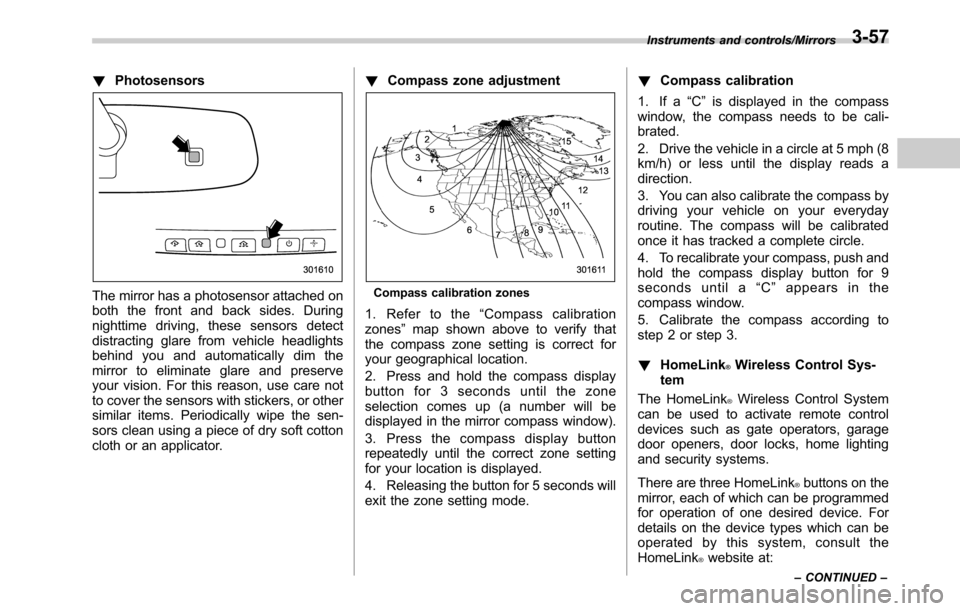
1. Refer to the“Compass calibration
zones”map shown above to verify that
the compass zone setting is correct for
your geographical location.
2. Press and hold the compass display
button for 3 seconds until the zone
selection comes up (a number will be
displayed in the mirror compass window).
3. Press the compass display button
repeatedly until the correct zone setting
for your location is displayed.
4. Releasing the button for 5 seconds will
exit the zone setting mode.!Compass calibration
1. If a“C”is displayed in the compass
window, the compass needs to be cali-
brated.
2. Drive the vehicle in a circle at 5 mph (8
km/h) or less until the display reads a
direction.
3. You can also calibrate the compass by
driving your vehicle on your everyday
routine. The compass will be calibrated
once it has tracked a complete circle.
4. To recalibrate your compass, push and
hold the compass display button for 9
seconds until a“C”appears in the
compass window.
5. Calibrate the compass according to
step 2 or step 3.
!HomeLink
®Wireless Control Sys-
tem
The HomeLink
®Wireless Control System
can be used to activate remote control
devices such as gate operators, garage
door openers, door locks, home lighting
and security systems.
There are three HomeLink
®buttons on the
mirror, each of which can be programmed
for operation of one desired device. For
details on the device types which can be
operated by this system, consult the
HomeLink
®website at:
Instruments and controls/Mirrors
–CONTINUED–3-57
Page 213 of 572
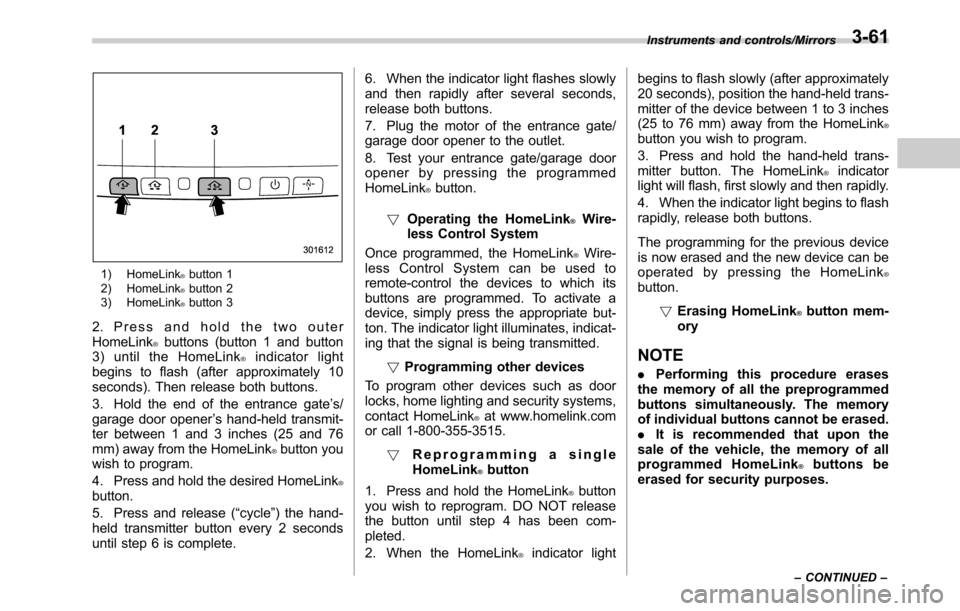
1) HomeLink®button 1
2) HomeLink®button 2
3) HomeLink®button 3
2. Press and hold the two outer
HomeLink®buttons (button 1 and button
3) until the HomeLink®indicator light
begins to flash (after approximately 10
seconds). Then release both buttons.
3. Hold the end of the entrance gate’s/
garage door opener’s hand-held transmit-
ter between 1 and 3 inches (25 and 76
mm) away from the HomeLink
®button you
wish to program.
4. Press and hold the desired HomeLink
®button.
5. Press and release (“cycle”) the hand-
held transmitter button every 2 seconds
until step 6 is complete.6. When the indicator light flashes slowly
and then rapidly after several seconds,
release both buttons.
7. Plug the motor of the entrance gate/
garage door opener to the outlet.
8. Test your entrance gate/garage door
opener by pressing the programmed
HomeLink
®button.
!Operating the HomeLink
®Wire-
less Control System
Once programmed, the HomeLink
®Wire-
less Control System can be used to
remote-control the devices to which its
buttons are programmed. To activate a
device, simply press the appropriate but-
ton. The indicator light illuminates, indicat-
ing that the signal is being transmitted.
!Programming other devices
To program other devices such as door
locks, home lighting and security systems,
contact HomeLink
®at www.homelink.com
or call 1-800-355-3515.
!Reprogramming a single
HomeLink
®button
1. Press and hold the HomeLink
®button
you wish to reprogram. DO NOT release
the button until step 4 has been com-
pleted.
2. When the HomeLink
®indicator lightbegins to flash slowly (after approximately
20 seconds), position the hand-held trans-
mitter of the device between 1 to 3 inches
(25 to 76 mm) away from the HomeLink
®button you wish to program.
3. Press and hold the hand-held trans-
mitter button. The HomeLink
®indicator
light will flash, first slowly and then rapidly.
4. When the indicator light begins to flash
rapidly, release both buttons.
The programming for the previous device
is now erased and the new device can be
operated by pressing the HomeLink
®button.
!Erasing HomeLink
®button mem-
ory
NOTE
.Performing this procedure erases
the memory of all the preprogrammed
buttons simultaneously. The memory
of individual buttons cannot be erased.
.It is recommended that upon the
sale of the vehicle, the memory of all
programmed HomeLink
®buttons be
erased for security purposes.
Instruments and controls/Mirrors
–CONTINUED–3-61
Page 319 of 572

In other situations
Symptom Likely cause SolutionPage
Cell
phoneThis
system
Even though all conceivable mea-
sures have been taken, the symptom
status does not change.The cell phone is not close enough to
this system.Bring the cell phone closer to this system.——
The cell phone is the most likely cause
of the symptom.Turn the cell phone off, remove and reinstall
the battery pack, and then restart the cell
phone.*—
Enable the cell phone’s Bluetooth connection. *—
Stop the cell phone’s security software and
close all applications.*—
Before using an application installed on the
cell phone, carefully check its source and how
its operation might affect this system.*—
*: For details, refer to the owner’s manual that came with the cell phone.Audio/What to do if...
5-91
Page 361 of 572
CAUTION
.When the operation indicator on
the push-button ignition switch is
flashing in orange, there may be
a malfunction with the vehicle.
Contact a SUBARU dealer imme-
diately.
.If the indicator on the push-
button ignition switch is flashing
in green after the engine has
started, it means that the steering
is still locked. While moving the
steering wheel right and left,
depress the brake pedal, and
press the push-button ignition
switch.
.Do not continue pushing the
push-button ignition switch for
more than 10 seconds. Doing so
could cause a malfunction. If the
engine does not start, stop push-
ing the push-button ignition
switch and turn off the engine.
Wait 10 seconds, and then push
the push-button ignition switch
to start the engine.
NOTE
.When the push-button ignition
switch is pressed while depressing
thebrakepedal,theenginestarter
operates for a maximum of 10 seconds
and after starting the engine, the starter
stops automatically.
.When the push-button ignition
switch is pressed while depressing
the brake pedal, the engine can be
started regardless of the power status.
.If the security indicator light illumi-
nates when you attempt to start the
engine but the engine does not start,
press the push-button ignition switch
to switch the power to“OFF”and then
try to start the engine again.
.If the engine does not start, press
the push-button ignition switch without
depressing the brake pedal to switch
the power to“OFF”. Then, while de-
pressing the brake pedal more force-
fully, press the push-button ignition
switch.
.The engine start procedures may
not function depending on the radio
wave conditions around the vehicle. In
such a case, refer to“Starting engine”
F9-19.
.If the vehicle battery is discharged,
the steering cannot be unlocked.
Charge the battery.
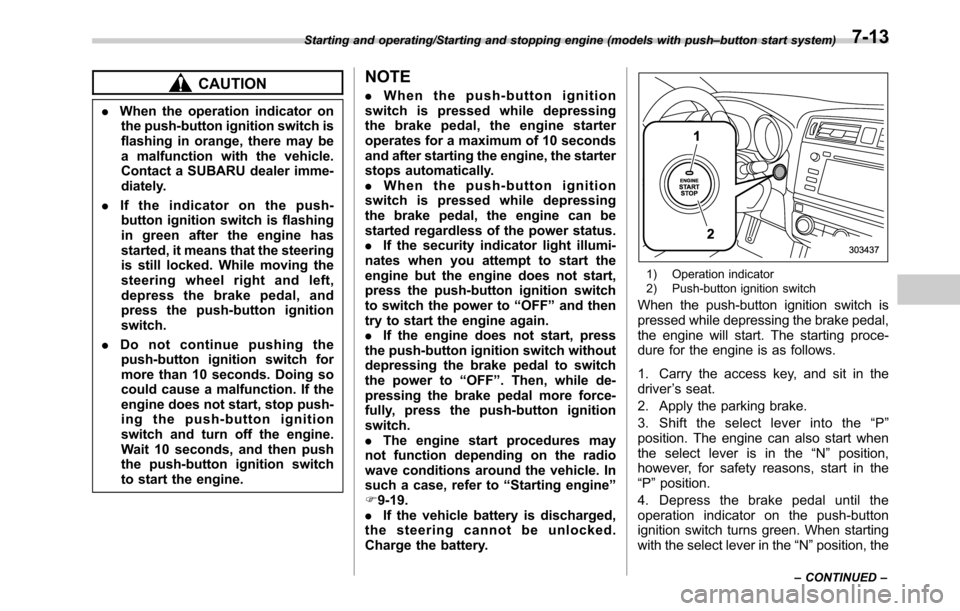
1) Operation indicator
2) Push-button ignition switch
When the push-button ignition switch is
pressed while depressing the brake pedal,
the engine will start. The starting proce-
dure for the engine is as follows.
1. Carry the access key, and sit in the
driver’s seat.
2. Apply the parking brake.
3. Shift the select lever into the“P”
position. The engine can also start when
the select lever is in the“N”position,
however, for safety reasons, start in the
“P”position.
4. Depress the brake pedal until the
operation indicator on the push-button
ignition switch turns green. When starting
with the select lever in the“N”position, the
Starting and operating/Starting and stopping engine (models with push–button start system)
–CONTINUED–7-13
Page 366 of 572

Starting and operating/Remote engine start system (dealer option)
start system will power off and then
attempt to start the engine 3 additional
times. The system will not attempt to
restart the engine if it determines a vehicle
malfunction is preventing starting. If the
engine does not start after 3 additional
attempts, the remote engine start request
will be aborted.
!Stopping the engine
Press and hold the fob button for at least 2
seconds to stop the engine. The fob will
flash and beep three times, indicating the
engine has stopped. If the stop request is
not received (for example, if the user is too
far away from the vehicle), the fob will
continue to flash once every 3 seconds.
The system will automatically stop the
engine after 15 minutes.
!Remote start safety features
For safety and security reasons, the
remote engine start system will prevent
starting (or stop the engine if running) and
sound the horn twice if any of the following
conditions is detected. In addition, the fob
will flash and beep 3 times.
.The brake pedal is depressed
.A key is in the ignition switch
.The engine hood is open
.The remote start system“Service
mode”is engaged
.The engine idle speed exceeds 3,500RPM
.The security alarm is triggered
.The select lever is not in the“P”
position
If the system detects any door (including
the rear gate/trunk lid) open during opera-
tion, it will prevent starting or stop the
engine, and sound the horn and flash side
marker lights, tail lights, and parking lights
6 times.
In addition to the items above, if the
vehicle’s engine management system
determines there is a safety risk due to a
vehicle-related problem, the vehicle will
power down and the horn will sound 3
times.
NOTE
.If the alarm system is armed at the
time of remote engine starter activation
(the security indicator light on the
combination meter is flashing), the
alarm system will remain armed
throughout the remote start run cycle.
.If the alarm system is disarmed at
the time of remote engine starter
activation (the security indicator light
on the combination meter is not flash-
ing), the alarm system will remain
disarmed throughout the remote start
run cycle.!Remote start operation - fob con-
firmation
Your remote engine starter fob is a
bidirectional transceiver that can confirm
system operation with several different
visual and audible indications. The fob’s
LED-backlit button and internal piezo
buzzer will indicate status of the system
using the following flash and beep se-
quences, provided the fob is within opera-
tional range of the system.
7-18
Page 560 of 572

14-6Index
H
Hands-free phone system........................................... 5-71
Hazard warning flasher........................................... 3-7, 9-2
Head restraint adjustment
Front seat............................................................... 1-8
Rear seat.............................................................. 1-14
Headlight.................................................................. 3-44
Beam leveler......................................................... 3-47
Bulb wattage....................................................... 12-14
Control switch........................................................ 3-43
Flasher................................................................. 3-46
Indicator light......................................................... 3-31
Welcome lighting function....................................... 3-44
High beam indicator light............................................ 3-30
High/low beam change (dimmer).................................. 3-46
Hill descent control..................................................... 7-39
Indicator................................................................ 3-31
Hill Holder................................................................. 7-45
Indicator light......................................................... 3-21
Switch.................................................................. 7-45
Hill start assist........................................................... 7-48
To activate/deactivate............................................. 7-49
HomeLink
®................................................................ 3-56
Hook
Coat..................................................................... 6-13
Convenient............................................................ 6-14
Convenient tie-down............................................... 6-19
Shopping bag........................................................ 6-14
Towing and tie-down............................................... 9-14
Horn......................................................................... 3-63
Hose and connections............................................... 11-14I
Ignition switch............................................................. 3-3
Light...................................................................... 3-4
Illumination brightness control...................................... 3-48
Immobilizer................................................................. 2-4
Indicator light (security indicator light)........................ 3-29
Indicator light
BSD/RCTA OFF.................................... 3-31, 3-38, 7-59
BSD/RCTA warning............................... 3-31, 3-38, 7-58
Cruise control........................................................ 3-30
Cruise control set................................................... 3-30
Door open............................................................. 3-22
Electronic parking brake.......................................... 3-20
Front fog light......................................................... 3-31
Headlight............................................................... 3-31
High beam............................................................. 3-30
Hill descent control................................................. 3-31
Hill Holder............................................................. 3-21
Immobilizer............................................................ 3-29
Security................................................................. 3-29
Select lever/Gear position........................................ 3-30
Steering responsive fog lights OFF ........................... 3-31
Turn signal............................................................ 3-30
Vehicle Dynamics Control OFF................................. 3-24
Vehicle Dynamics Control operation .......................... 3-23
X-mode................................................................. 3-31
Information display...................................................... 3-32
Inside mirror.............................................................. 3-56
Interior lights............................................................... 6-2
Internal trunk lid release handle.................................... 2-39
Page 564 of 572

14-10Index
Security
Alarm system........................................................ 2-28
Immobilizer.............................................................. 2-4
Indicator light......................................................... 3-29
Shock sensors....................................................... 2-32
Select lever
Position indicator................................................... 3-30
Shift lock function................................................... 7-27
Shock sensors........................................................... 2-32
Shopping bag hook.................................................... 6-14
Snow tires........................................................ 8-11, 11-25
Snowy and icy roads.................................................. 8-10
Spark plugs...................................................... 11-18, 12-9
Specifications............................................................ 12-2
Speedometer............................................................... 3-8
SRS airbag (Supplemental Restraint System airbag) ... 4, 1-41
SRS airbag system
Monitors................................................................ 1-68
Servicing............................................................... 1-69
Warning light......................................................... 3-14
Starting & stopping engine.................................... 7-9, 7-12
State emission testing (U.S. only).................................. 7-7
Steering responsive fog lights system........................... 3-49
OFF indicator........................................................ 3-31
Steering switches for audio......................................... 5-63
Steering wheel
Lock............................................................. 7-11, 7-15
Power................................................................... 7-31
Tilt/telescopic......................................................... 3-63
Stop light................................................................ 12-15
Storage compartment................................................... 6-6Sun shade................................................................. 2-50
Sun visors.................................................................. 6-4
Supplemental Restraint System airbag (SRS)................ 1-41
Synthetic leather upholstery......................................... 10-5
T
Tachometer................................................................. 3-9
Temperature gauge..................................................... 3-11
Temperature warning light
AT OIL TEMP......................................................... 3-16
Temporary spare tire.................................................... 9-2
Tether (child restraint system).............................. 1-35, 1-38
Tie-down hooks.......................................................... 9-14
Tire................................................................. 11-24, 12-9
Chains.................................................................. 8-12
Inspection............................................................ 11-26
Pressures and wear.............................................. 11-27
Replacement........................................................ 11-30
Rotation.............................................................. 11-29
Size and pressure.................................................. 12-9
Types.................................................................. 11-24
Tire pressure monitoring system (TPMS)..... 7-40, 9-10, 11-25
Warning light.......................................................... 3-16
Tires and wheels...................................................... 11-24
Tools
.......................................................................... 9-3
Top tether anchorages........................................ 1-35, 1-38
Towing...................................................................... 9-13
All wheels on the ground......................................... 9-17
Flat-bed truck......................................................... 9-16
Hooks................................................................... 9-14
Weight .................................................................. 8-21