buttons SUBARU OUTBACK 2016 6.G User Guide
[x] Cancel search | Manufacturer: SUBARU, Model Year: 2016, Model line: OUTBACK, Model: SUBARU OUTBACK 2016 6.GPages: 572, PDF Size: 21.79 MB
Page 214 of 572
Instruments and controls/Mirrors
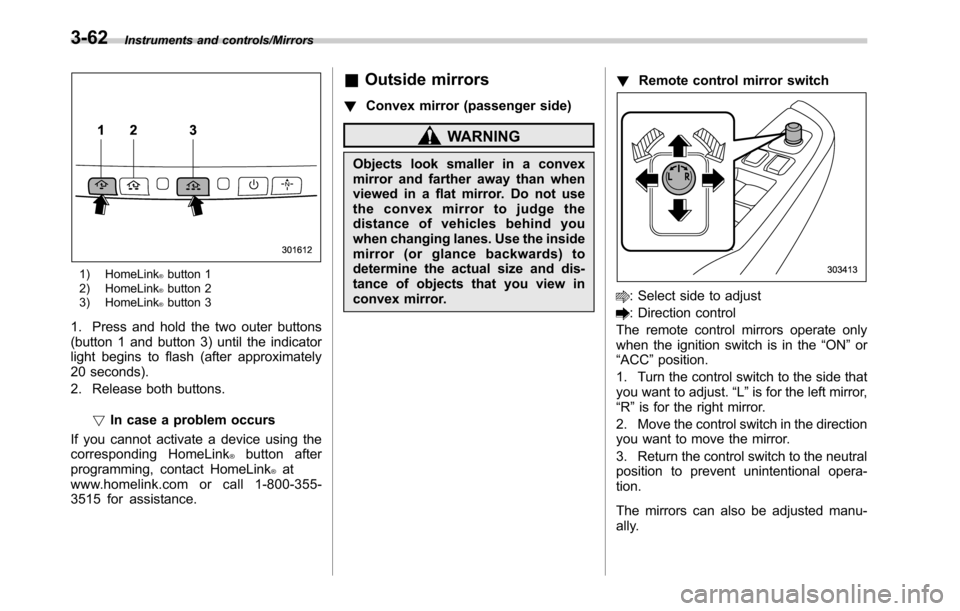
1) HomeLink®button 1
2) HomeLink®button 2
3) HomeLink®button 3
1. Press and hold the two outer buttons
(button 1 and button 3) until the indicator
light begins to flash (after approximately
20 seconds).
2. Release both buttons.
!In case a problem occurs
If you cannot activate a device using the
corresponding HomeLink
®button after
programming, contact HomeLink®at
www.homelink.com or call 1-800-355-
3515 for assistance.
&Outside mirrors
!Convex mirror (passenger side)
WARNING
Objects look smaller in a convex
mirror and farther away than when
viewed in a flat mirror. Do not use
the convex mirror to judge the
distance of vehicles behind you
when changing lanes. Use the inside
mirror (or glance backwards) to
determine the actual size and dis-
tance of objects that you view in
convex mirror.!Remote control mirror switch
: Select side to adjust
: Direction control
The remote control mirrors operate only
when the ignition switch is in the“ON”or
“ACC”position.
1. Turn the control switch to the side that
you want to adjust.“L”is for the left mirror,
“R”is for the right mirror.
2. Move the control switch in the direction
you want to move the mirror.
3. Return the control switch to the neutral
position to prevent unintentional opera-
tion.
The mirrors can also be adjusted manu-
ally.
3-62
Page 221 of 572
Automatic climate control
system (type B)
NOTE
.Operate the automatic climate con-
trol system when the engine is running.
.The blower fan rotates at a low
speed when the engine coolant tem-
perature is low.
.For efficient defogging or dehumidi-
fying in cold weather, press the“A/C”
button.
When the automatic climate control mode
is selected, the following items are auto-
matically controlled.
.Outlet air temperature
.Fan speed
.Airflow distribution
.Air inlet control
.Air conditioner compressor operation
To activate this mode, perform the follow-
ing procedure.
1. Set the preferred temperature using
the temperature control button.
2. Press the“AUTO”button. The FULL
AUTO mode is selected and the“FULL
AUTO”indicator light on the display
illuminates.
NOTE
If you operate any of the buttons on the
control panel other than the“OFF”
button, rear window defogger button
and temperature control buttons during
FULL AUTO mode operation, the
“FULL”indicator light on the control
panel will turn off and the“AUTO”
indicator light will remain illuminated.
You can then manually control the
system as desired. To change the
system back to the FULL AUTO mode,
press the“AUTO”button.
To turn off the climate control system,
press the“OFF”button. The air inlet
selection is then automatically switched
to the outside air mode.&Temperature sensors
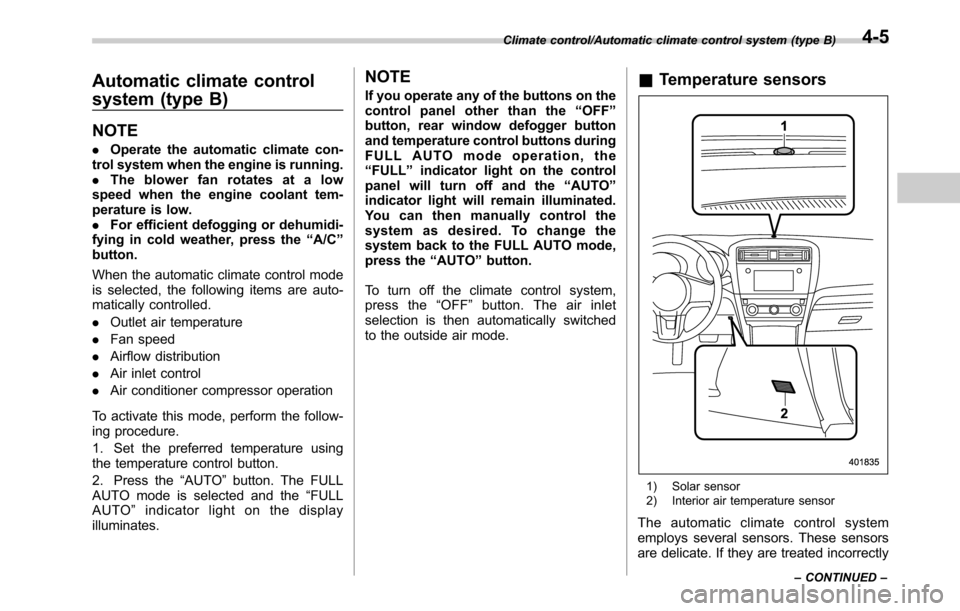
1) Solar sensor
2) Interior air temperature sensor
The automatic climate control system
employs several sensors. These sensors
are delicate. If they are treated incorrectly
Climate control/Automatic climate control system (type B)
–CONTINUED–4-5
Page 224 of 572

Climate control/Manual climate control
.The air conditioner will turn on.
While the MAX A/C mode is selected,
performing the following operation returns
the system to the setting that had been
selected before the MAX A/C mode is
selected.
.Turn the temperature control dial to a
position other than“MAX A/C”position
(models with type A climate control sys-
tem).
.Press the“MAX A/C”button again
(models with type B climate control sys-
tem).
!“DUAL”mode (type B)
You can change the setting of the driver’s
side and front passenger’s side tempera-
ture independently by selecting the
“DUAL”mode.
You can select the“DUAL”mode by
performing either of the following proce-
dures.
.Press the“DUAL”button
.Turn the passenger’s side temperature
control dial
The“DUAL”mode can be canceled by
pressing the“DUAL”button.
When the“DUAL”mode is selected:
Turn the driver’ssidedialtosetthe
driver’s side temperature. Turn the frontpassenger’s side dial to set the front
passenger’s side temperature.
When the“DUAL”mode is canceled:
Set the desired temperature by turning the
driver’s side dial.
&Fan speed control
The fan operates only when the ignition
switch is in the“ON”position. Select the
preferred fan speed by turning the fan
speed control dial (type A), or by pressing
the fan speed control buttons (type B).
&Air conditioner control
The air conditioner operates only when
the engine is running.
Press the air conditioner button while the
fan is in operation to turn on the air
conditioner. When the air conditioner is
on, the“A/C”indicator light illuminates.
To turn off the air conditioner, press the
button again. The indicator light will turn
off.
NOTE
For efficient defogging or dehumidify-
ing in cold weather, turn on the air
conditioner. However, if the ambient
temperature decreases to approxi-
mately 328F(08C), the air conditioner
and dehumidification system may notwork properly.
&Air inlet selection
Select the air inlet by pressing the air inlet
selection button.
ON position (recirculation): Interior air is
recirculated inside the vehicle. Press the
air inlet selection button to the ON position
for fast cooling with the air conditioner or
when driving on a dusty road. When the
ON position is selected, the“
”indicator
light on the information display (type A)/
the indicator light on the air inlet selection
button (type B) illuminates.
OFF position (outside air): Outside air is
drawn into the passenger compartment.
Press the air inlet selection button to the
OFF position when the interior has cooled
to a comfortable temperature and the road
is no longer dusty. The indicator light will
turn off.
4-8
Page 232 of 572

Audio/Audio set
&Base display audio set (if equipped)
1) Power/VOLUME knob
2) Eject button
3) AUDIO/TUNE knob
4) HOME button5) APPS button
6) Display
7) SEEK/TRACK buttons
The audio set will operate only when the
ignition switch is in the“ACC”or“ON”
position.
.Power and audio controls: refer to
“Basic operation”F5-18.
.STARLINK (if equipped): refer to
“STARLINK”F5-26.
.Radio operation: refer to“AM/FM radio”
F5-28.
.Satellite radio operation (if equipped):
refer to“SiriusXM Satellite Radio”F5-37.
.aha
TM: refer to“ahaTMby HARMAN”
F5-44.
.Pandora
®(if equipped): refer to“Pan-
dora®”F5-50.
.CD (compact disc) player operation:
refer to“CD”F5-53.
.USB storage device: refer to“USB
memory”F5-55.
.iPod operation: refer to“iPod”F5-56.
.Bluetooth
®audio: refer to“Bluetooth
audio”F5-58.
.Auxiliary input jack: refer to“AUX”F5-
61.
.Hands-free phone system: refer to
“Hands-free phone system”F5-71.
5-4
Page 456 of 572
In case of emergency/Access key–if access key does not operate properly
Access key–if access key
does not operate properly
CAUTION
Keep metallic objects, magnetic
sources and signal transmitters
away from the area between the
access key and the push-button
ignition switch. They may interfere
with the communication between
the access key and the push-button
ignition switch.
If the locking/unlocking procedures, power
switch procedures or engine start proce-
dures cannot be operated because of
strong radio signals in the surrounding
area or a low battery condition of the
access key, perform the following proce-
dure. When the battery of the access key
is discharged, replace it with a new one.
Refer to“Replacing battery of access key”
F11-50.
&Locking and unlocking
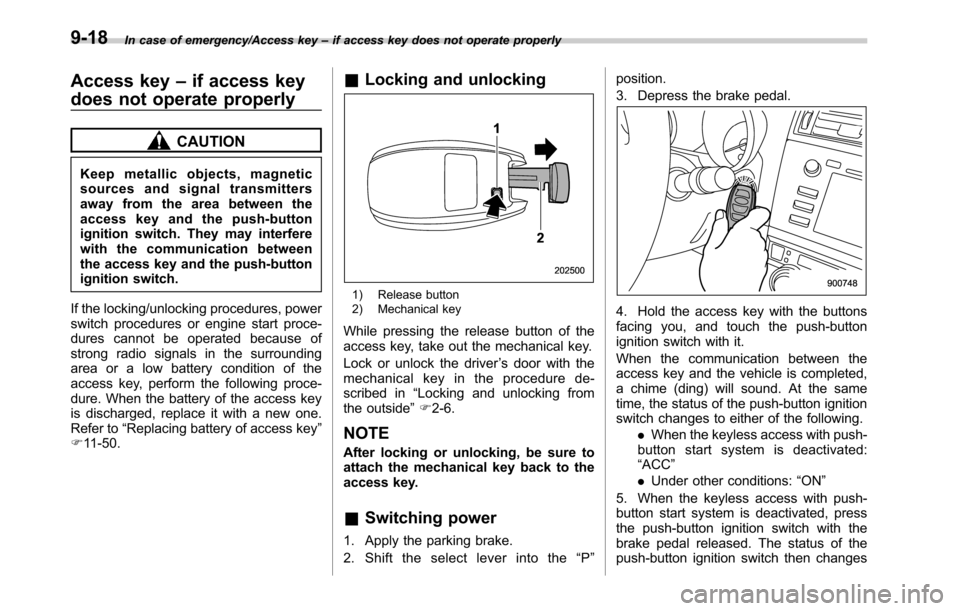
1) Release button
2) Mechanical key
While pressing the release button of the
access key, take out the mechanical key.
Lock or unlock the driver’s door with the
mechanical key in the procedure de-
scribed in“Locking and unlocking from
the outside”F2-6.
NOTE
After locking or unlocking, be sure to
attach the mechanical key back to the
access key.
&Switching power
1. Apply the parking brake.
2. Shift the select lever into the“P”position.
3. Depress the brake pedal.
4. Hold the access key with the buttons
facing you, and touch the push-button
ignition switch with it.
When the communication between the
access key and the vehicle is completed,
a chime (ding) will sound. At the same
time, the status of the push-button ignition
switch changes to either of the following.
.When the keyless access with push-
button start system is deactivated:
“ACC”
.Under other conditions:“ON”
5. When the keyless access with push-
button start system is deactivated, press
the push-button ignition switch with the
brake pedal released. The status of the
push-button ignition switch then changes
9-18
Page 457 of 572
to“ON”.
NOTE
If the power does not switch even
though the above procedure was fol-
lowed precisely, contact your SUBARU
dealer.
&Starting engine
1. Apply the parking brake.
2. Shift the select lever into the“P”
position.
3. Depress the brake pedal.
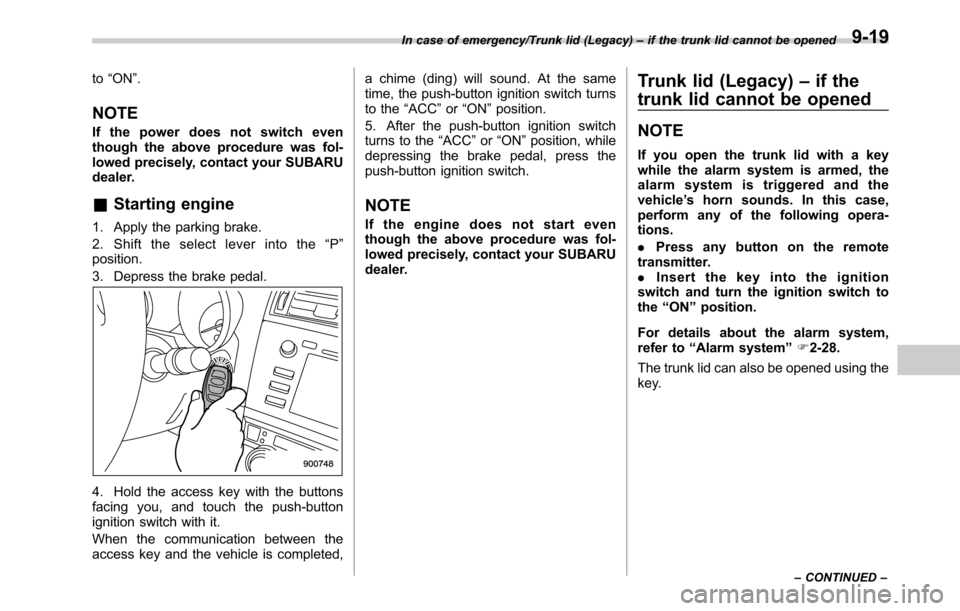
4. Hold the access key with the buttons
facing you, and touch the push-button
ignition switch with it.
When the communication between the
access key and the vehicle is completed,a chime (ding) will sound. At the same
time, the push-button ignition switch turns
to the“ACC”or“ON”position.
5. After the push-button ignition switch
turns to the“ACC”or“ON”position, while
depressing the brake pedal, press the
push-button ignition switch.
NOTE
If the engine does not start even
though the above procedure was fol-
lowed precisely, contact your SUBARU
dealer.
Trunk lid (Legacy)–if the
trunk lid cannot be opened
NOTE
If you open the trunk lid with a key
while the alarm system is armed, the
alarm system is triggered and the
vehicle’s horn sounds. In this case,
perform any of the following opera-
tions.
.Press any button on the remote
transmitter.
.Insert the key into the ignition
switch and turn the ignition switch to
the“ON”position.
For details about the alarm system,
refer to“Alarm system”F2-28.
The trunk lid can also be opened using the
key.
In case of emergency/Trunk lid (Legacy)–if the trunk lid cannot be opened
–CONTINUED–9-19