instrument panel SUBARU OUTBACK 2016 6.G User Guide
[x] Cancel search | Manufacturer: SUBARU, Model Year: 2016, Model line: OUTBACK, Model: SUBARU OUTBACK 2016 6.GPages: 572, PDF Size: 21.79 MB
Page 200 of 572
Instruments and controls/Illumination brightness control
&One-touch lane changer
To flash the turn signal and turn signal
indicator light three times, push the turn
signal lever up or down slightly and
immediately release it.
The operational/non-operational setting of
the one-touch lane changer’s can be
changed by a SUBARU dealer. Contact
the nearest SUBARU dealer for details.
Illumination brightness con-
trol
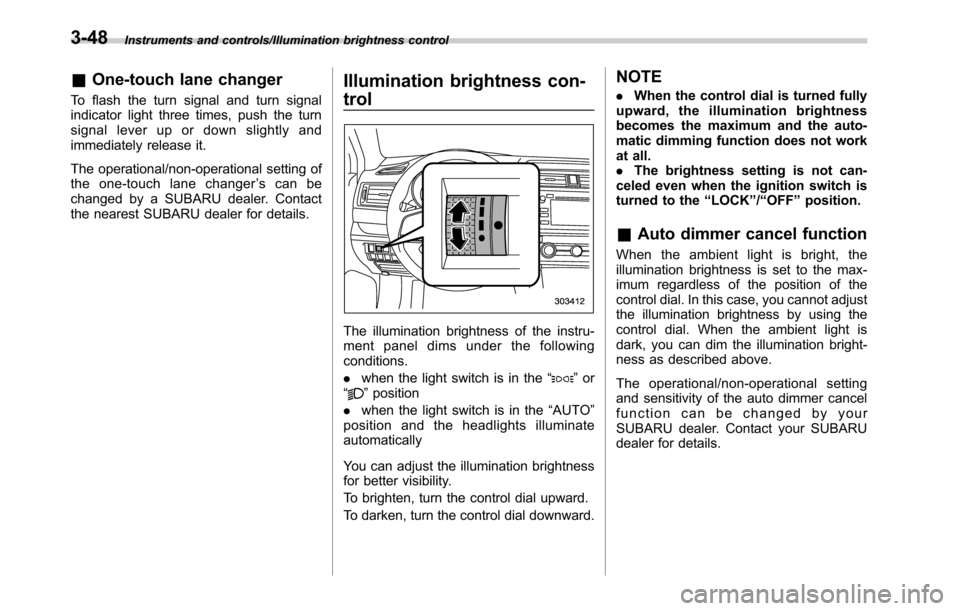
The illumination brightness of the instru-
ment panel dims under the following
conditions.
.when the light switch is in the“
”or
“”position
.when the light switch is in the“AUTO”
position and the headlights illuminate
automatically
You can adjust the illumination brightness
for better visibility.
To brighten, turn the control dial upward.
To darken, turn the control dial downward.
NOTE
.When the control dial is turned fully
upward, the illumination brightness
becomes the maximum and the auto-
matic dimming function does not work
at all.
.The brightness setting is not can-
celed even when the ignition switch is
turned to the“LOCK”/“OFF”position.
&Auto dimmer cancel function
When the ambient light is bright, the
illumination brightness is set to the max-
imum regardless of the position of the
control dial. In this case, you cannot adjust
the illumination brightness by using the
control dial. When the ambient light is
dark, you can dim the illumination bright-
ness as described above.
The operational/non-operational setting
and sensitivity of the auto dimmer cancel
function can be changed by your
SUBARU dealer. Contact your SUBARU
dealer for details.
3-48
Page 222 of 572

Climate control/Manual climate control
and become damaged, the system may
not be able to control the interior tempera-
ture correctly. To avoid damaging the
sensors, observe the following precau-
tions:
–Do not subject the sensors to impact.
–Keep water away from the sensors.
–Do not cover the sensors.
The sensors are located as follows:
–Solar sensor: beside the speaker grille
on the dashboard
–Interior air temperature sensor: on the
side of the driver-side part of the center
panel
–Outside temperature sensor: behind
front grille.Manual climate control
&Airflow mode selection
Select the preferred airflow mode by
pressing the airflow mode selection button
or defroster button.
Airflow modes are as follows.
A) Models with rear ventilators
(Ventilation): Instrument panel outlets
A) Models with rear ventilators
(Bi-level): Instrument panel outlets and the
foot outlets
A) Models with rear ventilators
(Heat): Foot outlets, both side outlets of
4-6
Page 223 of 572

the instrument panel and some through
windshield defroster outlets (A small
amount of air flows to the windshield and
both side windows to prevent fogging.)
A) Models with rear ventilators
(Heat-def): Windshield defroster outlets,
foot outlets and both side outlets of the
instrument panel
A) Models with rear ventilators
(Defrost): Windshield defroster outlets and
both side outlets of the instrument panel
NOTE
.When the“”mode or“”mode
is selected, the air conditioner com-
pressor automatically operates to more
quickly defog the windshield. At the
same time, the air inlet selection is
automatically set to the outside air
mode.
In this state:
–The air conditioner indicator light
does not illuminate.
–You cannot stop the air condi-
tioner compressor by pressing the
air conditioner button.
&Temperature control
Turn the temperature control dial over a
range from the blue side (cool) to red side
(warm) to regulate the temperature of
airflow from the air outlets.
!MAX A/C mode
Perform the following operation to select
the MAX A/C mode.
.Turn the temperature control dial to the
“MAX A/C”position (models with type A
climate control system).
.Press the“MAX A/C”button (models
with type B climate control system).
When this mode is selected, some of the
settings will be changed as follows.
Type A climate control system:
.The air inlet selection mode will be
changed to the ON position (recirculation).
.The air conditioner will turn on.
Type B climate control system:
.The temperature setting will be chan-
ged to the maximum cooling mode.
.The fan speed setting will be changed
to the maximum speed.
.The airflow mode setting will be chan-
ged to the“
”(ventilation) mode.
.The air inlet selection mode will be
changed to the ON position (recirculation).
Climate control/Manual climate control
–CONTINUED–4-7
Page 463 of 572

Exterior care....................................................... 10-2
Washing............................................................. 10-2
Waxing and polishing......................................... 10-3
Cleaning aluminum wheels................................. 10-3
Corrosion protection.......................................... 10-4
Most common causes of corrosion..................... 10-4
To help prevent corrosion................................... 10-4
Cleaning the interior.......................................... 10-5Seat fabric......................................................... 10-5
Leather seat materials........................................ 10-5
Synthetic leather upholstery............................... 10-5
Climate control panel, audio panel, instrument
panel, console panel, switches, combination
meter, and other plastic surface....................... 10-6
Monitor (if equipped).......................................... 10-6
Appearance care
10
Page 468 of 572

Appearance care/Cleaning the interior
&Climate control panel, audio
panel, instrument panel,
console panel, switches,
combination meter, and other
plastic surface
Use a soft, damp cloth to clean the climate
control panel, audio equipment, instru-
ment panel, center console, combination
meter panel, and switches.
CAUTION
.Do not use organic solvents such
as paint thinners or gasoline, or
strong cleaning agents that con-
tain those solvents. Doing so
could damage the surface and
cause the color to deteriorate.
.Do not use chemical solvents
that contain silicone on the vehi-
cle audio system, electrical com-
ponents of the air-conditioner or
any switches. If silicone adheres
to these parts, it may cause
damage to electrical compo-
nents.
&Monitor (if equipped)
To clean the audio/navigation monitor,
wipe it with a silicone cloth or with a soft
cloth. If the monitor is extremely dirty,
clean it with a soft cloth moistened with
neutral detergent then carefully wipe off
any remaining detergent.
CAUTION
.Do not spray neutral detergent
directly onto the monitor. Doing
so could damage the monitor’s
components.
.Do not wipe the monitor with a
hard cloth. Doing so could
scratch the monitor.
.Do not use cleaning fluid that
contains thinner, gasoline, or any
other volatile substance. Such
cleaning fluid could erase the
lettering on the switches at the
bottom of the monitor.
10-6
Page 476 of 572
Maintenance and service/Engine hood
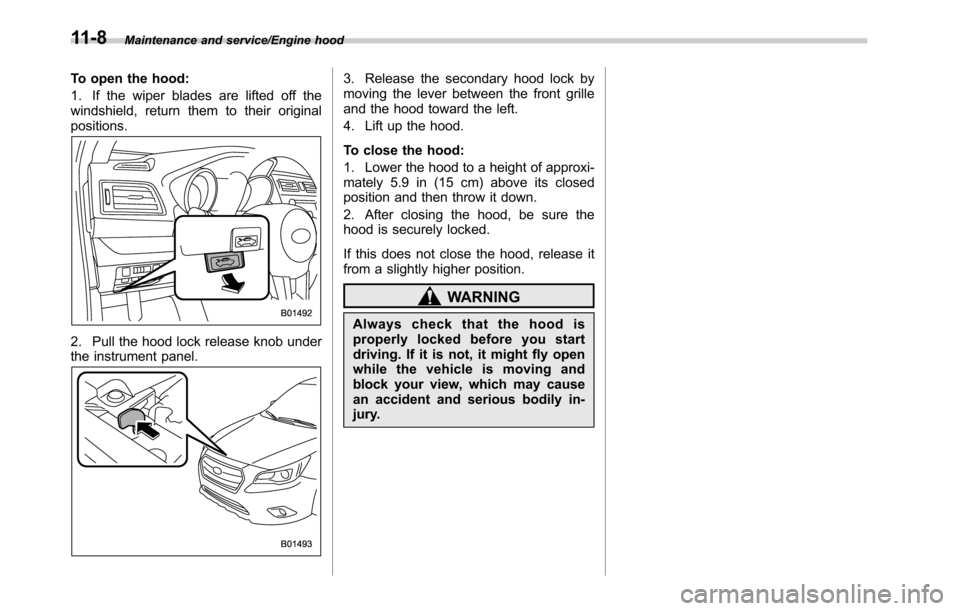
To open the hood:
1. If the wiper blades are lifted off the
windshield, return them to their original
positions.
2. Pull the hood lock release knob under
the instrument panel.
3. Release the secondary hood lock by
moving the lever between the front grille
and the hood toward the left.
4. Lift up the hood.
To close the hood:
1. Lower the hood to a height of approxi-
mately 5.9 in (15 cm) above its closed
position and then throw it down.
2. After closing the hood, be sure the
hood is securely locked.
If this does not close the hood, release it
from a slightly higher position.
WARNING
Always check that the hood is
properly locked before you start
driving. If it is not, it might fly open
while the vehicle is moving and
block your view, which may cause
an accident and serious bodily in-
jury.
11-8
Page 494 of 572
Maintenance and service/Tires and wheels
System resetting is necessary when the
wheels are changed (for example, a
switch to snow tires) and new TPMS
valves are installed on the newly fitted
wheels. Have this work performed by a
SUBARU dealer following wheel replace-
ment.
It may not be possible to install TPMS
valves on certain wheels that are on the
market. Therefore, if you change the
wheels (for example, a switch to snow
tires), use wheels that have the same part
number as the standard-equipment
wheels. Without four operational TPMS
valve/sensors on the wheels, the TPMS
will not fully function and the warning light
in the instrument panel will illuminate
steadily after blinking for approximately
one minute.
When a tire is replaced, adjustments are
necessary to ensure continued normal
operation of the tire pressure monitoring
system. As with wheel replacement, there-
fore, you should have the work performed
by a SUBARU dealer.
WARNING
If the low tire pressure warning light
does not illuminate briefly after the
ignition switch is turned ON or the
light illuminates steadily after blink-ing for approximately one minute,
you should have your Tire Pressure
Monitoring System checked at a
SUBARU dealer as soon as possi-
ble.
If this light illuminates while driving,
never brake suddenly and keep
driving straight ahead while gradu-
ally reducing speed. Then slowly
pull off the road to a safe place.
Otherwise an accident involving
serious vehicle damage and serious
personal injury could occur.
If this light still illuminates while
driving after adjusting the tire pres-
sure, a tire may have significant
damage and a fast leak that causes
the tire to lose air rapidly. If you have
a flat tire, replace it with a spare tire
as soon as possible.
When a spare tire is mounted or a
wheel rim is replaced without the
original pressure sensor/transmitter
being transferred, the low tire pres-
sure warning light will illuminate
steadily after blinking for approxi-
mately one minute. This indicates
the TPMS is unable to monitor all
four road wheels. Contact your
SUBARU dealer as soon as possible
for tire and sensor replacement and/
or system resetting. If the lightilluminates steadily after blinking for
approximately one minute, promptly
contact a SUBARU dealer to have
the system inspected.
&Tire inspection
Check on a daily basis that the tires are
free from serious damage, nails, and
stones. At the same time, check the tires
for abnormal wear.
Contact your SUBARU dealer immedi-
ately if you find any problem.
NOTE
.When the wheels and tires strike
curbs or are subjected to harsh treat-
ment as when the vehicle is driven on a
rough surface, they can suffer damage
that cannot be seen with the naked eye.
This type of damage does not become
evident until time has passed. Try not
to drive over curbs, potholes or on
other rough surfaces. If doing so is
unavoidable, keep the vehicle’s speed
down to a walking pace or less, and
approach the curbs as squarely as
possible. Also, make sure the tires are
not pressed against the curb when you
park the vehicle.
.If you feel unusual vibration while
driving or find it difficult to steer the
11-26
Page 506 of 572
Maintenance and service/Fuses
distilled water.Fuses
CAUTION
Never replace a fuse with one hav-
ing a higher rating or with material
other than a fuse because serious
damage or a fire could result.
The fuses are designed to melt during an
overload to prevent damage to the wiring
harness and electrical equipment. The
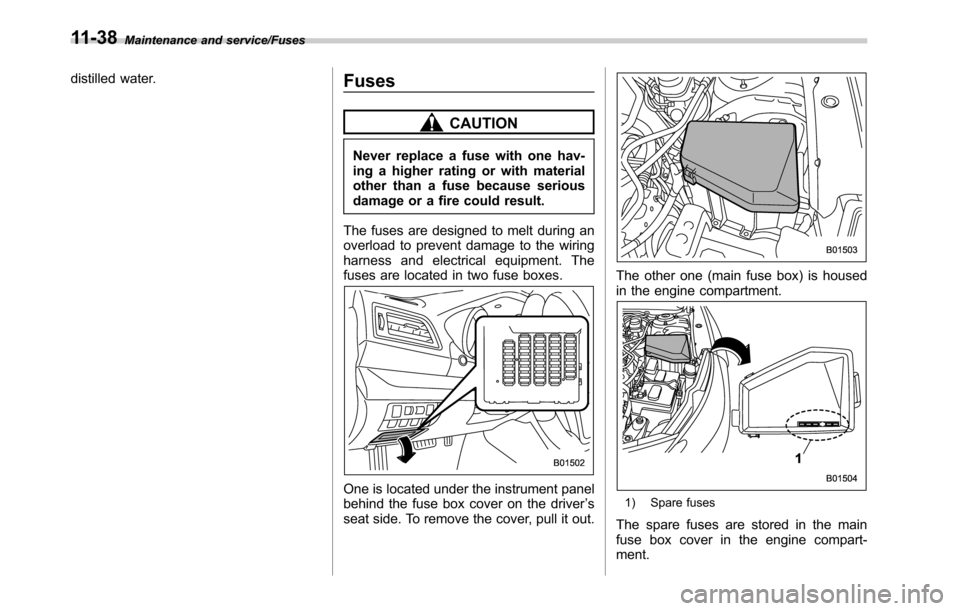
fuses are located in two fuse boxes.
One is located under the instrument panel
behind the fuse box cover on the driver’s
seat side. To remove the cover, pull it out.
The other one (main fuse box) is housed
in the engine compartment.
1) Spare fuses
The spare fuses are stored in the main
fuse box cover in the engine compart-
ment.
11-38