speed indicator SUBARU OUTBACK 2016 6.G User Guide
[x] Cancel search | Manufacturer: SUBARU, Model Year: 2016, Model line: OUTBACK, Model: SUBARU OUTBACK 2016 6.GPages: 572, PDF Size: 21.79 MB
Page 174 of 572
Instruments and controls/Warning and indicator lights
&Door open indicator
When any of the doors, the rear gate
(Outback) or the trunk lid (Legacy) is not
fully closed, the door open indicator
appears. This function is effective even if
the ignition switch is in the“LOCK”/“OFF”
or“ACC”position (all models) or the key is
removed from the ignition switch (models
without“keyless access with push-button
start system”).
The open door is indicated by the corre-
sponding part of the door open indicator.
Always make sure this indicator does not
appear before you start to drive.
&Windshield washer
fluid warning indicator
This indicator appears when the fluid level
in the windshield washer fluid tank de-
creases to the lower limit (approximately
0.6 US qt, 0.6 liter, 0.5 Imp qt).
&All-Wheel Drive warn-
ing light (CVT models)
WARNING
Continued driving with the AWD
warning light flashing can lead to
powertrain damage. If the AWD
warning light flashes, promptly parkin a safe place then check whether
all four tires are the same diameter
and whether any of the tires has a
puncture or has lost air pressure for
some other reason.
NOTE
If the temporary spare tire is used, the
AWD warning light may flash. Use of
the temporary spare tire should there-
fore be restricted to the minimum time
necessary. Replace the temporary
spare tire with a conventional tire as
soon as possible.
This light flashes if the vehicle is driven
with tires of different diameters fitted on its
wheels or with the air pressure exces-
sively low in any of its tires.
&Power steering warn-
ing light
While the engine is running, this warning
light illuminates when a malfunction has
been detected in the electric power steer-
ing system.
CAUTION
When the power steering warning
light is illuminated, there may be
more resistance when the steeringwheel is operated. Drive carefully to
the nearest SUBARU dealer and
have the vehicle inspected immedi-
ately.
NOTE
If the steering wheel is operated in the
following ways, the power steering
control system may temporarily limit
the power assist in order to prevent the
system components, such as the con-
trol computer and drive motor, from
overheating.
.The steering wheel is operated fre-
quently and turned sharply while the
vehicle is maneuvered at extremely low
speeds, such as while frequently turn-
ing the steering wheel during parallel
parking.
.The steering wheel remains in the
fully turned position for a long period
of time.
At this time, there will be more resis-
tance when steering. However this is
not a malfunction. Normal steering
force will be restored after the steering
wheel is not operated for a while and
the power steering control system has
an opportunity to cool down. However,
if the power steering is operated in a
non-standard way which causes power
3-22
Page 182 of 572
Instruments and controls/Warning and indicator lights
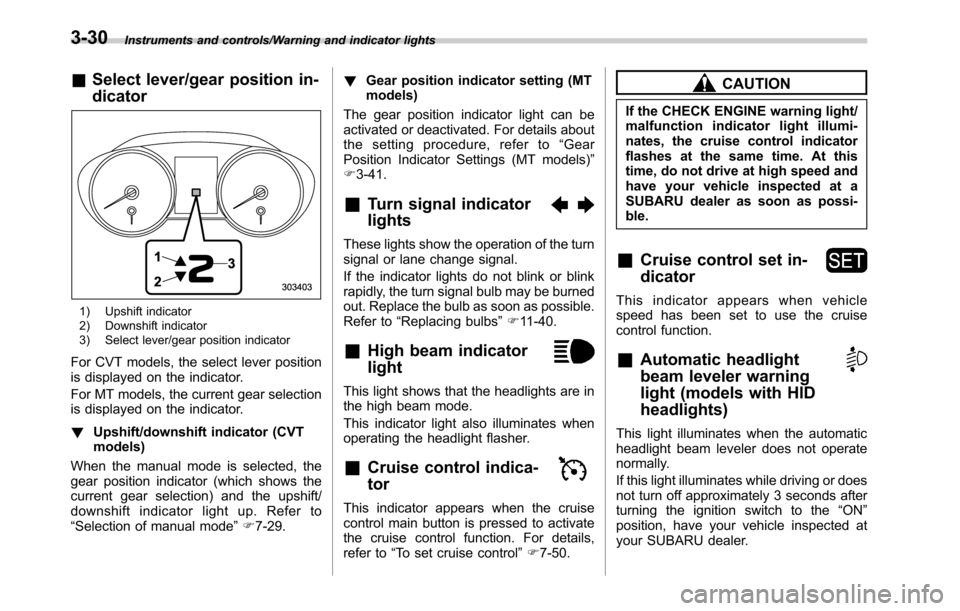
&Select lever/gear position in-
dicator
1) Upshift indicator
2) Downshift indicator
3) Select lever/gear position indicator
For CVT models, the select lever position
is displayed on the indicator.
For MT models, the current gear selection
is displayed on the indicator.
!Upshift/downshift indicator (CVT
models)
When the manual mode is selected, the
gear position indicator (which shows the
current gear selection) and the upshift/
downshift indicator light up. Refer to
“Selection of manual mode”F7-29.!Gear position indicator setting (MT
models)
The gear position indicator light can be
activated or deactivated. For details about
the setting procedure, refer to“Gear
Position Indicator Settings (MT models)”
F3-41.
&Turn signal indicator
lights
These lights show the operation of the turn
signal or lane change signal.
If the indicator lights do not blink or blink
rapidly, the turn signal bulb may be burned
out. Replace the bulb as soon as possible.
Refer to“Replacing bulbs”F11-40.
&High beam indicator
light
This light shows that the headlights are in
the high beam mode.
This indicator light also illuminates when
operating the headlight flasher.
&Cruise control indica-
tor
This indicator appears when the cruise
control main button is pressed to activate
the cruise control function. For details,
refer to“To set cruise control”F7-50.
CAUTION
If the CHECK ENGINE warning light/
malfunction indicator light illumi-
nates, the cruise control indicator
flashes at the same time. At this
time, do not drive at high speed and
have your vehicle inspected at a
SUBARU dealer as soon as possi-
ble.
&Cruise control set in-
dicator
This indicator appears when vehicle
speed has been set to use the cruise
control function.
&Automatic headlight
beam leveler warning
light (models with HID
headlights)
This light illuminates when the automatic
headlight beam leveler does not operate
normally.
If this light illuminates while driving or does
not turn off approximately 3 seconds after
turning the ignition switch to the“ON”
position, have your vehicle inspected at
your SUBARU dealer.
3-30
Page 184 of 572
Instruments and controls/Information display
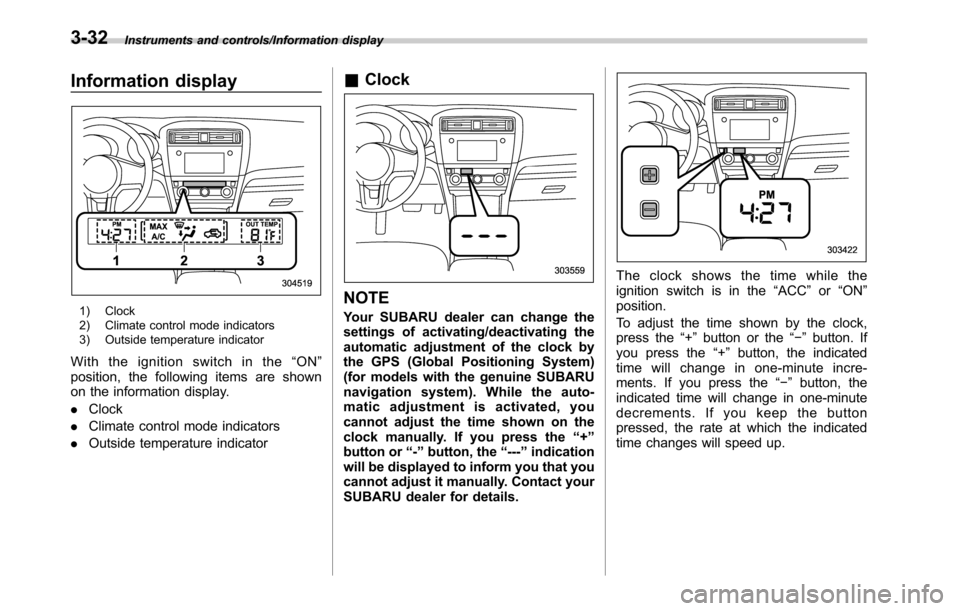
Information display
1) Clock
2) Climate control mode indicators
3) Outside temperature indicator
With the ignition switch in the“ON”
position, the following items are shown
on the information display.
.Clock
.Climate control mode indicators
.Outside temperature indicator
&Clock
NOTE
Your SUBARU dealer can change the
settings of activating/deactivating the
automatic adjustment of the clock by
the GPS (Global Positioning System)
(for models with the genuine SUBARU
navigation system). While the auto-
matic adjustment is activated, you
cannot adjust the time shown on the
clock manually. If you press the“+”
button or“-”button, the“---”indication
will be displayed to inform you that you
cannot adjust it manually. Contact your
SUBARU dealer for details.
The clock shows the time while the
ignition switch is in the“ACC”or“ON”
position.
To adjust the time shown by the clock,
press the“+”button or the“−”button. If
you press the“+”button, the indicated
time will change in one-minute incre-
ments. If you press the“−”button, the
indicated time will change in one-minute
decrements. If you keep the button
pressed, the rate at which the indicated
time changes will speed up.
3-32
Page 185 of 572
&Climate control mode indica-
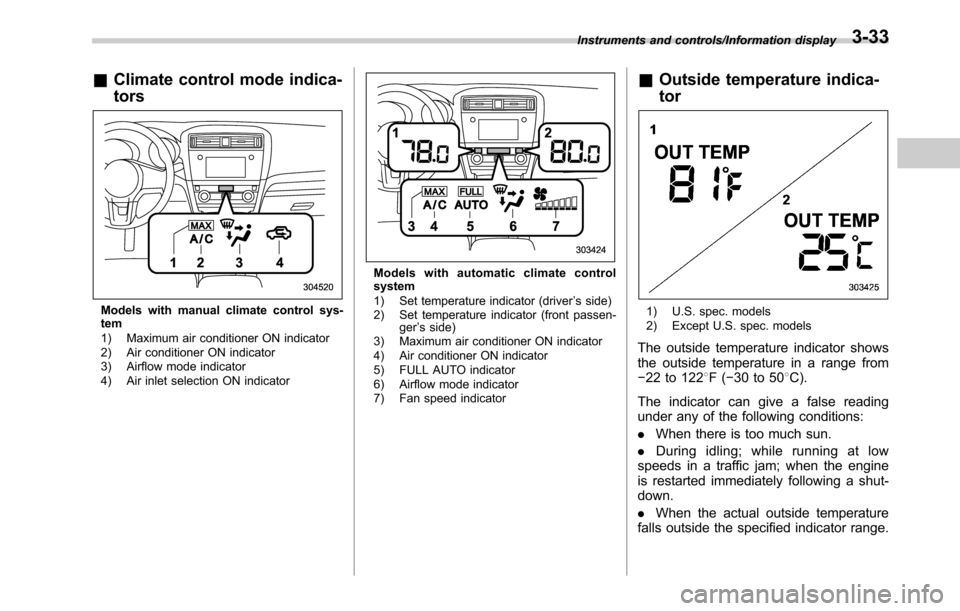
tors
Models with manual climate control sys-
tem
1) Maximum air conditioner ON indicator
2) Air conditioner ON indicator
3) Airflow mode indicator
4) Air inlet selection ON indicator
Models with automatic climate control
system
1) Set temperature indicator (driver’s side)
2) Set temperature indicator (front passen-
ger’s side)
3) Maximum air conditioner ON indicator
4) Air conditioner ON indicator
5) FULL AUTO indicator
6) Airflow mode indicator
7) Fan speed indicator
&Outside temperature indica-
tor
1) U.S. spec. models
2) Except U.S. spec. models
The outside temperature indicator shows
the outside temperature in a range from
−22 to 1228F(−30 to 508C).
The indicator can give a false reading
under any of the following conditions:
.When there is too much sun.
.During idling; while running at low
speeds in a traffic jam; when the engine
is restarted immediately following a shut-
down.
.When the actual outside temperature
falls outside the specified indicator range.
Instruments and controls/Information display3-33
Page 193 of 572

!Screen Settings
After entering the“Screen Settings”menu,
select one of the following menus.
!Welcome Screen
The welcome screen can be activated or
deactivated. Select“On (with Sound)”to
activate the screen and sound. Select“On
(without Sound)”to activate the screen
and deactivate the sound. Select“Off”to
deactivate the screen.
!Good-bye Screen
The Good-bye screen can be activated or
deactivated. Select“On”to activate the
screen. Select“Off”to deactivate the
screen.
!Gauge Initial Movement
The movement of the meter needles and
gauge needles that occurs when the
ignition switch is turned to the“ON”
position can be activated or deactivated.
Select“On”to activate. Select“Off”to
deactivate.
!Gear Position Indicator Settings
(MT models)
The gear position indicator light can be
activated or deactivated. Select“On”to
activate. Select“Off”to deactivate.!Units
You can select the displayed units of the
distance, vehicle speed and volume.
Operate the“
”or“”switch on the
steering wheel to display the preferred
units. Then pull the“
/SET”switch to
select the displayed units.
!Languages
Operate the“
”or“”switch on the
steering wheel to display the preferred
language. Then pull the“
/SET”switch to
select the displayed language.
!Combination Meter Illumination (if
equipped)
After entering the“Combination Meter
Illumination”menu, select the following
menu.
!Meter Ring Illumination
The illumination of the combination meter
rings can be activated or deactivated.
Select“On”to activate the illumination.
Select“Off”to deactivate the illumination.
!EyeSight (models with EyeSight
system)
NOTE
For models with the EyeSight system,
refer to the Owner’s Manual supple-
ment for the EyeSight system.After entering the“EyeSight”menu, select
one of the following menus.
!Warning Volume
The volume of the warning buzzer that
sounds when the EyeSight system is in
use can be set in 3 stages (“Max”,“Mid”
and“Min”).
!Lead Vehicle Acquisition Sound
When adaptive cruise control is used, the
buzzer that sounds under any of the
following conditions can be activated or
deactivated.
.A vehicle is detected in front
.Detection is not possible
Select“On”to activate the buzzer. Select
“Off”to deactivate the buzzer.
!Lead Vehicle Moving Monitor
Function
When adaptive cruise control is used, the
buzzer that sounds if a vehicle in front has
started can be activated or deactivated.
Select“On”to activate the buzzer. Select
“Off”to deactivate the buzzer.
!Vehicle Icon
The vehicle icon indication can be acti-
vated or deactivated. Select“On”to
activate. Select“Off”to deactivate.
Instruments and controls/Multi information display
–CONTINUED–3-41
Page 201 of 572
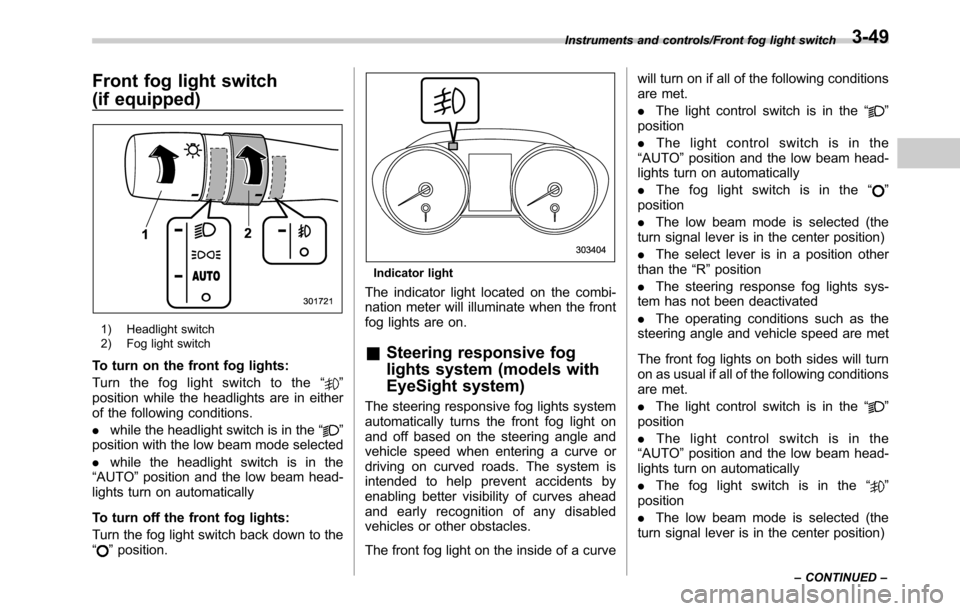
Front fog light switch
(if equipped)
1) Headlight switch
2) Fog light switch
To turn on the front fog lights:
Turn the fog light switch to the“
”
position while the headlights are in either
of the following conditions.
.while the headlight switch is in the“
”
position with the low beam mode selected
.while the headlight switch is in the
“AUTO”position and the low beam head-
lights turn on automatically
To turn off the front fog lights:
Turn the fog light switch back down to the
“
”position.
Indicator light
The indicator light located on the combi-
nation meter will illuminate when the front
fog lights are on.
&Steering responsive fog
lights system (models with
EyeSight system)
The steering responsive fog lights system
automatically turns the front fog light on
and off based on the steering angle and
vehicle speed when entering a curve or
driving on curved roads. The system is
intended to help prevent accidents by
enabling better visibility of curves ahead
and early recognition of any disabled
vehicles or other obstacles.
The front fog light on the inside of a curvewill turn on if all of the following conditions
are met.
.The light control switch is in the“
”
position
.The light control switch is in the
“AUTO”position and the low beam head-
lights turn on automatically
.The fog light switch is in the“
”
position
.The low beam mode is selected (the
turn signal lever is in the center position)
.The select lever is in a position other
than the“R”position
.The steering response fog lights sys-
tem has not been deactivated
.The operating conditions such as the
steering angle and vehicle speed are met
The front fog lights on both sides will turn
on as usual if all of the following conditions
are met.
.The light control switch is in the“
”
position
.The light control switch is in the
“AUTO”position and the low beam head-
lights turn on automatically
.The fog light switch is in the“
”
position
.The low beam mode is selected (the
turn signal lever is in the center position)
Instruments and controls/Front fog light switch
–CONTINUED–3-49
Page 205 of 572
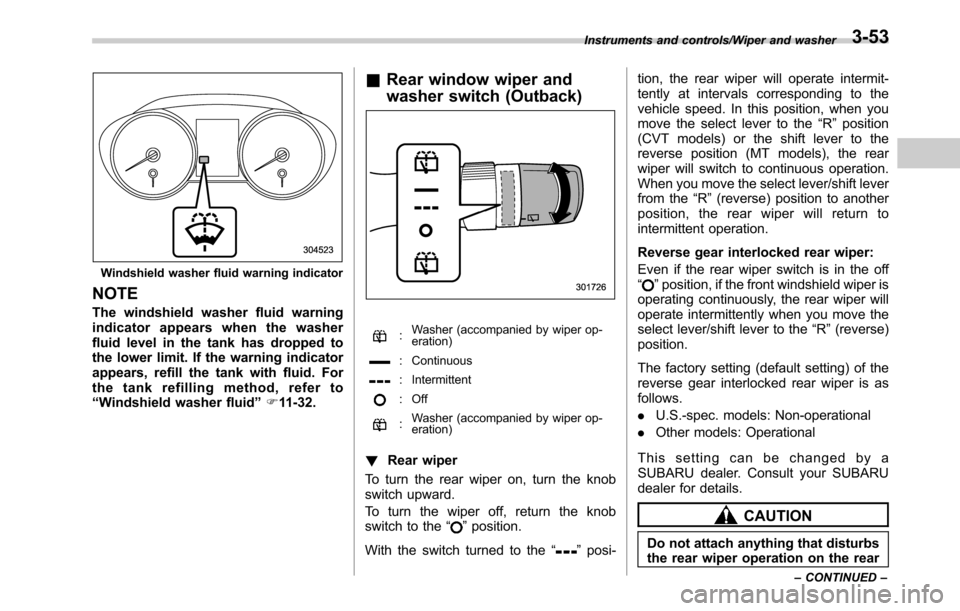
Windshield washer fluid warning indicator
NOTE
The windshield washer fluid warning
indicator appears when the washer
fluid level in the tank has dropped to
the lower limit. If the warning indicator
appears, refill the tank with fluid. For
the tank refilling method, refer to
“Windshield washer fluid”F11-32.
&Rear window wiper and
washer switch (Outback)
:Washer (accompanied by wiper op-
eration)
: Continuous
: Intermittent
: Off
:Washer (accompanied by wiper op-
eration)
!Rear wiper
To turn the rear wiper on, turn the knob
switch upward.
To turn the wiper off, return the knob
switch to the“
”position.
With the switch turned to the“
”posi-tion, the rear wiper will operate intermit-
tently at intervals corresponding to the
vehicle speed. In this position, when you
move the select lever to the“R”position
(CVT models) or the shift lever to the
reverse position (MT models), the rear
wiper will switch to continuous operation.
When you move the select lever/shift lever
from the“R”(reverse) position to another
position, the rear wiper will return to
intermittent operation.
Reverse gear interlocked rear wiper:
Even if the rear wiper switch is in the off
“
”position, if the front windshield wiper is
operating continuously, the rear wiper will
operate intermittently when you move the
select lever/shift lever to the“R”(reverse)
position.
The factory setting (default setting) of the
reverse gear interlocked rear wiper is as
follows.
.U.S.-spec. models: Non-operational
.Other models: Operational
This setting can be changed by a
SUBARU dealer. Consult your SUBARU
dealer for details.
CAUTION
Do not attach anything that disturbs
the rear wiper operation on the rear
Instruments and controls/Wiper and washer
–CONTINUED–3-53
Page 207 of 572
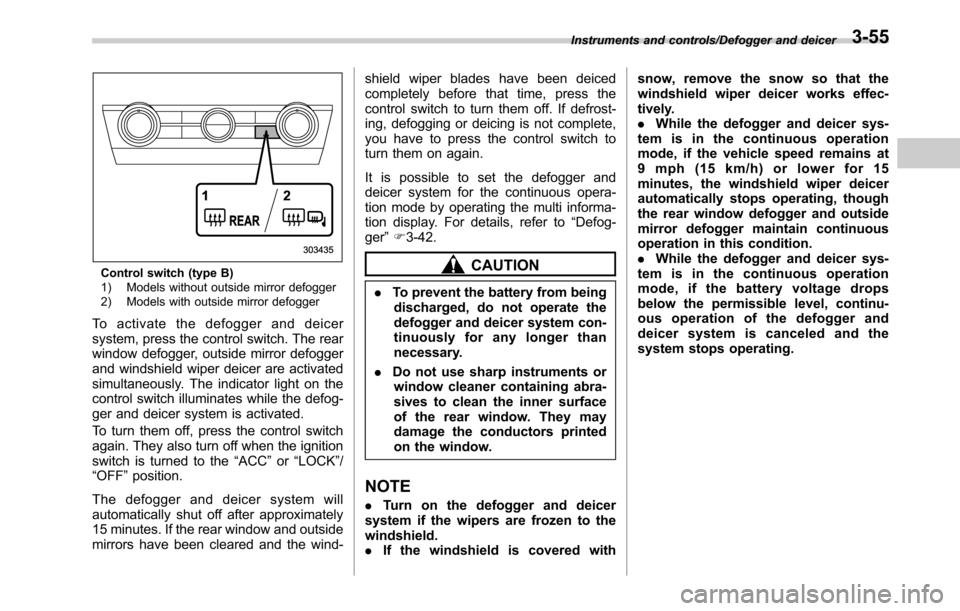
Control switch (type B)
1) Models without outside mirror defogger
2) Models with outside mirror defogger
To activate the defogger and deicer
system, press the control switch. The rear
window defogger, outside mirror defogger
and windshield wiper deicer are activated
simultaneously. The indicator light on the
control switch illuminates while the defog-
ger and deicer system is activated.
To turn them off, press the control switch
again. They also turn off when the ignition
switch is turned to the“ACC”or“LOCK”/
“OFF”position.
The defogger and deicer system will
automatically shut off after approximately
15 minutes. If the rear window and outside
mirrors have been cleared and the wind-shield wiper blades have been deiced
completely before that time, press the
control switch to turn them off. If defrost-
ing, defogging or deicing is not complete,
you have to press the control switch to
turn them on again.
It is possible to set the defogger and
deicer system for the continuous opera-
tion mode by operating the multi informa-
tion display. For details, refer to“Defog-
ger”F3-42.
CAUTION
.To prevent the battery from being
discharged, do not operate the
defogger and deicer system con-
tinuously for any longer than
necessary.
.Do not use sharp instruments or
window cleaner containing abra-
sives to clean the inner surface
of the rear window. They may
damage the conductors printed
on the window.
NOTE
.Turn on the defogger and deicer
system if the wipers are frozen to the
windshield.
.If the windshield is covered withsnow, remove the snow so that the
windshield wiper deicer works effec-
tively.
.While the defogger and deicer sys-
tem is in the continuous operation
mode, if the vehicle speed remains at
9 mph (15 km/h) or lower for 15
minutes, the windshield wiper deicer
automatically stops operating, though
the rear window defogger and outside
mirror defogger maintain continuous
operation in this condition.
.While the defogger and deicer sys-
tem is in the continuous operation
mode, if the battery voltage drops
below the permissible level, continu-
ous operation of the defogger and
deicer system is canceled and the
system stops operating.
Instruments and controls/Defogger and deicer3-55
Page 221 of 572
Automatic climate control
system (type B)
NOTE
.Operate the automatic climate con-
trol system when the engine is running.
.The blower fan rotates at a low
speed when the engine coolant tem-
perature is low.
.For efficient defogging or dehumidi-
fying in cold weather, press the“A/C”
button.
When the automatic climate control mode
is selected, the following items are auto-
matically controlled.
.Outlet air temperature
.Fan speed
.Airflow distribution
.Air inlet control
.Air conditioner compressor operation
To activate this mode, perform the follow-
ing procedure.
1. Set the preferred temperature using
the temperature control button.
2. Press the“AUTO”button. The FULL
AUTO mode is selected and the“FULL
AUTO”indicator light on the display
illuminates.
NOTE
If you operate any of the buttons on the
control panel other than the“OFF”
button, rear window defogger button
and temperature control buttons during
FULL AUTO mode operation, the
“FULL”indicator light on the control
panel will turn off and the“AUTO”
indicator light will remain illuminated.
You can then manually control the
system as desired. To change the
system back to the FULL AUTO mode,
press the“AUTO”button.
To turn off the climate control system,
press the“OFF”button. The air inlet
selection is then automatically switched
to the outside air mode.&Temperature sensors
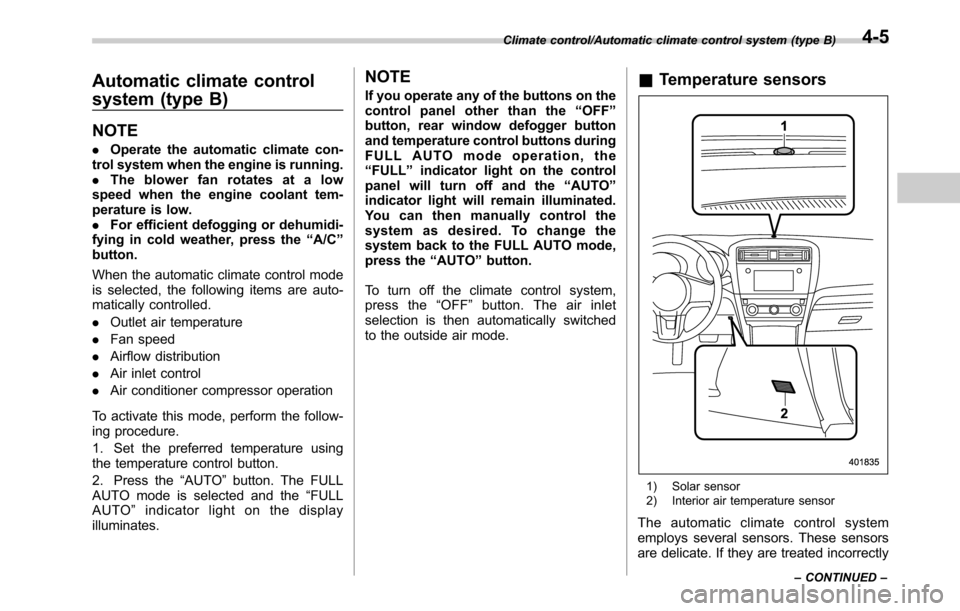
1) Solar sensor
2) Interior air temperature sensor
The automatic climate control system
employs several sensors. These sensors
are delicate. If they are treated incorrectly
Climate control/Automatic climate control system (type B)
–CONTINUED–4-5
Page 223 of 572

the instrument panel and some through
windshield defroster outlets (A small
amount of air flows to the windshield and
both side windows to prevent fogging.)
A) Models with rear ventilators
(Heat-def): Windshield defroster outlets,
foot outlets and both side outlets of the
instrument panel
A) Models with rear ventilators
(Defrost): Windshield defroster outlets and
both side outlets of the instrument panel
NOTE
.When the“”mode or“”mode
is selected, the air conditioner com-
pressor automatically operates to more
quickly defog the windshield. At the
same time, the air inlet selection is
automatically set to the outside air
mode.
In this state:
–The air conditioner indicator light
does not illuminate.
–You cannot stop the air condi-
tioner compressor by pressing the
air conditioner button.
&Temperature control
Turn the temperature control dial over a
range from the blue side (cool) to red side
(warm) to regulate the temperature of
airflow from the air outlets.
!MAX A/C mode
Perform the following operation to select
the MAX A/C mode.
.Turn the temperature control dial to the
“MAX A/C”position (models with type A
climate control system).
.Press the“MAX A/C”button (models
with type B climate control system).
When this mode is selected, some of the
settings will be changed as follows.
Type A climate control system:
.The air inlet selection mode will be
changed to the ON position (recirculation).
.The air conditioner will turn on.
Type B climate control system:
.The temperature setting will be chan-
ged to the maximum cooling mode.
.The fan speed setting will be changed
to the maximum speed.
.The airflow mode setting will be chan-
ged to the“
”(ventilation) mode.
.The air inlet selection mode will be
changed to the ON position (recirculation).
Climate control/Manual climate control
–CONTINUED–4-7