tail lights SUBARU OUTBACK 2016 6.G User Guide
[x] Cancel search | Manufacturer: SUBARU, Model Year: 2016, Model line: OUTBACK, Model: SUBARU OUTBACK 2016 6.GPages: 572, PDF Size: 21.79 MB
Page 192 of 572

Instruments and controls/Multi information display
First menuSecond menu
Third menu Settings
Vehicle Setting Keyless Entry System
Audible Signal*1ON/OFF
Hazard Warning FlasherON/OFF
Driver Door Unlock
*1 *2Driver Door Only, All
Rear Gate Unlock
*1 *2 *3Rear Gate Only, All
Defogger
—15 minutes/Continuous
Interior Light
—10 seconds–30 seconds, OFF
Auto Headlights
Light SensitivityMax/Mid/Low/Min
Wiper LinkON/OFF
Welcome Lighting
Approaching Time Set30 seconds–90 seconds, OFF
Leaving Time Set30 seconds–90 seconds, OFF
Default Settings OK To Reset?
—Yes/No
*1: The setting menu is available only for models with“keyless access with push-button start system”.
*2: The setting can only be changed for the“keyless access”entry function. For details, refer to“Door unlock selection function”F2-17.
*3: For Outback only
3-40
Page 194 of 572

Instruments and controls/Multi information display
!BSD/RCTA (if equipped)
After entering the“BSD/RCTA”menu,
select the“Warning Volume”menu. You
can set the volume of the warning buzzer
that sounds when the function of the
RCTA (Rear Cross Traffic Alert) has been
activated. You can select“Max”,“Mid”or
“Min”.
!Vehicle Setting
After entering the“Vehicle Setting”menu,
select one of the following menus.
!Keyless Entry System
After entering the“Keyless Entry System”
menu, select one of the following menus.
.Audible Signal (models with“key-
less access with push-button start
system”):
The audible signal can be activated or
deactivated. Select“On”to activate. Se-
lect“Off”to deactivate.
.Hazard Warning Flasher (all mod-
els):
The hazard warning flasher operation can
be activated or deactivated. Select“On”to
activate. Select“Off”to deactivate..Driver Door Unlock (models with
“keyless access with push-button start
system”):
The door unlock selection function is
available for the“keyless access”entry
function. For details, refer to“Door unlock
selection function”F2-17. On this setting
menu, the door unlock selection function
for the driver’s door can be customized.
Select“Driver Door Only”to set as
“Operational”. Select“All”to set as“Non-
operational”.
.Rear Gate Unlock (Outback with
“keyless access with push-button start
system”):
The door unlock selection function is
available for the“keyless access”entry
function. For details, refer to“Door unlock
selection function”F2-17. On this setting
menu, the door unlock selection function
for the rear gate can be customized.
Select“Rear Gate Only”to set as“Opera-
tional”. Select“All”to set as“Non-opera-
tional”.
!Defogger
The defogger and deicer system can be
set for the continuous operation mode or
automatic shut-off mode. Select“Contin-
uous”to select the continuous operation
mode. Select“15 minutes”to select theautomatic shut-off mode.
!Interior Light
The setting for the period of time in which
the interior lights remain on (OFF delay
timer) after closing the doors and/or the
rear gate can be set or customized. Select
the preferred seconds to customize the
operation period. Select“Off”to deactivate
the OFF delay timer.
!Auto Headlights
.Light Sensitivity:
The operational sensitivity of the auto on/
off headlights can be set. You can select
“Max”,“Mid”,“Low”or“Min”.
.Wiper Link:
The automatic headlight turn on function
that is linked with the wiper operation can
be activated or deactivated. Select“On”to
activate. Select“Off”to deactivate.
!Welcome Lighting
After entering the“Welcome Lighting”
menu, select either of the following me-
nus.
.Approaching Time Set:
The setting for the period of time in which
the low beam headlights remain on when
approaching the vehicle can be set or
customized. Select the preferred seconds
3-42
Page 196 of 572
Instruments and controls/Light control switch
&Headlights
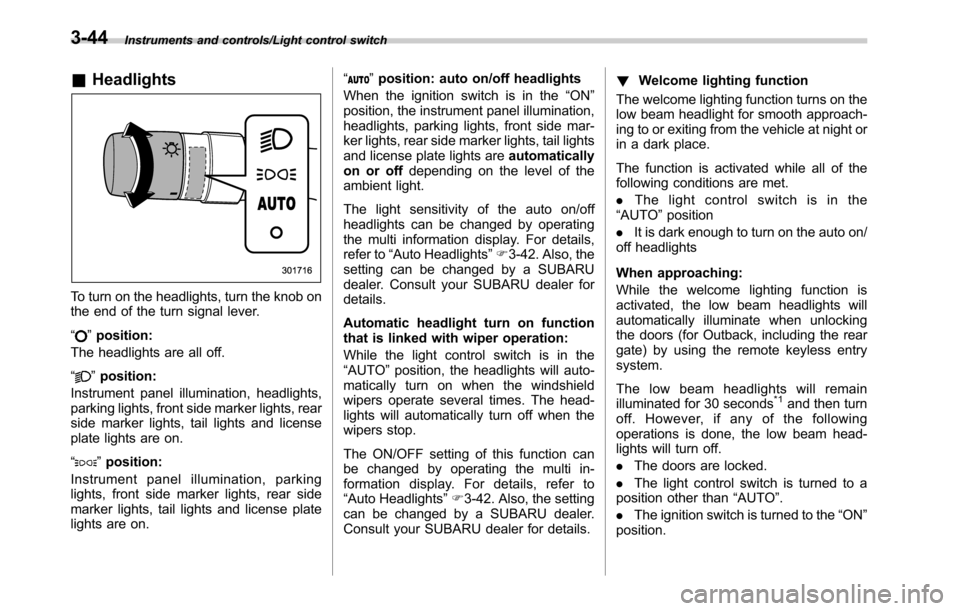
To turn on the headlights, turn the knob on
the end of the turn signal lever.
“
”position:
The headlights are all off.
“
”position:
Instrument panel illumination, headlights,
parking lights, front side marker lights, rear
side marker lights, tail lights and license
plate lights are on.
“
”position:
Instrument panel illumination, parking
lights, front side marker lights, rear side
marker lights, tail lights and license plate
lights are on.“
”position: auto on/off headlights
When the ignition switch is in the“ON”
position, the instrument panel illumination,
headlights, parking lights, front side mar-
ker lights, rear side marker lights, tail lights
and license plate lights areautomatically
on or offdepending on the level of the
ambient light.
The light sensitivity of the auto on/off
headlights can be changed by operating
the multi information display. For details,
refer to“Auto Headlights”F3-42. Also, the
setting can be changed by a SUBARU
dealer. Consult your SUBARU dealer for
details.
Automatic headlight turn on function
that is linked with wiper operation:
While the light control switch is in the
“AUTO”position, the headlights will auto-
matically turn on when the windshield
wipers operate several times. The head-
lights will automatically turn off when the
wipers stop.
The ON/OFF setting of this function can
be changed by operating the multi in-
formation display. For details, refer to
“Auto Headlights”F3-42. Also, the setting
can be changed by a SUBARU dealer.
Consult your SUBARU dealer for details.!Welcome lighting function
The welcome lighting function turns on the
low beam headlight for smooth approach-
ing to or exiting from the vehicle at night or
in a dark place.
The function is activated while all of the
following conditions are met.
.The light control switch is in the
“AUTO”position
.It is dark enough to turn on the auto on/
off headlights
When approaching:
While the welcome lighting function is
activated, the low beam headlights will
automatically illuminate when unlocking
the doors (for Outback, including the rear
gate) by using the remote keyless entry
system.
The low beam headlights will remain
illuminated for 30 seconds
*1and then turn
off. However, if any of the following
operations is done, the low beam head-
lights will turn off.
.The doors are locked.
.The light control switch is turned to a
position other than“AUTO”.
.The ignition switch is turned to the“ON”
position.
3-44
Page 197 of 572
When exiting:
While the welcome lighting function is
activated, the low beam headlights will
remain illuminated even when either of the
following operation is done.
.Thepush-buttonignitionswitchis
turned to the“OFF”status (models with
“keyless access with push-button start
system”)
.The key is pulled out from the ignition
switch (models without“keyless access
with push-button start system”)
The low beam headlights will turn off
under any of the following conditions.
.3 minutes have passed since the low
beam headlights were illuminated by the
welcome lighting function.
.30 seconds have passed since the
door is opened and closed.
*1
.The light control switch is turned to a
position other than“AUTO”.
.The locking procedure is performed
twice. When performing the unlocking
procedure after performing the locking
procedure, perform the locking procedure
twice again.
*1: The setting for the period of time in which
the low beam headlights remain on by the
welcome lighting function can be changed by a
SUBARU dealer. Contact your SUBARU dealerfor details. Also, you can change the setting by
operating the multi information display. For
details, refer to“Welcome Lighting”F3-42
.For models with the genuine SUBARU naviga-
tion system, you can change the setting by
using the navigation system. For details, refer to
the Owner’s Manual supplement for the naviga-
tion system.
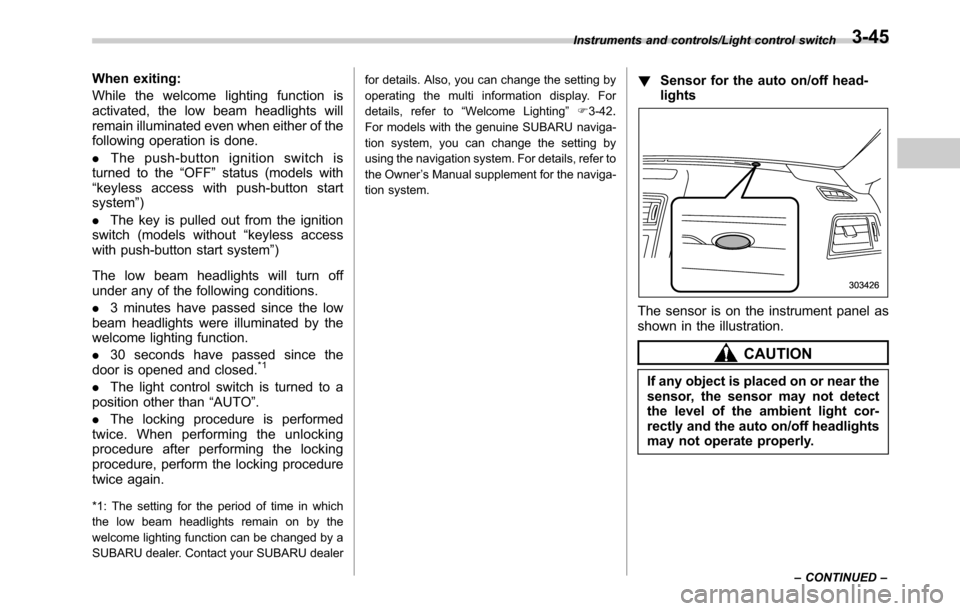
!Sensor for the auto on/off head-
lights
The sensor is on the instrument panel as
shown in the illustration.
CAUTION
If any object is placed on or near the
sensor, the sensor may not detect
the level of the ambient light cor-
rectly and the auto on/off headlights
may not operate properly.
Instruments and controls/Light control switch
–CONTINUED–3-45
Page 198 of 572
Instruments and controls/Light control switch
&High/low beam change
(dimmer)
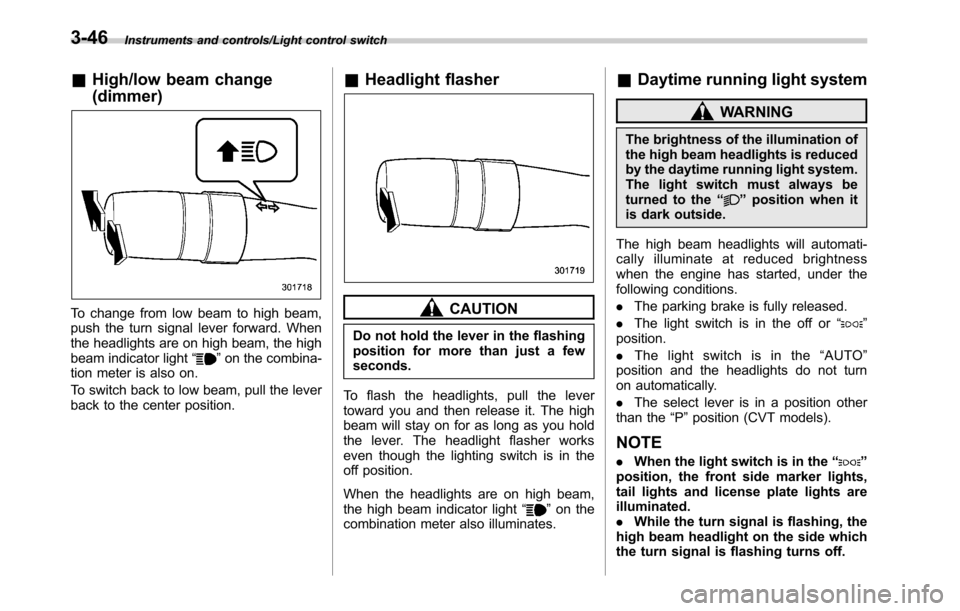
To change from low beam to high beam,
push the turn signal lever forward. When
the headlights are on high beam, the high
beam indicator light“
”on the combina-
tion meter is also on.
To switch back to low beam, pull the lever
back to the center position.
&Headlight flasher
CAUTION
Do not hold the lever in the flashing
position for more than just a few
seconds.
To flash the headlights, pull the lever
toward you and then release it. The high
beam will stay on for as long as you hold
the lever. The headlight flasher works
even though the lighting switch is in the
off position.
When the headlights are on high beam,
the high beam indicator light“
”on the
combination meter also illuminates.
&Daytime running light system
WARNING
The brightness of the illumination of
the high beam headlights is reduced
by the daytime running light system.
The light switch must always be
turned to the“
”position when it
is dark outside.
The high beam headlights will automati-
cally illuminate at reduced brightness
when the engine has started, under the
following conditions.
.The parking brake is fully released.
.The light switch is in the off or“
”
position.
.The light switch is in the“AUTO”
position and the headlights do not turn
on automatically.
.The select lever is in a position other
than the“P”position (CVT models).
NOTE
.When the light switch is in the“”
position, the front side marker lights,
tail lights and license plate lights are
illuminated.
.While the turn signal is flashing, the
high beam headlight on the side which
the turn signal is flashing turns off.
3-46
Page 200 of 572
Instruments and controls/Illumination brightness control
&One-touch lane changer
To flash the turn signal and turn signal
indicator light three times, push the turn
signal lever up or down slightly and
immediately release it.
The operational/non-operational setting of
the one-touch lane changer’s can be
changed by a SUBARU dealer. Contact
the nearest SUBARU dealer for details.
Illumination brightness con-
trol
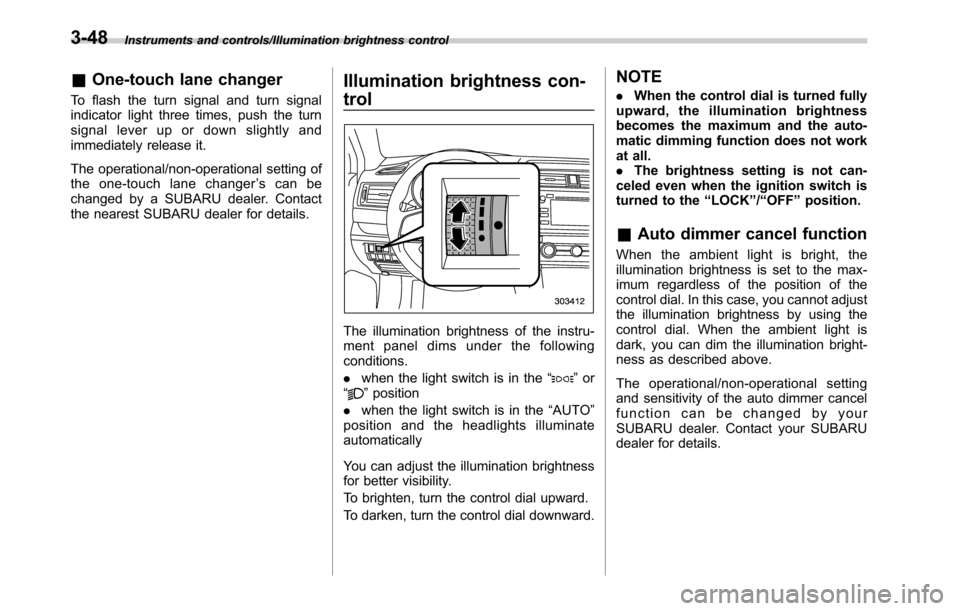
The illumination brightness of the instru-
ment panel dims under the following
conditions.
.when the light switch is in the“
”or
“”position
.when the light switch is in the“AUTO”
position and the headlights illuminate
automatically
You can adjust the illumination brightness
for better visibility.
To brighten, turn the control dial upward.
To darken, turn the control dial downward.
NOTE
.When the control dial is turned fully
upward, the illumination brightness
becomes the maximum and the auto-
matic dimming function does not work
at all.
.The brightness setting is not can-
celed even when the ignition switch is
turned to the“LOCK”/“OFF”position.
&Auto dimmer cancel function
When the ambient light is bright, the
illumination brightness is set to the max-
imum regardless of the position of the
control dial. In this case, you cannot adjust
the illumination brightness by using the
control dial. When the ambient light is
dark, you can dim the illumination bright-
ness as described above.
The operational/non-operational setting
and sensitivity of the auto dimmer cancel
function can be changed by your
SUBARU dealer. Contact your SUBARU
dealer for details.
3-48
Page 209 of 572
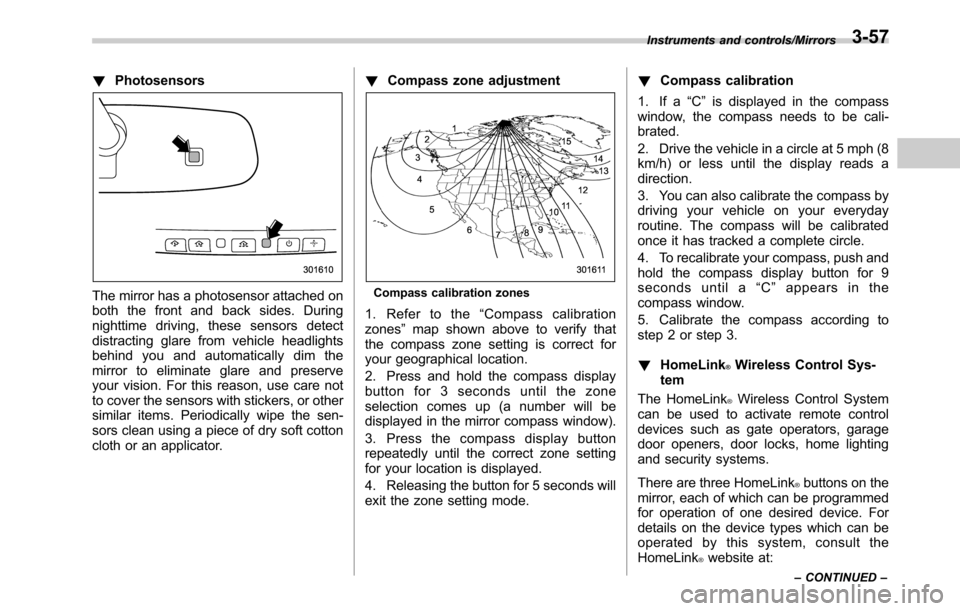
!Photosensors
The mirror has a photosensor attached on
both the front and back sides. During
nighttime driving, these sensors detect
distracting glare from vehicle headlights
behind you and automatically dim the
mirror to eliminate glare and preserve
your vision. For this reason, use care not
to cover the sensors with stickers, or other
similar items. Periodically wipe the sen-
sors clean using a piece of dry soft cotton
cloth or an applicator.!Compass zone adjustmentCompass calibration zones
1. Refer to the“Compass calibration
zones”map shown above to verify that
the compass zone setting is correct for
your geographical location.
2. Press and hold the compass display
button for 3 seconds until the zone
selection comes up (a number will be
displayed in the mirror compass window).
3. Press the compass display button
repeatedly until the correct zone setting
for your location is displayed.
4. Releasing the button for 5 seconds will
exit the zone setting mode.!Compass calibration
1. If a“C”is displayed in the compass
window, the compass needs to be cali-
brated.
2. Drive the vehicle in a circle at 5 mph (8
km/h) or less until the display reads a
direction.
3. You can also calibrate the compass by
driving your vehicle on your everyday
routine. The compass will be calibrated
once it has tracked a complete circle.
4. To recalibrate your compass, push and
hold the compass display button for 9
seconds until a“C”appears in the
compass window.
5. Calibrate the compass according to
step 2 or step 3.
!HomeLink
®Wireless Control Sys-
tem
The HomeLink
®Wireless Control System
can be used to activate remote control
devices such as gate operators, garage
door openers, door locks, home lighting
and security systems.
There are three HomeLink
®buttons on the
mirror, each of which can be programmed
for operation of one desired device. For
details on the device types which can be
operated by this system, consult the
HomeLink
®website at:
Instruments and controls/Mirrors
–CONTINUED–3-57
Page 324 of 572
Interior equipment/Interior light
Interior light
CAUTION
When leaving your vehicle, make
sure the lights are turned off to
avoid battery discharge.
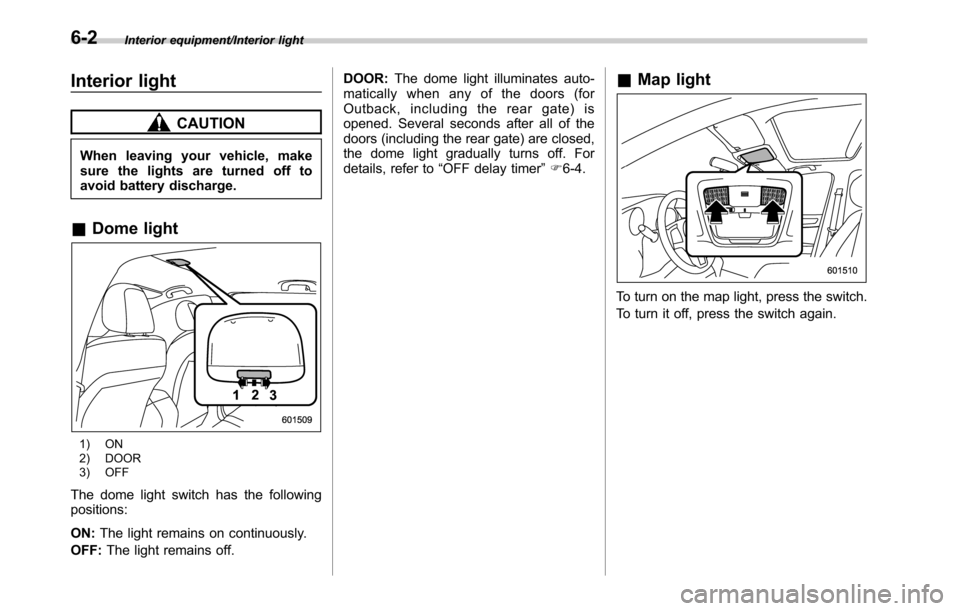
&Dome light
1) ON
2) DOOR
3) OFF
The dome light switch has the following
positions:
ON:The light remains on continuously.
OFF:The light remains off.DOOR:The dome light illuminates auto-
matically when any of the doors (for
Outback, including the rear gate) is
opened. Several seconds after all of the
doors (including the rear gate) are closed,
the dome light gradually turns off. For
details, refer to“OFF delay timer”F6-4.
&Map light
To turn on the map light, press the switch.
To turn it off, press the switch again.
6-2
Page 325 of 572
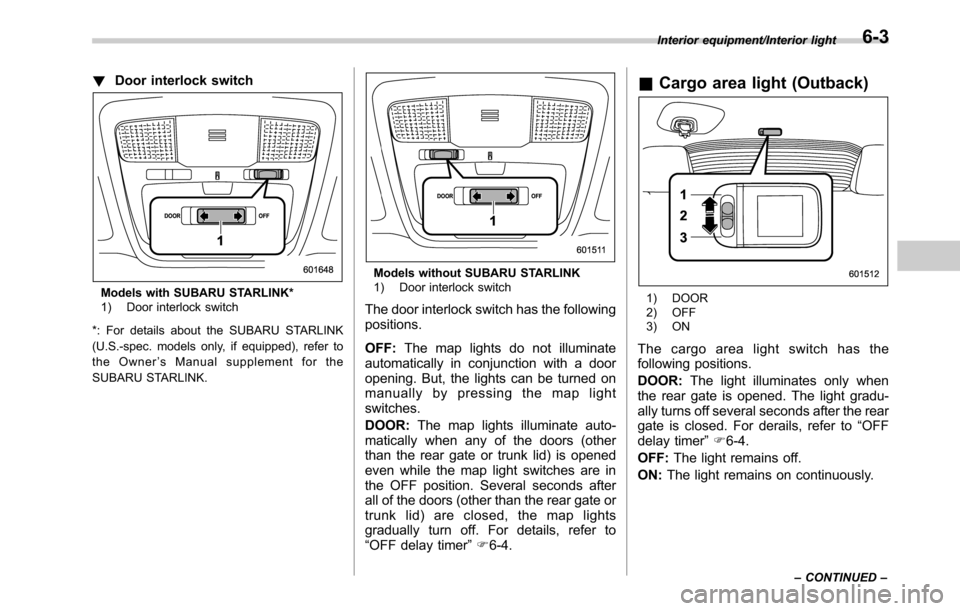
!Door interlock switch
Models with SUBARU STARLINK*
1) Door interlock switch
*: For details about the SUBARU STARLINK
(U.S.-spec. models only, if equipped), refer to
the Owner’s Manual supplement for the
SUBARU STARLINK.
Models without SUBARU STARLINK
1) Door interlock switch
The door interlock switch has the following
positions.
OFF:The map lights do not illuminate
automatically in conjunction with a door
opening. But, the lights can be turned on
manually by pressing the map light
switches.
DOOR:The map lights illuminate auto-
matically when any of the doors (other
than the rear gate or trunk lid) is opened
even while the map light switches are in
the OFF position. Several seconds after
all of the doors (other than the rear gate or
trunk lid) are closed, the map lights
gradually turn off. For details, refer to
“OFF delay timer”F6-4.
&Cargo area light (Outback)
1) DOOR
2) OFF
3) ON
The cargo area light switch has the
following positions.
DOOR:The light illuminates only when
the rear gate is opened. The light gradu-
ally turns off several seconds after the rear
gate is closed. For derails, refer to“OFF
delay timer”F6-4.
OFF:The light remains off.
ON:The light remains on continuously.
Interior equipment/Interior light
–CONTINUED–6-3
Page 326 of 572
Interior equipment/Sun visors
&OFF delay timer
The following lights have an automatic
illumination function.
.dome light
.map light
.cargo area light (Outback)
After being illuminated automatically,
these lights remain on for several seconds
and then gradually turn off under the
following conditions.
.after the ignition switch is turned to the
“LOCK”/“OFF”position
.after any doors or the rear gate
(Outback) is closed (dome light)
.after all doors are closed (map light)
.after the rear gate is closed (cargo area
light)
.after the doors are unlocked using the
keyless access function (if equipped)
(dome light and map light)
.after the doors are unlocked using the
remote keyless entry system (dome light
and map light)
.when approaching with the access key
(if equipped) (dome light and map light)
While the lights are illuminated, if any of
the following operations is performed, the
lights turn off immediately.
.The ignition switch is turned from the“LOCK”/“OFF”position to the“ACC”or
“ON”position.
.All doors and the rear gate (Outback)
are locked using the keyless access
function (if equipped).
.All doors and the rear gate (Outback)
are locked using the remote keyless entry
system.
The setting for the period of time in which
the lights remain on (OFF delay timer) can
be changed by a SUBARU dealer. Con-
tact your SUBARU dealer for details. Also,
the setting can be changed by operating
the multi information display. For details,
refer to“Interior Light”F3-42.
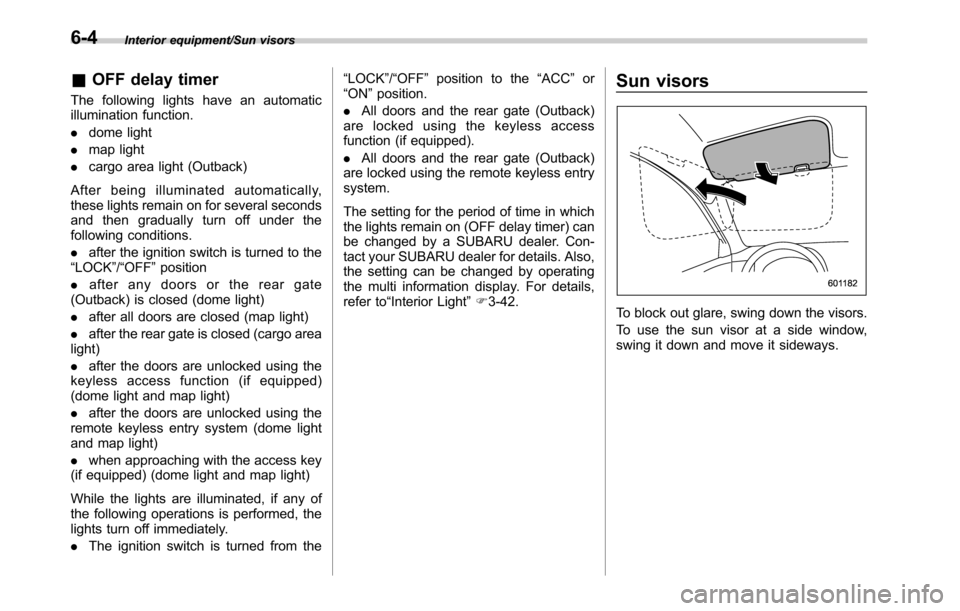
Sun visors
To block out glare, swing down the visors.
To use the sun visor at a side window,
swing it down and move it sideways.
6-4