Speed indicator SUBARU OUTBACK 2016 6.G Owner's Manual
[x] Cancel search | Manufacturer: SUBARU, Model Year: 2016, Model line: OUTBACK, Model: SUBARU OUTBACK 2016 6.GPages: 572, PDF Size: 21.79 MB
Page 224 of 572

Climate control/Manual climate control
.The air conditioner will turn on.
While the MAX A/C mode is selected,
performing the following operation returns
the system to the setting that had been
selected before the MAX A/C mode is
selected.
.Turn the temperature control dial to a
position other than“MAX A/C”position
(models with type A climate control sys-
tem).
.Press the“MAX A/C”button again
(models with type B climate control sys-
tem).
!“DUAL”mode (type B)
You can change the setting of the driver’s
side and front passenger’s side tempera-
ture independently by selecting the
“DUAL”mode.
You can select the“DUAL”mode by
performing either of the following proce-
dures.
.Press the“DUAL”button
.Turn the passenger’s side temperature
control dial
The“DUAL”mode can be canceled by
pressing the“DUAL”button.
When the“DUAL”mode is selected:
Turn the driver’ssidedialtosetthe
driver’s side temperature. Turn the frontpassenger’s side dial to set the front
passenger’s side temperature.
When the“DUAL”mode is canceled:
Set the desired temperature by turning the
driver’s side dial.
&Fan speed control
The fan operates only when the ignition
switch is in the“ON”position. Select the
preferred fan speed by turning the fan
speed control dial (type A), or by pressing
the fan speed control buttons (type B).
&Air conditioner control
The air conditioner operates only when
the engine is running.
Press the air conditioner button while the
fan is in operation to turn on the air
conditioner. When the air conditioner is
on, the“A/C”indicator light illuminates.
To turn off the air conditioner, press the
button again. The indicator light will turn
off.
NOTE
For efficient defogging or dehumidify-
ing in cold weather, turn on the air
conditioner. However, if the ambient
temperature decreases to approxi-
mately 328F(08C), the air conditioner
and dehumidification system may notwork properly.
&Air inlet selection
Select the air inlet by pressing the air inlet
selection button.
ON position (recirculation): Interior air is
recirculated inside the vehicle. Press the
air inlet selection button to the ON position
for fast cooling with the air conditioner or
when driving on a dusty road. When the
ON position is selected, the“
”indicator
light on the information display (type A)/
the indicator light on the air inlet selection
button (type B) illuminates.
OFF position (outside air): Outside air is
drawn into the passenger compartment.
Press the air inlet selection button to the
OFF position when the interior has cooled
to a comfortable temperature and the road
is no longer dusty. The indicator light will
turn off.
4-8
Page 349 of 572

Fuel...................................................................... 7-3
Fuel requirements............................................... 7-3
Fuel filler lid and cap........................................... 7-4
State emission testing (U.S. only)...................... 7-7
Preparing to drive............................................... 7-8
Starting and stopping the engine (models
without push-button ignition switch).............. 7-9
Starting engine.................................................... 7-9
Stopping the engine........................................... 7-11
Steering lock (models without“keyless access
with push-button start system”)........................ 7-11
Starting and stopping engine (models with
push-button start system).............................. 7-12
Safety precautions............................................. 7-12
Operating range for push-button start
system............................................................. 7-12
Starting engine................................................... 7-12
Stopping engine................................................. 7-14
When access key does not operate properly....... 7-14
Steering lock (models with“keyless access with
push-button start system”) ............................... 7-15
Remote engine start system (dealer
option).............................................................. 7-15
Models with“keyless access with push-button
start system”................................................... 7-16
Models without“keyless access with push-button
start system”................................................... 7-17
Entering the vehicle while it is running via remote
start................................................................. 7-20
Entering the vehicle following remote engine start
shutdown......................................................... 7-20Pre-heating or pre-cooling the interior of the
vehicle............................................................ 7-20
Service mode (models without“keyless access
with push-button start system”) ....................... 7-20
Remote transmitter program (models without
“keyless access with push-button start
system”).......................................................... 7-20
System maintenance.......................................... 7-21
Manual transmission......................................... 7-23Selecting reverse gear....................................... 7-23
Shifting speeds.................................................. 7-23
Driving tips........................................................ 7-24
Continuously variable transmission................. 7-25Select lever....................................................... 7-26
Shift lock function............................................. 7-27
Selection of manual mode.................................. 7-29
Driving tips........................................................ 7-30
Power steering................................................... 7-31
Braking............................................................... 7-32
Braking tips....................................................... 7-32
Brake system.................................................... 7-32
Disc brake pad wear warning indicators............. 7-33
ABS (Anti-lock Brake System).......................... 7-33
ABS self-check.................................................. 7-33
ABS warning light.............................................. 7-33
Electronic Brake Force Distribution (EBD)
system............................................................. 7-34
Steps to take if EBD system malfunctions.......... 7-34
Vehicle Dynamics Control system.................... 7-35Vehicle Dynamics Control system monitor.......... 7-36
Vehicle Dynamics Control OFF switch................ 7-37
Starting and operating
7
Page 350 of 572

Starting and operating
X-mode (Outback CVT models)......................... 7-38
To activate/deactivate the X-mode....................... 7-39
Hill descent control function............................... 7-39
Tire pressure monitoring system (TPMS) (if
equipped)......................................................... 7-40
Parking your vehicle.......................................... 7-42
Electronic parking brake..................................... 7-42
Parking tips....................................................... 7-47
Hill start assist system (MT models)................ 7-48
To activate/deactivate the Hill start assist
system............................................................. 7-49
Cruise control..................................................... 7-49To set cruise control.......................................... 7-50
To temporarily cancel the cruise control............. 7-51To turn off the cruise control.............................. 7-51
To change the cruising speed............................ 7-51
Cruise control indicator..................................... 7-53
Cruise control set indicator................................ 7-53
BSD/RCTA (if equipped).................................... 7-53System features................................................. 7-53
System operation............................................... 7-55
BSD/RCTA approach indicator light/warning
buzzer............................................................. 7-56
BSD/RCTA warning indicator.............................. 7-58
BSD/RCTA OFF switch....................................... 7-59
Certification for the BSD/RCTA........................... 7-60
Handling of radar sensors.................................. 7-60
Page 358 of 572

Starting and operating/Starting and stopping the engine (models without push–button ignition switch)
when using the remote engine
start system).
NOTE
.Avoid rapid racing and rapid accel-
eration immediately after the engine
has started.
.For a short time after the engine has
started, the engine speed is kept high.
When the warm-up is completed, the
engine speed lowers automatically.
.On rare occasions, it may be difficult
to start the engine depending on the
fuel and the usage condition (repeated
driving of a distance in which the
engine has not warmed up sufficiently).
In such a case, it is recommended that
you change to a different brand of fuel.
.On rare occasions, transient knock-
ing may be heard from the engine when
the accelerator is operated rapidly
such as a rapid start-up and a rapid
acceleration. This is not a malfunction.
.The engine starts more easily when
the headlights, air conditioner and rear
window defogger are turned off.
.After the engine starts, the engine
speed will be kept high until the engine
has warmed up sufficiently.!MT models
1. Apply the parking brake.
2. Turn off unnecessary lights and ac-
cessories.
3. Depress the clutch pedal to the floor
and shift the shift lever into neutral. Hold
the clutch pedal to the floor while starting
the engine. The starter motor will only
operate when the clutch pedal is de-
pressed fully to the floor.
4. Turn the ignition switch to the“ON”
position and check the operation of the
warning and indicator lights. Refer to
“Warning and indicator lights”F3-12.
5. Turn the ignition switch to the“START”
positionwithoutdepressing the accelera-
tor pedal. Release the key immediately
after the engine has started.
If the engine does not start, perform the
following procedure.
(1) Turn the ignition switch to the
“LOCK”position and wait for at least
10 seconds. After checking that the
parking brake is applied, turn the
ignition switch to the“START”position
while depressing the accelerator pedal
slightly (approximately a quarter of the
full stroke). Release the accelerator
pedal as soon as the engine starts.
(2) If this fails to start the engine, turn
the ignition switch back to the“LOCK”position and wait for at least 10
seconds. Then fully depress the accel-
erator pedal and turn the ignition
switch to the“START”position. If the
engine starts, quickly release the
accelerator pedal.
(3) If this does not start the engine,
turn the ignition switch again to the
“LOCK”position. After waiting for 10
seconds or longer, turn the ignition
switch to the“START”position without
depressing the accelerator pedal.
(4) If the engine still refuses to start,
contact your nearest SUBARU dealer
for assistance.
6. Confirm that all warning and indicator
lights have turned off after the engine has
started. The fuel injection system auto-
matically lowers the idle speed as the
engine warms up.
!CVT models
CAUTION
If you restart the engine while the
vehicle is moving, shift the select
lever into the“N”position. Do not
attempt to place the select lever of a
moving vehicle into the“P”posi-
tion.
7-10
Page 359 of 572
1. Apply the parking brake.
2. Turn off unnecessary lights and ac-
cessories.
3. Shift the select lever to the“P”or“N”
position (preferably“P”position). The
starter will only operate when the select
lever is at the“P”or“N”position.
4. Turn the ignition switch to the“ON”
position and check the operation of the
warning and indicator lights. Refer to
“Warning and indicator lights”F3-12.
5. Turn the ignition switch to the“START”
positionwithoutdepressing the accelera-
tor pedal. Release the key immediately
after the engine has started.
If the engine does not start, perform the
following procedure.
(1) Turn the ignition switch to the
“LOCK”position and wait for at least
10 seconds. After checking that the
parking brake is applied, turn the
ignition switch to the“START”position
while depressing the accelerator pedal
slightly (approximately a quarter of the
full stroke). Release the accelerator
pedal as soon as the engine starts.
(2) If this fails to start the engine, turn
the ignition switch back to the“LOCK”
position and wait for at least 10
seconds. Then fully depress the accel-
erator pedal and turn the ignition
switch to the“START”position. If theengine starts, quickly release the
accelerator pedal.
(3) If this fails to start the engine, turn
the ignition switch again to the“LOCK”
position. After waiting for 10 seconds
or longer, turn the ignition switch to the
“START”position without depressing
the accelerator pedal.
(4) If the engine still refuses to start,
contact your nearest SUBARU dealer
for assistance.
6. Confirm that all warning and indicator
lights have turned off after the engine has
started. The fuel injection system auto-
matically lowers the idle speed as the
engine warms up.
While the engine is warming up, make
sure that the select lever is at the“P”or
“N”position and that the parking brake is
applied.
&Stopping the engine
WARNING
Do not stop the engine when the
vehicle is moving. This will cause
loss of power to the power steering
and the brake booster, making steer-
ing and braking more difficult. It
could also result in accidental acti-
vation of the“LOCK”position on theignition switch, causing the steering
wheel to lock.
The ignition switch should be turned off
only when the vehicle is stopped and the
engine is idling.
&Steering lock (models with-
out“keyless access with
push-button start system”)
After stopping the engine and the key is
removed from ignition switch, the steering
wheel will be locked due to the steering
lock function.
When the engine is restarted, the steering
lock will be automatically canceled.
!When the steering lock cannot be
released
When you cannot restart the engine due to
the steering lock, perform the following
steps.
!MT models
1. Check that the parking brake is ap-
plied.
2. Turn off unnecessary lights and ac-
cessories.
3. Depress the clutch pedal to the floor
and shift the shift lever into neutral. Hold
the clutch pedal to the floor while starting
the engine.
Starting and operating/Starting and stopping the engine (models without push–button ignition switch)
–CONTINUED–7-11
Page 366 of 572

Starting and operating/Remote engine start system (dealer option)
start system will power off and then
attempt to start the engine 3 additional
times. The system will not attempt to
restart the engine if it determines a vehicle
malfunction is preventing starting. If the
engine does not start after 3 additional
attempts, the remote engine start request
will be aborted.
!Stopping the engine
Press and hold the fob button for at least 2
seconds to stop the engine. The fob will
flash and beep three times, indicating the
engine has stopped. If the stop request is
not received (for example, if the user is too
far away from the vehicle), the fob will
continue to flash once every 3 seconds.
The system will automatically stop the
engine after 15 minutes.
!Remote start safety features
For safety and security reasons, the
remote engine start system will prevent
starting (or stop the engine if running) and
sound the horn twice if any of the following
conditions is detected. In addition, the fob
will flash and beep 3 times.
.The brake pedal is depressed
.A key is in the ignition switch
.The engine hood is open
.The remote start system“Service
mode”is engaged
.The engine idle speed exceeds 3,500RPM
.The security alarm is triggered
.The select lever is not in the“P”
position
If the system detects any door (including
the rear gate/trunk lid) open during opera-
tion, it will prevent starting or stop the
engine, and sound the horn and flash side
marker lights, tail lights, and parking lights
6 times.
In addition to the items above, if the
vehicle’s engine management system
determines there is a safety risk due to a
vehicle-related problem, the vehicle will
power down and the horn will sound 3
times.
NOTE
.If the alarm system is armed at the
time of remote engine starter activation
(the security indicator light on the
combination meter is flashing), the
alarm system will remain armed
throughout the remote start run cycle.
.If the alarm system is disarmed at
the time of remote engine starter
activation (the security indicator light
on the combination meter is not flash-
ing), the alarm system will remain
disarmed throughout the remote start
run cycle.!Remote start operation - fob con-
firmation
Your remote engine starter fob is a
bidirectional transceiver that can confirm
system operation with several different
visual and audible indications. The fob’s
LED-backlit button and internal piezo
buzzer will indicate status of the system
using the following flash and beep se-
quences, provided the fob is within opera-
tional range of the system.
7-18
Page 378 of 572
Starting and operating/Continuously variable transmission
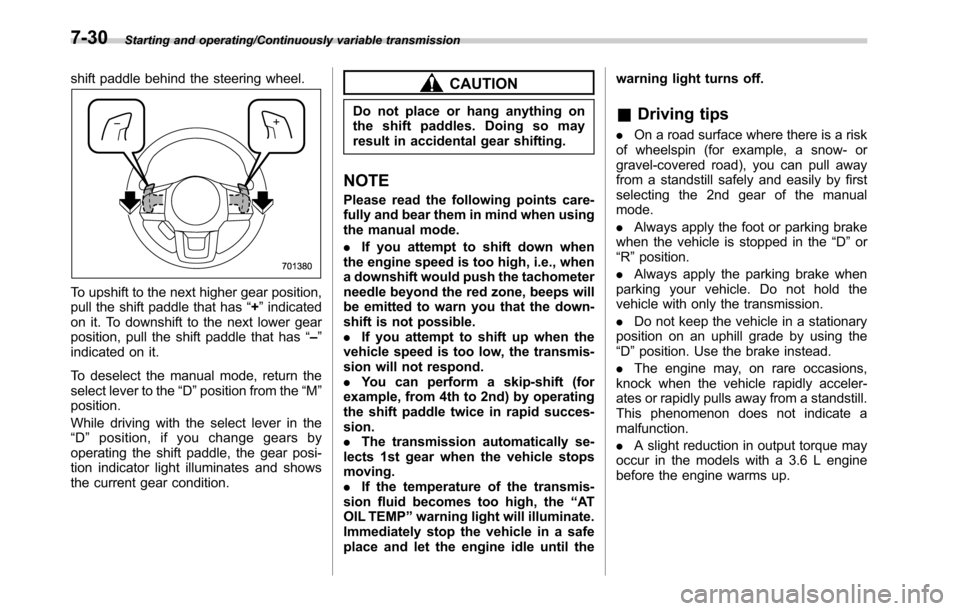
shift paddle behind the steering wheel.
To upshift to the next higher gear position,
pull the shift paddle that has“+”indicated
on it. To downshift to the next lower gear
position, pull the shift paddle that has“–”
indicated on it.
To deselect the manual mode, return the
select lever to the“D”position from the“M”
position.
While driving with the select lever in the
“D”position, if you change gears by
operating the shift paddle, the gear posi-
tion indicator light illuminates and shows
the current gear condition.
CAUTION
Do not place or hang anything on
the shift paddles. Doing so may
result in accidental gear shifting.
NOTE
Please read the following points care-
fully and bear them in mind when using
the manual mode.
.If you attempt to shift down when
the engine speed is too high, i.e., when
a downshift would push the tachometer
needle beyond the red zone, beeps will
be emitted to warn you that the down-
shift is not possible.
.If you attempt to shift up when the
vehicle speed is too low, the transmis-
sion will not respond.
.You can perform a skip-shift (for
example, from 4th to 2nd) by operating
the shift paddle twice in rapid succes-
sion.
.The transmission automatically se-
lects 1st gear when the vehicle stops
moving.
.If the temperature of the transmis-
sion fluid becomes too high, the“AT
OIL TEMP”warning light will illuminate.
Immediately stop the vehicle in a safe
place and let the engine idle until thewarning light turns off.
&Driving tips
.On a road surface where there is a risk
of wheelspin (for example, a snow- or
gravel-covered road), you can pull away
from a standstill safely and easily by first
selecting the 2nd gear of the manual
mode.
.Always apply the foot or parking brake
when the vehicle is stopped in the“D”or
“R”position.
.Always apply the parking brake when
parking your vehicle. Do not hold the
vehicle with only the transmission.
.Do not keep the vehicle in a stationary
position on an uphill grade by using the
“D”position. Use the brake instead.
.The engine may, on rare occasions,
knock when the vehicle rapidly acceler-
ates or rapidly pulls away from a standstill.
This phenomenon does not indicate a
malfunction.
.A slight reduction in output torque may
occur in the models with a 3.6 L engine
before the engine warms up.
7-30
Page 381 of 572
cate any malfunctions, and the brake
assist system is operating properly.
.You might feel that the brake pedal
is applied by lighter force and gener-
ates a greater braking force.
.You might hear the sound of ABS
operating from the engine compart-
ment.
&Disc brake pad wear warning
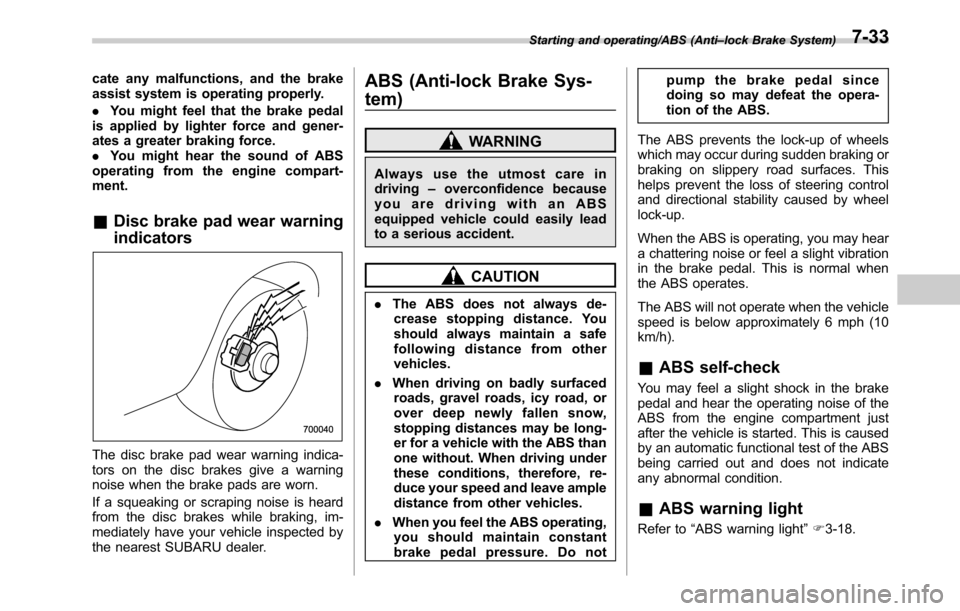
indicators
The disc brake pad wear warning indica-
tors on the disc brakes give a warning
noise when the brake pads are worn.
If a squeaking or scraping noise is heard
from the disc brakes while braking, im-
mediately have your vehicle inspected by
the nearest SUBARU dealer.
ABS (Anti-lock Brake Sys-
tem)
WARNING
Always use the utmost care in
driving–overconfidence because
youaredrivingwithanABS
equipped vehicle could easily lead
to a serious accident.
CAUTION
.The ABS does not always de-
crease stopping distance. You
should always maintain a safe
following distance from other
vehicles.
.When driving on badly surfaced
roads, gravel roads, icy road, or
over deep newly fallen snow,
stopping distances may be long-
er for a vehicle with the ABS than
one without. When driving under
these conditions, therefore, re-
duce your speed and leave ample
distance from other vehicles.
.When you feel the ABS operating,
you should maintain constant
brake pedal pressure. Do notpump the brake pedal since
doing so may defeat the opera-
tion of the ABS.
The ABS prevents the lock-up of wheels
which may occur during sudden braking or
braking on slippery road surfaces. This
helps prevent the loss of steering control
and directional stability caused by wheel
lock-up.
When the ABS is operating, you may hear
a chattering noise or feel a slight vibration
in the brake pedal. This is normal when
the ABS operates.
The ABS will not operate when the vehicle
speed is below approximately 6 mph (10
km/h).
&ABS self-check
You may feel a slight shock in the brake
pedal and hear the operating noise of the
ABS from the engine compartment just
after the vehicle is started. This is caused
by an automatic functional test of the ABS
being carried out and does not indicate
any abnormal condition.
&ABS warning light
Refer to“ABS warning light”F3-18.
Starting and operating/ABS (Anti–lock Brake System)7-33
Page 384 of 572

Starting and operating/Vehicle Dynamics Control system
flat tire. With a temporary
spare tire, the effectiveness
of the Vehicle Dynamics Con-
trol system is reduced and
this should be taken into ac-
count when driving the vehi-
cle in such a condition.
.If non-matching tires are used,
the Vehicle Dynamics Control
system may not operate cor-
rectly.
In the event of wheelspin and/or skidding
on a slippery road surface and/or during
cornering and/or an evasive maneuver,
the Vehicle Dynamics Control system
adjusts the engine’s output and the
wheels’respective braking forces to help
maintain traction and directional control.
.Traction Control Function
The traction control function is designed to
prevent spinning of the driving wheels on
slippery road surfaces, thereby helping to
maintain traction and directional control.
Activation of this function is indicated by
flashing of the Vehicle Dynamics Control
operation indicator light.
.Skid Suppression Function
The skid suppression function is designed
to help maintain directional stability by
suppressing the wheels’tendency to slidesideways during steering operations. Acti-
vation of this function is indicated by
flashing of the Vehicle Dynamics Control
operation indicator light.
NOTE
.The Vehicle Dynamics Control sys-
tem may be considered normal when
the following conditions occur.
–Slight twitching of the brake
pedal is felt.
–The vehicle or steering wheel
shakes to a small degree.
–An operating noise from the en-
gine compartment is heard briefly
when starting the engine and when
driving off after starting the engine.
–The brake pedal seems to jolt
when driving off after starting the
engine.
.In the following circumstances, the
vehicle may be less stable than it feels
to the driver. The Vehicle Dynamics
Control System may therefore operate.
Such operation does not indicate a
system malfunction.
–on gravel-covered or rutted
roads
–on unfinished roads
–when the vehicle is towing a
trailer
–when the vehicle is fitted withsnow tires or winter tires
.Activation of the Vehicle Dynamics
Control system will cause operation of
the steering wheel to feel slightly
different compared to that for normal
conditions.
.It is always important to reduce
speed when approaching a corner,
even if the vehicle is equipped with
Vehicle Dynamics Control.
.Always turn off the engine before
replacing a tire as failure to do so may
render the Vehicle Dynamics Control
system unable to operate correctly.
&Vehicle Dynamics Control
system monitor
Refer to“Vehicle Dynamics Control warn-
ing light/Vehicle Dynamics Control opera-
tion indicator light”F3-23 and“Vehicle
Dynamics Control OFF indicator light”F3-
24.
7-36
Page 386 of 572
Starting and operating/X–mode (Outback CVT models)
X-mode (Outback CVT mod-
els)
WARNING
.Always use the utmost care in
driving–overconfidence be-
cause you are driving a vehicle
with X-mode could easily lead to
a serious accident.
.Always use the utmost care in
driving–overconfidence be-
cause you are driving a vehicle
with hill descent control function
could easily lead to a serious
accident. Be especially careful,
and depress the brake pedal if
necessary when driving on ex-
tremely steep downhill, frozen,
muddy or sandy roads. Failure
to control the vehicle’s speed
may cause a loss of control and
result in a serious accident.
CAUTION
.Even if your vehicle is equipped
with X-mode, winter tires should
be used when driving on snow-
covered or icy roads; in addition,
vehicle speed should be reducedconsiderably. Simply having X-
mode does not guarantee that
the vehicle will be able to avoid
accidents in any situation.
.Activating the X-mode should be
done when you encounter a very
slippery surface at low speed.
However, having X-mode is no
guarantee that full vehicle con-
trol will be maintained at all times
and under all conditions. When
activating X-mode, the speed of
the vehicle should be reduced
considerably.
.Whenever suspension compo-
nents, steering components, or
an axle are removed from a
vehicle, have the system in-
spected by an authorized
SUBARU dealer.
.The following precautions should
be observed in order to ensure
that the X-mode is operating
properly:
–All four wheels should be
fitted with tires of the same
size, type, and brand. Further-
more, the amount of wear
should be the same for all
four tires.
–Keep the tire pressure at theproper level as shown on the
label attached to the vehicle’s
door pillar.
–Use only the special tempor-
ary spare tire to replace a flat
tire. With a normal temporary
spare tire, the effectiveness of
the X-mode is reduced and
this should be taken into ac-
count when driving the vehi-
cle in such a condition.
.If the hill descent control function
has operated continuously for a
long time, the temperature of the
brake disc may increase and the
hill descent control function may
be temporarily disabled. In this
case, the hill descent control
indicator will disappear. When
the hill descent control indicator
disappears, the hill descent con-
trol function is disabled.
X-mode is the integrated control system of
the engine, AWD and Vehicle Dynamics
Control system, etc. for driving with bad
road conditions. Using X-mode, you can
drive more comfortably even in slippery
road conditions including uphill and down-
hill.
X-mode has the following functions.
7-38