tow SUBARU OUTBACK 2016 6.G Owner's Manual
[x] Cancel search | Manufacturer: SUBARU, Model Year: 2016, Model line: OUTBACK, Model: SUBARU OUTBACK 2016 6.GPages: 572, PDF Size: 21.79 MB
Page 300 of 572
Audio/Hands–free phone system
pointed towards the microphone.
–The sound of the air conditioning
fan is loud.
–Thereisanegativeeffecton
sound quality due to the phone
and/or network being used.
.When another phone is connected,
the following registered data cannot be
read:
–Contact data
–Call history data
–All phone settings
.When selling or disposing of the
vehicle, initialize the data. Refer to
“Unit settings”F5-19.
.Once initialized, the data and set-
tings will be erased. Take extra caution
when initializing the data.
.The voice command system sup-
ports phone commands, so dialing a
phone number using your voice is
possible. Refer to“Vo i c e c o m m a n d
system”F5-81.
.The images shown in this Owner’s
Manual are sample images. The actual
images may vary depending on the
market and specifications of your ve-
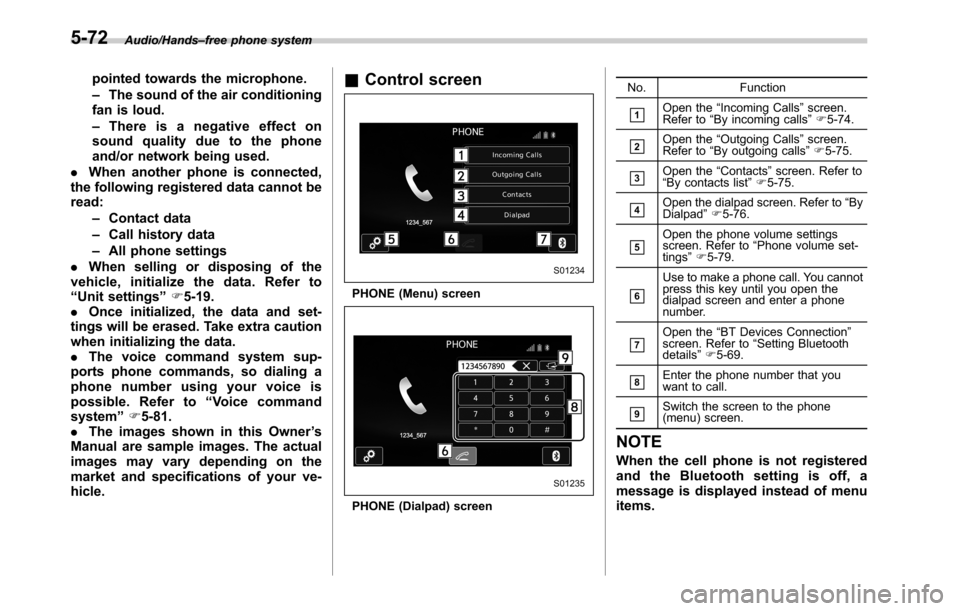
hicle.&Control screen
PHONE (Menu) screen
PHONE (Dialpad) screenNo. Function
&1Open the“Incoming Calls”screen.
Refer to“By incoming calls”F5-74.
&2Open the“Outgoing Calls”screen.
Refer to“By outgoing calls”F5-75.
&3Open the“Contacts”screen. Refer to
“By contacts list”F5-75.
&4Open the dialpad screen. Refer to“By
Dialpad”F5-76.
&5Open the phone volume settings
screen. Refer to“Phone volume set-
tings”F5-79.
&6
Use to make a phone call. You cannot
press this key until you open the
dialpad screen and enter a phone
number.
&7Open the“BT Devices Connection”
screen. Refer to“Setting Bluetooth
details”F5-69.
&8Enter the phone number that you
want to call.
&9Switch the screen to the phone
(menu) screen.
NOTE
When the cell phone is not registered
and the Bluetooth setting is off, a
message is displayed instead of menu
items.
5-72
Page 310 of 572
Audio/Voice command system
open.
–Passengers are talking while
voice commands are spoken.
–The air conditioning speed is set
high.
–The air conditioning vents are
turned towards the microphone.
.In the following conditions, the sys-
tem may not recognize the command
properly and using voice commands
may not be possible:
–The command is incorrect or
unclear. Note that certain words,
accents or speech patterns may be
difficult for the system to recognize.
–There is excessive background
noise, such as wind noise.&Voice command system op-
eration
1. Press the talk switch on the steering
wheel.
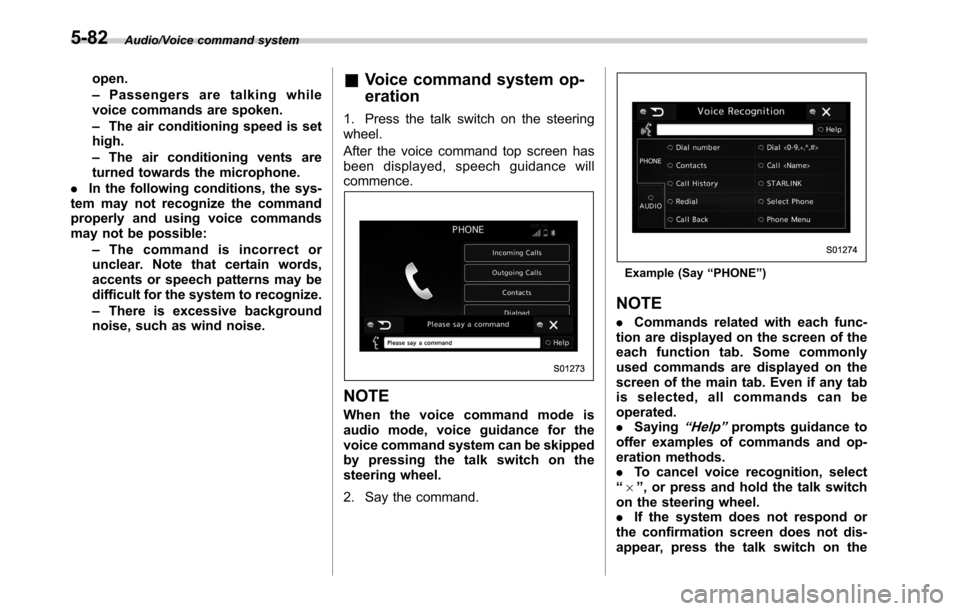
After the voice command top screen has
been displayed, speech guidance will
commence.
NOTE
When the voice command mode is
audio mode, voice guidance for the
voice command system can be skipped
by pressing the talk switch on the
steering wheel.
2. Say the command.
Example (Say“PHONE”)
NOTE
.Commands related with each func-
tion are displayed on the screen of the
each function tab. Some commonly
used commands are displayed on the
screen of the main tab. Even if any tab
is selected, all commands can be
operated.
.Saying
“Help”prompts guidance to
offer examples of commands and op-
eration methods.
.To cancel voice recognition, select
“6”, or press and hold the talk switch
on the steering wheel.
.If the system does not respond or
the confirmation screen does not dis-
appear, press the talk switch on the
5-82
Page 323 of 572

Interior light......................................................... 6-2
Dome light.......................................................... 6-2
Map light............................................................. 6-2
Cargo area light (Outback)................................... 6-3
OFF delay timer.................................................. 6-4
Sun visors........................................................... 6-4Vanity mirror with light........................................ 6-5
Storage compartment......................................... 6-6Glove box........................................................... 6-6
Center console.................................................... 6-6
Overhead console............................................... 6-7
Pocket................................................................ 6-7
Cup holder........................................................... 6-8Front passenger’s cup holder.............................. 6-8
Rear passenger’s cup holder............................... 6-9
Bottle holders...................................................... 6-9
Accessory power outlets................................... 6-10
Ashtray (if equipped)......................................... 6-12
Coat hook........................................................... 6-13Shopping bag hook........................................... 6-14
Legacy.............................................................. 6-14
Outback............................................................ 6-14
Convenient grip (Outback)................................ 6-14
Floor mat............................................................ 6-15
Cargo area cover (Outback–if equipped)....... 6-16
Using the cover................................................. 6-16
To install the front cover.................................... 6-17
To remove the front cover.................................. 6-17
To remove the cover housing ............................. 6-17
Stowage of the cargo area cover........................ 6-18
To take out the stowed cover housing................ 6-19
To install the cover housing............................... 6-19
Convenient tie-down hooks (Outback)............. 6-19
Under-floor storage compartment.................... 6-20
Rear view camera.............................................. 6-21
How to use the rear view camera....................... 6-22
Viewing range on the screen.............................. 6-23
Help line............................................................ 6-24
Interior equipment
6
Page 327 of 572
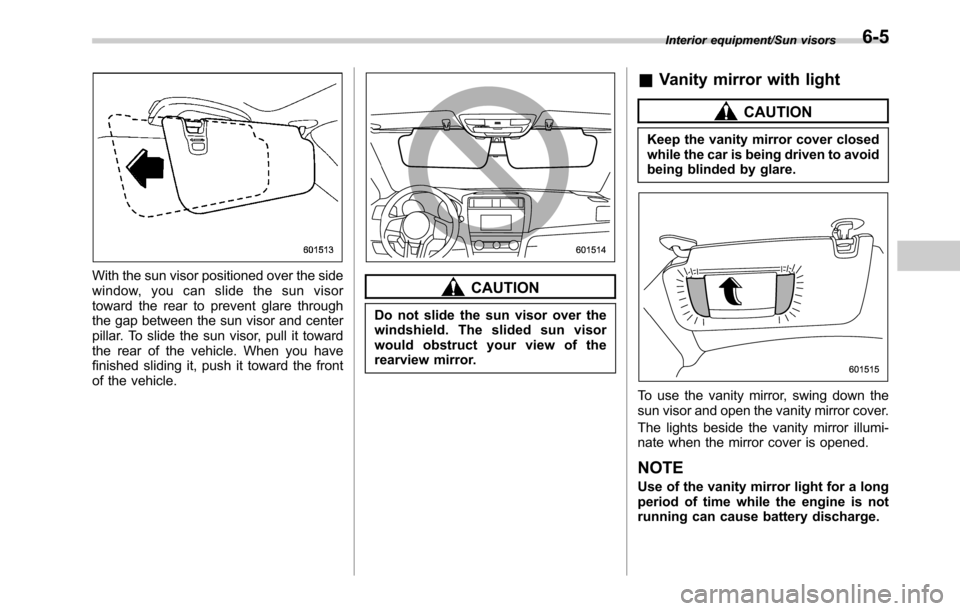
With the sun visor positioned over the side
window, you can slide the sun visor
toward the rear to prevent glare through
the gap between the sun visor and center
pillar. To slide the sun visor, pull it toward
the rear of the vehicle. When you have
finished sliding it, push it toward the front
of the vehicle.CAUTION
Do not slide the sun visor over the
windshield. The slided sun visor
would obstruct your view of the
rearview mirror.
&Vanity mirror with light
CAUTION
Keep the vanity mirror cover closed
while the car is being driven to avoid
being blinded by glare.
To use the vanity mirror, swing down the
sun visor and open the vanity mirror cover.
The lights beside the vanity mirror illumi-
nate when the mirror cover is opened.
NOTE
Use of the vanity mirror light for a long
period of time while the engine is not
running can cause battery discharge.
Interior equipment/Sun visors6-5
Page 338 of 572
Interior equipment/Cargo area cover (Outback–if equipped)
Cargo area cover
(Outback–if equipped)
The cargo area cover is provided for
covering the cargo area and to protect its
contents from direct sunlight. This cover is
detachable to make room for additional
cargo.
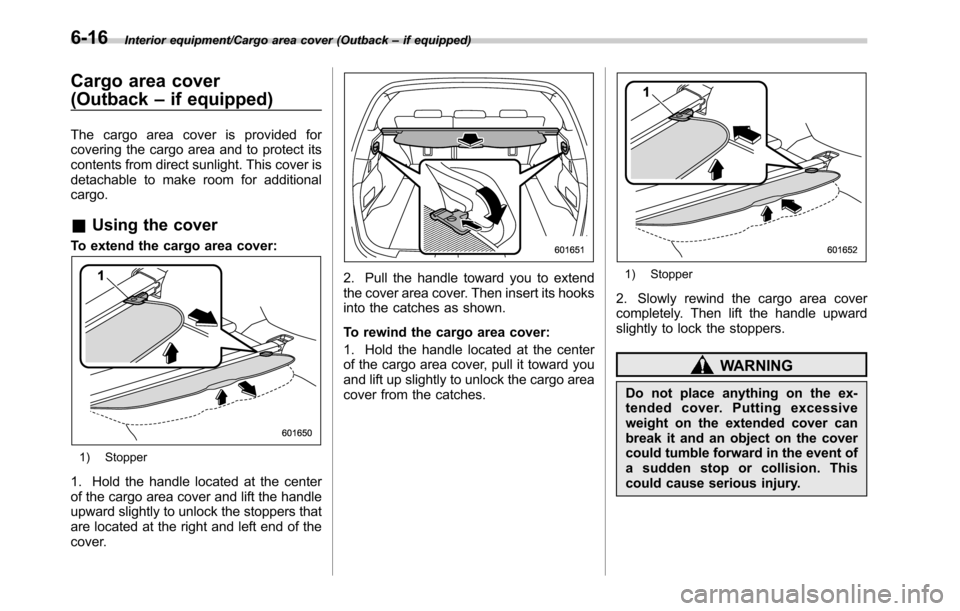
&Using the cover
To extend the cargo area cover:
1) Stopper
1. Hold the handle located at the center
of the cargo area cover and lift the handle
upward slightly to unlock the stoppers that
are located at the right and left end of the
cover.
2. Pull the handle toward you to extend
the cover area cover. Then insert its hooks
into the catches as shown.
To rewind the cargo area cover:
1. Hold the handle located at the center
of the cargo area cover, pull it toward you
and lift up slightly to unlock the cargo area
cover from the catches.1) Stopper
2. Slowly rewind the cargo area cover
completely. Then lift the handle upward
slightly to lock the stoppers.
WARNING
Do not place anything on the ex-
tended cover. Putting excessive
weight on the extended cover can
break it and an object on the cover
could tumble forward in the event of
a sudden stop or collision. This
could cause serious injury.
6-16
Page 340 of 572
Interior equipment/Cargo area cover (Outback–if equipped)
&Stowage of the cargo area
cover
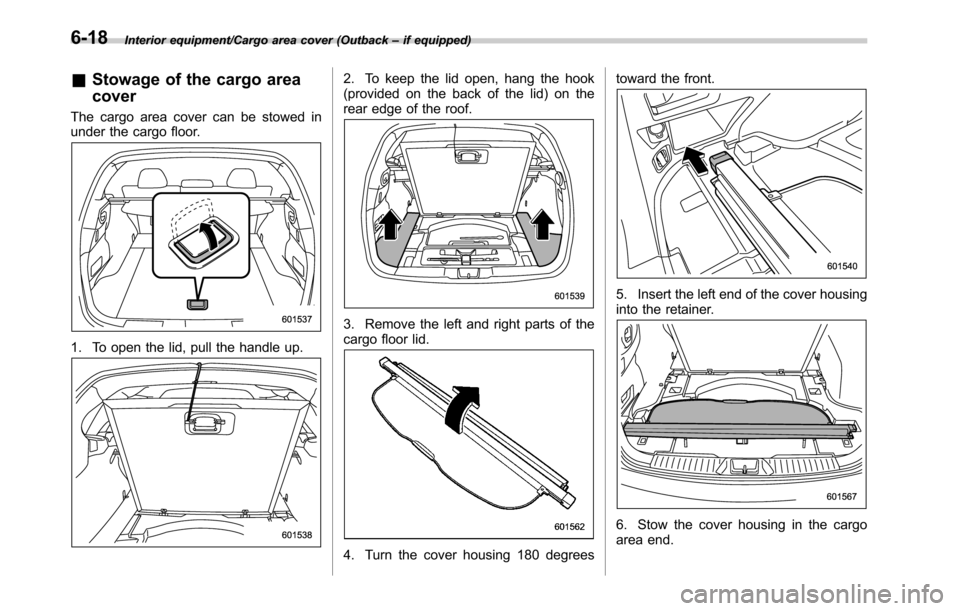
The cargo area cover can be stowed in
under the cargo floor.
1. To open the lid, pull the handle up.
2. To keep the lid open, hang the hook
(provided on the back of the lid) on the
rear edge of the roof.
3. Remove the left and right parts of the
cargo floor lid.
4. Turn the cover housing 180 degreestoward the front.
5. Insert the left end of the cover housing
into the retainer.
6. Stow the cover housing in the cargo
area end.
6-18
Page 341 of 572
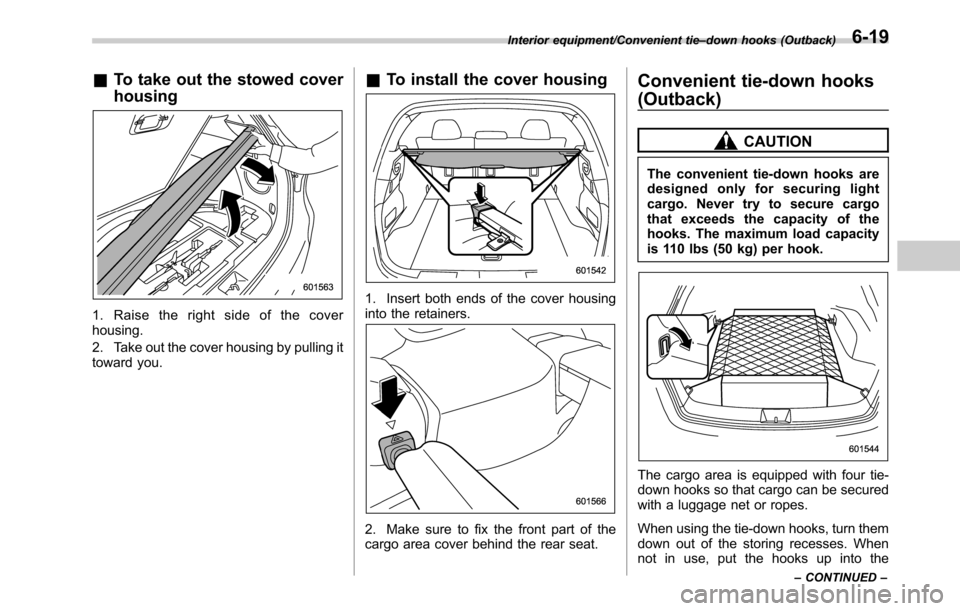
&To take out the stowed cover
housing
1. Raise the right side of the cover
housing.
2. Take out the cover housing by pulling it
toward you.
&To install the cover housing
1. Insert both ends of the cover housing
into the retainers.
2. Make sure to fix the front part of the
cargo area cover behind the rear seat.
Convenient tie-down hooks
(Outback)
CAUTION
The convenient tie-down hooks are
designed only for securing light
cargo. Never try to secure cargo
that exceeds the capacity of the
hooks. The maximum load capacity
is 110 lbs (50 kg) per hook.
The cargo area is equipped with four tie-
down hooks so that cargo can be secured
with a luggage net or ropes.
When using the tie-down hooks, turn them
down out of the storing recesses. When
not in use, put the hooks up into the
Interior equipment/Convenient tie–down hooks (Outback)
–CONTINUED–6-19
Page 373 of 572
Continuously variable trans-
mission
The continuously variable transmission is
electronically controlled and provides an
infinite number of forward speeds and 1
reverse speed. It also has a manual mode.
WARNING
Do not shift from the“P”or“N”
position into the“D”or“R”position
while depressing the accelerator
pedal. This may cause the vehicle
to lurch forward or backward.
CAUTION
.Shift into the“P”or“R”position
only after the vehicle is comple-
tely stopped. Shifting while the
vehicle is moving may cause
damage to the transmission.
.Do not race the engine for more
than 5 seconds in any position
except the“N”or“P”position
when the brake is applied or
when chocks are used in the
wheels. This may cause the
transmission fluid to overheat.
.Do not shift from the“D”positioninto the“R”position or vice
versa until the vehicle has com-
pletely stopped. Such shifting
may cause damage to the trans-
mission.
.When parking the vehicle, first
securely apply the parking brake
and then place the select lever in
the“P”position. Do not park for
a long time with the select lever
in any other position as doing so
could result in a dead battery.
NOTE
.When the engine coolant tempera-
ture is still low, the transmission will
upshift to higher engine speeds than
when the coolant temperature is suffi-
ciently high in order to shorten the
warm-up time and improve driveability.
The gearshift timing will automatically
shift to the normal timing after the
engine has warmed up.
.Immediately after transmission fluid
is replaced, you may feel that the
transmission operation is somewhat
unusual. This results from invalidation
of data which the on-board computer
has collected and stored in memory to
allow the transmission to shift at the
most appropriate times for the currentcondition of your vehicle. Optimized
shifting will be restored as the vehicle
continues to be driven for a while.
.When driving under continuous hea-
vy load conditions such as towing a
camper or climbing a long, steep hill,
the engine speed or the vehicle speed
may automatically be reduced. This is
not a malfunction. This phenomenon
results from the engine control func-
tion maintaining the cooling perfor-
mance of the vehicle. The engine and
vehicle speed will return to a normal
speed when the engine is able to
maintain the optimum cooling perfor-
mance after the heavy load decreases.
Driving under a heavy load must be
performed with extreme care. Do not
try to pass a vehicle in front when
driving on an uphill slope while towing.
.The continuously variable transmis-
sion is a chain type system that
provides superior transmission effi-
ciency for maximum fuel economy. At
times, depending on varying driving
conditions, a chain operating noise
may be heard that is characteristic of
this type of system.
Starting and operating/Continuously variable transmission
–CONTINUED–7-25
Page 382 of 572
Starting and operating/Electronic Brake Force Distribution (EBD) system
Electronic Brake Force Dis-
tribution (EBD) system
The EBD system maximizes the effective-
ness of the brakes by allowing the rear
brakes to supply a greater proportion of
the braking force. It functions by adjusting
the distribution of braking force to the rear
wheels in accordance with the vehicle’s
loading condition and speed.
The EBD system is an integral part of the
ABS and uses some of the ABS compo-
nents to perform its function of optimizing
the distribution of braking force. If any of
the ABS components used by the EBD
function fails, the EBD system also stops
working.
When the EBD system is operating, you
may hear a chattering noise or feel a slight
vibration in the brake pedal. This is normal
and does not indicate a malfunction.
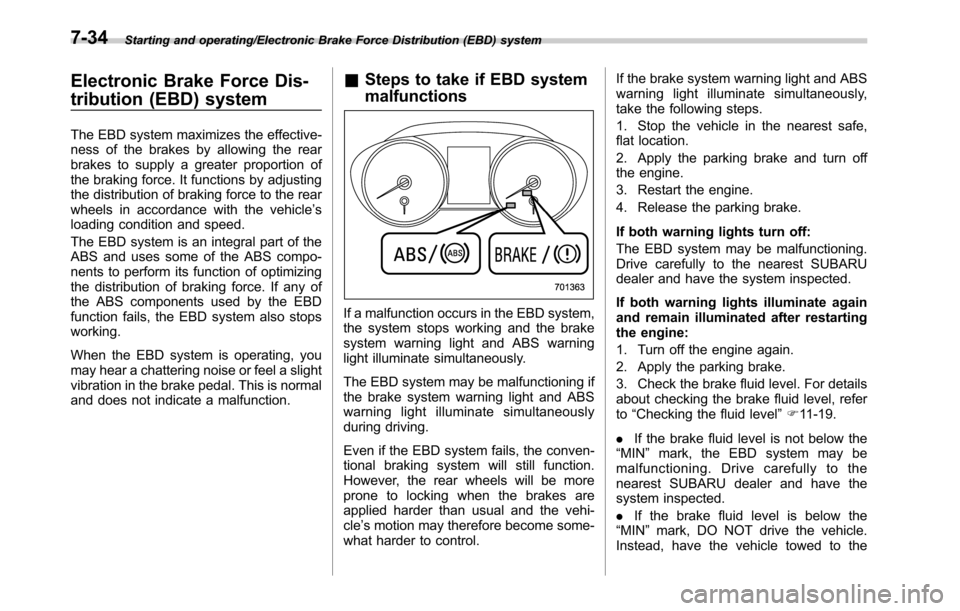
&Steps to take if EBD system
malfunctions
If a malfunction occurs in the EBD system,
the system stops working and the brake
system warning light and ABS warning
light illuminate simultaneously.
The EBD system may be malfunctioning if
the brake system warning light and ABS
warning light illuminate simultaneously
during driving.
Even if the EBD system fails, the conven-
tional braking system will still function.
However, the rear wheels will be more
prone to locking when the brakes are
applied harder than usual and the vehi-
cle’s motion may therefore become some-
what harder to control.If the brake system warning light and ABS
warning light illuminate simultaneously,
take the following steps.
1. Stop the vehicle in the nearest safe,
flat location.
2. Apply the parking brake and turn off
the engine.
3. Restart the engine.
4. Release the parking brake.
If both warning lights turn off:
The EBD system may be malfunctioning.
Drive carefully to the nearest SUBARU
dealer and have the system inspected.
If both warning lights illuminate again
and remain illuminated after restarting
the engine:
1. Turn off the engine again.
2. Apply the parking brake.
3. Check the brake fluid level. For details
about checking the brake fluid level, refer
to“Checking the fluid level”F11-19.
.If the brake fluid level is not below the
“MIN”mark, the EBD system may be
malfunctioning. Drive carefully to the
nearest SUBARU dealer and have the
system inspected.
.If the brake fluid level is below the
“MIN”mark, DO NOT drive the vehicle.
Instead, have the vehicle towed to the
7-34
Page 383 of 572
nearest SUBARU dealer for repair.
WARNING
.Driving with the brake system
warning light on is dangerous.
This indicates your brake system
may not be working properly. If
the light remains on, have the
brakes inspected by a SUBARU
dealer immediately.
.If at all in doubt about whether
the brakes are operating prop-
erly, do not drive the vehicle.
Have your vehicle towed to the
nearest SUBARU dealer for re-
pair.
Vehicle Dynamics Control
system
WARNING
Always use the utmost care in
driving–overconfidence because
you are driving with a Vehicle Dy-
namics Control system equipped
vehicle could easily lead to a ser-
ious accident.
CAUTION
.Even if your vehicle is equipped
with Vehicle Dynamics Control
system, winter tires should be
used when driving on snow-cov-
ered or icy roads; in addition,
vehicle speed should be reduced
considerably. Simply having a
Vehicle Dynamics Control sys-
tem does not guarantee that the
vehicle will be able to avoid
accidents in any situation.
.Activation of the Vehicle Dy-
namics Control system is an
indication that the road being
travelled on has a slippery sur-
face; since having Vehicle Dy-namics Control is no guarantee
that full vehicle control will be
maintained at all times and under
all conditions, its activation
should be seen as a sign that
the speed of the vehicle should
be reduced considerably.
.Whenever suspension compo-
nents, steering components, or
an axle are removed from a
vehicle equipped with the Vehicle
Dynamics Control system, have
an inspection of that system
performed by an authorized
SUBARU dealer.
.The following precautions should
be observed in order to ensure
that the Vehicle Dynamics Con-
trol system is operating properly.
–All four wheels should be
fitted with tires of the same
size, type, and brand. Further-
more, the amount of wear
should be the same for all
four tires.
–Keep the tire pressure at the
proper level as shown on the
vehicle placard attached to
the driver’s side door pillar.
–Use only the specified tem-
porary spare tire to replace a
Starting and operating/Vehicle Dynamics Control system
–CONTINUED–7-35