ECU SUBARU OUTBACK 2016 6.G Service Manual
[x] Cancel search | Manufacturer: SUBARU, Model Year: 2016, Model line: OUTBACK, Model: SUBARU OUTBACK 2016 6.GPages: 572, PDF Size: 21.79 MB
Page 178 of 572

Instruments and controls/Warning and indicator lights
Inside warning
chimeOutside warning
chimeOperation indicator
on push-button
ignition switchStatus Action
Ding,
ding ...
(intermittent)——The driver’s door was opened while the
push-button ignition switch is“ACC”and the
select lever is in the“P”position.Switch the push-button ignition switch to
“OFF”, or close the driver’s door.
*When exiting the vehicle, be sure to switch
the push-button ignition switch to“OFF”.
The push-button ignition switch was
switched to“OFF”while the driver’s door is
open.Close the driver’s door.
DingShort beep
(2 seconds)—Lockout warning:
An attempt was made to lock all doors while
the access key is left inside the vehicle.Take out the access key from the vehicle,
and lock the doors.
*The doors cannot be locked while the
access key is inside the vehicle.
*A chirp sound will be heard, and all doors
will be unlocked.
—Short beep
(2 seconds)—Access key lock-in warning:
The door lock sensor was touched while the
push-button ignition switch is“OFF”and the
access key is inside the vehicle.Take out the access key from the vehicle,
and lock the doors.
*If the access key is inside the vehicle, the
doors cannot be locked.
—Beep, beep,
beep, beep,
beep
(5 times)—Door ajar warning:
The door lock sensor is touched while the
ignition switch is in the“OFF”position and
one of the doors including the rear gate is
opened.Close the doors securely and lock them.
*If one of the doors including the rear gate is
opened, the doors cannot be locked.
DingLong beep (60
seconds max.)—Power warning:
The door lock sensor was touched while
carrying the access key, the push-button
ignition switch is in a position other than
“OFF”and the select lever is in the“P”
position.Return the access key inside the vehicle, or
switch the push-button ignition switch to
“OFF”.
*If the push-button ignition switch is not
switched to“OFF”, the doors cannot be
locked.
Ding,
ding ...
(7 seconds)——Access key warning:
The vehicle was driven while the access key
is not inside the vehicle.Carry the access key, and drive the vehicle.
3-26
Page 181 of 572

&Security indicator light
This indicator light shows the status of the
alarm system. It also indicates operation
of the immobilizer system.
!Alarm system
It blinks to show the driver the operational
status of the alarm system. For detailed
information, refer to“Alarm system”F2-
28.
!Immobilizer system
The security indicator light starts blinking
in the following conditions.
For models with“keyless access with
push-button start system”:
.Immediately after the push-button igni-
tion switch is turned to the“OFF”position.
.Immediately after the driver’s door is
opened or closed when all of the following
conditions are met.
–The push-button ignition switch is in
the“ON”or“ACC”position.
–The access key is outside the
vehicle.
–The engine is not running.
–In the event that an unauthorized
key is used (for example, the key is
unregistered or the ID code does not
match), the power is not switched to
“ON”and the security indicator lightcontinues blinking.
For models without“keyless access
with push-button start system”:
.Approximately 60 seconds after the
ignition switch is turned from the“ON”
position to the“ACC”or“LOCK”position.
.Immediately after the key is pulled out.
If the indicator light does not blink in the
above conditions, it may indicate that
immobilizer system may be malfunction-
ing. Contact your nearest SUBARU dealer
immediately.
In the event that an unauthorized key (for
example, an unauthorized duplicate) is
used, the security indicator light illumi-
nates. For details about the immobilizer
system, refer to“Immobilizer”F2-4.
NOTE
.The security indicator light remains
off in the following conditions. It means
that the matching of the ID code is
completed and the immobilizer system
is deactivated, and it does not indicate
a malfunction.
Models with“keyless access with
push-button start system”:
–while the engine is running
–the push-button ignition switchhas been turned to the“ON”or
“ACC”position and the driver’s
door has not been opened or closed
Models without“keyless access
with push-button start system”:
–while the engine is running
–for approximately 60 seconds
after the ignition switch is turned
from the“ON”position to the
“ACC”or“LOCK”position
–when the ignition switch is in the
“ON”position.
.Even if a malfunction occurs, such
as the security indicator light flashes
irregularly, it will not affect the func-
tionality of the immobilizer system.
Instruments and controls/Warning and indicator lights
–CONTINUED–3-29
Page 209 of 572
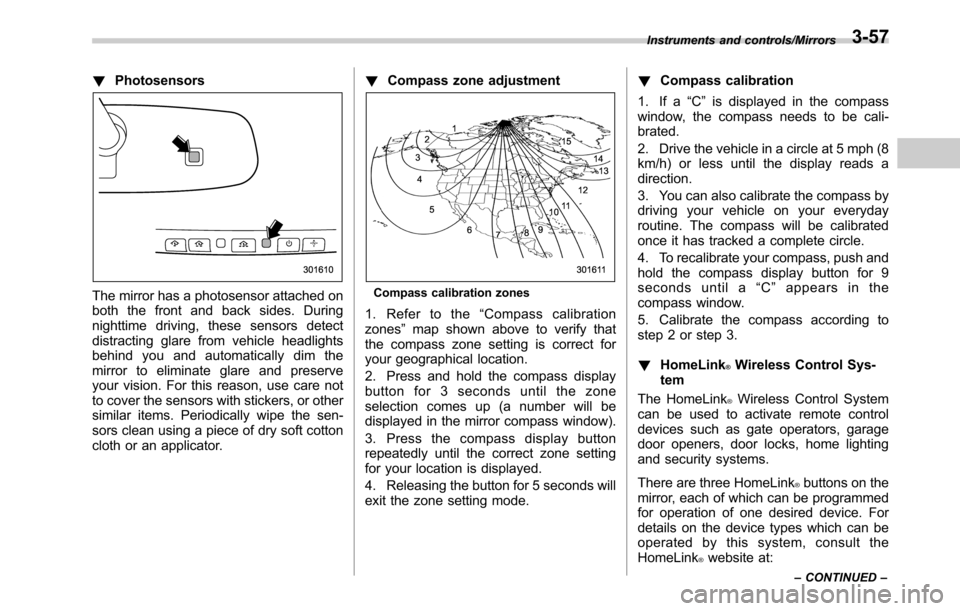
!Photosensors
The mirror has a photosensor attached on
both the front and back sides. During
nighttime driving, these sensors detect
distracting glare from vehicle headlights
behind you and automatically dim the
mirror to eliminate glare and preserve
your vision. For this reason, use care not
to cover the sensors with stickers, or other
similar items. Periodically wipe the sen-
sors clean using a piece of dry soft cotton
cloth or an applicator.!Compass zone adjustmentCompass calibration zones
1. Refer to the“Compass calibration
zones”map shown above to verify that
the compass zone setting is correct for
your geographical location.
2. Press and hold the compass display
button for 3 seconds until the zone
selection comes up (a number will be
displayed in the mirror compass window).
3. Press the compass display button
repeatedly until the correct zone setting
for your location is displayed.
4. Releasing the button for 5 seconds will
exit the zone setting mode.!Compass calibration
1. If a“C”is displayed in the compass
window, the compass needs to be cali-
brated.
2. Drive the vehicle in a circle at 5 mph (8
km/h) or less until the display reads a
direction.
3. You can also calibrate the compass by
driving your vehicle on your everyday
routine. The compass will be calibrated
once it has tracked a complete circle.
4. To recalibrate your compass, push and
hold the compass display button for 9
seconds until a“C”appears in the
compass window.
5. Calibrate the compass according to
step 2 or step 3.
!HomeLink
®Wireless Control Sys-
tem
The HomeLink
®Wireless Control System
can be used to activate remote control
devices such as gate operators, garage
door openers, door locks, home lighting
and security systems.
There are three HomeLink
®buttons on the
mirror, each of which can be programmed
for operation of one desired device. For
details on the device types which can be
operated by this system, consult the
HomeLink
®website at:
Instruments and controls/Mirrors
–CONTINUED–3-57
Page 213 of 572
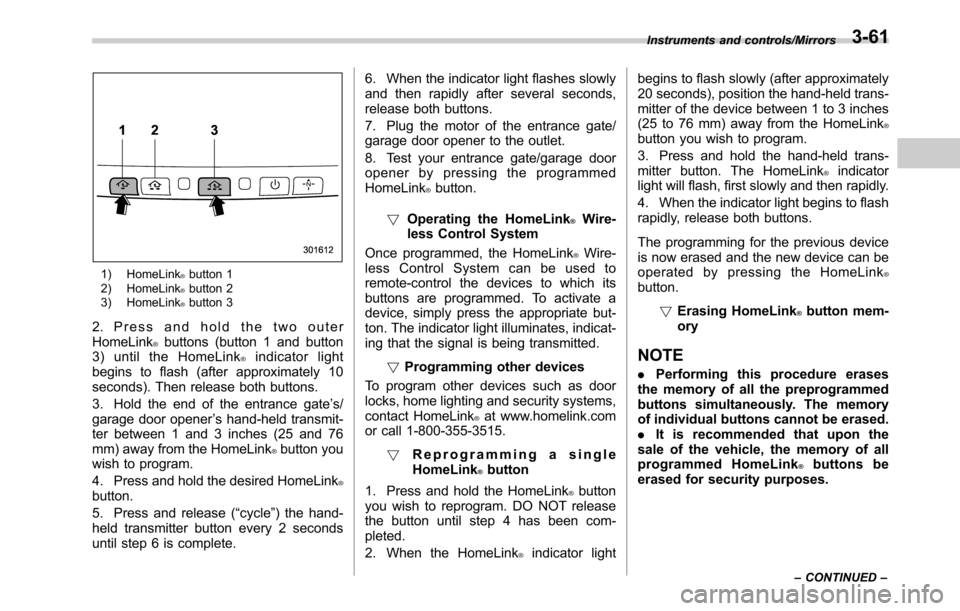
1) HomeLink®button 1
2) HomeLink®button 2
3) HomeLink®button 3
2. Press and hold the two outer
HomeLink®buttons (button 1 and button
3) until the HomeLink®indicator light
begins to flash (after approximately 10
seconds). Then release both buttons.
3. Hold the end of the entrance gate’s/
garage door opener’s hand-held transmit-
ter between 1 and 3 inches (25 and 76
mm) away from the HomeLink
®button you
wish to program.
4. Press and hold the desired HomeLink
®button.
5. Press and release (“cycle”) the hand-
held transmitter button every 2 seconds
until step 6 is complete.6. When the indicator light flashes slowly
and then rapidly after several seconds,
release both buttons.
7. Plug the motor of the entrance gate/
garage door opener to the outlet.
8. Test your entrance gate/garage door
opener by pressing the programmed
HomeLink
®button.
!Operating the HomeLink
®Wire-
less Control System
Once programmed, the HomeLink
®Wire-
less Control System can be used to
remote-control the devices to which its
buttons are programmed. To activate a
device, simply press the appropriate but-
ton. The indicator light illuminates, indicat-
ing that the signal is being transmitted.
!Programming other devices
To program other devices such as door
locks, home lighting and security systems,
contact HomeLink
®at www.homelink.com
or call 1-800-355-3515.
!Reprogramming a single
HomeLink
®button
1. Press and hold the HomeLink
®button
you wish to reprogram. DO NOT release
the button until step 4 has been com-
pleted.
2. When the HomeLink
®indicator lightbegins to flash slowly (after approximately
20 seconds), position the hand-held trans-
mitter of the device between 1 to 3 inches
(25 to 76 mm) away from the HomeLink
®button you wish to program.
3. Press and hold the hand-held trans-
mitter button. The HomeLink
®indicator
light will flash, first slowly and then rapidly.
4. When the indicator light begins to flash
rapidly, release both buttons.
The programming for the previous device
is now erased and the new device can be
operated by pressing the HomeLink
®button.
!Erasing HomeLink
®button mem-
ory
NOTE
.Performing this procedure erases
the memory of all the preprogrammed
buttons simultaneously. The memory
of individual buttons cannot be erased.
.It is recommended that upon the
sale of the vehicle, the memory of all
programmed HomeLink
®buttons be
erased for security purposes.
Instruments and controls/Mirrors
–CONTINUED–3-61
Page 215 of 572
Tilt/telescopic steering wheel
WARNING
.Do not adjust the steering wheel
tilt/telescopic position while driv-
ing. This may cause loss of
vehicle control and result in
personal injury.
.If the lever cannot be raised to
the fixed position, adjust the
steering wheel again. It is dan-
gerous to drive without locking
the steering wheel. This may
cause loss of vehicle control
and result in personal injury.
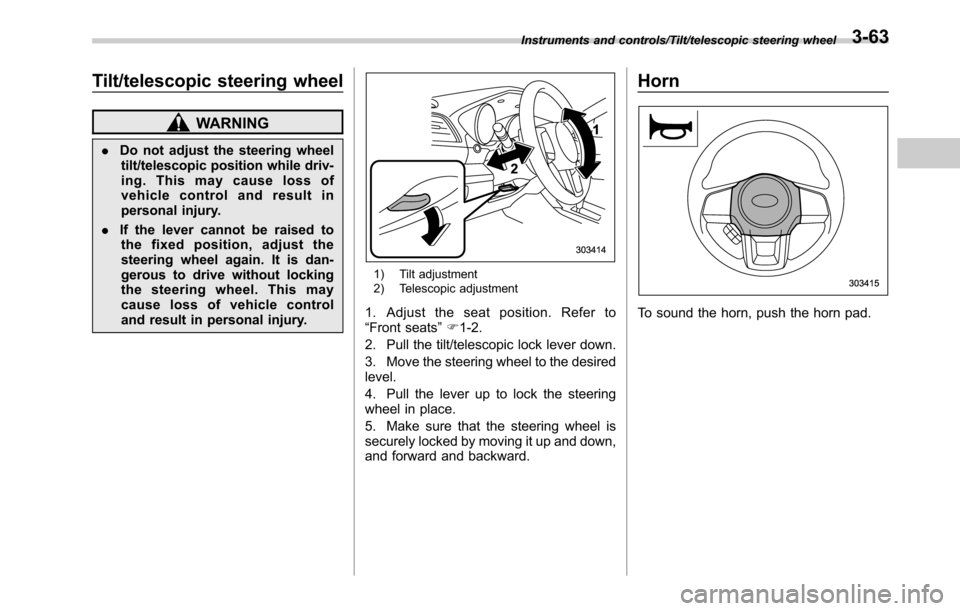
1) Tilt adjustment
2) Telescopic adjustment
1. Adjust the seat position. Refer to
“Front seats”F1-2.
2. Pull the tilt/telescopic lock lever down.
3. Move the steering wheel to the desired
level.
4. Pull the lever up to lock the steering
wheel in place.
5. Make sure that the steering wheel is
securely locked by moving it up and down,
and forward and backward.
Horn
To sound the horn, push the horn pad.
Instruments and controls/Tilt/telescopic steering wheel3-63
Page 257 of 572
.The radio automatically blends to an
HD Radio signal (if equipped) in AM or
FM where available.
!How to change the source
Select the“AM”or“FM”key on the source
select screen. Refer to“Selecting an audio
source”F5-18.
!Presetting a station
In total 18 stations can be set for the FM
band (6 each for FM1, FM2 and FM3) and
12 stations can be set for the AM band (6
each for AM1 and AM2).
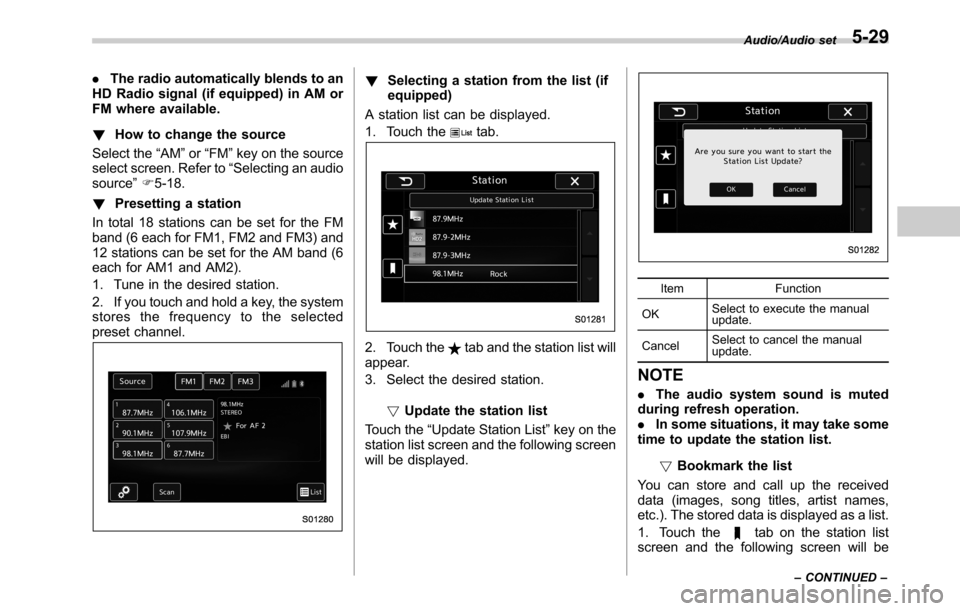
1. Tune in the desired station.
2. If you touch and hold a key, the system
stores the frequency to the selected
preset channel.!Selecting a station from the list (if
equipped)
A station list can be displayed.
1. Touch the
tab.
2. Touch thetab and the station list will
appear.
3. Select the desired station.
!Update the station list
Touch the“Update Station List”key on the
station list screen and the following screen
will be displayed.
Item Function
OKSelect to execute the manual
update.
CancelSelect to cancel the manual
update.
NOTE
.The audio system sound is muted
during refresh operation.
.In some situations, it may take some
time to update the station list.
!Bookmark the list
You can store and call up the received
data (images, song titles, artist names,
etc.). The stored data is displayed as a list.
1. Touch the
tab on the station list
screen and the following screen will be
Audio/Audio set
–CONTINUED–5-29
Page 274 of 572

Audio/Audio set
Audio panel
No. Function
&1Turn to adjust volume.
Press to turn the audio system on/off.
&2Press to display the sound setting
screen. Refer to“Unit settings”F5-19.
&3Press to display the station operation
screen.
Press to select an audio mode.
&4
Turn to display the next/previous con-
tent item.
Press to select an audio source. Refer
to“Selecting an audio source”F5-18.
&5Press to display the next/previous con-
tent item.
NOTE
.For safety reasons, certain func-
tions are not available while your
vehicle is in motion.
.In order to maximize signal recep-
tion, performance and precision of the
smartphone, please ensure the smart-
phone is placed as close to the system
as possible, while ensuring it is stowed
and secure while driving.
.When the ignition switch is in the
“ACC”or“ON”position, the battery of
the connected iPhone/iPod touch is
charged.
.iPhone/iPod touch may not be re-
cognized when the ignition switch is in
the“ACC”or“ON”position. In this
case, remove the iPhone/iPod touch
and reconnect it.
.The accuracy of the displayed in-
formation or the signal reception per-
formance depends on the smartphone
or the connected device, and it’s wire-
less connection.
.Since the aha application uses sig-
nals from GPS satellites and wireless
communication lines, it may not work
properly in the following locations.
–In a tunnel
–In underground parking lots
5-46
Page 295 of 572
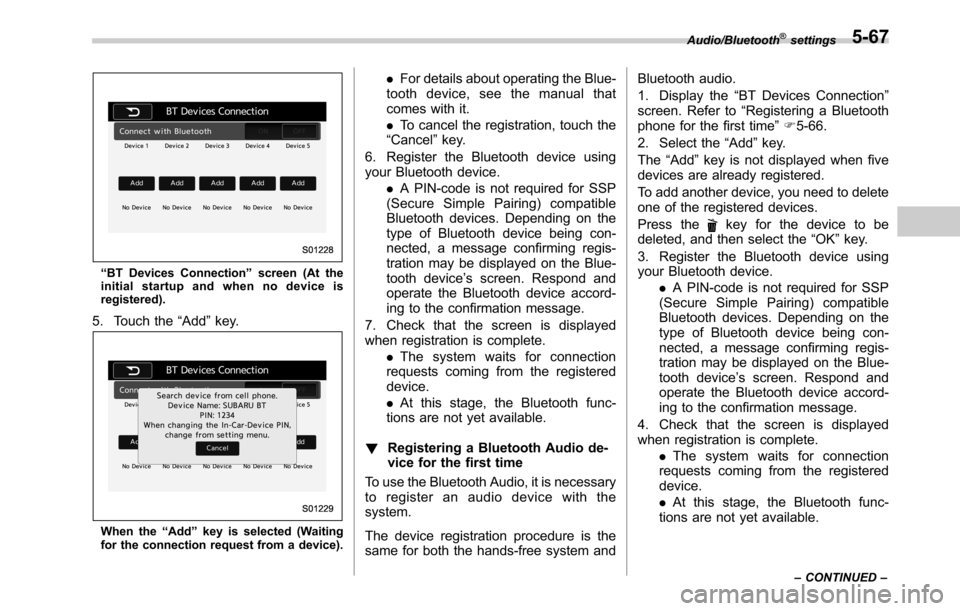
“BT Devices Connection”screen (At the
initial startup and when no device is
registered).
5. Touch the“Add”key.
When the“Add”key is selected (Waiting
for the connection request from a device).
.For details about operating the Blue-
tooth device, see the manual that
comes with it.
.To cancel the registration, touch the
“Cancel”key.
6. Register the Bluetooth device using
your Bluetooth device.
.A PIN-code is not required for SSP
(Secure Simple Pairing) compatible
Bluetooth devices. Depending on the
type of Bluetooth device being con-
nected, a message confirming regis-
tration may be displayed on the Blue-
tooth device’s screen. Respond and
operate the Bluetooth device accord-
ing to the confirmation message.
7. Check that the screen is displayed
when registration is complete.
.The system waits for connection
requests coming from the registered
device.
.At this stage, the Bluetooth func-
tions are not yet available.
!Registering a Bluetooth Audio de-
vice for the first time
To use the Bluetooth Audio, it is necessary
to register an audio device with the
system.
The device registration procedure is the
same for both the hands-free system andBluetooth audio.
1. Display the“BT Devices Connection”
screen. Refer to“Registering a Bluetooth
phone for the first time”F5-66.
2. Select the“Add”key.
The“Add”key is not displayed when five
devices are already registered.
To add another device, you need to delete
one of the registered devices.
Press the
key for the device to be
deleted, and then select the“OK”key.
3. Register the Bluetooth device using
your Bluetooth device.
.A PIN-code is not required for SSP
(Secure Simple Pairing) compatible
Bluetooth devices. Depending on the
type of Bluetooth device being con-
nected, a message confirming regis-
tration may be displayed on the Blue-
tooth device’s screen. Respond and
operate the Bluetooth device accord-
ing to the confirmation message.
4. Check that the screen is displayed
when registration is complete.
.The system waits for connection
requests coming from the registered
device.
.At this stage, the Bluetooth func-
tions are not yet available.
Audio/Bluetooth®settings
–CONTINUED–5-67
Page 302 of 572
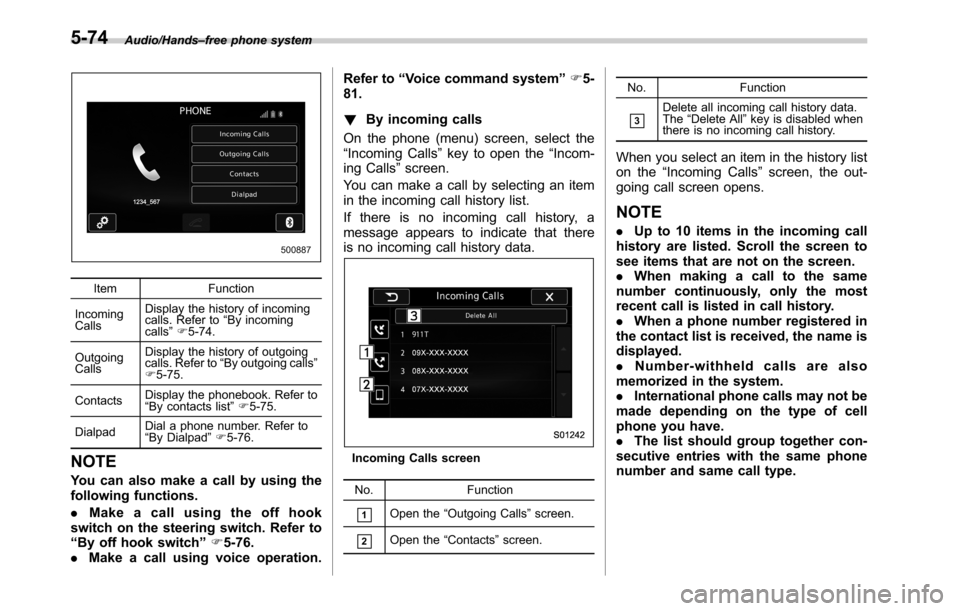
Audio/Hands–free phone system
Item Function
Incoming
CallsDisplay the history of incoming
calls. Refer to“By incoming
calls”F5-74.
Outgoing
CallsDisplay the history of outgoing
calls. Refer to“By outgoing calls”
F5-75.
ContactsDisplay the phonebook. Refer to
“By contacts list”F5-75.
DialpadDial a phone number. Refer to
“By Dialpad”F5-76.
NOTE
You can also make a call by using the
following functions.
.Make a call using the off hook
switch on the steering switch. Refer to
“By off hook switch”F5-76.
.Make a call using voice operation.Refer to“Voice command system”F5-
81.
!By incoming calls
On the phone (menu) screen, select the
“Incoming Calls”key to open the“Incom-
ing Calls”screen.
You can make a call by selecting an item
in the incoming call history list.
If there is no incoming call history, a
message appears to indicate that there
is no incoming call history data.
Incoming Calls screen
No. Function
&1Open the“Outgoing Calls”screen.
&2Open the“Contacts”screen.No. Function
&3Delete all incoming call history data.
The“Delete All”key is disabled when
there is no incoming call history.
When you select an item in the history list
on the“Incoming Calls”screen, the out-
going call screen opens.
NOTE
.Up to 10 items in the incoming call
history are listed. Scroll the screen to
see items that are not on the screen.
.When making a call to the same
number continuously, only the most
recent call is listed in call history.
.When a phone number registered in
the contact list is received, the name is
displayed.
.Number-withheld calls are also
memorized in the system.
.International phone calls may not be
made depending on the type of cell
phone you have.
.The list should group together con-
secutive entries with the same phone
number and same call type.
5-74
Page 303 of 572
!By outgoing calls
On the phone (menu) screen, select the
“Outgoing Calls”key to open the“Out-
going Calls”screen. You can make a call
by selecting an item in the outgoing call
history list.
If there is no outgoing call history, a
message appears to indicate that there
is no outgoing call history data.
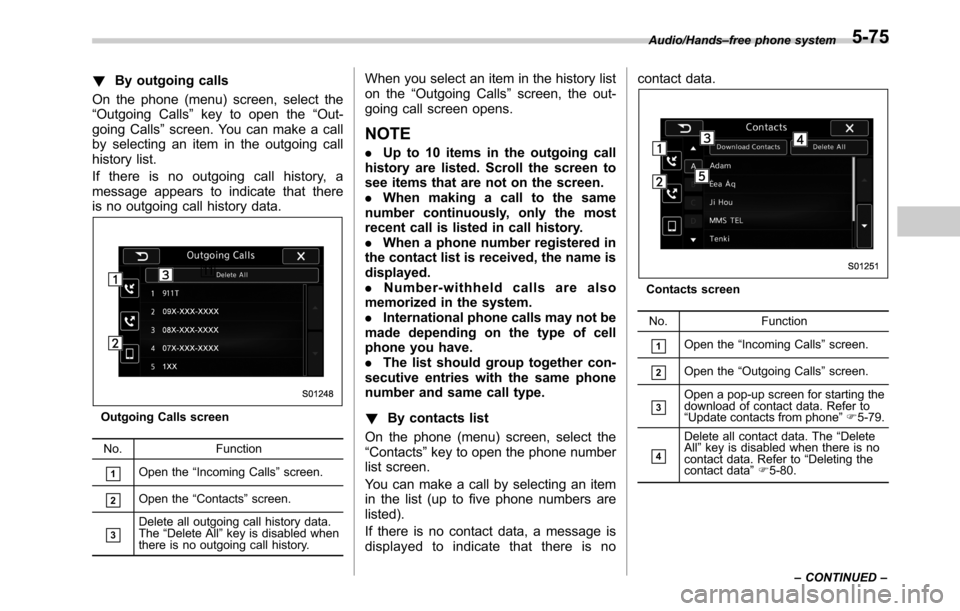
Outgoing Calls screen
No. Function
&1Open the“Incoming Calls”screen.
&2Open the“Contacts”screen.
&3Delete all outgoing call history data.
The“Delete All”key is disabled when
there is no outgoing call history.
When you select an item in the history list
on the“Outgoing Calls”screen, the out-
going call screen opens.
NOTE
.Up to 10 items in the outgoing call
history are listed. Scroll the screen to
see items that are not on the screen.
.When making a call to the same
number continuously, only the most
recent call is listed in call history.
.When a phone number registered in
the contact list is received, the name is
displayed.
.Number-withheld calls are also
memorized in the system.
.International phone calls may not be
made depending on the type of cell
phone you have.
.The list should group together con-
secutive entries with the same phone
number and same call type.
!By contacts list
On the phone (menu) screen, select the
“Contacts”key to open the phone number
list screen.
You can make a call by selecting an item
in the list (up to five phone numbers are
listed).
If there is no contact data, a message is
displayed to indicate that there is nocontact data.
Contacts screen
No. Function
&1Open the“Incoming Calls”screen.
&2Open the“Outgoing Calls”screen.
&3Open a pop-up screen for starting the
download of contact data. Refer to
“Update contacts from phone”F5-79.
&4
Delete all contact data. The“Delete
All”key is disabled when there is no
contact data. Refer to“Deleting the
contact data”F5-80. Audio/Hands–free phone system
–CONTINUED–
5-75