stop start SUBARU OUTBACK 2016 6.G Workshop Manual
[x] Cancel search | Manufacturer: SUBARU, Model Year: 2016, Model line: OUTBACK, Model: SUBARU OUTBACK 2016 6.GPages: 572, PDF Size: 21.79 MB
Page 382 of 572
Starting and operating/Electronic Brake Force Distribution (EBD) system
Electronic Brake Force Dis-
tribution (EBD) system
The EBD system maximizes the effective-
ness of the brakes by allowing the rear
brakes to supply a greater proportion of
the braking force. It functions by adjusting
the distribution of braking force to the rear
wheels in accordance with the vehicle’s
loading condition and speed.
The EBD system is an integral part of the
ABS and uses some of the ABS compo-
nents to perform its function of optimizing
the distribution of braking force. If any of
the ABS components used by the EBD
function fails, the EBD system also stops
working.
When the EBD system is operating, you
may hear a chattering noise or feel a slight
vibration in the brake pedal. This is normal
and does not indicate a malfunction.
&Steps to take if EBD system
malfunctions
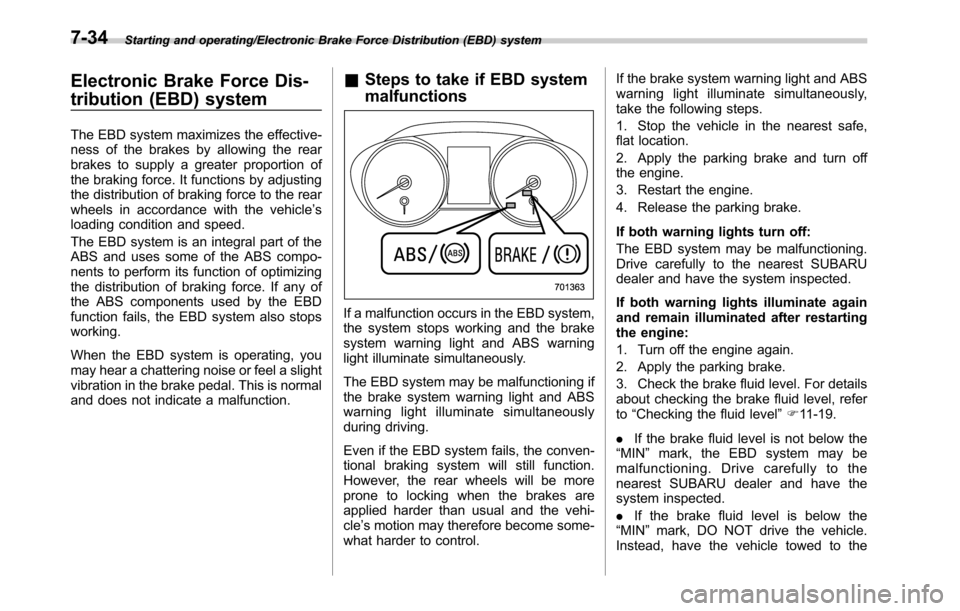
If a malfunction occurs in the EBD system,
the system stops working and the brake
system warning light and ABS warning
light illuminate simultaneously.
The EBD system may be malfunctioning if
the brake system warning light and ABS
warning light illuminate simultaneously
during driving.
Even if the EBD system fails, the conven-
tional braking system will still function.
However, the rear wheels will be more
prone to locking when the brakes are
applied harder than usual and the vehi-
cle’s motion may therefore become some-
what harder to control.If the brake system warning light and ABS
warning light illuminate simultaneously,
take the following steps.
1. Stop the vehicle in the nearest safe,
flat location.
2. Apply the parking brake and turn off
the engine.
3. Restart the engine.
4. Release the parking brake.
If both warning lights turn off:
The EBD system may be malfunctioning.
Drive carefully to the nearest SUBARU
dealer and have the system inspected.
If both warning lights illuminate again
and remain illuminated after restarting
the engine:
1. Turn off the engine again.
2. Apply the parking brake.
3. Check the brake fluid level. For details
about checking the brake fluid level, refer
to“Checking the fluid level”F11-19.
.If the brake fluid level is not below the
“MIN”mark, the EBD system may be
malfunctioning. Drive carefully to the
nearest SUBARU dealer and have the
system inspected.
.If the brake fluid level is below the
“MIN”mark, DO NOT drive the vehicle.
Instead, have the vehicle towed to the
7-34
Page 390 of 572
Starting and operating/Parking your vehicle
CAUTION
Do not place metal film or any metal
parts under the driver’s seat. This
may cause poor reception of the
signals from the tire pressure sen-
sors, and the tire pressure monitor-
ing system will not function prop-
erly.
FCC ID: CWTWD1U848
NOTE
This device complies with Part 15 of
the FCC Rules. Operation is subject to
the following two conditions: (1) This
device may not cause harmful inter-
ference, and (2) this device must
accept any interference received, in-
cluding interference that may cause
undesired operation.
FCC CAUTION
Changes or modifications not ex-
pressly approved by the party respon-
sible for compliance could void the
user’s authority to operate the equip-
ment.
Parking your vehicle
WARNING
.Never leave unattended children
or pets in the vehicle. They could
accidentally injure themselves or
others through inadvertent op-
eration of the vehicle. Also, on
hot or sunny days, the tempera-
ture in a closed vehicle could
quickly become high enough to
cause severe or possibly fatal
injuries to them.
.Do not park the vehicle over
flammable materials such as dry
grass, waste paper or rags, as
they may burn easily if they come
near hot engine or exhaust sys-
tem parts.
.Be sure to stop the engine if you
take a nap in the vehicle. If
engine exhaust gas enters the
passenger compartment, occu-
pants in the vehicle could die
from carbon monoxide (CO) con-
tained in the exhaust gas.
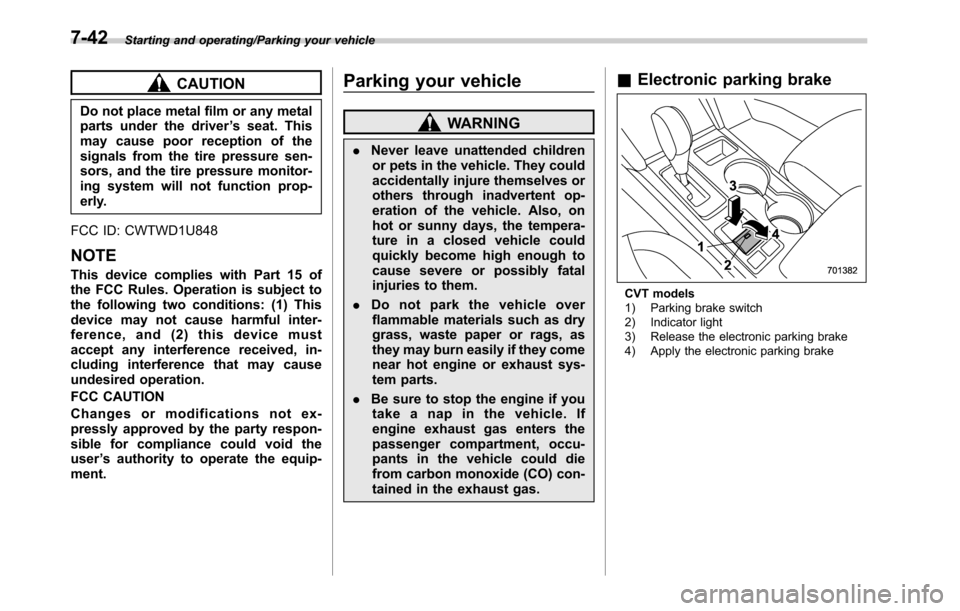
&Electronic parking brake
CVT models
1) Parking brake switch
2) Indicator light
3) Release the electronic parking brake
4) Apply the electronic parking brake
7-42
Page 391 of 572
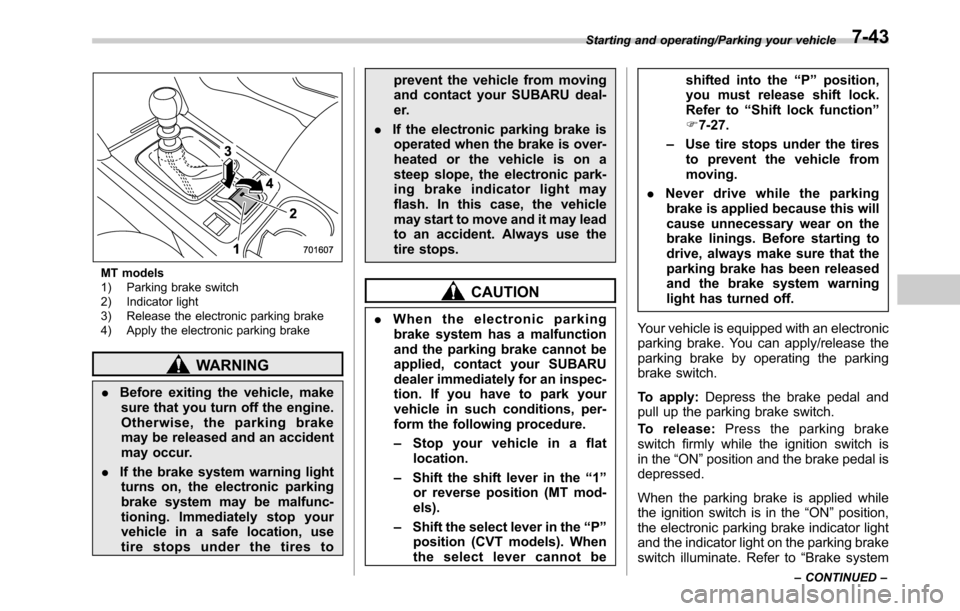
MT models
1) Parking brake switch
2) Indicator light
3) Release the electronic parking brake
4) Apply the electronic parking brake
WARNING
.Before exiting the vehicle, make
sure that you turn off the engine.
Otherwise, the parking brake
may be released and an accident
may occur.
.If the brake system warning light
turns on, the electronic parking
brake system may be malfunc-
tioning. Immediately stop your
vehicle in a safe location, use
tire stops under the tires toprevent the vehicle from moving
and contact your SUBARU deal-
er.
.If the electronic parking brake is
operated when the brake is over-
heated or the vehicle is on a
steep slope, the electronic park-
ing brake indicator light may
flash. In this case, the vehicle
may start to move and it may lead
to an accident. Always use the
tire stops.
CAUTION
.When the electronic parking
brake system has a malfunction
and the parking brake cannot be
applied, contact your SUBARU
dealer immediately for an inspec-
tion. If you have to park your
vehicle in such conditions, per-
form the following procedure.
–Stop your vehicle in a flat
location.
–Shift the shift lever in the“1”
or reverse position (MT mod-
els).
–Shift the select lever in the“P”
position (CVT models). When
the select lever cannot beshifted into the“P”position,
you must release shift lock.
Refer to“Shift lock function”
F7-27.
–Use tire stops under the tires
to prevent the vehicle from
moving.
.Never drive while the parking
brake is applied because this will
cause unnecessary wear on the
brake linings. Before starting to
drive, always make sure that the
parking brake has been released
and the brake system warning
light has turned off.
Your vehicle is equipped with an electronic
parking brake. You can apply/release the
parking brake by operating the parking
brake switch.
To apply:Depress the brake pedal and
pull up the parking brake switch.
To release:Press the parking brake
switch firmly while the ignition switch is
in the“ON”position and the brake pedal is
depressed.
When the parking brake is applied while
the ignition switch is in the“ON”position,
the electronic parking brake indicator light
and the indicator light on the parking brake
switch illuminate. Refer to“Brake system
Starting and operating/Parking your vehicle
–CONTINUED–7-43
Page 392 of 572

Starting and operating/Parking your vehicle
warning light”F3-18.
NOTE
.If the parking brake switch is
pressed with the ignition switch in the
“ACC”or“LOCK”/“OFF”position, the
parking brake is not released.
.If the parking brake switch is
pressed without depressing the brake
pedal (all models) and/or clutch pedal
(MT models), the parking brake is not
released.
.The electronic parking brake system
uses motors to apply the parking
brake. Therefore, operating sounds
from the motors will be heard when
applying or releasing the parking
brake. Make sure that the motor
sounds are heard when applying or
releasing the parking brake.
.When the electronic parking brake
system has a malfunction or the elec-
tronic parking brake operation is pro-
hibited temporarily, if the parking brake
switch is operated, a chirp sound is
heard and the electronic parking brake
indicator light flashes.
.When you cannot release the park-
ing brake due to, for example, a system
malfunction, contact your SUBARU
dealer and have your SUBARU dealer
release the parking brake.
.If the operation of the electronicparking brake switch is stopped mid-
way or performed extremely slowly, the
system may detect an error and turn on
the brake system warning light. How-
ever, this does not indicate a malfunc-
tion if the warning light turns off after
operating the switch.
.When the electronic parking brake
has not been used for a long period of
time, the electronic parking brake may
operate automatically after the ignition
switch is turned to the“LOCK”/“OFF”
position. This occurs due to checking
the proper operation of the electronic
parking brake and does not indicate a
malfunction.
.If the electronic parking brake
switch is malfunctioning and the elec-
tronic parking brake cannot be re-
leased, refer to the instructions de-
scribed in“Automatic release function
by accelerator pedal”F7-44.
After activating the EPB, you may hear
a short sound several minutes after the
indicator lamp illuminates as the sys-
tem confirms proper engagement. This
sound is different from the apply and
release sound.
This can occur:
–If the brakes are extremely hot.
–If the car is parked on a steep
incline.–If the electronic parking brake is
applied after the ignition switch is
turned OFF.
This is a normal operating sound under
any of these conditions.
!Automatic release function by ac-
celerator pedal
The electronic parking brake system has
an automatic release function. The park-
ing brake will be automatically released by
depressing the accelerator pedal. How-
ever, the automatic release function does
not operate under the following conditions.
.Any door (other than the trunk lid or
rear gate) is open.
.The driver’s seatbelt is not fastened.
.The clutch pedal is released from the
fully depressed position to partially en-
gaged position (MT models).
If the parking brake is automatically
released, the electronic parking brake
indicator light and the indicator light on
the parking brake switch turn off.
NOTE
Even if you have applied the parking
brake, the parking brake will be auto-
matically released when the accelera-
tor pedal is depressed.
7-44
Page 393 of 572
!Hill Holder function
The electronic parking brake system has a
Hill Holder function. If the Hill Holder
function is activated, the parking brake
will be automatically applied when stop-
ping on an uphill slope with the brake
pedal depressed. In this case, the electro-
nic parking brake indicator light and the
indicator light on the parking brake switch
illuminate.
NOTE
.The Hill Holder function may not
activate on a gentle uphill slope. In this
case, manually apply the electronic
parking brake.
.If you do not depress the brake
pedal sufficiently, the Hill Holder func-
tion may not operate properly. How-
ever, this is not a malfunction. When
stopping on an uphill slope, depress
the brake pedal firmly and release it
after the electronic parking brake in-
dicator light illuminates.
.Depending on the condition of the
road surface and braking force, the
brakes operate temporarily and feel
different than usual.
.When the electronic parking brake
system has a malfunction while the Hill
Holder function is activated, a chirp
sound is heard, the Hill Holder indica-
tor light turns off and the brake systemwarning light turns on.
.When the hill holder activates on a
slope, the electronic parking brake is
engaged. The electronic parking brake
will release when you accelerate from
the stop. If you manually release the
electronic parking brake while the hill
holder is activated, the hill holder
function is cancelled and will not re-
engage until the vehicle has moved
some distance. In that case, you will
need to manually engage the electronic
parking brake if needed.
!Hill Holder switch
WARNING
When stopping on an uphill slope
with the Hill Holder function acti-
vated, release the brake pedal after
the electronic parking brake indica-
tor light has illuminated. Otherwise,
the Hill Holder function may not
operate properly and an accident
may occur.
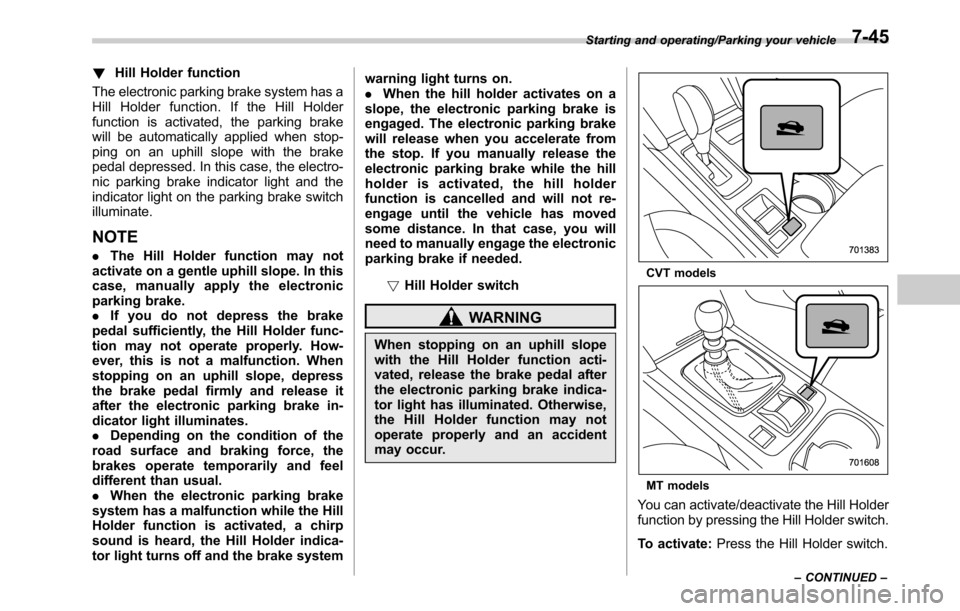
CVT models
MT models
You can activate/deactivate the Hill Holder
function by pressing the Hill Holder switch.
To activate:Press the Hill Holder switch.
Starting and operating/Parking your vehicle
–CONTINUED–7-45
Page 394 of 572
Starting and operating/Parking your vehicle
To deactivate:Press the Hill Holder
switch again.
Deactivate the Hill Holder function under
the following conditions.
.When towing a trailer
.When carrying a heavy load
.When you do not frequently use the
parking brake when stopping on an uphill
slope
NOTE
.If the Hill Holder switch is pressed
for more than 30 seconds, the Hill
Holder indicator light turns off and the
system ignores any further pressing of
the switch. To activate the switch again,
turn the ignition switch to the“LOCK”/
“OFF”position and restart the engine.
.When the Hill Holder function is
deactivated while the Hill Holder func-
tion has a malfunction, if you press the
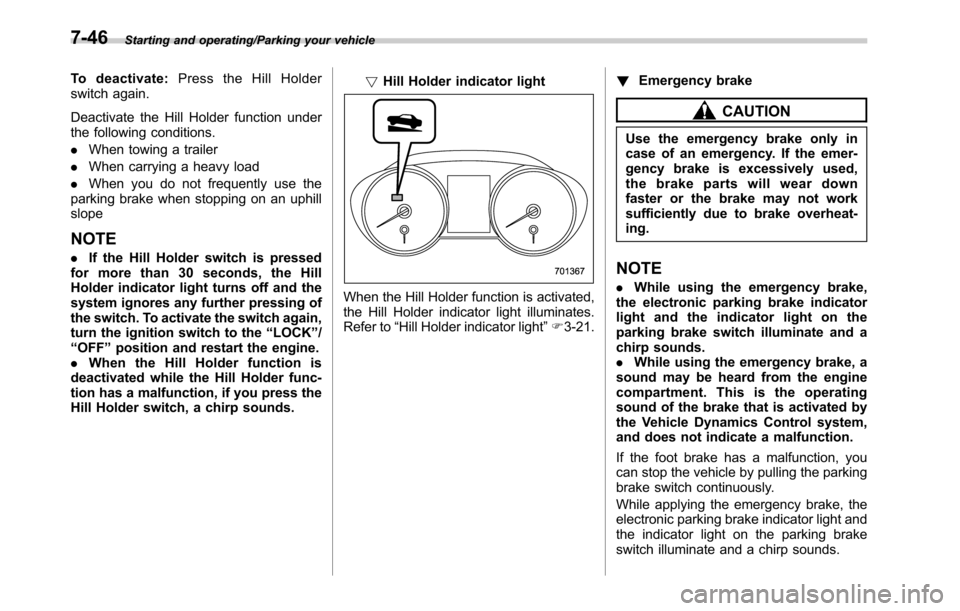
Hill Holder switch, a chirp sounds.!Hill Holder indicator light
When the Hill Holder function is activated,
the Hill Holder indicator light illuminates.
Refer to“Hill Holder indicator light”F3-21.!Emergency brake
CAUTION
Use the emergency brake only in
case of an emergency. If the emer-
gency brake is excessively used,
the brake parts will wear down
faster or the brake may not work
sufficiently due to brake overheat-
ing.
NOTE
.While using the emergency brake,
the electronic parking brake indicator
light and the indicator light on the
parking brake switch illuminate and a
chirp sounds.
.While using the emergency brake, a
sound may be heard from the engine
compartment. This is the operating
sound of the brake that is activated by
the Vehicle Dynamics Control system,
and does not indicate a malfunction.
If the foot brake has a malfunction, you
can stop the vehicle by pulling the parking
brake switch continuously.
While applying the emergency brake, the
electronic parking brake indicator light and
the indicator light on the parking brake
switch illuminate and a chirp sounds.
7-46
Page 395 of 572
!Electronic parking brake system
warning
CAUTION
If the brake system warning light
turns on, the electronic parking
brake system may be malfunction-
ing. Immediately stop your vehicle
in the nearest safe location and
contact your SUBARU dealer.
If a malfunction occurs in the electronic
parking brake system, the brake system
warning light turns on. Refer to“Electronic
parking brake system warning”F3-20.
&Parking tips
When parking your vehicle, always per-
form the following items.
.Apply the parking brake.
.For MT models, place the shift lever in
the“1”(1st) for upgrade or“R”(Reverse)
for a downgrade.
.For CVT models, place the select lever
in the“P”(Park) position.
Never rely on the transmission alone to
hold the vehicle.
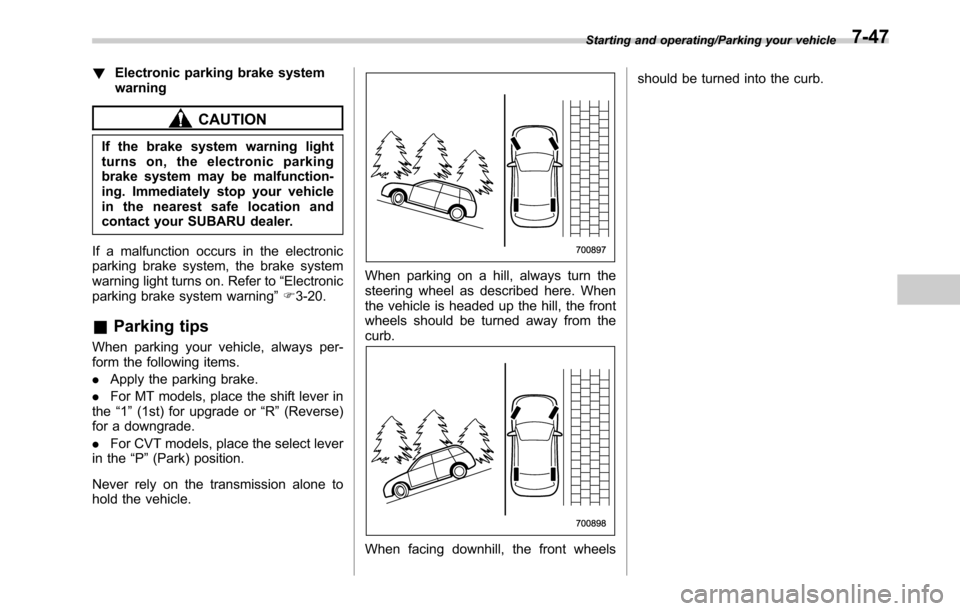
When parking on a hill, always turn the
steering wheel as described here. When
the vehicle is headed up the hill, the front
wheels should be turned away from the
curb.
When facing downhill, the front wheelsshould be turned into the curb.
Starting and operating/Parking your vehicle7-47
Page 399 of 572
maintain the previous cruising speed.
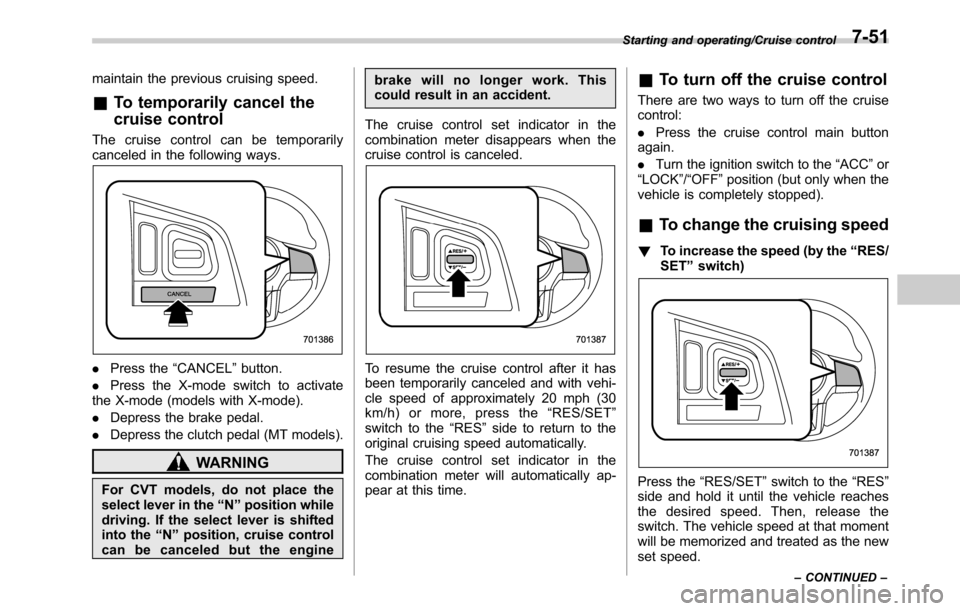
&To temporarily cancel the
cruise control
The cruise control can be temporarily
canceled in the following ways.
.Press the“CANCEL”button.
.Press the X-mode switch to activate
the X-mode (models with X-mode).
.Depress the brake pedal.
.Depress the clutch pedal (MT models).
WARNING
For CVT models, do not place the
select lever in the“N”position while
driving. If the select lever is shifted
into the“N”position, cruise control
can be canceled but the enginebrake will no longer work. This
could result in an accident.
The cruise control set indicator in the
combination meter disappears when the
cruise control is canceled.
To resume the cruise control after it has
been temporarily canceled and with vehi-
cle speed of approximately 20 mph (30
km/h) or more, press the“RES/SET”
switch to the“RES”side to return to the
original cruising speed automatically.
The cruise control set indicator in the
combination meter will automatically ap-
pear at this time.
&To turn off the cruise control
There are two ways to turn off the cruise
control:
.Press the cruise control main button
again.
.Turn the ignition switch to the“ACC”or
“LOCK”/“OFF”position (but only when the
vehicle is completely stopped).
&To change the cruising speed
!To increase the speed (by the“RES/
SET”switch)
Press the“RES/SET”switch to the“RES”
side and hold it until the vehicle reaches
the desired speed. Then, release the
switch. The vehicle speed at that moment
will be memorized and treated as the new
set speed.
Starting and operating/Cruise control
–CONTINUED–7-51
Page 403 of 572
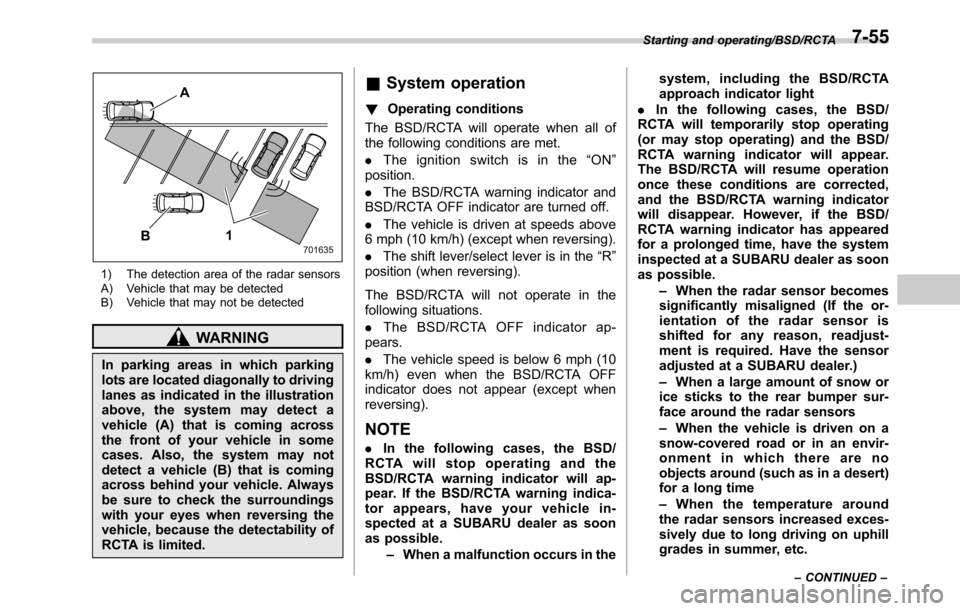
1) The detection area of the radar sensors
A) Vehicle that may be detected
B) Vehicle that may not be detected
WARNING
In parking areas in which parking
lots are located diagonally to driving
lanes as indicated in the illustration
above, the system may detect a
vehicle (A) that is coming across
the front of your vehicle in some
cases. Also, the system may not
detect a vehicle (B) that is coming
across behind your vehicle. Always
be sure to check the surroundings
with your eyes when reversing the
vehicle, because the detectability of
RCTA is limited.
&System operation
!Operating conditions
The BSD/RCTA will operate when all of
the following conditions are met.
.Theignitionswitchisinthe“ON”
position.
.The BSD/RCTA warning indicator and
BSD/RCTA OFF indicator are turned off.
.The vehicle is driven at speeds above
6 mph (10 km/h) (except when reversing).
.The shift lever/select lever is in the“R”
position (when reversing).
The BSD/RCTA will not operate in the
following situations.
.The BSD/RCTA OFF indicator ap-
pears.
.The vehicle speed is below 6 mph (10
km/h) even when the BSD/RCTA OFF
indicator does not appear (except when
reversing).
NOTE
.In the following cases, the BSD/
RCTA will stop operating and the
BSD/RCTA warning indicator will ap-
pear. If the BSD/RCTA warning indica-
tor appears, have your vehicle in-
spected at a SUBARU dealer as soon
as possible.
–When a malfunction occurs in thesystem, including the BSD/RCTA
approach indicator light
.In the following cases, the BSD/
RCTA will temporarily stop operating
(or may stop operating) and the BSD/
RCTA warning indicator will appear.
The BSD/RCTA will resume operation
once these conditions are corrected,
and the BSD/RCTA warning indicator
will disappear. However, if the BSD/
RCTA warning indicator has appeared
for a prolonged time, have the system
inspected at a SUBARU dealer as soon
as possible.
–When the radar sensor becomes
significantly misaligned (If the or-
ientation of the radar sensor is
shifted for any reason, readjust-
ment is required. Have the sensor
adjusted at a SUBARU dealer.)
–When a large amount of snow or
ice sticks to the rear bumper sur-
face around the radar sensors
–When the vehicle is driven on a
snow-covered road or in an envir-
onment in which there are no
objects around (such as in a desert)
for a long time
–When the temperature around
the radar sensors increased exces-
sively due to long driving on uphill
grades in summer, etc.
Starting and operating/BSD/RCTA
–CONTINUED–7-55
Page 406 of 572
Starting and operating/BSD/RCTA
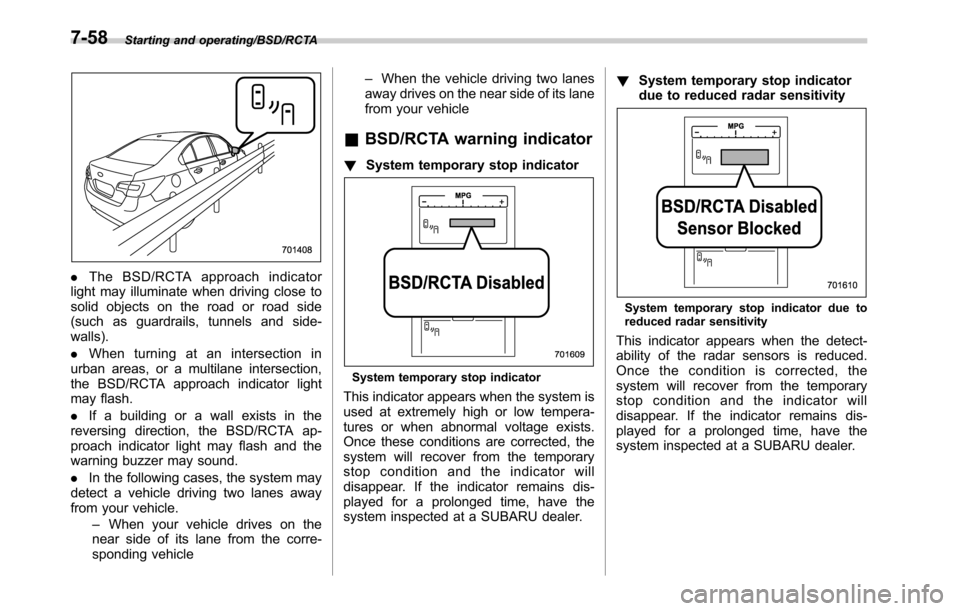
.The BSD/RCTA approach indicator
light may illuminate when driving close to
solid objects on the road or road side
(such as guardrails, tunnels and side-
walls).
.When turning at an intersection in
urban areas, or a multilane intersection,
the BSD/RCTA approach indicator light
may flash.
.If a building or a wall exists in the
reversing direction, the BSD/RCTA ap-
proach indicator light may flash and the
warning buzzer may sound.
.In the following cases, the system may
detect a vehicle driving two lanes away
from your vehicle.
–When your vehicle drives on the
near side of its lane from the corre-
sponding vehicle–When the vehicle driving two lanes
away drives on the near side of its lane
from your vehicle
&BSD/RCTA warning indicator
!System temporary stop indicator
System temporary stop indicator
This indicator appears when the system is
used at extremely high or low tempera-
tures or when abnormal voltage exists.
Once these conditions are corrected, the
system will recover from the temporary
stop condition and the indicator will
disappear. If the indicator remains dis-
played for a prolonged time, have the
system inspected at a SUBARU dealer.!System temporary stop indicator
due to reduced radar sensitivity
System temporary stop indicator due to
reduced radar sensitivity
This indicator appears when the detect-
ability of the radar sensors is reduced.
Once the condition is corrected, the
system will recover from the temporary
stop condition and the indicator will
disappear. If the indicator remains dis-
played for a prolonged time, have the
system inspected at a SUBARU dealer.
7-58