Acc switch SUBARU OUTBACK 2016 6.G Repair Manual
[x] Cancel search | Manufacturer: SUBARU, Model Year: 2016, Model line: OUTBACK, Model: SUBARU OUTBACK 2016 6.GPages: 572, PDF Size: 21.79 MB
Page 201 of 572
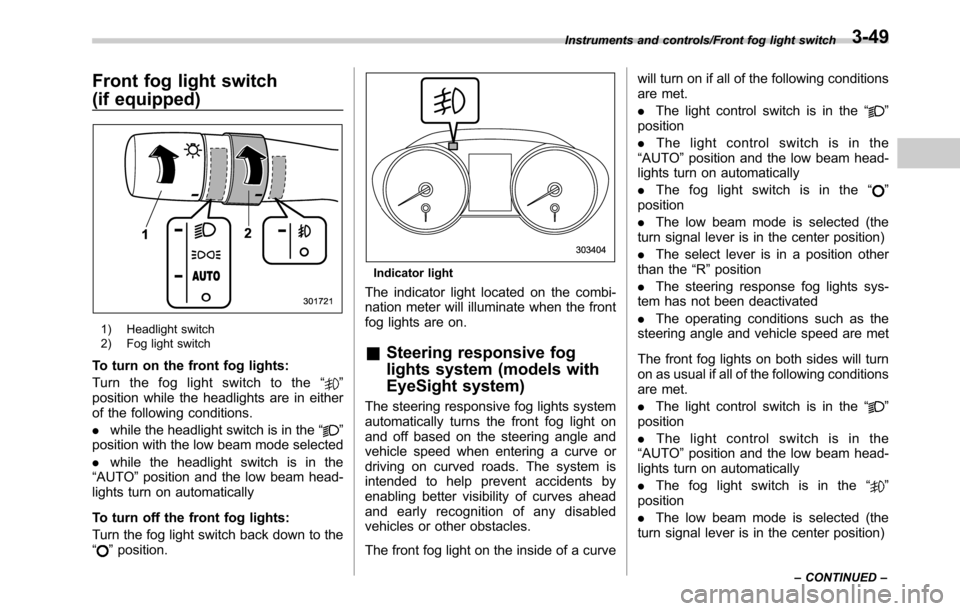
Front fog light switch
(if equipped)
1) Headlight switch
2) Fog light switch
To turn on the front fog lights:
Turn the fog light switch to the“
”
position while the headlights are in either
of the following conditions.
.while the headlight switch is in the“
”
position with the low beam mode selected
.while the headlight switch is in the
“AUTO”position and the low beam head-
lights turn on automatically
To turn off the front fog lights:
Turn the fog light switch back down to the
“
”position.
Indicator light
The indicator light located on the combi-
nation meter will illuminate when the front
fog lights are on.
&Steering responsive fog
lights system (models with
EyeSight system)
The steering responsive fog lights system
automatically turns the front fog light on
and off based on the steering angle and
vehicle speed when entering a curve or
driving on curved roads. The system is
intended to help prevent accidents by
enabling better visibility of curves ahead
and early recognition of any disabled
vehicles or other obstacles.
The front fog light on the inside of a curvewill turn on if all of the following conditions
are met.
.The light control switch is in the“
”
position
.The light control switch is in the
“AUTO”position and the low beam head-
lights turn on automatically
.The fog light switch is in the“
”
position
.The low beam mode is selected (the
turn signal lever is in the center position)
.The select lever is in a position other
than the“R”position
.The steering response fog lights sys-
tem has not been deactivated
.The operating conditions such as the
steering angle and vehicle speed are met
The front fog lights on both sides will turn
on as usual if all of the following conditions
are met.
.The light control switch is in the“
”
position
.The light control switch is in the
“AUTO”position and the low beam head-
lights turn on automatically
.The fog light switch is in the“
”
position
.The low beam mode is selected (the
turn signal lever is in the center position)
Instruments and controls/Front fog light switch
–CONTINUED–3-49
Page 203 of 572

.In freezing weather, be sure that
the wiper blades are not frozen to
the windshield or rear window
before switching on the wipers.
Attempting to operate the wiper
with the blades frozen to the
window glass could cause not
only the wiper blades to be
damaged but also might cause
the wiper motor to fail. If the
wiper blades are frozen to the
window glass, be sure to operate
the defroster, windshield wiper
deicer (if equipped) or rear win-
dow defogger before turning on
the wiper.
.If the wipers stop during opera-
tion because of ice or some other
obstruction on the window, this
might cause the wiper motor to
fail even if the wiper switch is
turned off. If this occurs,
promptly stop the vehicle in a
safe location, turn the ignition
switch to the“LOCK”/“OFF”po-
sition and clean the window
glass to allow proper wiper op-
eration.
.Use clean water if windshield
washer fluid is unavailable. In
areas where water freezes in
winter, use SUBARU WindshieldWasher Fluid or the equivalent.
Refer to“Windshield washer
fluid”F11-32.
Also, when driving the vehicle
when there are freezing tempera-
tures, use non-freezing type wi-
per blades.
.Do not clean the wiper blades
with gasoline or a solvent, such
as paint thinner or benzine. This
will cause deterioration of the
wiper blades.
NOTE
.The windshield wiper motor is pro-
tected against overloads by a circuit
breaker. If the motor operates continu-
ously under an unusually heavy load,
the circuit breaker may trip to stop the
motor temporarily. If this happens, park
your vehicle in a safe location, turn off
the wiper switch, and wait for approxi-
mately 10 minutes. The circuit breaker
will reset itself, and the wipers will
again operate normally.
.Clean your wiper blades and win-
dow glass periodically with a washer
solution to prevent streaking, and to
remove accumulations of road salt or
road film. Operate the windshield
washer for at least 1 second so thatwasher solution will be sprinkled all
over the windshield or rear window.
.Grease, wax, insects or other mate-
rial on the windshield or the wiper
blades results in jerky wiper operation
and streaking on the glass. If you
cannot remove those streaks after
operating the washer or if the wiper
operation is jerky, clean the outer sur-
face of the windshield or rear window
and the wiper blades using a sponge or
soft cloth with a neutral detergent or
mild abrasive cleaner. After cleaning,
rinse the window glass and wiper
blades with clean water. The glass is
clean if no beads form on the glass
when you rinse with water.
.If you cannot eliminate the streaking
even after following this procedure,
replace the wiper blades with new
ones. For replacement instructions,
refer to“Replacement of wiper blades”
F11-33.
Instruments and controls/Wiper and washer
–CONTINUED–3-51
Page 205 of 572
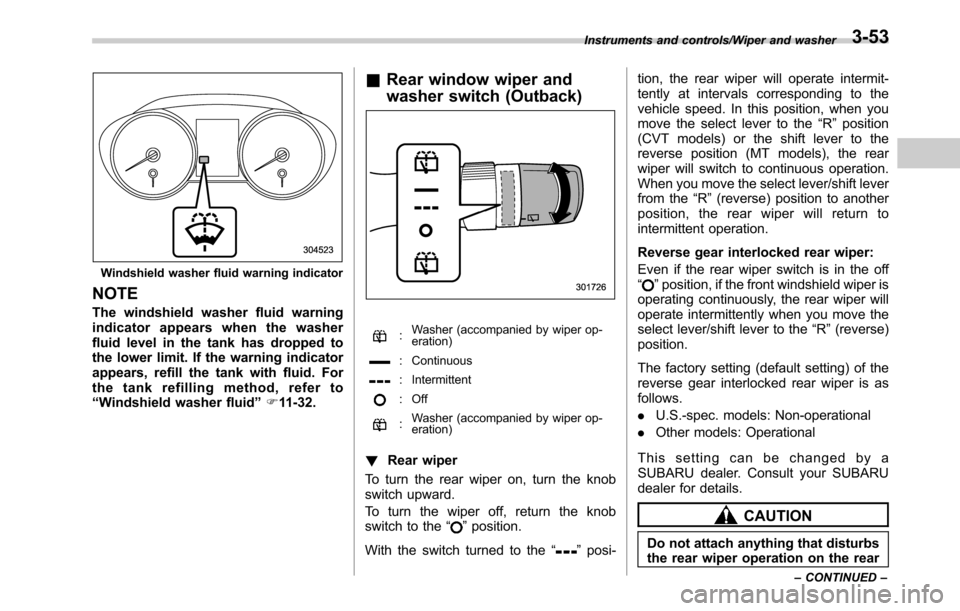
Windshield washer fluid warning indicator
NOTE
The windshield washer fluid warning
indicator appears when the washer
fluid level in the tank has dropped to
the lower limit. If the warning indicator
appears, refill the tank with fluid. For
the tank refilling method, refer to
“Windshield washer fluid”F11-32.
&Rear window wiper and
washer switch (Outback)
:Washer (accompanied by wiper op-
eration)
: Continuous
: Intermittent
: Off
:Washer (accompanied by wiper op-
eration)
!Rear wiper
To turn the rear wiper on, turn the knob
switch upward.
To turn the wiper off, return the knob
switch to the“
”position.
With the switch turned to the“
”posi-tion, the rear wiper will operate intermit-
tently at intervals corresponding to the
vehicle speed. In this position, when you
move the select lever to the“R”position
(CVT models) or the shift lever to the
reverse position (MT models), the rear
wiper will switch to continuous operation.
When you move the select lever/shift lever
from the“R”(reverse) position to another
position, the rear wiper will return to
intermittent operation.
Reverse gear interlocked rear wiper:
Even if the rear wiper switch is in the off
“
”position, if the front windshield wiper is
operating continuously, the rear wiper will
operate intermittently when you move the
select lever/shift lever to the“R”(reverse)
position.
The factory setting (default setting) of the
reverse gear interlocked rear wiper is as
follows.
.U.S.-spec. models: Non-operational
.Other models: Operational
This setting can be changed by a
SUBARU dealer. Consult your SUBARU
dealer for details.
CAUTION
Do not attach anything that disturbs
the rear wiper operation on the rear
Instruments and controls/Wiper and washer
–CONTINUED–3-53
Page 207 of 572
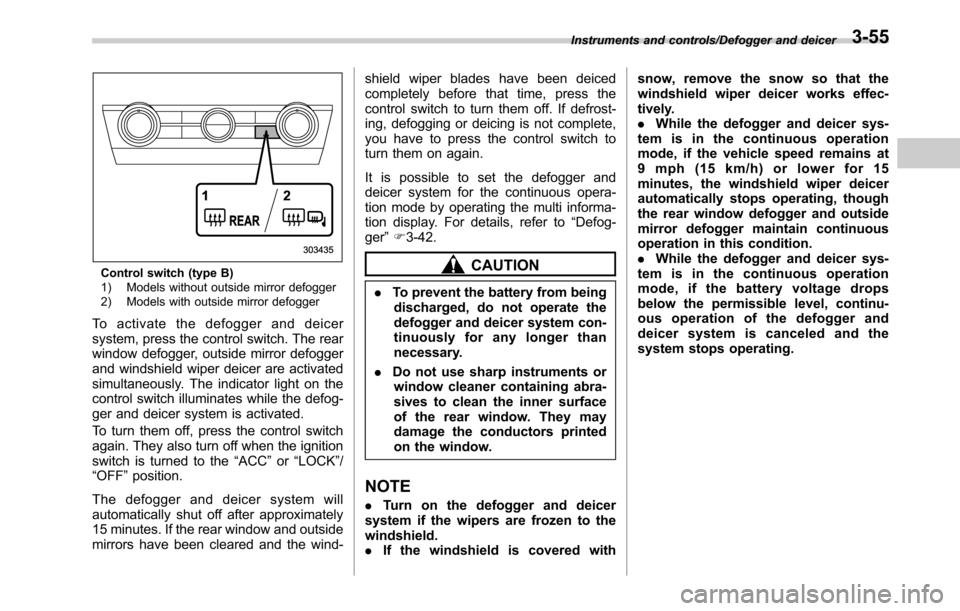
Control switch (type B)
1) Models without outside mirror defogger
2) Models with outside mirror defogger
To activate the defogger and deicer
system, press the control switch. The rear
window defogger, outside mirror defogger
and windshield wiper deicer are activated
simultaneously. The indicator light on the
control switch illuminates while the defog-
ger and deicer system is activated.
To turn them off, press the control switch
again. They also turn off when the ignition
switch is turned to the“ACC”or“LOCK”/
“OFF”position.
The defogger and deicer system will
automatically shut off after approximately
15 minutes. If the rear window and outside
mirrors have been cleared and the wind-shield wiper blades have been deiced
completely before that time, press the
control switch to turn them off. If defrost-
ing, defogging or deicing is not complete,
you have to press the control switch to
turn them on again.
It is possible to set the defogger and
deicer system for the continuous opera-
tion mode by operating the multi informa-
tion display. For details, refer to“Defog-
ger”F3-42.
CAUTION
.To prevent the battery from being
discharged, do not operate the
defogger and deicer system con-
tinuously for any longer than
necessary.
.Do not use sharp instruments or
window cleaner containing abra-
sives to clean the inner surface
of the rear window. They may
damage the conductors printed
on the window.
NOTE
.Turn on the defogger and deicer
system if the wipers are frozen to the
windshield.
.If the windshield is covered withsnow, remove the snow so that the
windshield wiper deicer works effec-
tively.
.While the defogger and deicer sys-
tem is in the continuous operation
mode, if the vehicle speed remains at
9 mph (15 km/h) or lower for 15
minutes, the windshield wiper deicer
automatically stops operating, though
the rear window defogger and outside
mirror defogger maintain continuous
operation in this condition.
.While the defogger and deicer sys-
tem is in the continuous operation
mode, if the battery voltage drops
below the permissible level, continu-
ous operation of the defogger and
deicer system is canceled and the
system stops operating.
Instruments and controls/Defogger and deicer3-55
Page 214 of 572
Instruments and controls/Mirrors
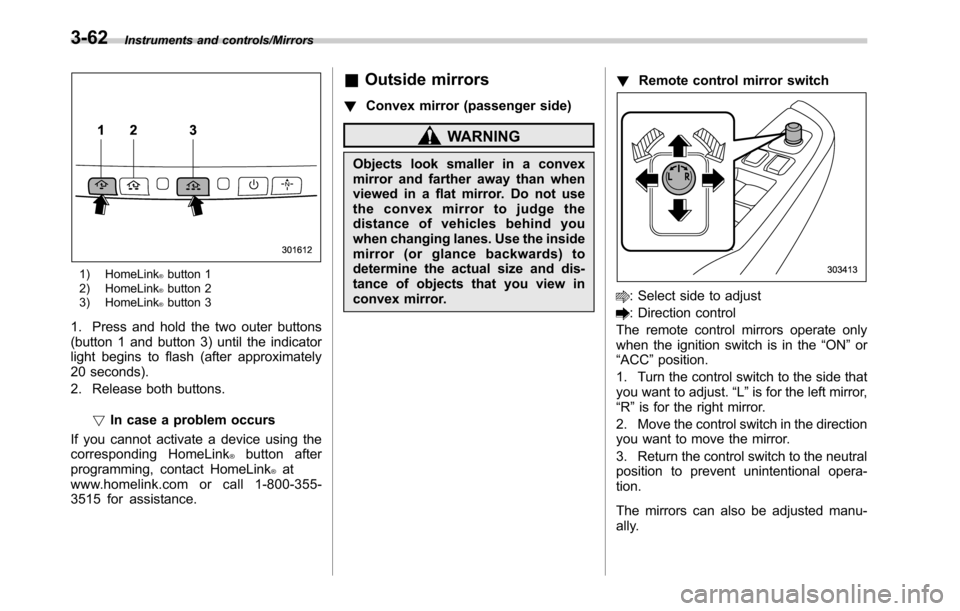
1) HomeLink®button 1
2) HomeLink®button 2
3) HomeLink®button 3
1. Press and hold the two outer buttons
(button 1 and button 3) until the indicator
light begins to flash (after approximately
20 seconds).
2. Release both buttons.
!In case a problem occurs
If you cannot activate a device using the
corresponding HomeLink
®button after
programming, contact HomeLink®at
www.homelink.com or call 1-800-355-
3515 for assistance.
&Outside mirrors
!Convex mirror (passenger side)
WARNING
Objects look smaller in a convex
mirror and farther away than when
viewed in a flat mirror. Do not use
the convex mirror to judge the
distance of vehicles behind you
when changing lanes. Use the inside
mirror (or glance backwards) to
determine the actual size and dis-
tance of objects that you view in
convex mirror.!Remote control mirror switch
: Select side to adjust
: Direction control
The remote control mirrors operate only
when the ignition switch is in the“ON”or
“ACC”position.
1. Turn the control switch to the side that
you want to adjust.“L”is for the left mirror,
“R”is for the right mirror.
2. Move the control switch in the direction
you want to move the mirror.
3. Return the control switch to the neutral
position to prevent unintentional opera-
tion.
The mirrors can also be adjusted manu-
ally.
3-62
Page 225 of 572
WARNING
Continued operation in the ON posi-
tion may fog up the windows. Switch
to the OFF position as soon as the
outside dusty condition clears.
Defrosting
Select the desired“”mode or“”mode
to defrost or dehumidify the windshield
and front door windows by performing the
following procedures.
.To select the“
”mode, press the
defroster button.
.To select the“
”mode, press the
airflow mode selection button and select
the“
”mode.
NOTE
.When the“”mode or“”mode
is selected, the air conditioner com-
pressor automatically operates to more
quickly defog the windshield. (The air
conditioner indicator light does not
illuminate in this case.) At the same
time, the air inlet selection is automa-
tically set to the outside air mode. For
details, refer to“Airflow mode selec-
tion”F4-6.
.If the defroster button is pressed
while the“
”mode is selected, it will
return to the previous mode before
selecting the“
”mode.
Operating tips for heater and
air conditioner
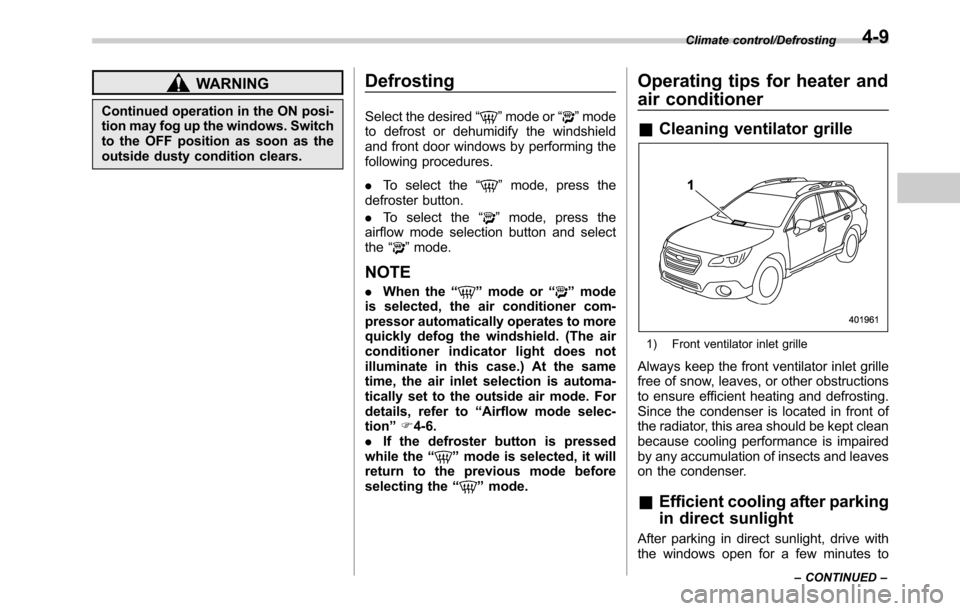
&Cleaning ventilator grille
1) Front ventilator inlet grille
Always keep the front ventilator inlet grille
free of snow, leaves, or other obstructions
to ensure efficient heating and defrosting.
Since the condenser is located in front of
the radiator, this area should be kept clean
because cooling performance is impaired
by any accumulation of insects and leaves
on the condenser.
&Efficient cooling after parking
in direct sunlight
After parking in direct sunlight, drive with
the windows open for a few minutes to
Climate control/Defrosting
–CONTINUED–4-9
Page 232 of 572

Audio/Audio set
&Base display audio set (if equipped)
1) Power/VOLUME knob
2) Eject button
3) AUDIO/TUNE knob
4) HOME button5) APPS button
6) Display
7) SEEK/TRACK buttons
The audio set will operate only when the
ignition switch is in the“ACC”or“ON”
position.
.Power and audio controls: refer to
“Basic operation”F5-18.
.STARLINK (if equipped): refer to
“STARLINK”F5-26.
.Radio operation: refer to“AM/FM radio”
F5-28.
.Satellite radio operation (if equipped):
refer to“SiriusXM Satellite Radio”F5-37.
.aha
TM: refer to“ahaTMby HARMAN”
F5-44.
.Pandora
®(if equipped): refer to“Pan-
dora®”F5-50.
.CD (compact disc) player operation:
refer to“CD”F5-53.
.USB storage device: refer to“USB
memory”F5-55.
.iPod operation: refer to“iPod”F5-56.
.Bluetooth
®audio: refer to“Bluetooth
audio”F5-58.
.Auxiliary input jack: refer to“AUX”F5-
61.
.Hands-free phone system: refer to
“Hands-free phone system”F5-71.
5-4
Page 234 of 572

Audio/Audio set
&SUBARU STARLINKTMMultimedia Plus audio set (U.S. spec.
models only, if equipped)The audio set will operate only when the
ignition switch is in the“ACC”or“ON”
position.
For details about how to use the SUBARU
STARLINK
TMMultimedia Plus audio set,
refer to the 2016 Legacy/Outback
SUBARU STARLINK
TMMultimedia Plus
and SUBARU STARLINKTMMultimedia
Navigation Owner’s Manual.
NOTE
HD Radio Technology should be in-
cluded as a feature in the SUBARU
STARLINK
TMMultimedia Plus audio
set.
5-6
Page 245 of 572

!Initial screen
When the ignition switch is in the“ACC”or
“ON”position, the initial screen will be
displayed and the system will begin
operating.
.When using the STARLINK function (if
equipped), the display screen may be
different from the screen above.
.After a few seconds, the caution screen
will be displayed.
.After about 5 seconds, the caution
screen automatically switches to the next
screen.
!Connecting and disconnecting a
USB memory/portable device
The USB port and the AUX jack are
located as shown in the following illustra-
tion.
NOTE
.This unit does not support commer-
cially available USB hubs.
.Turn on the power of the device
when it is not turned on.
.This device has a USB port for USB
memory/portable device.
.For compatible USB memory de-
vices, refer to“USB memory device”
F5-10.
.For compatible iPod models, refer to
“iPod”F5-10.
.Even if a USB hub is used to
connect more than two USB devices,
Audio/Audio set
–CONTINUED–5-17
Page 246 of 572
Audio/Audio set
only the first two connected devices
will be recognized.
&Basic operation
This section describes some of the basic
features of the audio/visual system. Some
information may not pertain to your sys-
tem.
Your audio/visual system works when the
ignition switch is turned to the“ACC”or
“ON”position.
CAUTION
To prevent the battery from being
discharged, do not leave the audio/
visual system on longer than neces-
sary when the engine is not running.
NOTE
Some functions can also be operated
by using the voice command system.
For details, refer to“Voice command
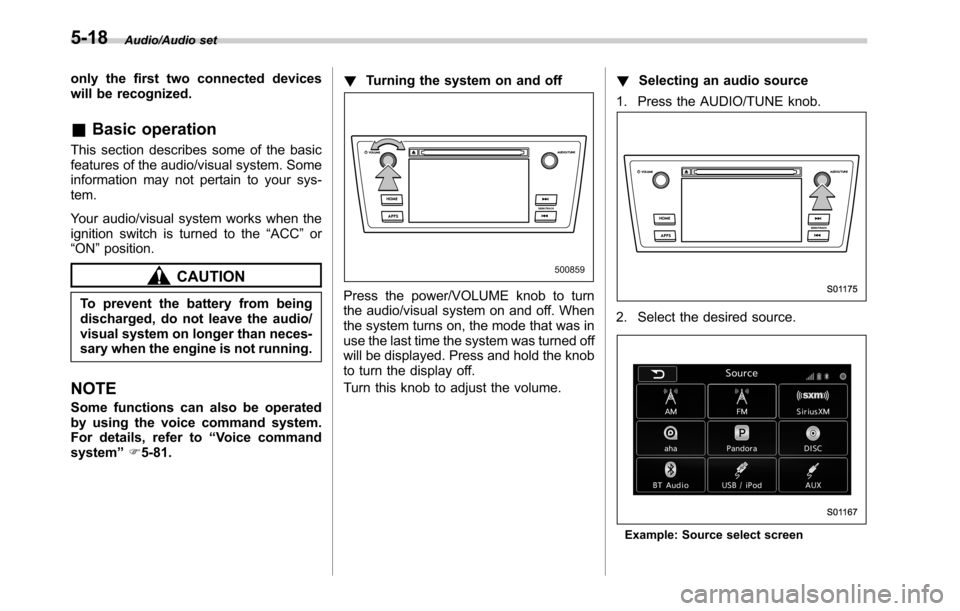
system”F5-81.!Turning the system on and off
Press the power/VOLUME knob to turn
the audio/visual system on and off. When
the system turns on, the mode that was in
use the last time the system was turned off
will be displayed. Press and hold the knob
to turn the display off.
Turn this knob to adjust the volume.!Selecting an audio source
1. Press the AUDIO/TUNE knob.
2. Select the desired source.
Example: Source select screen
5-18