warning light SUBARU OUTBACK 2016 6.G Repair Manual
[x] Cancel search | Manufacturer: SUBARU, Model Year: 2016, Model line: OUTBACK, Model: SUBARU OUTBACK 2016 6.GPages: 572, PDF Size: 21.79 MB
Page 198 of 572
Instruments and controls/Light control switch
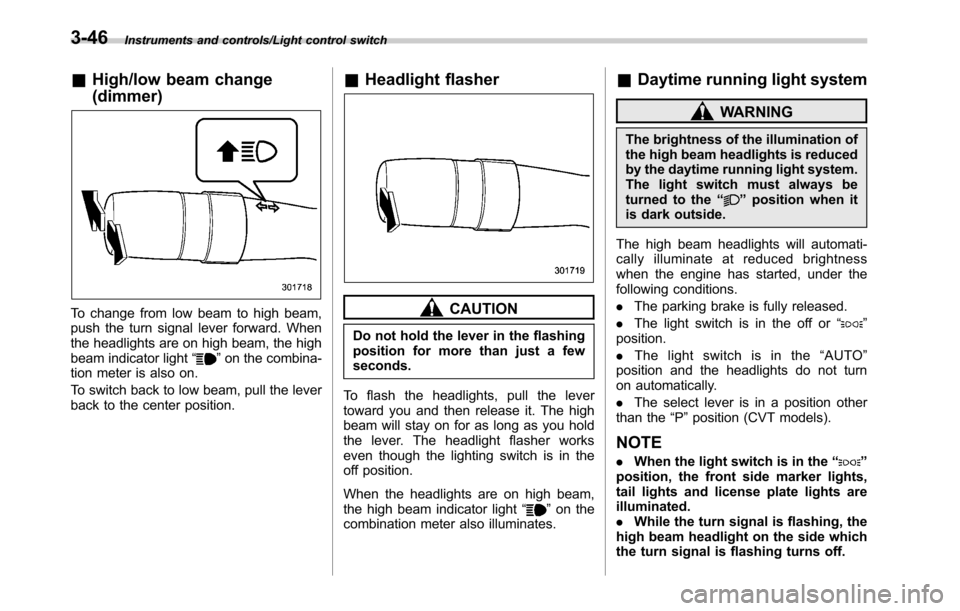
&High/low beam change
(dimmer)
To change from low beam to high beam,
push the turn signal lever forward. When
the headlights are on high beam, the high
beam indicator light“
”on the combina-
tion meter is also on.
To switch back to low beam, pull the lever
back to the center position.
&Headlight flasher
CAUTION
Do not hold the lever in the flashing
position for more than just a few
seconds.
To flash the headlights, pull the lever
toward you and then release it. The high
beam will stay on for as long as you hold
the lever. The headlight flasher works
even though the lighting switch is in the
off position.
When the headlights are on high beam,
the high beam indicator light“
”on the
combination meter also illuminates.
&Daytime running light system
WARNING
The brightness of the illumination of
the high beam headlights is reduced
by the daytime running light system.
The light switch must always be
turned to the“
”position when it
is dark outside.
The high beam headlights will automati-
cally illuminate at reduced brightness
when the engine has started, under the
following conditions.
.The parking brake is fully released.
.The light switch is in the off or“
”
position.
.The light switch is in the“AUTO”
position and the headlights do not turn
on automatically.
.The select lever is in a position other
than the“P”position (CVT models).
NOTE
.When the light switch is in the“”
position, the front side marker lights,
tail lights and license plate lights are
illuminated.
.While the turn signal is flashing, the
high beam headlight on the side which
the turn signal is flashing turns off.
3-46
Page 199 of 572

.While the hazard warning flasher is
on, the high beam headlights turn off.Headlight beam leveler
(models with HID headlights)
The HID headlights generate more light
than conventional halogen headlights.
Therefore a driver of an oncoming vehicle
may experience too much glare when your
headlight beam height adjustment is high
due to the vehicle carrying heavy load.
The automatic headlight beam leveler
adjusts the headlight beam height auto-
matically and optimally according to the
load being carried by the vehicle.
Turn signal lever
To activate the right turn signal, push the
turn signal lever up. To activate the left
turn signal, push the turn signal lever
down. When the turn is finished, the lever
will return automatically. If the lever does
not return after cornering, return the lever
to the neutral position by hand.
To signal a lane change, push the turn
signal lever up or down slightly and hold it
during the lane change. The turn signal
indicator lights will flash in the direction of
the turn or lane change. The lever will
return automatically to the neutral position
when you release it.
Instruments and controls/Headlight beam leveler (models with HID headlights)
–CONTINUED–3-47
Page 202 of 572
Instruments and controls/Wiper and washer
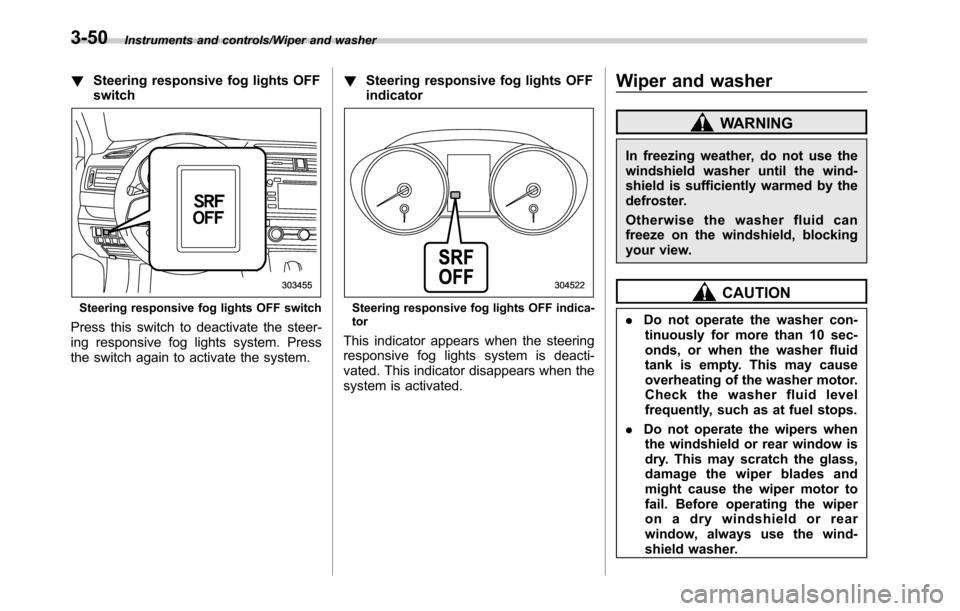
!Steering responsive fog lights OFF
switch
Steering responsive fog lights OFF switch
Press this switch to deactivate the steer-
ing responsive fog lights system. Press
the switch again to activate the system.!Steering responsive fog lights OFF
indicator
Steering responsive fog lights OFF indica-
tor
This indicator appears when the steering
responsive fog lights system is deacti-
vated. This indicator disappears when the
system is activated.
Wiper and washer
WARNING
In freezing weather, do not use the
windshield washer until the wind-
shield is sufficiently warmed by the
defroster.
Otherwise the washer fluid can
freeze on the windshield, blocking
your view.
CAUTION
.Do not operate the washer con-
tinuously for more than 10 sec-
onds, or when the washer fluid
tank is empty. This may cause
overheating of the washer motor.
Check the washer fluid level
frequently, such as at fuel stops.
.Do not operate the wipers when
the windshield or rear window is
dry. This may scratch the glass,
damage the wiper blades and
might cause the wiper motor to
fail. Before operating the wiper
on a dry windshield or rear
window, always use the wind-
shield washer.
3-50
Page 214 of 572
Instruments and controls/Mirrors
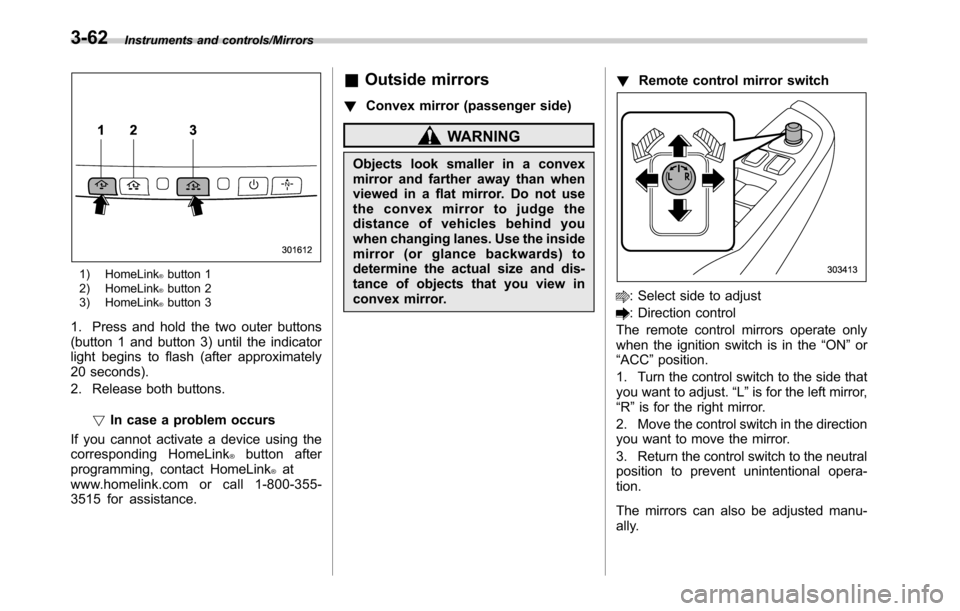
1) HomeLink®button 1
2) HomeLink®button 2
3) HomeLink®button 3
1. Press and hold the two outer buttons
(button 1 and button 3) until the indicator
light begins to flash (after approximately
20 seconds).
2. Release both buttons.
!In case a problem occurs
If you cannot activate a device using the
corresponding HomeLink
®button after
programming, contact HomeLink®at
www.homelink.com or call 1-800-355-
3515 for assistance.
&Outside mirrors
!Convex mirror (passenger side)
WARNING
Objects look smaller in a convex
mirror and farther away than when
viewed in a flat mirror. Do not use
the convex mirror to judge the
distance of vehicles behind you
when changing lanes. Use the inside
mirror (or glance backwards) to
determine the actual size and dis-
tance of objects that you view in
convex mirror.!Remote control mirror switch
: Select side to adjust
: Direction control
The remote control mirrors operate only
when the ignition switch is in the“ON”or
“ACC”position.
1. Turn the control switch to the side that
you want to adjust.“L”is for the left mirror,
“R”is for the right mirror.
2. Move the control switch in the direction
you want to move the mirror.
3. Return the control switch to the neutral
position to prevent unintentional opera-
tion.
The mirrors can also be adjusted manu-
ally.
3-62
Page 225 of 572
WARNING
Continued operation in the ON posi-
tion may fog up the windows. Switch
to the OFF position as soon as the
outside dusty condition clears.
Defrosting
Select the desired“”mode or“”mode
to defrost or dehumidify the windshield
and front door windows by performing the
following procedures.
.To select the“
”mode, press the
defroster button.
.To select the“
”mode, press the
airflow mode selection button and select
the“
”mode.
NOTE
.When the“”mode or“”mode
is selected, the air conditioner com-
pressor automatically operates to more
quickly defog the windshield. (The air
conditioner indicator light does not
illuminate in this case.) At the same
time, the air inlet selection is automa-
tically set to the outside air mode. For
details, refer to“Airflow mode selec-
tion”F4-6.
.If the defroster button is pressed
while the“
”mode is selected, it will
return to the previous mode before
selecting the“
”mode.
Operating tips for heater and
air conditioner
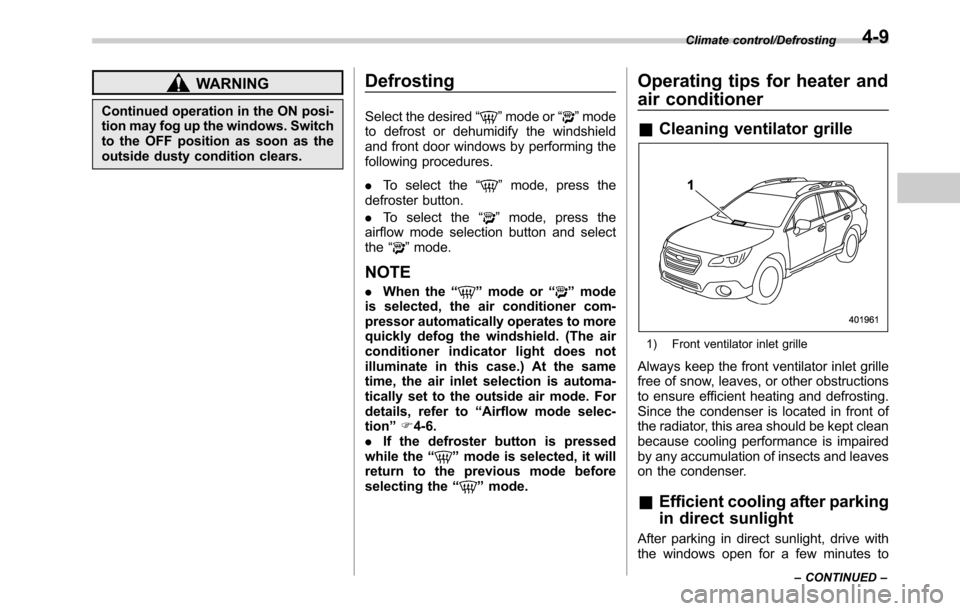
&Cleaning ventilator grille
1) Front ventilator inlet grille
Always keep the front ventilator inlet grille
free of snow, leaves, or other obstructions
to ensure efficient heating and defrosting.
Since the condenser is located in front of
the radiator, this area should be kept clean
because cooling performance is impaired
by any accumulation of insects and leaves
on the condenser.
&Efficient cooling after parking
in direct sunlight
After parking in direct sunlight, drive with
the windows open for a few minutes to
Climate control/Defrosting
–CONTINUED–4-9
Page 243 of 572
&Basic information before use
WARNING
When the vehicle is stopped with the
engine running, always apply the
parking brake for safety. Failure to
do so may result in loss of control of
your vehicle and cause an accident
or serious injury.
CAUTION
.To prevent damaging the screen,
touch the screen keys with your
finger lightly.
.Wipe off fingerprints using a
glass cleaning cloth. Do not use
chemical cleaners to clean the
screen, as they may damage the
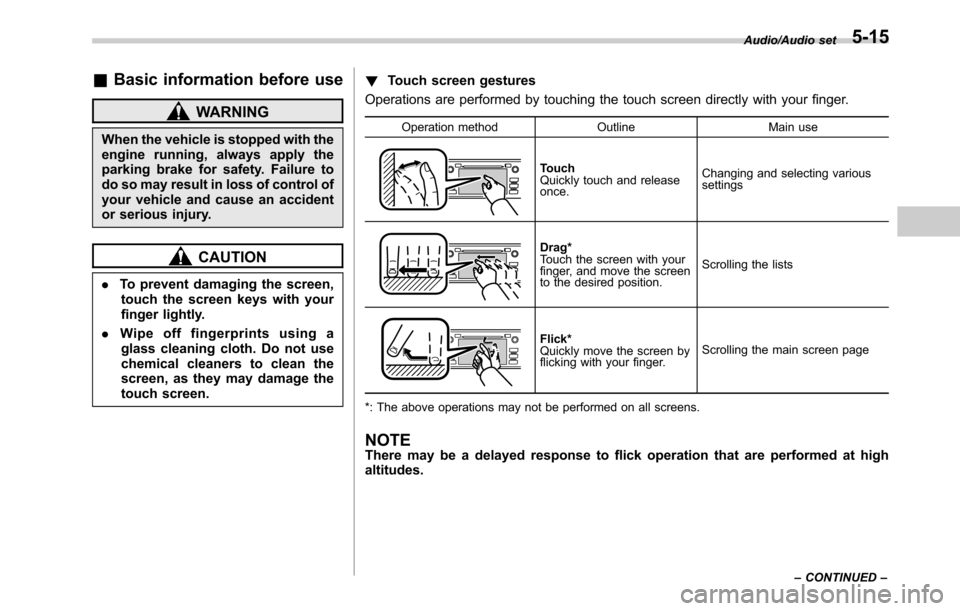
touch screen.!Touch screen gestures
Operations are performed by touching the touch screen directly with your finger.
Operation method Outline Main use
Touch
Quickly touch and release
once.Changing and selecting various
settings
Drag*
Touch the screen with your
finger, and move the screen
to the desired position.Scrolling the lists
Flick*
Quickly move the screen by
flicking with your finger.Scrolling the main screen page
*: The above operations may not be performed on all screens.
NOTEThere may be a delayed response to flick operation that are performed at high
altitudes.
Audio/Audio set
–CONTINUED–5-15
Page 253 of 572
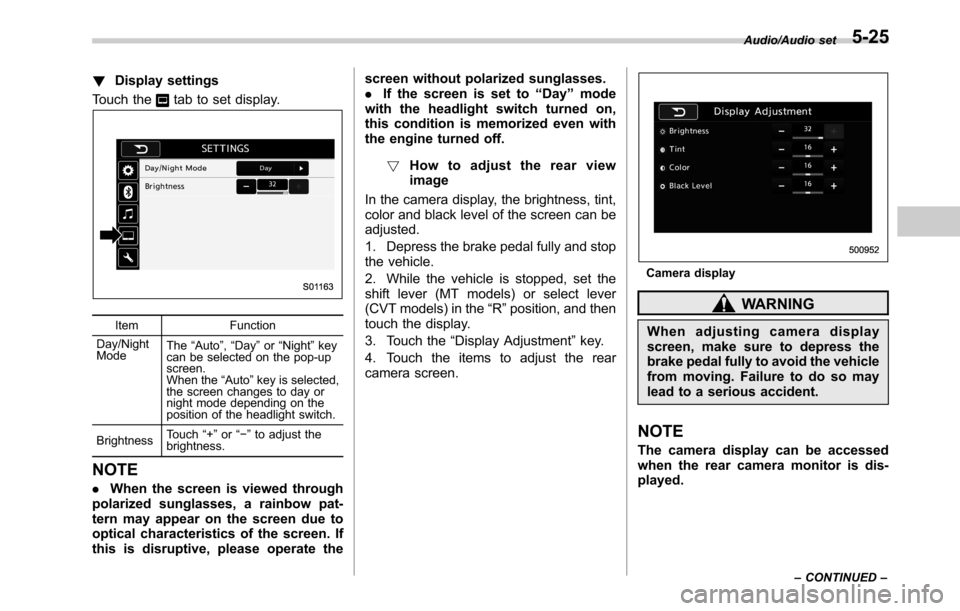
!Display settings
Touch the
tab to set display.
Item Function
Day/Night
ModeThe“Auto”,“Day”or“Night”key
can be selected on the pop-up
screen.
When the“Auto”key is selected,
the screen changes to day or
night mode depending on the
position of the headlight switch.
BrightnessTouch“+”or“−”to adjust the
brightness.
NOTE
.When the screen is viewed through
polarized sunglasses, a rainbow pat-
tern may appear on the screen due to
optical characteristics of the screen. If
this is disruptive, please operate thescreen without polarized sunglasses.
.If the screen is set to“Day”mode
with the headlight switch turned on,
this condition is memorized even with
the engine turned off.
!How to adjust the rear view
image
In the camera display, the brightness, tint,
color and black level of the screen can be
adjusted.
1. Depress the brake pedal fully and stop
the vehicle.
2. While the vehicle is stopped, set the
shift lever (MT models) or select lever
(CVT models) in the“R”position, and then
touch the display.
3. Touch the“Display Adjustment”key.
4. Touch the items to adjust the rear
camera screen.
Camera display
WARNING
When adjusting camera display
screen, make sure to depress the
brake pedal fully to avoid the vehicle
from moving. Failure to do so may
lead to a serious accident.
NOTE
The camera display can be accessed
when the rear camera monitor is dis-
played.
Audio/Audio set
–CONTINUED–5-25
Page 338 of 572
Interior equipment/Cargo area cover (Outback–if equipped)
Cargo area cover
(Outback–if equipped)
The cargo area cover is provided for
covering the cargo area and to protect its
contents from direct sunlight. This cover is
detachable to make room for additional
cargo.
&Using the cover
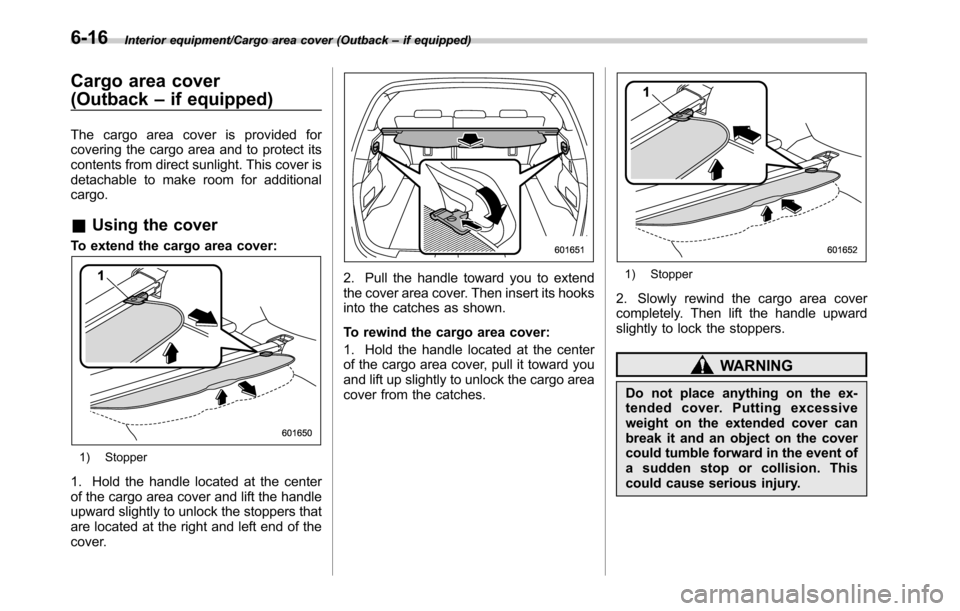
To extend the cargo area cover:
1) Stopper
1. Hold the handle located at the center
of the cargo area cover and lift the handle
upward slightly to unlock the stoppers that
are located at the right and left end of the
cover.
2. Pull the handle toward you to extend
the cover area cover. Then insert its hooks
into the catches as shown.
To rewind the cargo area cover:
1. Hold the handle located at the center
of the cargo area cover, pull it toward you
and lift up slightly to unlock the cargo area
cover from the catches.1) Stopper
2. Slowly rewind the cargo area cover
completely. Then lift the handle upward
slightly to lock the stoppers.
WARNING
Do not place anything on the ex-
tended cover. Putting excessive
weight on the extended cover can
break it and an object on the cover
could tumble forward in the event of
a sudden stop or collision. This
could cause serious injury.
6-16
Page 349 of 572

Fuel...................................................................... 7-3
Fuel requirements............................................... 7-3
Fuel filler lid and cap........................................... 7-4
State emission testing (U.S. only)...................... 7-7
Preparing to drive............................................... 7-8
Starting and stopping the engine (models
without push-button ignition switch).............. 7-9
Starting engine.................................................... 7-9
Stopping the engine........................................... 7-11
Steering lock (models without“keyless access
with push-button start system”)........................ 7-11
Starting and stopping engine (models with
push-button start system).............................. 7-12
Safety precautions............................................. 7-12
Operating range for push-button start
system............................................................. 7-12
Starting engine................................................... 7-12
Stopping engine................................................. 7-14
When access key does not operate properly....... 7-14
Steering lock (models with“keyless access with
push-button start system”) ............................... 7-15
Remote engine start system (dealer
option).............................................................. 7-15
Models with“keyless access with push-button
start system”................................................... 7-16
Models without“keyless access with push-button
start system”................................................... 7-17
Entering the vehicle while it is running via remote
start................................................................. 7-20
Entering the vehicle following remote engine start
shutdown......................................................... 7-20Pre-heating or pre-cooling the interior of the
vehicle............................................................ 7-20
Service mode (models without“keyless access
with push-button start system”) ....................... 7-20
Remote transmitter program (models without
“keyless access with push-button start
system”).......................................................... 7-20
System maintenance.......................................... 7-21
Manual transmission......................................... 7-23Selecting reverse gear....................................... 7-23
Shifting speeds.................................................. 7-23
Driving tips........................................................ 7-24
Continuously variable transmission................. 7-25Select lever....................................................... 7-26
Shift lock function............................................. 7-27
Selection of manual mode.................................. 7-29
Driving tips........................................................ 7-30
Power steering................................................... 7-31
Braking............................................................... 7-32
Braking tips....................................................... 7-32
Brake system.................................................... 7-32
Disc brake pad wear warning indicators............. 7-33
ABS (Anti-lock Brake System).......................... 7-33
ABS self-check.................................................. 7-33
ABS warning light.............................................. 7-33
Electronic Brake Force Distribution (EBD)
system............................................................. 7-34
Steps to take if EBD system malfunctions.......... 7-34
Vehicle Dynamics Control system.................... 7-35Vehicle Dynamics Control system monitor.......... 7-36
Vehicle Dynamics Control OFF switch................ 7-37
Starting and operating
7
Page 350 of 572

Starting and operating
X-mode (Outback CVT models)......................... 7-38
To activate/deactivate the X-mode....................... 7-39
Hill descent control function............................... 7-39
Tire pressure monitoring system (TPMS) (if
equipped)......................................................... 7-40
Parking your vehicle.......................................... 7-42
Electronic parking brake..................................... 7-42
Parking tips....................................................... 7-47
Hill start assist system (MT models)................ 7-48
To activate/deactivate the Hill start assist
system............................................................. 7-49
Cruise control..................................................... 7-49To set cruise control.......................................... 7-50
To temporarily cancel the cruise control............. 7-51To turn off the cruise control.............................. 7-51
To change the cruising speed............................ 7-51
Cruise control indicator..................................... 7-53
Cruise control set indicator................................ 7-53
BSD/RCTA (if equipped).................................... 7-53System features................................................. 7-53
System operation............................................... 7-55
BSD/RCTA approach indicator light/warning
buzzer............................................................. 7-56
BSD/RCTA warning indicator.............................. 7-58
BSD/RCTA OFF switch....................................... 7-59
Certification for the BSD/RCTA........................... 7-60
Handling of radar sensors.................................. 7-60