Load limit SUBARU OUTBACK 2016 6.G Owners Manual
[x] Cancel search | Manufacturer: SUBARU, Model Year: 2016, Model line: OUTBACK, Model: SUBARU OUTBACK 2016 6.GPages: 572, PDF Size: 21.79 MB
Page 235 of 572

&Tips for operating the audio/
visual system
CAUTION
To avoid damage to the audio/visual
system:
.Be careful not to spill beverages
over the audio/visual system.
.Do not put anything other than an
appropriate disc into the disc
slot.
NOTE
The use of a cell phone inside or near
the vehicle may cause a noise from the
speakers of the audio/visual system
which you are listening to. However,
this does not indicate a malfunction.
!Radio
Usually, a problem with radio reception
does not mean there is a problem with the
radio—it is just the normal result of
conditions outside the vehicle.
For example, nearby buildings and terrain
can interfere with FM reception. Power
lines or phone wires can interfere with AM
signals. And of course, radio signals have
a limited range. The farther the vehicle isfrom a station, the weaker its signal will
be. In addition, reception conditions
change constantly as the vehicle moves.
Here, some common reception problems
that probably do not indicate a problem
with the radio are described.
!FM
Fading and drifting stations: Generally, the
effective range of FM is about 25 miles (40
km). Once outside this range, you may
notice fading and drifting, which increase
with the distance from the radio transmit-
ter. They are often accompanied by
distortion.
Multi-path: FM signals are reflective,
making it possible for 2 signals to reach
the vehicle’s antenna at the same time. If
this happens, the signals will cancel each
other out, causing a momentary flutter or
loss of reception.
Static and fluttering: These occur when
signals are blocked by buildings, trees or
other large objects. Increasing the bass
level may reduce static and fluttering.
Station swapping: If the FM signal being
listened to is interrupted or weakened, and
there is another strong station nearby on
the FM band, the radio may tune in the
second station until the original signal can
be picked up again.!AM
Fading: AM broadcasts are reflected by
the upper atmosphere—especially at
night. These reflected signals can inter-
fere with those received directly from the
radio station, causing the radio station to
sound alternately strong and weak.
Station interference: When a reflected
signal and a signal received directly from
a radio station are very nearly the same
frequency, they can interfere with each
other, making it difficult to hear the broad-
cast.
Static: AM is easily affected by external
sources of electrical noise, such as high
tension power lines, lightening or electrical
motors. This results in static.
!SiriusXM (if equipped)
.Cargo loaded on the roof luggage
carrier, especially metal objects, may
adversely affect the reception of SiriusXM
Satellite Radio.
.Alternation or modifications carried out
without appropriate authorization may in-
validate the user’s right to operate the
equipment.
Audio/Audio set
–CONTINUED–5-7
Page 275 of 572

–Outside wireless communication
range, such as some countryside
areas
–Where the wireless communica-
tion network is congested, or where
communications are restricted
.Depending on the circumstances
and environment, the signal may be
weak or not be received. In such cases,
an error may occur.
.Top 35 entries in the preset station
list on the smartphone are displayed.
When there are more than 35 entries in
the preset station list, change the order
of the entries in the list on the smart-
phone. You can change the priority of
your preset stations within the aha
application (after disconnected from
this system) to modify the station list
shown on the screen. Please see your
smartphone aha application“Edit Pre-
sets (in Main menu)”to modify this list.
.For operating the smartphone, see
the instruction manual that comes with
it.
.If there are multiple music files
stored on your iPhone or iPod touch,
it may take some time until playback
starts.
.Playback may be intermittent when
you switch to streaming Bluetooth
audio from aha on your smartphonedevice.
.When connecting the device via
Bluetooth, the communication speed
may become slower than via USB.
!Before using aha application
In order to use the aha application on this
system, the application must be installed
on the smartphone.
!Settings required to use aha
application
.Search and download the aha applica-
tion from your smartphone app store.
–iPhone and iPod touch: Apple App
Store via iTunes
–Android device: Google Play Store
.Create an account and login to the aha
application on the smartphone.
NOTE
Please use the latest version of the aha
application.
!About app-based connected con-
tent
Requirements for using the connected
content services of the aha application
on this system.
.Latest version of the system is compa-
tible with connected content application(s)
for the smartphone, available from aha,downloaded to your smartphone.
.A current account with a wireless
content service provider.
.A smartphone data plan: If the data
plan for your smartphone does not provide
for unlimited data usage, additional
charges from your carrier may apply for
accessing app-based connected content
via 3G, 4G, Wi-Fi or 4G LTE wireless
networks.
.Connection to the internet via 3G, 4G,
Wi-Fi or 4G LTE networks.
NOTE
.Changes to product specifications
may result in differences between the
content of the manual and features of
the product.
.Be careful not to exceed the data
usage limits for your smartphone.
Doing so will result in additional data
usage charges from your phone car-
rier.
.Access to app-based connected
content will depend on the availability
of wireless cell and/or Wi-Fi network
coverage for the purpose of allowing
your smartphone to connect to the
internet.
.Service availability may be geogra-
phically limited by region. Consult the
wireless connected content service
Audio/Audio set
–CONTINUED–5-47
Page 320 of 572

Audio/Appendix
Appendix
&Certification
.Bluetooth
The Bluetooth word mark and logo are
registered trademarks of Bluetooth SIG,
Inc. and any use of such marks by Clarion
Co., Ltd. is under license.
.SiriusXM Satellite Radio (if
equipped)
SiriusXM
TMand all related marks and
logos are trademarks of SiriusXM Radio
Inc. All rights reserved.
.Pandora (if equipped)
Pandora, the Pandora logo, and other
Pandora marks are trademarks or regis-
tered trademarks of Pandora Media, Inc.,
or its subsidiaries worldwide.
If you have any issues with the Pandora
application on your mobile phone, please
direct them to
[email protected].
.iPod
“Made for iPod”and“Made for iPhone”
mean that an electronic accessory has
been designed to connect specifically to
iPod or iPhone respectively, and has been
certified by the developer to meet Apple
performance standards. Apple is not
responsible for the operation of this device
or its compliance with safety and regula-
tory standards. Please note that the use of
this accessory with iPod or iPhone may
affect wireless performance.
iPhone, iPod, iPod classic, iPod nano,
iPod touch, and iTunes are trademarks of
Apple Inc., registered in the U.S. and other
countries.
.How to get the source code using
the open source
This system implements software using
the open source. For customers who
would like to get the source code of the
software, it is available by downloading it
from the web site of Clarion Co., Ltd.
For details, refer to the following web site.http://www.clarion.com/us/en/support/in-
dex.html
&Certification for the Hands-
free system
This device complies with Part 15 of FCC
Rules and Industry Canada licence-ex-
empt RSS standard(s). Operation is sub-
ject to the following two conditions: (1) this
device may not cause harmful interfer-
ence, and (2) this device must accept any
interference received, including interfer-
ence that may cause undesired operation.
Le présent appareil est conforme à la
partie 15 des règles de la FCC et CNR
d’Industrie Canada applicables aux appa-
reils radio exempts de licence. L’exploita-
tion est autorisée aux deux conditions
suivantes : (1) l’appareil ne doit pas
produire de brouillage, et (2) l’utilisateur
de l’appareil doit accepter tout brouillage
radioélectrique subi, même si le brouillage
est susceptible d’en compromettre le
fonctionnement.
This equipment complies with FCC/IC
radiation exposure limits set forth for an
uncontrolled environment and meets the
FCC radio frequency (RF) Exposure
Guidelines in Supplement C to OET65
and RSS-102 of the IC radio frequency
(RF) Exposure rules. This equipment has
5-92
Page 346 of 572
Interior equipment/Rear view camera
tion cannot be seen on the screen.
CAUTION
The range that can be viewed with
the rear view camera is limited.
Always be sure to check with your
eyes when moving backward and
proceed slowly.
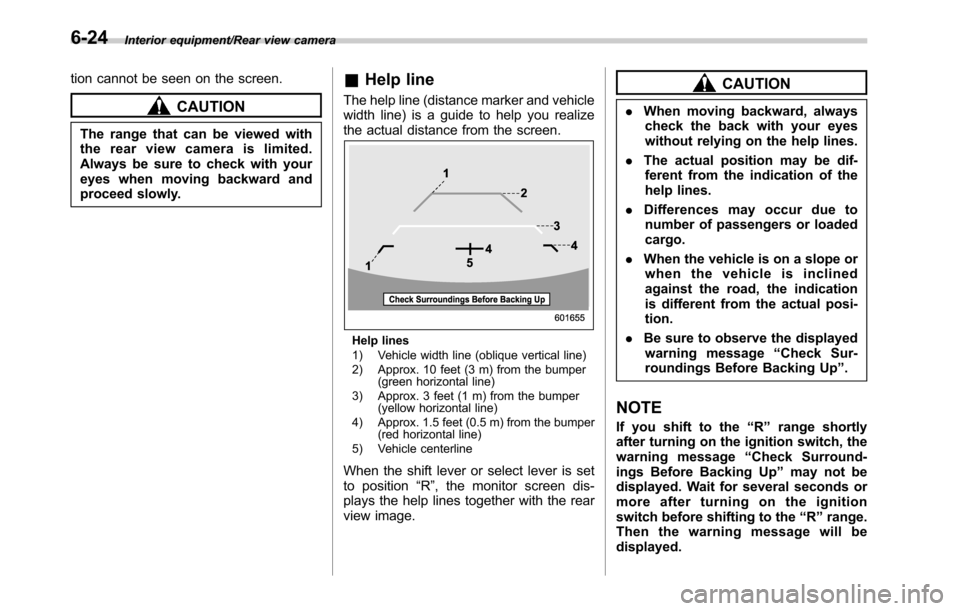
&Help line
The help line (distance marker and vehicle
width line) is a guide to help you realize
the actual distance from the screen.
Help lines
1) Vehicle width line (oblique vertical line)
2) Approx. 10 feet (3 m) from the bumper
(green horizontal line)
3) Approx. 3 feet (1 m) from the bumper
(yellow horizontal line)
4) Approx. 1.5 feet (0.5 m) from the bumper
(red horizontal line)
5) Vehicle centerline
When the shift lever or select lever is set
to position“R”, the monitor screen dis-
plays the help lines together with the rear
view image.
CAUTION
.When moving backward, always
check the back with your eyes
without relying on the help lines.
.The actual position may be dif-
ferent from the indication of the
help lines.
.Differences may occur due to
number of passengers or loaded
cargo.
.When the vehicle is on a slope or
when the vehicle is inclined
against the road, the indication
is different from the actual posi-
tion.
.Be sure to observe the displayed
warning message“Check Sur-
roundings Before Backing Up”.
NOTE
If you shift to the“R”range shortly
after turning on the ignition switch, the
warning message“Check Surround-
ings Before Backing Up”may not be
displayed. Wait for several seconds or
more after turning on the ignition
switch before shifting to the“R”range.
Then the warning message will be
displayed.
6-24
Page 411 of 572

New vehicle break-in driving–the first
1,000 miles (1,600 km)..................................... 8-2
Fuel economy hints............................................ 8-2
Engine exhaust gas (carbon monoxide)............ 8-2
Catalytic converter.............................................. 8-3
Periodic inspections........................................... 8-4
Driving in foreign countries............................... 8-4
Driving tips for AWD vehicles............................ 8-5
Off road driving................................................... 8-6
Legacy................................................................ 8-6
Outback.............................................................. 8-6
Winter driving...................................................... 8-8Operation during cold weather............................. 8-8
Driving on snowy and icy roads......................... 8-10
Corrosion protection.......................................... 8-11
Snow tires......................................................... 8-11
Tire chains......................................................... 8-12Rocking the vehicle........................................... 8-12
Loading your vehicle......................................... 8-12Vehicle capacity weight...................................... 8-13
GVWR and GAWR (Gross Vehicle Weight Rating
and Gross Axle Weight Rating)........................ 8-14
Roof rails with integrated crossbars
(Outback)........................................................ 8-14
Trailer hitch (Outback—if equipped).............. 8-18Connecting a trailer........................................... 8-19
If not towing a trailer.......................................... 8-20
Trailer towing (Legacy)...................................... 8-21
Trailer towing (Outback).................................... 8-21
Warranties and maintenance.............................. 8-21
Maximum load limits.......................................... 8-21
Trailer Hitches................................................... 8-25
Connecting a trailer........................................... 8-25
Trailer towing tips.............................................. 8-26
Driving tips
8
Page 423 of 572
possible.
.When you carry something inside
the vehicle, secure it whenever
you can to prevent it from being
thrown around inside the vehicle
during sudden stops, sharp turns
or in an accident.
.Do not pile heavy loads on the
roof. These loads raise the vehi-
cle’s center of gravity and make it
more prone to tip over.
.Secure long items properly to
prevent them from shooting for-
ward and causing serious injury
during a sudden stop.
.Never exceed the maximum load
limit. If you do, some parts on
your vehicle can break, or it can
change the way your vehicle
handles. This could result in loss
of control and cause personal
injury. Also, overloading can
shorten the life of your vehicle..Do not place anything on the rear
shelf behind the rear seatback
(Legacy) or the extended cargo
area cover (Outback–if
equipped). Such items could
tumble forward in the event of a
sudden stop or a collision. This
could cause serious injury.
CAUTION
Do not carry spray cans, containers
with flammable or corrosive liquids
or any other dangerous items inside
the vehicle.
NOTE
For better fuel economy, do not carry
unneeded cargo.
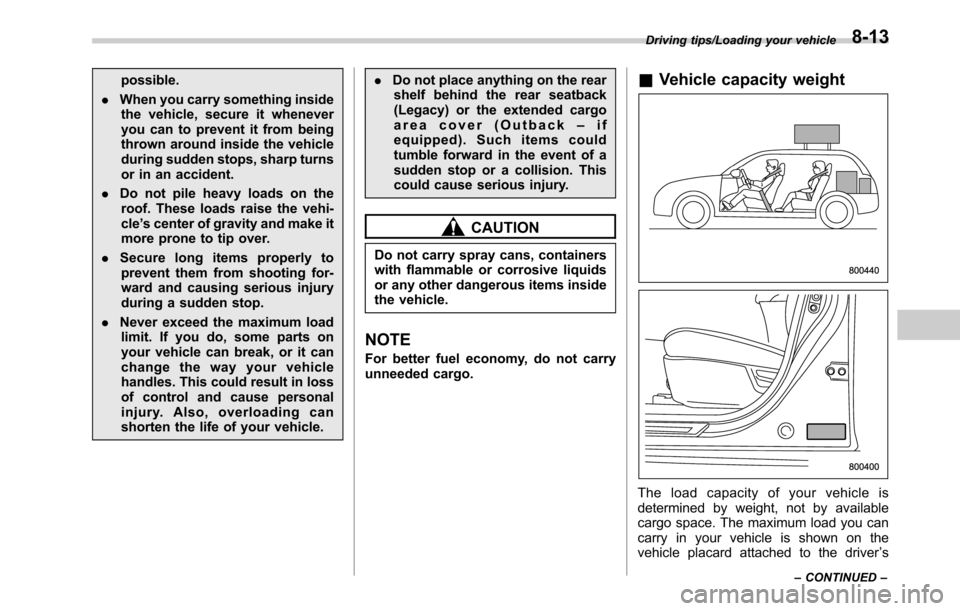
&Vehicle capacity weight
The load capacity of your vehicle is
determined by weight, not by available
cargo space. The maximum load you can
carry in your vehicle is shown on the
vehicle placard attached to the driver’s
Driving tips/Loading your vehicle
–CONTINUED–8-13
Page 424 of 572
Driving tips/Loading your vehicle
side door pillar. It includes the total weight
of the driver and all passengers and their
belongings, any optional equipment such
as a trailer hitch, roof rack or bike carrier,
etc., and the tongue load of a trailer.
&GVWR and GAWR (Gross
Vehicle Weight Rating and
Gross Axle Weight Rating)
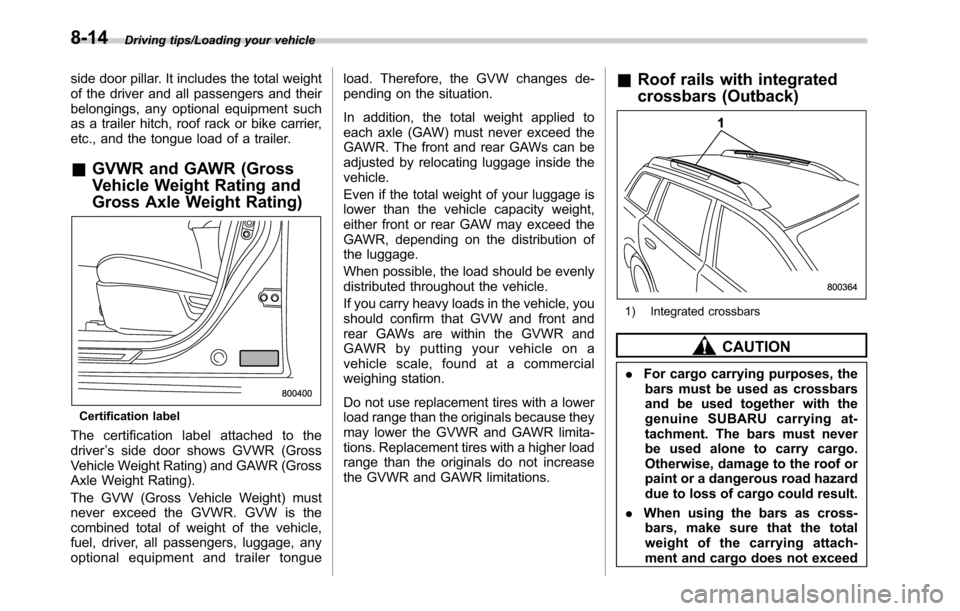
Certification label
The certification label attached to the
driver’s side door shows GVWR (Gross
Vehicle Weight Rating) and GAWR (Gross
Axle Weight Rating).
The GVW (Gross Vehicle Weight) must
never exceed the GVWR. GVW is the
combined total of weight of the vehicle,
fuel, driver, all passengers, luggage, any
optional equipment and trailer tongueload. Therefore, the GVW changes de-
pending on the situation.
In addition, the total weight applied to
each axle (GAW) must never exceed the
GAWR. The front and rear GAWs can be
adjusted by relocating luggage inside the
vehicle.
Even if the total weight of your luggage is
lower than the vehicle capacity weight,
either front or rear GAW may exceed the
GAWR, depending on the distribution of
the luggage.
When possible, the load should be evenly
distributed throughout the vehicle.
If you carry heavy loads in the vehicle, you
should confirm that GVW and front and
rear GAWs are within the GVWR and
GAWR by putting your vehicle on a
vehicle scale, found at a commercial
weighing station.
Do not use replacement tires with a lower
load range than the originals because they
may lower the GVWR and GAWR limita-
tions. Replacement tires with a higher load
range than the originals do not increase
the GVWR and GAWR limitations.
&Roof rails with integrated
crossbars (Outback)
1) Integrated crossbars
CAUTION
.For cargo carrying purposes, the
bars must be used as crossbars
and be used together with the
genuine SUBARU carrying at-
tachment. The bars must never
be used alone to carry cargo.
Otherwise, damage to the roof or
paint or a dangerous road hazard
due to loss of cargo could result.
.When using the bars as cross-
bars, make sure that the total
weight of the carrying attach-
ment and cargo does not exceed
8-14
Page 425 of 572

the maximum load limit. Over-
loading may cause damage to
the vehicle and create a safety
hazard.
The bars can be used as crossbars.
Cargo can be carried after setting the
bars as crossbarsand installing the
genuine SUBARU carrying attachment.
When you carry cargo on the roof using
the crossbars and a carrying attachment,
never exceed the maximum load limit
explained in the following. You should
also be careful that your vehicle does not
exceed the Gross Vehicle Weight Rating
(GVWR) and front and rear Gross Axle
Weight Rating (GAWR). For information
on loading cargo into or onto your vehicle,
refer to“Loading your vehicle”F8-12. The
maximum load limit of the cargo and
carrying attachment must not exceed the
allowable load limit described in the Own-
er’s Manual of a genuine SUBARU carry-
ing attachment. Place the heaviest load at
the bottom, nearest the roof, and evenly
distribute the cargo. Always properly
secure all cargo.!Installing carrying attachments on
the crossbars
When installing any carrying attachment
such as a bike carrier, ski carrier, kayak
carrier, cargo basket, etc. on the cross-
bars, follow the manufacturer’s instruc-
tions and make sure that the attachment is
securely fixed to the crossbars. Use only
attachments designed specifically for the
crossbars. A set of the crossbars is
designed to carry loads (cargo and attach-
ment) of not more than the allowable load
limit described in the Owner’s Manual of a
genuine SUBARU carrying attachment.
Before operating the vehicle, make sure
that the cargo is properly secured on the
attachment.
NOTE
.Remember that the vehicle’s center
of gravity is altered with the weight of
the load on the roof, thus affecting the
driving characteristics. Drive carefully,
avoid rapid starts, hard cornering and
abrupt stops. Crosswind effects will be
increased.
.Restore the bars to the original
position when the bars are not used
as crossbars.!How to use as crossbars
CAUTION
.Do not raise the bar higher than
necessary. The base of the bar
may be damaged.
.Be careful not to contact the bars
while sliding them. Otherwise,
the bars may be scratched or
the latch portions may be da-
maged.
.Do not slide the bar more than
necessary when sliding the bar.
The base of the bar may be
damaged.
.Do not allow the bar to fall on or
contact the roof panel or the
moonroof when sliding the bar.
Otherwise the roof panel may be
dented or the glass of the moon-
roof may be damaged.
Driving tips/Loading your vehicle
–CONTINUED–8-15
Page 428 of 572
Driving tips/Trailer hitch (Outback—if equipped)
4. Install the bars into the holders.
5. Make sure that the latches are fitted
securely.
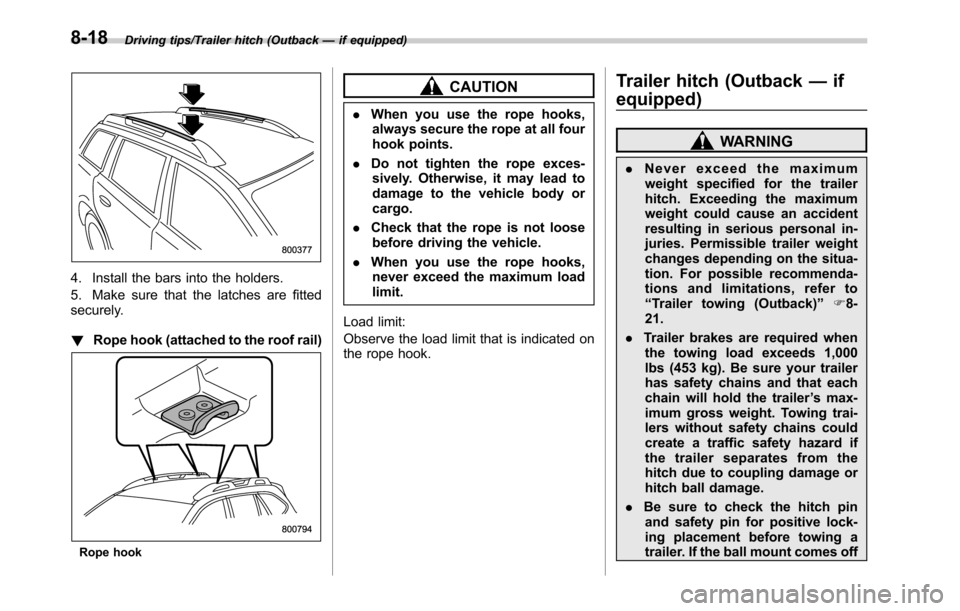
!Rope hook (attached to the roof rail)
Rope hook
CAUTION
.When you use the rope hooks,
always secure the rope at all four
hook points.
.Do not tighten the rope exces-
sively. Otherwise, it may lead to
damage to the vehicle body or
cargo.
.Check that the rope is not loose
before driving the vehicle.
.When you use the rope hooks,
never exceed the maximum load
limit.
Load limit:
Observe the load limit that is indicated on
the rope hook.
Trailer hitch (Outback—if
equipped)
WARNING
.Never exceed the maximum
weight specified for the trailer
hitch. Exceeding the maximum
weight could cause an accident
resulting in serious personal in-
juries. Permissible trailer weight
changes depending on the situa-
tion. For possible recommenda-
tions and limitations, refer to
“Trailer towing (Outback)”F8-
21.
.Trailer brakes are required when
the towing load exceeds 1,000
lbs (453 kg). Be sure your trailer
has safety chains and that each
chain will hold the trailer’s max-
imum gross weight. Towing trai-
lers without safety chains could
create a traffic safety hazard if
the trailer separates from the
hitch due to coupling damage or
hitch ball damage.
.Be sure to check the hitch pin
and safety pin for positive lock-
ing placement before towing a
trailer. If the ball mount comes off
8-18
Page 431 of 572
Trailer towing (Legacy)
Your vehicle is neither designed nor
intended to be used for trailer towing.
Therefore, never tow a trailer with your
vehicle.
SUBARU assumes no responsibility for
injuries or vehicle damage that may result
from trailer towing, from any trailer towing
equipment or from any errors or omissions
in the instructions accompanying such
equipment. SUBARU warranties do not
apply to vehicle damage or malfunction
caused by trailer towing.
Trailer towing (Outback)
Your vehicle is designed and intended to
be used primarily as a passenger-carrying
vehicle. Towing a trailer puts additional
loads on your vehicle’s engine, drivetrain,
brakes, tires and suspension and has an
adverse effect on fuel economy.
If you do decide to tow a trailer, your safety
and satisfaction depend upon proper use
of correct equipment and cautious opera-
tion of your vehicle. Seek the advice of
your SUBARU dealer to assist you in
purchasing a hitch and other necessary
towing equipment appropriate for your
vehicle. Do not use towing equipment
other than genuine SUBARU towing
equipment. In addition, be sure to follow
the instructions on correct installation and
use provided by SUBARU.
SUBARU assumes no responsibility for
injuries or vehicle damage that result from
trailer towing equipment, or from any
errors or omissions in the instructions
accompanying such equipment or for your
failure to follow the proper instructions.
Regularly check that the hitch mounting
bolts and nuts are tightened securely.
&Warranties and maintenance
SUBARU warranties do not apply to
vehicle damage or malfunction caused
by trailer towing. If you use your vehicle to
tow a trailer, more frequent maintenance
will be required due to the additional load.
(Refer to“Maintenance schedule under
severe driving conditions”in the“Warranty
and Maintenance Booklet”.)
Under no circumstances should a trailer
be towed with a new vehicle or a vehicle
with any new powertrain component (en-
gine, transmission, differential, wheel
bearings, etc.) for the first 1,000 miles
(1,600 km) of driving.
&Maximum load limits
WARNING
Never exceed the maximum load
limits explained in the following.
Exceeding the maximum load limits
could cause personal injury and/or
vehicle damage.
CAUTION
.Adequate size trailer brakes are
required when the trailer and its
cargo exceed 1,000 lbs (453 kg)
Driving tips/Trailer towing (Legacy)
–CONTINUED–8-21