odometer SUBARU OUTBACK 2016 6.G Owners Manual
[x] Cancel search | Manufacturer: SUBARU, Model Year: 2016, Model line: OUTBACK, Model: SUBARU OUTBACK 2016 6.GPages: 572, PDF Size: 21.79 MB
Page 23 of 572

&Combination meter
!U.S. spec. models (type A)
1) Tachometer (page 3-9)
2) ECO gauge (page 3-11)
3) Speedometer (page 3-8)
4) Temperature gauge (page 3-11)
5) Select lever/gear position indicator
(page 3-30)
6) Trip meter and odometer (page 3-8)
7) Fuel gauge (page 3-10)
–CONTINUED–
19
Page 24 of 572

!U.S. spec. models (type B)1) Tachometer (page 3-9)
2) ECO gauge (page 3-11)
3) Speedometer (page 3-8)
4) Temperature gauge (page 3-11)
5) Select lever/gear position indicator
(page 3-30)
6) Trip meter and odometer (page 3-8)
7) Fuel gauge (page 3-10)
20
Page 25 of 572

!Except U.S. spec. models (type A)1) Tachometer (page 3-9)
2) ECO gauge (page 3-11)
3) Speedometer (page 3-8)
4) Temperature gauge (page 3-11)
5) Select lever/gear position indicator
(page 3-30)
6) Trip meter and odometer (page 3-8)
7) Fuel gauge (page 3-10)
–CONTINUED–
21
Page 26 of 572

!Except U.S. spec. models (type B)1) Tachometer (page 3-9)
2) ECO gauge (page 3-11)
3) Speedometer (page 3-8)
4) Temperature gauge (page 3-11)
5) Select lever/gear position indicator
(page 3-30)
6) Trip meter and odometer (page 3-8)
7) Fuel gauge (page 3-10)
22
Page 130 of 572

Keys and doors/Alarm system
Alarm system
The alarm system helps to protect your
vehicle and valuables from theft. The horn
sounds and the hazard warning flashers
flash if someone attempts to break into
your vehicle.
For models with“keyless access with
push-button start system”:
The system can be armed or disarmed
with the keyless access function or access
key.
The system will not be activated when the
push-button ignition switch is in the“ACC”
or“ON”position.
For models without“keyless access
with push-button start system”:
The system can be armed and disarmed
with the remote transmitter.
The system will not be activated when the
key is inserted into the ignition switch.
Your vehicle’s alarm system has been set
for activation at the time of shipment from
the factory. You can set the system for
deactivation yourself or have it done by
your SUBARU dealer.
&System alarm operation
The alarm system will give the following
alarms when triggered.
.The vehicle’s horn will sound for 30
seconds.
.The hazard warning flashers will flash
for 30 seconds.
If any of the doors (or the rear gate/trunk
lid) remains open after the 30-second
period, the horn will continue to sound
for a maximum of 3 minutes. If the door (or
the rear gate/trunk lid) is closed while the
horn is sounding, the horn will stop
sounding with a delay of up to 30 seconds.
The alarm is triggered by:
.Opening any of the doors, rear gate or
the trunk lid
.Physical impact to the vehicle, such as
forced entry (only models with shock
sensors (dealer option))
NOTE
The alarm system can be set to trigger
the illumination of the following interior
lights.
.Map lights
.Dome light (illuminates only when
the dome light switch is in the“DOOR”
position)
.Cargo area light (Outback)The notifications regarding the map
lights, dome light and cargo area light
(Outback) are deactivated as the fac-
tory setting. A SUBARU dealer can
activate the system. Contact your
SUBARU dealer for details.
&Activating and deactivating
the alarm system
To change the setting of your vehicle’s
alarm system for activation or deactiva-
tion, do the following.
1. Disarm the alarm system. Refer to
“Disarming the system”F2-32.
2. Sit in the driver’s seat and shut all
doors (and the rear gate (Outback)).
3. Turn the ignition switch to the“ON”
position.
4. Hold down the REAR (UNLOCK) side
of the driver’s power door locking switch,
open the driver’s door within the following
1 second, and wait 10 seconds without
releasing the switch. The setting will then
be changed as follows:
If the system was previously activated:
The odometer screen displays“ALOF”
and the horn sounds twice, indicating that
the system is now deactivated.
2-28
Page 131 of 572

If the system was previously deacti-
vated:
The odometer screen displays“ALON”
and the horn sounds once, indicating that
the system is now activated.
NOTE
You may have the above setting
change done by your SUBARU dealer.
&If you have accidentally trig-
gered the alarm system
!To stop the alarm
Perform any of the following operations.
.Press any button on the access key/
remote transmitter.
.Turn the ignition switch to the“ON”
position (models without“keyless access
with push-button start system”).
.Turn the push-button ignition switch to
the“ACC”position (models with“keyless
access with push-button start system”).
NOTE
Only registered keys will stop the
alarm. If the key is not registered, the
alarm will not stop.
&Arming the system
NOTE
.The system can be armed even if the
engine hood, the windows and/or
moonroof are open. Always make sure
that they are fully closed before arming
the system.
.When arming the system, if any of
the doors or the rear gate/trunk lid is
not fully closed, an electronic chirp
sounds five times, the hazard warning
flashers flash five times to alert you
that the doors (or the rear gate/trunk
lid) are not properly closed. When you
close the door, doors will automatically
lock and the system will automatically
arm in 30 seconds.
.The 30-second standby time can be
eliminated if you prefer. Have it per-
formed by your SUBARU dealer.
.For Legacy, if you open the trunk
using the access key/remote transmit-
ter’s“
”button in the surveillance
state (or the standby state), the system
will be temporarily placed in a standby
state. The system will go back to the
surveillance state in 30 seconds upon
locking the trunk.
.The system is in the standby state
for a 30-second period before arming
the system. The security indicator light
will flash at short intervals during thisperiod.
.If any of the following actions is
done during the standby period, the
system will not switch to the surveil-
lance state.
–Doors (including the rear gate/
trunk lid) are unlocked using the
access key/remote transmitter.
–Doors (including the rear gate/
trunk lid) are unlocked using the
keyless access function (models
with“keyless access with push-
button start system”).
–Any door (including the rear gate/
trunk lid) is opened.
–The ignition switch is turned to
the“ON”position (models without
“keyless access with push-button
start system”).
–Push-button ignition switch is
turned to the“ACC”position (mod-
els with“keyless access with push-
button start system”).
!To arm the system using the access
key/remote transmitter
1. Close all windows and the moonroof (if
equipped).
2. Remove the key from the ignition
switch (models without“keyless access
with push-button start system”)/turn the
push-button ignition switch to the“OFF”
Keys and doors/Alarm system
–CONTINUED–2-29
Page 153 of 572

Ignition switch (models without push-
button start system)......................................... 3-3
LOCK.................................................................. 3-3
ACC.................................................................... 3-4
ON...................................................................... 3-4
START ................................................................ 3-4
Key reminder chime............................................ 3-4
Ignition switch light............................................. 3-4
Push-button ignition switch (models with
push-button start system)............................... 3-5
Safety precautions.............................................. 3-5
Operating range for push-button start system...... 3-5
Switching power................................................. 3-6
When access key does not operate properly........ 3-7
Hazard warning flasher....................................... 3-7
Meters and gauges.............................................. 3-7
Combination meter illumination........................... 3-7
Canceling the function for meter/gauge needle
movement upon turning on the ignition
switch............................................................... 3-8
Speedometer....................................................... 3-8
Odometer............................................................ 3-8
Double trip meter................................................ 3-9
Tachometer......................................................... 3-9
Fuel gauge......................................................... 3-10
Temperature gauge............................................ 3-11
ECO gauge........................................................ 3-11
Warning and indicator lights............................. 3-12
Seatbelt warning light and chime........................ 3-12
SRS airbag system warning light........................ 3-14Front passenger’s frontal airbag ON and OFF
indicators........................................................ 3-14
CHECK ENGINE warning light/Malfunction
indicator light.................................................. 3-15
Charge warning light.......................................... 3-15
Oil pressure warning light.................................. 3-15
Engine low oil level warning indicator................ 3-16
AT OIL TEMP warning light (CVT models)........... 3-16
Low tire pressure warning light (U.S. spec.
models)........................................................... 3-16
ABS warning light.............................................. 3-18
Brake system warning light................................ 3-18
Electronic parking brake indicator light.............. 3-20
Hill Holder indicator light................................... 3-21
Low fuel warning light....................................... 3-21
Door open indicator........................................... 3-22
Windshield washer fluid warning indicator.......... 3-22
All-Wheel Drive warning light (CVT models) ........ 3-22
Power steering warning light.............................. 3-22
Vehicle Dynamics Control warning light/Vehicle
Dynamics Control operation indicator light ....... 3-23
Vehicle Dynamics Control OFF indicator light..... 3-24
Warning chimes and warning indicator of the
keyless access with push-button start system (if
equipped)........................................................ 3-24
Security indicator light....................................... 3-29
Select lever/gear position indicator..................... 3-30
Turn signal indicator lights................................. 3-30
High beam indicator light................................... 3-30
Cruise control indicator..................................... 3-30
Cruise control set indicator................................ 3-30
Instruments and controls
3
Page 160 of 572
Instruments and controls/Meters and gauges
NOTE
This sequence of operations may not
take place if you quickly turn the
ignition switch to start the engine. This
is not a malfunction.
&Canceling the function for
meter/gauge needle move-
ment upon turning on the
ignition switch
It is possible to activate or deactivate the
movement of the meter needles and
gauge needles that takes place when the
ignition switch is turned to the“ON”
position. For details, perform the proce-
dures described in“Gauge Initial Move-
ment”F3-41.
&Speedometer
The speedometer shows the vehicle
speed.
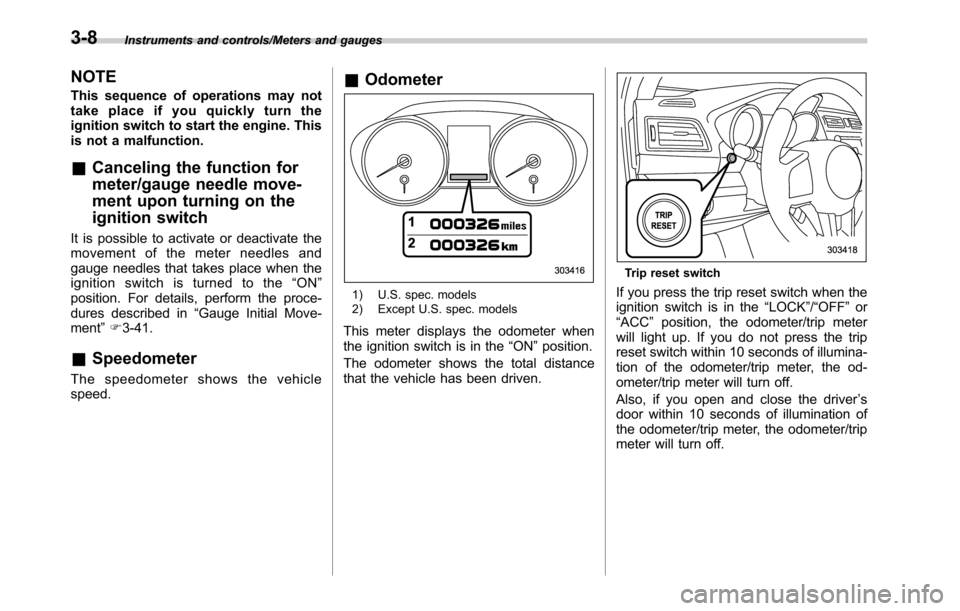
&Odometer
1) U.S. spec. models
2) Except U.S. spec. models
This meter displays the odometer when
the ignition switch is in the“ON”position.
The odometer shows the total distance
that the vehicle has been driven.
Trip reset switch
If you press the trip reset switch when the
ignition switch is in the“LOCK”/“OFF”or
“ACC”position, the odometer/trip meter
will light up. If you do not press the trip
reset switch within 10 seconds of illumina-
tion of the odometer/trip meter, the od-
ometer/trip meter will turn off.
Also, if you open and close the driver’s
door within 10 seconds of illumination of
the odometer/trip meter, the odometer/trip
meter will turn off.
3-8
Page 161 of 572
&Double trip meter
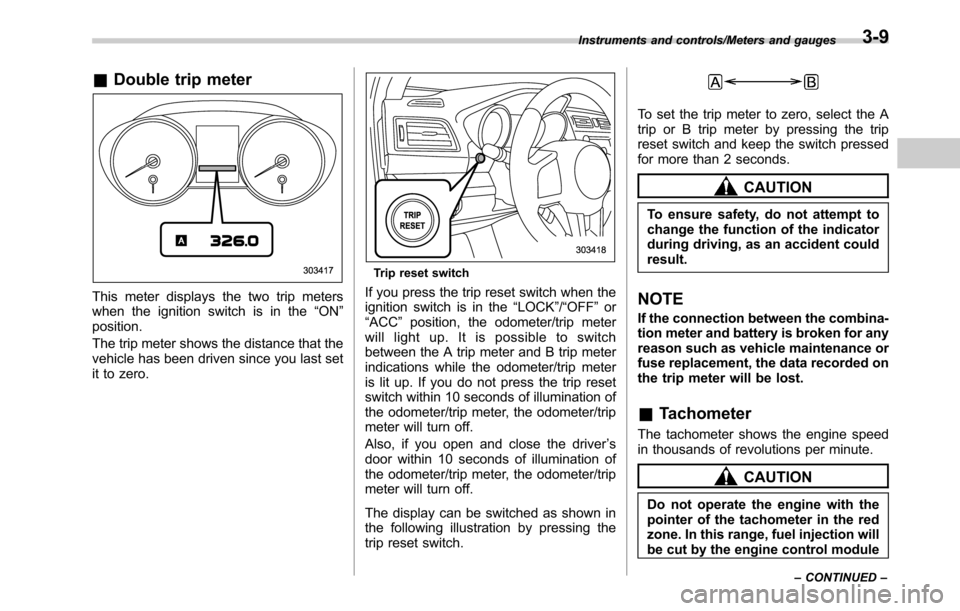
This meter displays the two trip meters
when the ignition switch is in the“ON”
position.
The trip meter shows the distance that the
vehicle has been driven since you last set
it to zero.
Trip reset switch
If you press the trip reset switch when the
ignition switch is in the“LOCK”/“OFF”or
“ACC”position, the odometer/trip meter
will light up. It is possible to switch
between the A trip meter and B trip meter
indications while the odometer/trip meter
is lit up. If you do not press the trip reset
switch within 10 seconds of illumination of
the odometer/trip meter, the odometer/trip
meter will turn off.
Also, if you open and close the driver’s
door within 10 seconds of illumination of
the odometer/trip meter, the odometer/trip
meter will turn off.
The display can be switched as shown in
the following illustration by pressing the
trip reset switch.
To set the trip meter to zero, select the A
trip or B trip meter by pressing the trip
reset switch and keep the switch pressed
for more than 2 seconds.
CAUTION
To ensure safety, do not attempt to
change the function of the indicator
during driving, as an accident could
result.
NOTE
If the connection between the combina-
tion meter and battery is broken for any
reason such as vehicle maintenance or
fuse replacement, the data recorded on
the trip meter will be lost.
&Tachometer
The tachometer shows the engine speed
in thousands of revolutions per minute.
CAUTION
Do not operate the engine with the
pointer of the tachometer in the red
zone. In this range, fuel injection will
be cut by the engine control module
Instruments and controls/Meters and gauges
–CONTINUED–3-9
Page 186 of 572
Instruments and controls/Multi information display
Multi information display
WARNING
Always pay adequate attention to
safe driving when operating the
multi information display while the
vehicle is in motion. When operation
of the multi information display
interferes with your ability to con-
centrate on driving, stop the vehicle
before performing operations on the
screen. Also, do not concentrate on
the display while driving. Doing so
may cause you to look away from
the road and could result in an
accident.
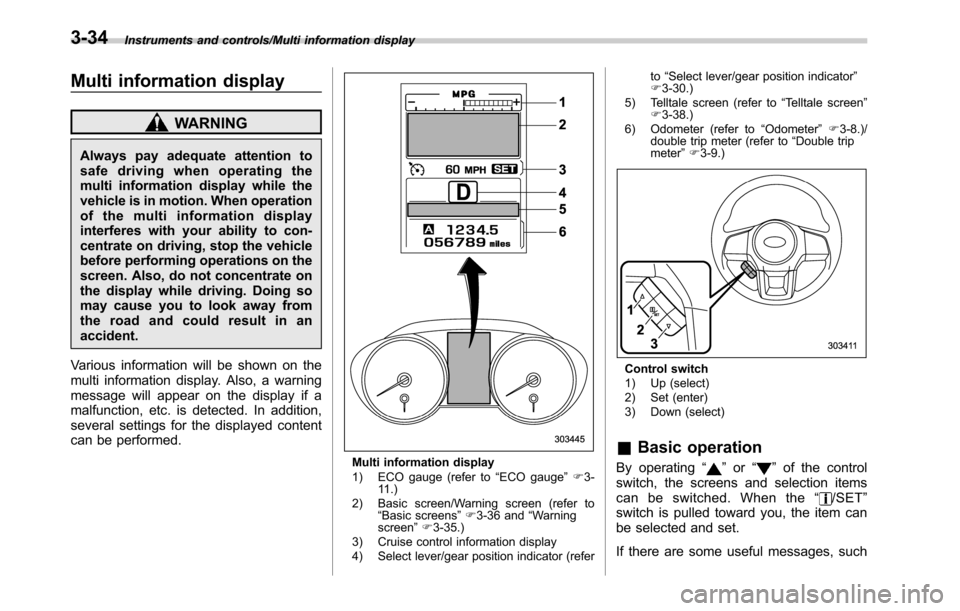
Various information will be shown on the
multi information display. Also, a warning
message will appear on the display if a
malfunction, etc. is detected. In addition,
several settings for the displayed content
can be performed.
Multi information display
1) ECO gauge (refer to“ECO gauge”F3-
11.)
2) Basic screen/Warning screen (refer to
“Basic screens”F3-36 and“Warning
screen”F3-35.)
3) Cruise control information display
4) Select lever/gear position indicator (referto“Select lever/gear position indicator”
F3-30.)
5) Telltale screen (refer to“Telltale screen”
F3-38.)
6) Odometer (refer to“Odometer”F3-8.)/
double trip meter (refer to“Double trip
meter”F3-9.)
Control switch
1) Up (select)
2) Set (enter)
3) Down (select)
&Basic operation
By operating“”or“”of the control
switch, the screens and selection items
can be switched. When the“
/SET”
switch is pulled toward you, the item can
be selected and set.
If there are some useful messages, such
3-34